

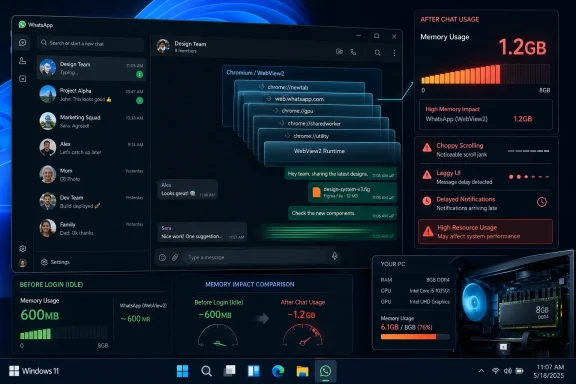
WhatsApp for Windows is reportedly using hundreds of megabytes of memory before login and as much as roughly 1.2GB after normal chat use on Windows 11, after Meta replaced its native UWP client with a Chromium WebView2-based desktop wrapper in 2025. The numbers matter because this is not a fringe utility, a beta toy, or a boutique productivity app. It is one of the world’s most important communications networks behaving like a browser tab that refuses to admit it is a browser tab.
The scandal is not merely that WhatsApp is heavy. Heavy software can be forgiven when it is fast, resilient, and doing obvious work. The problem is that WhatsApp for Windows now appears to combine the worst traits of modern desktop software: web-app memory appetite, degraded responsiveness, uneven background behavior, and a striking indifference to the people still using ordinary PCs with 8GB of RAM.
For a brief period, WhatsApp on Windows felt like an argument for taking the platform seriously. The UWP-era client was not glamorous, but it was fast in the way messaging software should be fast: open quickly, switch chats instantly, idle quietly, and stay out of the way until needed. That is not a low bar for a communications app; it is the entire bar.
The newer WebView2 version changes the bargain. Instead of a native Windows client using native Windows primitives, the app effectively hosts the WhatsApp Web experience inside Microsoft’s Chromium-based WebView2 runtime. That decision may simplify Meta’s engineering life, but it pushes the cost onto users, especially those whose PCs are not disposable development workstations with 32GB of memory.
The reported behavior is damning because it is so mundane. Hundreds of megabytes before the user has even logged in is not an edge case caused by massive chat history. Memory climbing toward 1.2GB after real use is not an exotic stress test. An idle footprint around 600MB is not the price of a high-end creative suite; it is the price Windows users are being asked to pay for a chat list.
And the performance complaints are not just about Task Manager vanity metrics. Users describe lag before messages leave the device, slow chat switching, choppy scrolling, delayed bursts of incoming messages, and flaky behavior after sleep or hibernate. A messenger that makes you wonder whether your message has actually gone anywhere has failed at the one thing it must do without drama.
But a tool becomes a crutch when it replaces the app. A messaging client is not a brochure, a settings page, or an occasional embedded dashboard. It is a long-running, notification-sensitive, latency-sensitive piece of software that users expect to leave open all day without thinking about it.
Chromium’s process model is excellent for browser security and isolation, but it is not free. Rendering, GPU work, networking, storage, crash handling, sandboxing, and audio can all live in separate helper processes. That architecture makes sense when the user knowingly opens a full browser. It feels much less defensible when the same machinery is summoned to display a list of chats and a text box.
This is where “web wrapper” stops being a nerd insult and becomes a practical diagnosis. The wrapper is not just a different implementation detail; it changes how the app consumes resources, wakes up, idles, and integrates with the operating system. The user may see a WhatsApp icon on the taskbar, but Windows sees a small Chromium estate.
The WebView2 version appears to need more of itself alive more of the time. Closing the window does not necessarily mean quitting the app; it can retreat to the system tray and continue running so notifications keep flowing. Exit it entirely, and the notification story becomes less satisfying, because the app is no longer sitting there with the same live session.
That behavior might be tolerable if the memory footprint were modest. It is much harder to defend when the application can sit on hundreds of megabytes while doing little visible work. On a 16GB or 32GB PC, that may be annoying. On an 8GB family machine, school laptop, mini PC, or older office desktop, it competes with the browser, Teams, Office, security software, cloud sync, and Windows itself.
This is why the anecdote of a 6th-generation Core i3 with 8GB of RAM lands harder than any benchmark chart. Plenty of people still use machines like that. They are not museum pieces; they are the PCs on kitchen tables, in back offices, in classrooms, and in households where a Windows machine is kept alive precisely because it still works.
If the whole system remains usable but WhatsApp is the app that stutters, the problem is not “old hardware.” It is bad prioritization by the software vendor. A chat client should not be the workload that makes a perfectly serviceable PC feel obsolete.
Microsoft spent years sending contradictory signals about what a Windows app should be. UWP was pitched as the future, pushed hard, and then slowly lost strategic gravity. WinUI and the Windows App SDK now represent the more modern native path, but the scars from earlier platform pivots remain.
Developers remember when the official answer changed. They remember framework churn, packaging uncertainty, Store confusion, and the long tail of Windows app models that were each, for a time, supposed to be the answer. A large company like Meta may have the money to maintain multiple native clients, but it also has a strong incentive to reduce platform-specific work wherever possible.
That is the charitable explanation for WhatsApp’s move. A web-based client gives Meta one core experience to update, test, and ship across environments. Features can arrive faster. Engineers can work closer to the web product. Bugs can be fixed once instead of across several codebases.
But users do not experience organizational efficiency. They experience lag. They experience RAM pressure. They experience the downgrade from an app that felt at home on Windows to one that feels like a cost-saving measure in a desktop costume.
That matters because Microsoft cannot credibly lecture developers about native Windows experiences while shipping flagship communications tools that validate the opposite instinct. If the owner of Windows decides that a web-heavy approach is good enough for daily enterprise communication, why would Meta conclude that WhatsApp must be native?
There is an ecosystem consequence to every first-party compromise. When Microsoft tolerates sluggish web surfaces in Windows, it lowers the social penalty for third-party developers doing the same. When Microsoft makes native development feel like a moving target, it raises the perceived risk of investing in the platform properly.
This is the Windows app identity crisis in miniature. Users want native performance. Developers want stable frameworks and lower maintenance costs. Microsoft wants both a modern app ecosystem and the freedom to keep changing its preferred answer. The result is too often a desktop full of apps that look installed but behave like captive browser tabs.
But a message is not a migration. Developers do not rebuild trust because a conference session said the right words. They rebuild trust when the platform remains stable over years, when documentation is excellent, when tooling feels first-class, and when Microsoft’s own apps demonstrate the payoff.
The phrase “native apps are back” has a nice rallying quality, but Windows users have heard versions of this speech before. What they need now is proof. They need inbox apps that stop feeling like web experiments. They need Microsoft to make WinUI boring in the best possible way: predictable, supported, and clearly worth betting on.
If Microsoft wants Meta, Slack, Discord, Spotify, and the rest of the desktop ecosystem to reconsider web wrappers, it has to make the native path cheaper in practice, not merely nobler in theory. Nobody should have to choose between developer efficiency and a messaging app that can idle below absurd memory levels. The platform owner’s job is to make the better choice the easier one.
Windows, meanwhile, has vastly larger reach than macOS and is especially important in markets where WhatsApp is not a secondary messaging app but basic infrastructure. For many users, WhatsApp is how family, schools, work groups, local businesses, and communities communicate. The Windows client is not a luxury add-on; it is the keyboard-and-monitor interface for a service they already depend on.
That makes the downgrade feel less like a technical choice and more like a class distinction. Mac users get polish because the platform is associated with affluent customers and developer prestige. Windows users, including those on older or cheaper machines, get a wrapper because the install base is too large to ignore but apparently not valuable enough to respect.
Meta would object that it is shipping a supported Windows app, not abandoning the platform. But support is not the same as quality. A company with Meta’s scale should not be applauded for keeping the icon alive while degrading the experience underneath it.
That trust matters to Windows as a platform. Enthusiasts and IT pros can tolerate rough edges when they understand the trade-off. They are much less forgiving when the trade-off appears to be “the vendor saves money, and the user gets a worse machine.”
For administrators, the issue is not just irritation. WebView2-based apps complicate resource planning because every “desktop” deployment may carry browser-like memory behavior. On shared machines, older laptops, virtual desktops, and managed fleets, that adds up. The app may be free, but the resource budget is not.
For security-minded users, the picture is more nuanced. WebView2 benefits from Chromium’s mature security model and Microsoft’s runtime servicing. But security is not a magic word that erases performance obligations. A secure app that users quit because it is annoying can create its own operational problems, including missed messages and workarounds through unmanaged browser sessions.
The successor path should be WinUI and the Windows App SDK, assuming Microsoft keeps its promises. A modern native WhatsApp for Windows does not need to be a museum piece. It can share business logic where sensible, use modern packaging, support current Windows design, and still avoid hauling a full browser engine through every interaction.
Meta’s likely objection is maintenance cost. But the company is not a small shop choosing between payroll and platform polish. It operates one of the world’s largest communications networks. If the Windows install base is large enough to justify a desktop app, it is large enough to justify a good one.
There is also a competitive argument. The desktop client is part of WhatsApp’s moat. When users move to WhatsApp Web in a regular browser because the dedicated app is slower, Meta has trained them that the app itself is unnecessary. That is a strange outcome for a company that usually fights hard to own the user’s attention surface.
Both companies now have a credibility problem. Meta must explain why Windows users should accept a downgrade from a company with effectively limitless engineering resources. Microsoft must explain why developers should trust yet another native-app push after years of mixed signals.
The path out is not mysterious. Meta should build a native WhatsApp client for Windows again, and Microsoft should make that decision feel safe rather than heroic. A WinUI-based WhatsApp would not solve every complaint overnight, but it would at least put the app back on an architecture suited to the job.
Until then, users will keep doing the rational thing: comparing the dedicated app with WhatsApp Web in a browser and wondering why the “real” app is worse.
The scandal is not merely that WhatsApp is heavy. Heavy software can be forgiven when it is fast, resilient, and doing obvious work. The problem is that WhatsApp for Windows now appears to combine the worst traits of modern desktop software: web-app memory appetite, degraded responsiveness, uneven background behavior, and a striking indifference to the people still using ordinary PCs with 8GB of RAM.
 Meta Turned a Good Windows App Into a Bad Browser Session
For a brief period, WhatsApp on Windows felt like an argument for taking the platform seriously. The UWP-era client was not glamorous, but it was fast in the way messaging software should be fast: open quickly, switch chats instantly, idle quietly, and stay out of the way until needed. That is not a low bar for a communications app; it is the entire bar.The newer WebView2 version changes the bargain. Instead of a native Windows client using native Windows primitives, the app effectively hosts the WhatsApp Web experience inside Microsoft’s Chromium-based WebView2 runtime. That decision may simplify Meta’s engineering life, but it pushes the cost onto users, especially those whose PCs are not disposable development workstations with 32GB of memory.
The reported behavior is damning because it is so mundane. Hundreds of megabytes before the user has even logged in is not an edge case caused by massive chat history. Memory climbing toward 1.2GB after real use is not an exotic stress test. An idle footprint around 600MB is not the price of a high-end creative suite; it is the price Windows users are being asked to pay for a chat list.
And the performance complaints are not just about Task Manager vanity metrics. Users describe lag before messages leave the device, slow chat switching, choppy scrolling, delayed bursts of incoming messages, and flaky behavior after sleep or hibernate. A messenger that makes you wonder whether your message has actually gone anywhere has failed at the one thing it must do without drama.
WebView2 Was Supposed to Be a Bridge, Not a Destination
Microsoft’s WebView2 is not inherently villainous. It gives developers a supported way to embed web content inside Windows apps, using the Edge/Chromium engine already present on modern systems. For sign-in screens, documentation panes, hybrid business workflows, and transitional codebases, it can be a useful tool.But a tool becomes a crutch when it replaces the app. A messaging client is not a brochure, a settings page, or an occasional embedded dashboard. It is a long-running, notification-sensitive, latency-sensitive piece of software that users expect to leave open all day without thinking about it.
Chromium’s process model is excellent for browser security and isolation, but it is not free. Rendering, GPU work, networking, storage, crash handling, sandboxing, and audio can all live in separate helper processes. That architecture makes sense when the user knowingly opens a full browser. It feels much less defensible when the same machinery is summoned to display a list of chats and a text box.
This is where “web wrapper” stops being a nerd insult and becomes a practical diagnosis. The wrapper is not just a different implementation detail; it changes how the app consumes resources, wakes up, idles, and integrates with the operating system. The user may see a WhatsApp icon on the taskbar, but Windows sees a small Chromium estate.
The Notification Tax Falls Hardest on Normal PCs
The old native client could lean on Windows notification infrastructure more naturally. A native app can be designed to sleep lightly, wake predictably, and use the platform’s own mechanisms without keeping a heavyweight browser context alive just to remain useful. That is the desktop bargain users expect.The WebView2 version appears to need more of itself alive more of the time. Closing the window does not necessarily mean quitting the app; it can retreat to the system tray and continue running so notifications keep flowing. Exit it entirely, and the notification story becomes less satisfying, because the app is no longer sitting there with the same live session.
That behavior might be tolerable if the memory footprint were modest. It is much harder to defend when the application can sit on hundreds of megabytes while doing little visible work. On a 16GB or 32GB PC, that may be annoying. On an 8GB family machine, school laptop, mini PC, or older office desktop, it competes with the browser, Teams, Office, security software, cloud sync, and Windows itself.
This is why the anecdote of a 6th-generation Core i3 with 8GB of RAM lands harder than any benchmark chart. Plenty of people still use machines like that. They are not museum pieces; they are the PCs on kitchen tables, in back offices, in classrooms, and in households where a Windows machine is kept alive precisely because it still works.
If the whole system remains usable but WhatsApp is the app that stutters, the problem is not “old hardware.” It is bad prioritization by the software vendor. A chat client should not be the workload that makes a perfectly serviceable PC feel obsolete.
Microsoft Helped Create the Incentives It Now Complains About
It is tempting to aim all the blame at Meta, and Meta has earned plenty of it. But Microsoft is not an innocent bystander in the web-wrapper era. Windows developers did not wake up one morning and abandon native software because they collectively forgot how performance works.Microsoft spent years sending contradictory signals about what a Windows app should be. UWP was pitched as the future, pushed hard, and then slowly lost strategic gravity. WinUI and the Windows App SDK now represent the more modern native path, but the scars from earlier platform pivots remain.
Developers remember when the official answer changed. They remember framework churn, packaging uncertainty, Store confusion, and the long tail of Windows app models that were each, for a time, supposed to be the answer. A large company like Meta may have the money to maintain multiple native clients, but it also has a strong incentive to reduce platform-specific work wherever possible.
That is the charitable explanation for WhatsApp’s move. A web-based client gives Meta one core experience to update, test, and ship across environments. Features can arrive faster. Engineers can work closer to the web product. Bugs can be fixed once instead of across several codebases.
But users do not experience organizational efficiency. They experience lag. They experience RAM pressure. They experience the downgrade from an app that felt at home on Windows to one that feels like a cost-saving measure in a desktop costume.
Teams Proves the Problem Is Bigger Than WhatsApp
The most awkward part for Microsoft is that its own house is not spotless. Teams has long been the poster child for the uneasy compromise between web architecture and desktop expectations. Even as Microsoft has improved the newer Teams client and reworked parts of its process model, the app remains a reminder that enterprise software can be mission-critical and still feel heavier than it should.That matters because Microsoft cannot credibly lecture developers about native Windows experiences while shipping flagship communications tools that validate the opposite instinct. If the owner of Windows decides that a web-heavy approach is good enough for daily enterprise communication, why would Meta conclude that WhatsApp must be native?
There is an ecosystem consequence to every first-party compromise. When Microsoft tolerates sluggish web surfaces in Windows, it lowers the social penalty for third-party developers doing the same. When Microsoft makes native development feel like a moving target, it raises the perceived risk of investing in the platform properly.
This is the Windows app identity crisis in miniature. Users want native performance. Developers want stable frameworks and lower maintenance costs. Microsoft wants both a modern app ecosystem and the freedom to keep changing its preferred answer. The result is too often a desktop full of apps that look installed but behave like captive browser tabs.
Build 2026 Was a Necessary Course Correction, Not a Victory Lap
Microsoft’s renewed push for native Windows development is welcome precisely because the problem has become so visible. At Build 2026, the company emphasized native Windows apps, WinUI, and a cleaner path for developers who want to build software that feels integrated rather than merely packaged. That is the right message.But a message is not a migration. Developers do not rebuild trust because a conference session said the right words. They rebuild trust when the platform remains stable over years, when documentation is excellent, when tooling feels first-class, and when Microsoft’s own apps demonstrate the payoff.
The phrase “native apps are back” has a nice rallying quality, but Windows users have heard versions of this speech before. What they need now is proof. They need inbox apps that stop feeling like web experiments. They need Microsoft to make WinUI boring in the best possible way: predictable, supported, and clearly worth betting on.
If Microsoft wants Meta, Slack, Discord, Spotify, and the rest of the desktop ecosystem to reconsider web wrappers, it has to make the native path cheaper in practice, not merely nobler in theory. Nobody should have to choose between developer efficiency and a messaging app that can idle below absurd memory levels. The platform owner’s job is to make the better choice the easier one.
Meta’s Apple Priorities Make the Windows Neglect Harder to Defend
The comparison with Apple platforms is uncomfortable for Meta. WhatsApp has a better story on macOS, and Meta has managed to put real effort into watchOS. Those investments prove the company can care about platform fit when it chooses to.Windows, meanwhile, has vastly larger reach than macOS and is especially important in markets where WhatsApp is not a secondary messaging app but basic infrastructure. For many users, WhatsApp is how family, schools, work groups, local businesses, and communities communicate. The Windows client is not a luxury add-on; it is the keyboard-and-monitor interface for a service they already depend on.
That makes the downgrade feel less like a technical choice and more like a class distinction. Mac users get polish because the platform is associated with affluent customers and developer prestige. Windows users, including those on older or cheaper machines, get a wrapper because the install base is too large to ignore but apparently not valuable enough to respect.
Meta would object that it is shipping a supported Windows app, not abandoning the platform. But support is not the same as quality. A company with Meta’s scale should not be applauded for keeping the icon alive while degrading the experience underneath it.
The Real Cost Is Trust, Not RAM
Memory usage is the easiest number to quote, but it is not the deepest injury. The deeper cost is trust in the desktop as a place where apps are supposed to be better than tabs. If installing an app simply gives users a heavier, less flexible browser session, the concept of a desktop app loses meaning.That trust matters to Windows as a platform. Enthusiasts and IT pros can tolerate rough edges when they understand the trade-off. They are much less forgiving when the trade-off appears to be “the vendor saves money, and the user gets a worse machine.”
For administrators, the issue is not just irritation. WebView2-based apps complicate resource planning because every “desktop” deployment may carry browser-like memory behavior. On shared machines, older laptops, virtual desktops, and managed fleets, that adds up. The app may be free, but the resource budget is not.
For security-minded users, the picture is more nuanced. WebView2 benefits from Chromium’s mature security model and Microsoft’s runtime servicing. But security is not a magic word that erases performance obligations. A secure app that users quit because it is annoying can create its own operational problems, including missed messages and workarounds through unmanaged browser sessions.
The Fix Is Not Nostalgia for UWP
None of this means Microsoft should resurrect UWP as if the last decade did not happen. UWP had real limitations, and many developers never bought into its model. The point is not that UWP was perfect; the point is that WhatsApp’s native Windows client demonstrated that a chat app could be lightweight, responsive, and integrated.The successor path should be WinUI and the Windows App SDK, assuming Microsoft keeps its promises. A modern native WhatsApp for Windows does not need to be a museum piece. It can share business logic where sensible, use modern packaging, support current Windows design, and still avoid hauling a full browser engine through every interaction.
Meta’s likely objection is maintenance cost. But the company is not a small shop choosing between payroll and platform polish. It operates one of the world’s largest communications networks. If the Windows install base is large enough to justify a desktop app, it is large enough to justify a good one.
There is also a competitive argument. The desktop client is part of WhatsApp’s moat. When users move to WhatsApp Web in a regular browser because the dedicated app is slower, Meta has trained them that the app itself is unnecessary. That is a strange outcome for a company that usually fights hard to own the user’s attention surface.
The Numbers Tell a Story Meta Cannot Hand-Wave Away
The practical story is simple enough for any Windows user to understand: the app got heavier, slower, and less native. The strategic story is more complicated but more important: Meta optimized for its own development pipeline while Microsoft is trying to convince the industry that Windows-native software still matters.Both companies now have a credibility problem. Meta must explain why Windows users should accept a downgrade from a company with effectively limitless engineering resources. Microsoft must explain why developers should trust yet another native-app push after years of mixed signals.
The path out is not mysterious. Meta should build a native WhatsApp client for Windows again, and Microsoft should make that decision feel safe rather than heroic. A WinUI-based WhatsApp would not solve every complaint overnight, but it would at least put the app back on an architecture suited to the job.
Until then, users will keep doing the rational thing: comparing the dedicated app with WhatsApp Web in a browser and wondering why the “real” app is worse.
A 1.2GB Messenger Is the Warning Light Windows Needed
The WhatsApp mess is useful because it turns an abstract platform debate into something visible in Task Manager. It shows why web wrappers are not just a matter of developer taste, and why Microsoft’s native-app campaign will be judged by outcomes rather than slogans.- WhatsApp for Windows reportedly shifted from a native UWP-style client to a WebView2 wrapper, trading platform integration for web-code convenience.
- The new client has been observed using hundreds of megabytes at idle and around 1.2GB after ordinary chat use, which is disproportionate for a messaging app.
- The user-facing complaints go beyond memory use and include delayed sending, slow chat switching, choppy scrolling, and unreliable behavior after sleep or hibernate.
- Microsoft shares responsibility because years of Windows app-framework churn made web wrappers look like the safer long-term bet for large developers.
- Microsoft’s renewed WinUI and native-app push will matter only if the company proves stability through its own apps, tooling, documentation, and long-term commitment.
- Meta has the scale and platform reach to justify a proper native Windows client, especially when WhatsApp is essential communication infrastructure for many users.
References
- Primary source: Windows Latest
Published: 2026-06-12T23:12:10.904634
Loading…
www.windowslatest.com - Related coverage: windowscentral.com
How Microsoft Build 2026 changes your Windows 11 PC
Build 2026 laid out the future of Windows 11 computing and laid the groundwork for the next category of AI devices. www.windowscentral.com
- Related coverage: gizmochina.com
Loading…
www.gizmochina.com - Related coverage: gsmgotech.com
Loading…
www.gsmgotech.com - Related coverage: 8bittoast.com
Loading…
8bittoast.com - Related coverage: informatecdigital.com
Loading…
informatecdigital.com
- Related coverage: thetechbasic.com
Loading…
thetechbasic.com - Related coverage: alternativeto.net
Loading…
alternativeto.net - Related coverage: novyny.live
Loading…
novyny.live - Related coverage: thetechoutlook.com
Loading…
www.thetechoutlook.com - Related coverage: blog.intramind-srl.com
Loading…
blog.intramind-srl.com - Related coverage: techspot.com
Loading…
www.techspot.com - Related coverage: pcgamer.com
Microsoft wants to build '100% native' Windows apps and ditch memory-hogging web apps
Microsoft shows Windows 11 yet more love.www.pcgamer.com