

Microsoft released Windows 11 Insider Experimental (Future Platforms) Preview Build 29610.1000 on June 12, 2026, for PCs in the Canary 29600 Series Channel, fixing green-screen KERNEL_SECURITY_CHECK_FAILURE crashes, storage-page slowdowns, false Defender warnings, and a duplicated Energy Saver control. The build is small by feature-count standards, but it lands at an awkward and revealing moment for the Insider Program. Microsoft is not merely patching a bad flight; it is asking testers to accept a renamed, more experimental pipeline while proving that the pipeline can still recover quickly when it breaks real machines.
That is the bargain at the heart of Canary, now being folded into Microsoft’s new Experimental Future Platforms language. Insiders get the earliest platform bits, but those bits are explicitly detached from any guaranteed Windows release. Build 29610.1000 is therefore less a preview of a shiny feature than a reminder that the operating system’s future is still built on the dull, vital discipline of crash fixes, Settings performance, and security-state accuracy.
The most important word in this build may not be “kernel,” “security,” or “storage.” It may be “Experimental.” Microsoft’s release notes make clear that the old Canary 29600 Series audience is being addressed under the newer Experimental Future Platforms naming, even if not every enrolled device immediately shows the updated label.
That gradual transition matters because channel names are not just branding. They set expectations. “Canary” already implied danger and early warning; “Experimental Future Platforms” makes the abstraction even stronger. Microsoft is telling testers that they are not necessarily previewing Windows 11 version 26H1 in any clean, consumer-facing sense. They are previewing platform work that may, may not, or may only partially become a shipping Windows feature.
For administrators and power users, that wording is useful precisely because it is less comforting. A build in this lane should not be treated as a soft launch of the next Windows release. It is closer to a public engineering branch with telemetry, staged rollouts, and a large enough user base to expose driver, security, and hardware interactions Microsoft cannot fully simulate internally.
Build 29610.1000 reinforces that identity. It contains no headline consumer experience, no obvious AI demo, and no major shell redesign. Instead, it fixes the kind of platform-level regressions that separate a usable test machine from a liability. That is not glamorous, but it is exactly the work an experimental channel is supposed to surface.
A KERNEL_SECURITY_CHECK_FAILURE stop error generally points to the kernel detecting corruption or inconsistency severe enough that continuing would be unsafe. In practice, users do not experience that as a neat diagnostic category. They experience it as a machine that crashes, interrupts work, and may become impossible to trust until the next flight or rollback.
That is why this fix towers over the rest of the changelog. A duplicate Quick Settings item is irritating. A slow storage page is frustrating. A false Defender notification can be alarming. But repeated bugchecks are existential for a testing branch because they threaten the feedback loop itself. If testers cannot keep the system running long enough to file reliable feedback, the channel stops functioning as an early-warning system and becomes noise.
Microsoft’s wording is careful: the crash “should” be resolved for users who were affected after the previous flight. That is the right level of confidence for a flighted fix in a branch this early. It says the known underlying issue has been addressed without pretending every possible KERNEL_SECURITY_CHECK_FAILURE on every Insider PC has vanished.
Security software depends on user trust in state reporting. If Windows says Defender is off, a responsible user or administrator has to treat that as actionable until proven otherwise. They may open Windows Security, check policies, inspect third-party antivirus registration, run PowerShell commands, or assume a larger system integrity issue. A false negative wastes time and trains users to discount future warnings.
That last part is the danger. Security notifications are supposed to be rare, specific, and believable. When they become wrong, they do not merely inconvenience the user; they erode the alerting channel. The next time Windows Security warns that protection is disabled, a tester who remembers the false alarm may hesitate.
This is especially sensitive in Insider builds because many testers are technical enough to notice contradictions but are also running configurations that differ sharply from managed enterprise baselines. Some machines have virtualization features enabled, some have kernel-mode tools, some have unusual drivers, and some are used specifically to evaluate security controls. A false Defender state notification in that environment can trigger hours of unnecessary troubleshooting.
Microsoft’s fix therefore matters beyond the individual toast notification. It restores a basic expectation: Windows should accurately report whether its built-in protection is running. In an era when Microsoft increasingly uses Windows Security as a dashboard for identity, app control, reputation, and device health, that expectation is not optional.
Large volumes are not exotic anymore. Enthusiasts routinely run multi-terabyte NVMe drives, external USB storage, Storage Spaces configurations, network-adjacent workflows, and development machines with large datasets. Small businesses and homelab users may attach big disks to Windows clients for backup, media, virtualization, or testing. A storage page that hesitates on a thin test image may crawl on a machine with actual storage history.
The old Control Panel and Microsoft Management Console utilities were not beautiful, but they often exposed storage information in ways that felt direct and deterministic. The modern Settings app has to do more: present friendly language, integrate with newer management layers, avoid blocking the UI, and handle asynchronous device queries without looking broken. That is harder than it appears.
Performance fixes in this area are easy to underrate because they do not change what the page can do. But the Settings app is now the default administrative surface for many Windows tasks. If it becomes slow when asked to describe a large disk, users will bypass it, distrust it, or assume the storage stack itself is unhealthy.
For IT pros, the practical significance is simple. A faster Disks & Volumes page reduces friction during the exact moments when users are already worried: after adding storage, diagnosing capacity problems, checking partitions, or preparing a drive. Experimental build or not, those moments are when Windows needs to feel precise.
Seeing two Energy Saver entries undermines that promise. It raises immediate questions. Are these two different controls? Is one stale? Will toggling one change the other? Is the power stack confused, or is the shell merely rendering the same state twice? Most users will not investigate; they will simply register that the system looks sloppy.
That is the curse of modern shell work. A small duplication can make a sophisticated system look unfinished. Windows 11 has spent years trying to consolidate quick controls, notifications, system tray behavior, and Settings into a cleaner visual model. Bugs like this puncture the illusion because they occur in the most visible layer of the OS.
The Energy Saver issue also matters because battery and power behavior have become more central to Windows laptops. As Arm PCs, high-refresh displays, background AI workloads, and heterogeneous processors become more common, users need confidence that power controls map cleanly to actual behavior. Even a cosmetic duplication weakens that confidence.
Microsoft’s fix here is not strategically profound. It is, however, necessary housekeeping. And in a build whose main purpose is to recover stability after a rougher flight, housekeeping is part of the message.
Experimental Future Platforms breaks that metaphor more openly. Microsoft is emphasizing that some features may never ship, may change, or may appear in a different form later. That may frustrate users who join Insider channels hoping to see next year’s Windows early. But for Microsoft, it creates room to test architectural changes without promising a release vehicle.
The tension is that Windows users still want a story. Version numbers such as 26H1 suggest chronology. Build trains such as 29600 suggest progression. Channel labels suggest relative stability. Yet the actual Windows engineering process now mixes cumulative updates, enablement packages, controlled feature rollouts, app updates, servicing stack changes, and cloud-connected experiences.
That means an Insider build can be both important and not predictive. Build 29610.1000 may contain platform changes that matter deeply to Windows’ future, but the visible changelog mostly shows repairs. The absence of splashy features does not mean little is happening underneath. It means Microsoft is increasingly separating what it tests from what it is ready to explain.
For WindowsForum readers, that distinction is worth keeping in mind. The build number is not a roadmap. The channel name is not a promise. The release notes are a partial window into a moving development branch where telemetry, controlled rollout, and internal priorities decide what testers actually see.
That unevenness is now a defining feature of Windows testing. It helps Microsoft compare cohorts, reduce blast radius, and watch telemetry before widening exposure. It also makes community diagnosis harder. Two users may both be “on the same build” and still see different behavior because a feature flag, rollout state, region, hardware profile, or account condition differs.
This complicates the old forum rhythm of “I installed build X; do you see Y?” Sometimes the answer will be no, and not because anyone is wrong. The operating system has become more dynamic than the build number printed in winver. That is operationally sensible for Microsoft and maddening for testers trying to produce reproducible reports.
In the context of Build 29610.1000, this matters because the fixes may not feel equally visible. A user who never hit the green screen will see the build as minor. A user whose machine crashed repeatedly may see it as essential. A user with large disks may notice Settings feels less sluggish, while someone on a small SSD may never open the relevant page.
That fragmentation is the price of modern Windows servicing. Microsoft can reduce risk by rolling things out gradually, but the community loses some shared certainty. The practical response is to be specific when reporting issues: build number, channel label, rollout toggles, hardware, storage layout, security configuration, and whether the behavior changed after the latest flight.
The Insider Program works because people donate real hardware time to Microsoft’s testing process. Some use spare machines, some use virtual machines, and some knowingly run pre-release builds on daily systems because they want early access or because they support environments where early awareness matters. Microsoft benefits from that diversity because it exposes bugs before they reach more conservative channels.
That creates a responsibility on both sides. Testers should not expect production-grade reliability from Experimental Future Platforms. Microsoft, in turn, should treat crash loops, false security warnings, and core Settings regressions as urgent even when they occur in the riskiest channel. Build 29610.1000 suggests that, at least in this case, the feedback loop worked.
The green screen fix is the clearest evidence. A regression appeared in a previous flight, affected some Insiders, and was called out directly in the next release notes as resolved. That is how a high-risk channel earns continued participation. Not by avoiding all breakage, but by moving quickly when breakage is severe.
The same principle applies to the smaller fixes. A duplicate Quick Settings control and a false Defender notification may not block boot, but they are the kinds of regressions that make testers feel the branch is losing polish. Fixing them promptly signals that Microsoft is watching both telemetry and usability, not just kernel crash counts.
Experimental Future Platforms is the place for earlier platform work, including changes that may not map cleanly to a named release. Beta is generally closer to features and fixes that Microsoft is more willing to expose to a broader testing population. Release Preview, when involved, is closer still to servicing and near-final validation. But those categories are not rigid rails, and Windows features increasingly ship outside the old once-a-year mental model.
That is why Build 29610.1000 should not be read as “the green-screen fix coming in 26H1,” full stop. It is a fix in an experimental branch associated with the Canary 29600 Series. The underlying lesson may inform other branches, and similar fixes may appear elsewhere when relevant, but the build itself is not a consumer release candidate.
Microsoft’s challenge is communication. The company wants the freedom to test future platform work without overpromising. Users want to know whether the thing they are testing is relevant to the Windows they will deploy. The new naming clarifies one part of that bargain by saying, in effect: this is future-facing, unstable, and not necessarily attached to a release.
That clarity is welcome, but it also raises the bar for release notes. If the channel is more experimental, the notes need to be more precise about known risks, fixed regressions, and rollout scope. Build 29610.1000 is concise, but it does identify the major user-facing fixes clearly enough for affected testers to decide whether installing is worth the risk.
Build 29610.1000 demonstrates why. A previous flight could trigger repeated kernel-level crashes for some users. The next flight may fix them. That cadence is acceptable for a lab, a spare laptop, or a VM snapshot. It is not acceptable for a machine that controls a conference room, supports a help desk, runs finance software, or anchors a developer’s release workflow.
The storage and Windows Security fixes also point to test-plan opportunities. If your organization evaluates Insider builds, do not only click through new features. Check large-volume storage views, Windows Security state reporting, power controls, VPN behavior, endpoint agent compatibility, and event logs after each flight. The boring surfaces are where regressions often become expensive.
For enthusiasts, the advice is similar but more personal. Keep backups current. Know how to roll back. Avoid using Experimental builds on the only PC you trust. If you do run them, treat every flight as a small migration rather than a routine patch. That mindset makes the difference between participating in the Insider Program and being surprised by it.
The green screen repair tells testers Microsoft can respond to severe regressions. The Defender notification fix tells security-minded users that state reporting matters even in pre-release builds. The storage performance improvement tells power users that Settings must scale beyond the simplest consumer hardware. The Quick Settings cleanup tells everyone that visible shell quality still counts.
Taken together, these fixes argue for a less glamorous view of Windows development. The future of Windows is not only Copilot buttons, AI agents, Arm optimization, or version branding. It is also the absence of bogus warnings, the ability to open a storage page without waiting, and the confidence that a test build will not repeatedly fall over in the kernel.
That is why this build deserves attention despite its modest surface area. It is a corrective release in a channel whose name now openly advertises uncertainty. Microsoft is trying to make room for experimentation while preserving enough trust that users keep opting in.
That is the bargain at the heart of Canary, now being folded into Microsoft’s new Experimental Future Platforms language. Insiders get the earliest platform bits, but those bits are explicitly detached from any guaranteed Windows release. Build 29610.1000 is therefore less a preview of a shiny feature than a reminder that the operating system’s future is still built on the dull, vital discipline of crash fixes, Settings performance, and security-state accuracy.
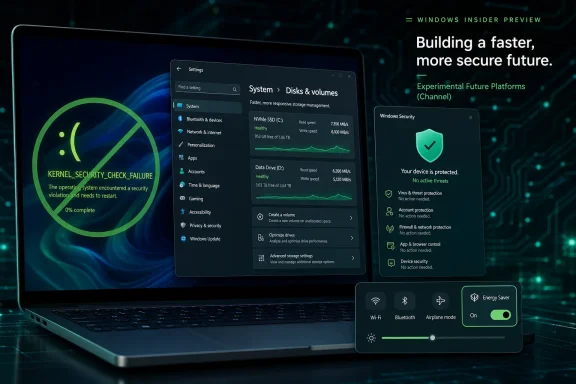 Microsoft’s New Label Makes the Old Canary Deal More Explicit
The most important word in this build may not be “kernel,” “security,” or “storage.” It may be “Experimental.” Microsoft’s release notes make clear that the old Canary 29600 Series audience is being addressed under the newer Experimental Future Platforms naming, even if not every enrolled device immediately shows the updated label.That gradual transition matters because channel names are not just branding. They set expectations. “Canary” already implied danger and early warning; “Experimental Future Platforms” makes the abstraction even stronger. Microsoft is telling testers that they are not necessarily previewing Windows 11 version 26H1 in any clean, consumer-facing sense. They are previewing platform work that may, may not, or may only partially become a shipping Windows feature.
For administrators and power users, that wording is useful precisely because it is less comforting. A build in this lane should not be treated as a soft launch of the next Windows release. It is closer to a public engineering branch with telemetry, staged rollouts, and a large enough user base to expose driver, security, and hardware interactions Microsoft cannot fully simulate internally.
Build 29610.1000 reinforces that identity. It contains no headline consumer experience, no obvious AI demo, and no major shell redesign. Instead, it fixes the kind of platform-level regressions that separate a usable test machine from a liability. That is not glamorous, but it is exactly the work an experimental channel is supposed to surface.
The Green Screen Fix Is the Build’s Real Story
The most consequential fix in Build 29610.1000 addresses repeated bugchecks that sent affected Insider PCs to a green screen with KERNEL_SECURITY_CHECK_FAILURE after the previous flight. On production Windows, a blue screen is the familiar symbol of a system-level failure. In Insider builds, the green screen serves the same purpose while marking the system as pre-release.A KERNEL_SECURITY_CHECK_FAILURE stop error generally points to the kernel detecting corruption or inconsistency severe enough that continuing would be unsafe. In practice, users do not experience that as a neat diagnostic category. They experience it as a machine that crashes, interrupts work, and may become impossible to trust until the next flight or rollback.
That is why this fix towers over the rest of the changelog. A duplicate Quick Settings item is irritating. A slow storage page is frustrating. A false Defender notification can be alarming. But repeated bugchecks are existential for a testing branch because they threaten the feedback loop itself. If testers cannot keep the system running long enough to file reliable feedback, the channel stops functioning as an early-warning system and becomes noise.
Microsoft’s wording is careful: the crash “should” be resolved for users who were affected after the previous flight. That is the right level of confidence for a flighted fix in a branch this early. It says the known underlying issue has been addressed without pretending every possible KERNEL_SECURITY_CHECK_FAILURE on every Insider PC has vanished.
Security Messaging Has to Be Boring to Be Trusted
The Windows Security fix is quieter but more psychologically important than it first appears. Build 29610.1000 resolves a problem where some Insiders saw erroneous notifications claiming Microsoft Defender was not enabled when it actually was. In a stable channel, that kind of false warning would be a support incident. In an experimental channel, it is still a serious credibility problem.Security software depends on user trust in state reporting. If Windows says Defender is off, a responsible user or administrator has to treat that as actionable until proven otherwise. They may open Windows Security, check policies, inspect third-party antivirus registration, run PowerShell commands, or assume a larger system integrity issue. A false negative wastes time and trains users to discount future warnings.
That last part is the danger. Security notifications are supposed to be rare, specific, and believable. When they become wrong, they do not merely inconvenience the user; they erode the alerting channel. The next time Windows Security warns that protection is disabled, a tester who remembers the false alarm may hesitate.
This is especially sensitive in Insider builds because many testers are technical enough to notice contradictions but are also running configurations that differ sharply from managed enterprise baselines. Some machines have virtualization features enabled, some have kernel-mode tools, some have unusual drivers, and some are used specifically to evaluate security controls. A false Defender state notification in that environment can trigger hours of unnecessary troubleshooting.
Microsoft’s fix therefore matters beyond the individual toast notification. It restores a basic expectation: Windows should accurately report whether its built-in protection is running. In an era when Microsoft increasingly uses Windows Security as a dashboard for identity, app control, reputation, and device health, that expectation is not optional.
Storage Performance Is Where Experimental Builds Meet Real Hardware
The storage improvement in Build 29610.1000 targets navigation to large volumes under Settings, through System, Storage, Advanced Storage Settings, and Disks & Volumes. That sounds like a narrow fix, and in one sense it is. But it also reflects a recurring weakness in modern Settings: pages that look simple can become painfully slow when they enumerate real-world hardware.Large volumes are not exotic anymore. Enthusiasts routinely run multi-terabyte NVMe drives, external USB storage, Storage Spaces configurations, network-adjacent workflows, and development machines with large datasets. Small businesses and homelab users may attach big disks to Windows clients for backup, media, virtualization, or testing. A storage page that hesitates on a thin test image may crawl on a machine with actual storage history.
The old Control Panel and Microsoft Management Console utilities were not beautiful, but they often exposed storage information in ways that felt direct and deterministic. The modern Settings app has to do more: present friendly language, integrate with newer management layers, avoid blocking the UI, and handle asynchronous device queries without looking broken. That is harder than it appears.
Performance fixes in this area are easy to underrate because they do not change what the page can do. But the Settings app is now the default administrative surface for many Windows tasks. If it becomes slow when asked to describe a large disk, users will bypass it, distrust it, or assume the storage stack itself is unhealthy.
For IT pros, the practical significance is simple. A faster Disks & Volumes page reduces friction during the exact moments when users are already worried: after adding storage, diagnosing capacity problems, checking partitions, or preparing a drive. Experimental build or not, those moments are when Windows needs to feel precise.
The Duplicate Energy Saver Toggle Shows How Shell Polish Still Matters
The fix for duplicate Energy Saver entries in Quick Settings is the kind of item that can look trivial in a release note and still matter to daily experience. Quick Settings is one of the few Windows 11 surfaces users touch constantly. It is supposed to be glanceable, predictable, and sparse.Seeing two Energy Saver entries undermines that promise. It raises immediate questions. Are these two different controls? Is one stale? Will toggling one change the other? Is the power stack confused, or is the shell merely rendering the same state twice? Most users will not investigate; they will simply register that the system looks sloppy.
That is the curse of modern shell work. A small duplication can make a sophisticated system look unfinished. Windows 11 has spent years trying to consolidate quick controls, notifications, system tray behavior, and Settings into a cleaner visual model. Bugs like this puncture the illusion because they occur in the most visible layer of the OS.
The Energy Saver issue also matters because battery and power behavior have become more central to Windows laptops. As Arm PCs, high-refresh displays, background AI workloads, and heterogeneous processors become more common, users need confidence that power controls map cleanly to actual behavior. Even a cosmetic duplication weakens that confidence.
Microsoft’s fix here is not strategically profound. It is, however, necessary housekeeping. And in a build whose main purpose is to recover stability after a rougher flight, housekeeping is part of the message.
The Insider Program Is Being Recast Around Uncertainty
Microsoft’s updated channel language is part of a broader shift in how the company presents Windows development. The old model encouraged users to imagine a ladder: Canary or Dev first, then Beta, then Release Preview, then general availability. Reality was always messier, but the metaphor was powerful.Experimental Future Platforms breaks that metaphor more openly. Microsoft is emphasizing that some features may never ship, may change, or may appear in a different form later. That may frustrate users who join Insider channels hoping to see next year’s Windows early. But for Microsoft, it creates room to test architectural changes without promising a release vehicle.
The tension is that Windows users still want a story. Version numbers such as 26H1 suggest chronology. Build trains such as 29600 suggest progression. Channel labels suggest relative stability. Yet the actual Windows engineering process now mixes cumulative updates, enablement packages, controlled feature rollouts, app updates, servicing stack changes, and cloud-connected experiences.
That means an Insider build can be both important and not predictive. Build 29610.1000 may contain platform changes that matter deeply to Windows’ future, but the visible changelog mostly shows repairs. The absence of splashy features does not mean little is happening underneath. It means Microsoft is increasingly separating what it tests from what it is ready to explain.
For WindowsForum readers, that distinction is worth keeping in mind. The build number is not a roadmap. The channel name is not a promise. The release notes are a partial window into a moving development branch where telemetry, controlled rollout, and internal priorities decide what testers actually see.
Controlled Rollouts Make Even a Small Build Uneven
Microsoft continues to lean on controlled feature rollout technology in Insider channels, and Build 29610.1000 sits inside that model. Not every tester necessarily receives every change at the same moment. Even channel identity itself is being transitioned gradually, with some Canary 29600 Series users not immediately seeing themselves moved to the new Experimental Future Platforms designation.That unevenness is now a defining feature of Windows testing. It helps Microsoft compare cohorts, reduce blast radius, and watch telemetry before widening exposure. It also makes community diagnosis harder. Two users may both be “on the same build” and still see different behavior because a feature flag, rollout state, region, hardware profile, or account condition differs.
This complicates the old forum rhythm of “I installed build X; do you see Y?” Sometimes the answer will be no, and not because anyone is wrong. The operating system has become more dynamic than the build number printed in winver. That is operationally sensible for Microsoft and maddening for testers trying to produce reproducible reports.
In the context of Build 29610.1000, this matters because the fixes may not feel equally visible. A user who never hit the green screen will see the build as minor. A user whose machine crashed repeatedly may see it as essential. A user with large disks may notice Settings feels less sluggish, while someone on a small SSD may never open the relevant page.
That fragmentation is the price of modern Windows servicing. Microsoft can reduce risk by rolling things out gradually, but the community loses some shared certainty. The practical response is to be specific when reporting issues: build number, channel label, rollout toggles, hardware, storage layout, security configuration, and whether the behavior changed after the latest flight.
Experimental Does Not Mean Disposable
There is a temptation to dismiss Canary and Experimental breakage with a shrug. Users opted in, the builds are unstable, and Microsoft warned everyone. That is true, but it is not the whole story.The Insider Program works because people donate real hardware time to Microsoft’s testing process. Some use spare machines, some use virtual machines, and some knowingly run pre-release builds on daily systems because they want early access or because they support environments where early awareness matters. Microsoft benefits from that diversity because it exposes bugs before they reach more conservative channels.
That creates a responsibility on both sides. Testers should not expect production-grade reliability from Experimental Future Platforms. Microsoft, in turn, should treat crash loops, false security warnings, and core Settings regressions as urgent even when they occur in the riskiest channel. Build 29610.1000 suggests that, at least in this case, the feedback loop worked.
The green screen fix is the clearest evidence. A regression appeared in a previous flight, affected some Insiders, and was called out directly in the next release notes as resolved. That is how a high-risk channel earns continued participation. Not by avoiding all breakage, but by moving quickly when breakage is severe.
The same principle applies to the smaller fixes. A duplicate Quick Settings control and a false Defender notification may not block boot, but they are the kinds of regressions that make testers feel the branch is losing polish. Fixing them promptly signals that Microsoft is watching both telemetry and usability, not just kernel crash counts.
The 26H1 Context Makes the Naming More Delicate
The user-facing story around Windows 11 version 26H1 is still developing, and Microsoft’s simultaneous release activity across Experimental and Beta builds shows how many lanes now exist in parallel. For casual observers, that can look like a conventional march toward the next version. For experienced Insiders, the channel split is more nuanced.Experimental Future Platforms is the place for earlier platform work, including changes that may not map cleanly to a named release. Beta is generally closer to features and fixes that Microsoft is more willing to expose to a broader testing population. Release Preview, when involved, is closer still to servicing and near-final validation. But those categories are not rigid rails, and Windows features increasingly ship outside the old once-a-year mental model.
That is why Build 29610.1000 should not be read as “the green-screen fix coming in 26H1,” full stop. It is a fix in an experimental branch associated with the Canary 29600 Series. The underlying lesson may inform other branches, and similar fixes may appear elsewhere when relevant, but the build itself is not a consumer release candidate.
Microsoft’s challenge is communication. The company wants the freedom to test future platform work without overpromising. Users want to know whether the thing they are testing is relevant to the Windows they will deploy. The new naming clarifies one part of that bargain by saying, in effect: this is future-facing, unstable, and not necessarily attached to a release.
That clarity is welcome, but it also raises the bar for release notes. If the channel is more experimental, the notes need to be more precise about known risks, fixed regressions, and rollout scope. Build 29610.1000 is concise, but it does identify the major user-facing fixes clearly enough for affected testers to decide whether installing is worth the risk.
For Admins, This Is a Reminder to Keep Canary Out of the Critical Path
No administrator should need to be told not to run Experimental Future Platforms builds on production machines. Yet the appeal of early Windows testing is real, especially in organizations that need to anticipate driver behavior, security changes, deployment tooling shifts, or user experience changes before they land broadly. The key is to separate curiosity from dependency.Build 29610.1000 demonstrates why. A previous flight could trigger repeated kernel-level crashes for some users. The next flight may fix them. That cadence is acceptable for a lab, a spare laptop, or a VM snapshot. It is not acceptable for a machine that controls a conference room, supports a help desk, runs finance software, or anchors a developer’s release workflow.
The storage and Windows Security fixes also point to test-plan opportunities. If your organization evaluates Insider builds, do not only click through new features. Check large-volume storage views, Windows Security state reporting, power controls, VPN behavior, endpoint agent compatibility, and event logs after each flight. The boring surfaces are where regressions often become expensive.
For enthusiasts, the advice is similar but more personal. Keep backups current. Know how to roll back. Avoid using Experimental builds on the only PC you trust. If you do run them, treat every flight as a small migration rather than a routine patch. That mindset makes the difference between participating in the Insider Program and being surprised by it.
Microsoft’s Small Fix Build Carries a Bigger Signal
The temptation with Build 29610.1000 is to call it a maintenance release and move on. That is accurate but incomplete. Maintenance in an experimental operating system branch is not filler; it is the mechanism that keeps the branch credible.The green screen repair tells testers Microsoft can respond to severe regressions. The Defender notification fix tells security-minded users that state reporting matters even in pre-release builds. The storage performance improvement tells power users that Settings must scale beyond the simplest consumer hardware. The Quick Settings cleanup tells everyone that visible shell quality still counts.
Taken together, these fixes argue for a less glamorous view of Windows development. The future of Windows is not only Copilot buttons, AI agents, Arm optimization, or version branding. It is also the absence of bogus warnings, the ability to open a storage page without waiting, and the confidence that a test build will not repeatedly fall over in the kernel.
That is why this build deserves attention despite its modest surface area. It is a corrective release in a channel whose name now openly advertises uncertainty. Microsoft is trying to make room for experimentation while preserving enough trust that users keep opting in.
The Build to Install After the One That Bit Testers
For anyone already in the Canary 29600 Series lane, Build 29610.1000 is mainly a stabilization flight rather than a feature hunt. The practical read is straightforward, even if the broader channel strategy is not.- Build 29610.1000 was released on June 12, 2026, for Windows 11 Insiders in the Canary 29600 Series Channel under the Experimental Future Platforms release-note branding.
- The most important fix addresses repeated green-screen crashes with KERNEL_SECURITY_CHECK_FAILURE that affected some users after the previous flight.
- Microsoft also fixed false Windows Security notifications that incorrectly said Microsoft Defender was disabled when it was actually running.
- Storage navigation for large volumes should be faster in the Disks & Volumes area of the Windows 11 Settings app.
- Quick Settings should no longer show two separate Energy Saver entries for affected Insiders.
- The build remains part of an unstable, early platform channel, so it should be treated as lab software rather than a production-ready preview.
References
- Primary source: Windows Report
Published: 2026-06-13T17:10:08.331413
Loading…
windowsreport.com - Official source: learn.microsoft.com
Loading…
learn.microsoft.com - Official source: blogs.windows.com

Announcing new builds 8 June 2026
[Update 6/11/2026: Release notes have now been published to Windows Insider release notes - Windows Insider Program | Microsoft Learn.]blogs.windows.com - Related coverage: ntcompatible.com
Loading…
www.ntcompatible.com - Related coverage: deskmodder.de
Loading…
www.deskmodder.de - Related coverage: elevenforum.com
Loading…
www.elevenforum.com
- Related coverage: admin.nordenson.com
Loading…
admin.nordenson.com - Related coverage: windowsarchive.orangera.in