

Buy the Lenovo Yoga Slim 9 14 only if the display, weight, and keyboard are your top priorities: it pairs a 14-inch 4K OLED 120Hz touchscreen with a 1.23 kg premium chassis and unusually good keys, but its price class makes the compromises hard to ignore. The short version is that this is a luxury Windows ultraportable, not an all-rounder. The screen and keyboard sell the machine; the ports, webcam, and brightness gap argue for restraint.
The Yoga Slim 9 14 is built to win the showroom test. Lenovo’s current Yoga Slim 9 14ILL10 specification lists a 14-inch 4K WQUXGA OLED touchscreen, 120Hz refresh rate, 750-nit HDR peak brightness, and 600-nit typical SDR brightness. On paper, that is exactly the kind of panel spec that makes a premium Windows laptop feel less like a productivity appliance and more like an object of desire.
The chassis plays the same game. Lenovo lists the machine at a starting weight of 1.23 kg, using CNC aluminum and glass materials, which puts it in the thin-and-light class without making it feel like a utilitarian business notebook. This is the category where buyers are not merely paying for CPU, RAM, and storage; they are paying for the object they open on a train, at a conference table, or in a client meeting.
That is why the decision is unusually binary. If you want a gorgeous OLED Windows laptop with a compact body and a keyboard that does not feel like an afterthought, the Yoga Slim 9 14 has a real claim. If you are trying to maximize practical value in the roughly $1,900 class, it starts giving you reasons to pause almost immediately.
The problem is not that the Yoga Slim 9 14 is bad. It is that it is expensive enough that every compromise stops being charming and starts becoming evidence.
That matters in Windows more than spec-sheet skeptics sometimes admit. High refresh makes scrolling, cursor movement, and interface animation feel smoother, while the 16:10 high-resolution canvas gives documents, browser tabs, code editors, photo timelines, and remote desktops room to breathe. OLED contrast also changes the subjective feel of Windows 11: dark mode looks intentional rather than gray, and media consumption becomes a real use case rather than a consolation prize.
But a premium display has to be judged in the real world, not just by its panel identity. Lenovo’s own spec sheet claims 600 nits typical SDR brightness and 750 nits HDR peak brightness, but Notebookcheck’s review found the panel dimmer than advertised. That is not a footnote in this price band; it is the difference between “elite display” and “elite display with a caveat.”
The caveat matters most for people who work across changing lighting conditions. If you spend your day in controlled indoor spaces, the OLED advantages may dominate. If you expect a premium ultraportable to shrug off bright offices, airport windows, patio tables, and glossy reflections, the dimmer-than-advertised result becomes a practical weakness rather than a lab curiosity.
This is the recurring Yoga Slim 9 14 story: the expensive parts are real, but so are the expensive omissions.
The reason is simple: the keyboard is the interface you cannot dock around when you are mobile. You can plug in a better webcam, attach a hub, and use an external monitor at a desk. You cannot make a bad built-in keyboard good when you are writing on a train tray, a hotel desk, or a meeting room table.
This is where the Yoga Slim 9 14 looks more mature than some design-first laptops. Premium machines often chase thinness until the keyboard becomes a casualty, then ask the buyer to admire the machining instead. Lenovo appears to have avoided that particular trap here, and that gives the laptop a stronger case for writers, developers, consultants, administrators, and students than the display alone would.
For IT pros, keyboard quality is not sentimental. It affects password entry, terminal work, ticket handling, documentation, PowerShell sessions, browser-heavy administration, and the thousand small text inputs that define a workday. A beautiful OLED panel may sell the laptop, but a comfortable keyboard is what makes the purchase feel less foolish six months later.
The webcam is not a vanity feature anymore. It is infrastructure. For hybrid workers, IT managers, support engineers, consultants, sales teams, and executives, camera quality is part of the device’s professional surface area. A weak webcam on a cheap laptop is forgivable; a weak webcam on a premium laptop is a design debt.
The under-display approach is easy to understand from Lenovo’s perspective. It helps preserve the clean, minimal look of the display area, reducing the visual clutter that conventional camera placement can create. But users do not buy a webcam concept; they buy the image other people see in Teams, Zoom, Meet, and recorded briefings.
This is where the Yoga Slim 9 14 asks for the wrong kind of patience. Early implementations of new display-camera technology often involve compromises, and enthusiasts may be willing to tolerate them. Business buyers are less forgiving, because “use an external webcam” is not an elegant answer when the laptop itself is being sold as an elegant object.
The result is a premium laptop that looks more advanced when closed than it may feel when the meeting starts.
For some buyers, the port situation will be a minor nuisance. If your workflow is already USB-C-first, cloud-first, Bluetooth-first, and dock-first, the Yoga Slim 9 14’s minimalist approach may feel acceptable. Many premium laptop buyers are already carrying a hub, using wireless earbuds, and living inside a browser plus a handful of cloud apps.
For others, it is a daily tax. The lack of a headphone jack matters in offices, classrooms, airports, studios, and support environments where wired audio is still reliable, cheap, latency-free, and easy to troubleshoot. Limited ports also mean more points of failure: one more adapter to forget, one more dock to validate, one more cable compatibility issue for the help desk.
This is especially relevant for WindowsForum’s sysadmin and enthusiast audience. The people most likely to appreciate a high-end Windows laptop are also often the people most likely to plug into odd equipment: recovery drives, Ethernet adapters, KVMs, external displays, serial adapters, audio gear, test devices, and presentation systems. For them, minimalism can quickly stop feeling premium.
The Yoga Slim 9 14 is therefore not merely a laptop with few ports. It is a laptop that assumes your workflow has already been redesigned around the absence of ports.
High-resolution OLED panels have a reputation for making battery life feel like the price of beauty. The Yoga Slim 9 14’s measured web-browsing runtime suggests Lenovo has avoided turning the display into a portability liability. That does not erase the other compromises, but it does make the machine more credible as a travel laptop.
This matters because premium ultraportables live or die by trust. A laptop can be gorgeous, fast-feeling, and well-built, but if users are always hunting for outlets, the whole premium proposition collapses. The Yoga Slim 9 14 appears to clear that bar in the tested web workload.
The charging time also helps the case. “Just under two hours” from empty to full is not magic, but it is reasonable for a machine that can plausibly last through a workday of lighter browsing-oriented use. In practice, many buyers will care less about absolute charge speed than about whether the laptop can survive a long day without making the charger part of the schedule.
That puts the Yoga Slim 9 14 in a more interesting position than a simple style-over-substance critique would allow. It is not merely pretty. It has at least one measurable endurance result that supports its premium travel pitch.
But the roughly $1,900 class changes the standard. At that price, buyers are entitled to expect fewer explanations. A laptop does not have to be perfect, but the compromises should feel aligned with the buyer’s priorities rather than imposed by the design team’s aesthetic agenda.
This is why the Yoga Slim 9 14 is easier to recommend as an emotional purchase than as a rational fleet choice. The display, chassis, and keyboard can absolutely justify desire. They are the things users notice every day, and Lenovo seems to have invested in them with purpose.
For procurement, though, the calculus is colder. A dimmer-than-advertised screen undermines spec confidence. A disappointing under-display webcam complicates hybrid-work suitability. Limited ports increase accessory dependence. No 3.5 mm jack removes a still-useful fallback for professional audio scenarios.
That does not mean IT departments should reject it outright. It means the Yoga Slim 9 14 belongs in a specific lane: executive travel, design-conscious users, writers, premium personal devices, and people who understand exactly what they are trading away. It is less compelling as a default high-end corporate standard.
For a fleet buyer, irrationality scales badly. Every missing port becomes an accessory line item. Every weak webcam becomes a support complaint. Every display brightness caveat becomes a mismatch between what users thought they were getting and what they experience in the field.
That split is not unique to Lenovo, but the Yoga Slim 9 14 makes it unusually clear. It is the kind of machine that can delight one power user and frustrate an IT team asked to standardize on it. The same design decisions that make it look clean and premium can make it harder to support consistently.
The safest enterprise interpretation is therefore selective deployment. Issue it to users who specifically benefit from the display, keyboard, weight, and premium finish. Avoid treating it as a universal laptop for employees who primarily need ports, camera quality, predictable peripherals, and lowest-friction support.
That is not an insult to the Yoga Slim 9 14. It is an acknowledgment that premium consumer design and enterprise practicality are still not the same thing.
That effort matters in a market where Apple’s MacBook line still defines much of the premium-laptop conversation. Windows machines do not win by copying the MacBook formula point for point. They win when they combine distinctive hardware with the flexibility of the Windows ecosystem.
The Yoga Slim 9 14 gets partway there. Its display and keyboard give Windows users something to be proud of. Its battery result helps defuse the fear that OLED luxury means constant charger anxiety. Its thin-and-light build makes it plausible as a daily carry rather than a desk ornament.
But enthusiasts should also be the first to notice when design ambition outruns practical execution. A futuristic webcam that disappoints is not a triumph. A premium chassis with limited ports is not automatically progress. A display specification that does not fully match measured brightness should make buyers read reviews carefully rather than buying from the spec sheet alone.
The right enthusiast verdict is not cynicism. It is conditional admiration.
That creates a clean yes/no framework. Buy it if you want a beautiful, portable OLED Windows laptop and can live in a USB-C, wireless-audio, occasional-external-webcam world. Skip it if you expect a premium laptop to be broadly practical without adapters or excuses.
The under-display webcam is the most symbolic compromise because it captures the machine’s personality. Lenovo chose an advanced-looking solution that preserves the design, but the measured review verdict says the result is disappointing. That is exactly the kind of tradeoff buyers must decide whether they are willing to fund.
The dimmer-than-advertised display result is the more subtle issue. The screen can still be excellent while falling short of the marketing promise, but in this price class, that distinction matters. Buyers should treat the Yoga Slim 9 14 as a laptop to see in person if possible, especially if brightness and glare handling are central to the purchase.
The keyboard, meanwhile, is the strongest argument against dismissing it. Many thin premium laptops look good on day one and become irritating by month three. A firmer, sharper keyboard with 1.5 mm travel is the kind of everyday improvement that can make a laptop feel better longer than its launch glamour lasts.
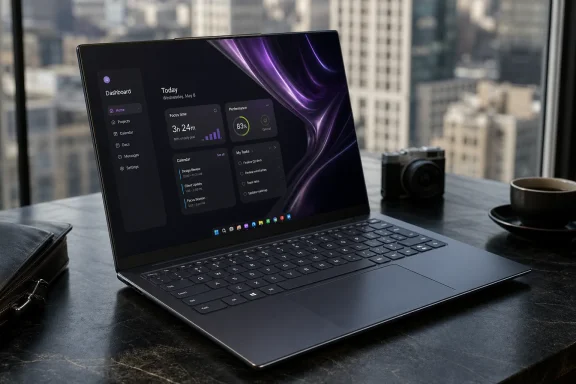 Lenovo Wins the First Five Minutes, Then Makes You Negotiate
The Yoga Slim 9 14 is built to win the showroom test. Lenovo’s current Yoga Slim 9 14ILL10 specification lists a 14-inch 4K WQUXGA OLED touchscreen, 120Hz refresh rate, 750-nit HDR peak brightness, and 600-nit typical SDR brightness. On paper, that is exactly the kind of panel spec that makes a premium Windows laptop feel less like a productivity appliance and more like an object of desire.The chassis plays the same game. Lenovo lists the machine at a starting weight of 1.23 kg, using CNC aluminum and glass materials, which puts it in the thin-and-light class without making it feel like a utilitarian business notebook. This is the category where buyers are not merely paying for CPU, RAM, and storage; they are paying for the object they open on a train, at a conference table, or in a client meeting.
That is why the decision is unusually binary. If you want a gorgeous OLED Windows laptop with a compact body and a keyboard that does not feel like an afterthought, the Yoga Slim 9 14 has a real claim. If you are trying to maximize practical value in the roughly $1,900 class, it starts giving you reasons to pause almost immediately.
The problem is not that the Yoga Slim 9 14 is bad. It is that it is expensive enough that every compromise stops being charming and starts becoming evidence.
The OLED Panel Is the Reason to Care
The display is the machine’s headline act, and Lenovo knows it. A 14-inch 3840 x 2400 OLED panel at 120Hz is an aggressively premium choice for a laptop this portable. It gives the Yoga Slim 9 14 the kind of density, contrast, and motion smoothness that cheaper 14-inch productivity laptops simply do not try to match.That matters in Windows more than spec-sheet skeptics sometimes admit. High refresh makes scrolling, cursor movement, and interface animation feel smoother, while the 16:10 high-resolution canvas gives documents, browser tabs, code editors, photo timelines, and remote desktops room to breathe. OLED contrast also changes the subjective feel of Windows 11: dark mode looks intentional rather than gray, and media consumption becomes a real use case rather than a consolation prize.
But a premium display has to be judged in the real world, not just by its panel identity. Lenovo’s own spec sheet claims 600 nits typical SDR brightness and 750 nits HDR peak brightness, but Notebookcheck’s review found the panel dimmer than advertised. That is not a footnote in this price band; it is the difference between “elite display” and “elite display with a caveat.”
The caveat matters most for people who work across changing lighting conditions. If you spend your day in controlled indoor spaces, the OLED advantages may dominate. If you expect a premium ultraportable to shrug off bright offices, airport windows, patio tables, and glossy reflections, the dimmer-than-advertised result becomes a practical weakness rather than a lab curiosity.
This is the recurring Yoga Slim 9 14 story: the expensive parts are real, but so are the expensive omissions.
Lenovo’s Best Argument May Be the Keyboard
Notebookcheck’s review says the Yoga Slim 9 14’s keyboard uses 1.5 mm of key travel and feels firmer and sharper than previous Yoga keys. That is not the flashiest line in a laptop review, but for WindowsForum readers who type all day, it may be the most important one. A premium ultraportable can survive a merely good display more easily than it can survive a mushy keyboard.The reason is simple: the keyboard is the interface you cannot dock around when you are mobile. You can plug in a better webcam, attach a hub, and use an external monitor at a desk. You cannot make a bad built-in keyboard good when you are writing on a train tray, a hotel desk, or a meeting room table.
This is where the Yoga Slim 9 14 looks more mature than some design-first laptops. Premium machines often chase thinness until the keyboard becomes a casualty, then ask the buyer to admire the machining instead. Lenovo appears to have avoided that particular trap here, and that gives the laptop a stronger case for writers, developers, consultants, administrators, and students than the display alone would.
For IT pros, keyboard quality is not sentimental. It affects password entry, terminal work, ticket handling, documentation, PowerShell sessions, browser-heavy administration, and the thousand small text inputs that define a workday. A beautiful OLED panel may sell the laptop, but a comfortable keyboard is what makes the purchase feel less foolish six months later.
The Under-Display Webcam Is the Wrong Kind of Futuristic
The Yoga Slim 9 14’s most interesting design trick is also one of its weakest practical choices. Notebookcheck identifies it as the first laptop with a 32 MP under-display webcam, and the review’s verdict calls the implementation disappointing. That is the sort of innovation that sounds premium until it collides with how people actually use laptops in 2026.The webcam is not a vanity feature anymore. It is infrastructure. For hybrid workers, IT managers, support engineers, consultants, sales teams, and executives, camera quality is part of the device’s professional surface area. A weak webcam on a cheap laptop is forgivable; a weak webcam on a premium laptop is a design debt.
The under-display approach is easy to understand from Lenovo’s perspective. It helps preserve the clean, minimal look of the display area, reducing the visual clutter that conventional camera placement can create. But users do not buy a webcam concept; they buy the image other people see in Teams, Zoom, Meet, and recorded briefings.
This is where the Yoga Slim 9 14 asks for the wrong kind of patience. Early implementations of new display-camera technology often involve compromises, and enthusiasts may be willing to tolerate them. Business buyers are less forgiving, because “use an external webcam” is not an elegant answer when the laptop itself is being sold as an elegant object.
The result is a premium laptop that looks more advanced when closed than it may feel when the meeting starts.
The Port Selection Turns Minimalism Into Policy
Notebookcheck’s verdict calls out limited ports and the absence of a 3.5 mm headphone jack. That is not surprising in a thin premium ultraportable, but it is still consequential. The industry has normalized dongle life, yet normalization is not the same as improvement.For some buyers, the port situation will be a minor nuisance. If your workflow is already USB-C-first, cloud-first, Bluetooth-first, and dock-first, the Yoga Slim 9 14’s minimalist approach may feel acceptable. Many premium laptop buyers are already carrying a hub, using wireless earbuds, and living inside a browser plus a handful of cloud apps.
For others, it is a daily tax. The lack of a headphone jack matters in offices, classrooms, airports, studios, and support environments where wired audio is still reliable, cheap, latency-free, and easy to troubleshoot. Limited ports also mean more points of failure: one more adapter to forget, one more dock to validate, one more cable compatibility issue for the help desk.
This is especially relevant for WindowsForum’s sysadmin and enthusiast audience. The people most likely to appreciate a high-end Windows laptop are also often the people most likely to plug into odd equipment: recovery drives, Ethernet adapters, KVMs, external displays, serial adapters, audio gear, test devices, and presentation systems. For them, minimalism can quickly stop feeling premium.
The Yoga Slim 9 14 is therefore not merely a laptop with few ports. It is a laptop that assumes your workflow has already been redesigned around the absence of ports.
Battery Life Is the Surprise That Keeps the Machine in the Fight
The Yoga Slim 9 14’s strongest practical counterargument is battery life. Notebookcheck measured about 15 hours and 46 minutes of Wi-Fi web browsing and reported that charging from empty to full takes just under two hours. For a 14-inch 4K OLED Windows laptop, that result is important because it pushes back against the usual OLED anxiety.High-resolution OLED panels have a reputation for making battery life feel like the price of beauty. The Yoga Slim 9 14’s measured web-browsing runtime suggests Lenovo has avoided turning the display into a portability liability. That does not erase the other compromises, but it does make the machine more credible as a travel laptop.
This matters because premium ultraportables live or die by trust. A laptop can be gorgeous, fast-feeling, and well-built, but if users are always hunting for outlets, the whole premium proposition collapses. The Yoga Slim 9 14 appears to clear that bar in the tested web workload.
The charging time also helps the case. “Just under two hours” from empty to full is not magic, but it is reasonable for a machine that can plausibly last through a workday of lighter browsing-oriented use. In practice, many buyers will care less about absolute charge speed than about whether the laptop can survive a long day without making the charger part of the schedule.
That puts the Yoga Slim 9 14 in a more interesting position than a simple style-over-substance critique would allow. It is not merely pretty. It has at least one measurable endurance result that supports its premium travel pitch.
The Price Makes Every Missing Piece Louder
The hardest part of reviewing the Yoga Slim 9 14 is that its weaknesses are not unusual. Premium ultraportables often have limited ports. Experimental webcam designs often disappoint. OLED brightness claims often require careful reading. None of that is shocking.But the roughly $1,900 class changes the standard. At that price, buyers are entitled to expect fewer explanations. A laptop does not have to be perfect, but the compromises should feel aligned with the buyer’s priorities rather than imposed by the design team’s aesthetic agenda.
This is why the Yoga Slim 9 14 is easier to recommend as an emotional purchase than as a rational fleet choice. The display, chassis, and keyboard can absolutely justify desire. They are the things users notice every day, and Lenovo seems to have invested in them with purpose.
For procurement, though, the calculus is colder. A dimmer-than-advertised screen undermines spec confidence. A disappointing under-display webcam complicates hybrid-work suitability. Limited ports increase accessory dependence. No 3.5 mm jack removes a still-useful fallback for professional audio scenarios.
That does not mean IT departments should reject it outright. It means the Yoga Slim 9 14 belongs in a specific lane: executive travel, design-conscious users, writers, premium personal devices, and people who understand exactly what they are trading away. It is less compelling as a default high-end corporate standard.
This Is a Better Personal Laptop Than Fleet Laptop
For an individual buyer, the Yoga Slim 9 14’s strengths may outweigh its flaws because personal satisfaction matters. If the laptop makes you want to use it, if the keyboard keeps your hands happy, and if the OLED panel makes every ordinary Windows task feel sharper, the compromises may be acceptable. A personal laptop is allowed to be a little irrational.For a fleet buyer, irrationality scales badly. Every missing port becomes an accessory line item. Every weak webcam becomes a support complaint. Every display brightness caveat becomes a mismatch between what users thought they were getting and what they experience in the field.
That split is not unique to Lenovo, but the Yoga Slim 9 14 makes it unusually clear. It is the kind of machine that can delight one power user and frustrate an IT team asked to standardize on it. The same design decisions that make it look clean and premium can make it harder to support consistently.
The safest enterprise interpretation is therefore selective deployment. Issue it to users who specifically benefit from the display, keyboard, weight, and premium finish. Avoid treating it as a universal laptop for employees who primarily need ports, camera quality, predictable peripherals, and lowest-friction support.
That is not an insult to the Yoga Slim 9 14. It is an acknowledgment that premium consumer design and enterprise practicality are still not the same thing.
The Windows Enthusiast Case Is Stronger Than the Admin Case
For Windows enthusiasts, the Yoga Slim 9 14 has obvious appeal. It represents the kind of polished hardware that Windows laptops need more of: high-density OLED, 120Hz refresh, strong materials, light weight, and a keyboard that reviewers describe as notably improved. It is easy to complain about Windows laptops being too compromised, too plastic, too dim, or too generic; this one at least tries to be special.That effort matters in a market where Apple’s MacBook line still defines much of the premium-laptop conversation. Windows machines do not win by copying the MacBook formula point for point. They win when they combine distinctive hardware with the flexibility of the Windows ecosystem.
The Yoga Slim 9 14 gets partway there. Its display and keyboard give Windows users something to be proud of. Its battery result helps defuse the fear that OLED luxury means constant charger anxiety. Its thin-and-light build makes it plausible as a daily carry rather than a desk ornament.
But enthusiasts should also be the first to notice when design ambition outruns practical execution. A futuristic webcam that disappoints is not a triumph. A premium chassis with limited ports is not automatically progress. A display specification that does not fully match measured brightness should make buyers read reviews carefully rather than buying from the spec sheet alone.
The right enthusiast verdict is not cynicism. It is conditional admiration.
The Buying Decision Comes Down to Which Compromise You Resent Most
The Yoga Slim 9 14 is not difficult to understand once you stop treating it as a generic premium laptop. It is a machine optimized around sensory quality: screen, materials, weight, typing feel. If those are your priorities, it makes sense. If your priorities are conferencing, port flexibility, and spec-sheet value, it becomes much harder to justify.That creates a clean yes/no framework. Buy it if you want a beautiful, portable OLED Windows laptop and can live in a USB-C, wireless-audio, occasional-external-webcam world. Skip it if you expect a premium laptop to be broadly practical without adapters or excuses.
The under-display webcam is the most symbolic compromise because it captures the machine’s personality. Lenovo chose an advanced-looking solution that preserves the design, but the measured review verdict says the result is disappointing. That is exactly the kind of tradeoff buyers must decide whether they are willing to fund.
The dimmer-than-advertised display result is the more subtle issue. The screen can still be excellent while falling short of the marketing promise, but in this price class, that distinction matters. Buyers should treat the Yoga Slim 9 14 as a laptop to see in person if possible, especially if brightness and glare handling are central to the purchase.
The keyboard, meanwhile, is the strongest argument against dismissing it. Many thin premium laptops look good on day one and become irritating by month three. A firmer, sharper keyboard with 1.5 mm travel is the kind of everyday improvement that can make a laptop feel better longer than its launch glamour lasts.
The Purchase Makes Sense Only for Buyers Who Know the Trade
The Yoga Slim 9 14’s value is not universal, but it is not imaginary either. It is a premium Windows ultraportable with a standout OLED specification, a light glass-and-aluminum build, a well-regarded keyboard, and strong reviewed web-browsing battery life. Its flaws are concentrated in the places practical buyers notice quickly.- The Yoga Slim 9 14 is worth considering if you care most about a 14-inch 4K OLED 120Hz touchscreen, low weight, premium materials, and typing feel.
- The laptop is harder to recommend if you need a strong built-in webcam for frequent professional video calls.
- The limited port selection and absence of a 3.5 mm headphone jack make it a poor fit for users who dislike hubs and adapters.
- The display should not be bought on Lenovo’s brightness numbers alone, because independent testing found it dimmer than advertised.
- The measured Wi-Fi browsing battery life keeps the machine credible as a travel laptop rather than merely a luxury desk device.
- The best buyer is an enthusiast, writer, executive traveler, or design-conscious Windows user who understands that the beauty is part of the price.
References
- Primary source: psref.lenovo.com
Loading…
psref.lenovo.com - Independent coverage: notebookcheck.net
Loading…
www.notebookcheck.net - Independent coverage: lenovo.com
Loading…
www.lenovo.com - Independent coverage: tomsguide.com
Loading…
www.tomsguide.com - Primary source: WindowsForum
Loading…
windowsforum.com