

Microsoft will block Exchange Online POP3 and IMAP4 client connections that still negotiate TLS 1.0 or TLS 1.1 beginning in July 2026, and the systems most likely to break are not modern Outlook clients but older gateways, scanners, archival tools, mailbox-polling applications, and line-of-business workflows that still collect mail through POP or IMAP. The immediate job is to inventory every non-human mail client, confirm whether it can negotiate TLS 1.2 or later, and either reconfigure, replace, or retire it before the cutoff. If an appliance cannot be moved away from legacy TLS, treat it as already failed in slow motion.
The practical remediation path is straightforward, even if the estate is messy. For each device or application that talks to Exchange Online, identify whether it retrieves mail with POP3, retrieves and folders mail with IMAP4, submits mail with SMTP, or combines those patterns. Then confirm whether the software stack supports TLS 1.2 or later, change the service settings to Microsoft’s currently supported Exchange Online configuration where possible, and test both message retrieval and message submission.
This article previously listed specific POP3, IMAP4, and SMTP port/protocol settings. Those settings are operationally important, but they should be validated against Microsoft’s current Exchange Online client configuration documentation and your tenant’s own configuration before anyone changes a production appliance. The point for this cutoff is not the port number by itself; it is whether the connection still negotiates TLS 1.0 or TLS 1.1.
The POP/IMAP/SMTP split matters because a device can half-survive the cutover. A scanner may still submit outbound scan messages through SMTP while a separate mailbox-polling function fails. A ticketing system may use IMAP to read inbound requests and SMTP to send acknowledgements, so a successful outbound test does not prove the intake queue works. An archiving connector may use IMAP to enumerate folders and retrieve messages, while status alerts use SMTP; one green dashboard badge can hide a broken retrieval path.
The first pass should not be an Outlook compatibility project. It should be a protocol census: every multifunction printer, ticketing system, backup notification tool, CRM integration, monitoring appliance, fax-to-mail box, voicemail platform, help desk collector, and archival product that has ever been handed a mailbox credential. If it signs in without a human watching it, it belongs on the list.
WindowsForum readers have been warning about exactly this shape of problem in related coverage of Exchange Online POP and IMAP legacy TLS deprecation. The forum’s recurring theme is not “users forgot to update Outlook.” It is that back-office systems, appliances, and old integrations often keep using mail protocols long after everyone assumes they were retired.
That qualification matters. Microsoft’s opt-in guidance is specifically framed around Exchange Online endpoints for legacy TLS clients using POP3 or IMAP4, with separate guidance for SMTP AUTH legacy TLS. It also calls out environment differences, including Microsoft 365 operated by 21Vianet in China, where timelines and availability have not necessarily matched worldwide commercial tenants. Administrators should therefore verify the exact Microsoft guidance for their tenant type instead of assuming the legacy endpoint is available, durable, or appropriate everywhere.
The change targets TLS negotiation, not POP and IMAP as names on a diagram. POP3 and IMAP4 can still exist as basic mailbox access methods, but a workflow that depends on TLS 1.0 or TLS 1.1 is the problem. That distinction keeps the project focused: do not panic because a system says “IMAP”; investigate whether that IMAP connection can complete a modern TLS session.
That is why the visible user story can be misleading. If a help desk asks, “Who still uses POP?” business users may answer “almost nobody.” If the same team asks, “Which devices authenticate to a mailbox to pick up or submit work?” the answer can suddenly include half the back office.
WindowsForum’s own coverage of Exchange Online blocking TLS 1.0 and TLS 1.1 for POP and IMAP in July 2026 framed the deadline as the end of the legacy endpoint escape hatch. That is the right operational lens: anything still depending on legacy TLS is no longer a weird exception. It is scheduled debt.
Multifunction printers are the obvious first target because they often combine old firmware, vendor-specific TLS libraries, and configuration screens that hide protocol choices behind labels such as “SSL,” “TLS,” or “secure connection.” If the printer only submits scans, the testable action is SMTP submission. If it also polls a mailbox for address books, release codes, or workflow routing, the testable action may include POP3 or IMAP4 retrieval as well.
Mail gateways and security appliances are trickier because they may sit in both directions of the mail path. A product might use IMAP to pull messages from a quarantine mailbox, POP to drain a shared mailbox, and SMTP to submit alerts or processed messages. If only the retrieval side uses obsolete TLS negotiation, administrators may see outbound alerts continue and assume the appliance survived.
Archival and e-discovery tools deserve special suspicion. Products that ingest mail through IMAP can be invisible until a compliance search, retention export, or legal hold workflow exposes missing data. In that category, a “test email worked” result is not enough; the IMAP test needs to prove that the collector can authenticate, enumerate folders, retrieve messages, and preserve whatever metadata the business expects. If the same product sends completion reports or failure notices, that is a separate SMTP submission test.
Homegrown integrations may be the most painful because nobody wants to own them. A script written years ago to poll a mailbox and create tickets may run on a forgotten VM, use a runtime with an old TLS stack, and fail with an error that looks like a password problem. For those systems, map the workflow explicitly: POP3 or IMAP4 for inbound ticket creation; SMTP for auto-replies, escalation notices, or assignment messages.
The second path is replacement. If the vendor no longer supports the device, cannot confirm TLS 1.2 support, or requires an upgrade that effectively becomes a new deployment, the organization should stop treating the issue as a mail setting. It is a lifecycle problem. The right question becomes whether the business still needs the appliance or app enough to justify a supported replacement.
The third path is retirement, and it is more common than people expect. POP and IMAP integrations often survive because they are never revisited, not because they are still important. A mailbox may be polled by a reporting tool nobody reads, a device may send status messages to a distribution group nobody monitors, or an application may maintain a fallback workflow superseded by a SaaS connector years ago.
The wrong path is to preserve the opt-in endpoint as a strategy. Legacy TLS support through a special endpoint was a bridge for limited scenarios, not a destination. Any appliance that cannot be reconfigured away from it is on borrowed time, and July 2026 is the point at which that borrowed time becomes a service-impacting incident.
For a scanner, test the SMTP submission path by performing a real scan-to-mail job and confirming delivery at the destination. If that same device also reads a mailbox for routing or status handling, test that POP3 or IMAP4 retrieval path separately.
For a mailbox-polling app, drop a test message into the mailbox, confirm the application retrieves it through POP3 or IMAP4, and confirm the downstream action occurs. If the app sends confirmations, assignments, or escalation notices, then send-path validation is a separate SMTP test.
For an archival tool, validate IMAP ingestion and retrieval in the archive, not merely the connector status page. If the archive product sends job completion reports, export notices, or failure messages, validate SMTP submission too.
Administrators should also test failure behavior. If the device cannot connect, does it retry forever, drop the message, store it locally, or alert someone? Many embedded systems were built on the assumption that mail is a notification channel, not a business-critical transport. That assumption breaks down when the “notification” is also the only evidence that a workflow succeeded.
Logs matter more than dashboards here. A green status icon may mean the appliance is powered on, not that it has completed a modern TLS session to Exchange Online. The evidence administrators need is a successful end-to-end transaction after the configuration change, plus a record of what changed so the same test can be repeated before the cutoff.
That is why the endpoint story matters. A device capable of TLS 1.2 or later may survive with configuration changes. A device limited to TLS 1.0 or TLS 1.1 will not. The same protocol name on two different products tells you less than the TLS stack underneath it.
The distinction also helps avoid unnecessary panic. This is not a blanket statement that every POP3 or IMAP4 workflow dies in July 2026. It is a statement that workflows still negotiating TLS 1.0 or TLS 1.1 against Exchange Online are in scope. The hard work is finding them before they become help desk tickets.
For WindowsForum’s audience, packet-level curiosity can help, but inventory still comes first. You do not need to turn every sysadmin into a protocol analyst, but you do need an inventory that reaches below the user mailbox view. Mailboxes with POP or IMAP enabled are only the starting clue; the real question is which physical or virtual thing is using them.
A copier that scans invoices to an accounting mailbox is an email client for this purpose if it submits mail through SMTP. A monitoring appliance that reads alert acknowledgements from a mailbox is an email client if it retrieves through POP3 or IMAP4. A legacy CRM connector that polls an IMAP folder for inbound leads is an email client. A backup product that submits job results through SMTP belongs in the same register even if it never touches POP or IMAP.
This is where a generic deprecation explainer becomes inadequate. The business impact is not “old mail apps stop working.” It is “document intake, ticket creation, archiving, alerts, and embedded workflows may fail in ways that look unrelated to Exchange.” The remediation owner may be a sysadmin, but the affected process may belong to operations, HR, finance, legal, or a plant floor.
WindowsForum’s related coverage of Exchange Online’s EAS 16.1 enforcement for March 1, 2026, Exchange and Outlook support deadlines in 2025, and Office Online Server retirement for Exchange on-premises customers points to the same broader administrative pattern: Microsoft platform deadlines rarely land in isolation. They expose the places where old clients, old servers, and old operational assumptions were allowed to keep running because nobody had a reason to touch them.
For administrators, POP/IMAP discovery cannot stop at mailbox access. If a multifunction printer scans to email, the relevant path may be SMTP submission. If a ticketing system creates cases from a mailbox, the relevant path may be IMAP retrieval plus SMTP response. If a gateway processes inbound mail and sends notifications, both sides need independent validation.
The testing matrix should reflect that split:
Next comes classification. Systems that already support TLS 1.2 or later should be scheduled for reconfiguration and testing. Systems that might support it after firmware or software updates should be placed in a vendor-confirmation lane. Systems that cannot support it should move directly to replacement or retirement planning.
The awkward middle category is where projects stall. Vendors may provide vague statements about “secure TLS” without saying which versions are supported. Web interfaces may offer a single checkbox for SSL/TLS with no version control. Documentation may describe a newer model or firmware branch than the one deployed. In those cases, administrators should insist on an actual validation test, not a marketing answer.
Service accounts also need attention, though this article’s spine is TLS rather than authentication policy. If a mailbox exists only so a device can poll it, now is the moment to ask whether that mailbox still needs POP or IMAP enabled at all. A cutoff project that leaves every old mailbox permission intact has solved only the transport symptom.
The relay approach may be reasonable as a time-bound mitigation when replacement cannot happen quickly. It is less reasonable as a permanent architecture that preserves devices nobody can patch, monitor, or audit. If a relay exists only to keep an obsolete TLS stack alive, the organization should assign it an expiration date.
This is especially important for embedded systems. Printers and appliances often lag behind server operating systems in update visibility. A Windows server running a supported relay can be patched and monitored through familiar tools; a copier firmware stack may not receive the same scrutiny. That difference can justify an intermediary, but it does not eliminate the need to retire the weak endpoint behind it.
The cleanest rule is simple: use a relay to buy time, not to avoid a decision. If the underlying workflow matters, modernize it. If it does not, delete it. If nobody can say which category it belongs in, the outage in July 2026 will answer for you.
What deserves more attention is the operational asymmetry. Microsoft can change a cloud endpoint once. Customers have to find every forgotten thing that depends on it. The vendor’s work is centralized; the customer’s work is scattered across closets, branch offices, factory floors, and scripts on servers whose names no longer match their jobs.
That is why this cutoff will be easy for some organizations and irritatingly slow for others. A cloud-native shop with managed devices and modern integrations may finish the project with a short inventory and a few tests. A long-lived business with acquisitions, branch hardware, and custom workflows may find that POP and IMAP are less like user preferences and more like sedimentary layers.
The strongest administrators will treat the cutoff as leverage. It is a reason to clean up dead mailboxes, remove unsupported appliances, force vendors to document TLS behavior, and replace mailbox-polling integrations with supported patterns where possible. The weakest response is to search for the one setting that makes the warning disappear.
The calendar should work backward from business validation, not from the Microsoft cutoff. Leave time for discovery, vendor responses, procurement, pilot testing, branch deployment, and rollback. The systems most likely to be affected are often the least standardized, which means a single test in headquarters may not tell you what happens in the warehouse.
The first practical milestone is a complete list of POP, IMAP, and SMTP-dependent systems. The second is a TLS 1.2 capability decision for each one. The third is a production test after reconfiguration or replacement. The fourth is a pre-cutoff retest, because somebody will restore an old configuration, swap in an older device, or deploy a vendor appliance from a stale image.
Administrators should also communicate the likely symptoms in advance. “Some old email clients may stop working” is too vague. Better language is: “Automated systems that read mailboxes or send mail through Exchange Online may fail, including scanners, gateways, archival tools, monitoring systems, and custom apps.” That sentence reaches the people who own the workflows.
The register does not need to be ornate. It needs the system name, owner, business function, protocol used, endpoint configured, TLS 1.2-or-later status, remediation path, test result, and retirement decision. If those fields cannot be filled in, the system is not ready.
The test evidence should be practical. Save screenshots of device configuration where that is the only interface available. Capture application logs showing successful retrieval or submission after the change. Record the test mailbox, test message, and expected outcome. The point is not bureaucracy; it is avoiding a second discovery project when the same device fails later.
This is also the moment to stop treating “basic email access” as a neutral default. POP and IMAP can still be useful, but every enabled mailbox should have a reason. A security baseline that disables unused protocols is easier to defend than one that leaves them open because nobody can prove they are unused.
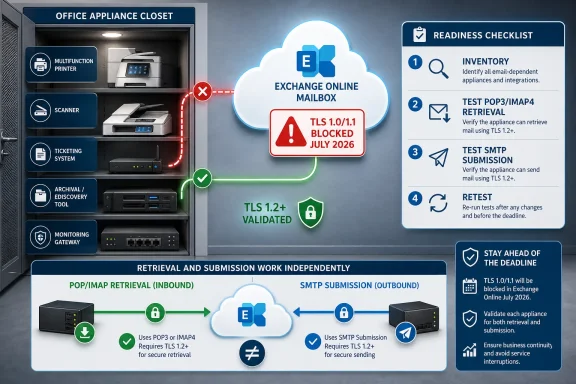 The Fix Starts With the Appliance Closet, Not the Outlook Fleet
The practical remediation path is straightforward, even if the estate is messy. For each device or application that talks to Exchange Online, identify whether it retrieves mail with POP3, retrieves and folders mail with IMAP4, submits mail with SMTP, or combines those patterns. Then confirm whether the software stack supports TLS 1.2 or later, change the service settings to Microsoft’s currently supported Exchange Online configuration where possible, and test both message retrieval and message submission.This article previously listed specific POP3, IMAP4, and SMTP port/protocol settings. Those settings are operationally important, but they should be validated against Microsoft’s current Exchange Online client configuration documentation and your tenant’s own configuration before anyone changes a production appliance. The point for this cutoff is not the port number by itself; it is whether the connection still negotiates TLS 1.0 or TLS 1.1.
The POP/IMAP/SMTP split matters because a device can half-survive the cutover. A scanner may still submit outbound scan messages through SMTP while a separate mailbox-polling function fails. A ticketing system may use IMAP to read inbound requests and SMTP to send acknowledgements, so a successful outbound test does not prove the intake queue works. An archiving connector may use IMAP to enumerate folders and retrieve messages, while status alerts use SMTP; one green dashboard badge can hide a broken retrieval path.
The first pass should not be an Outlook compatibility project. It should be a protocol census: every multifunction printer, ticketing system, backup notification tool, CRM integration, monitoring appliance, fax-to-mail box, voicemail platform, help desk collector, and archival product that has ever been handed a mailbox credential. If it signs in without a human watching it, it belongs on the list.
WindowsForum readers have been warning about exactly this shape of problem in related coverage of Exchange Online POP and IMAP legacy TLS deprecation. The forum’s recurring theme is not “users forgot to update Outlook.” It is that back-office systems, appliances, and old integrations often keep using mail protocols long after everyone assumes they were retired.
July 2026 Turns a Grace Period Into a Deadline
Microsoft’s older TLS story in Exchange Online has had an awkward transition period. TLS 1.0 and TLS 1.1 have not been the supported future for years, but Microsoft provided opt-in legacy TLS endpoint guidance for some customers that still needed POP3 or IMAP4 access while they migrated old clients. That opt-in model should be read narrowly: it was a temporary accommodation for specific Exchange Online environments and qualifying legacy-client scenarios, not a broadly safe architecture for every tenant, every cloud, or every mail workflow.That qualification matters. Microsoft’s opt-in guidance is specifically framed around Exchange Online endpoints for legacy TLS clients using POP3 or IMAP4, with separate guidance for SMTP AUTH legacy TLS. It also calls out environment differences, including Microsoft 365 operated by 21Vianet in China, where timelines and availability have not necessarily matched worldwide commercial tenants. Administrators should therefore verify the exact Microsoft guidance for their tenant type instead of assuming the legacy endpoint is available, durable, or appropriate everywhere.
The change targets TLS negotiation, not POP and IMAP as names on a diagram. POP3 and IMAP4 can still exist as basic mailbox access methods, but a workflow that depends on TLS 1.0 or TLS 1.1 is the problem. That distinction keeps the project focused: do not panic because a system says “IMAP”; investigate whether that IMAP connection can complete a modern TLS session.
That is why the visible user story can be misleading. If a help desk asks, “Who still uses POP?” business users may answer “almost nobody.” If the same team asks, “Which devices authenticate to a mailbox to pick up or submit work?” the answer can suddenly include half the back office.
WindowsForum’s own coverage of Exchange Online blocking TLS 1.0 and TLS 1.1 for POP and IMAP in July 2026 framed the deadline as the end of the legacy endpoint escape hatch. That is the right operational lens: anything still depending on legacy TLS is no longer a weird exception. It is scheduled debt.
The Breakage Pattern Is Boring, Which Is Why It Will Be Missed
The systems at risk are rarely glamorous. They are the devices that “just send an email” when a copier scans a document, a UPS overheats, a backup finishes, a badge system exports a report, or a help desk mailbox becomes the intake queue for a workflow that predates the current IT team.Multifunction printers are the obvious first target because they often combine old firmware, vendor-specific TLS libraries, and configuration screens that hide protocol choices behind labels such as “SSL,” “TLS,” or “secure connection.” If the printer only submits scans, the testable action is SMTP submission. If it also polls a mailbox for address books, release codes, or workflow routing, the testable action may include POP3 or IMAP4 retrieval as well.
Mail gateways and security appliances are trickier because they may sit in both directions of the mail path. A product might use IMAP to pull messages from a quarantine mailbox, POP to drain a shared mailbox, and SMTP to submit alerts or processed messages. If only the retrieval side uses obsolete TLS negotiation, administrators may see outbound alerts continue and assume the appliance survived.
Archival and e-discovery tools deserve special suspicion. Products that ingest mail through IMAP can be invisible until a compliance search, retention export, or legal hold workflow exposes missing data. In that category, a “test email worked” result is not enough; the IMAP test needs to prove that the collector can authenticate, enumerate folders, retrieve messages, and preserve whatever metadata the business expects. If the same product sends completion reports or failure notices, that is a separate SMTP submission test.
Homegrown integrations may be the most painful because nobody wants to own them. A script written years ago to poll a mailbox and create tickets may run on a forgotten VM, use a runtime with an old TLS stack, and fail with an error that looks like a password problem. For those systems, map the workflow explicitly: POP3 or IMAP4 for inbound ticket creation; SMTP for auto-replies, escalation notices, or assignment messages.
The Decision Tree Is Reconfigure, Replace, or Retire
The best outcome is reconfiguration. If the device or application can negotiate TLS 1.2 or later, the work may be limited to firmware updates, runtime updates, endpoint changes, and validation. That is the cleanest path because the business workflow remains intact while the insecure negotiation disappears.The second path is replacement. If the vendor no longer supports the device, cannot confirm TLS 1.2 support, or requires an upgrade that effectively becomes a new deployment, the organization should stop treating the issue as a mail setting. It is a lifecycle problem. The right question becomes whether the business still needs the appliance or app enough to justify a supported replacement.
The third path is retirement, and it is more common than people expect. POP and IMAP integrations often survive because they are never revisited, not because they are still important. A mailbox may be polled by a reporting tool nobody reads, a device may send status messages to a distribution group nobody monitors, or an application may maintain a fallback workflow superseded by a SaaS connector years ago.
The wrong path is to preserve the opt-in endpoint as a strategy. Legacy TLS support through a special endpoint was a bridge for limited scenarios, not a destination. Any appliance that cannot be reconfigured away from it is on borrowed time, and July 2026 is the point at which that borrowed time becomes a service-impacting incident.
A Concrete Admin Checklist for Validation
Use a register, not a spreadsheet full of guesses. For every device, app, connector, scheduled task, and vendor service that reads from or sends through Exchange Online, capture the following and do not mark it complete until there is evidence.- Identify the owner and business function
- Record the system name, location, vendor, owner, support contact, and business process.
- Failure check: if nobody can approve a configuration change or replacement, the item is not ready.
- Classify the mail path
- Mark whether the system uses POP3 retrieval, IMAP4 retrieval, SMTP submission, or a mix.
- For a scanner, the likely test is SMTP submission.
- For a ticketing collector, the likely test is IMAP or POP retrieval plus SMTP acknowledgement.
- For an archive connector, the likely test is IMAP retrieval plus any SMTP status reporting.
- Failure check: if the record only says “email” or “Office 365,” it is not specific enough.
- Confirm TLS capability
- Check vendor documentation, firmware release notes, application runtime versions, and configuration screens for TLS 1.2 or later support.
- Where the interface only says “SSL/TLS,” perform a real connection test rather than accepting the label.
- Failure check: “supports secure email” is not proof. “Negotiates TLS 1.2 or later in this deployed version” is the evidence you need.
- Validate retrieval separately
- For POP3: place a known test message in the mailbox, run the workflow, and confirm the system retrieves the message and performs the expected downstream action.
- For IMAP4: place a known test message in the expected folder, confirm the application can authenticate, enumerate the folder, retrieve the message, and process or archive it correctly.
- Failure check: a successful login or connector status page is not enough if no message was actually retrieved.
- Validate submission separately
- For SMTP: send a real test message through the configured submission path to a controlled recipient and confirm delivery, headers, and application behavior.
- If the device submits scans, alerts, confirmations, or workflow replies, test each message type that matters.
- Failure check: do not let a successful SMTP test close an item that also uses POP or IMAP for retrieval.
- Check failure behavior
- Temporarily test a controlled failure where safe, or review logs and vendor behavior to determine what happens if the system cannot connect.
- Does it queue, retry, discard, store locally, or alert an owner?
- Failure check: if the system silently drops messages or only logs locally, add monitoring or replace the workflow before the cutoff.
- Record evidence and retest date
- Save screenshots, logs, test message IDs, timestamps, mailbox names, and the expected result.
- Schedule a pre-cutoff retest before July 2026.
- Failure check: if the only proof is “admin said it worked,” the item should remain open.
Testing Has to Prove the Whole Workflow, Not Just a Login
A useful validation plan starts with the protocol mix. For each system, document whether it receives mail using POP3, receives mail using IMAP4, sends mail using SMTP, or performs more than one of those jobs. The common operational mistake is to test only the visible half of the workflow.For a scanner, test the SMTP submission path by performing a real scan-to-mail job and confirming delivery at the destination. If that same device also reads a mailbox for routing or status handling, test that POP3 or IMAP4 retrieval path separately.
For a mailbox-polling app, drop a test message into the mailbox, confirm the application retrieves it through POP3 or IMAP4, and confirm the downstream action occurs. If the app sends confirmations, assignments, or escalation notices, then send-path validation is a separate SMTP test.
For an archival tool, validate IMAP ingestion and retrieval in the archive, not merely the connector status page. If the archive product sends job completion reports, export notices, or failure messages, validate SMTP submission too.
Administrators should also test failure behavior. If the device cannot connect, does it retry forever, drop the message, store it locally, or alert someone? Many embedded systems were built on the assumption that mail is a notification channel, not a business-critical transport. That assumption breaks down when the “notification” is also the only evidence that a workflow succeeded.
Logs matter more than dashboards here. A green status icon may mean the appliance is powered on, not that it has completed a modern TLS session to Exchange Online. The evidence administrators need is a successful end-to-end transaction after the configuration change, plus a record of what changed so the same test can be repeated before the cutoff.
POP and IMAP Are Not the Villains, But They Are the Breadcrumbs
It is tempting to frame this as another round in the long campaign against legacy mail clients. That is partly true, but it undersells the administrative reality. POP and IMAP are not automatically obsolete in every use case. The problem is older TLS negotiation attached to workflows that may never have been designed for cloud-era security baselines.That is why the endpoint story matters. A device capable of TLS 1.2 or later may survive with configuration changes. A device limited to TLS 1.0 or TLS 1.1 will not. The same protocol name on two different products tells you less than the TLS stack underneath it.
The distinction also helps avoid unnecessary panic. This is not a blanket statement that every POP3 or IMAP4 workflow dies in July 2026. It is a statement that workflows still negotiating TLS 1.0 or TLS 1.1 against Exchange Online are in scope. The hard work is finding them before they become help desk tickets.
For WindowsForum’s audience, packet-level curiosity can help, but inventory still comes first. You do not need to turn every sysadmin into a protocol analyst, but you do need an inventory that reaches below the user mailbox view. Mailboxes with POP or IMAP enabled are only the starting clue; the real question is which physical or virtual thing is using them.
The Systems Most Likely to Surprise You Are the Ones Nobody Calls Email Clients
The phrase “email client” misdirects attention toward desktop software. In many environments, the riskiest clients are headless. They do not appear in app inventories, they are not patched through endpoint management, and their owners may not know they use Exchange Online at all.A copier that scans invoices to an accounting mailbox is an email client for this purpose if it submits mail through SMTP. A monitoring appliance that reads alert acknowledgements from a mailbox is an email client if it retrieves through POP3 or IMAP4. A legacy CRM connector that polls an IMAP folder for inbound leads is an email client. A backup product that submits job results through SMTP belongs in the same register even if it never touches POP or IMAP.
This is where a generic deprecation explainer becomes inadequate. The business impact is not “old mail apps stop working.” It is “document intake, ticket creation, archiving, alerts, and embedded workflows may fail in ways that look unrelated to Exchange.” The remediation owner may be a sysadmin, but the affected process may belong to operations, HR, finance, legal, or a plant floor.
WindowsForum’s related coverage of Exchange Online’s EAS 16.1 enforcement for March 1, 2026, Exchange and Outlook support deadlines in 2025, and Office Online Server retirement for Exchange on-premises customers points to the same broader administrative pattern: Microsoft platform deadlines rarely land in isolation. They expose the places where old clients, old servers, and old operational assumptions were allowed to keep running because nobody had a reason to touch them.
SMTP Is the Other Half of the Story
POP3 and IMAP4 are retrieval protocols. They are not how a client submits new outbound mail. That is why SMTP belongs in the investigation even though the July 2026 POP/IMAP legacy TLS cutoff is the headline.For administrators, POP/IMAP discovery cannot stop at mailbox access. If a multifunction printer scans to email, the relevant path may be SMTP submission. If a ticketing system creates cases from a mailbox, the relevant path may be IMAP retrieval plus SMTP response. If a gateway processes inbound mail and sends notifications, both sides need independent validation.
The testing matrix should reflect that split:
- SMTP-only workflow: scanner sends a scan, monitoring appliance sends an alert, backup tool sends a job report. Test outbound submission and delivery.
- POP3 retrieval workflow: legacy app drains a mailbox and deletes or processes each message. Test message pickup and downstream action.
- IMAP4 retrieval workflow: help desk, archive, CRM, or compliance connector reads specific folders. Test folder access, message retrieval, and processing.
- Mixed workflow: ticketing system reads inbound requests through IMAP and sends acknowledgements through SMTP. Test both directions separately.
The Migration Plan Needs Owners, Not Just Settings
A strong plan begins with a named owner for every mail-enabled device and application. “Printer fleet” is not an owner. “The old scanner in receiving” is not an owner. Someone needs authority to update firmware, change credentials, schedule downtime, approve replacement, or retire the workflow.Next comes classification. Systems that already support TLS 1.2 or later should be scheduled for reconfiguration and testing. Systems that might support it after firmware or software updates should be placed in a vendor-confirmation lane. Systems that cannot support it should move directly to replacement or retirement planning.
The awkward middle category is where projects stall. Vendors may provide vague statements about “secure TLS” without saying which versions are supported. Web interfaces may offer a single checkbox for SSL/TLS with no version control. Documentation may describe a newer model or firmware branch than the one deployed. In those cases, administrators should insist on an actual validation test, not a marketing answer.
Service accounts also need attention, though this article’s spine is TLS rather than authentication policy. If a mailbox exists only so a device can poll it, now is the moment to ask whether that mailbox still needs POP or IMAP enabled at all. A cutoff project that leaves every old mailbox permission intact has solved only the transport symptom.
The Relay Temptation Is Real, But It Should Not Become a Museum
Some organizations will consider placing an internal relay or intermediary service between legacy devices and Exchange Online. In principle, that can isolate an old appliance that cannot speak modern TLS externally while allowing a controlled system to handle the cloud-facing connection. In practice, it can also become a museum for bad assumptions.The relay approach may be reasonable as a time-bound mitigation when replacement cannot happen quickly. It is less reasonable as a permanent architecture that preserves devices nobody can patch, monitor, or audit. If a relay exists only to keep an obsolete TLS stack alive, the organization should assign it an expiration date.
This is especially important for embedded systems. Printers and appliances often lag behind server operating systems in update visibility. A Windows server running a supported relay can be patched and monitored through familiar tools; a copier firmware stack may not receive the same scrutiny. That difference can justify an intermediary, but it does not eliminate the need to retire the weak endpoint behind it.
The cleanest rule is simple: use a relay to buy time, not to avoid a decision. If the underlying workflow matters, modernize it. If it does not, delete it. If nobody can say which category it belongs in, the outage in July 2026 will answer for you.
Security Rationale Is the Easy Part; Operational Reality Is Harder
Nobody in 2026 should need a sermon on why TLS 1.0 and TLS 1.1 are poor bets for cloud mail. The security rationale is well understood, and Microsoft’s compliance posture is not surprising. Cloud services are progressively less willing to support antique protocol negotiation for the sake of long-tail clients.What deserves more attention is the operational asymmetry. Microsoft can change a cloud endpoint once. Customers have to find every forgotten thing that depends on it. The vendor’s work is centralized; the customer’s work is scattered across closets, branch offices, factory floors, and scripts on servers whose names no longer match their jobs.
That is why this cutoff will be easy for some organizations and irritatingly slow for others. A cloud-native shop with managed devices and modern integrations may finish the project with a short inventory and a few tests. A long-lived business with acquisitions, branch hardware, and custom workflows may find that POP and IMAP are less like user preferences and more like sedimentary layers.
The strongest administrators will treat the cutoff as leverage. It is a reason to clean up dead mailboxes, remove unsupported appliances, force vendors to document TLS behavior, and replace mailbox-polling integrations with supported patterns where possible. The weakest response is to search for the one setting that makes the warning disappear.
The July Cutoff Belongs on the Change Calendar Now
A July 2026 deadline is close enough to plan and far enough away to waste. That is the dangerous window. Organizations that wait until the month before will discover that printers need firmware, firmware needs maintenance windows, maintenance windows need site contacts, and site contacts need someone to remember the admin password.The calendar should work backward from business validation, not from the Microsoft cutoff. Leave time for discovery, vendor responses, procurement, pilot testing, branch deployment, and rollback. The systems most likely to be affected are often the least standardized, which means a single test in headquarters may not tell you what happens in the warehouse.
The first practical milestone is a complete list of POP, IMAP, and SMTP-dependent systems. The second is a TLS 1.2 capability decision for each one. The third is a production test after reconfiguration or replacement. The fourth is a pre-cutoff retest, because somebody will restore an old configuration, swap in an older device, or deploy a vendor appliance from a stale image.
Administrators should also communicate the likely symptoms in advance. “Some old email clients may stop working” is too vague. Better language is: “Automated systems that read mailboxes or send mail through Exchange Online may fail, including scanners, gateways, archival tools, monitoring systems, and custom apps.” That sentence reaches the people who own the workflows.
The Windows Admin View Is Inventory, Evidence, and Exit Paths
For Windows-heavy shops, the work often crosses Microsoft 365 administration, endpoint management, print services, application ownership, and vendor support. That makes it a governance problem disguised as a protocol change. The winning move is to create a small but unforgiving register of every dependency.The register does not need to be ornate. It needs the system name, owner, business function, protocol used, endpoint configured, TLS 1.2-or-later status, remediation path, test result, and retirement decision. If those fields cannot be filled in, the system is not ready.
The test evidence should be practical. Save screenshots of device configuration where that is the only interface available. Capture application logs showing successful retrieval or submission after the change. Record the test mailbox, test message, and expected outcome. The point is not bureaucracy; it is avoiding a second discovery project when the same device fails later.
This is also the moment to stop treating “basic email access” as a neutral default. POP and IMAP can still be useful, but every enabled mailbox should have a reason. A security baseline that disables unused protocols is easier to defend than one that leaves them open because nobody can prove they are unused.
Frequently Asked Questions
Does this mean POP3 and IMAP4 are being removed from Exchange Online?
No. The July 2026 issue is legacy TLS negotiation for POP3 and IMAP4 connections, not the mere existence of POP3 or IMAP4 as protocols. A workflow that can connect using TLS 1.2 or later is in a different position from one that can only use TLS 1.0 or TLS 1.1.Do I only need to check Outlook clients?
No. The more likely problem is non-human clients: scanners, ticketing systems, voicemail platforms, monitoring appliances, CRM connectors, archival products, and custom scripts. Modern Outlook clients are not the center of this project.Why should SMTP be included if the headline is POP and IMAP?
Because POP3 and IMAP4 retrieve mail; they do not submit new outbound messages. Many real workflows combine retrieval and submission. A ticketing system may read new requests through IMAP and send acknowledgements through SMTP. A scanner may only use SMTP. A gateway may use IMAP for one function and SMTP for another. Testing only one side can miss the broken half.Can we keep using Microsoft’s legacy TLS opt-in endpoint?
Do not treat that as a strategy. Microsoft’s opt-in guidance was created for specific legacy-client scenarios and tenant environments, with separate handling for POP/IMAP and SMTP AUTH. Availability and timing can vary by environment, and the July 2026 cutoff makes continued dependency on legacy TLS a scheduled risk. Use the guidance to understand your current state, not to justify leaving old clients in place.What is the fastest useful inventory question?
Ask: “Which systems automatically read from or send through Exchange Online?” Then force each answer into POP3 retrieval, IMAP4 retrieval, SMTP submission, or mixed workflow. If the answer is only “email,” keep digging.What proof should close a remediation item?
A real end-to-end test. For POP3 or IMAP4, prove the system can retrieve and process a test message. For SMTP, prove it can submit and deliver a test message. For mixed workflows, prove both. Save logs, timestamps, configuration screenshots, and the expected result.What should we do with devices that cannot support TLS 1.2 or later?
Replace them, retire the workflow, or use a tightly scoped temporary relay only long enough to complete replacement or retirement. A relay should not become a permanent museum for unpatchable appliances.The Useful Field Notes Before the Cutoff
By the time this reaches production change control, the successful organizations will have shifted the conversation from “Microsoft is removing old TLS” to “these specific workflows are safe, replaced, or retired.” That is the difference between reading a deprecation notice and running an estate.- Inventory every appliance, gateway, scanner, archival product, monitoring system, and custom application that reads from or sends through Exchange Online.
- Confirm whether each system uses POP3, IMAP4, SMTP, or a mix, because send and receive paths can fail independently.
- For SMTP-only workflows, test real outbound submission and delivery.
- For POP3 workflows, test mailbox retrieval and the downstream business action.
- For IMAP4 workflows, test authentication, folder access, message retrieval, and processing.
- For mixed workflows, test retrieval and submission independently so one working half does not mask the failed half.
- Reconfigure systems that support TLS 1.2 or later to use Microsoft’s currently supported Exchange Online settings, then validate the complete business workflow.
- Treat systems that require the legacy opt-in endpoint as temporary exceptions, not as stable architecture.
- Replace or retire devices and applications that cannot negotiate TLS 1.2 or later, especially when the vendor cannot provide clear support evidence.
- Repeat validation before July 2026 so restored configurations, forgotten branch hardware, and vendor swaps do not reintroduce obsolete TLS.
References
- Primary source: learn.microsoft.com

POP3 and IMAP4 in Exchange Online | Microsoft Learn
Summary: An overview of POP3 and IMAP4 in Exchange Online, and the differences between them.learn.microsoft.com - Independent coverage: techcommunity.microsoft.com

Exchange Online to Deprecate Legacy TLS for POP3 and IMAP4 | Microsoft Community Hub
Microsoft will start to refuse inbound IMAP4 and POP3 client connections using legacy TLS versions (1.0 and 1.1) in July 2026. The move is consistent with... techcommunity.microsoft.com
- Primary source: WindowsForum

Exchange Online POP IMAP Legacy TLS Deprecation: Move to TLS 1.2 by July 2026 | Windows Forum
Microsoft’s latest Exchange Online security announcement is a reminder that “legacy” does not always mean unused. POP3 and IMAP4 may no longer be the...windowsforum.com