

Microsoft’s 2011 Secure Boot certificate for third-party UEFI boot components is set to expire in late June 2026, forcing Linux distributions, hardware vendors, and administrators to complete a long-planned migration to Microsoft’s newer 2023 Secure Boot certificate chain. The uncomfortable part is not that millions of Linux systems will suddenly refuse to start. The uncomfortable part is that one of Linux’s most common boot paths still depends on a Microsoft-controlled trust anchor embedded in PC firmware. This is less a cliff edge than a stress test of the uneasy bargain that has governed Secure Boot on commodity PCs for more than a decade.
The first thing to get straight is that certificate expiration is not the same thing as mass revocation. A Linux system that boots today through a Microsoft-signed shim should not automatically fail the morning after the Microsoft UEFI CA 2011 certificate reaches its expiration date, provided that the existing trust database still contains the old certificate and the boot components have not been revoked.
That distinction matters because Secure Boot failures tend to produce blunt symptoms and dramatic interpretations. The machine powers on, the firmware checks the first-stage boot component, and if the chain of trust breaks, the user may see only a terse firmware error or an unexplained refusal to load the operating system. To the person standing in front of the screen, “expired certificate,” “revoked bootloader,” “missing firmware update,” and “bad USB installer” can look like the same outage.
The transition Microsoft is now pushing is about preserving the future usefulness of Secure Boot, not retroactively invalidating every existing Linux installation. The 2011-era certificates were always time-limited. The replacement certificates arrived years ago. What has changed is that the grace period is ending, and the PC ecosystem now has to prove that it can rotate foundational boot trust without turning ordinary maintenance into a support incident.
For Linux users, the lesson is subtler than the usual “update now” slogan. Existing systems are likely to continue booting, but new installation media, recovery environments, dual-boot repairs, older firmware, and stale Secure Boot databases are where the failures will concentrate. In other words, the riskiest moment may not be normal boot; it may be the moment a user tries to fix something else.
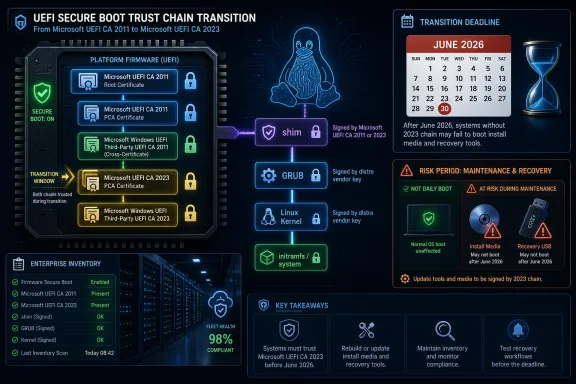
Linux distributions solved that problem with shim, a small first-stage UEFI bootloader signed by Microsoft. The firmware trusts shim because Microsoft signed it; shim then trusts the distribution’s own keys and verifies the next stages, typically GRUB and the kernel. It is a pragmatic bridge between the Windows-centric PC supply chain and Linux’s need to boot securely on the same hardware.
That bridge has always carried political weight. Secure Boot was controversial from the start because it placed a gatekeeper role in the hands of a platform vendor whose operating system competes with Linux. The existence of shim made Secure Boot workable for mainstream distributions, but it did not make the trust model neutral. Linux did not win equal standing in firmware; it won a reliable passport stamped by Microsoft.
The 2026 certificate rollover exposes the cost of that compromise. Distributions now need shim binaries signed under the newer 2023 Microsoft UEFI CA, and systems need firmware or operating-system-managed Secure Boot databases that recognize the corresponding certificate. The work is not glamorous, but it is foundational. If any link in the chain is stale, the user does not get a nuanced explanation of certificate lineage; the boot process just stops trusting the path forward.
This is where the expiration becomes operationally interesting for administrators. Secure Boot is not just one setting in firmware; it is a relationship among firmware databases, certificate authorities, bootloader signatures, revocation lists, OEM updates, operating-system updates, and distribution packaging. A fleet can look compliant on paper while still containing machines that differ in firmware age, db contents, dbx revocations, and shim versions.
Linux distributions have been preparing for the 2023 CA transition, but distribution readiness is only part of the equation. If firmware does not know the newer Microsoft UEFI CA, a shim signed only by that newer certificate may not launch. If an organization removes the 2011 CA too early, older boot media or older installed environments may fail. If rescue workflows depend on stale ISO images, administrators may discover the problem only during an outage, which is exactly when nobody wants to debug UEFI trust stores.
The risk is therefore asymmetric. Normal users may never notice the transition if their vendor and distribution handle updates correctly. Power users and sysadmins, especially those who keep old installers and recovery drives around “just in case,” are more likely to trip over the hidden dependency. Secure Boot’s promise is that the machine refuses untrusted code; its nuisance is that “untrusted” can include yesterday’s perfectly legitimate maintenance tool.
But the optics are still awkward because the Linux ecosystem’s bootability on mainstream PCs remains entangled with Microsoft’s certificate infrastructure. That is not quite the same as Microsoft controlling Linux boot, but it is close enough to make open-source purists wince. The default trust store in mass-market PC firmware reflects market power, not a philosophically balanced map of operating-system legitimacy.
There is also a practical reason Microsoft is moving cautiously. The old keys cannot simply be tossed into the revocation database overnight without risking collateral damage. Too many boot components, hardware option ROMs, recovery tools, and legacy workflows have depended on the 2011 chain. In Secure Boot, revocation is a chainsaw, not a scalpel.
That is why the transition is staged rather than explosive. New certificates are added, updated binaries are signed, vendors issue guidance, and administrators are told to inventory before they enforce. The slow pace can look indecisive, but it is probably the only sane way to rotate a trust anchor that spans Windows, Linux, firmware, hypervisors, servers, laptops, removable media, and embedded-ish PC appliances.
Linux on physical servers often lives under stricter operational controls than Linux on a hobbyist laptop. Administrators may use Secure Boot as part of a chain that supports measured boot, disk encryption policies, remote attestation, or compliance reporting. In those environments, disabling Secure Boot to get past a boot failure may be a temporary workaround, but it is not a satisfactory end state.
Cloud and virtualization add another layer. Linux virtual machines that use UEFI Secure Boot depend on platform templates, virtual firmware, distribution shim packages, and image maintenance pipelines. A stale golden image can become just as troublesome as a stale USB stick. The fact that a VM has no physical firmware setup screen does not remove the trust-chain problem; it merely moves it into the provider’s platform and the administrator’s image lifecycle.
The same applies to appliances built on Linux. Security products, storage nodes, kiosk systems, industrial controllers, and purpose-built devices may all run Linux under Secure Boot in configurations their owners rarely inspect. Those systems often have long service lives and conservative update policies. The more “set and forget” the system is, the more likely its Secure Boot assumptions have fossilized.
Most users do not know which certificate signed their shim. Many administrators cannot easily answer whether a given machine’s firmware db contains the 2023 Microsoft UEFI CA. Even fewer have a clean inventory of which rescue media, PXE boot images, and offline installers in their environment depend on the 2011 path. Secure Boot failures often become visible only when the boot path is exercised.
This is an old enterprise problem wearing UEFI clothing. Organizations manage operating-system versions, application versions, BIOS versions, TPM readiness, disk encryption state, and patch compliance. Secure Boot certificate state deserves the same treatment, but it has rarely been monitored with the same seriousness because the 2011 trust chain simply worked for so long.
The 2026 transition should change that. Administrators need to treat Secure Boot databases as living configuration, not immutable firmware furniture. They need to know whether machines have the new certificates, whether firmware updates are required, whether distribution shims have moved to the 2023 signing path, and whether rollback or recovery media remain bootable under current policy.
The temptation to “clean up” old certificates is understandable and dangerous. If the 2011 Microsoft UEFI CA looks obsolete, a security-minded user might assume removing it is prudent. In the middle of a transition, that can be exactly the wrong move. Older signed bootloaders, older recovery media, and some hardware paths may still rely on it.
The better approach is coexistence until the ecosystem is ready for enforcement. The presence of both old and new certificates is not inherently a failure. It is part of how large trust transitions avoid breaking the installed base. The problem is not that the old key still exists; the problem is relying on it forever without a migration plan.
For Linux users who manage their own machines, the safest checklist is simple: update the distro, update firmware, refresh installation and rescue media, and do not assume an ISO downloaded two years ago remains a valid Secure Boot recovery tool. For enterprises, the checklist expands into inventory, staged testing, vendor coordination, and documentation of break-glass procedures. The work is mundane, but the alternative is discovering trust-chain drift during a failed boot.
Windows users who occasionally boot Linux from USB may be surprised by a different failure mode than full-time Linux users. Their installed Windows environment may be updated for the 2023 certificates, but an older Linux installer may still depend on the 2011 path. Conversely, a newer Linux installer signed under the 2023 CA may fail on older firmware that has not received the updated certificate. The direction of failure depends on exactly which side of the transition each component occupies.
This is why blanket advice is hazardous. “Disable Secure Boot” may get a user unstuck, but it also lowers the security posture and may interfere with assumptions made by Windows 11, disk encryption setups, anti-cheat systems, or enterprise policy. “Remove the old key” may sound secure but break legitimate boot paths. “Update everything” is correct but incomplete if the user’s emergency media and firmware database remain stale.
The dual-boot lesson is to test before crisis. If Linux matters on a Secure Boot-enabled PC, users should verify that their current installer and rescue media actually boot on that hardware. They should do that before wiping partitions, replacing disks, or traveling with a laptop whose only recovery plan is a thumb drive from 2023.
If a system never receives the newer certificates through firmware or operating-system-managed updates, it may remain dependent on the old path for some boot scenarios. That does not necessarily make the machine useless. It does mean its Secure Boot posture becomes more complicated, especially as distributions and signing services eventually move forward.
This is where the industry’s lifecycle mismatch becomes visible. Linux users often extend hardware life well beyond the period OEMs consider commercially important. Secure Boot, however, depends partly on firmware and platform trust stores maintained by those same OEMs. A machine can be perfectly adequate for Linux in CPU, memory, storage, and driver support while still aging badly as a Secure Boot citizen.
The open-source answer has always been owner-controlled keys. Users and organizations can enroll their own Secure Boot keys and sign their own boot chain. That is powerful, but it is not mainstream-friendly. It requires knowledge, discipline, backup procedures, and a tolerance for firmware interfaces that remain wildly inconsistent across vendors.
This is where the certificate transition intersects with the darker history of boot security. Vulnerable bootloaders and bootkits have shown that a valid signature is not a guarantee of safety forever. Once a signed component becomes a reliable bypass, the ecosystem needs a way to revoke it. But revocation becomes painful when old legitimate workflows still depend on the same broad trust relationships.
Microsoft and vendors therefore have to balance two bad outcomes. Move too slowly, and machines retain trust in components that should no longer be acceptable. Move too aggressively, and legitimate systems fail to boot or lose recovery options. Secure Boot is strongest when trust is narrow and current; the PC ecosystem is most compatible when trust is broad and forgiving.
That tension is not going away. The 2026 certificate rollover is only one episode in a longer shift toward more active boot-chain management. If Secure Boot is to remain meaningful against modern threats, certificates, revocations, and boot components will need regular maintenance. The era when firmware trust could be installed at the factory and ignored for fifteen years is ending.
Those administrators should resist the urge to treat Secure Boot as a single yes-or-no field. A device can have Secure Boot enabled and still lack the newer certificates. It can be patched at the OS level but missing an OEM firmware update. It can boot normally but fail with updated installation media. It can pass today’s compliance check and still be one reset-to-defaults away from a surprise.
A mature response starts with discovery. Which devices have the 2023 certificates in the relevant Secure Boot databases? Which models need BIOS or UEFI updates? Which Linux distributions and versions are in use? Which bootloaders are signed under which chain? Which recovery images, PXE environments, and offline installers have been refreshed?
After discovery comes staged enforcement. Test representative hardware. Test dual-boot systems. Test encrypted disks. Test rollback. Test rescue media. Then document what support staff should do when a machine reports a Secure Boot violation, because the first person to see the error may not be the engineer who understands the certificate transition.
That long tail is still worth taking seriously. Boot problems are expensive because they happen before remote management agents, endpoint tools, and normal operating-system diagnostics are available. A system that cannot boot securely may require hands-on intervention, firmware navigation, or physical recovery media. At enterprise scale, even a small percentage of failures can become a real operational burden.
The broader habit shift is to treat boot trust as part of routine maintenance. Firmware updates are not optional oddities. Rescue media has a shelf life. Distribution shim packages matter. Certificate state belongs in inventory. Secure Boot is not a checkbox you enable once and forget; it is a living dependency.
 The Expiration Date Is Real, but the Panic Version Is Wrong
The first thing to get straight is that certificate expiration is not the same thing as mass revocation. A Linux system that boots today through a Microsoft-signed shim should not automatically fail the morning after the Microsoft UEFI CA 2011 certificate reaches its expiration date, provided that the existing trust database still contains the old certificate and the boot components have not been revoked.That distinction matters because Secure Boot failures tend to produce blunt symptoms and dramatic interpretations. The machine powers on, the firmware checks the first-stage boot component, and if the chain of trust breaks, the user may see only a terse firmware error or an unexplained refusal to load the operating system. To the person standing in front of the screen, “expired certificate,” “revoked bootloader,” “missing firmware update,” and “bad USB installer” can look like the same outage.
The transition Microsoft is now pushing is about preserving the future usefulness of Secure Boot, not retroactively invalidating every existing Linux installation. The 2011-era certificates were always time-limited. The replacement certificates arrived years ago. What has changed is that the grace period is ending, and the PC ecosystem now has to prove that it can rotate foundational boot trust without turning ordinary maintenance into a support incident.
For Linux users, the lesson is subtler than the usual “update now” slogan. Existing systems are likely to continue booting, but new installation media, recovery environments, dual-boot repairs, older firmware, and stale Secure Boot databases are where the failures will concentrate. In other words, the riskiest moment may not be normal boot; it may be the moment a user tries to fix something else.
Linux’s Secure Boot Compromise Comes Due
Secure Boot was designed to prevent untrusted code from running before the operating system takes control. In principle, that is a clean security idea. In practice, on consumer and business PCs, the firmware usually ships with Microsoft’s keys trusted by default, because Windows is the platform the OEM must support at scale.Linux distributions solved that problem with shim, a small first-stage UEFI bootloader signed by Microsoft. The firmware trusts shim because Microsoft signed it; shim then trusts the distribution’s own keys and verifies the next stages, typically GRUB and the kernel. It is a pragmatic bridge between the Windows-centric PC supply chain and Linux’s need to boot securely on the same hardware.
That bridge has always carried political weight. Secure Boot was controversial from the start because it placed a gatekeeper role in the hands of a platform vendor whose operating system competes with Linux. The existence of shim made Secure Boot workable for mainstream distributions, but it did not make the trust model neutral. Linux did not win equal standing in firmware; it won a reliable passport stamped by Microsoft.
The 2026 certificate rollover exposes the cost of that compromise. Distributions now need shim binaries signed under the newer 2023 Microsoft UEFI CA, and systems need firmware or operating-system-managed Secure Boot databases that recognize the corresponding certificate. The work is not glamorous, but it is foundational. If any link in the chain is stale, the user does not get a nuanced explanation of certificate lineage; the boot process just stops trusting the path forward.
The Real Blast Radius Is Installation, Recovery, and Fleet Drift
The most predictable failures will appear at the edges of normal operation. A fully patched Linux laptop that already boots under Secure Boot may continue doing so without drama. A newly downloaded installer, an old rescue USB stick, a reimaged lab machine, or a dual-boot system whose firmware settings were reset is a different story.This is where the expiration becomes operationally interesting for administrators. Secure Boot is not just one setting in firmware; it is a relationship among firmware databases, certificate authorities, bootloader signatures, revocation lists, OEM updates, operating-system updates, and distribution packaging. A fleet can look compliant on paper while still containing machines that differ in firmware age, db contents, dbx revocations, and shim versions.
Linux distributions have been preparing for the 2023 CA transition, but distribution readiness is only part of the equation. If firmware does not know the newer Microsoft UEFI CA, a shim signed only by that newer certificate may not launch. If an organization removes the 2011 CA too early, older boot media or older installed environments may fail. If rescue workflows depend on stale ISO images, administrators may discover the problem only during an outage, which is exactly when nobody wants to debug UEFI trust stores.
The risk is therefore asymmetric. Normal users may never notice the transition if their vendor and distribution handle updates correctly. Power users and sysadmins, especially those who keep old installers and recovery drives around “just in case,” are more likely to trip over the hidden dependency. Secure Boot’s promise is that the machine refuses untrusted code; its nuisance is that “untrusted” can include yesterday’s perfectly legitimate maintenance tool.
Microsoft’s Role Is Both Necessary and Awkward
Microsoft is not wrong to rotate old Secure Boot certificates. A security system that never changes its roots of trust becomes brittle in a different way. The 2011 certificates have had a remarkably long run, and the industry has known for years that they would eventually need replacement.But the optics are still awkward because the Linux ecosystem’s bootability on mainstream PCs remains entangled with Microsoft’s certificate infrastructure. That is not quite the same as Microsoft controlling Linux boot, but it is close enough to make open-source purists wince. The default trust store in mass-market PC firmware reflects market power, not a philosophically balanced map of operating-system legitimacy.
There is also a practical reason Microsoft is moving cautiously. The old keys cannot simply be tossed into the revocation database overnight without risking collateral damage. Too many boot components, hardware option ROMs, recovery tools, and legacy workflows have depended on the 2011 chain. In Secure Boot, revocation is a chainsaw, not a scalpel.
That is why the transition is staged rather than explosive. New certificates are added, updated binaries are signed, vendors issue guidance, and administrators are told to inventory before they enforce. The slow pace can look indecisive, but it is probably the only sane way to rotate a trust anchor that spans Windows, Linux, firmware, hypervisors, servers, laptops, removable media, and embedded-ish PC appliances.
The Linux Desktop Is Not the Only Linux at Stake
It is tempting to frame this as a desktop Linux inconvenience: Ubuntu, Fedora, Debian, openSUSE, Arch-derived systems, and the usual dual-boot crowd. That understates the issue. Secure Boot is now part of the expected baseline for enterprise endpoints, servers, cloud images, regulated environments, and security-sensitive workloads.Linux on physical servers often lives under stricter operational controls than Linux on a hobbyist laptop. Administrators may use Secure Boot as part of a chain that supports measured boot, disk encryption policies, remote attestation, or compliance reporting. In those environments, disabling Secure Boot to get past a boot failure may be a temporary workaround, but it is not a satisfactory end state.
Cloud and virtualization add another layer. Linux virtual machines that use UEFI Secure Boot depend on platform templates, virtual firmware, distribution shim packages, and image maintenance pipelines. A stale golden image can become just as troublesome as a stale USB stick. The fact that a VM has no physical firmware setup screen does not remove the trust-chain problem; it merely moves it into the provider’s platform and the administrator’s image lifecycle.
The same applies to appliances built on Linux. Security products, storage nodes, kiosk systems, industrial controllers, and purpose-built devices may all run Linux under Secure Boot in configurations their owners rarely inspect. Those systems often have long service lives and conservative update policies. The more “set and forget” the system is, the more likely its Secure Boot assumptions have fossilized.
The Shim Model Still Works, but It Needs Better Operational Visibility
Shim has been a remarkably successful compromise. It allowed mainstream Linux distributions to support Secure Boot without asking every user to enroll custom keys or every OEM to ship distribution-specific trust anchors. That success should not obscure its administrative opacity.Most users do not know which certificate signed their shim. Many administrators cannot easily answer whether a given machine’s firmware db contains the 2023 Microsoft UEFI CA. Even fewer have a clean inventory of which rescue media, PXE boot images, and offline installers in their environment depend on the 2011 path. Secure Boot failures often become visible only when the boot path is exercised.
This is an old enterprise problem wearing UEFI clothing. Organizations manage operating-system versions, application versions, BIOS versions, TPM readiness, disk encryption state, and patch compliance. Secure Boot certificate state deserves the same treatment, but it has rarely been monitored with the same seriousness because the 2011 trust chain simply worked for so long.
The 2026 transition should change that. Administrators need to treat Secure Boot databases as living configuration, not immutable firmware furniture. They need to know whether machines have the new certificates, whether firmware updates are required, whether distribution shims have moved to the 2023 signing path, and whether rollback or recovery media remain bootable under current policy.
The Worst Advice Is to Start Hand-Editing Keys in a Panic
The practical advice for most users is boring, which is a blessing. Keep the operating system updated. Install distribution-provided shim and bootloader updates. Apply firmware updates from the PC or server vendor when they are offered. Avoid manually deleting Secure Boot keys unless a vendor, distribution, or administrator with a tested recovery plan tells you to do it.The temptation to “clean up” old certificates is understandable and dangerous. If the 2011 Microsoft UEFI CA looks obsolete, a security-minded user might assume removing it is prudent. In the middle of a transition, that can be exactly the wrong move. Older signed bootloaders, older recovery media, and some hardware paths may still rely on it.
The better approach is coexistence until the ecosystem is ready for enforcement. The presence of both old and new certificates is not inherently a failure. It is part of how large trust transitions avoid breaking the installed base. The problem is not that the old key still exists; the problem is relying on it forever without a migration plan.
For Linux users who manage their own machines, the safest checklist is simple: update the distro, update firmware, refresh installation and rescue media, and do not assume an ISO downloaded two years ago remains a valid Secure Boot recovery tool. For enterprises, the checklist expands into inventory, staged testing, vendor coordination, and documentation of break-glass procedures. The work is mundane, but the alternative is discovering trust-chain drift during a failed boot.
Dual-Boot Users Sit at the Messiest Intersection
Dual-boot systems are uniquely exposed because they combine Windows update behavior, Linux shim packaging, firmware settings, and user experimentation. A machine may receive Secure Boot database updates through Windows, boot Linux through shim, and later have its firmware reset during troubleshooting. Each component may be behaving correctly in isolation while the combined system becomes fragile.Windows users who occasionally boot Linux from USB may be surprised by a different failure mode than full-time Linux users. Their installed Windows environment may be updated for the 2023 certificates, but an older Linux installer may still depend on the 2011 path. Conversely, a newer Linux installer signed under the 2023 CA may fail on older firmware that has not received the updated certificate. The direction of failure depends on exactly which side of the transition each component occupies.
This is why blanket advice is hazardous. “Disable Secure Boot” may get a user unstuck, but it also lowers the security posture and may interfere with assumptions made by Windows 11, disk encryption setups, anti-cheat systems, or enterprise policy. “Remove the old key” may sound secure but break legitimate boot paths. “Update everything” is correct but incomplete if the user’s emergency media and firmware database remain stale.
The dual-boot lesson is to test before crisis. If Linux matters on a Secure Boot-enabled PC, users should verify that their current installer and rescue media actually boot on that hardware. They should do that before wiping partitions, replacing disks, or traveling with a laptop whose only recovery plan is a thumb drive from 2023.
Older Hardware Will Reveal the Industry’s Maintenance Gap
The hardest cases will be older systems that are technically capable of Secure Boot but no longer receive meaningful firmware maintenance. PC vendors are uneven about long-tail firmware support. Business-class machines usually fare better than consumer systems, but even enterprise hardware ages out.If a system never receives the newer certificates through firmware or operating-system-managed updates, it may remain dependent on the old path for some boot scenarios. That does not necessarily make the machine useless. It does mean its Secure Boot posture becomes more complicated, especially as distributions and signing services eventually move forward.
This is where the industry’s lifecycle mismatch becomes visible. Linux users often extend hardware life well beyond the period OEMs consider commercially important. Secure Boot, however, depends partly on firmware and platform trust stores maintained by those same OEMs. A machine can be perfectly adequate for Linux in CPU, memory, storage, and driver support while still aging badly as a Secure Boot citizen.
The open-source answer has always been owner-controlled keys. Users and organizations can enroll their own Secure Boot keys and sign their own boot chain. That is powerful, but it is not mainstream-friendly. It requires knowledge, discipline, backup procedures, and a tolerance for firmware interfaces that remain wildly inconsistent across vendors.
Security Gains Depend on Revocation, and Revocation Is Where Things Break
Secure Boot’s value does not come merely from allowing signed code. It also depends on the ability to distrust known-bad code. That is the role of revocation databases, including dbx, which can block vulnerable bootloaders even if they were once legitimately signed.This is where the certificate transition intersects with the darker history of boot security. Vulnerable bootloaders and bootkits have shown that a valid signature is not a guarantee of safety forever. Once a signed component becomes a reliable bypass, the ecosystem needs a way to revoke it. But revocation becomes painful when old legitimate workflows still depend on the same broad trust relationships.
Microsoft and vendors therefore have to balance two bad outcomes. Move too slowly, and machines retain trust in components that should no longer be acceptable. Move too aggressively, and legitimate systems fail to boot or lose recovery options. Secure Boot is strongest when trust is narrow and current; the PC ecosystem is most compatible when trust is broad and forgiving.
That tension is not going away. The 2026 certificate rollover is only one episode in a longer shift toward more active boot-chain management. If Secure Boot is to remain meaningful against modern threats, certificates, revocations, and boot components will need regular maintenance. The era when firmware trust could be installed at the factory and ignored for fifteen years is ending.
The 2026 Rollover Turns Secure Boot Into an Inventory Problem
The most important audience for this transition may be neither Linux desktop enthusiasts nor Microsoft critics. It is the administrator responsible for thousands of machines who now has to translate a cryptographic lifecycle event into asset management, patch compliance, and help-desk readiness.Those administrators should resist the urge to treat Secure Boot as a single yes-or-no field. A device can have Secure Boot enabled and still lack the newer certificates. It can be patched at the OS level but missing an OEM firmware update. It can boot normally but fail with updated installation media. It can pass today’s compliance check and still be one reset-to-defaults away from a surprise.
A mature response starts with discovery. Which devices have the 2023 certificates in the relevant Secure Boot databases? Which models need BIOS or UEFI updates? Which Linux distributions and versions are in use? Which bootloaders are signed under which chain? Which recovery images, PXE environments, and offline installers have been refreshed?
After discovery comes staged enforcement. Test representative hardware. Test dual-boot systems. Test encrypted disks. Test rollback. Test rescue media. Then document what support staff should do when a machine reports a Secure Boot violation, because the first person to see the error may not be the engineer who understands the certificate transition.
The Most Important Fix Is Not a Patch but a Habit
The industry will probably get through the 2026 Secure Boot certificate rollover with fewer disasters than the loudest warnings suggest. That is partly because Microsoft, OEMs, and distributions have had years to prepare, and partly because existing signed boot paths are not expected to self-destruct on expiration day. The danger is not a single global outage; it is a long tail of confusing, local failures.That long tail is still worth taking seriously. Boot problems are expensive because they happen before remote management agents, endpoint tools, and normal operating-system diagnostics are available. A system that cannot boot securely may require hands-on intervention, firmware navigation, or physical recovery media. At enterprise scale, even a small percentage of failures can become a real operational burden.
The broader habit shift is to treat boot trust as part of routine maintenance. Firmware updates are not optional oddities. Rescue media has a shelf life. Distribution shim packages matter. Certificate state belongs in inventory. Secure Boot is not a checkbox you enable once and forget; it is a living dependency.
The Practical Map Through Microsoft’s Secure Boot Rollover
The path through this transition is less dramatic than the headlines, but it rewards preparation. The machines most likely to sail through are the ones whose owners do the least exotic thing: accept vendor updates, keep Linux packages current, and avoid improvised Secure Boot surgery.- Existing Linux systems that already boot with Secure Boot enabled are not expected to fail solely because the 2011 Microsoft UEFI CA reaches its expiration date.
- New Linux installers, updated shim binaries, rescue media, and reimaging workflows are more likely to expose missing 2023 certificate support than routine daily booting.
- Removing the 2011 Secure Boot certificate too early can break older legitimate boot paths and should not be treated as routine cleanup.
- Administrators should inventory Secure Boot certificate state, firmware versions, Linux shim versions, and offline recovery media before tightening policy.
- Older hardware with limited firmware support is the most likely place for messy edge cases, especially in dual-boot and long-lived Linux deployments.
- The safest user-level advice is to update the operating system, update firmware, refresh boot media, and leave Secure Boot key management to vendor-backed tooling unless there is a tested reason to do otherwise.
References
- Primary source: Linuxiac
Published: Sun, 14 Jun 2026 09:05:14 GMT
Loading…
linuxiac.com - Official source: support.microsoft.com
- Official source: learn.microsoft.com

Update Secure Boot Certificates for Windows Devices - Windows Client
Update your Windows devices to maintain Secure Boot protection with 2023 certificates before they expire in June 2026.learn.microsoft.com - Official source: techcommunity.microsoft.com
Loading…
techcommunity.microsoft.com - Related coverage: notebookcheck.net
Windows Secure Boot certificates start expiring June 24
Windows Secure Boot certificates from 2011 expire June 24. Devices without the update will lose boot-level security protections, with no fix for some older PCs. www.notebookcheck.net
- Related coverage: manageengine.com
Loading…
www.manageengine.com

- Related coverage: cisco.com
- Related coverage: windowscentral.com
A foundation of Windows security expires in 8 weeks, and your PC might be at risk. Here's how you can avoid the fallout.
Microsoft's original Windows Secure Boot certificates issued in 2011 expire in June 2026. Here's what that means for your PC and what you can do if you're not eligible for the update. www.windowscentral.com
- Related coverage: tomshardware.com
Microsoft's Secure Boot UEFI bootloader signing key expires in September, posing problems for Linux users
A new key was issued in 2023, but it might not be well-supported ahead of the original key's expiration.www.tomshardware.com
- Related coverage: pcgamer.com
Secure Boot certificates used by anti-cheat software are set to expire in June but new ones are already in the mail | PC Gamer
You shouldn't have to worry about expired certificates if you keep your PC up-to-date.www.pcgamer.com - Related coverage: techradar.com

Linux users are about to face another major Microsoft Secure Boot issue
A signing key supporting Secure Boot on Linux is about to expirewww.techradar.com
- Related coverage: uefi.org
Loading…
uefi.org