

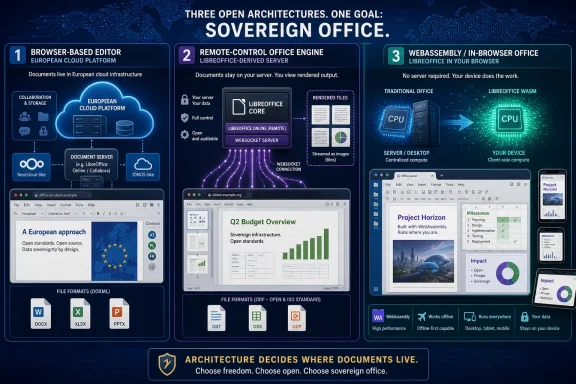
Euro-Office, Collabora Online, and The Document Foundation’s planned LibreOffice Web and Mobile effort are three open-source alternatives to Microsoft 365 that differ mainly in architecture: web-native editing, server-rendered LibreOffice sessions, and a future WebAssembly port that pushes office processing back onto the client. That distinction matters more than ribbon placement, logo politics, or whether a toolbar feels familiar on first launch. The battle over “sovereign office” is really a battle over where documents live, where they are rendered, and who pays the compute bill. For Windows users and IT departments, the choice is less about escaping Microsoft than about deciding which compromises they are willing to own.
The easy story is that Europe wants an office suite it can trust. Microsoft 365 and Google Workspace have become the default gravitational centers of modern productivity, and governments, schools, and regulated companies have grown uneasy about dependency on US cloud platforms. In that environment, any project wrapped in “digital sovereignty” language arrives with political oxygen already in the room.
But office software is not like replacing a chat app or swapping a file sync client. Documents are institutional memory in executable disguise: macros, templates, tracked changes, layout quirks, embedded objects, decades of compatibility expectations, and a surprising amount of emotional baggage. A replacement suite has to open yesterday’s files, collaborate on today’s files, and still look plausible when someone sends the result to a lawyer, a ministry, or a customer using Microsoft Word.
That is why the Heise comparison lands on the right axis. Euro-Office, Collabora Online, and LibreOffice’s proposed web future are not merely three products. They are three answers to the same infrastructure question: should the office suite be a browser app, a remote-controlled server application, or a desktop application rebuilt for the browser runtime?
Microsoft 365 hides much of this complexity behind Microsoft’s cloud. The user sees Word in a browser tab; the administrator sees licenses, identity, compliance knobs, and tenant policy. The free-software world does not get to hide the machinery so easily. It has to expose the architecture, because that architecture determines cost, performance, sovereignty, format fidelity, and operational pain.
That distinction is crucial. Microsoft 365 is a suite, a storage service, an identity plane, a compliance platform, an email system, a meeting platform, a device management story, and a procurement machine. Euro-Office is narrower. It gives a platform such as Nextcloud an embedded document editor, but it does not become the platform.
Technically, Euro-Office inherits the OnlyOffice model: a Document Server sits between the browser and the storage backend. The browser loads a JavaScript-heavy editor interface, while the server coordinates document loading, session state, conversion, collaborative editing, and save operations. In a Nextcloud deployment, that means the Document Server must be reachable by both the storage platform and the clients, with callback addresses, security tokens, and routing all configured correctly.
The user experience is deliberately web-native. Euro-Office does not try to expose a traditional HTML document full of editable paragraphs and hope the browser’s layout engine behaves like Word. Instead, it uses controlled rendering through web technologies such as canvas, giving the application more authority over layout, object placement, tables, headers, footers, and page breaks. That matters because office documents are brutally sensitive to minor rendering differences.
This is Euro-Office’s strongest argument. It starts from the assumption that office work is now collaborative, browser-first, and frequently embedded inside a document platform. That makes it attractive for organizations that already run Nextcloud or similar systems and want browser-based editing without asking users to install a desktop suite.
The harsh truth is that most enterprises do not live in a pure open-document world. They receive Word documents from suppliers, spreadsheets from auditors, PowerPoint decks from consultants, and forms from government agencies. Even organizations with formal ODF policies often swim in OOXML because the outside world sends it to them every day.
That makes Euro-Office pragmatic. If the immediate pain point is “we need to co-edit the files people actually send us,” an OOXML-centered web editor can look like the fastest route out of Microsoft’s subscription orbit. Users get a familiar shape. Administrators get an editor that fits into a sovereign platform story. Executives get to say the organization is reducing dependency.
The liability is that this can reproduce Microsoft’s file-format gravity while claiming to escape it. The Document Foundation has been blunt on this point, arguing that a suite centered on Microsoft formats risks becoming a softer form of lock-in. That criticism is not merely ideological. If a public agency says it is moving to open standards but continues to use Microsoft formats as the operational default, the policy achievement may be thinner than the press release suggests.
Euro-Office’s future therefore depends on whether it becomes genuinely strong with ODF as a first-class format or remains, in practice, an open-source route to better Microsoft-format handling. Both outcomes have a constituency. Only one satisfies the stricter version of digital sovereignty.
This sounds inelegant until you remember what LibreOffice already has: import filters, layout logic, ODF maturity, and years of compatibility work. Collabora’s argument is that the document engine should remain the serious part of the system, and the browser should be the interface rather than the author of truth. The server opens the document, computes its state, renders what the user needs to see, and sends view updates back to the client.
The architecture uses persistent communication between browser and server, commonly through WebSockets. The client sends user actions: keystrokes, pointer events, scrolling, zooming, selections, and commands. The server sends rendered areas of the document back, often described as tiles. When something changes, the affected region is invalidated and refreshed.
This model is well suited to preserving document fidelity. If the server is running LibreOffice-derived logic, a document created in LibreOffice has a better chance of behaving like itself. That is especially important for organizations that care about ODT, ODS, and ODP not as export formats but as the native working formats of the institution.
Collabora Online is therefore the mature answer for a certain kind of IT department: one that wants web-based office editing today, wants to stay close to LibreOffice and ODF, and is prepared to run the infrastructure properly. It is not vaporware. It is already deployed in real organizations, often alongside Nextcloud, ownCloud, or other content platforms.
This matters in capacity planning. Collabora Online is stateful in ways that make horizontal scaling more delicate than simply adding more front-end containers behind a load balancer. Multiple users editing the same document need to land on the same relevant session. WebSocket handling, reverse proxy behavior, TLS termination, resource limits, storage integration, and WOPI-style connections all become part of the operational picture.
For a small deployment, that may be manageable. For a school district, ministry, hospital network, or enterprise with thousands of concurrent users, it becomes an engineering discipline. The system must be tested with real documents, not sample files. It must be tested with real user behavior, not synthetic logins. It must be tested across bad Wi-Fi, VPNs, proxy appliances, and the strange edge cases that appear only after a rollout email goes to everyone.
The user experience reflects this trade-off. When the server is healthy and latency is low, Collabora can feel impressively close to LibreOffice in the browser. When the server is overloaded or the network path is poor, the remote-control nature of the system becomes visible. Scrolling, zooming, cursor movement, and input response can start to feel less immediate.
That is not a fatal flaw. It is the cost of choosing fidelity and ODF maturity through a centralized engine. But it does mean Collabora should not be sold internally as “free Microsoft 365.” It is a serious office platform that demands serious infrastructure ownership.
That sounds audacious because it is. LibreOffice is a large C++ desktop application with decades of assumptions behind it. Turning that into a browser-delivered application is not a simple compile target. It means reconciling desktop expectations with the browser’s sandbox, memory model, threading constraints, file access rules, clipboard restrictions, printing behavior, and security headers.
But the architectural bet is powerful. If LibreOffice can run locally in the browser, the server no longer has to render every page, calculate every layout change, and stream every view update. The server can become thinner: deliver the application, store files, enforce permissions, and coordinate collaboration. The client does more of the work.
That flips the cost model. Instead of spending heavily on central compute, organizations spend the compute they already bought in laptops, desktops, and mobile devices. In an era of rising hosting costs and energy scrutiny, that argument has teeth. It also fits the older desktop-office intuition that a document editor should remain usable even when the network is imperfect.
For Windows users, this idea has a familiar echo. The desktop still matters because latency matters, local resources matter, and people expect office tools to respond immediately. A browser-based LibreOffice that preserves much of the desktop codebase could, in theory, offer the best of both worlds: web deployment with local responsiveness.
The browser sandbox also changes the office model. Desktop LibreOffice can talk to the local file system, the printer subsystem, the clipboard, fonts, accessibility tools, and operating-system services in ways users barely notice. A browser app must use browser-mediated APIs. That can be safer, but it can also be awkward.
Then there is mobile. “LibreOffice on phones” is easy to say and hard to design. The desktop suite is powerful partly because it exposes a huge surface area: menus, toolbars, dialogs, styles, tables, fields, templates, comments, tracked changes, macros, and document settings that only a procurement department could love. Shrinking that into a usable phone interface is not porting; it is product design.
Collaboration is another open frontier. TDF has described a path that involves a client-server architecture and, eventually, a document server to coordinate collaborative editing. Peer-to-peer collaboration is intellectually attractive but operationally complex. The uncomfortable fact is that Euro-Office and Collabora already do collaborative editing in production, while LibreOffice Web still has to prove it can do so at scale.
That does not make the plan misguided. It makes it early. The technology industry often underestimates long-term platform work because it cannot be purchased in the current budget cycle. If TDF succeeds, it could give free office software a cleaner future across desktop, web, and mobile. If it fails, it may remain a fascinating prototype that confirms why browser office suites are so hard.
That is why a free office suite can be technically impressive and still fail an enterprise migration. A CIO does not merely ask whether a DOCX opens correctly. They ask how the suite handles authentication, data residency, device loss, guest access, legal hold, ransomware recovery, support contracts, monitoring, and user training. A school asks whether it works on student Chromebooks. A municipality asks whether it satisfies procurement rules and accessibility standards.
Euro-Office’s answer is ecosystem embedding. Let Nextcloud, OpenProject, XWiki, or another platform handle the surrounding collaboration environment, and let the editor do editing. That can work well if the surrounding platform is strong. It can also create integration seams that Microsoft hides inside one commercial cloud.
Collabora’s answer is maturity and fidelity. It says: if you care about LibreOffice documents and ODF, run the office engine centrally and give users browser access. That is a sober proposition for organizations that already understand self-hosting and want control more than convenience.
TDF’s answer is platform renewal. It says the free office world should not permanently choose between a desktop suite and a server-rendered web suite. Instead, the codebase itself should evolve so LibreOffice can reach browsers and mobile devices without abandoning its identity. That is the most strategically interesting answer, but also the one with the longest road.
For public-sector buyers, that distinction should matter. If the goal is to reduce dependency on a particular vendor, switching applications while keeping the same de facto document standard may not be enough. File formats are institutional infrastructure. They determine who can read, edit, archive, automate, and validate documents years later.
This is where ODF remains politically and technically important. LibreOffice and Collabora are strongest when ODF is treated as the native working language. Euro-Office is strongest when the organization lives in Microsoft-format interchange. Neither fact should be hidden.
The real procurement question is therefore not “Which suite is sovereign?” It is “Which dependency are we choosing?” Euro-Office may reduce dependency on Microsoft’s cloud while preserving dependency on Microsoft’s formats. Collabora may reduce format dependency while increasing server-operational dependency. LibreOffice Web may reduce central compute dependency in the future while increasing client and browser-runtime demands.
There is no pure escape hatch. There are only different places to put the complexity.
That means pilots must start with the ugly files. Use the templates HR actually sends. Use the Excel workbooks finance is afraid to touch. Use the PowerPoint decks with embedded media, corporate fonts, and old objects copied from older decks. Use the legal documents with comments, footnotes, revisions, and formatting conventions that have outlived two document-management systems.
A clean demo document proves almost nothing. Office migrations fail in the margins: a broken macro here, a shifted table there, a missing font in a board pack, a spreadsheet formula that works differently, a user who cannot find mail merge five minutes before a deadline. Microsoft’s moat is not perfection; it is that most organizations have already absorbed its imperfections into their workflows.
Administrators should also test the network path. Euro-Office’s Document Server model, Collabora’s server-rendered sessions, and a future WebAssembly LibreOffice all stress different parts of the environment. The same organization may find that one works best for headquarters, another for remote staff, and another for controlled ODF workflows.
Security teams should resist simplistic claims. Self-hosting can improve control, but it can also transfer responsibility. Patch cadence, exposed services, authentication hardening, logging, backup integrity, and incident response all move closer to the organization. Sovereignty is not a discount on administration.
A public agency might standardize ODF for internal documents through LibreOffice and Collabora while keeping Microsoft 365 licenses for departments that must exchange complex DOCX and XLSX files with external partners. A school system might use a Nextcloud-plus-Euro-Office stack for student collaboration while retaining desktop LibreOffice for offline labs. A company might wait for LibreOffice Web to mature while using Collabora for departments with strong ODF requirements.
This mixed future is less satisfying than a clean victory narrative, but it is more plausible. Office software sits too close to daily work to be replaced by ideology alone. The transition path matters as much as the destination.
Microsoft understands this. Its ecosystem wins because it lowers friction across identity, storage, communication, and documents. Alternatives win only where they make a specific trade-off worthwhile: better sovereignty, better open-format alignment, better self-hosting control, lower licensing exposure, or a more acceptable privacy posture.
That is why the architecture debate is so consequential. It tells IT leaders where the friction will appear before users discover it in production.
Microsoft’s dominance was built by making those choices invisible to users and convenient for administrators. The next generation of open office suites will succeed only if it makes different choices visible without making them unbearable. Euro-Office, Collabora Online, and LibreOffice Web are three attempts to redraw that map, and the organizations watching them should treat architecture not as a footnote, but as the product.
 Europe’s Office Rebellion Is Really an Architecture Fight
The easy story is that Europe wants an office suite it can trust. Microsoft 365 and Google Workspace have become the default gravitational centers of modern productivity, and governments, schools, and regulated companies have grown uneasy about dependency on US cloud platforms. In that environment, any project wrapped in “digital sovereignty” language arrives with political oxygen already in the room.But office software is not like replacing a chat app or swapping a file sync client. Documents are institutional memory in executable disguise: macros, templates, tracked changes, layout quirks, embedded objects, decades of compatibility expectations, and a surprising amount of emotional baggage. A replacement suite has to open yesterday’s files, collaborate on today’s files, and still look plausible when someone sends the result to a lawyer, a ministry, or a customer using Microsoft Word.
That is why the Heise comparison lands on the right axis. Euro-Office, Collabora Online, and LibreOffice’s proposed web future are not merely three products. They are three answers to the same infrastructure question: should the office suite be a browser app, a remote-controlled server application, or a desktop application rebuilt for the browser runtime?
Microsoft 365 hides much of this complexity behind Microsoft’s cloud. The user sees Word in a browser tab; the administrator sees licenses, identity, compliance knobs, and tenant policy. The free-software world does not get to hide the machinery so easily. It has to expose the architecture, because that architecture determines cost, performance, sovereignty, format fidelity, and operational pain.
Euro-Office Makes the Browser the Main Stage
Euro-Office is the newest and most politically charged of the three. Backed by European players including Nextcloud, IONOS, Proton-adjacent ecosystem names, XWiki, OpenProject, and others, it is positioned as a sovereign office component for platforms that already handle files, identity, sharing, and collaboration. It is not, by itself, a Microsoft 365 clone. It is an editor layer designed to plug into a larger stack.That distinction is crucial. Microsoft 365 is a suite, a storage service, an identity plane, a compliance platform, an email system, a meeting platform, a device management story, and a procurement machine. Euro-Office is narrower. It gives a platform such as Nextcloud an embedded document editor, but it does not become the platform.
Technically, Euro-Office inherits the OnlyOffice model: a Document Server sits between the browser and the storage backend. The browser loads a JavaScript-heavy editor interface, while the server coordinates document loading, session state, conversion, collaborative editing, and save operations. In a Nextcloud deployment, that means the Document Server must be reachable by both the storage platform and the clients, with callback addresses, security tokens, and routing all configured correctly.
The user experience is deliberately web-native. Euro-Office does not try to expose a traditional HTML document full of editable paragraphs and hope the browser’s layout engine behaves like Word. Instead, it uses controlled rendering through web technologies such as canvas, giving the application more authority over layout, object placement, tables, headers, footers, and page breaks. That matters because office documents are brutally sensitive to minor rendering differences.
This is Euro-Office’s strongest argument. It starts from the assumption that office work is now collaborative, browser-first, and frequently embedded inside a document platform. That makes it attractive for organizations that already run Nextcloud or similar systems and want browser-based editing without asking users to install a desktop suite.
OOXML Compatibility Is Euro-Office’s Superpower and Its Liability
Euro-Office’s lineage also explains its format politics. OnlyOffice has long been known for strong practical compatibility with Microsoft Office formats: DOCX, XLSX, and PPTX. For many organizations, that is not a concession. It is survival.The harsh truth is that most enterprises do not live in a pure open-document world. They receive Word documents from suppliers, spreadsheets from auditors, PowerPoint decks from consultants, and forms from government agencies. Even organizations with formal ODF policies often swim in OOXML because the outside world sends it to them every day.
That makes Euro-Office pragmatic. If the immediate pain point is “we need to co-edit the files people actually send us,” an OOXML-centered web editor can look like the fastest route out of Microsoft’s subscription orbit. Users get a familiar shape. Administrators get an editor that fits into a sovereign platform story. Executives get to say the organization is reducing dependency.
The liability is that this can reproduce Microsoft’s file-format gravity while claiming to escape it. The Document Foundation has been blunt on this point, arguing that a suite centered on Microsoft formats risks becoming a softer form of lock-in. That criticism is not merely ideological. If a public agency says it is moving to open standards but continues to use Microsoft formats as the operational default, the policy achievement may be thinner than the press release suggests.
Euro-Office’s future therefore depends on whether it becomes genuinely strong with ODF as a first-class format or remains, in practice, an open-source route to better Microsoft-format handling. Both outcomes have a constituency. Only one satisfies the stricter version of digital sovereignty.
Collabora Online Keeps LibreOffice on the Server
Collabora Online comes from the opposite direction. Rather than building a web-native editor first, it brings LibreOffice technology to the server and lets the browser act as a remote control. The result is less like Google Docs and more like an interactive, multi-user office engine streamed into a browser tab.This sounds inelegant until you remember what LibreOffice already has: import filters, layout logic, ODF maturity, and years of compatibility work. Collabora’s argument is that the document engine should remain the serious part of the system, and the browser should be the interface rather than the author of truth. The server opens the document, computes its state, renders what the user needs to see, and sends view updates back to the client.
The architecture uses persistent communication between browser and server, commonly through WebSockets. The client sends user actions: keystrokes, pointer events, scrolling, zooming, selections, and commands. The server sends rendered areas of the document back, often described as tiles. When something changes, the affected region is invalidated and refreshed.
This model is well suited to preserving document fidelity. If the server is running LibreOffice-derived logic, a document created in LibreOffice has a better chance of behaving like itself. That is especially important for organizations that care about ODT, ODS, and ODP not as export formats but as the native working formats of the institution.
Collabora Online is therefore the mature answer for a certain kind of IT department: one that wants web-based office editing today, wants to stay close to LibreOffice and ODF, and is prepared to run the infrastructure properly. It is not vaporware. It is already deployed in real organizations, often alongside Nextcloud, ownCloud, or other content platforms.
The Server Bill Is the Part Nobody Can Wish Away
Collabora’s strength is also its cost center. If the office engine runs on the server, then the server must do office-engine work. Rendering large spreadsheets, complex documents, and multi-user sessions is not the same as serving static web pages.This matters in capacity planning. Collabora Online is stateful in ways that make horizontal scaling more delicate than simply adding more front-end containers behind a load balancer. Multiple users editing the same document need to land on the same relevant session. WebSocket handling, reverse proxy behavior, TLS termination, resource limits, storage integration, and WOPI-style connections all become part of the operational picture.
For a small deployment, that may be manageable. For a school district, ministry, hospital network, or enterprise with thousands of concurrent users, it becomes an engineering discipline. The system must be tested with real documents, not sample files. It must be tested with real user behavior, not synthetic logins. It must be tested across bad Wi-Fi, VPNs, proxy appliances, and the strange edge cases that appear only after a rollout email goes to everyone.
The user experience reflects this trade-off. When the server is healthy and latency is low, Collabora can feel impressively close to LibreOffice in the browser. When the server is overloaded or the network path is poor, the remote-control nature of the system becomes visible. Scrolling, zooming, cursor movement, and input response can start to feel less immediate.
That is not a fatal flaw. It is the cost of choosing fidelity and ODF maturity through a centralized engine. But it does mean Collabora should not be sold internally as “free Microsoft 365.” It is a serious office platform that demands serious infrastructure ownership.
LibreOffice Web Is the Most Ambitious Answer Because It Is Not Yet a Product
The Document Foundation’s new web and mobile direction is the most interesting of the three because it is the least immediately deployable. TDF is not offering a polished Microsoft 365 replacement today. It is sketching a strategy: take the existing LibreOffice codebase, modernize the relevant platform layers, and use Qt 6 plus WebAssembly to run much of LibreOffice directly in the browser.That sounds audacious because it is. LibreOffice is a large C++ desktop application with decades of assumptions behind it. Turning that into a browser-delivered application is not a simple compile target. It means reconciling desktop expectations with the browser’s sandbox, memory model, threading constraints, file access rules, clipboard restrictions, printing behavior, and security headers.
But the architectural bet is powerful. If LibreOffice can run locally in the browser, the server no longer has to render every page, calculate every layout change, and stream every view update. The server can become thinner: deliver the application, store files, enforce permissions, and coordinate collaboration. The client does more of the work.
That flips the cost model. Instead of spending heavily on central compute, organizations spend the compute they already bought in laptops, desktops, and mobile devices. In an era of rising hosting costs and energy scrutiny, that argument has teeth. It also fits the older desktop-office intuition that a document editor should remain usable even when the network is imperfect.
For Windows users, this idea has a familiar echo. The desktop still matters because latency matters, local resources matter, and people expect office tools to respond immediately. A browser-based LibreOffice that preserves much of the desktop codebase could, in theory, offer the best of both worlds: web deployment with local responsiveness.
WebAssembly Moves the Bottleneck, It Does Not Remove It
The risk is that WebAssembly merely moves the pain from the data center to the endpoint. A full office suite is not small. Loading, compiling, initializing, and running a large application in the browser can be expensive, especially on older hardware. Schools, call centers, public kiosks, and thin-client environments do not always have spare CPU and RAM waiting to be used.The browser sandbox also changes the office model. Desktop LibreOffice can talk to the local file system, the printer subsystem, the clipboard, fonts, accessibility tools, and operating-system services in ways users barely notice. A browser app must use browser-mediated APIs. That can be safer, but it can also be awkward.
Then there is mobile. “LibreOffice on phones” is easy to say and hard to design. The desktop suite is powerful partly because it exposes a huge surface area: menus, toolbars, dialogs, styles, tables, fields, templates, comments, tracked changes, macros, and document settings that only a procurement department could love. Shrinking that into a usable phone interface is not porting; it is product design.
Collaboration is another open frontier. TDF has described a path that involves a client-server architecture and, eventually, a document server to coordinate collaborative editing. Peer-to-peer collaboration is intellectually attractive but operationally complex. The uncomfortable fact is that Euro-Office and Collabora already do collaborative editing in production, while LibreOffice Web still has to prove it can do so at scale.
That does not make the plan misguided. It makes it early. The technology industry often underestimates long-term platform work because it cannot be purchased in the current budget cycle. If TDF succeeds, it could give free office software a cleaner future across desktop, web, and mobile. If it fails, it may remain a fascinating prototype that confirms why browser office suites are so hard.
Microsoft 365 Is the Benchmark Because It Solved the Boring Parts
Every alternative to Microsoft 365 must confront an unfair reality: Microsoft’s advantage is not just Word, Excel, and PowerPoint. It is the boring integration fabric around them. Identity, conditional access, file sharing, retention, audit, eDiscovery, Teams integration, mobile management, admin tooling, and procurement all reinforce the office apps.That is why a free office suite can be technically impressive and still fail an enterprise migration. A CIO does not merely ask whether a DOCX opens correctly. They ask how the suite handles authentication, data residency, device loss, guest access, legal hold, ransomware recovery, support contracts, monitoring, and user training. A school asks whether it works on student Chromebooks. A municipality asks whether it satisfies procurement rules and accessibility standards.
Euro-Office’s answer is ecosystem embedding. Let Nextcloud, OpenProject, XWiki, or another platform handle the surrounding collaboration environment, and let the editor do editing. That can work well if the surrounding platform is strong. It can also create integration seams that Microsoft hides inside one commercial cloud.
Collabora’s answer is maturity and fidelity. It says: if you care about LibreOffice documents and ODF, run the office engine centrally and give users browser access. That is a sober proposition for organizations that already understand self-hosting and want control more than convenience.
TDF’s answer is platform renewal. It says the free office world should not permanently choose between a desktop suite and a server-rendered web suite. Instead, the codebase itself should evolve so LibreOffice can reach browsers and mobile devices without abandoning its identity. That is the most strategically interesting answer, but also the one with the longest road.
Sovereignty Without Format Strategy Is Just Rebranding
The phrase “digital sovereignty” has become so useful that it risks becoming slippery. A system can be hosted in Europe, governed by European organizations, and still reinforce the operational dominance of Microsoft formats. Conversely, a system can be less polished commercially but more sovereign in the deeper sense if it makes open formats normal rather than ceremonial.For public-sector buyers, that distinction should matter. If the goal is to reduce dependency on a particular vendor, switching applications while keeping the same de facto document standard may not be enough. File formats are institutional infrastructure. They determine who can read, edit, archive, automate, and validate documents years later.
This is where ODF remains politically and technically important. LibreOffice and Collabora are strongest when ODF is treated as the native working language. Euro-Office is strongest when the organization lives in Microsoft-format interchange. Neither fact should be hidden.
The real procurement question is therefore not “Which suite is sovereign?” It is “Which dependency are we choosing?” Euro-Office may reduce dependency on Microsoft’s cloud while preserving dependency on Microsoft’s formats. Collabora may reduce format dependency while increasing server-operational dependency. LibreOffice Web may reduce central compute dependency in the future while increasing client and browser-runtime demands.
There is no pure escape hatch. There are only different places to put the complexity.
Windows Shops Should Test the Workflow, Not the Logo
For Windows-heavy organizations, these alternatives should be evaluated with brutal practicality. Most users do not care whether a document engine is elegant. They care whether the quarterly spreadsheet opens, whether tracked changes survive, whether a table stays on the right page, and whether the application hesitates during a meeting.That means pilots must start with the ugly files. Use the templates HR actually sends. Use the Excel workbooks finance is afraid to touch. Use the PowerPoint decks with embedded media, corporate fonts, and old objects copied from older decks. Use the legal documents with comments, footnotes, revisions, and formatting conventions that have outlived two document-management systems.
A clean demo document proves almost nothing. Office migrations fail in the margins: a broken macro here, a shifted table there, a missing font in a board pack, a spreadsheet formula that works differently, a user who cannot find mail merge five minutes before a deadline. Microsoft’s moat is not perfection; it is that most organizations have already absorbed its imperfections into their workflows.
Administrators should also test the network path. Euro-Office’s Document Server model, Collabora’s server-rendered sessions, and a future WebAssembly LibreOffice all stress different parts of the environment. The same organization may find that one works best for headquarters, another for remote staff, and another for controlled ODF workflows.
Security teams should resist simplistic claims. Self-hosting can improve control, but it can also transfer responsibility. Patch cadence, exposed services, authentication hardening, logging, backup integrity, and incident response all move closer to the organization. Sovereignty is not a discount on administration.
The Real Winner May Be a Mixed Estate
The office-suite market is often discussed as if one platform must replace another everywhere. That is rarely how enterprises actually change. More likely, organizations will carve out zones.A public agency might standardize ODF for internal documents through LibreOffice and Collabora while keeping Microsoft 365 licenses for departments that must exchange complex DOCX and XLSX files with external partners. A school system might use a Nextcloud-plus-Euro-Office stack for student collaboration while retaining desktop LibreOffice for offline labs. A company might wait for LibreOffice Web to mature while using Collabora for departments with strong ODF requirements.
This mixed future is less satisfying than a clean victory narrative, but it is more plausible. Office software sits too close to daily work to be replaced by ideology alone. The transition path matters as much as the destination.
Microsoft understands this. Its ecosystem wins because it lowers friction across identity, storage, communication, and documents. Alternatives win only where they make a specific trade-off worthwhile: better sovereignty, better open-format alignment, better self-hosting control, lower licensing exposure, or a more acceptable privacy posture.
That is why the architecture debate is so consequential. It tells IT leaders where the friction will appear before users discover it in production.
The Office War Has Moved Below the Ribbon
The practical lesson from these three projects is that “web office” is not one category. It is at least three.- Euro-Office is the strongest near-term fit for organizations that want a web-native editor embedded in platforms such as Nextcloud and that routinely exchange Microsoft Office formats.
- Collabora Online is the strongest deployed option for organizations that want LibreOffice-derived document handling and ODF-first workflows in the browser today.
- The Document Foundation’s LibreOffice Web and Mobile strategy is a long-term architectural bet, not a finished replacement for Microsoft 365.
- Server capacity planning is central to Collabora deployments because rendering and document logic remain concentrated on the server.
- Client hardware, browser capabilities, startup time, and mobile interface design will decide whether WebAssembly LibreOffice becomes practical beyond demonstrations.
- Any serious migration must test real documents, real latency, real collaboration patterns, and real administrative procedures before procurement turns into policy.
Microsoft’s dominance was built by making those choices invisible to users and convenient for administrators. The next generation of open office suites will succeed only if it makes different choices visible without making them unbearable. Euro-Office, Collabora Online, and LibreOffice Web are three attempts to redraw that map, and the organizations watching them should treat architecture not as a footnote, but as the product.
References
- Primary source: heise online
Published: Sat, 13 Jun 2026 05:30:00 GMT
Loading…
www.heise.de - Related coverage: windowscentral.com

LibreOffice slams Euro-Office as "a freeware clone" of Microsoft Office — riding on digital sovereignty | Windows Central
The Document Foundation says Euro-Office isn't the first European open-source office suite.www.windowscentral.com - Related coverage: techradar.com

LibreOffice slams rival Euro-Office as a 'de facto ally' of Microsoft lock-in — as concerns over possible Russian interference rise | TechRadar
Euro-Office criticized over sovereignty claimswww.techradar.com - Related coverage: nextcloud.com

Sovereign office suite Euro-Office to release June 9 - Nextcloud
The first release of Euro-Office will be made available for all users on June 9, also integrated into Nextcloud Hub 26 Spring nextcloud.com
- Related coverage: ionos.fr
- Related coverage: ionos-group.com
Wirtschaftsinitiative startet souveräne Office-Alternative Euro-Office
Souveräner Ersatz für Microsoft Office mit intuitiver Benutzeroberfläche und starker Kompatibilität, unterstützt von der europäischen Open-Source-Community.www.ionos-group.com

- Related coverage: ionos.es
Loading…
www.ionos.es - Related coverage: foro3d.com
Loading…
foro3d.com - Related coverage: tobias-weiss.org

World-Office: How a Rust Rewrite Fixes Euro-Office's Inherent Problems | DevOps | Tobias Weiss
Euro-Office inherited 10,000+ C++ files, an unresolved AGPLv3 licensing dispute, and a web frontend stuck in 2014. World-Office is rewriting it all from scratch in Rust — 9,083 C++ files replaced by 25 crates with 470+ tests.www.tobias-weiss.org - Official source: github.com
Loading…
github.com - Related coverage: vsx.global
Loading…
vsx.global - Related coverage: forum.collaboraonline.com
Loading…
forum.collaboraonline.com