

Amazon is still directing many international Windows users to the legacy Kindle for PC application in mid-June 2026, even though that app is scheduled to stop working after June 30 and its replacement is a Microsoft Store Kindle app for Windows. The result is not a mere web-maintenance hiccup. It is a transition problem hiding in plain sight: Amazon is asking readers to trust a new Windows strategy while its own storefronts continue to point them toward the exit door.
The mess matters because Kindle is not just another media app. For many users, especially in education, publishing, accessibility workflows, comics reading, and long-form research, Kindle for PC has been the bridge between Amazon’s book ecosystem and the Windows desktop. When that bridge is being torn down, the detour needs to be clearly marked.
The basic timeline is simple enough. Amazon has told Kindle for PC users that the old desktop app will no longer be available after June 30, 2026, and a replacement Kindle app for Windows has appeared in the Microsoft Store. That new app is meant to carry the Kindle reading experience forward on modern Windows PCs, with support for ebooks, comics, manga, personal documents, synced reading progress, notes, highlights, and Audible-linked content.
But the rollout is being undercut by Amazon’s own web presence. According to Good e-Reader’s checks, Amazon.com in the United States now points customers toward the new Microsoft Store entry, while Amazon’s Canadian and UK sites still link to the legacy Kindle for PC installer. Amazon Germany reportedly does something stranger still: clicking Kindle for PC leads not to the Windows replacement, but to Kindle for Android.
That kind of inconsistency is familiar to anyone who has watched a large platform migrate legacy software. Regional storefronts, support pages, cached download links, app naming conventions, and localization teams often move at different speeds. But familiarity does not make it harmless. When the shutdown clock is measured in days rather than quarters, a stale download button becomes a support incident waiting to happen.
Amazon has spent years training Kindle customers to think of their library as portable and durable. Buy once, read anywhere, pick up where you left off. The company’s Windows messaging now risks puncturing that promise, not because the new app cannot work, but because the path to it is needlessly muddy.
For readers, that meant a large screen, keyboard navigation, easy searching, and a place to read without picking up a phone or tablet. For students and researchers, it meant notes and highlights in the same environment where papers, documents, browsers, and word processors already lived. For users with limited device budgets, it meant a PC could double as a Kindle without buying dedicated hardware.
The PC app also mattered because Windows remains the platform where edge cases live. People manage libraries there. They run accessibility tools there. They deal with old monitors, school-issued laptops, locked-down enterprise machines, regional accounts, and offline workflows that are less common on mobile. A desktop reader is not merely a convenience; for some users, it is the only practical way into the ecosystem.
That is why Amazon’s move cannot be evaluated only as an app refresh. It is a platform migration. And platform migrations succeed or fail less on feature checklists than on trust, clarity, and continuity.
There are real advantages to that model. Store-delivered apps can update more cleanly, reduce installer confusion, and align with Windows’ modern app-management expectations. For less technical users, the Microsoft Store can be safer than hunting for an executable file through search results, mirror sites, or outdated help pages. For Microsoft, a high-profile Kindle app also helps reinforce the Store as a legitimate destination for major consumer software.
But the Store is also a boundary. It depends on region availability, account configuration, Windows version compatibility, enterprise policy, and whether the Microsoft Store is enabled at all. Many corporate and education PCs restrict Store access. Some users remove or avoid it. Others run Windows editions or configurations where Store app deployment is inconvenient, unreliable, or administratively blocked.
That does not mean Amazon is wrong to use the Store. It does mean Amazon has to own the consequences. If the old Win32-style Kindle for PC app disappears and the only replacement is Store-distributed, the migration is no longer just “download the new version.” It becomes “make sure your Windows environment can accept Amazon’s new distribution model.”
For WindowsForum readers, that is the part worth watching. Microsoft has spent years trying to make the Store more credible for traditional desktop users, and Amazon is now effectively testing whether that credibility is enough for a mainstream content library app. If the handoff is rough, users will not carefully allocate blame between Amazon, Microsoft, regional storefronts, and Store policy. They will simply experience Kindle on Windows as broken.
If the new Kindle app truly requires Windows 11, Amazon is effectively turning the retirement of Kindle for PC into another pressure point in the Windows 10 sunset story. That would be a dramatic practical change for users who have no immediate plan to upgrade their hardware or operating system. If the app also works on Windows 10, Amazon should say so consistently and prominently, because the current messaging has already created uncertainty.
The distinction is not academic. A Windows 10 user who sees “Kindle for Windows 11” may assume they are stranded. A Windows 11 user in a country where Amazon’s local site still offers the old installer may assume there is no new app yet. An IT administrator may delay guidance to users because the platform requirements are unclear. A reader may simply give up and use a phone.
This is the kind of confusion that large ecosystems often create when product teams, marketing teams, support teams, and regional storefronts do not move in lockstep. It is also the kind of confusion that users remember. People can forgive a retirement date; they are less forgiving when a company appears not to know what it wants them to install.
Amazon’s handling of Comixology has been controversial for years, and the migration of comics into the Kindle ecosystem has not always delighted power users. But the direction is clear. Amazon wants Kindle to be the single container for digital reading, whether the content began as a novel, a manga volume, a PDF-like personal document, a comic series, or an Audible-connected title.
On Windows, that could be valuable. Comics and manga benefit from large displays. Guided View can make panel-by-panel reading less clumsy on non-touch hardware. A desktop client that handles both prose and image-heavy reading gives Amazon a better answer to browser-based reading and third-party comic apps.
Yet this also raises the stakes for the migration. If the new app is meant to consolidate more kinds of content, then the Windows client becomes more important, not less. A sloppy rollout does not just inconvenience people reading novels. It affects comic readers, manga fans, students using personal documents, and anyone who relies on cross-device sync to move between a PC, phone, tablet, and Kindle e-reader.
Amazon’s pitch is coherent: one reading app, many content types, synchronized everywhere. The implementation story, at least right now, is less coherent: one deadline, multiple regional download paths, and uncertain compatibility messaging.
For some readers, “bring your own files” is not a niche feature. It covers public-domain books, documents from work or school, manuscripts, review copies, converted ebooks, and material purchased outside Amazon. A PC is often where those files originate, are organized, or are converted before being sent elsewhere.
If Amazon preserves and improves that workflow, the new Windows app could become more useful than the legacy client. A modern drag-and-drop path that syncs personal documents across devices is cleaner than old folder-watching habits and manual file juggling. It also fits how Amazon increasingly wants users to think about Kindle: not as a device or a file format, but as a cloud-backed reading state.
The catch is that users who relied on the old app’s local behavior may not experience the change as an upgrade. Any shift from local-first file management to app-mediated cloud sync can feel like a loss of control, even when it adds convenience. Windows users are particularly sensitive to that because the platform’s culture still values file visibility, offline access, and user-managed folders more than mobile platforms do.
Amazon would be wise to document this transition clearly. What file types work? What syncs? What remains local? What happens offline? How are personal documents stored and removed? Those answers matter more than marketing copy about reading “anytime, anywhere.”
A competent migration plan would make the replacement impossible to miss. Every regional Amazon page that currently offers Kindle for PC would point to the new app or explain its availability. The legacy app would display a precise, localized migration prompt. Amazon support pages would distinguish between Windows 10 and Windows 11 compatibility. The Microsoft Store listing would be easy to identify as the official app, not one reader among lookalikes. The old installer pages would stop being promoted except as historical references.
Instead, users are encountering a patchwork. Some are being sent to the new app. Some are being sent to the old app. Some are reportedly sent to a mobile app page that does not solve the Windows problem at all. Others are left to search the Microsoft Store themselves, where naming and regional availability can introduce fresh confusion.
This is not just an Amazon problem. It is a recurring pattern in modern software retirements. Companies assume that because an app is “available,” users will find it. They assume that because a pop-up was shown, the message was received. They assume that because a support article exists somewhere, the migration has been communicated. Those assumptions collapse quickly when the affected users are spread across countries, Windows versions, and support languages.
For a company with Amazon’s reach, the standard should be higher. Kindle is a mature ecosystem with millions of customers and years of purchase history behind it. When access software changes, Amazon is not moving a disposable utility. It is moving the front door to people’s paid libraries.
US users may experience the transition as a fairly direct handoff: old app ending, new app in the Store. Canadian, UK, German, and other international users may experience it as mixed signals. The same company, the same product family, and the same deadline can look different depending on which national Amazon site a reader trusts.
That is a poor fit for how Kindle customers actually behave. People move countries. They use devices bought in one region with accounts registered in another. They search in their local language but read English-language books. They follow old bookmarks, local Amazon help pages, and search-engine results that may not surface the most current US page.
The Kindle ecosystem has always depended on centralization. The library is in Amazon’s cloud. The store is Amazon’s store. The sync layer is Amazon’s layer. That centralization creates convenience, but it also creates responsibility. If Amazon controls the platform, Amazon also controls whether the migration path is legible.
International inconsistency also increases the risk of scams and copycat confusion. When users cannot find the official app through the expected route, they search elsewhere. When they search elsewhere, they encounter unofficial tools, paid lookalikes, outdated installers, and forum advice of varying quality. A clear official route is not just a matter of polish; it is a basic user-protection measure.
That argument is stronger in 2026 than it would have been a decade ago. Content apps are account apps. Account apps are security targets. A Kindle client is not merely opening local text files; it authenticates to Amazon, accesses purchases, syncs notes, handles personal documents, and may interact with payment-adjacent account services. A cleaner client distributed through the Microsoft Store may reduce some risks.
But security does not excuse poor communication. In fact, it raises the communication bar. If Amazon wants users to abandon an old executable and install a new Store app, it must make the official path unmistakable. Every ambiguous download link weakens the security case by nudging users toward search-engine roulette.
There is also a control tradeoff. Store distribution can improve update hygiene, but it can reduce user autonomy. It places more of the installation and update process under Microsoft’s app platform rules and Amazon’s app lifecycle decisions. For consumer users, that may be fine. For administrators, it is another dependency to evaluate.
The best version of this transition would be boring: clear notices, clean Store listing, verified publisher identity, explicit compatibility, and no regional drift. The current version is not boring enough.
Many managed Windows environments restrict Microsoft Store access. Some allow only curated apps. Some disable consumer Microsoft account sign-in. Some use application-control policies that treat Store apps differently from traditional installers. Others have procurement or privacy concerns around apps that sync user content through consumer cloud accounts.
For those environments, the question is not whether the new Kindle app has nicer margins or better image zoom. The question is whether it can be deployed, updated, supported, and permitted under local policy. Amazon’s migration messaging does not appear to be centered on that audience, but the audience exists.
Even small organizations can be affected. A teacher using Kindle materials on a classroom PC, a book reviewer using a Windows laptop, or a support worker helping a user with accessible reading settings may all run into the same wall: the old app is going away, and the replacement’s availability depends on a Store path that may not be open.
This is where Amazon’s consumer simplicity collides with Windows’ institutional complexity. On iOS and Android, app-store dependency is expected. On Windows, especially among IT pros, it is still a design choice with operational consequences.
The Kindle for PC retirement arrives in a period when digital ownership is already under scrutiny. Readers know, at least vaguely, that “buying” an ebook is not the same as owning a printed copy. They know access depends on accounts, DRM, regional rights, device support, and vendor decisions. They may not obsess over those dependencies every day, but a shutdown notice brings them to the surface.
Amazon does not need to lose many users for the perception damage to matter. Kindle’s strongest asset is not the hardware; it is confidence. People buy into the ecosystem because they believe their books will be there later. If the Windows migration feels careless, it chips away at that confidence even for users who ultimately install the new app successfully.
This is why the continued promotion of the old app is more than embarrassing. It sends the wrong signal at the wrong moment. Amazon should be projecting certainty: here is the new app, here is who can use it, here is what happens next. Instead, users are seeing a company that has set a deadline but not finished changing the signs.
Every Kindle download page should be audited by region. Every old Kindle for PC link should either be replaced or paired with a prominent warning. The Microsoft Store listing should make publisher identity, Windows compatibility, and feature scope obvious. The legacy app should give users a direct migration path instead of relying on search. Support pages should explain what happens to downloaded books, personal documents, notes, highlights, and offline access.
None of this is glamorous work, which is precisely why it is easy to neglect. But unglamorous work is what makes platform migrations feel safe. Users rarely praise a well-executed retirement; they simply move on. They complain when the retirement becomes a scavenger hunt.
Amazon still has the chance to make this transition mostly invisible. The new Kindle app may turn out to be better for many users, especially those who read comics, manga, and image-heavy books on Windows. But the company has to get people there first.
The mess matters because Kindle is not just another media app. For many users, especially in education, publishing, accessibility workflows, comics reading, and long-form research, Kindle for PC has been the bridge between Amazon’s book ecosystem and the Windows desktop. When that bridge is being torn down, the detour needs to be clearly marked.
 Amazon’s Windows Reset Arrives With the Wrong Signposts
The basic timeline is simple enough. Amazon has told Kindle for PC users that the old desktop app will no longer be available after June 30, 2026, and a replacement Kindle app for Windows has appeared in the Microsoft Store. That new app is meant to carry the Kindle reading experience forward on modern Windows PCs, with support for ebooks, comics, manga, personal documents, synced reading progress, notes, highlights, and Audible-linked content.But the rollout is being undercut by Amazon’s own web presence. According to Good e-Reader’s checks, Amazon.com in the United States now points customers toward the new Microsoft Store entry, while Amazon’s Canadian and UK sites still link to the legacy Kindle for PC installer. Amazon Germany reportedly does something stranger still: clicking Kindle for PC leads not to the Windows replacement, but to Kindle for Android.
That kind of inconsistency is familiar to anyone who has watched a large platform migrate legacy software. Regional storefronts, support pages, cached download links, app naming conventions, and localization teams often move at different speeds. But familiarity does not make it harmless. When the shutdown clock is measured in days rather than quarters, a stale download button becomes a support incident waiting to happen.
Amazon has spent years training Kindle customers to think of their library as portable and durable. Buy once, read anywhere, pick up where you left off. The company’s Windows messaging now risks puncturing that promise, not because the new app cannot work, but because the path to it is needlessly muddy.
The Old Kindle for PC Was More Than a Reader
Kindle for PC has always been a slightly odd member of the Kindle family. It was never as polished as the iPad app, never as tactile as the e-ink hardware, and never as strategically glamorous as Kindle Unlimited or the Kindle Store itself. Yet it served a role that mattered: it made Kindle books feel native on the world’s dominant desktop operating system.For readers, that meant a large screen, keyboard navigation, easy searching, and a place to read without picking up a phone or tablet. For students and researchers, it meant notes and highlights in the same environment where papers, documents, browsers, and word processors already lived. For users with limited device budgets, it meant a PC could double as a Kindle without buying dedicated hardware.
The PC app also mattered because Windows remains the platform where edge cases live. People manage libraries there. They run accessibility tools there. They deal with old monitors, school-issued laptops, locked-down enterprise machines, regional accounts, and offline workflows that are less common on mobile. A desktop reader is not merely a convenience; for some users, it is the only practical way into the ecosystem.
That is why Amazon’s move cannot be evaluated only as an app refresh. It is a platform migration. And platform migrations succeed or fail less on feature checklists than on trust, clarity, and continuity.
The Microsoft Store Becomes the Gatekeeper
The most important strategic change is not the typography menu or the support for comics. It is distribution. By moving the replacement Kindle app into the Microsoft Store, Amazon is changing how Windows users find, install, update, and sometimes even qualify for Kindle access.There are real advantages to that model. Store-delivered apps can update more cleanly, reduce installer confusion, and align with Windows’ modern app-management expectations. For less technical users, the Microsoft Store can be safer than hunting for an executable file through search results, mirror sites, or outdated help pages. For Microsoft, a high-profile Kindle app also helps reinforce the Store as a legitimate destination for major consumer software.
But the Store is also a boundary. It depends on region availability, account configuration, Windows version compatibility, enterprise policy, and whether the Microsoft Store is enabled at all. Many corporate and education PCs restrict Store access. Some users remove or avoid it. Others run Windows editions or configurations where Store app deployment is inconvenient, unreliable, or administratively blocked.
That does not mean Amazon is wrong to use the Store. It does mean Amazon has to own the consequences. If the old Win32-style Kindle for PC app disappears and the only replacement is Store-distributed, the migration is no longer just “download the new version.” It becomes “make sure your Windows environment can accept Amazon’s new distribution model.”
For WindowsForum readers, that is the part worth watching. Microsoft has spent years trying to make the Store more credible for traditional desktop users, and Amazon is now effectively testing whether that credibility is enough for a mainstream content library app. If the handoff is rough, users will not carefully allocate blame between Amazon, Microsoft, regional storefronts, and Store policy. They will simply experience Kindle on Windows as broken.
Windows 10 Users Are Caught in the Wording Fog
There is another wrinkle: the replacement app has been described in some reporting and user-facing notices as a Windows 11 app, while other descriptions and Store references suggest broader Windows compatibility. That ambiguity matters because Windows 10 remains widely deployed in homes, schools, small businesses, and enterprise fleets, even as Microsoft’s own support timeline pushes users toward Windows 11.If the new Kindle app truly requires Windows 11, Amazon is effectively turning the retirement of Kindle for PC into another pressure point in the Windows 10 sunset story. That would be a dramatic practical change for users who have no immediate plan to upgrade their hardware or operating system. If the app also works on Windows 10, Amazon should say so consistently and prominently, because the current messaging has already created uncertainty.
The distinction is not academic. A Windows 10 user who sees “Kindle for Windows 11” may assume they are stranded. A Windows 11 user in a country where Amazon’s local site still offers the old installer may assume there is no new app yet. An IT administrator may delay guidance to users because the platform requirements are unclear. A reader may simply give up and use a phone.
This is the kind of confusion that large ecosystems often create when product teams, marketing teams, support teams, and regional storefronts do not move in lockstep. It is also the kind of confusion that users remember. People can forgive a retirement date; they are less forgiving when a company appears not to know what it wants them to install.
Comics and Manga Show What Amazon Actually Wants
The new app’s feature list points toward Amazon’s broader ambition. This is not merely a replacement for the old ebook reader; it is a more unified Kindle client for text, comics, manga, magazines, personal documents, and audiobooks. The inclusion of high-definition color images and Comixology-style Guided View is especially telling.Amazon’s handling of Comixology has been controversial for years, and the migration of comics into the Kindle ecosystem has not always delighted power users. But the direction is clear. Amazon wants Kindle to be the single container for digital reading, whether the content began as a novel, a manga volume, a PDF-like personal document, a comic series, or an Audible-connected title.
On Windows, that could be valuable. Comics and manga benefit from large displays. Guided View can make panel-by-panel reading less clumsy on non-touch hardware. A desktop client that handles both prose and image-heavy reading gives Amazon a better answer to browser-based reading and third-party comic apps.
Yet this also raises the stakes for the migration. If the new app is meant to consolidate more kinds of content, then the Windows client becomes more important, not less. A sloppy rollout does not just inconvenience people reading novels. It affects comic readers, manga fans, students using personal documents, and anyone who relies on cross-device sync to move between a PC, phone, tablet, and Kindle e-reader.
Amazon’s pitch is coherent: one reading app, many content types, synchronized everywhere. The implementation story, at least right now, is less coherent: one deadline, multiple regional download paths, and uncertain compatibility messaging.
Sideloading Survives, But the Workflow Is Changing
One of the more reassuring parts of the new app description is support for personal documents. Users can drag and drop their own files into the Kindle app and read them across supported Kindle apps and devices. That matters because sideloading has long been part of the Kindle ecosystem’s uneasy compromise between Amazon’s store and users’ own libraries.For some readers, “bring your own files” is not a niche feature. It covers public-domain books, documents from work or school, manuscripts, review copies, converted ebooks, and material purchased outside Amazon. A PC is often where those files originate, are organized, or are converted before being sent elsewhere.
If Amazon preserves and improves that workflow, the new Windows app could become more useful than the legacy client. A modern drag-and-drop path that syncs personal documents across devices is cleaner than old folder-watching habits and manual file juggling. It also fits how Amazon increasingly wants users to think about Kindle: not as a device or a file format, but as a cloud-backed reading state.
The catch is that users who relied on the old app’s local behavior may not experience the change as an upgrade. Any shift from local-first file management to app-mediated cloud sync can feel like a loss of control, even when it adds convenience. Windows users are particularly sensitive to that because the platform’s culture still values file visibility, offline access, and user-managed folders more than mobile platforms do.
Amazon would be wise to document this transition clearly. What file types work? What syncs? What remains local? What happens offline? How are personal documents stored and removed? Those answers matter more than marketing copy about reading “anytime, anywhere.”
A Shutdown Date Is Not a Migration Plan
There is a difference between announcing that old software will stop working and successfully moving users to new software. The former is a notice. The latter is a project.A competent migration plan would make the replacement impossible to miss. Every regional Amazon page that currently offers Kindle for PC would point to the new app or explain its availability. The legacy app would display a precise, localized migration prompt. Amazon support pages would distinguish between Windows 10 and Windows 11 compatibility. The Microsoft Store listing would be easy to identify as the official app, not one reader among lookalikes. The old installer pages would stop being promoted except as historical references.
Instead, users are encountering a patchwork. Some are being sent to the new app. Some are being sent to the old app. Some are reportedly sent to a mobile app page that does not solve the Windows problem at all. Others are left to search the Microsoft Store themselves, where naming and regional availability can introduce fresh confusion.
This is not just an Amazon problem. It is a recurring pattern in modern software retirements. Companies assume that because an app is “available,” users will find it. They assume that because a pop-up was shown, the message was received. They assume that because a support article exists somewhere, the migration has been communicated. Those assumptions collapse quickly when the affected users are spread across countries, Windows versions, and support languages.
For a company with Amazon’s reach, the standard should be higher. Kindle is a mature ecosystem with millions of customers and years of purchase history behind it. When access software changes, Amazon is not moving a disposable utility. It is moving the front door to people’s paid libraries.
The International Problem Is the Real Story
Good e-Reader’s most important observation is not that Amazon.com appears to be updated. It is that Amazon’s international storefronts are lagging or inconsistent. That matters because Kindle is a global service, and software migrations often reveal which markets are treated as first-class.US users may experience the transition as a fairly direct handoff: old app ending, new app in the Store. Canadian, UK, German, and other international users may experience it as mixed signals. The same company, the same product family, and the same deadline can look different depending on which national Amazon site a reader trusts.
That is a poor fit for how Kindle customers actually behave. People move countries. They use devices bought in one region with accounts registered in another. They search in their local language but read English-language books. They follow old bookmarks, local Amazon help pages, and search-engine results that may not surface the most current US page.
The Kindle ecosystem has always depended on centralization. The library is in Amazon’s cloud. The store is Amazon’s store. The sync layer is Amazon’s layer. That centralization creates convenience, but it also creates responsibility. If Amazon controls the platform, Amazon also controls whether the migration path is legible.
International inconsistency also increases the risk of scams and copycat confusion. When users cannot find the official app through the expected route, they search elsewhere. When they search elsewhere, they encounter unofficial tools, paid lookalikes, outdated installers, and forum advice of varying quality. A clear official route is not just a matter of polish; it is a basic user-protection measure.
The Security Argument Cuts Both Ways
Amazon can reasonably argue that retiring old clients is part of maintaining a secure and supportable ecosystem. Legacy desktop apps accumulate technical debt. They may depend on old authentication flows, old rendering engines, old DRM components, old update mechanisms, or old assumptions about Windows. At some point, keeping them alive costs more than replacing them.That argument is stronger in 2026 than it would have been a decade ago. Content apps are account apps. Account apps are security targets. A Kindle client is not merely opening local text files; it authenticates to Amazon, accesses purchases, syncs notes, handles personal documents, and may interact with payment-adjacent account services. A cleaner client distributed through the Microsoft Store may reduce some risks.
But security does not excuse poor communication. In fact, it raises the communication bar. If Amazon wants users to abandon an old executable and install a new Store app, it must make the official path unmistakable. Every ambiguous download link weakens the security case by nudging users toward search-engine roulette.
There is also a control tradeoff. Store distribution can improve update hygiene, but it can reduce user autonomy. It places more of the installation and update process under Microsoft’s app platform rules and Amazon’s app lifecycle decisions. For consumer users, that may be fine. For administrators, it is another dependency to evaluate.
The best version of this transition would be boring: clear notices, clean Store listing, verified publisher identity, explicit compatibility, and no regional drift. The current version is not boring enough.
Enterprise and Education Will Notice the Store Dependency
Kindle on Windows is often discussed as a consumer app, but the PC context inevitably brings institutions into the picture. Schools, universities, libraries, training departments, and businesses may not officially standardize on Kindle, yet users inside those environments still rely on it. A Store-only replacement complicates that reality.Many managed Windows environments restrict Microsoft Store access. Some allow only curated apps. Some disable consumer Microsoft account sign-in. Some use application-control policies that treat Store apps differently from traditional installers. Others have procurement or privacy concerns around apps that sync user content through consumer cloud accounts.
For those environments, the question is not whether the new Kindle app has nicer margins or better image zoom. The question is whether it can be deployed, updated, supported, and permitted under local policy. Amazon’s migration messaging does not appear to be centered on that audience, but the audience exists.
Even small organizations can be affected. A teacher using Kindle materials on a classroom PC, a book reviewer using a Windows laptop, or a support worker helping a user with accessible reading settings may all run into the same wall: the old app is going away, and the replacement’s availability depends on a Store path that may not be open.
This is where Amazon’s consumer simplicity collides with Windows’ institutional complexity. On iOS and Android, app-store dependency is expected. On Windows, especially among IT pros, it is still a design choice with operational consequences.
The Reader Trust Problem Is Bigger Than This App
The Kindle brand rests on a bargain: Amazon controls the ecosystem, and in return users get convenience, scale, syncing, and long-term access. Every retirement tests that bargain. Hardware ages out. File features change. Apps are replaced. Store policies shift. Users generally tolerate this when the benefits are obvious and the migration is humane.The Kindle for PC retirement arrives in a period when digital ownership is already under scrutiny. Readers know, at least vaguely, that “buying” an ebook is not the same as owning a printed copy. They know access depends on accounts, DRM, regional rights, device support, and vendor decisions. They may not obsess over those dependencies every day, but a shutdown notice brings them to the surface.
Amazon does not need to lose many users for the perception damage to matter. Kindle’s strongest asset is not the hardware; it is confidence. People buy into the ecosystem because they believe their books will be there later. If the Windows migration feels careless, it chips away at that confidence even for users who ultimately install the new app successfully.
This is why the continued promotion of the old app is more than embarrassing. It sends the wrong signal at the wrong moment. Amazon should be projecting certainty: here is the new app, here is who can use it, here is what happens next. Instead, users are seeing a company that has set a deadline but not finished changing the signs.
The June 30 Deadline Leaves Little Room for Drift
With June already halfway over, Amazon has limited time to clean up the transition. The company does not need a grand announcement. It needs operational discipline.Every Kindle download page should be audited by region. Every old Kindle for PC link should either be replaced or paired with a prominent warning. The Microsoft Store listing should make publisher identity, Windows compatibility, and feature scope obvious. The legacy app should give users a direct migration path instead of relying on search. Support pages should explain what happens to downloaded books, personal documents, notes, highlights, and offline access.
None of this is glamorous work, which is precisely why it is easy to neglect. But unglamorous work is what makes platform migrations feel safe. Users rarely praise a well-executed retirement; they simply move on. They complain when the retirement becomes a scavenger hunt.
Amazon still has the chance to make this transition mostly invisible. The new Kindle app may turn out to be better for many users, especially those who read comics, manga, and image-heavy books on Windows. But the company has to get people there first.
The Windows Kindle Handoff Is Still Salvageable
The practical story for readers is narrower than the strategic one: do not assume the first Kindle for PC download link you find is the future-facing app. Check whether you are being sent to the Microsoft Store Kindle app rather than the legacy installer, and pay attention to Windows compatibility and regional availability before the June 30 cutoff arrives.- Amazon has told users the legacy Kindle for PC app will no longer be available after June 30, 2026.
- The replacement Kindle app for Windows is distributed through the Microsoft Store, making Store access part of the migration.
- Amazon’s regional websites reportedly do not yet present a consistent path to the new app.
- The new app expands the Windows reader beyond prose ebooks with comics, manga, high-definition images, Guided View, personal documents, sync, notes, highlights, and Audible-related support.
- Windows 10 compatibility messaging remains a point users should verify carefully, because some reports and notices frame the replacement as a Windows 11 app.
- Users in managed, regional, or Store-restricted Windows environments should test the replacement before the legacy app’s cutoff rather than waiting until the final week.
References
- Primary source: Good e-Reader
Published: Sun, 14 Jun 2026 18:40:20 GMT
Loading…
goodereader.com - Related coverage: gamesradar.com
Loading…
www.gamesradar.com - Related coverage: heise.de

Amazon: Kindle app for PC moves to the Microsoft Store
Amazon will no longer offer the current Kindle app for PC after June 30. It will be replaced by a new version from the Microsoft Store.www.heise.de
- Related coverage: chip.de
Loading…
www.chip.de - Related coverage: epubor.com
Loading…
www.epubor.com - Related coverage: bgr.com
Loading…
www.bgr.com
- Related coverage: blog.the-ebook-reader.com

Amazon Pulling the Plug on Kindle for PC on June 30th
Amazon is discontinuing the current Kindle for PC app on June 30th, and they're releasing a new Kindle app for Windows 11 on the Microsoft Store.blog.the-ebook-reader.com
- Related coverage: drwindows.de
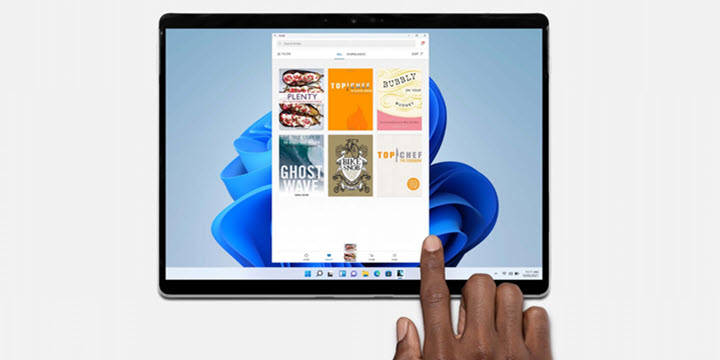
Schon wieder: Amazon tauscht seine Kindle-App für Windows aus
Amazon stellt den klassischen Desktop-Client "Kindle für PC" ein. An seine Stelle soll eine App aus dem Microsoft Store treten.www.drwindows.de
- Official source: support.microsoft.com
Loading…
support.microsoft.com - Related coverage: newsminimalist.com
Loading…
www.newsminimalist.com - Related coverage: netzwelt.de

Änderung bei Amazon: Zum 30. Juni 2026 müsst ihr euch von dieser App verabschieden
Amazon bietet neben der App für den beliebten Onlineshop noch zahlreiche weitere Anwendungen an. Eine davon wird eingestellt, um gegen illegale Aktivitäten vorzugehen. www.netzwelt.de
- Related coverage: computerbase.de
Loading…
www.computerbase.de - Related coverage: bild.de
Kein Windows-10-Support: Amazon bringt neue Kindle-App für Windows 11
Amazon stellt die Kindle-App für Windows ein. Nutzer müssen für die neue App allerdings auf Windows 11 umsteigen. www.bild.de
- Related coverage: techradar.com
Kindle owners are frustrated that Amazon is pulling the plug on old devices that are still widely used — but it’s not stopping users from sideloading | TechRadar
How long will it be before Amazon stops this workaround?www.techradar.com - Related coverage: cincodias.elpais.com
Loading…
cincodias.elpais.com - Related coverage: t3.com

Kindle for PC gets a major upgrade – the new Windows 11 app is more feature-packed than ever before
Take your Kindle books to a bigger screenwww.t3.com
- Related coverage: kiplinger.com

Your Older Kindle Might Become Useless After May 20
Amazon is dropping support for older Kindles in May. Will you be forced to upgrade? www.kiplinger.com
- Related coverage: phys.org
Loading…
phys.org