

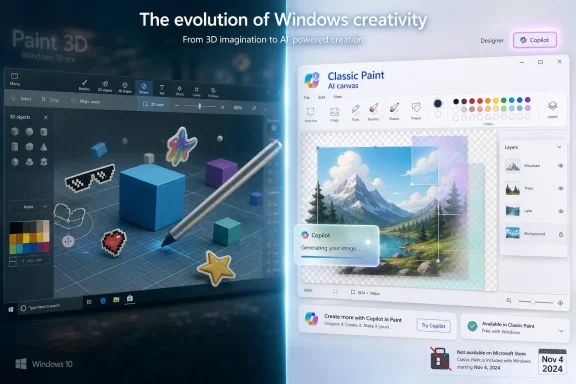
Microsoft Paint 3D, introduced with the Windows 10 Creators Update in 2017 and removed from Microsoft Store availability after November 4, 2024, matters in 2026 less as a living app than as a revealing fossil of Microsoft’s abandoned mixed-reality ambitions and current AI design pivot. The oddity is that a discontinued program may now explain Windows better than many shipping ones. Paint 3D was supposed to drag the most familiar creative app in computing into a world of objects, depth, touch, pens, and headsets; instead, classic Paint survived, learned layers and AI tricks, and quietly ate its successor’s lunch. That reversal is the story: Microsoft did not give up on casual creativity, but it decisively changed the surface on which it wants ordinary users to create.
The claim that Paint 3D is again a flagship Windows creative tool needs a hard correction at the top. Paint 3D is not currently the cheerful, preinstalled on-ramp to 3D creativity that Microsoft once imagined. Microsoft deprecated it, stopped offering future updates, and removed it from the Microsoft Store after November 4, 2024.
That does not make Paint 3D irrelevant. It makes it more interesting. Software does not have to survive to leave a design language behind, and Paint 3D’s ghost is visible in the way Microsoft now talks about Paint, Designer, Copilot, Surface, and the whole category of “anyone can make something” Windows experiences.
The app’s old proposition was straightforward: let a normal person sketch, sticker, texture, rotate, and export a scene without understanding meshes, render pipelines, UV maps, or Blender’s intimidating interface. It was not a professional tool and never convincingly pretended to be one. Its ambition was cultural rather than technical: make 3D feel like the next default literacy after drawing a rectangle in MS Paint.
That was exactly why it launched with such fanfare in the Windows 10 era. Microsoft was selling a future in which mixed reality, 3D printing, pen input, and Surface hardware all pointed in the same direction. Paint 3D was the toy-like front door to that future, the app a child, teacher, hobbyist, or office worker could open before graduating to more serious tools.
The trouble is that the future moved. Consumer 3D never became the default Windows behavior. Mixed reality receded. 3D printing remained useful but niche. Meanwhile, generative AI gave Microsoft a more immediately legible pitch: don’t build a model from primitives; describe what you want and let the machine synthesize it.
In that worldview, classic Paint looked charming but insufficient. It represented the flat desktop metaphor of an earlier computing age: pixels, lines, bucket fills, pasted screenshots, and quick annotations. Paint 3D tried to keep the innocence of that interface while moving the user into an object-based canvas.
That mattered because the app treated 3D not as a specialist discipline, but as a basic consumer affordance. You could drop in a cube, sketch a fish, wrap a sticker around a model, add text, and move things around with a mouse or finger. It was crude, but it was approachable in precisely the way Windows accessories have historically been approachable.
Microsoft’s mistake was not that Paint 3D was badly conceived. The mistake was assuming that spatial computing would become ordinary quickly enough for a default-adjacent 3D editor to feel necessary. Instead, for most users, 3D remained something they consumed in games, product configurators, and design software rather than something they casually produced between email and PowerPoint.
That gap between vision and behavior doomed the app’s central premise. Paint 3D was a mass-market tool for a mass-market habit that never arrived. It solved the onboarding problem for a creative workflow most people did not yet want.
For decades, Paint has occupied a peculiar place in Windows culture. It is not admired because it is powerful. It is loved because it is immediate, disposable, and impossible to be pretentious about. You open it, paste a screenshot, circle something in red, crop badly, save a PNG, and move on with your life.
Paint 3D asked users to accept a different mental model. Objects stayed editable. The canvas could imply depth. The interface had more panels, more modes, more novelty, and more ways to wonder whether you were doing the right thing. For beginners, that extra capability was the pitch; for everyday users, it was often friction.
Microsoft appears to have learned the lesson. Rather than replacing Paint with Paint 3D, the company invested in classic Paint itself. Windows 11-era Paint gained a more modern interface, layers, transparency support, background removal, and AI-assisted image generation features in various markets and configurations. The old app became the new app by absorbing the useful parts of modern creative software without forcing everyone into a 3D metaphor.
That is the great irony of Paint 3D. It lost the product war, but it helped prove that Microsoft’s humble inbox apps could be strategic again. The company discovered that users did want more creativity in Windows; they just did not necessarily want that creativity organized around low-end 3D modeling.
For Windows enthusiasts, that timestamp matters because Microsoft’s app retirements often reveal the company’s platform priorities more honestly than its launch events do. Paint 3D’s removal signaled that the mixed-reality-adjacent consumer 3D push had fully lost internal gravity. Microsoft was no longer trying to maintain even the symbolic front door.
Existing installations could continue to work, but that is not the same as being part of the platform. An app that receives no updates and cannot be newly downloaded through the official Store has crossed from “supported Windows feature” into “legacy convenience.” For sysadmins and educators, that distinction is practical, not philosophical.
It changes imaging decisions. It changes classroom documentation. It changes whether a help desk should encourage a workflow around the app. It changes whether a parent buying a new Windows 11 PC can expect to find the same tool a child used on an older Windows 10 machine.
This is why the article’s 2026 framing needs care. Paint 3D may still matter to users who already have it, to communities archiving it, and to anyone studying Microsoft’s creative strategy. But calling it broadly available or preinstalled on most consumer Windows configurations in 2026 obscures the most important fact: Microsoft has already moved on.
Paint 3D tried to make creation accessible by simplifying the production of 3D objects. Generative AI makes creation accessible by skipping much of the production process altogether. A user who might never manipulate a 3D primitive can type a prompt, sketch loosely, remove a background, or generate variations with far less understanding of the underlying craft.
That shift fits Microsoft’s current operating-system strategy. Windows is being recast as a place where AI assistance appears inside familiar surfaces rather than as a separate destination. Paint is a perfect vessel for that because it already has mass recognition, low stakes, and a long history as the place where non-designers do just enough visual work to solve a problem.
Cocreator and related Paint features are not merely feature additions. They are a redefinition of what a default graphics app is for. The old Paint was a manual tool. Paint 3D was a spatial tool. The new Paint is becoming a conversational and assistive tool.
That evolution also explains why classic Paint won. AI features are easier to graft onto a familiar 2D canvas than onto a half-consumer, half-modeling environment whose core metaphor never became mainstream. Microsoft did not need Paint 3D to introduce everyday users to machine-assisted creativity. It needed the app with the stronger muscle memory.
That role has not disappeared, but the demo has changed. Today’s premium Windows pitch is less about spinning a cartoon fish in 3D and more about accelerating a task: generate an image, erase a background, summarize a note, enhance a call, search semantically, or continue work across cloud-connected apps. The magic is not the z-axis; it is the reduction of effort.
Surface hardware still benefits from creative defaults. Pen support, displays, webcams, NPUs, and battery life all need obvious experiences that justify their cost. But Microsoft’s showcase apps increasingly point toward AI assistance and productivity, not the mixed-reality consumer stack that gave Paint 3D its original reason to exist.
That is not necessarily a retreat from creativity. It is a retreat from one particular theory of creativity. Microsoft once suggested ordinary users would become casual 3D makers. It now suggests ordinary users will become prompt-assisted editors, presenters, designers, and communicators.
The distinction matters for WindowsForum readers because it changes what hardware capabilities are likely to be rewarded. A decade ago, the platform story emphasized touch, pens, sensors, and headsets. In 2026, the platform story puts far more pressure on local AI acceleration, cloud services, and app surfaces that can absorb generative features without terrifying normal users.
That is still a valuable idea. Early creative tools shape how people understand computers. Many adults learned image manipulation by abusing MS Paint. Many younger users learned editing through mobile apps and social platforms. A basic 3D sandbox inside Windows had a plausible role in helping students understand the building blocks behind games, product design, and 3D printing.
But education alone rarely saves a Windows app unless it connects to a broader commercial and platform priority. Paint 3D lived in the awkward middle: too limited for serious curriculum, too unfamiliar for casual users, and too disconnected from Microsoft’s strongest subscription engines. Schools that needed real 3D modeling could choose dedicated tools. Schools that needed quick visuals could use web apps or modern Paint.
The result was a product with passionate pockets rather than universal pull. That distinction is familiar in Windows history. Microsoft often builds tools that are beloved by a subset of users but too strategically orphaned to keep receiving attention once the company’s larger bets move elsewhere.
Paint 3D’s educational value therefore survives more as a lesson than as a platform. It showed that beginner 3D tools need continuity, file portability, classroom support, and a visible future. Without those, teachers hesitate to build lessons around them, and students learn that the safest creative tools are the ones with ecosystems larger than Windows itself.
Canva, Figma, Adobe Express, web-based image editors, template libraries, and social video tools changed expectations. Users came to expect collaboration, templates, stock assets, brand kits, cloud saves, one-click export sizes, and instant sharing. Paint 3D had local immediacy, but it did not have the networked workflow that modern casual design increasingly demands.
That matters because Microsoft’s historical advantage with Windows accessories was distribution. If an app came with the operating system, it automatically became part of millions of users’ lives. But default placement is less decisive when users begin their creative work in a browser tab, a phone app, or a shared workspace.
Paint 3D was in some ways too Windows-native for the era that followed. Its strength was offline, local, lightweight manipulation. Its weakness was that casual creativity became social, templated, and cross-device. A 3D scene sitting on one PC did not compete well with a design project living in the cloud and ready for a team, a classroom, or a marketing feed.
Microsoft’s answer has been to move up the stack. Designer, Copilot, Microsoft 365 integration, OneDrive, and AI-powered features point toward a cloud-connected creative system rather than a single local sandbox. Paint remains important because it is familiar, but the economic center is no longer the accessory app itself.
A deprecated app creates several questions. Is it allowed in the image? Is it patched? Is it supported by the vendor? Is it part of a documented workflow? If users depend on it, what is the migration path? If installers circulate through unofficial archives, what is the security posture?
Those are not academic concerns. Once an app leaves the Store and stops receiving updates, organizations should be cautious about standardizing on it even if it still launches. Legacy creative tools can become vectors for unsafe downloads, unsupported file handling, or unplanned help desk tickets when users move to new machines.
The right enterprise response is not panic. Paint 3D was never the kind of deeply embedded line-of-business component that breaks a company when removed. But it is a useful reminder that “free with Windows” is not the same as “stable forever.” Microsoft’s consumer app layer changes according to strategy, telemetry, engineering cost, and regulatory pressure.
For managed environments, that argues for an explicit inventory of small tools users actually rely on. The surprise is rarely that a major enterprise product changes. The surprise is that a tiny utility became someone’s workflow, and nobody noticed until the replacement PC arrived.
But small apps can still matter as platform signals. They show where Microsoft is willing to spend attention and where it is not. Paint 3D’s decline says that Microsoft’s consumer 3D push did not become important enough to maintain. Paint’s revival says that familiar creation surfaces are important enough to modernize.
That distinction is more useful than pretending Paint 3D is a hidden pillar of Microsoft’s valuation. Microsoft’s real consumer strategy is bundled experience: Windows as the base, Microsoft accounts as identity, OneDrive as continuity, Microsoft 365 as productivity, Copilot as assistive layer, and Surface as premium hardware showcase. The creative apps matter when they reinforce that loop.
Paint 3D once reinforced a loop around Surface, pens, mixed reality, and 3D content. Modern Paint reinforces a loop around AI, image editing, and everyday productivity. In both cases, the app is not the business. The app is the invitation.
This is how Microsoft often works. It seeds a capability in a low-friction place, watches whether usage and strategy align, and either expands the feature into the ecosystem or lets the experiment fade. Paint 3D faded. Its accessibility argument did not.
That simplicity is hard to replace. Blender is extraordinary but overwhelming. CAD packages are purposeful but specialized. Browser tools vary widely in quality, privacy posture, and longevity. Paint 3D occupied a strange niche: not powerful, not elegant, but fast enough for playful edits and basic compositions.
When Microsoft removes such a tool, enthusiasts often respond by preserving installers, sharing workarounds, and building informal knowledge bases. That impulse is understandable, but it also moves users away from the safety of official distribution. The more beloved an abandoned app is, the more likely it is to develop a shadow ecosystem of downloads that ordinary users should treat carefully.
This is where Windows nostalgia and Windows security collide. The Windows community has always preserved tools Microsoft abandoned, from Media Center to Movie Maker to older PowerToys-era utilities. Some of that preservation is historically valuable. Some of it is risky, especially when unofficial binaries start circulating as substitutes for a trusted Store listing.
Paint 3D’s afterlife will likely follow that pattern. It will remain installed on some older machines, archived by hobbyists, mentioned fondly by educators, and rediscovered by users who liked its one-click weirdness. But its future is no longer in Microsoft’s hands in the same way a living Windows app’s future would be.
During the Windows 10 years, Microsoft treated 3D and mixed reality as a broad platform frontier. There were viewers, capture concepts, headset integrations, 3D objects folders, educational demos, and creative tools. The bet was that Windows could become the everyday operating system for a spatial computing future.
By 2026, that future has fragmented. Virtual reality exists, but it is not a default Windows behavior. Augmented reality has had enterprise and specialized uses, but Microsoft’s consumer Windows shell did not become a mixed-reality hub. AI, not spatial computing, became the company’s platform-wide accelerant.
Paint 3D is therefore best understood as part of the cleanup. Microsoft is not merely pruning an old graphics app; it is clearing away the residue of a previous strategic story. That cleanup can be healthy. Platforms become incoherent when every abandoned bet remains installed forever.
But cleanup has a cost. Windows loses some of its eccentric breadth when these tools vanish. The operating system becomes tidier, more cloud-connected, more AI-forward, and perhaps more commercially disciplined — but also less full of odd little doors a curious user can open without signing up for anything.
Classic Paint had the one thing Paint 3D never fully secured: unquestioned user trust. Nobody opens Paint expecting a professional suite. Nobody feels embarrassed using it for something crude. That makes it a perfect landing zone for AI features because the app’s low-stakes identity reduces the intimidation factor of generative tools.
Layers, transparency, background removal, Cocreator-style generation, and project-oriented editing all push Paint toward a more capable future without severing its relationship with the past. Microsoft can modernize the app while preserving the mental model: a blank canvas for quick visual work. That continuity is powerful.
Paint 3D, by contrast, required users to accept a new metaphor before they experienced the benefit. That was a harder sell. AI inside Paint asks less of the user at the start and offers more immediate gratification. It turns “I can’t draw that” into “I can ask for that,” which is a more broadly marketable leap than “I can rotate that.”
This does not mean AI creativity is automatically better. It raises its own questions about authorship, training data, cost, privacy, and creative sameness. But in terms of mainstream adoption, Microsoft has clearly found a stronger path. The canvas survived; the 3D layer did not.
 Paint 3D Is Not Back, but Its Argument Is
The claim that Paint 3D is again a flagship Windows creative tool needs a hard correction at the top. Paint 3D is not currently the cheerful, preinstalled on-ramp to 3D creativity that Microsoft once imagined. Microsoft deprecated it, stopped offering future updates, and removed it from the Microsoft Store after November 4, 2024.That does not make Paint 3D irrelevant. It makes it more interesting. Software does not have to survive to leave a design language behind, and Paint 3D’s ghost is visible in the way Microsoft now talks about Paint, Designer, Copilot, Surface, and the whole category of “anyone can make something” Windows experiences.
The app’s old proposition was straightforward: let a normal person sketch, sticker, texture, rotate, and export a scene without understanding meshes, render pipelines, UV maps, or Blender’s intimidating interface. It was not a professional tool and never convincingly pretended to be one. Its ambition was cultural rather than technical: make 3D feel like the next default literacy after drawing a rectangle in MS Paint.
That was exactly why it launched with such fanfare in the Windows 10 era. Microsoft was selling a future in which mixed reality, 3D printing, pen input, and Surface hardware all pointed in the same direction. Paint 3D was the toy-like front door to that future, the app a child, teacher, hobbyist, or office worker could open before graduating to more serious tools.
The trouble is that the future moved. Consumer 3D never became the default Windows behavior. Mixed reality receded. 3D printing remained useful but niche. Meanwhile, generative AI gave Microsoft a more immediately legible pitch: don’t build a model from primitives; describe what you want and let the machine synthesize it.
Microsoft’s 2017 Bet Was That Everyone Would Need a Z-Axis
Paint 3D arrived at a moment when Microsoft was trying to make Windows feel newly spatial. The Windows 10 Creators Update was not just a name; it was a worldview. Microsoft wanted creation to look less like typing in Office and more like manipulating objects across screens, pens, headsets, and physical printers.In that worldview, classic Paint looked charming but insufficient. It represented the flat desktop metaphor of an earlier computing age: pixels, lines, bucket fills, pasted screenshots, and quick annotations. Paint 3D tried to keep the innocence of that interface while moving the user into an object-based canvas.
That mattered because the app treated 3D not as a specialist discipline, but as a basic consumer affordance. You could drop in a cube, sketch a fish, wrap a sticker around a model, add text, and move things around with a mouse or finger. It was crude, but it was approachable in precisely the way Windows accessories have historically been approachable.
Microsoft’s mistake was not that Paint 3D was badly conceived. The mistake was assuming that spatial computing would become ordinary quickly enough for a default-adjacent 3D editor to feel necessary. Instead, for most users, 3D remained something they consumed in games, product configurators, and design software rather than something they casually produced between email and PowerPoint.
That gap between vision and behavior doomed the app’s central premise. Paint 3D was a mass-market tool for a mass-market habit that never arrived. It solved the onboarding problem for a creative workflow most people did not yet want.
The App Failed Because Classic Paint Refused to Die
Paint 3D’s most formidable competitor was not Blender, Canva, Photoshop, or Figma. It was the stubborn emotional durability of classic Paint.For decades, Paint has occupied a peculiar place in Windows culture. It is not admired because it is powerful. It is loved because it is immediate, disposable, and impossible to be pretentious about. You open it, paste a screenshot, circle something in red, crop badly, save a PNG, and move on with your life.
Paint 3D asked users to accept a different mental model. Objects stayed editable. The canvas could imply depth. The interface had more panels, more modes, more novelty, and more ways to wonder whether you were doing the right thing. For beginners, that extra capability was the pitch; for everyday users, it was often friction.
Microsoft appears to have learned the lesson. Rather than replacing Paint with Paint 3D, the company invested in classic Paint itself. Windows 11-era Paint gained a more modern interface, layers, transparency support, background removal, and AI-assisted image generation features in various markets and configurations. The old app became the new app by absorbing the useful parts of modern creative software without forcing everyone into a 3D metaphor.
That is the great irony of Paint 3D. It lost the product war, but it helped prove that Microsoft’s humble inbox apps could be strategic again. The company discovered that users did want more creativity in Windows; they just did not necessarily want that creativity organized around low-end 3D modeling.
The Store Removal Turned a Utility into an Artifact
The November 2024 Store removal changed Paint 3D’s meaning. Before then, it was a neglected app with a shrinking role. Afterward, it became a timestamp.For Windows enthusiasts, that timestamp matters because Microsoft’s app retirements often reveal the company’s platform priorities more honestly than its launch events do. Paint 3D’s removal signaled that the mixed-reality-adjacent consumer 3D push had fully lost internal gravity. Microsoft was no longer trying to maintain even the symbolic front door.
Existing installations could continue to work, but that is not the same as being part of the platform. An app that receives no updates and cannot be newly downloaded through the official Store has crossed from “supported Windows feature” into “legacy convenience.” For sysadmins and educators, that distinction is practical, not philosophical.
It changes imaging decisions. It changes classroom documentation. It changes whether a help desk should encourage a workflow around the app. It changes whether a parent buying a new Windows 11 PC can expect to find the same tool a child used on an older Windows 10 machine.
This is why the article’s 2026 framing needs care. Paint 3D may still matter to users who already have it, to communities archiving it, and to anyone studying Microsoft’s creative strategy. But calling it broadly available or preinstalled on most consumer Windows configurations in 2026 obscures the most important fact: Microsoft has already moved on.
AI Did What 3D Could Not: It Made Creation Feel Instant
The replacement story is not simply “Paint 3D died.” The sharper version is that AI made Paint 3D’s democratizing promise easier to sell.Paint 3D tried to make creation accessible by simplifying the production of 3D objects. Generative AI makes creation accessible by skipping much of the production process altogether. A user who might never manipulate a 3D primitive can type a prompt, sketch loosely, remove a background, or generate variations with far less understanding of the underlying craft.
That shift fits Microsoft’s current operating-system strategy. Windows is being recast as a place where AI assistance appears inside familiar surfaces rather than as a separate destination. Paint is a perfect vessel for that because it already has mass recognition, low stakes, and a long history as the place where non-designers do just enough visual work to solve a problem.
Cocreator and related Paint features are not merely feature additions. They are a redefinition of what a default graphics app is for. The old Paint was a manual tool. Paint 3D was a spatial tool. The new Paint is becoming a conversational and assistive tool.
That evolution also explains why classic Paint won. AI features are easier to graft onto a familiar 2D canvas than onto a half-consumer, half-modeling environment whose core metaphor never became mainstream. Microsoft did not need Paint 3D to introduce everyday users to machine-assisted creativity. It needed the app with the stronger muscle memory.
Surface Still Needs Demo Magic, but the Demo Has Changed
Paint 3D once made sense as a Surface demo because it gave touch and pen input something playful to do. A salesperson could hand a customer a stylus, let them draw a shape, spin an object, and show that a Windows device was not merely a keyboard-and-trackpad machine. It made the hardware feel tactile.That role has not disappeared, but the demo has changed. Today’s premium Windows pitch is less about spinning a cartoon fish in 3D and more about accelerating a task: generate an image, erase a background, summarize a note, enhance a call, search semantically, or continue work across cloud-connected apps. The magic is not the z-axis; it is the reduction of effort.
Surface hardware still benefits from creative defaults. Pen support, displays, webcams, NPUs, and battery life all need obvious experiences that justify their cost. But Microsoft’s showcase apps increasingly point toward AI assistance and productivity, not the mixed-reality consumer stack that gave Paint 3D its original reason to exist.
That is not necessarily a retreat from creativity. It is a retreat from one particular theory of creativity. Microsoft once suggested ordinary users would become casual 3D makers. It now suggests ordinary users will become prompt-assisted editors, presenters, designers, and communicators.
The distinction matters for WindowsForum readers because it changes what hardware capabilities are likely to be rewarded. A decade ago, the platform story emphasized touch, pens, sensors, and headsets. In 2026, the platform story puts far more pressure on local AI acceleration, cloud services, and app surfaces that can absorb generative features without terrifying normal users.
The Education Case Was Real, but Not Enough
Paint 3D’s strongest defense was always education. It gave teachers a lightweight way to introduce spatial thinking without deploying a full CAD lab. A student could learn rotation, scale, composition, lighting, and object placement in an environment that did not punish curiosity.That is still a valuable idea. Early creative tools shape how people understand computers. Many adults learned image manipulation by abusing MS Paint. Many younger users learned editing through mobile apps and social platforms. A basic 3D sandbox inside Windows had a plausible role in helping students understand the building blocks behind games, product design, and 3D printing.
But education alone rarely saves a Windows app unless it connects to a broader commercial and platform priority. Paint 3D lived in the awkward middle: too limited for serious curriculum, too unfamiliar for casual users, and too disconnected from Microsoft’s strongest subscription engines. Schools that needed real 3D modeling could choose dedicated tools. Schools that needed quick visuals could use web apps or modern Paint.
The result was a product with passionate pockets rather than universal pull. That distinction is familiar in Windows history. Microsoft often builds tools that are beloved by a subset of users but too strategically orphaned to keep receiving attention once the company’s larger bets move elsewhere.
Paint 3D’s educational value therefore survives more as a lesson than as a platform. It showed that beginner 3D tools need continuity, file portability, classroom support, and a visible future. Without those, teachers hesitate to build lessons around them, and students learn that the safest creative tools are the ones with ecosystems larger than Windows itself.
The Real Competition Came from the Browser
Paint 3D also ran into a market that was changing underneath Windows. The creative entry point for many users moved from bundled desktop apps to browser-based services.Canva, Figma, Adobe Express, web-based image editors, template libraries, and social video tools changed expectations. Users came to expect collaboration, templates, stock assets, brand kits, cloud saves, one-click export sizes, and instant sharing. Paint 3D had local immediacy, but it did not have the networked workflow that modern casual design increasingly demands.
That matters because Microsoft’s historical advantage with Windows accessories was distribution. If an app came with the operating system, it automatically became part of millions of users’ lives. But default placement is less decisive when users begin their creative work in a browser tab, a phone app, or a shared workspace.
Paint 3D was in some ways too Windows-native for the era that followed. Its strength was offline, local, lightweight manipulation. Its weakness was that casual creativity became social, templated, and cross-device. A 3D scene sitting on one PC did not compete well with a design project living in the cloud and ready for a team, a classroom, or a marketing feed.
Microsoft’s answer has been to move up the stack. Designer, Copilot, Microsoft 365 integration, OneDrive, and AI-powered features point toward a cloud-connected creative system rather than a single local sandbox. Paint remains important because it is familiar, but the economic center is no longer the accessory app itself.
For IT Pros, Deprecated Creative Apps Are a Management Problem
To consumers, the disappearance of Paint 3D may feel like nostalgia. To IT administrators, it is another example of why default Windows experiences require governance.A deprecated app creates several questions. Is it allowed in the image? Is it patched? Is it supported by the vendor? Is it part of a documented workflow? If users depend on it, what is the migration path? If installers circulate through unofficial archives, what is the security posture?
Those are not academic concerns. Once an app leaves the Store and stops receiving updates, organizations should be cautious about standardizing on it even if it still launches. Legacy creative tools can become vectors for unsafe downloads, unsupported file handling, or unplanned help desk tickets when users move to new machines.
The right enterprise response is not panic. Paint 3D was never the kind of deeply embedded line-of-business component that breaks a company when removed. But it is a useful reminder that “free with Windows” is not the same as “stable forever.” Microsoft’s consumer app layer changes according to strategy, telemetry, engineering cost, and regulatory pressure.
For managed environments, that argues for an explicit inventory of small tools users actually rely on. The surprise is rarely that a major enterprise product changes. The surprise is that a tiny utility became someone’s workflow, and nobody noticed until the replacement PC arrived.
The Investor Angle Is Smaller Than the Platform Angle
The source framing around Microsoft investors and Paint 3D needs proportionality. Paint 3D itself is not financially material to Microsoft. It does not move Azure revenue, determine Microsoft 365 retention, or meaningfully affect the company’s market capitalization.But small apps can still matter as platform signals. They show where Microsoft is willing to spend attention and where it is not. Paint 3D’s decline says that Microsoft’s consumer 3D push did not become important enough to maintain. Paint’s revival says that familiar creation surfaces are important enough to modernize.
That distinction is more useful than pretending Paint 3D is a hidden pillar of Microsoft’s valuation. Microsoft’s real consumer strategy is bundled experience: Windows as the base, Microsoft accounts as identity, OneDrive as continuity, Microsoft 365 as productivity, Copilot as assistive layer, and Surface as premium hardware showcase. The creative apps matter when they reinforce that loop.
Paint 3D once reinforced a loop around Surface, pens, mixed reality, and 3D content. Modern Paint reinforces a loop around AI, image editing, and everyday productivity. In both cases, the app is not the business. The app is the invitation.
This is how Microsoft often works. It seeds a capability in a low-friction place, watches whether usage and strategy align, and either expands the feature into the ecosystem or lets the experiment fade. Paint 3D faded. Its accessibility argument did not.
Paint 3D’s Afterlife Belongs to Enthusiasts and Archivists
There is a reason Paint 3D still attracts discussion after its official demotion. Some users genuinely liked it. More specifically, they liked that it was simple in a way professional 3D tools are not.That simplicity is hard to replace. Blender is extraordinary but overwhelming. CAD packages are purposeful but specialized. Browser tools vary widely in quality, privacy posture, and longevity. Paint 3D occupied a strange niche: not powerful, not elegant, but fast enough for playful edits and basic compositions.
When Microsoft removes such a tool, enthusiasts often respond by preserving installers, sharing workarounds, and building informal knowledge bases. That impulse is understandable, but it also moves users away from the safety of official distribution. The more beloved an abandoned app is, the more likely it is to develop a shadow ecosystem of downloads that ordinary users should treat carefully.
This is where Windows nostalgia and Windows security collide. The Windows community has always preserved tools Microsoft abandoned, from Media Center to Movie Maker to older PowerToys-era utilities. Some of that preservation is historically valuable. Some of it is risky, especially when unofficial binaries start circulating as substitutes for a trusted Store listing.
Paint 3D’s afterlife will likely follow that pattern. It will remain installed on some older machines, archived by hobbyists, mentioned fondly by educators, and rediscovered by users who liked its one-click weirdness. But its future is no longer in Microsoft’s hands in the same way a living Windows app’s future would be.
The Bigger Retirement Wave Is Microsoft Leaving Mixed Reality Behind
Paint 3D’s fate also fits a larger retreat. Microsoft’s Windows mixed-reality era has been steadily dismantled, and related consumer 3D components have lost relevance one after another. The pattern is more important than any single app.During the Windows 10 years, Microsoft treated 3D and mixed reality as a broad platform frontier. There were viewers, capture concepts, headset integrations, 3D objects folders, educational demos, and creative tools. The bet was that Windows could become the everyday operating system for a spatial computing future.
By 2026, that future has fragmented. Virtual reality exists, but it is not a default Windows behavior. Augmented reality has had enterprise and specialized uses, but Microsoft’s consumer Windows shell did not become a mixed-reality hub. AI, not spatial computing, became the company’s platform-wide accelerant.
Paint 3D is therefore best understood as part of the cleanup. Microsoft is not merely pruning an old graphics app; it is clearing away the residue of a previous strategic story. That cleanup can be healthy. Platforms become incoherent when every abandoned bet remains installed forever.
But cleanup has a cost. Windows loses some of its eccentric breadth when these tools vanish. The operating system becomes tidier, more cloud-connected, more AI-forward, and perhaps more commercially disciplined — but also less full of odd little doors a curious user can open without signing up for anything.
Classic Paint Became the AI Canvas Paint 3D Wanted to Be
The phrase “AI canvas” now belongs more naturally to Paint than to Paint 3D. That is the reversal that defines the moment.Classic Paint had the one thing Paint 3D never fully secured: unquestioned user trust. Nobody opens Paint expecting a professional suite. Nobody feels embarrassed using it for something crude. That makes it a perfect landing zone for AI features because the app’s low-stakes identity reduces the intimidation factor of generative tools.
Layers, transparency, background removal, Cocreator-style generation, and project-oriented editing all push Paint toward a more capable future without severing its relationship with the past. Microsoft can modernize the app while preserving the mental model: a blank canvas for quick visual work. That continuity is powerful.
Paint 3D, by contrast, required users to accept a new metaphor before they experienced the benefit. That was a harder sell. AI inside Paint asks less of the user at the start and offers more immediate gratification. It turns “I can’t draw that” into “I can ask for that,” which is a more broadly marketable leap than “I can rotate that.”
This does not mean AI creativity is automatically better. It raises its own questions about authorship, training data, cost, privacy, and creative sameness. But in terms of mainstream adoption, Microsoft has clearly found a stronger path. The canvas survived; the 3D layer did not.
The Useful Lesson Is Hiding in the App Microsoft Retired
Paint 3D’s story leaves a surprisingly concrete set of lessons for Windows users, admins, and Microsoft watchers. The discontinued app is not a reason to pretend 2017’s creative vision has returned. It is a reason to understand why Microsoft’s next creative push looks so different.- Paint 3D should be treated as a deprecated legacy app in 2026, not as a broadly available Windows feature for new deployments.
- Existing installations may still be useful for simple 2D and 3D compositions, but organizations should avoid building new workflows around unsupported software.
- Classic Paint has become Microsoft’s preferred casual graphics surface, especially as Windows 11 gains layers, transparency, background removal, and AI-assisted creation features.
- The retirement of Paint 3D reflects the broader decline of Microsoft’s consumer mixed-reality push and the rise of AI as the company’s default platform narrative.
- Users who still need beginner-friendly 3D creation should evaluate maintained alternatives rather than relying on unofficial Paint 3D installers.
- The app remains historically important because it shows how Microsoft experiments with default Windows experiences before folding winning ideas into more durable products.
References
- Primary source: AD HOC NEWS
Published: 2026-06-15T12:40:07.294182
Loading…
www.ad-hoc-news.de - Related coverage: tomshardware.com
Loading…
www.tomshardware.com - Related coverage: windowslatest.com
Loading…
www.windowslatest.com - Related coverage: howtogeek.com
Loading…
www.howtogeek.com - Official source: support.microsoft.com
Loading…
support.microsoft.com - Related coverage: windowscentral.com
Loading…
www.windowscentral.com
- Related coverage: techbriefly.com
Loading…
techbriefly.com - Official source: answers.microsoft.com
Loading…
answers.microsoft.com - Related coverage: techradar.com
Loading…
www.techradar.com - Related coverage: pcguide.com
Loading…
www.pcguide.com - Related coverage: techspot.com
Loading…
www.techspot.com - Official source: news.microsoft.com