

Microsoft used Build 2026 in San Francisco on June 2 to position the next Windows Subsystem for Linux wave—reported by ZDNET as WSL 3—as a developer-first upgrade for Windows 11, centered on faster Linux containers and more direct access to local GPU and NPU hardware. The pitch is not subtle: Windows wants to remain the machine under the keyboard even when the developer’s stack, tools, models, and deployment targets are overwhelmingly Linux. That is less a concession to open source than a strategic lock-in maneuver with better manners. If Microsoft can make Linux workloads feel native enough on Windows, it does not need to win the Linux desktop war; it only needs to make leaving Windows feel unnecessary.
For most of Windows history, Linux compatibility was either a threat, a science project, or a begrudging bridge for people who had already mentally left the platform. WSL changed that by turning Linux from an external dependency into a Windows feature. WSL 1 translated Linux system calls; WSL 2 moved to a lightweight virtual machine running a real Linux kernel; the new WSL push tries to make that virtualized boundary matter less in daily work.
That history matters because each WSL generation has answered a different complaint. WSL 1 was about convenience: can I run Bash, package managers, and Linux tools without a separate machine? WSL 2 was about correctness: can I run real Linux binaries and containers without pretending Windows is Linux? The Build 2026 message is about performance and workflow ownership: can I run modern AI and container workloads locally without paying a penalty for staying on Windows?
ZDNET’s report describes WSL 3 as an architectural pivot rather than a total replacement. The shell experience remains familiar, the distribution model remains tied to WSL updates rather than a boxed product, and developers still live inside the same
That is a crucial distinction. Microsoft is not trying to make Windows look like GNOME or KDE. It is trying to make Windows a credible host for the parts of Linux that developers actually need when they are building software in 2026: containers, model tooling, Python stacks, GPU frameworks, package managers, and reproducible environments.
That is where WSL’s next act becomes interesting. Microsoft’s Windows AI strategy needs developers to target local silicon across CPUs, GPUs, and NPUs, but much of the actual AI developer ecosystem is Linux-first. If the Windows answer is “rewrite for Windows,” it loses. If the Windows answer is “boot Ubuntu,” it also loses. WSL is the compromise Microsoft can sell: keep Windows as the managed corporate desktop, but let the AI stack behave more like it is running where it wants to run.
The phrase “GPU and NPU without the performance tax,” as reported by ZDNET, is the whole sales deck compressed into one line. WSL 2 already brought GPU compute support into many developer workflows, and for plenty of people it was good enough. But good enough becomes fragile when local model development is bounded by memory bandwidth, driver support, accelerator access, and the friction of getting frameworks to see the right hardware.
That is why the reported emphasis on paravirtualization matters. Developers are not asking for a philosophical victory over virtualization. They are asking for less overhead, fewer compatibility traps, and a smaller gap between “this works on my Linux workstation” and “this works on my Windows laptop.” If WSL 3 narrows that gap, Microsoft gets to turn the Linux desktop from an escape route into an implementation detail.
On Windows today, Linux container workflows often rely on additional tooling, most notably Docker Desktop or other container runtimes layered into a WSL-backed setup. That arrangement works, but it can be awkward in managed environments. Licensing, configuration drift, network quirks, filesystem behavior, image sourcing, and visibility all become part of the support burden.
Microsoft’s stated goal is to make Linux containers run out of the box through WSL, with a CLI and API that Windows applications can use. That is not just a developer convenience. It is an enterprise governance move. If containers become a first-class WSL feature, IT gets a better shot at policy controls, visibility, and standard deployment patterns instead of discovering that every developer workstation has become a snowflake.
This also changes the role of Windows in cloud-native development. The old compromise was that Windows could be a fine editor and browser host while the “real” environment lived elsewhere. The new pitch is that Windows can host the local Linux container lifecycle directly, with fewer third-party assumptions and tighter platform integration. That will not impress purists, but it may impress the person responsible for onboarding 400 developers onto standardized laptops.
ZDNET’s report says Copilot+ PCs and systems based on Qualcomm Snapdragon X Elite, Intel Meteor Lake, and Intel Lunar Lake architectures are expected to benefit, while AMD support will not be available at first. If that sequencing holds, it illustrates the practical difficulty behind the marketing. WSL’s next leap is not merely a Windows feature toggle; it depends on silicon roadmaps, drivers, firmware, frameworks, and Microsoft’s ability to make all of it feel boring.
That is especially true for NPUs. GPUs are familiar territory for AI developers, even if the Windows path has its own quirks. NPUs are newer, more fragmented, and more closely tied to vendor-specific stacks and OS-level abstractions. The idea of giving Linux workloads useful NPU access inside Windows is compelling precisely because it is hard.
The first wave, then, should be treated as a preview, not a revolution. If Microsoft says the architecture reduces overhead, that is promising. If early adopters show PyTorch and TensorFlow workloads behaving closer to native Linux on supported hardware, that will be meaningful. But the credibility test will come from boring, repeatable reports: install this build, run this model, use this driver, compare this workload, measure the delta.
That compromise is why WSL has become so durable. It does not require companies to abandon their Windows fleet. It does not require developers to give up Bash, apt, SSH, container tooling, or Linux-native build assumptions. It turns a platform fight into a workflow feature.
The Build 2026 additions deepen that bargain. Windows Developer Configurations bundle WSL with the rest of the modern setup story: VS Code, GitHub Copilot, PowerShell 7, Git tooling, and developer-friendly defaults. WSL containers promise fewer setup hurdles for Linux workloads. Windows AI APIs expand local model access across more hardware. These are not isolated announcements; they are a coordinated attempt to make a fresh Windows 11 machine feel like a ready-made development appliance.
That appliance is not neutral. It points developers toward Microsoft’s preferred stack: GitHub, Copilot, Windows Terminal, WinGet, Windows AI APIs, and managed Windows endpoints. But it also acknowledges reality. The modern developer environment is polyglot, containerized, cloud-adjacent, and heavily Linux-shaped. Microsoft’s old instinct would have been to compete with that. The new instinct is to host it.
The same is true for developers who want their desktop environment, package system, init system, filesystem layout, and GPU stack to match production as closely as possible. WSL can reduce friction, but it cannot erase the fact that there is still a Windows host underneath. That host brings benefits, but it also brings policy, update cadence, security products, filesystem boundaries, and the occasional reminder that the Linux environment is not the whole machine.
For hobbyists and independent developers, dual-booting or running Linux directly may still be more satisfying. For organizations, however, satisfaction is not the only variable. Device management, compliance, support contracts, identity, auditability, and procurement matter. WSL 3, if it delivers, is aimed squarely at that enterprise middle ground: developers who would prefer Linux, administrators who require Windows, and managers who want fewer exceptions.
That is why the “best” platform answer is increasingly contextual. Native Linux may be best for the cleanest AI workstation. Windows with WSL may be best for a regulated enterprise that cannot let every developer choose a distro and a driver stack. The fight is not about purity; it is about which compromise wastes the least time.
But open source does not make WSL independent of Windows. Some kernel-mode and filesystem components remain tied to Microsoft’s platform, and the whole value proposition depends on deep integration with Windows internals. WSL is open enough to invite trust and contribution, but strategic enough to reinforce Windows’ role as the host.
That duality is not hypocrisy; it is the modern Microsoft playbook. The company no longer needs to reject open source to control the developer experience. It can participate in open source, package it, integrate it, manage it, and make the Windows version the most convenient version for a large class of users.
For WindowsForum readers, that is the part worth watching. WSL’s openness may improve the software and accelerate fixes, but Microsoft’s incentives remain commercial and platform-driven. The company wants Linux workloads to thrive on Windows because that makes Windows harder to displace.
For them, WSL is not a toy. It is the pressure valve that makes a Windows mandate tolerable. It lets a developer use Linux toolchains while staying inside the company’s approved desktop environment. It reduces the number of arguments between engineering and IT. It turns “I need a Linux laptop” into “I need WSL enabled.”
WSL 3, or whatever final branding Microsoft settles on for this next architecture, raises the stakes because AI development is becoming a local hardware issue again. Cloud GPUs are powerful but expensive. Local inference and fine-tuning workflows are increasingly attractive. If the corporate-approved Windows laptop has capable silicon inside but Linux tooling cannot use it well, developers will push harder for exceptions.
Microsoft’s answer is to make the exception unnecessary. Give Linux more direct accelerator access. Make containers built-in. Provide setup scripts. Integrate with Terminal and Copilot. Let IT govern the whole thing through Windows. That is not just developer empathy; it is platform retention.
But deeper WSL integration also means Linux workloads become more central to Windows endpoint risk. A developer machine running local containers, AI models, package managers, and agentic tools is not a normal office PC. It is a miniature build farm with access to source code, credentials, networks, and sometimes production-adjacent data.
Microsoft knows this, which is why its Build 2026 Windows message pairs developer convenience with containment, identity, and management. Microsoft Execution Containers, agent identity, Defender integration, Intune policy, and Purview visibility all belong to the same story. The company is trying to convince enterprises that local AI and Linux-heavy development can be powerful without becoming ungovernable.
That is an ambitious claim. Admins should welcome the direction but demand specifics. Which WSL features can be disabled? Which container sources can be restricted? What logs exist? How do endpoint tools inspect Linux processes without breaking developer workflows? What happens when a Linux container, a Windows agent runtime, and a local model all touch the same sensitive repository?
That discrepancy does not mean the story is false; it means the branding and delivery timeline are still fluid. Microsoft often rolls platform features through Insider builds, Store/MSI packages, GitHub releases, and Windows feature updates in overlapping waves. The result is familiar to Windows enthusiasts: the announcement is real, the code path exists or is emerging, but the exact moment it becomes a normal user’s default experience is less tidy than the keynote suggests.
This matters because developers should not bet production workflows on a preview label. Testing WSL pre-release builds on a spare machine is one thing. Moving a team’s AI workflow onto an unreleased architecture is another. The smart path is to validate workloads, measure performance, document driver requirements, and keep native Linux or current WSL 2 paths available until the new stack proves itself.
It also matters because Microsoft’s delivery model has changed. WSL can update independently of Windows, which is good for speed but awkward for fleet predictability. A feature may depend on the Windows build, the WSL package, the Linux kernel version, the driver branch, and the hardware platform. That is manageable, but only if organizations treat WSL like real infrastructure rather than a developer sidecar.
But adaptation is not surrender. WSL lets Microsoft concede the toolchain while defending the workstation. That is the subtle victory. The developer may spend all day inside Ubuntu on WSL, push to Linux containers, deploy to Kubernetes, and train models with Linux-first frameworks, yet the device is still enrolled in Windows management and the daily session still begins at a Windows login screen.
This is why WSL’s evolution is more strategically important than another Windows shell feature or Start menu adjustment. Microsoft is not merely polishing the command line. It is trying to make Windows the preferred host operating system for work that no longer primarily targets Windows.
That has consequences for the broader ecosystem. Docker Desktop, third-party runtimes, Linux desktop distributions, GPU vendors, and enterprise endpoint vendors all have to respond to a Windows platform that is more comfortable hosting Linux workloads directly. The more complete WSL becomes, the less room there is for tools whose main value is papering over Windows’ old Linux gaps.
That is especially important as Microsoft expands Windows AI APIs beyond NPUs to CPUs and GPUs. The company appears to be hedging against the reality that the AI PC installed base is heterogeneous. Some machines have strong NPUs, some have discrete GPUs, some have capable CPUs, and many have combinations that do not map cleanly onto a single developer target.
WSL gives Microsoft a way to meet developers where they already are while Windows AI APIs give app developers a more native path. Those two tracks are not contradictory. They are a pincer movement. Linux-first developers get WSL; Windows app developers get local AI APIs; enterprise customers get a story about management and security across both.
The danger is fragmentation. A model that runs well through a Windows API may not behave the same way inside WSL. A GPU path may be mature while an NPU path lags. Qualcomm, Intel, AMD, and NVIDIA systems may differ in ways that matter. Microsoft’s job is to hide enough of that complexity without pretending it does not exist.
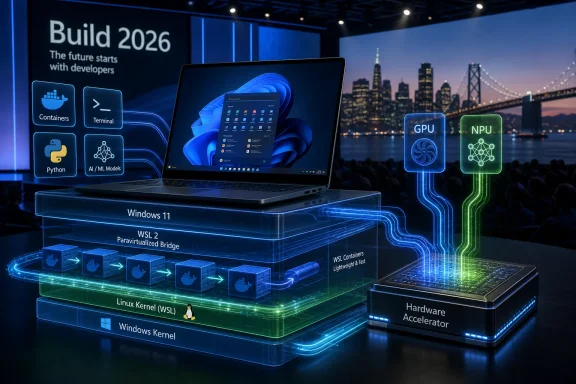 Microsoft Is No Longer Treating Linux as a Guest
For most of Windows history, Linux compatibility was either a threat, a science project, or a begrudging bridge for people who had already mentally left the platform. WSL changed that by turning Linux from an external dependency into a Windows feature. WSL 1 translated Linux system calls; WSL 2 moved to a lightweight virtual machine running a real Linux kernel; the new WSL push tries to make that virtualized boundary matter less in daily work.That history matters because each WSL generation has answered a different complaint. WSL 1 was about convenience: can I run Bash, package managers, and Linux tools without a separate machine? WSL 2 was about correctness: can I run real Linux binaries and containers without pretending Windows is Linux? The Build 2026 message is about performance and workflow ownership: can I run modern AI and container workloads locally without paying a penalty for staying on Windows?
ZDNET’s report describes WSL 3 as an architectural pivot rather than a total replacement. The shell experience remains familiar, the distribution model remains tied to WSL updates rather than a boxed product, and developers still live inside the same
wsl command surface. The difference is under the floorboards, where Linux processes are supposed to see accelerators and container primitives with fewer layers in the way.That is a crucial distinction. Microsoft is not trying to make Windows look like GNOME or KDE. It is trying to make Windows a credible host for the parts of Linux that developers actually need when they are building software in 2026: containers, model tooling, Python stacks, GPU frameworks, package managers, and reproducible environments.
The AI PC Needed a Linux Story Before Developers Would Care
The AI PC has been marketed for two years as a consumer story: local recall, smarter search, background effects, translation, summarization, and the usual parade of demos that look better onstage than in enterprise change-control meetings. Developers have had a colder reaction. They care less about whether Windows can summarize a meeting and more about whether PyTorch, TensorFlow, llama.cpp, Ollama, Docker-compatible workflows, CUDA-adjacent tooling, and Linux package ecosystems can use the hardware they already bought.That is where WSL’s next act becomes interesting. Microsoft’s Windows AI strategy needs developers to target local silicon across CPUs, GPUs, and NPUs, but much of the actual AI developer ecosystem is Linux-first. If the Windows answer is “rewrite for Windows,” it loses. If the Windows answer is “boot Ubuntu,” it also loses. WSL is the compromise Microsoft can sell: keep Windows as the managed corporate desktop, but let the AI stack behave more like it is running where it wants to run.
The phrase “GPU and NPU without the performance tax,” as reported by ZDNET, is the whole sales deck compressed into one line. WSL 2 already brought GPU compute support into many developer workflows, and for plenty of people it was good enough. But good enough becomes fragile when local model development is bounded by memory bandwidth, driver support, accelerator access, and the friction of getting frameworks to see the right hardware.
That is why the reported emphasis on paravirtualization matters. Developers are not asking for a philosophical victory over virtualization. They are asking for less overhead, fewer compatibility traps, and a smaller gap between “this works on my Linux workstation” and “this works on my Windows laptop.” If WSL 3 narrows that gap, Microsoft gets to turn the Linux desktop from an escape route into an implementation detail.
Containers Are the Quiet Power Move
The most concrete official Build 2026 language centers on WSL containers, a built-in way to create, run, and interact with Linux containers on Windows. That may sound less glamorous than NPU acceleration, but it may matter more to working developers and IT departments. Containers are not an edge case in modern development; they are the unit of packaging, testing, local orchestration, and increasingly AI workload isolation.On Windows today, Linux container workflows often rely on additional tooling, most notably Docker Desktop or other container runtimes layered into a WSL-backed setup. That arrangement works, but it can be awkward in managed environments. Licensing, configuration drift, network quirks, filesystem behavior, image sourcing, and visibility all become part of the support burden.
Microsoft’s stated goal is to make Linux containers run out of the box through WSL, with a CLI and API that Windows applications can use. That is not just a developer convenience. It is an enterprise governance move. If containers become a first-class WSL feature, IT gets a better shot at policy controls, visibility, and standard deployment patterns instead of discovering that every developer workstation has become a snowflake.
This also changes the role of Windows in cloud-native development. The old compromise was that Windows could be a fine editor and browser host while the “real” environment lived elsewhere. The new pitch is that Windows can host the local Linux container lifecycle directly, with fewer third-party assumptions and tighter platform integration. That will not impress purists, but it may impress the person responsible for onboarding 400 developers onto standardized laptops.
The Performance Claim Still Has to Survive Real Hardware
The risk in Microsoft’s WSL messaging is that “near-native” can mean many things depending on the benchmark, the driver, the filesystem path, the model, and the silicon vendor. Developers have learned this the hard way. WSL can be excellent when files live inside the Linux filesystem and painful when a workload hammers cross-boundary paths. GPU compute can be smooth in one framework and brittle in another. Local AI demos can hide driver and memory constraints that appear immediately in real projects.ZDNET’s report says Copilot+ PCs and systems based on Qualcomm Snapdragon X Elite, Intel Meteor Lake, and Intel Lunar Lake architectures are expected to benefit, while AMD support will not be available at first. If that sequencing holds, it illustrates the practical difficulty behind the marketing. WSL’s next leap is not merely a Windows feature toggle; it depends on silicon roadmaps, drivers, firmware, frameworks, and Microsoft’s ability to make all of it feel boring.
That is especially true for NPUs. GPUs are familiar territory for AI developers, even if the Windows path has its own quirks. NPUs are newer, more fragmented, and more closely tied to vendor-specific stacks and OS-level abstractions. The idea of giving Linux workloads useful NPU access inside Windows is compelling precisely because it is hard.
The first wave, then, should be treated as a preview, not a revolution. If Microsoft says the architecture reduces overhead, that is promising. If early adopters show PyTorch and TensorFlow workloads behaving closer to native Linux on supported hardware, that will be meaningful. But the credibility test will come from boring, repeatable reports: install this build, run this model, use this driver, compare this workload, measure the delta.
Windows Is Becoming a Managed Linux Workstation by Another Name
The strategic brilliance of WSL is that it lets different constituencies believe they are getting what they want. Developers get Linux tooling without filing an exception request for a new operating system. Security teams get Windows management, identity, endpoint protection, and policy enforcement. Microsoft gets to keep Windows at the center of the developer machine. Linux gets used constantly, but rarely gets to own the desktop session.That compromise is why WSL has become so durable. It does not require companies to abandon their Windows fleet. It does not require developers to give up Bash, apt, SSH, container tooling, or Linux-native build assumptions. It turns a platform fight into a workflow feature.
The Build 2026 additions deepen that bargain. Windows Developer Configurations bundle WSL with the rest of the modern setup story: VS Code, GitHub Copilot, PowerShell 7, Git tooling, and developer-friendly defaults. WSL containers promise fewer setup hurdles for Linux workloads. Windows AI APIs expand local model access across more hardware. These are not isolated announcements; they are a coordinated attempt to make a fresh Windows 11 machine feel like a ready-made development appliance.
That appliance is not neutral. It points developers toward Microsoft’s preferred stack: GitHub, Copilot, Windows Terminal, WinGet, Windows AI APIs, and managed Windows endpoints. But it also acknowledges reality. The modern developer environment is polyglot, containerized, cloud-adjacent, and heavily Linux-shaped. Microsoft’s old instinct would have been to compete with that. The new instinct is to host it.
Native Linux Still Wins Where the Machine Is the Workload
There is a limit to the argument, and ZDNET is right to say that a pure Linux desktop remains the cleaner answer for some AI developers. If your daily work is kernel-adjacent, driver-heavy, cluster-oriented, or tuned around maximum accelerator control, Windows plus WSL may still be the compromise rather than the ideal. Bare-metal Linux will continue to offer simpler mental models for many high-end AI and systems workflows.The same is true for developers who want their desktop environment, package system, init system, filesystem layout, and GPU stack to match production as closely as possible. WSL can reduce friction, but it cannot erase the fact that there is still a Windows host underneath. That host brings benefits, but it also brings policy, update cadence, security products, filesystem boundaries, and the occasional reminder that the Linux environment is not the whole machine.
For hobbyists and independent developers, dual-booting or running Linux directly may still be more satisfying. For organizations, however, satisfaction is not the only variable. Device management, compliance, support contracts, identity, auditability, and procurement matter. WSL 3, if it delivers, is aimed squarely at that enterprise middle ground: developers who would prefer Linux, administrators who require Windows, and managers who want fewer exceptions.
That is why the “best” platform answer is increasingly contextual. Native Linux may be best for the cleanest AI workstation. Windows with WSL may be best for a regulated enterprise that cannot let every developer choose a distro and a driver stack. The fight is not about purity; it is about which compromise wastes the least time.
Open Source Changed the Politics, Not the Power Dynamic
Microsoft open-sourcing WSL in 2025 changed the tone around the project. It made WSL easier to inspect, discuss, and contribute to, and it gave the community a clearer view into the development process. According to Microsoft’s Build messaging, community contributions have grown substantially since that move, which suggests the decision was more than cosmetic.But open source does not make WSL independent of Windows. Some kernel-mode and filesystem components remain tied to Microsoft’s platform, and the whole value proposition depends on deep integration with Windows internals. WSL is open enough to invite trust and contribution, but strategic enough to reinforce Windows’ role as the host.
That duality is not hypocrisy; it is the modern Microsoft playbook. The company no longer needs to reject open source to control the developer experience. It can participate in open source, package it, integrate it, manage it, and make the Windows version the most convenient version for a large class of users.
For WindowsForum readers, that is the part worth watching. WSL’s openness may improve the software and accelerate fixes, but Microsoft’s incentives remain commercial and platform-driven. The company wants Linux workloads to thrive on Windows because that makes Windows harder to displace.
The Real Audience Is the Developer Who Cannot Leave
The most revealing line in ZDNET’s framing is not the enthusiasm for performance; it is the nod to developers who are “stuck with Windows.” That is the actual market. WSL’s most loyal users are often not people choosing between equally easy options. They are people navigating corporate device standards, security baselines, VPN clients, endpoint agents, procurement rules, and legacy Windows-only business software.For them, WSL is not a toy. It is the pressure valve that makes a Windows mandate tolerable. It lets a developer use Linux toolchains while staying inside the company’s approved desktop environment. It reduces the number of arguments between engineering and IT. It turns “I need a Linux laptop” into “I need WSL enabled.”
WSL 3, or whatever final branding Microsoft settles on for this next architecture, raises the stakes because AI development is becoming a local hardware issue again. Cloud GPUs are powerful but expensive. Local inference and fine-tuning workflows are increasingly attractive. If the corporate-approved Windows laptop has capable silicon inside but Linux tooling cannot use it well, developers will push harder for exceptions.
Microsoft’s answer is to make the exception unnecessary. Give Linux more direct accelerator access. Make containers built-in. Provide setup scripts. Integrate with Terminal and Copilot. Let IT govern the whole thing through Windows. That is not just developer empathy; it is platform retention.
The Admin’s Bargain Gets Better and More Complicated
For sysadmins, the next WSL era is both a gift and a new class of headaches. Built-in Linux containers and better WSL integration could reduce unofficial tooling and make developer workstations easier to standardize. Policy-based controls over container enablement, image sources, and host interaction are exactly the sort of knobs enterprises will ask for before they bless this at scale.But deeper WSL integration also means Linux workloads become more central to Windows endpoint risk. A developer machine running local containers, AI models, package managers, and agentic tools is not a normal office PC. It is a miniature build farm with access to source code, credentials, networks, and sometimes production-adjacent data.
Microsoft knows this, which is why its Build 2026 Windows message pairs developer convenience with containment, identity, and management. Microsoft Execution Containers, agent identity, Defender integration, Intune policy, and Purview visibility all belong to the same story. The company is trying to convince enterprises that local AI and Linux-heavy development can be powerful without becoming ungovernable.
That is an ambitious claim. Admins should welcome the direction but demand specifics. Which WSL features can be disabled? Which container sources can be restricted? What logs exist? How do endpoint tools inspect Linux processes without breaking developer workflows? What happens when a Linux container, a Windows agent runtime, and a local model all touch the same sensitive repository?
The Preview Label Is Doing Real Work
The temptation with WSL 3 is to treat the name as if it marks a clean generational handoff. In practice, the early story is messier. ZDNET reports that WSL 3 is not available as of June 13, 2026, and that users need Windows Insider channels or pre-release WSL packages to chase the newest bits. Microsoft’s official Build language emphasizes WSL containers coming to public preview in the coming months as a regular WSL update.That discrepancy does not mean the story is false; it means the branding and delivery timeline are still fluid. Microsoft often rolls platform features through Insider builds, Store/MSI packages, GitHub releases, and Windows feature updates in overlapping waves. The result is familiar to Windows enthusiasts: the announcement is real, the code path exists or is emerging, but the exact moment it becomes a normal user’s default experience is less tidy than the keynote suggests.
This matters because developers should not bet production workflows on a preview label. Testing WSL pre-release builds on a spare machine is one thing. Moving a team’s AI workflow onto an unreleased architecture is another. The smart path is to validate workloads, measure performance, document driver requirements, and keep native Linux or current WSL 2 paths available until the new stack proves itself.
It also matters because Microsoft’s delivery model has changed. WSL can update independently of Windows, which is good for speed but awkward for fleet predictability. A feature may depend on the Windows build, the WSL package, the Linux kernel version, the driver branch, and the hardware platform. That is manageable, but only if organizations treat WSL like real infrastructure rather than a developer sidecar.
The Desktop War Is Over, but the Workstation War Is Not
For years, Linux advocates argued that Microsoft’s embrace of Linux was proof that Windows had lost the developer mindshare battle. There is truth in that. The modern cloud, container, and AI ecosystem is deeply Linux-native. Microsoft did not persuade developers to abandon that world; it adapted Windows around it.But adaptation is not surrender. WSL lets Microsoft concede the toolchain while defending the workstation. That is the subtle victory. The developer may spend all day inside Ubuntu on WSL, push to Linux containers, deploy to Kubernetes, and train models with Linux-first frameworks, yet the device is still enrolled in Windows management and the daily session still begins at a Windows login screen.
This is why WSL’s evolution is more strategically important than another Windows shell feature or Start menu adjustment. Microsoft is not merely polishing the command line. It is trying to make Windows the preferred host operating system for work that no longer primarily targets Windows.
That has consequences for the broader ecosystem. Docker Desktop, third-party runtimes, Linux desktop distributions, GPU vendors, and enterprise endpoint vendors all have to respond to a Windows platform that is more comfortable hosting Linux workloads directly. The more complete WSL becomes, the less room there is for tools whose main value is papering over Windows’ old Linux gaps.
The Hardware Story Finally Meets the Developer Story
The Copilot+ PC launch made NPUs a consumer checkbox before many developers had a compelling reason to care. WSL’s next generation could change that. If Linux AI frameworks can access NPUs and GPUs with less overhead, then local accelerator hardware becomes more than a Windows feature-demo engine. It becomes part of the daily development loop.That is especially important as Microsoft expands Windows AI APIs beyond NPUs to CPUs and GPUs. The company appears to be hedging against the reality that the AI PC installed base is heterogeneous. Some machines have strong NPUs, some have discrete GPUs, some have capable CPUs, and many have combinations that do not map cleanly onto a single developer target.
WSL gives Microsoft a way to meet developers where they already are while Windows AI APIs give app developers a more native path. Those two tracks are not contradictory. They are a pincer movement. Linux-first developers get WSL; Windows app developers get local AI APIs; enterprise customers get a story about management and security across both.
The danger is fragmentation. A model that runs well through a Windows API may not behave the same way inside WSL. A GPU path may be mature while an NPU path lags. Qualcomm, Intel, AMD, and NVIDIA systems may differ in ways that matter. Microsoft’s job is to hide enough of that complexity without pretending it does not exist.
The WSL 3 Promise Comes Down to Fewer Excuses
The practical case for WSL’s next step is refreshingly concrete, even if the branding remains unsettled. Developers do not need another manifesto about loving Linux. They need fewer reasons to abandon the Windows laptop sitting in front of them.- WSL’s next architecture is meant to reduce the gap between Linux workloads on Windows and Linux workloads on bare metal, especially where GPU and NPU access matters.
- Built-in WSL containers could reduce dependence on third-party container tooling for common local development and testing workflows.
- The first wave of accelerator benefits appears likely to favor specific modern chip platforms, so hardware support will matter as much as Windows enthusiasm.
- Native Linux remains the cleaner choice for developers who need maximum control over drivers, kernels, filesystems, and accelerator behavior.
- Enterprises should treat WSL as managed developer infrastructure, not as a convenience feature that escapes normal security and lifecycle planning.
- Microsoft’s larger goal is to keep Windows central even when the software being built, tested, and deployed is fundamentally Linux-shaped.
References
- Primary source: ZDNET
Published: 2026-06-15T13:21:07.285788
Loading…
www.zdnet.com - Related coverage: tomshardware.com

Microsoft is reportedly testing Copilot+ AI features with discrete GPUs instead of NPUs — a feature available on Windows App SDK with a Windows Insider Experimental Channel build and Developer Mode turned on | Tom's Hardware
Is this the beginning of the end for Copilot+ PCs?www.tomshardware.com - Related coverage: techradar.com

Microsoft is bringing AI features to more Windows 11 PCs — just in case you were under the impression that AI was being cut back | TechRadar
There's no need for an NPU for certain AI features now, as an Nvidia GPU will do the jobwww.techradar.com - Related coverage: techtimes.com
WSL 3 at Build 2026: Near-Native GPU and NPU Passthrough Brings Local AI to Windows
WSL 3 GPU passthrough for Windows arrives at Microsoft Build 2026, letting developers run Ollama, PyTorch, and llama.cpp inside Linux on Windows at near-native GPU and NPU speed. Qualcomm Snapdragon X Elite and Intel Meteor Lake platforms are supported at launch; AMD support is planned for a later www.techtimes.com
- Official source: blogs.windows.com
Build 2026: Furthering Windows as the trusted platform for development
Build is one of our favorite moments each year - a chance to connect with the global developer community and share what we’ve been building. Over the past year, we have connected with many developers pushing the boundaries of what’s possible onblogs.windows.com - Related coverage: pureinfotech.com
Loading…
pureinfotech.com
- Related coverage: windowscentral.com
Microsoft uses Build 2026 to push developers toward fully native Windows apps, not web wrappers, with new tools and a clearer roadmap | Windows Central
Microsoft wants more WinUI 3 apps across Windows 11, and Build 2026 shows how developers can get there with new tools, agents, and hardware.www.windowscentral.com - Related coverage: ebisuda.net
Loading…
www.ebisuda.net - Related coverage: heise.de
Loading…
www.heise.de - Related coverage: windowslatest.com
Microsoft is killing Windows 11's web app slop, encourages devs to build native apps using WinUI
At the Build 2026 developer conference, Microsoft encouraged developers to build more native apps for Windows 11. www.windowslatest.com
- Official source: learn.microsoft.com

GPU accelerated ML training in WSL
Learn how to setup the Windows Subsystem for Linux with NVIDIA CUDA, TensorFlow-DirectML, and PyTorch-DirectML. Read about using GPU acceleration with WSL to support machine learning training scenarios.learn.microsoft.com - Related coverage: windowsforum.com
Loading…
windowsforum.com - Related coverage: insiderllm.com
Loading…
insiderllm.com