

Keep Microsoft 365 Copilot Search enabled only if you have already tightened Microsoft 365 permissions, audited overshared mail and files, reviewed Copilot activity, and blocked obvious data-exfiltration paths; otherwise, pause or limit rollout now while security teams validate controls. On June 15, 2026, Varonis Threat Labs published SearchLeak, a three-stage vulnerability chain in Microsoft 365 Copilot Enterprise Search that reportedly enabled single-click exfiltration of MFA codes, email messages, meeting details, and private organizational files. The practical decision is not whether Copilot is broadly “safe,” but whether your tenant is safe enough for an AI search layer that can assemble sensitive data at machine speed.
The wrong lesson from SearchLeak is that every organization should rip out Copilot. The equally wrong lesson is that Microsoft’s security model makes the incident irrelevant because Copilot “only sees what the user can see.” Both answers dodge the operational question administrators actually have to answer this week.
If your Microsoft 365 environment is clean, labeled, least-privilege, and monitored, SearchLeak is a prompt to verify and harden rather than an automatic stop sign. If your environment is the normal enterprise swamp of legacy SharePoint permissions, stale Teams, permissive mailboxes, sensitive files in broad groups, and users receiving one-time codes in Outlook, the answer changes. Copilot Search should not be treated as a harmless productivity surface until the data plane underneath it is brought under control.
The reason is simple: Copilot inherits existing access controls, but inherited access is only as safe as the access model being inherited. In many organizations, “what the user can access” already includes far more than what the user should access. SearchLeak matters because it turns that familiar governance problem into an AI-assisted exfiltration problem.
Microsoft’s own guidance frames Copilot as a layered security system with defenses against prompt injection and data-exfiltration scenarios. That is important, and it should not be dismissed. But the same guidance also acknowledges leakage paths involving unauthenticated images and malicious images, which is another way of saying that the boundary between “the model answered a question” and “the system emitted data somewhere unsafe” remains an active engineering problem.
That single-click requirement matters because it lives in the real world of enterprise compromise. Users click links. Executives click links. Help desk staff click links while juggling tickets. A control model that assumes the user will never activate a malicious path is not a control model; it is a hope with branding.
The reported data classes are also telling: MFA codes, email messages, meeting details, and private organizational files. That is not an abstract “AI safety” concern. That is the exact material an attacker wants during account takeover, business email compromise, ransomware staging, insider reconnaissance, or competitive intelligence theft.
MFA codes are especially uncomfortable because many organizations still route sign-in and recovery flows through email. If an attacker can cause an AI-powered enterprise search interface to retrieve recent one-time codes or password-reset messages in the user’s context, the compromise chain becomes much shorter. The same applies to meeting details that reveal incident response calls, acquisition discussions, legal strategy, or internal security escalations.
This is where AI search differs from ordinary search. A traditional search box returns documents, messages, and links that a human must triage. Copilot can summarize, correlate, and surface the important parts. That is the product promise — and, in the wrong chain, the attacker’s productivity gain.
But inherited permissions are not the same as safe permissions. They are a mirror. If the mirror reflects a tenant where “Everyone except external users” can read too much, where former project members retain access to sensitive Teams, or where managers’ assistants have broad mailbox rights that were never revisited, Copilot does not solve that. It makes the reflection easier to query.
This is the core governance gap that too much Copilot coverage still softens. AI did not create the oversharing problem in Microsoft 365. It made the cost of ignoring it harder to defend.
The old enterprise bargain was that bad permissions were mitigated by friction. A user might technically have access to thousands of documents, but finding the damaging one required knowing where to look. Copilot compresses that friction into a prompt, and SearchLeak reportedly showed how a malicious chain could weaponize that compression.
That is why the go/no-go decision should begin with data exposure, not with license enthusiasm. If you cannot answer which users can reach sensitive mail, files, meeting records, and credentials-adjacent messages, you are not ready to rely on Copilot’s inherited-permissions model as your primary comfort blanket.
That should sharpen the planning conversation inside every tenant. If your SOC cannot explain what a user asked Copilot, what data Copilot accessed, and whether the result touched sensitive material, then your rollout is ahead of your evidence trail. You may still choose to proceed, but you should do so knowingly.
The investigation angle also changes how administrators should think about pilots. A pilot with enthusiastic business users but no security telemetry is not a pilot; it is a live deployment with a small blast radius and poor instrumentation. A real pilot should test whether the organization can detect, investigate, and explain anomalous AI-assisted access.
This is particularly important because prompt-driven incidents may not look like conventional intrusions. There may be no malware beacon, no suspicious executable, no impossible travel event, and no obvious mailbox rule. The suspicious object may be a user interaction with an AI service that returned data the organization did not expect that user to assemble.
For WindowsForum readers who have followed earlier Copilot security stories, including the EchoLeak discussions and ransomware-themed Copilot abuse threads, SearchLeak fits a pattern. The risk is not that Copilot is uniquely reckless. The risk is that enterprise AI now sits directly on top of the same identity, collaboration, and data sprawl problems admins have been trying to tame for years.
But a targeted pause after SearchLeak is defensible if the organization cannot prove that sensitive data exposure is constrained. The pause should be framed as a control validation window, not as an anti-AI posture. The message to leadership should be blunt: Copilot can inherit access faster than we can explain it, so we are verifying the access model before expanding the audience.
The best candidates for a pause are easy to identify. If users commonly receive MFA codes or recovery links by email, if executives and finance teams store sensitive material in broadly accessible Teams or SharePoint sites, if meeting transcripts contain legal or HR content without consistent labeling, or if admins cannot quickly review Copilot-related activity, the rollout deserves a checkpoint.
A pause does not have to mean turning everything off for everyone. It can mean holding expansion, restricting licenses to a hardened pilot group, disabling access for high-risk departments until permissions are reviewed, or isolating Copilot use to users whose data exposure has already been audited. The point is to stop treating “enabled” as the default state before the tenant is ready.
For smaller organizations, the calculus can be even harsher. Many SMB tenants lack dedicated data governance teams, mature sensitivity labeling, or a SOC that can reconstruct AI activity. Those environments may benefit from Copilot, but they are also less likely to notice when AI-assisted access behaves strangely.
Review the users and groups included in your current or planned Copilot deployment. If the rollout includes broad executive, finance, legal, HR, IT, or security populations, treat those groups as higher risk. These are precisely the users whose accessible content is most valuable if a prompt-driven exfiltration path appears.
Next, inspect where sensitive data actually lives. Look at Exchange mail patterns, Teams meeting artifacts, SharePoint libraries, OneDrive sharing, and old Microsoft 365 groups that have accumulated permissions over time. The question is not whether a document is confidential in policy language; it is whether ordinary users can still reach it through inherited access.
Then review whether sensitive data is being sent through channels Copilot can search. MFA codes, password reset messages, incident bridge details, legal negotiations, and private HR material should not be casually retrievable through a general-purpose AI assistant. If those workflows remain in email and meetings, Copilot’s access to them deserves special scrutiny.
Finally, test your investigation path before you need it. Microsoft’s new guidance around reconstructing Copilot activity and unexpected data access should be treated as a runbook input, not a PDF to bookmark for later. If an executive asks tomorrow whether Copilot exposed a sensitive file, your team should already know where to look and who has authority to review the evidence.
A user prompt can draw from mail, meetings, chats, files, and organizational context. A malicious prompt-injection chain can try to influence how that retrieval and response process behaves. A leakage path can involve rendered content, images, links, or other output mechanisms that were never the central concern of ordinary document access governance.
That is why Microsoft’s layered defenses are necessary but not sufficient as a customer-side risk answer. The vendor has to harden the AI application. The customer still has to harden the data universe the AI is allowed to traverse.
This is also where data-loss prevention needs to evolve from a compliance checkbox into an AI-era control. DLP rules that were designed to stop users from emailing credit card numbers may not fully answer whether Copilot should summarize a sensitive file, combine it with meeting context, or include it in a response that could be manipulated by hostile instructions. The policy intent is familiar, but the interaction pattern is new.
Security teams should assume that attackers will keep experimenting with prompt injection, content rendering, images, search parameters, and trusted Microsoft domains. SearchLeak is not the final form of this class of attack. It is another proof point that the attack surface now includes how AI systems interpret and present enterprise data.
The more useful an assistant becomes, the more sensitive its reachable context becomes. Mail, calendars, files, chats, screenshots, browser context, and local documents are all productivity goldmines. They are also attacker goldmines.
For home users and power users, the practical lesson is to avoid casually feeding AI systems credentials, recovery codes, private documents, or account-reset material. For admins, the lesson is larger: do not deploy AI as a new interface to old chaos. Clean up the chaos first, or at least contain it before giving it a natural-language front end.
This is not an argument against AI search. It is an argument against pretending that search is still just search once the interface can infer, summarize, and act across a graph of enterprise data.
That evidence should include mundane but critical answers. Did Copilot surface documents users did not expect to see? Did meeting summaries expose sensitive details to users with inherited access? Did users discover stale SharePoint content that should have been archived or restricted years ago? Did the SOC successfully reconstruct AI activity when asked?
If those answers are uncomfortable, the rollout is doing its job. Copilot pilots should reveal hidden governance debt before attackers do. A pilot that only measures user satisfaction misses half the product’s enterprise impact.
Business leaders may resist this slower approach because Copilot is sold as an acceleration tool. But deploying it into an ungoverned tenant can accelerate the wrong things: discovery of sensitive files, correlation of internal conversations, and extraction of security-adjacent material. The productivity case and the security case must move together.
The right posture is not permanent paralysis. It is staged adoption with kill switches, monitoring, access reviews, and a willingness to say that some departments are not ready yet.
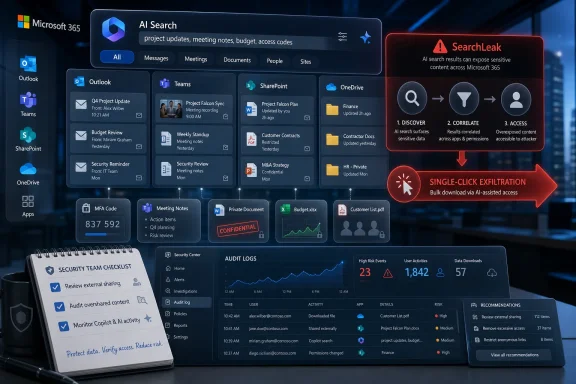 The Verdict Is Conditional, Not Ideological
The wrong lesson from SearchLeak is that every organization should rip out Copilot. The equally wrong lesson is that Microsoft’s security model makes the incident irrelevant because Copilot “only sees what the user can see.” Both answers dodge the operational question administrators actually have to answer this week.If your Microsoft 365 environment is clean, labeled, least-privilege, and monitored, SearchLeak is a prompt to verify and harden rather than an automatic stop sign. If your environment is the normal enterprise swamp of legacy SharePoint permissions, stale Teams, permissive mailboxes, sensitive files in broad groups, and users receiving one-time codes in Outlook, the answer changes. Copilot Search should not be treated as a harmless productivity surface until the data plane underneath it is brought under control.
The reason is simple: Copilot inherits existing access controls, but inherited access is only as safe as the access model being inherited. In many organizations, “what the user can access” already includes far more than what the user should access. SearchLeak matters because it turns that familiar governance problem into an AI-assisted exfiltration problem.
Microsoft’s own guidance frames Copilot as a layered security system with defenses against prompt injection and data-exfiltration scenarios. That is important, and it should not be dismissed. But the same guidance also acknowledges leakage paths involving unauthenticated images and malicious images, which is another way of saying that the boundary between “the model answered a question” and “the system emitted data somewhere unsafe” remains an active engineering problem.
One Click Changes the Risk Calculation
SearchLeak’s most important detail is not that it involved Copilot. It is that Varonis describes the attack as a three-stage vulnerability chain capable of turning Microsoft 365 Copilot Enterprise Search into a single-click data theft mechanism.That single-click requirement matters because it lives in the real world of enterprise compromise. Users click links. Executives click links. Help desk staff click links while juggling tickets. A control model that assumes the user will never activate a malicious path is not a control model; it is a hope with branding.
The reported data classes are also telling: MFA codes, email messages, meeting details, and private organizational files. That is not an abstract “AI safety” concern. That is the exact material an attacker wants during account takeover, business email compromise, ransomware staging, insider reconnaissance, or competitive intelligence theft.
MFA codes are especially uncomfortable because many organizations still route sign-in and recovery flows through email. If an attacker can cause an AI-powered enterprise search interface to retrieve recent one-time codes or password-reset messages in the user’s context, the compromise chain becomes much shorter. The same applies to meeting details that reveal incident response calls, acquisition discussions, legal strategy, or internal security escalations.
This is where AI search differs from ordinary search. A traditional search box returns documents, messages, and links that a human must triage. Copilot can summarize, correlate, and surface the important parts. That is the product promise — and, in the wrong chain, the attacker’s productivity gain.
Microsoft’s “Inherited Permissions” Argument Is True but Incomplete
Microsoft has consistently emphasized that Microsoft 365 Copilot respects existing Microsoft 365 permissions. In a narrow technical sense, that is the right foundation. Copilot should not magically bypass SharePoint, Exchange, Teams, OneDrive, or Microsoft Graph access controls.But inherited permissions are not the same as safe permissions. They are a mirror. If the mirror reflects a tenant where “Everyone except external users” can read too much, where former project members retain access to sensitive Teams, or where managers’ assistants have broad mailbox rights that were never revisited, Copilot does not solve that. It makes the reflection easier to query.
This is the core governance gap that too much Copilot coverage still softens. AI did not create the oversharing problem in Microsoft 365. It made the cost of ignoring it harder to defend.
The old enterprise bargain was that bad permissions were mitigated by friction. A user might technically have access to thousands of documents, but finding the damaging one required knowing where to look. Copilot compresses that friction into a prompt, and SearchLeak reportedly showed how a malicious chain could weaponize that compression.
That is why the go/no-go decision should begin with data exposure, not with license enthusiasm. If you cannot answer which users can reach sensitive mail, files, meeting records, and credentials-adjacent messages, you are not ready to rely on Copilot’s inherited-permissions model as your primary comfort blanket.
The New Guidance Says the Quiet Part Out Loud
Microsoft’s June 9, 2026 investigation guidance is significant because it treats AI activity as something defenders already need to reconstruct. That is a notable shift from theoretical AI risk to incident response reality. Security teams are not merely asking whether Copilot could expose unexpected data; they are being told how to investigate activity involving Microsoft 365 Copilot and unexpected data access.That should sharpen the planning conversation inside every tenant. If your SOC cannot explain what a user asked Copilot, what data Copilot accessed, and whether the result touched sensitive material, then your rollout is ahead of your evidence trail. You may still choose to proceed, but you should do so knowingly.
The investigation angle also changes how administrators should think about pilots. A pilot with enthusiastic business users but no security telemetry is not a pilot; it is a live deployment with a small blast radius and poor instrumentation. A real pilot should test whether the organization can detect, investigate, and explain anomalous AI-assisted access.
This is particularly important because prompt-driven incidents may not look like conventional intrusions. There may be no malware beacon, no suspicious executable, no impossible travel event, and no obvious mailbox rule. The suspicious object may be a user interaction with an AI service that returned data the organization did not expect that user to assemble.
For WindowsForum readers who have followed earlier Copilot security stories, including the EchoLeak discussions and ransomware-themed Copilot abuse threads, SearchLeak fits a pattern. The risk is not that Copilot is uniquely reckless. The risk is that enterprise AI now sits directly on top of the same identity, collaboration, and data sprawl problems admins have been trying to tame for years.
A Pause Is Not Panic When the Data Estate Is Messy
There is a stigma in enterprise IT around pausing a rollout. Vendors hear “delay.” Business sponsors hear “blocker.” Security teams hear “we are about to be blamed for slowing innovation again.”But a targeted pause after SearchLeak is defensible if the organization cannot prove that sensitive data exposure is constrained. The pause should be framed as a control validation window, not as an anti-AI posture. The message to leadership should be blunt: Copilot can inherit access faster than we can explain it, so we are verifying the access model before expanding the audience.
The best candidates for a pause are easy to identify. If users commonly receive MFA codes or recovery links by email, if executives and finance teams store sensitive material in broadly accessible Teams or SharePoint sites, if meeting transcripts contain legal or HR content without consistent labeling, or if admins cannot quickly review Copilot-related activity, the rollout deserves a checkpoint.
A pause does not have to mean turning everything off for everyone. It can mean holding expansion, restricting licenses to a hardened pilot group, disabling access for high-risk departments until permissions are reviewed, or isolating Copilot use to users whose data exposure has already been audited. The point is to stop treating “enabled” as the default state before the tenant is ready.
For smaller organizations, the calculus can be even harsher. Many SMB tenants lack dedicated data governance teams, mature sensitivity labeling, or a SOC that can reconstruct AI activity. Those environments may benefit from Copilot, but they are also less likely to notice when AI-assisted access behaves strangely.
The Admin Checklist Starts With Boring Controls
The immediate response to SearchLeak should not be a hunt for magic AI security settings. It should start with the unglamorous controls that determine what Copilot can retrieve in the first place.Review the users and groups included in your current or planned Copilot deployment. If the rollout includes broad executive, finance, legal, HR, IT, or security populations, treat those groups as higher risk. These are precisely the users whose accessible content is most valuable if a prompt-driven exfiltration path appears.
Next, inspect where sensitive data actually lives. Look at Exchange mail patterns, Teams meeting artifacts, SharePoint libraries, OneDrive sharing, and old Microsoft 365 groups that have accumulated permissions over time. The question is not whether a document is confidential in policy language; it is whether ordinary users can still reach it through inherited access.
Then review whether sensitive data is being sent through channels Copilot can search. MFA codes, password reset messages, incident bridge details, legal negotiations, and private HR material should not be casually retrievable through a general-purpose AI assistant. If those workflows remain in email and meetings, Copilot’s access to them deserves special scrutiny.
Finally, test your investigation path before you need it. Microsoft’s new guidance around reconstructing Copilot activity and unexpected data access should be treated as a runbook input, not a PDF to bookmark for later. If an executive asks tomorrow whether Copilot exposed a sensitive file, your team should already know where to look and who has authority to review the evidence.
The Security Boundary Has Moved From Files to Flows
Traditional Microsoft 365 security thinking often begins with containers: mailboxes, sites, Teams, libraries, groups, and labels. That still matters. But Copilot pushes defenders to think in flows.A user prompt can draw from mail, meetings, chats, files, and organizational context. A malicious prompt-injection chain can try to influence how that retrieval and response process behaves. A leakage path can involve rendered content, images, links, or other output mechanisms that were never the central concern of ordinary document access governance.
That is why Microsoft’s layered defenses are necessary but not sufficient as a customer-side risk answer. The vendor has to harden the AI application. The customer still has to harden the data universe the AI is allowed to traverse.
This is also where data-loss prevention needs to evolve from a compliance checkbox into an AI-era control. DLP rules that were designed to stop users from emailing credit card numbers may not fully answer whether Copilot should summarize a sensitive file, combine it with meeting context, or include it in a response that could be manipulated by hostile instructions. The policy intent is familiar, but the interaction pattern is new.
Security teams should assume that attackers will keep experimenting with prompt injection, content rendering, images, search parameters, and trusted Microsoft domains. SearchLeak is not the final form of this class of attack. It is another proof point that the attack surface now includes how AI systems interpret and present enterprise data.
Enthusiasts Should Watch the Enterprise Lesson, Too
Windows enthusiasts may be tempted to see this as a corporate Microsoft 365 problem, separate from the consumer Copilot experience or Copilot+ PC debates. That separation is only partly true. The specific SearchLeak report concerns Microsoft 365 Copilot Enterprise Search, but the broader lesson applies wherever AI assistants gain access to personal or organizational context.The more useful an assistant becomes, the more sensitive its reachable context becomes. Mail, calendars, files, chats, screenshots, browser context, and local documents are all productivity goldmines. They are also attacker goldmines.
For home users and power users, the practical lesson is to avoid casually feeding AI systems credentials, recovery codes, private documents, or account-reset material. For admins, the lesson is larger: do not deploy AI as a new interface to old chaos. Clean up the chaos first, or at least contain it before giving it a natural-language front end.
This is not an argument against AI search. It is an argument against pretending that search is still just search once the interface can infer, summarize, and act across a graph of enterprise data.
The Sensible Rollout Is Smaller, Slower, and Better Instrumented
A mature Copilot rollout after SearchLeak should look less like a license assignment project and more like a security program. The first wave should include users whose permissions have been reviewed, whose sensitive data exposure is understood, and whose activity can be monitored. The second wave should not begin until the first wave has produced evidence.That evidence should include mundane but critical answers. Did Copilot surface documents users did not expect to see? Did meeting summaries expose sensitive details to users with inherited access? Did users discover stale SharePoint content that should have been archived or restricted years ago? Did the SOC successfully reconstruct AI activity when asked?
If those answers are uncomfortable, the rollout is doing its job. Copilot pilots should reveal hidden governance debt before attackers do. A pilot that only measures user satisfaction misses half the product’s enterprise impact.
Business leaders may resist this slower approach because Copilot is sold as an acceleration tool. But deploying it into an ungoverned tenant can accelerate the wrong things: discovery of sensitive files, correlation of internal conversations, and extraction of security-adjacent material. The productivity case and the security case must move together.
The right posture is not permanent paralysis. It is staged adoption with kill switches, monitoring, access reviews, and a willingness to say that some departments are not ready yet.
SearchLeak Makes the Rollout Decision Concrete
The immediate value of the SearchLeak disclosure is that it gives IT and security teams a sharper decision framework. You do not have to settle the philosophical debate over AI in the workplace. You have to decide whether your current controls can withstand a prompt-driven path to sensitive Microsoft 365 data.- Keep Copilot Search enabled for users whose Microsoft 365 permissions, sensitive data exposure, and investigation coverage have already been reviewed.
- Pause expansion if your tenant has known oversharing in SharePoint, Teams, OneDrive, Exchange, or Microsoft 365 groups.
- Treat email-based MFA codes, password resets, incident details, legal discussions, HR records, and executive meeting content as high-risk data classes for Copilot exposure.
- Validate that your security team can reconstruct Microsoft 365 Copilot activity involving unexpected data access before a real incident forces the question.
- Do not rely on Microsoft’s inherited-permissions model as proof of safety unless you have also proven that the inherited permissions are correct.
- Resume rollout in phases only after you can explain what Copilot can reach, what it returned, and how you would detect suspicious AI-assisted access.
References
- Primary source: learn.microsoft.com

Security for Microsoft 365 Copilot
Learn how Microsoft secures Microsoft 365 Copilot and how Copilot inherits Microsoft 365 security, compliance, and privacy protections.learn.microsoft.com - Independent coverage: microsoft.com
Loading…
www.microsoft.com - Independent coverage: thehackernews.com
Loading…
thehackernews.com - Independent coverage: aim.security
Loading…
www.aim.security - Independent coverage: cdn-dynmedia-1.microsoft.com
Microsoft Copilot for Microsoft 365
Microsoft Copilot for Microsoft 365cdn-dynmedia-1.microsoft.com
- Primary source: WindowsForum
Loading…
windowsforum.com