

Google disclosed CVE-2026-11643 on June 8, 2026, as a critical use-after-free vulnerability in Chrome’s Proxy component affecting versions before 149.0.7827.103, with NVD later listing affected Chrome builds on Windows, macOS, and Linux. The uncomfortable part is not merely that Chrome had another memory-safety bug. It is that this one lives near the machinery that decides how browser traffic finds its way to the network. For Windows users and administrators, the patch is simple; the lesson is not.
CVE-2026-11643 is described in the plain vocabulary of modern browser security: a use after free in Proxy allowed a remote attacker to execute arbitrary code via malicious network traffic. That phrasing is doing a lot of work. It says the bug is memory corruption, it says the attack surface is reachable over the network, and it says user interaction is not part of the assigned CVSS vector.
That does not mean every vulnerable Chrome installation was one packet away from compromise in the crude, wormable sense. CISA’s ADP score assigned high attack complexity, which is the scoring system’s way of saying exploitation depends on conditions more finicky than “send request, get shell.” But the absence of required privileges or user interaction is still the part that should make administrators sit up.
Chrome’s proxy stack is not glamorous. It is the kind of browser plumbing most users never see unless a corporate PAC file breaks, a VPN client inserts itself in the path, or a captive portal refuses to behave. Yet that is precisely why a critical vulnerability there matters. The browser is no longer just a renderer for web pages; it is a policy endpoint, a network client, an identity broker, and, in many organizations, the most exposed application on the machine.
For WindowsForum readers, the practical advice is straightforward: do not split hairs between .102 and .103 if Chrome’s built-in updater offers a newer 149.0.7827 build. Open Chrome’s About page, let it check, relaunch, and verify the installed version after restart. In managed environments, confirm the version through your endpoint management platform rather than assuming the browser’s silent updater completed across the fleet.
This is where vulnerability management dashboards can mislead. A scanner ingesting NVD’s CPE configuration may flag “Chrome before 149.0.7827.103” even where Google’s Windows channel has remediated at 149.0.7827.102. That is not a reason to ignore the finding; it is a reason to validate against vendor release notes and actual installed builds.
The CPE record itself is also worth reading carefully. NVD lists Google Chrome with operating-system conditions covering Windows, Linux, and macOS. That is not “Windows is vulnerable” in isolation. It means Chrome, when installed on those operating systems, is the vulnerable product. This distinction matters in asset inventories because remediation belongs to the browser update channel, not Windows Update.
The June 8 Chrome update included 74 security fixes, and the externally highlighted list leaned heavily on memory-safety issues. CVE-2026-11643 sat among a run of critical use-after-free flaws affecting components such as Ozone, Aura, Bluetooth, Autofill, Views, Printing, Compositing, Web Apps, and Proxy. That breadth is the story. The modern browser is a large operating environment stitched together from performance-sensitive components, and performance-sensitive components are often written in languages where memory lifetime bugs remain possible.
Google and the broader Chromium project have been investing in mitigations, fuzzing, sandboxing, and memory-safe language work. Those efforts matter. They reduce exploit reliability, shrink blast radius, and catch classes of flaws before release. But CVE-2026-11643 is a reminder that defensive depth does not abolish the need for fast patching.
It is also a reminder that “critical” in Chromium’s severity taxonomy is not marketing noise. Chrome’s process model and sandbox are designed to contain compromised renderer code, but bugs in browser-adjacent services, network plumbing, IPC boundaries, and privileged components can change the shape of the attack. When the affected component is Proxy, administrators should think less about web-page rendering and more about the trusted machinery that makes browser traffic happen.
CVE-2026-11643, by contrast, is not publicly described as exploited in the wild. That difference matters. We should not inflate every critical Chrome bug into a confirmed campaign. But treating non-zero-day criticals as second-class work is how organizations end up patching only after proof of exploitation appears, which is often too late.
The more useful framing is that Chrome 149’s June 8 update was a cluster of serious memory-safety fixes, one of which had confirmed exploitation and several of which had severe theoretical consequences. CVE-2026-11643 belongs in that cluster. It may not be the headline zero-day, but it is the kind of vulnerability attackers study quickly once a patch ships and bug metadata begins to leak through the ecosystem.
Chrome’s policy of restricting bug details until most users are updated is part of that race. It protects users from instant weaponization, but it also leaves defenders with deliberately sparse information. The right operational response is not to wait for a proof of concept. It is to treat the version boundary as the actionable fact.
That posture changes how CVE-2026-11643 should land. If a remote attacker can potentially execute code through malicious network traffic, then “the user did not click anything suspicious” is not a satisfying control. Network position, proxy configuration, captive-portal behavior, malware already present on the local network, and hostile infrastructure all become part of the threat model.
For unmanaged home systems, automatic update plus relaunch is probably enough. For businesses, the hard part is not acquiring the patch. It is proving that the patch has actually landed everywhere: persistent VDI images, lab machines, kiosk devices, developer workstations, offline laptops, jump boxes, and servers where Chrome exists because someone once needed a browser for a vendor portal.
Edge complicates the story in the usual Chromium way. Microsoft Edge is Chromium-based, but Chrome CVEs do not automatically mean Edge is vulnerable at the same version boundary or patched on the same schedule. Administrators should track Edge through Microsoft’s own release notes and update channel, not infer Edge exposure solely from a Google Chrome CPE.
This is the vulnerability management world we now live in. The canonical public database may contain enough information to act, but not enough enrichment to satisfy every automated workflow on day one. If your patch process waits for perfect NVD scoring, Chrome will outrun you. Browser security requires vendor-feed-first operations.
That does not mean NVD is useless. It remains valuable for normalization, asset matching, historical tracking, and integration across tooling. But CVE-2026-11643 shows the limits of treating NVD as the starting pistol. The starting pistol was Google’s Stable Channel update.
Security teams should therefore tune their Chrome process around release channels, not just CVE ingestion. Watch vendor advisories, map fixed versions to your platforms, check management telemetry, and use NVD as a corroborating record rather than the only source of truth. The difference is not academic when the update contains both a critical proxy bug and a separately exploited V8 bug.
Browser auto-update works well on machines that are online, healthy, and regularly restarted. Enterprise fleets contain many machines that are none of those things. Chrome may download an update but wait for relaunch. A managed device may have update policies that pin versions for compatibility. A security appliance may report a stale executable sitting on disk even though the active browser has moved on.
CVE-2026-11643 is the kind of flaw that punishes that messiness. Because the vulnerable component is not a niche extension or obscure flag, defenders cannot assume only unusual configurations are exposed. Proxy behavior is core browser behavior, and even organizations with direct internet access may have PAC files, explicit proxies, VPN clients, TLS inspection, or security agents touching the same path.
The remediation job is therefore broader than “tell users to update.” It is inventory, enforcement, relaunch, and verification. For Windows shops, that means leaning on Intune, Group Policy, enterprise browser management, EDR inventory, or software deployment tooling to confirm the browser build, not just the installed product name.
Routine is dangerous here. The browser is where untrusted content meets trusted identity. It is also where attackers get the best return on exploit investment because the target base is huge and the patch window is uneven. Every day between vendor release and fleet convergence is an opportunity.
The right comparison is not between CVE-2026-11643 and some catastrophic unauthenticated server RCE. The comparison is between a patched browser and an unpatched browser that employees use all day to access mail, documents, admin consoles, password managers, and internal tools. In that comparison, even a high-complexity exploit deserves fast treatment.
There is also a defensive communications lesson. Users understand “restart Chrome to finish updating” better than they understand CVE numbers. Administrators should be blunt: Chrome needs to be relaunched after update, and leaving it open for days can leave the old code running. Browser patching is no longer complete when the package is downloaded.
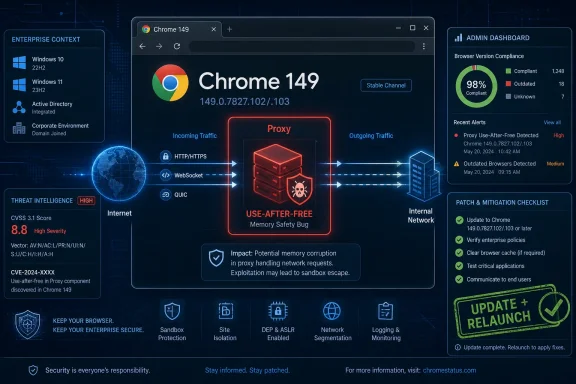 Chrome’s Proxy Bug Is a Reminder That the Browser Is Now Network Infrastructure
CVE-2026-11643 is described in the plain vocabulary of modern browser security: a use after free in Proxy allowed a remote attacker to execute arbitrary code via malicious network traffic. That phrasing is doing a lot of work. It says the bug is memory corruption, it says the attack surface is reachable over the network, and it says user interaction is not part of the assigned CVSS vector.That does not mean every vulnerable Chrome installation was one packet away from compromise in the crude, wormable sense. CISA’s ADP score assigned high attack complexity, which is the scoring system’s way of saying exploitation depends on conditions more finicky than “send request, get shell.” But the absence of required privileges or user interaction is still the part that should make administrators sit up.
Chrome’s proxy stack is not glamorous. It is the kind of browser plumbing most users never see unless a corporate PAC file breaks, a VPN client inserts itself in the path, or a captive portal refuses to behave. Yet that is precisely why a critical vulnerability there matters. The browser is no longer just a renderer for web pages; it is a policy endpoint, a network client, an identity broker, and, in many organizations, the most exposed application on the machine.
The Version Number Tells a More Complicated Story Than the CVE
Google’s June 8 Stable Channel update moved desktop Chrome to 149.0.7827.102/.103 for Windows and macOS and 149.0.7827.102 for Linux, with the usual staged rollout language. NVD’s entry for CVE-2026-11643 uses “prior to 149.0.7827.103,” while some advisories describe Windows and Linux as fixed at .102 and macOS at .103. That mismatch is not a mystery so much as a reminder that version metadata is often less tidy than security teams want it to be.For WindowsForum readers, the practical advice is straightforward: do not split hairs between .102 and .103 if Chrome’s built-in updater offers a newer 149.0.7827 build. Open Chrome’s About page, let it check, relaunch, and verify the installed version after restart. In managed environments, confirm the version through your endpoint management platform rather than assuming the browser’s silent updater completed across the fleet.
This is where vulnerability management dashboards can mislead. A scanner ingesting NVD’s CPE configuration may flag “Chrome before 149.0.7827.103” even where Google’s Windows channel has remediated at 149.0.7827.102. That is not a reason to ignore the finding; it is a reason to validate against vendor release notes and actual installed builds.
The CPE record itself is also worth reading carefully. NVD lists Google Chrome with operating-system conditions covering Windows, Linux, and macOS. That is not “Windows is vulnerable” in isolation. It means Chrome, when installed on those operating systems, is the vulnerable product. This distinction matters in asset inventories because remediation belongs to the browser update channel, not Windows Update.
Use-After-Free Bugs Keep Winning Because C++ Still Runs the Web
A use-after-free flaw occurs when software continues to use memory after it has been released. In safe conditions, that becomes a crash. In hostile conditions, an attacker may be able to shape what occupies that memory next and redirect program behavior. Browser vendors have spent years adding mitigations to make that harder, but Chrome’s security bulletins remain crowded with this class of bug.The June 8 Chrome update included 74 security fixes, and the externally highlighted list leaned heavily on memory-safety issues. CVE-2026-11643 sat among a run of critical use-after-free flaws affecting components such as Ozone, Aura, Bluetooth, Autofill, Views, Printing, Compositing, Web Apps, and Proxy. That breadth is the story. The modern browser is a large operating environment stitched together from performance-sensitive components, and performance-sensitive components are often written in languages where memory lifetime bugs remain possible.
Google and the broader Chromium project have been investing in mitigations, fuzzing, sandboxing, and memory-safe language work. Those efforts matter. They reduce exploit reliability, shrink blast radius, and catch classes of flaws before release. But CVE-2026-11643 is a reminder that defensive depth does not abolish the need for fast patching.
It is also a reminder that “critical” in Chromium’s severity taxonomy is not marketing noise. Chrome’s process model and sandbox are designed to contain compromised renderer code, but bugs in browser-adjacent services, network plumbing, IPC boundaries, and privileged components can change the shape of the attack. When the affected component is Proxy, administrators should think less about web-page rendering and more about the trusted machinery that makes browser traffic happen.
The Zero-Day Nearby Should Not Distract From the Critical Bug in Front of Us
The same June 8 update also included CVE-2026-11645, a V8 out-of-bounds memory access vulnerability that Google said had an exploit in the wild. That bug understandably attracted the faster headlines because active exploitation changes patch urgency from “soon” to “now.” CISA added CVE-2026-11645 to its Known Exploited Vulnerabilities catalog on June 9.CVE-2026-11643, by contrast, is not publicly described as exploited in the wild. That difference matters. We should not inflate every critical Chrome bug into a confirmed campaign. But treating non-zero-day criticals as second-class work is how organizations end up patching only after proof of exploitation appears, which is often too late.
The more useful framing is that Chrome 149’s June 8 update was a cluster of serious memory-safety fixes, one of which had confirmed exploitation and several of which had severe theoretical consequences. CVE-2026-11643 belongs in that cluster. It may not be the headline zero-day, but it is the kind of vulnerability attackers study quickly once a patch ships and bug metadata begins to leak through the ecosystem.
Chrome’s policy of restricting bug details until most users are updated is part of that race. It protects users from instant weaponization, but it also leaves defenders with deliberately sparse information. The right operational response is not to wait for a proof of concept. It is to treat the version boundary as the actionable fact.
Windows Admins Should Patch the Browser Like an Edge Service
In many enterprises, Chrome still gets treated as a user application. It should be treated more like an internet-facing service with a GUI. It processes untrusted content continuously, carries authenticated sessions, obeys enterprise policy, speaks through proxies, handles certificates, and often bridges personal browsing, SaaS administration, internal portals, and privileged cloud consoles.That posture changes how CVE-2026-11643 should land. If a remote attacker can potentially execute code through malicious network traffic, then “the user did not click anything suspicious” is not a satisfying control. Network position, proxy configuration, captive-portal behavior, malware already present on the local network, and hostile infrastructure all become part of the threat model.
For unmanaged home systems, automatic update plus relaunch is probably enough. For businesses, the hard part is not acquiring the patch. It is proving that the patch has actually landed everywhere: persistent VDI images, lab machines, kiosk devices, developer workstations, offline laptops, jump boxes, and servers where Chrome exists because someone once needed a browser for a vendor portal.
Edge complicates the story in the usual Chromium way. Microsoft Edge is Chromium-based, but Chrome CVEs do not automatically mean Edge is vulnerable at the same version boundary or patched on the same schedule. Administrators should track Edge through Microsoft’s own release notes and update channel, not infer Edge exposure solely from a Google Chrome CPE.
NVD’s Lag Is Now Part of the Vulnerability
One of the more revealing details in the CVE-2026-11643 entry is not the bug description, but the enrichment state. NVD had not yet provided its own CVSS 4.0, CVSS 3.x, or CVSS 2.0 base score at the time reflected in the entry, while CISA-ADP supplied a CVSS 3.1 score of 8.1 High. The record still contained useful data: CWE-416, vendor references, affected Chrome versions, and the change history.This is the vulnerability management world we now live in. The canonical public database may contain enough information to act, but not enough enrichment to satisfy every automated workflow on day one. If your patch process waits for perfect NVD scoring, Chrome will outrun you. Browser security requires vendor-feed-first operations.
That does not mean NVD is useless. It remains valuable for normalization, asset matching, historical tracking, and integration across tooling. But CVE-2026-11643 shows the limits of treating NVD as the starting pistol. The starting pistol was Google’s Stable Channel update.
Security teams should therefore tune their Chrome process around release channels, not just CVE ingestion. Watch vendor advisories, map fixed versions to your platforms, check management telemetry, and use NVD as a corroborating record rather than the only source of truth. The difference is not academic when the update contains both a critical proxy bug and a separately exploited V8 bug.
The Real Risk Is the Fleet You Forgot Had Chrome
The most exposed Chrome installations are not always the ones on primary employee laptops. They are the leftovers. A conference-room PC that never gets rebooted. A build server with a stale browser used for testing. A point-of-sale back office machine. A golden image that quietly bakes in an old installer. A local admin’s spare workstation in a closet.Browser auto-update works well on machines that are online, healthy, and regularly restarted. Enterprise fleets contain many machines that are none of those things. Chrome may download an update but wait for relaunch. A managed device may have update policies that pin versions for compatibility. A security appliance may report a stale executable sitting on disk even though the active browser has moved on.
CVE-2026-11643 is the kind of flaw that punishes that messiness. Because the vulnerable component is not a niche extension or obscure flag, defenders cannot assume only unusual configurations are exposed. Proxy behavior is core browser behavior, and even organizations with direct internet access may have PAC files, explicit proxies, VPN clients, TLS inspection, or security agents touching the same path.
The remediation job is therefore broader than “tell users to update.” It is inventory, enforcement, relaunch, and verification. For Windows shops, that means leaning on Intune, Group Policy, enterprise browser management, EDR inventory, or software deployment tooling to confirm the browser build, not just the installed product name.
The Patch Window Is the Security Boundary
Chrome’s release cadence is designed for speed. That is a strength, but it also creates a cultural problem: frequent updates can make individual advisories feel routine. A critical use-after-free in Proxy becomes one line in a long bulletin, which becomes one more ticket in a queue already full of operating-system updates, VPN client fixes, firmware advisories, and SaaS configuration warnings.Routine is dangerous here. The browser is where untrusted content meets trusted identity. It is also where attackers get the best return on exploit investment because the target base is huge and the patch window is uneven. Every day between vendor release and fleet convergence is an opportunity.
The right comparison is not between CVE-2026-11643 and some catastrophic unauthenticated server RCE. The comparison is between a patched browser and an unpatched browser that employees use all day to access mail, documents, admin consoles, password managers, and internal tools. In that comparison, even a high-complexity exploit deserves fast treatment.
There is also a defensive communications lesson. Users understand “restart Chrome to finish updating” better than they understand CVE numbers. Administrators should be blunt: Chrome needs to be relaunched after update, and leaving it open for days can leave the old code running. Browser patching is no longer complete when the package is downloaded.
The Concrete Work Hiding Behind Chrome 149
CVE-2026-11643 should push Windows administrators toward a short, practical checklist, not panic. The fix exists. The vendor has shipped it. The job is to close the distance between the advisory and the machines that actually run code.- Confirm that Chrome on Windows and macOS is on the fixed 149.0.7827.102/.103 line or newer, and do not rely on the product merely reporting that updates are enabled.
- Force or strongly prompt a browser relaunch where Chrome has downloaded the update but the old process is still running.
- Validate browser versions through management telemetry across laptops, VDI pools, kiosks, lab systems, and rarely used administrative workstations.
- Treat NVD’s CPE and scoring data as useful context, but prioritize Google’s release notes and installed-version evidence for remediation decisions.
- Track Microsoft Edge separately through Microsoft’s release channel instead of assuming Chrome’s version boundary maps perfectly to every Chromium-based browser.
- Review proxy, PAC, VPN, and TLS-inspection environments for stale managed devices, because proxy-adjacent browser bugs are most relevant where network path complexity is highest.
References
- Primary source: NVD / Chromium
Published: 2026-06-15T19:13:50-07:00

NVD - CVE-2026-11643
 nvd.nist.gov
- Security advisory: MSRC
Published: 2026-06-15T19:13:50-07:00
Original feed URL

Security Update Guide - Microsoft Security Response Center
 msrc.microsoft.com
- Related coverage: govcert.gov.hk

GovCERT.HK - Security Alert (A26-06-08): Multiple Vulnerabilities in Google Chrome
Security Alert (A26-06-08): Multiple Vulnerabilities in Google Chromewww.govcert.gov.hk
- Related coverage: labs.cloudsecurityalliance.org
CSA research note nist nvd riskbased enrichment governance 20260426 csa styled
PDF documentlabs.cloudsecurityalliance.org