

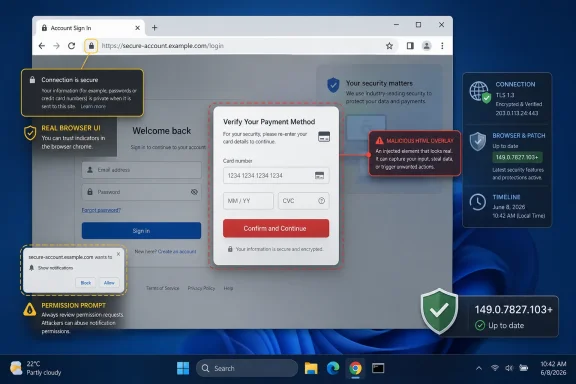
Google assigned CVE-2026-11666 to a high-severity Chrome flaw fixed on June 8, 2026, in desktop builds before 149.0.7827.103, where insufficient validation of untrusted input in the browser’s Input component could let a remote attacker spoof UI through a crafted HTML page. The narrow description makes it sound like a paperwork bug, but UI spoofing is one of those browser failures whose damage depends less on raw code execution than on where the user’s trust is silently redirected. For Windows users and administrators, the practical answer is simple: update Chrome and Chromium-derived browsers, then verify fleet inventory. The more interesting answer is that the CPE entry is probably not missing the obvious platform coverage; it is exposing how awkward vulnerability databases become when a browser is both an application and a cross-platform attack surface.
CVE-2026-11666 did not arrive alone. It was part of Google’s June 8 Stable Channel update for desktop Chrome, which moved Windows and macOS systems to the 149.0.7827.102/.103 line and Linux systems to 149.0.7827.102. Google said the update contained 74 security fixes, including a cluster of critical use-after-free bugs and high-severity issues across V8, WebRTC, Autofill, Printing, Bluetooth, Views, and other browser subsystems.
That matters because the instinct with a medium CVSS score is to triage the vulnerability into the “later” pile. NVD lists CVE-2026-11666 at 5.4 under CVSS 3.1, while Chromium labels it High. That mismatch is not necessarily an error; it reflects two different ways of thinking about browser risk.
CVSS rewards vulnerabilities that directly expose confidentiality, integrity, or availability in measurable ways. A UI spoofing bug can look modest in that framework because it requires user interaction and may not itself execute code. Browser vendors, however, tend to take UI deception seriously because the browser’s security model depends on the user being able to tell which origin, permission prompt, payment surface, identity flow, or security indicator they are actually interacting with.
In other words, this is not the kind of flaw that screams from a scanner dashboard. It is the kind that can make a user click the wrong thing with complete confidence.
Chrome spends enormous engineering effort separating web content from privileged browser chrome. Sites can draw pages, modals, overlays, and animations, but they should not be able to convincingly impersonate browser-owned surfaces such as permission prompts, address-bar states, download warnings, identity indicators, tab behavior, file pickers, or trusted navigation affordances. When a vulnerability breaks that expectation, attackers do not need to defeat cryptography. They can defeat the human reading the screen.
CVE-2026-11666 is described as insufficient validation of untrusted input in “Input,” which is not much to go on while Chromium issue details remain permission-restricted. That restriction is normal immediately after a Chrome security release; Google often limits access until enough users have received the patch. But the public description is enough to infer the shape of the risk: a crafted HTML page could manipulate how input-related UI is presented or interpreted, creating a believable mismatch between what the user sees and what the browser is actually doing.
That does not make CVE-2026-11666 a credential-theft exploit by itself. It does make it a useful ingredient. Phishing has long depended on fake login pages, fake SSO prompts, fake CAPTCHA flows, fake browser warnings, and fake support dialogs. A browser-level UI spoofing primitive can make those deceptions less fake-looking, and that is exactly why browser vendors do not treat visual trust bugs as mere polish defects.
That shape is not saying Windows, Linux, or macOS are themselves vulnerable to CVE-2026-11666. It is trying to express the affected product as Chrome running on those operating systems. In CPE logic, an “AND” configuration can be used to model a vulnerable application only when present on one of several platforms. The browser is the vulnerable application; the operating systems describe where that affected application configuration exists.
For most WindowsForum readers, the important point is that the Chrome CPE is the one that matters for remediation. You do not patch Windows to fix CVE-2026-11666. You patch Chrome. If your scanner shows this finding against Windows endpoints, it is usually because Chrome is installed on those endpoints, not because the Windows operating system contains the flaw.
Could the entry still be incomplete? Possibly, depending on how one expects CPE data to represent downstream Chromium consumers. NVD’s listed product is Google Chrome, not Microsoft Edge, Brave, Vivaldi, Opera, Electron apps, or other Chromium-based software. That is not necessarily a defect in this CVE record. It may simply reflect the source advisory and the product named by the assigning CNA.
That does not mean CVE-2026-11666 automatically maps one-for-one to every Chromium browser on day one. Some bugs sit in Chrome-specific UI, Google-specific services, or code paths not exposed the same way downstream. Others live squarely in shared Chromium code and must be treated as ecosystem vulnerabilities. Without public bug details, administrators should avoid overclaiming either way.
The conservative enterprise posture is to treat Chrome’s 149.0.7827.103 security line as a signal to check all Chromium browsers, not just Google Chrome. If Edge is managed by policy, verify the installed version through Microsoft’s normal update reporting or endpoint management tooling. If nonstandard browsers exist in developer workstations, lab machines, kiosks, or BYOD pockets, the update story becomes messier and more important.
This is where asset inventory earns its keep. A vulnerability that depends on a crafted HTML page does not need local privilege, lateral movement, or a domain foothold to begin. It needs a user, a browser, and a page.
Chromium’s High rating is not a contradiction so much as a warning about context. Browser vendors score bugs with an eye toward exploit chains, abuse patterns, and the sensitivity of the UI being spoofed. A vulnerability that helps an attacker fool a user into granting access, accepting a download, trusting a fake origin, or entering credentials can be operationally serious even if the vulnerability record cannot prove a direct integrity impact.
CVSS is especially awkward for deception vulnerabilities. The framework asks what the vulnerability directly changes. A UI spoofing bug may directly alter only what the user perceives, while the real-world consequence happens after the user acts on that false perception. That middle step lowers the formal score, but it does not make the attack harmless.
Security teams already understand this in other contexts. A malicious OAuth consent screen, a fake MFA prompt, or a lookalike IdP page can cause more damage than many “higher-scored” bugs. The risk is not just the primitive; it is the trust decision the primitive manipulates.
But patch urgency is not assigned one CVE at a time when the fix ships as a browser build. Users do not selectively install the CVE-2026-11666 patch while skipping the V8 patch. They install the Chrome update, and that update contains both the UI spoofing fix and the more urgent zero-day fix.
That is why the right operational message is not “CVE-2026-11666 is being exploited.” Based on the public record, that would be too strong. The accurate message is that CVE-2026-11666 was fixed in a Chrome release that also addressed an actively exploited Chrome zero-day, making prompt deployment of the entire update line the only sensible posture.
This distinction is more than pedantry. Security teams lose credibility when every bug becomes a “zero-day” in internal alerts. They also lose ground when they understate a bundle because one CVE in the bundle has a medium score. The patch, not the individual paragraph in NVD, is the unit of action.
In business environments, evidence means version reporting. Administrators should be able to say which endpoints are below the fixed Chrome line, which are waiting for a browser restart, which are blocked by policy, and which do not have Chrome installed at all. If a scanner flags the CPE but endpoint management says the browser is current, the next question is whether stale binaries, side-by-side installs, user-profile installs, or portable copies are being detected.
Chrome has a long tail problem on Windows because it can appear in several operational forms. There is machine-wide Chrome, user-level Chrome, Chrome in VDI images, Chrome in packaged application layers, Chrome in test harnesses, and Chromium embedded in tools that nobody in central IT remembers approving. The CPE model sees a product. The endpoint sees a mess.
That mess is why browser patching should be treated as infrastructure maintenance rather than user convenience. The browser is the runtime for email, identity, SaaS administration, banking, HR systems, support portals, password managers, and internal dashboards. When that runtime has a security update, the blast radius is measured in workflows, not just tabs.
Input is where the web page and the user meet. It is where a site asks for text, files, clicks, focus, selections, permissions, and confirmation. It is also where browsers apply guardrails so web content cannot smuggle untrusted assumptions into privileged UI or misrepresent the state of the interaction.
The web platform is full of edge cases because compatibility is brutal. A browser must support decades of content, complex event models, accessibility layers, international text handling, touch and pointer behavior, shadow DOM, autofill, virtual keyboards, payment flows, file pickers, and cross-origin isolation rules. Every one of those features has a security story.
That is why “insufficient validation of untrusted input” remains such a durable vulnerability class. It is not a beginner mistake that disappears from mature codebases. It is the recurring cost of letting untrusted documents ask a high-privilege application to render, parse, transform, and respond at human speed.
It is not enough to explain the exploit mechanics. That gap is deliberate. Browser vendors often keep bug details private during the early update window because publishing a precise technical recipe before broad patch adoption would help attackers. This frustrates defenders who want to assess exposure, but it is a reasonable trade-off when the vulnerable population is measured in hundreds of millions of installations.
The result is a familiar asymmetry. Attackers can reverse-engineer patches, diff builds, and hunt for the fixed code path. Defenders mostly get a version number and a sentence. That makes speed more important than perfect understanding.
For sysadmins, the lesson is not to wait for the perfect CVE write-up. By the time a browser vulnerability has a full public autopsy, the patch window that mattered most has already passed.
That is a tooling problem, not a reason to ignore the finding. Vulnerability scanners consume structured data that was never designed to capture every nuance of modern software supply chains cleanly. Browsers are especially hard because they are cross-platform applications, auto-updating runtimes, and shared upstream projects all at once.
The right remediation ticket should be written in plain language: update Google Chrome on affected desktop systems to the fixed release or later. If the environment uses Microsoft Edge or other Chromium-based browsers, check vendor updates separately. Do not assign the Windows team a kernel remediation task because an NVD configuration includes an operating-system CPE.
This is also a good moment to tune exception handling. If Chrome is not installed on a system but a scanner still reports CVE-2026-11666, investigate the detection logic. If Chrome is installed but current, check whether the scanner is seeing an old executable in a user profile, backup directory, software distribution cache, or golden image.
Modern users do not merely browse pages. They approve OAuth grants, accept passkey prompts, confirm WebAuthn actions, authorize device access, copy security codes, trust browser-generated warnings, and decide whether a page is part of a legitimate login chain. A vulnerability that makes the wrong thing look right can punch above its score.
This is especially true in enterprise environments where the browser is the front door to everything. A well-timed spoof during an SSO flow may not need malware. It may need only a convincing page, a tired employee, and a browser UI ambiguity that should not exist.
Defenders cannot patch human perception directly. They can patch the browser, reduce exposure to risky sites, harden identity flows, enforce phishing-resistant authentication, and train users not to trust visual familiarity alone. CVE-2026-11666 sits at the intersection of those controls.
That delay creates a strange limbo. The update may be downloaded, policy may be correct, and management may show progress, but the vulnerable process may still be running. For a crafted-page vulnerability, that distinction matters.
Administrators should pay close attention to pending relaunch states after high-volume Chrome security releases. Policy can force relaunch after a grace period, but too aggressive a setting will anger users and disrupt work. Too lenient a setting leaves critical browser code exposed long after the patch technically arrived.
The answer is not theatrical urgency for every browser update. It is a predictable browser restart policy that users understand before the emergency. If the first time employees hear about forced restarts is during a zero-day week, IT has already lost part of the argument.
But in this case, the most obvious missing entries are not Windows CPEs. Windows is already represented as a platform condition in the configuration. The more debatable omissions would be downstream Chromium products if and when vendors confirm that the same vulnerable code affects them.
That is a different kind of claim. Google Chrome’s CVE record should not automatically become a universal Chromium CVE record unless the affected code path and product exposure line up. Microsoft Edge, for example, should be tracked through Microsoft’s own advisory and release notes when Microsoft ships a corresponding fix. The same principle applies to other Chromium browsers.
So yes, there may be ecosystem follow-up work. No, the presence of Windows, Linux, and macOS in the NVD configuration does not mean the entry forgot to include Windows. The entry is clumsy in the way cross-platform CPE entries often are, but its remediation target remains clear.
The concrete reading is narrow but important:
 The Browser Patch Was Bigger Than This One CVE
CVE-2026-11666 did not arrive alone. It was part of Google’s June 8 Stable Channel update for desktop Chrome, which moved Windows and macOS systems to the 149.0.7827.102/.103 line and Linux systems to 149.0.7827.102. Google said the update contained 74 security fixes, including a cluster of critical use-after-free bugs and high-severity issues across V8, WebRTC, Autofill, Printing, Bluetooth, Views, and other browser subsystems.That matters because the instinct with a medium CVSS score is to triage the vulnerability into the “later” pile. NVD lists CVE-2026-11666 at 5.4 under CVSS 3.1, while Chromium labels it High. That mismatch is not necessarily an error; it reflects two different ways of thinking about browser risk.
CVSS rewards vulnerabilities that directly expose confidentiality, integrity, or availability in measurable ways. A UI spoofing bug can look modest in that framework because it requires user interaction and may not itself execute code. Browser vendors, however, tend to take UI deception seriously because the browser’s security model depends on the user being able to tell which origin, permission prompt, payment surface, identity flow, or security indicator they are actually interacting with.
In other words, this is not the kind of flaw that screams from a scanner dashboard. It is the kind that can make a user click the wrong thing with complete confidence.
UI Spoofing Is Social Engineering With a Browser Assist
The phrase UI spoofing has a habit of underselling itself. It sounds cosmetic, as if the bug merely allows an attacker to draw a convincing fake button. In a browser, the user interface is not decoration; it is part of the security boundary.Chrome spends enormous engineering effort separating web content from privileged browser chrome. Sites can draw pages, modals, overlays, and animations, but they should not be able to convincingly impersonate browser-owned surfaces such as permission prompts, address-bar states, download warnings, identity indicators, tab behavior, file pickers, or trusted navigation affordances. When a vulnerability breaks that expectation, attackers do not need to defeat cryptography. They can defeat the human reading the screen.
CVE-2026-11666 is described as insufficient validation of untrusted input in “Input,” which is not much to go on while Chromium issue details remain permission-restricted. That restriction is normal immediately after a Chrome security release; Google often limits access until enough users have received the patch. But the public description is enough to infer the shape of the risk: a crafted HTML page could manipulate how input-related UI is presented or interpreted, creating a believable mismatch between what the user sees and what the browser is actually doing.
That does not make CVE-2026-11666 a credential-theft exploit by itself. It does make it a useful ingredient. Phishing has long depended on fake login pages, fake SSO prompts, fake CAPTCHA flows, fake browser warnings, and fake support dialogs. A browser-level UI spoofing primitive can make those deceptions less fake-looking, and that is exactly why browser vendors do not treat visual trust bugs as mere polish defects.
The CPE Entry Looks Strange Because Chrome Lives on Top of Three Operating Systems
The user-facing CPE question is fair: are we missing a CPE here? At first glance, NVD’s configuration looks odd. It lists vulnerable Google Chrome versions up to but excluding 149.0.7827.103, and then combines that application CPE with operating-system CPEs for Microsoft Windows, Linux kernel, and Apple macOS.That shape is not saying Windows, Linux, or macOS are themselves vulnerable to CVE-2026-11666. It is trying to express the affected product as Chrome running on those operating systems. In CPE logic, an “AND” configuration can be used to model a vulnerable application only when present on one of several platforms. The browser is the vulnerable application; the operating systems describe where that affected application configuration exists.
For most WindowsForum readers, the important point is that the Chrome CPE is the one that matters for remediation. You do not patch Windows to fix CVE-2026-11666. You patch Chrome. If your scanner shows this finding against Windows endpoints, it is usually because Chrome is installed on those endpoints, not because the Windows operating system contains the flaw.
Could the entry still be incomplete? Possibly, depending on how one expects CPE data to represent downstream Chromium consumers. NVD’s listed product is Google Chrome, not Microsoft Edge, Brave, Vivaldi, Opera, Electron apps, or other Chromium-based software. That is not necessarily a defect in this CVE record. It may simply reflect the source advisory and the product named by the assigning CNA.
Edge Administrators Should Not Sleep on a Chrome CVE
The uncomfortable truth for Windows shops is that “Chrome vulnerability” often becomes “Chromium vulnerability” before the week is over. Microsoft Edge is built on Chromium, and although Microsoft ships its own browser packages, security-relevant Chromium fixes frequently flow into Edge after Google publishes the Chrome advisory. The same architectural reality applies to other Chromium-derived browsers, even when their branding and release channels differ.That does not mean CVE-2026-11666 automatically maps one-for-one to every Chromium browser on day one. Some bugs sit in Chrome-specific UI, Google-specific services, or code paths not exposed the same way downstream. Others live squarely in shared Chromium code and must be treated as ecosystem vulnerabilities. Without public bug details, administrators should avoid overclaiming either way.
The conservative enterprise posture is to treat Chrome’s 149.0.7827.103 security line as a signal to check all Chromium browsers, not just Google Chrome. If Edge is managed by policy, verify the installed version through Microsoft’s normal update reporting or endpoint management tooling. If nonstandard browsers exist in developer workstations, lab machines, kiosks, or BYOD pockets, the update story becomes messier and more important.
This is where asset inventory earns its keep. A vulnerability that depends on a crafted HTML page does not need local privilege, lateral movement, or a domain foothold to begin. It needs a user, a browser, and a page.
CVSS Says Medium, Chromium Says High, and Both Can Be Right
The NVD and CISA-ADP CVSS 3.1 vector for CVE-2026-11666 is straightforward: network attack vector, low complexity, no privileges required, user interaction required, unchanged scope, low confidentiality impact, no integrity impact, and low availability impact. That lands at 5.4, squarely Medium.Chromium’s High rating is not a contradiction so much as a warning about context. Browser vendors score bugs with an eye toward exploit chains, abuse patterns, and the sensitivity of the UI being spoofed. A vulnerability that helps an attacker fool a user into granting access, accepting a download, trusting a fake origin, or entering credentials can be operationally serious even if the vulnerability record cannot prove a direct integrity impact.
CVSS is especially awkward for deception vulnerabilities. The framework asks what the vulnerability directly changes. A UI spoofing bug may directly alter only what the user perceives, while the real-world consequence happens after the user acts on that false perception. That middle step lowers the formal score, but it does not make the attack harmless.
Security teams already understand this in other contexts. A malicious OAuth consent screen, a fake MFA prompt, or a lookalike IdP page can cause more damage than many “higher-scored” bugs. The risk is not just the primitive; it is the trust decision the primitive manipulates.
The Zero-Day in the Same Release Changes the Patch Urgency
CVE-2026-11666 is not the vulnerability Google said was exploited in the wild. That distinction matters. The actively exploited issue in the same Chrome release was CVE-2026-11645, a high-severity V8 memory access flaw. CISA added that separate CVE to its Known Exploited Vulnerabilities catalog on June 9, the day after Google’s advisory.But patch urgency is not assigned one CVE at a time when the fix ships as a browser build. Users do not selectively install the CVE-2026-11666 patch while skipping the V8 patch. They install the Chrome update, and that update contains both the UI spoofing fix and the more urgent zero-day fix.
That is why the right operational message is not “CVE-2026-11666 is being exploited.” Based on the public record, that would be too strong. The accurate message is that CVE-2026-11666 was fixed in a Chrome release that also addressed an actively exploited Chrome zero-day, making prompt deployment of the entire update line the only sensible posture.
This distinction is more than pedantry. Security teams lose credibility when every bug becomes a “zero-day” in internal alerts. They also lose ground when they understate a bundle because one CVE in the bundle has a medium score. The patch, not the individual paragraph in NVD, is the unit of action.
Windows Fleets Need Version Proof, Not Reassurance
On unmanaged home PCs, Chrome’s automatic updater usually does the job. The user opens the browser, the updater checks in, and a relaunch completes the process. That model is good enough for many consumers, but it is not evidence.In business environments, evidence means version reporting. Administrators should be able to say which endpoints are below the fixed Chrome line, which are waiting for a browser restart, which are blocked by policy, and which do not have Chrome installed at all. If a scanner flags the CPE but endpoint management says the browser is current, the next question is whether stale binaries, side-by-side installs, user-profile installs, or portable copies are being detected.
Chrome has a long tail problem on Windows because it can appear in several operational forms. There is machine-wide Chrome, user-level Chrome, Chrome in VDI images, Chrome in packaged application layers, Chrome in test harnesses, and Chromium embedded in tools that nobody in central IT remembers approving. The CPE model sees a product. The endpoint sees a mess.
That mess is why browser patching should be treated as infrastructure maintenance rather than user convenience. The browser is the runtime for email, identity, SaaS administration, banking, HR systems, support portals, password managers, and internal dashboards. When that runtime has a security update, the blast radius is measured in workflows, not just tabs.
The “Input” Component Is a Reminder That Small UI Bugs Sit Near Sensitive Flows
The public CVE text names “Input” as the affected area. Without the restricted Chromium issue, we should not pretend to know whether that means a specific input control, a subsystem around form handling, file input, event processing, focus management, or another browser component with that label. But the category is suggestive enough to explain why the bug is worth attention.Input is where the web page and the user meet. It is where a site asks for text, files, clicks, focus, selections, permissions, and confirmation. It is also where browsers apply guardrails so web content cannot smuggle untrusted assumptions into privileged UI or misrepresent the state of the interaction.
The web platform is full of edge cases because compatibility is brutal. A browser must support decades of content, complex event models, accessibility layers, international text handling, touch and pointer behavior, shadow DOM, autofill, virtual keyboards, payment flows, file pickers, and cross-origin isolation rules. Every one of those features has a security story.
That is why “insufficient validation of untrusted input” remains such a durable vulnerability class. It is not a beginner mistake that disappears from mature codebases. It is the recurring cost of letting untrusted documents ask a high-privilege application to render, parse, transform, and respond at human speed.
The Database Record Is Useful, but It Is Not the Whole Truth
NVD’s record gives defenders a common handle: CVE-2026-11666, CWE-20 from Chrome, NVD-CWE-noinfo from NIST, CVSS 5.4, affected Chrome versions before 149.0.7827.103, and references to Google’s release notes and the restricted Chromium issue. That is enough to power scanners, tickets, dashboards, and compliance reports.It is not enough to explain the exploit mechanics. That gap is deliberate. Browser vendors often keep bug details private during the early update window because publishing a precise technical recipe before broad patch adoption would help attackers. This frustrates defenders who want to assess exposure, but it is a reasonable trade-off when the vulnerable population is measured in hundreds of millions of installations.
The result is a familiar asymmetry. Attackers can reverse-engineer patches, diff builds, and hunt for the fixed code path. Defenders mostly get a version number and a sentence. That makes speed more important than perfect understanding.
For sysadmins, the lesson is not to wait for the perfect CVE write-up. By the time a browser vulnerability has a full public autopsy, the patch window that mattered most has already passed.
Scanner Noise Will Make This Look More Confusing Than It Is
The CPE wording will almost certainly generate confusing vulnerability-management output. Some tools may show Windows, macOS, or Linux in the affected configuration because NVD’s CPE logic includes those platforms. Others may normalize the finding simply as Google Chrome before 149.0.7827.103. A few may flag Linux kernel CPEs in ways that look absurd to anyone reading the underlying vulnerability description.That is a tooling problem, not a reason to ignore the finding. Vulnerability scanners consume structured data that was never designed to capture every nuance of modern software supply chains cleanly. Browsers are especially hard because they are cross-platform applications, auto-updating runtimes, and shared upstream projects all at once.
The right remediation ticket should be written in plain language: update Google Chrome on affected desktop systems to the fixed release or later. If the environment uses Microsoft Edge or other Chromium-based browsers, check vendor updates separately. Do not assign the Windows team a kernel remediation task because an NVD configuration includes an operating-system CPE.
This is also a good moment to tune exception handling. If Chrome is not installed on a system but a scanner still reports CVE-2026-11666, investigate the detection logic. If Chrome is installed but current, check whether the scanner is seeing an old executable in a user profile, backup directory, software distribution cache, or golden image.
UI Trust Is Now a First-Class Attack Surface
The browser security conversation still gravitates toward memory corruption, sandbox escapes, and JavaScript engine bugs. Those are serious, and the Chrome 149 update had plenty of them. But the last decade of attacks has also shown that identity and trust flows are just as important.Modern users do not merely browse pages. They approve OAuth grants, accept passkey prompts, confirm WebAuthn actions, authorize device access, copy security codes, trust browser-generated warnings, and decide whether a page is part of a legitimate login chain. A vulnerability that makes the wrong thing look right can punch above its score.
This is especially true in enterprise environments where the browser is the front door to everything. A well-timed spoof during an SSO flow may not need malware. It may need only a convincing page, a tired employee, and a browser UI ambiguity that should not exist.
Defenders cannot patch human perception directly. They can patch the browser, reduce exposure to risky sites, harden identity flows, enforce phishing-resistant authentication, and train users not to trust visual familiarity alone. CVE-2026-11666 sits at the intersection of those controls.
The Patch Is the Easy Part; the Restart Is the Trap
Chrome’s update model is one of the better success stories in consumer software security, but enterprise reality still has a stubborn weak spot: the browser must often restart to complete the update. Users leave browsers open for days. They keep SaaS sessions alive, preserve tab state, and avoid relaunches because relaunches interrupt work.That delay creates a strange limbo. The update may be downloaded, policy may be correct, and management may show progress, but the vulnerable process may still be running. For a crafted-page vulnerability, that distinction matters.
Administrators should pay close attention to pending relaunch states after high-volume Chrome security releases. Policy can force relaunch after a grace period, but too aggressive a setting will anger users and disrupt work. Too lenient a setting leaves critical browser code exposed long after the patch technically arrived.
The answer is not theatrical urgency for every browser update. It is a predictable browser restart policy that users understand before the emergency. If the first time employees hear about forced restarts is during a zero-day week, IT has already lost part of the argument.
CPE Completeness Should Not Become a Distraction
There is a legitimate metadata question here. NVD’s “Are we missing a CPE?” prompt exists because vulnerability data is imperfect and community feedback helps improve coverage. If an affected product is absent, reporting it can improve downstream detection. If a CPE is malformed or misleading, that also deserves correction.But in this case, the most obvious missing entries are not Windows CPEs. Windows is already represented as a platform condition in the configuration. The more debatable omissions would be downstream Chromium products if and when vendors confirm that the same vulnerable code affects them.
That is a different kind of claim. Google Chrome’s CVE record should not automatically become a universal Chromium CVE record unless the affected code path and product exposure line up. Microsoft Edge, for example, should be tracked through Microsoft’s own advisory and release notes when Microsoft ships a corresponding fix. The same principle applies to other Chromium browsers.
So yes, there may be ecosystem follow-up work. No, the presence of Windows, Linux, and macOS in the NVD configuration does not mean the entry forgot to include Windows. The entry is clumsy in the way cross-platform CPE entries often are, but its remediation target remains clear.
The Practical Reading for WindowsForum Readers
For Windows enthusiasts, this vulnerability is a reminder to check the browser version rather than trust the icon. For sysadmins, it is a reminder to separate CPE metadata from product remediation. For security teams, it is a reminder that a medium CVSS score can still belong to a browser bug worth moving quickly, especially when it ships in the same release as an actively exploited Chrome flaw.The concrete reading is narrow but important:
- Chrome versions before the fixed 149.0.7827.102/.103 desktop line should be treated as needing update, with 149.0.7827.103 or later being the clean version target when normalizing across platforms.
- CVE-2026-11666 is a Google Chrome UI spoofing vulnerability, not a Windows operating-system vulnerability.
- The NVD CPE configuration uses Windows, Linux, and macOS as platform conditions for Chrome, which can make scanner output look broader than the actual remediation.
- The public record does not show CVE-2026-11666 as exploited in the wild, but the same Chrome release fixed CVE-2026-11645, which Google and government advisories identify as actively exploited.
- Edge and other Chromium-based browsers should be checked through their own vendor update channels rather than assumed safe or assumed vulnerable without verification.
- Browser restart compliance matters because a downloaded update does not necessarily protect a still-running vulnerable browser process.
References
- Primary source: NVD / Chromium
Published: 2026-06-15T19:14:23-07:00

NVD - CVE-2026-11666
 nvd.nist.gov
- Security advisory: MSRC
Published: 2026-06-15T19:14:23-07:00
Original feed URL

Security Update Guide - Microsoft Security Response Center
 msrc.microsoft.com