

Microsoft’s June 9, 2026 Windows 11 update, KB5094126, adds expanded Task Manager monitoring for neural processing units on supported Windows 11 24H2 and 25H2 PCs, giving administrators a visible way to check whether AI-capable hardware is present and active. That sounds like a small instrumentation change, because in one sense it is. But for the AI PC market, it is also a quiet admission that hardware claims are not enough. Microsoft has spent two years telling buyers that the NPU matters; now Windows is beginning to give IT teams a way to ask the machine whether that silicon is actually being used.
The AI PC has always had a measurement problem. OEMs can print TOPS figures on spec sheets, Microsoft can define Copilot+ PCs around NPU performance, and chipmakers can argue about efficiency curves, but none of that helps an administrator sitting in front of a fleet pilot wondering whether a local workload is running where it was promised to run.
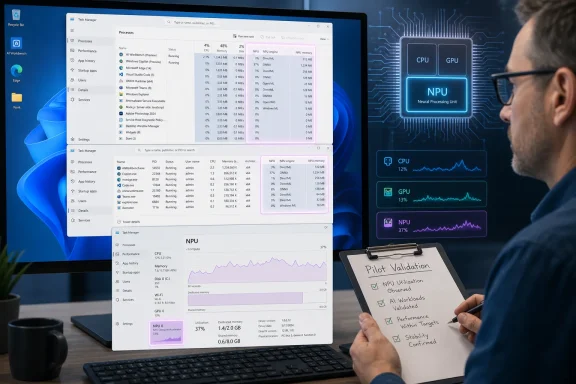
KB5094126 does not solve the entire problem, but it changes the posture. With the June cumulative update installed, supported PCs can expose optional NPU and NPU Engine columns in Task Manager on the Processes, Users, and Details pages. The Details page can also surface dedicated and shared NPU memory, while the Performance page can show neural engines associated with a GPU.
That matters because Task Manager is not a developer profiler or a vendor demo deck. It is the tool Windows users reach for when they want to know what is happening on the box in front of them. By putting NPU visibility there, Microsoft is moving AI hardware from a procurement abstraction into the same practical world as CPU spikes, memory pressure, disk churn, and runaway background processes.
For Windows enthusiasts, this is overdue transparency. For IT departments, it is more consequential: an AI PC pilot can now include a visible endpoint check before the organization scales a device class across departments. The claim “this device has an NPU” becomes less useful than “Windows sees the NPU, Task Manager exposes it, the driver stack is current, and the workload we care about produces observable activity.”
The awkward part was that Windows itself did not give ordinary users and administrators enough visibility into the thing being sold. A CPU has decades of tooling around it. GPUs have their own monitoring panels, driver utilities, performance overlays, and Task Manager history. The NPU, despite being central to the AI PC pitch, has often been treated like a magic co-processor: crucial in theory, opaque in practice.
That opacity is not harmless. Enterprise buyers are being asked to pay for new hardware during a period when many organizations are already juggling Windows 10 migration pressure, Windows 11 compatibility rules, security baseline changes, and subscription fatigue. If an AI PC costs more because of local AI acceleration, IT teams need more than an assurance that the acceleration exists.
Visibility also changes internal conversations. Without a simple way to inspect NPU usage, pilot results can collapse into competing anecdotes: one user says battery life is better, another says the AI feature feels the same, a vendor says the workload is optimized, and a security team asks where the model runs. Task Manager cannot settle every dispute, but it gives the discussion a common starting point.
The more cynical reading is that Microsoft is retrofitting observability after pushing the category first. The more generous reading is that Windows is catching up to a new class of silicon as the platform matures. Both can be true. The practical result is that the NPU is becoming less invisible, and that is good for anyone expected to justify a fleet decision.
The simplest workflow is mundane: confirm the build number, open Task Manager, right-click a column header, and look for NPU-related fields. On the Details page, check for NPU memory columns. Then run the AI workload under evaluation and watch what changes. It is not a laboratory-grade test, but it is exactly the kind of practical check that can catch misconfigured drivers, unsupported hardware states, or assumptions that crumble outside a demo environment.
The build split is also important. Windows 11 24H2 moves to OS build 26100.8655, while Windows 11 25H2 moves to 26200.8655. Those numbers matter because enterprise troubleshooting starts with known state. If a user says “the NPU column is missing,” support teams need to know whether the device is on the right Windows version, whether the feature is available on that hardware, and whether the relevant driver stack is installed.
The update also arrives through the usual Windows servicing channels. Microsoft’s support documentation treats KB5094126 as the June cumulative update for 24H2 and 25H2, with security fixes and improvements from prior optional preview work folded in. That means the NPU monitoring story is not an isolated Insider novelty; it is part of the monthly servicing machinery administrators already manage.
Still, this should not be mistaken for a full AI observability platform. Task Manager can show activity, but it does not explain every routing decision. It will not tell a CIO whether a specific model architecture should run locally or in the cloud. It will not prove that an application is taking the most efficient path. It is a visibility layer, not a verdict.
Windows ML supports execution across CPU, GPU, and NPU providers. Which provider actually handles a workload can vary by device, driver, model format, application configuration, and available runtime support. In other words, local AI is not a single lane; it is a routing problem. The NPU may be the desired destination, but the OS and app stack need a usable path to get there.
That distinction matters for enterprise pilots because a low NPU graph can mean several different things. The workload might be too small or too brief to show sustained activity. The app might be using the GPU because that provider is better supported. The driver might be missing or outdated. The feature might be gated by device class, region, policy, account type, or staged rollout. Or the workload might simply not be optimized for the NPU yet.
This is where the AI PC market still has a credibility gap. The industry has been eager to describe local AI as a user-facing revolution, but the operational mechanics are still uneven. Microsoft, chip vendors, OEMs, and app developers all have roles in making NPU acceleration visible, reliable, and explainable. If any one layer is immature, the buyer sees ambiguity.
KB5094126 therefore gives IT a better question, not a final answer. Instead of asking whether a device theoretically qualifies as an AI PC, teams can ask what Windows exposes, what the driver stack reports, and how the organization’s actual workloads behave. That is a healthier conversation because it is empirical.
On AMD systems, for example, administrators should pay attention to chipset and Ryzen AI-related drivers. AMD’s Ryzen Chipset Driver 6.07.22.037 added a Ryzen AI 300 Series driver, but that does not automatically mean the package is a universal requirement for every Task Manager visibility scenario. The responsible approach is to validate against the OEM’s support matrix, AMD’s release notes, Windows Update behavior, and the actual hardware model in the pilot.
Intel and Qualcomm systems have their own version of the same issue. The silicon vendor matters, but so does the OEM image. A laptop bought through enterprise procurement may ship with a customized driver set, firmware package, power profile, and support cadence. Two systems with similar marketing labels may behave differently once enrolled in management, hardened by policy, and updated through enterprise channels.
This is why the Task Manager change is more valuable to IT than to marketing. Marketing wants a clean category: AI PC, Copilot+ PC, NPU-equipped PC. Operations sees device IDs, driver versions, update rings, firmware dependencies, support tickets, and inconsistent fleet states. Visibility is the bridge between those worlds.
The most useful pilots will treat NPU monitoring as one line item in a broader readiness checklist. Does Windows recognize the NPU? Are NPU columns available? Does Device Manager show errors? Are chipset and AI drivers current? Do the organization’s approved AI apps use local acceleration? Does battery impact match expectations? Those are the questions that turn a slogan into a deployable platform.
The NPU is now entering that familiar period between hardware availability and software inevitability. The component exists. Windows recognizes its strategic importance. Developers are gradually adapting. But the daily value varies sharply depending on workload. A device can be technically ready and still underutilized.
This is where Microsoft’s broader AI agent ambitions complicate the hardware story. If more AI agents run on enterprise devices, local execution may matter for latency, privacy, cost control, and offline resilience. But the minute Microsoft and partners suggest that endpoint hardware is part of the agent strategy, administrators will want proof that endpoint hardware is doing useful work.
There is also a governance angle. Some organizations prefer local processing for sensitive data because it can reduce cloud exposure. Others prefer centralized cloud execution because it simplifies monitoring, policy enforcement, and model governance. Most will end up hybrid. NPU visibility helps clarify which side of that hybrid architecture is active on a given endpoint.
The more AI features become embedded into Windows and Microsoft 365, the less acceptable black-box behavior becomes. If an AI feature summarizes content, enhances a video feed, indexes local files, or supports an agent workflow, IT will want to know what runs locally, what leaves the device, what hardware is used, and what policies apply. Task Manager’s NPU columns do not answer all of that, but they are a visible piece of the trust puzzle.
The Windows Hello changes deserve particular attention. Face or fingerprint can now become the default sign-in method when available, and Windows can keep using PIN after three consecutive PIN sign-ins until the user switches methods again. That may sound like a small usability adjustment, but authentication behavior is policy-sensitive. Small shifts in default sign-in experience can generate help desk tickets or conflict with organizational expectations around biometrics, PIN use, and user training.
Multi-App Camera also needs testing before broad enablement. Letting multiple apps access the same camera stream could be helpful for users who juggle conferencing, recording, virtual camera tools, accessibility workflows, or support sessions. It could also expose weird interactions in standardized video stacks, especially in environments with conferencing add-ins, device control software, privacy indicators, or endpoint security tools watching camera access.
Shared Audio is likely to be welcomed by consumers and some accessibility scenarios, but in enterprise settings even friendly features can require policy review. Bluetooth behavior, supported devices, conference-room etiquette, and data leakage concerns all become part of the rollout discussion. The lesson is familiar: a cumulative update rarely changes only the thing that made the headline.
The Secure Boot certificate notes are a reminder that Windows servicing is now deeply entwined with platform trust. Microsoft has been updating certificates used by most Windows devices as older certificates approach expiration, and the June update includes targeting improvements for eligible devices. Admins deploying images or dynamic updates need to pay attention to boot-related files and media construction details, not just endpoint installation success.
For consumer devices, the deadline reinforces Microsoft’s push toward newer releases. For enterprise devices, it is a reminder that Windows versioning remains a moving target even when hardware purchasing cycles move slowly. A company could buy 24H2-era AI PCs, validate NPU behavior, and still need to plan its next feature update path almost immediately.
That does not make the NPU monitoring work less useful. It makes it more important to build repeatable validation into update rings. If NPU visibility appears in one build, changes in another, or depends on driver updates delivered through different channels, administrators need a baseline they can re-run. The point is not just “does it work today?” but “can we prove it keeps working after Patch Tuesday, firmware updates, and OEM package changes?”
Windows 11 25H2 complicates and simplifies the picture at the same time. It offers a newer branch for organizations ready to move, but mixed fleets will exist. Help desk scripts and endpoint compliance checks must account for both 26100 and 26200 build families. That is tedious, but it is also normal Windows administration.
The bigger point is that AI PC validation cannot be a one-off procurement exercise. It belongs in the same lifecycle discipline as BIOS updates, driver baselines, security policy testing, and application compatibility. KB5094126 gives IT one more observable signal to feed into that discipline.
That pressure is healthy. The AI PC category has been flooded with claims about productivity, battery life, local privacy, and future-proofing. Some of those claims will prove true. Some will depend heavily on app support. Some will age badly. A visible NPU meter will not end the marketing fog, but it gives buyers a flashlight.
It also pushes software vendors. If an application advertises AI acceleration on Windows, customers can ask whether it uses the NPU, the GPU, the CPU, or a cloud service. Developers may reasonably choose different execution providers for different models, but they will need to explain those choices. “AI-powered” is becoming too vague for serious buyers.
Microsoft itself is not exempt. The company’s own Windows AI features and Copilot-adjacent workflows should be judged by the same standard. If the sales pitch emphasizes local AI, the platform should make local AI observable. If a feature uses the cloud, Microsoft should say so. If routing varies, the documentation should be clear enough for admins to plan around it.
This is the real value of Task Manager integration. It democratizes skepticism. You do not need a vendor’s private tooling to ask whether the NPU is awake. You need the right Windows build, supported hardware, and a workload worth testing. That shifts a little power back toward the people who have to deploy and support the machines.
Task Manager activity is not a perfect metric either. It is momentary, workload-dependent, and context-sensitive. But it has one advantage over TOPS: it is observable in the field. That makes it more useful for the first phase of real deployment.
The enterprise metric that eventually matters will be a blend of factors: battery life under AI-heavy workloads, latency for local features, user satisfaction, privacy posture, software compatibility, and support burden. NPU utilization is only one input. But without it, organizations are left guessing whether expensive silicon is participating at all.
There is an analogy here to GPU adoption in business software. For years, many users had discrete or integrated GPUs that were barely touched by their daily workflows. Then video conferencing, browsers, creative tools, data visualization, and machine learning workloads made GPU acceleration more visible and more necessary. The NPU may follow a similar path, but it is not there yet.
KB5094126 is therefore less a victory lap than a measuring tape. It helps buyers see the gap between installed capability and used capability. That gap will shrink only if Windows, drivers, apps, and enterprise policy all mature together.
Administrators should begin by confirming that pilot machines are on the expected Windows build and enrolled in the intended update ring. They should verify that Task Manager exposes the NPU fields on supported hardware. They should collect driver versions, firmware state, OEM support package levels, and known limitations for each device model. Then they should test actual workloads, not vendor demos.
The workload selection matters. If the organization’s near-term AI use is mostly cloud-based Copilot in Microsoft 365, endpoint NPU usage may be modest. If the use case involves local image processing, offline inference, video enhancement, on-device agents, or privacy-sensitive local models, NPU behavior becomes more important. The same hardware can be strategically irrelevant in one organization and essential in another.
Policy testing should happen alongside performance testing. Windows Hello changes, camera sharing, Bluetooth audio behavior, and AI component updates can all intersect with security baselines. A pilot that watches only NPU activity but ignores user authentication and device privacy behavior is incomplete.
This is also the moment to document failure modes. What does a missing NPU column mean on each model? What driver package resolves it? What event logs are useful? What should help desk staff ask first? AI PC support will be easier later if organizations write those answers now.
A fleet decision should not hinge on a single Task Manager column. It should hinge on whether the device class improves the organization’s real workflows, fits its security posture, and can be supported over the lifecycle of Windows updates and OEM driver releases. NPU monitoring helps answer those questions, but it does not answer them alone.
The concrete lessons from KB5094126 are narrow enough to act on now:
 Microsoft Turns the AI PC Pitch Into an Operations Check
The AI PC has always had a measurement problem. OEMs can print TOPS figures on spec sheets, Microsoft can define Copilot+ PCs around NPU performance, and chipmakers can argue about efficiency curves, but none of that helps an administrator sitting in front of a fleet pilot wondering whether a local workload is running where it was promised to run.KB5094126 does not solve the entire problem, but it changes the posture. With the June cumulative update installed, supported PCs can expose optional NPU and NPU Engine columns in Task Manager on the Processes, Users, and Details pages. The Details page can also surface dedicated and shared NPU memory, while the Performance page can show neural engines associated with a GPU.
That matters because Task Manager is not a developer profiler or a vendor demo deck. It is the tool Windows users reach for when they want to know what is happening on the box in front of them. By putting NPU visibility there, Microsoft is moving AI hardware from a procurement abstraction into the same practical world as CPU spikes, memory pressure, disk churn, and runaway background processes.
For Windows enthusiasts, this is overdue transparency. For IT departments, it is more consequential: an AI PC pilot can now include a visible endpoint check before the organization scales a device class across departments. The claim “this device has an NPU” becomes less useful than “Windows sees the NPU, Task Manager exposes it, the driver stack is current, and the workload we care about produces observable activity.”
The NPU Was Sold as the Future, Then Hidden From the People Buying It
Microsoft defines Copilot+ PCs around an NPU capable of more than 40 trillion operations per second. That threshold has done a lot of marketing work since the first wave of Snapdragon X systems and subsequent AMD and Intel platforms arrived. It gave OEMs a line to meet, gave Microsoft a new class of Windows hardware to promote, and gave buyers a shorthand for local AI readiness.The awkward part was that Windows itself did not give ordinary users and administrators enough visibility into the thing being sold. A CPU has decades of tooling around it. GPUs have their own monitoring panels, driver utilities, performance overlays, and Task Manager history. The NPU, despite being central to the AI PC pitch, has often been treated like a magic co-processor: crucial in theory, opaque in practice.
That opacity is not harmless. Enterprise buyers are being asked to pay for new hardware during a period when many organizations are already juggling Windows 10 migration pressure, Windows 11 compatibility rules, security baseline changes, and subscription fatigue. If an AI PC costs more because of local AI acceleration, IT teams need more than an assurance that the acceleration exists.
Visibility also changes internal conversations. Without a simple way to inspect NPU usage, pilot results can collapse into competing anecdotes: one user says battery life is better, another says the AI feature feels the same, a vendor says the workload is optimized, and a security team asks where the model runs. Task Manager cannot settle every dispute, but it gives the discussion a common starting point.
The more cynical reading is that Microsoft is retrofitting observability after pushing the category first. The more generous reading is that Windows is catching up to a new class of silicon as the platform matures. Both can be true. The practical result is that the NPU is becoming less invisible, and that is good for anyone expected to justify a fleet decision.
Task Manager Becomes the First AI PC Audit Tool Most Admins Will Actually Use
The new columns are optional, which is appropriate. Not every user needs another metric staring at them, and most processes will not produce meaningful NPU activity all the time. But optional does not mean marginal. For administrators, help desk staff, and power users, the presence of those columns can become a fast sanity check.The simplest workflow is mundane: confirm the build number, open Task Manager, right-click a column header, and look for NPU-related fields. On the Details page, check for NPU memory columns. Then run the AI workload under evaluation and watch what changes. It is not a laboratory-grade test, but it is exactly the kind of practical check that can catch misconfigured drivers, unsupported hardware states, or assumptions that crumble outside a demo environment.
The build split is also important. Windows 11 24H2 moves to OS build 26100.8655, while Windows 11 25H2 moves to 26200.8655. Those numbers matter because enterprise troubleshooting starts with known state. If a user says “the NPU column is missing,” support teams need to know whether the device is on the right Windows version, whether the feature is available on that hardware, and whether the relevant driver stack is installed.
The update also arrives through the usual Windows servicing channels. Microsoft’s support documentation treats KB5094126 as the June cumulative update for 24H2 and 25H2, with security fixes and improvements from prior optional preview work folded in. That means the NPU monitoring story is not an isolated Insider novelty; it is part of the monthly servicing machinery administrators already manage.
Still, this should not be mistaken for a full AI observability platform. Task Manager can show activity, but it does not explain every routing decision. It will not tell a CIO whether a specific model architecture should run locally or in the cloud. It will not prove that an application is taking the most efficient path. It is a visibility layer, not a verdict.
Low NPU Activity Is a Clue, Not a Conviction
One trap is already obvious: administrators may open Task Manager, run an AI feature, see little or no NPU activity, and conclude that the hardware is useless. That may be true in some cases, but it is not a safe assumption. AI workload placement depends on more than the existence of an NPU.Windows ML supports execution across CPU, GPU, and NPU providers. Which provider actually handles a workload can vary by device, driver, model format, application configuration, and available runtime support. In other words, local AI is not a single lane; it is a routing problem. The NPU may be the desired destination, but the OS and app stack need a usable path to get there.
That distinction matters for enterprise pilots because a low NPU graph can mean several different things. The workload might be too small or too brief to show sustained activity. The app might be using the GPU because that provider is better supported. The driver might be missing or outdated. The feature might be gated by device class, region, policy, account type, or staged rollout. Or the workload might simply not be optimized for the NPU yet.
This is where the AI PC market still has a credibility gap. The industry has been eager to describe local AI as a user-facing revolution, but the operational mechanics are still uneven. Microsoft, chip vendors, OEMs, and app developers all have roles in making NPU acceleration visible, reliable, and explainable. If any one layer is immature, the buyer sees ambiguity.
KB5094126 therefore gives IT a better question, not a final answer. Instead of asking whether a device theoretically qualifies as an AI PC, teams can ask what Windows exposes, what the driver stack reports, and how the organization’s actual workloads behave. That is a healthier conversation because it is empirical.
Driver Readiness Is Where the AI PC Story Gets Less Glamorous
The update also forces attention onto the least glamorous part of the AI PC stack: drivers. A neural processor is only useful to Windows if firmware, chipset software, device drivers, runtimes, and applications line up. This is not new in computing, but AI PC marketing has often blurred the fact that hardware capability and software readiness are different things.On AMD systems, for example, administrators should pay attention to chipset and Ryzen AI-related drivers. AMD’s Ryzen Chipset Driver 6.07.22.037 added a Ryzen AI 300 Series driver, but that does not automatically mean the package is a universal requirement for every Task Manager visibility scenario. The responsible approach is to validate against the OEM’s support matrix, AMD’s release notes, Windows Update behavior, and the actual hardware model in the pilot.
Intel and Qualcomm systems have their own version of the same issue. The silicon vendor matters, but so does the OEM image. A laptop bought through enterprise procurement may ship with a customized driver set, firmware package, power profile, and support cadence. Two systems with similar marketing labels may behave differently once enrolled in management, hardened by policy, and updated through enterprise channels.
This is why the Task Manager change is more valuable to IT than to marketing. Marketing wants a clean category: AI PC, Copilot+ PC, NPU-equipped PC. Operations sees device IDs, driver versions, update rings, firmware dependencies, support tickets, and inconsistent fleet states. Visibility is the bridge between those worlds.
The most useful pilots will treat NPU monitoring as one line item in a broader readiness checklist. Does Windows recognize the NPU? Are NPU columns available? Does Device Manager show errors? Are chipset and AI drivers current? Do the organization’s approved AI apps use local acceleration? Does battery impact match expectations? Those are the questions that turn a slogan into a deployable platform.
Copilot+ PCs Need Proof Because the Enterprise Has Been Burned Before
The enterprise skepticism around AI PCs is not simply anti-AI conservatism. IT departments have seen waves of hardware promises that only partially materialized in software. Fingerprint readers arrived before authentication workflows were mature. TPMs became essential long after many users ignored them. GPUs moved from gamer luxury to productivity accelerator, but only when apps caught up. Touch screens, pen input, webcams, and biometric sensors all went through similar cycles.The NPU is now entering that familiar period between hardware availability and software inevitability. The component exists. Windows recognizes its strategic importance. Developers are gradually adapting. But the daily value varies sharply depending on workload. A device can be technically ready and still underutilized.
This is where Microsoft’s broader AI agent ambitions complicate the hardware story. If more AI agents run on enterprise devices, local execution may matter for latency, privacy, cost control, and offline resilience. But the minute Microsoft and partners suggest that endpoint hardware is part of the agent strategy, administrators will want proof that endpoint hardware is doing useful work.
There is also a governance angle. Some organizations prefer local processing for sensitive data because it can reduce cloud exposure. Others prefer centralized cloud execution because it simplifies monitoring, policy enforcement, and model governance. Most will end up hybrid. NPU visibility helps clarify which side of that hybrid architecture is active on a given endpoint.
The more AI features become embedded into Windows and Microsoft 365, the less acceptable black-box behavior becomes. If an AI feature summarizes content, enhances a video feed, indexes local files, or supports an agent workflow, IT will want to know what runs locally, what leaves the device, what hardware is used, and what policies apply. Task Manager’s NPU columns do not answer all of that, but they are a visible piece of the trust puzzle.
The June Update Is Not Only About AI, and That Is Part of the Risk
KB5094126 also includes other changes that administrators cannot ignore. Shared Audio, Multi-App Camera support, Windows Hello behavior changes, file search improvements, Secure Boot certificate work, virtualization fixes, and AI component updates all travel in the same cumulative package. That is the Windows servicing bargain: desirable features, security fixes, and operational surprises arrive together.The Windows Hello changes deserve particular attention. Face or fingerprint can now become the default sign-in method when available, and Windows can keep using PIN after three consecutive PIN sign-ins until the user switches methods again. That may sound like a small usability adjustment, but authentication behavior is policy-sensitive. Small shifts in default sign-in experience can generate help desk tickets or conflict with organizational expectations around biometrics, PIN use, and user training.
Multi-App Camera also needs testing before broad enablement. Letting multiple apps access the same camera stream could be helpful for users who juggle conferencing, recording, virtual camera tools, accessibility workflows, or support sessions. It could also expose weird interactions in standardized video stacks, especially in environments with conferencing add-ins, device control software, privacy indicators, or endpoint security tools watching camera access.
Shared Audio is likely to be welcomed by consumers and some accessibility scenarios, but in enterprise settings even friendly features can require policy review. Bluetooth behavior, supported devices, conference-room etiquette, and data leakage concerns all become part of the rollout discussion. The lesson is familiar: a cumulative update rarely changes only the thing that made the headline.
The Secure Boot certificate notes are a reminder that Windows servicing is now deeply entwined with platform trust. Microsoft has been updating certificates used by most Windows devices as older certificates approach expiration, and the June update includes targeting improvements for eligible devices. Admins deploying images or dynamic updates need to pay attention to boot-related files and media construction details, not just endpoint installation success.
The 24H2 Clock Makes This More Than a Feature Update
There is a lifecycle dimension hiding under the AI story. Windows 11 24H2 Home and Pro editions are scheduled to reach end of updates on October 13, 2026, while Enterprise and Education editions remain supported longer. That timing means some organizations are evaluating AI PCs while also managing version drift, support deadlines, and migration planning.For consumer devices, the deadline reinforces Microsoft’s push toward newer releases. For enterprise devices, it is a reminder that Windows versioning remains a moving target even when hardware purchasing cycles move slowly. A company could buy 24H2-era AI PCs, validate NPU behavior, and still need to plan its next feature update path almost immediately.
That does not make the NPU monitoring work less useful. It makes it more important to build repeatable validation into update rings. If NPU visibility appears in one build, changes in another, or depends on driver updates delivered through different channels, administrators need a baseline they can re-run. The point is not just “does it work today?” but “can we prove it keeps working after Patch Tuesday, firmware updates, and OEM package changes?”
Windows 11 25H2 complicates and simplifies the picture at the same time. It offers a newer branch for organizations ready to move, but mixed fleets will exist. Help desk scripts and endpoint compliance checks must account for both 26100 and 26200 build families. That is tedious, but it is also normal Windows administration.
The bigger point is that AI PC validation cannot be a one-off procurement exercise. It belongs in the same lifecycle discipline as BIOS updates, driver baselines, security policy testing, and application compatibility. KB5094126 gives IT one more observable signal to feed into that discipline.
Vendors Now Have Less Room to Hide Behind the Acronym
The most interesting consequence of NPU visibility may be its effect on vendors. When Windows exposes NPU usage in a familiar interface, OEMs and chipmakers have less room to talk around real behavior. If a device is marketed around local AI acceleration but customers rarely see NPU activity in supported workloads, uncomfortable questions will follow.That pressure is healthy. The AI PC category has been flooded with claims about productivity, battery life, local privacy, and future-proofing. Some of those claims will prove true. Some will depend heavily on app support. Some will age badly. A visible NPU meter will not end the marketing fog, but it gives buyers a flashlight.
It also pushes software vendors. If an application advertises AI acceleration on Windows, customers can ask whether it uses the NPU, the GPU, the CPU, or a cloud service. Developers may reasonably choose different execution providers for different models, but they will need to explain those choices. “AI-powered” is becoming too vague for serious buyers.
Microsoft itself is not exempt. The company’s own Windows AI features and Copilot-adjacent workflows should be judged by the same standard. If the sales pitch emphasizes local AI, the platform should make local AI observable. If a feature uses the cloud, Microsoft should say so. If routing varies, the documentation should be clear enough for admins to plan around it.
This is the real value of Task Manager integration. It democratizes skepticism. You do not need a vendor’s private tooling to ask whether the NPU is awake. You need the right Windows build, supported hardware, and a workload worth testing. That shifts a little power back toward the people who have to deploy and support the machines.
The First Useful AI PC Metric Is Not the One Marketers Wanted
TOPS has been the headline metric for AI PCs, but it is a crude instrument. It measures theoretical neural processing throughput under vendor-defined conditions, not user value. A 40 TOPS threshold may be useful for category definition, but it does not tell an administrator whether Teams background effects, local image search, model inference, security agents, or business-specific apps are using the NPU effectively.Task Manager activity is not a perfect metric either. It is momentary, workload-dependent, and context-sensitive. But it has one advantage over TOPS: it is observable in the field. That makes it more useful for the first phase of real deployment.
The enterprise metric that eventually matters will be a blend of factors: battery life under AI-heavy workloads, latency for local features, user satisfaction, privacy posture, software compatibility, and support burden. NPU utilization is only one input. But without it, organizations are left guessing whether expensive silicon is participating at all.
There is an analogy here to GPU adoption in business software. For years, many users had discrete or integrated GPUs that were barely touched by their daily workflows. Then video conferencing, browsers, creative tools, data visualization, and machine learning workloads made GPU acceleration more visible and more necessary. The NPU may follow a similar path, but it is not there yet.
KB5094126 is therefore less a victory lap than a measuring tape. It helps buyers see the gap between installed capability and used capability. That gap will shrink only if Windows, drivers, apps, and enterprise policy all mature together.
A Sensible Pilot Starts With Boring Evidence
The right response to KB5094126 is not to rush AI PCs into every refresh cycle. It is to make AI PC pilots more evidence-based. That starts with boring, repeatable checks, because boring repeatability is what separates enterprise deployment from enthusiasm.Administrators should begin by confirming that pilot machines are on the expected Windows build and enrolled in the intended update ring. They should verify that Task Manager exposes the NPU fields on supported hardware. They should collect driver versions, firmware state, OEM support package levels, and known limitations for each device model. Then they should test actual workloads, not vendor demos.
The workload selection matters. If the organization’s near-term AI use is mostly cloud-based Copilot in Microsoft 365, endpoint NPU usage may be modest. If the use case involves local image processing, offline inference, video enhancement, on-device agents, or privacy-sensitive local models, NPU behavior becomes more important. The same hardware can be strategically irrelevant in one organization and essential in another.
Policy testing should happen alongside performance testing. Windows Hello changes, camera sharing, Bluetooth audio behavior, and AI component updates can all intersect with security baselines. A pilot that watches only NPU activity but ignores user authentication and device privacy behavior is incomplete.
This is also the moment to document failure modes. What does a missing NPU column mean on each model? What driver package resolves it? What event logs are useful? What should help desk staff ask first? AI PC support will be easier later if organizations write those answers now.
KB5094126 Gives IT a Shorter Path From Claim to Proof
The practical read on the June update is straightforward: Microsoft has made the AI PC easier to inspect, but not necessarily easier to justify. That distinction is important. Visibility can reveal value, but it can also expose underuse.A fleet decision should not hinge on a single Task Manager column. It should hinge on whether the device class improves the organization’s real workflows, fits its security posture, and can be supported over the lifecycle of Windows updates and OEM driver releases. NPU monitoring helps answer those questions, but it does not answer them alone.
The concrete lessons from KB5094126 are narrow enough to act on now:
- Windows 11 24H2 systems should be checked for build 26100.8655, while Windows 11 25H2 systems should be checked for build 26200.8655.
- Task Manager can now expose optional NPU, NPU Engine, and NPU memory fields on supported systems, making endpoint validation more practical.
- Low or absent NPU activity should trigger driver, workload, provider, and policy investigation rather than an immediate conclusion that acceleration failed.
- AI PC pilots should include OEM driver verification, especially for systems where chipset and AI accelerator packages are updated separately.
- Windows Hello, Multi-App Camera, Shared Audio, Secure Boot, and virtualization changes should be tested in the same rollout plan as the NPU features.
- The update gives buyers leverage because vendor AI claims can now be compared against what Windows actually sees on managed devices.
References
- Primary source: TechRepublic
Published: 2026-06-16T12:34:10.373570
Loading…
www.techrepublic.com