

Microsoft 365 Copilot is a paid per-user add-on license, typically priced at $30 per user per month for enterprise customers, that requires an eligible Microsoft 365 or Office 365 base subscription and unlocks Copilot experiences across Word, Excel, PowerPoint, Outlook, Teams, and Microsoft 365 Chat. The simple version is easy enough for procurement: buy the base plan, add the Copilot user subscription license, assign it to the people who need it. The complicated version is where IT actually lives, because Copilot is no longer just a feature bolted onto Office. It is becoming Microsoft’s metered AI layer for work, and the license is only the front door.
The cleanest way to understand Microsoft 365 Copilot licensing is to start with what it is not. It is not automatically included in Microsoft 365 E3 or E5, even though those plans are among the subscriptions that can qualify as the foundation for it. E3 and E5 customers still need to buy and assign a separate Copilot license if they want the full in-app experience.
That distinction matters because Microsoft has spent years training enterprise buyers to think in suite logic. E5 became the “buy the top shelf and stop worrying” SKU for many organizations. Copilot breaks that mental model by making AI productivity a separate paid layer, even for customers already paying for Microsoft’s highest mainstream enterprise bundle.
The user subscription license, or USL, is therefore both familiar and deceptive. It looks like any other per-user Microsoft 365 add-on, but the experience it unlocks depends heavily on tenant data, app deployment, identity configuration, admin controls, compliance posture, and whether users wander into agentic or pay-as-you-go scenarios. The license buys access; it does not make the surrounding governance problem disappear.
For WindowsForum readers, this is the part worth slowing down on. Copilot licensing is not merely a purchasing question. It is an architecture question disguised as a line item.
That eligibility list is broader than Copilot’s original enterprise-only posture, and that is not an accident. Microsoft first positioned Copilot for large organizations with the budgets and compliance maturity to absorb it. Since then, the company has steadily widened the funnel, pushing Copilot toward small and midsize businesses and, in parallel, toward consumer Microsoft 365 plans.
The base plan matters because Copilot is only useful when it can sit on top of Microsoft’s productivity stack. Word, Excel, PowerPoint, Outlook, Teams, SharePoint, OneDrive, Exchange, and Microsoft Graph are not incidental plumbing. They are the substrate. Without the user’s work data, the magic trick becomes a chatbot with better stationery.
That is why the phrase “qualifying base license” understates the dependency. Copilot does not merely require Microsoft 365 because Microsoft wants a billing anchor. It requires Microsoft 365 because the product’s core value proposition is that it can reason over files, meetings, mail, chats, calendars, and organizational relationships already living in Microsoft’s cloud.
The base subscription gets you into the building. The Copilot USL opens the rooms where Microsoft believes the margin now lives.
The important point is that Copilot Business is not best understood as “Copilot Lite.” Microsoft positions it as offering the same core capabilities as Microsoft 365 Copilot, packaged for smaller organizations that already live in the Business plan family. In practice, the difference is less about the intelligence of the feature and more about the commercial lane Microsoft wants the customer to occupy.
That positioning is strategic. Microsoft knows that small businesses are often less tolerant of enterprise licensing ambiguity, but they are also more likely to feel the labor-saving promise of AI immediately. A five-person consultancy does not need a 90-page adoption framework to see the appeal of summarizing meetings, drafting proposals, or turning rough notes into polished slides.
The 300-seat ceiling also protects Microsoft’s segmentation. Business plans have always been a bargain relative to enterprise SKUs, but only up to a point. Copilot Business follows the same logic: accessible enough to seed the SMB market, bounded enough to prevent larger customers from using it as an escape hatch.
For admins, the practical question is simple. If the tenant is already on Business Basic, Business Standard, or Business Premium and sits below the seat limit, Copilot Business is the natural starting point. If the organization is on E3 or E5, or has enterprise compliance and governance requirements, the standard Microsoft 365 Copilot path is the real conversation.
The result is a vocabulary problem with budget consequences. A user may say they “have Copilot” because they can open a chat pane. Another user may have the paid Microsoft 365 Copilot license and see AI features directly inside Word, Excel, PowerPoint, Outlook, Teams, and the broader Microsoft 365 Copilot app. Both are using something branded Copilot, but they are not using the same product.
That ambiguity got sharper as Microsoft adjusted the boundary between free or included Copilot Chat experiences and paid Microsoft 365 Copilot experiences inside Office apps. Microsoft has made clear that the full productivity play belongs to the paid license. The company may continue to use Copilot Chat as the adoption ramp, but the real workplace automation story lives behind the USL.
For IT departments, this means license discovery cannot stop at a user’s claim that Copilot is available. Admins need to know which Copilot surface the user is accessing, whether the user has a Microsoft 365 Copilot license assigned, and whether that interaction is covered by the seat license or potentially governed by a pay-as-you-go model.
The naming may be consumer-friendly, but it is not admin-friendly. In the Microsoft 365 admin center, clarity comes from assigned licenses, service plans, usage reports, and billing configuration — not from the word “Copilot” appearing somewhere in an app.
For straightforward in-app productivity use, the economics are relatively predictable. A user with an eligible base plan gets a Copilot add-on, and the organization pays the monthly per-user fee. The user drafts documents, summarizes meetings, asks questions about files, prepares presentations, and analyzes spreadsheets inside the Microsoft 365 environment.
The trouble starts when customers treat that per-user fee as an all-inclusive AI buffet. Microsoft’s Copilot ecosystem now includes Copilot Chat, Copilot Studio, agents, connectors, SharePoint agents, and other extensibility paths. Some of those scenarios can involve usage-based billing, especially when organizations move from interactive assistance to automated or agent-driven work.
This is not unique to Microsoft. The entire enterprise AI market is trying to reconcile per-seat software licensing with compute-heavy usage. A traditional SaaS user opening Outlook ten times a day does not create the same cost profile as an autonomous agent chewing through workflows, calling tools, using models, transferring data, and running tasks in the background.
Microsoft’s challenge is that it wants Copilot to feel like Office, but the economics are closer to cloud compute. The more Copilot becomes a platform for work, the more the bill begins to resemble Azure: predictable in theory, surprising in practice if governance is weak.
That shift is why licensing conversations are becoming more complex. A human asking Copilot to summarize a Teams meeting is a bounded productivity interaction. An agent that monitors information, triggers workflows, queries systems, or performs repeated actions has a different cost profile and a different risk profile.
Copilot Studio sits at the center of this transition. It gives organizations a way to build and publish agents, connect them to knowledge sources, and extend Microsoft 365 Copilot beyond Microsoft’s own default experiences. But once organizations start building agents, they also start managing capacity, credits, connectors, environments, and billing policies.
This is where the Microsoft 365 Copilot USL stops being the end of the story. Licensed users may get rights to use certain Copilot and agent experiences, but broader extensibility can introduce separate consumption mechanics. The details depend on the scenario, the channel, the connector, the data source, and the licensing path chosen.
Administrators should therefore resist the comforting sentence, “We already licensed Copilot.” That may be true for personal productivity. It may not be true for the agentic future the business is already imagining after its first successful demo.
The commercial logic is straightforward. If one user asks Copilot to rewrite a paragraph and another triggers a long-running agentic process involving models, tools, data movement, and business systems, Microsoft does not want both interactions priced as though they cost the same to deliver. The per-user license gets the user into the ecosystem; credits and usage billing capture the extra compute and orchestration.
That is why admins should treat Cowork and similar agentic features as a separate planning category. The first question is not merely whether the user has Microsoft 365 Copilot. It is whether the organization has enabled the billing and governance model needed for tasks that consume credits or incur pay-as-you-go charges.
This is also where Microsoft’s AI stack begins to look less like Office licensing and more like a hybrid of Microsoft 365, Power Platform, and Azure. Budgets, scoped billing policies, alerts, and usage monitoring become part of the rollout plan. Finance and IT need to be in the same room before experimentation becomes production.
The risk is not that Microsoft is hiding the ball. The risk is that Copilot’s friendliest demos encourage business users to think in outcomes while the platform bills in units of work.
That is a revealing move. For the past year, many customers have asked whether Copilot should have been included in E5. Microsoft’s answer, in effect, is no — but there will be a bigger suite for customers that want AI built into the top of the stack from the start.
E7 is not just a pricing tier. It is Microsoft’s attempt to normalize AI as part of the enterprise control plane. Copilot handles the productivity layer, Agent 365 addresses management and governance for agents, and the surrounding security and compliance tools help justify the bundle to organizations that might otherwise hesitate at per-user AI spend.
For large enterprises, E7 may simplify the commercial story. Instead of separately pricing E5, Copilot, Agent 365, and adjacent capabilities, Microsoft can pitch one strategic SKU. That appeals to CIOs who prefer platform consolidation, especially when AI governance is becoming a board-level topic.
But E7 also reinforces the direction of travel. Copilot is not being absorbed into the old Microsoft 365 model as a free enhancement. It is becoming the anchor for a new premium layer above the traditional enterprise suite.
That is both Copilot’s killer feature and its scariest deployment detail. If SharePoint permissions are a mess, Copilot can make the mess easier to query. If old Teams channels contain sensitive files with overly broad access, Copilot may surface information that was technically available but practically buried. AI does not create the permission problem; it removes the friction that used to hide it.
This is why serious Copilot deployment starts before the purchase order. Organizations need to review sharing settings, sensitivity labels, retention policies, data loss prevention rules, guest access, and overshared repositories. The license turns Copilot on, but governance determines whether turning it on is wise.
Microsoft has built a substantial security and compliance story around Copilot, and much of it is credible because Copilot works within existing Microsoft 365 permissions rather than ignoring them. But “respects existing permissions” is not the same as “your permissions are good.” A tenant with bad access controls will get a very modern interface on an old administrative failure.
The most successful deployments will be the least dramatic ones. They will start with a pilot group, measure actual use, inspect the data surfaced, tighten controls, expand gradually, and treat Copilot as a reason to modernize information governance rather than as a magic layer sprinkled over disorder.
That matters because $30 per user per month is not a trivial add-on at scale. For 1,000 users, the list-price enterprise Copilot line item is $360,000 per year before considering base subscriptions, implementation, governance, training, or consumption-based extensions. The boardroom demo has to become daily behavior for the math to work.
The strongest early use cases are usually mundane. Summarizing meetings, drafting follow-up emails, finding information across documents, creating first-pass presentations, turning notes into plans, and accelerating document review are not science fiction. They are the repetitive knowledge-work taxes that fill the day.
Excel is more nuanced. Copilot can help users explore data, explain formulas, and generate analysis, but the quality of the result depends heavily on how the workbook is structured and what the user asks. Organizations expecting every employee to become a data analyst overnight will be disappointed. Organizations using Copilot to reduce friction for already competent users will have a better time.
The productivity gain is real when the workflow is real. Copilot cannot rescue a vague process, a chaotic file structure, or a meeting culture that generates no decisions. It can, however, make competent workers faster in environments where Microsoft 365 is already the system of record for collaboration.
A finance analyst, sales manager, HR generalist, legal reviewer, project manager, and executive assistant may all produce enough text, meetings, and document work to justify Copilot. A senior leader who delegates most drafting may use it less than a mid-level operations employee buried in Teams threads. The right licensing unit is not hierarchy; it is workflow intensity.
This is where telemetry matters. Microsoft 365 admins should watch activation, feature use, meeting summaries, app-level engagement, and qualitative feedback. If users have the license but do not change their habits, the deployment is stalled. If unlicensed users are leaning heavily on Copilot Chat or requesting agent access, demand may be emerging somewhere procurement did not expect.
Training also changes the economics. Copilot is not a conventional feature with a fixed menu of buttons. Better prompting, better file hygiene, better meeting discipline, and better understanding of what Copilot can and cannot access all affect output quality. An untrained Copilot user can make a $30 license look underwhelming very quickly.
The best licensing strategy is iterative. Start with departments where use cases are obvious, gather evidence, expand to adjacent teams, and keep a close eye on agentic scenarios that may introduce consumption billing. Treat licenses as an adoption portfolio, not a trophy count.
That fluidity creates a new kind of administrative risk. A feature that begins as a user productivity tool can become an automation layer. A pilot that begins with meeting summaries can become a request for departmental agents. A chatbot that begins inside Microsoft 365 can become a front end to business processes and third-party systems.
Security teams will recognize the pattern. The first wave of cloud adoption was shadow IT. The first wave of low-code automation was shadow process design. Copilot risks becoming shadow AI unless admins establish policies early enough to shape behavior.
The answer is not to block everything. That would waste the license and send users hunting for unsanctioned tools. The answer is to define which Copilot experiences are allowed, which require review, which can use organizational data, which can call connectors, and which billing models are approved.
This is where WindowsForum’s sysadmin audience has an advantage. The people who have lived through Exchange migrations, SharePoint sprawl, Teams governance, Power Platform surprises, and Azure bill shock already know the pattern. Copilot is new, but the administrative lesson is old: platforms expand into every gap you leave open.
Seen more broadly, the matrix is Microsoft’s transition plan. The company is moving from selling productivity software to selling AI-mediated work. The old Office value proposition was that users created, communicated, and collaborated inside Microsoft apps. The new value proposition is that Copilot participates in that work, and increasingly, that agents may perform parts of it.
That transition explains why Microsoft is careful not to make Copilot simply “included.” If AI becomes the interface to work, Microsoft wants it priced as a premium layer, not absorbed as a maintenance update. The company is protecting a new revenue stream while building habits that may become difficult for customers to unwind later.
It also explains the coexistence of per-user and usage-based models. The seat license maps to human access. Credits and pay-as-you-go billing map to machine work. Copilot sits at the intersection, which is exactly why procurement teams are finding old licensing instincts less useful.
The argument for buying Copilot is not that every user will instantly save an hour a day. The argument is that Microsoft 365 is becoming AI-native, and organizations already committed to Microsoft’s cloud need to learn where that helps, where it costs more, and where it changes risk.
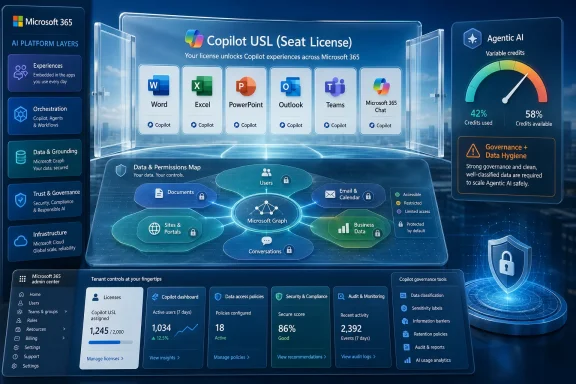 Microsoft Sells Copilot as a Seat, but the Product Behaves Like a Platform
The cleanest way to understand Microsoft 365 Copilot licensing is to start with what it is not. It is not automatically included in Microsoft 365 E3 or E5, even though those plans are among the subscriptions that can qualify as the foundation for it. E3 and E5 customers still need to buy and assign a separate Copilot license if they want the full in-app experience.That distinction matters because Microsoft has spent years training enterprise buyers to think in suite logic. E5 became the “buy the top shelf and stop worrying” SKU for many organizations. Copilot breaks that mental model by making AI productivity a separate paid layer, even for customers already paying for Microsoft’s highest mainstream enterprise bundle.
The user subscription license, or USL, is therefore both familiar and deceptive. It looks like any other per-user Microsoft 365 add-on, but the experience it unlocks depends heavily on tenant data, app deployment, identity configuration, admin controls, compliance posture, and whether users wander into agentic or pay-as-you-go scenarios. The license buys access; it does not make the surrounding governance problem disappear.
For WindowsForum readers, this is the part worth slowing down on. Copilot licensing is not merely a purchasing question. It is an architecture question disguised as a line item.
The Base Plan Is the Gatekeeper, Not the Prize
Microsoft’s current licensing model requires a qualifying Microsoft 365 or Office 365 subscription before an organization can buy Microsoft 365 Copilot. Eligible plans include major enterprise subscriptions such as Microsoft 365 E3 and E5, Office 365 E1, E3, and E5, and several business plans, including Microsoft 365 Business Basic, Business Standard, and Business Premium.That eligibility list is broader than Copilot’s original enterprise-only posture, and that is not an accident. Microsoft first positioned Copilot for large organizations with the budgets and compliance maturity to absorb it. Since then, the company has steadily widened the funnel, pushing Copilot toward small and midsize businesses and, in parallel, toward consumer Microsoft 365 plans.
The base plan matters because Copilot is only useful when it can sit on top of Microsoft’s productivity stack. Word, Excel, PowerPoint, Outlook, Teams, SharePoint, OneDrive, Exchange, and Microsoft Graph are not incidental plumbing. They are the substrate. Without the user’s work data, the magic trick becomes a chatbot with better stationery.
That is why the phrase “qualifying base license” understates the dependency. Copilot does not merely require Microsoft 365 because Microsoft wants a billing anchor. It requires Microsoft 365 because the product’s core value proposition is that it can reason over files, meetings, mail, chats, calendars, and organizational relationships already living in Microsoft’s cloud.
The base subscription gets you into the building. The Copilot USL opens the rooms where Microsoft believes the margin now lives.
Business Customers Get a Smaller Door, Not a Smaller Copilot
Microsoft 365 Copilot Business is the company’s SMB-focused path into the same AI pitch. It is available to organizations using eligible Microsoft 365 Business plans, including Business Basic, Business Standard, and Business Premium, and it is designed for tenants with up to 300 seats. Above that threshold, Microsoft wants customers looking at the broader Microsoft 365 Copilot enterprise licensing path.The important point is that Copilot Business is not best understood as “Copilot Lite.” Microsoft positions it as offering the same core capabilities as Microsoft 365 Copilot, packaged for smaller organizations that already live in the Business plan family. In practice, the difference is less about the intelligence of the feature and more about the commercial lane Microsoft wants the customer to occupy.
That positioning is strategic. Microsoft knows that small businesses are often less tolerant of enterprise licensing ambiguity, but they are also more likely to feel the labor-saving promise of AI immediately. A five-person consultancy does not need a 90-page adoption framework to see the appeal of summarizing meetings, drafting proposals, or turning rough notes into polished slides.
The 300-seat ceiling also protects Microsoft’s segmentation. Business plans have always been a bargain relative to enterprise SKUs, but only up to a point. Copilot Business follows the same logic: accessible enough to seed the SMB market, bounded enough to prevent larger customers from using it as an escape hatch.
For admins, the practical question is simple. If the tenant is already on Business Basic, Business Standard, or Business Premium and sits below the seat limit, Copilot Business is the natural starting point. If the organization is on E3 or E5, or has enterprise compliance and governance requirements, the standard Microsoft 365 Copilot path is the real conversation.
Copilot Chat Is the Naming Trap Microsoft Built for Itself
Microsoft has split the Copilot brand into layers, and that split is now one of the easiest ways for buyers to misunderstand what they own. Copilot Chat is available across many commercial Microsoft 365 environments and gives users a secured AI chat experience. Microsoft 365 Copilot, by contrast, is the paid license that unlocks the richer in-app experiences and deeper grounding in work data.The result is a vocabulary problem with budget consequences. A user may say they “have Copilot” because they can open a chat pane. Another user may have the paid Microsoft 365 Copilot license and see AI features directly inside Word, Excel, PowerPoint, Outlook, Teams, and the broader Microsoft 365 Copilot app. Both are using something branded Copilot, but they are not using the same product.
That ambiguity got sharper as Microsoft adjusted the boundary between free or included Copilot Chat experiences and paid Microsoft 365 Copilot experiences inside Office apps. Microsoft has made clear that the full productivity play belongs to the paid license. The company may continue to use Copilot Chat as the adoption ramp, but the real workplace automation story lives behind the USL.
For IT departments, this means license discovery cannot stop at a user’s claim that Copilot is available. Admins need to know which Copilot surface the user is accessing, whether the user has a Microsoft 365 Copilot license assigned, and whether that interaction is covered by the seat license or potentially governed by a pay-as-you-go model.
The naming may be consumer-friendly, but it is not admin-friendly. In the Microsoft 365 admin center, clarity comes from assigned licenses, service plans, usage reports, and billing configuration — not from the word “Copilot” appearing somewhere in an app.
The $30 Price Is Real, but It Is Not the Whole Bill
The standard enterprise price for Microsoft 365 Copilot has been $30 per user per month with annual commitment. That number is now famous enough to function as shorthand for Microsoft’s AI monetization strategy. It is also narrow enough to mislead.For straightforward in-app productivity use, the economics are relatively predictable. A user with an eligible base plan gets a Copilot add-on, and the organization pays the monthly per-user fee. The user drafts documents, summarizes meetings, asks questions about files, prepares presentations, and analyzes spreadsheets inside the Microsoft 365 environment.
The trouble starts when customers treat that per-user fee as an all-inclusive AI buffet. Microsoft’s Copilot ecosystem now includes Copilot Chat, Copilot Studio, agents, connectors, SharePoint agents, and other extensibility paths. Some of those scenarios can involve usage-based billing, especially when organizations move from interactive assistance to automated or agent-driven work.
This is not unique to Microsoft. The entire enterprise AI market is trying to reconcile per-seat software licensing with compute-heavy usage. A traditional SaaS user opening Outlook ten times a day does not create the same cost profile as an autonomous agent chewing through workflows, calling tools, using models, transferring data, and running tasks in the background.
Microsoft’s challenge is that it wants Copilot to feel like Office, but the economics are closer to cloud compute. The more Copilot becomes a platform for work, the more the bill begins to resemble Azure: predictable in theory, surprising in practice if governance is weak.
Agentic AI Turns Licensing into Capacity Planning
The word agent is doing a lot of work in Microsoft’s current AI strategy. In the simplest terms, agents are AI-powered components that can answer questions, use organizational knowledge, interact with tools, and in more advanced scenarios perform tasks on behalf of users. They move Copilot from “help me write this email” toward “help run this process.”That shift is why licensing conversations are becoming more complex. A human asking Copilot to summarize a Teams meeting is a bounded productivity interaction. An agent that monitors information, triggers workflows, queries systems, or performs repeated actions has a different cost profile and a different risk profile.
Copilot Studio sits at the center of this transition. It gives organizations a way to build and publish agents, connect them to knowledge sources, and extend Microsoft 365 Copilot beyond Microsoft’s own default experiences. But once organizations start building agents, they also start managing capacity, credits, connectors, environments, and billing policies.
This is where the Microsoft 365 Copilot USL stops being the end of the story. Licensed users may get rights to use certain Copilot and agent experiences, but broader extensibility can introduce separate consumption mechanics. The details depend on the scenario, the channel, the connector, the data source, and the licensing path chosen.
Administrators should therefore resist the comforting sentence, “We already licensed Copilot.” That may be true for personal productivity. It may not be true for the agentic future the business is already imagining after its first successful demo.
Copilot Cowork Shows Where Microsoft Wants the Meter to Run
Copilot Cowork is the clearest sign that Microsoft’s AI licensing model is moving beyond simple seat assignment. Microsoft has positioned Cowork around agentic tasks, where AI can take on work rather than merely assist inside an app. That kind of product almost inevitably points toward variable pricing because the work performed can vary dramatically from one task to another.The commercial logic is straightforward. If one user asks Copilot to rewrite a paragraph and another triggers a long-running agentic process involving models, tools, data movement, and business systems, Microsoft does not want both interactions priced as though they cost the same to deliver. The per-user license gets the user into the ecosystem; credits and usage billing capture the extra compute and orchestration.
That is why admins should treat Cowork and similar agentic features as a separate planning category. The first question is not merely whether the user has Microsoft 365 Copilot. It is whether the organization has enabled the billing and governance model needed for tasks that consume credits or incur pay-as-you-go charges.
This is also where Microsoft’s AI stack begins to look less like Office licensing and more like a hybrid of Microsoft 365, Power Platform, and Azure. Budgets, scoped billing policies, alerts, and usage monitoring become part of the rollout plan. Finance and IT need to be in the same room before experimentation becomes production.
The risk is not that Microsoft is hiding the ball. The risk is that Copilot’s friendliest demos encourage business users to think in outcomes while the platform bills in units of work.
E7 Repackages the Copilot Bet for Enterprises That Want the Whole Stack
Microsoft 365 E7 changes the licensing conversation again by bundling Copilot into a higher-end suite rather than treating it only as an add-on to E3 or E5. Microsoft has positioned E7 as a broader “frontier” package that combines Microsoft 365 E5, Microsoft 365 Copilot, Agent 365, and additional AI, identity, security, management, and compliance capabilities.That is a revealing move. For the past year, many customers have asked whether Copilot should have been included in E5. Microsoft’s answer, in effect, is no — but there will be a bigger suite for customers that want AI built into the top of the stack from the start.
E7 is not just a pricing tier. It is Microsoft’s attempt to normalize AI as part of the enterprise control plane. Copilot handles the productivity layer, Agent 365 addresses management and governance for agents, and the surrounding security and compliance tools help justify the bundle to organizations that might otherwise hesitate at per-user AI spend.
For large enterprises, E7 may simplify the commercial story. Instead of separately pricing E5, Copilot, Agent 365, and adjacent capabilities, Microsoft can pitch one strategic SKU. That appeals to CIOs who prefer platform consolidation, especially when AI governance is becoming a board-level topic.
But E7 also reinforces the direction of travel. Copilot is not being absorbed into the old Microsoft 365 model as a free enhancement. It is becoming the anchor for a new premium layer above the traditional enterprise suite.
The Real Prerequisite Is Data Hygiene
Licensing is the visible hurdle. Data hygiene is the operational one. Copilot’s value depends on what it can see, and in Microsoft 365 that usually means the same permissions, files, chats, meetings, and mailboxes users already have access to.That is both Copilot’s killer feature and its scariest deployment detail. If SharePoint permissions are a mess, Copilot can make the mess easier to query. If old Teams channels contain sensitive files with overly broad access, Copilot may surface information that was technically available but practically buried. AI does not create the permission problem; it removes the friction that used to hide it.
This is why serious Copilot deployment starts before the purchase order. Organizations need to review sharing settings, sensitivity labels, retention policies, data loss prevention rules, guest access, and overshared repositories. The license turns Copilot on, but governance determines whether turning it on is wise.
Microsoft has built a substantial security and compliance story around Copilot, and much of it is credible because Copilot works within existing Microsoft 365 permissions rather than ignoring them. But “respects existing permissions” is not the same as “your permissions are good.” A tenant with bad access controls will get a very modern interface on an old administrative failure.
The most successful deployments will be the least dramatic ones. They will start with a pilot group, measure actual use, inspect the data surfaced, tighten controls, expand gradually, and treat Copilot as a reason to modernize information governance rather than as a magic layer sprinkled over disorder.
The ROI Argument Is Strongest Where Work Is Repetitive and Text-Heavy
The value case for Microsoft 365 Copilot is not evenly distributed. Users who live in meetings, email, documents, presentations, spreadsheets, and Teams chats are more likely to see immediate benefit. Users whose work happens mostly in specialized line-of-business systems may need custom agents or integrations before Copilot becomes transformative.That matters because $30 per user per month is not a trivial add-on at scale. For 1,000 users, the list-price enterprise Copilot line item is $360,000 per year before considering base subscriptions, implementation, governance, training, or consumption-based extensions. The boardroom demo has to become daily behavior for the math to work.
The strongest early use cases are usually mundane. Summarizing meetings, drafting follow-up emails, finding information across documents, creating first-pass presentations, turning notes into plans, and accelerating document review are not science fiction. They are the repetitive knowledge-work taxes that fill the day.
Excel is more nuanced. Copilot can help users explore data, explain formulas, and generate analysis, but the quality of the result depends heavily on how the workbook is structured and what the user asks. Organizations expecting every employee to become a data analyst overnight will be disappointed. Organizations using Copilot to reduce friction for already competent users will have a better time.
The productivity gain is real when the workflow is real. Copilot cannot rescue a vague process, a chaotic file structure, or a meeting culture that generates no decisions. It can, however, make competent workers faster in environments where Microsoft 365 is already the system of record for collaboration.
Admins Need to License for Behavior, Not Job Titles
Traditional Microsoft licensing often starts with personas: information workers get one SKU, frontline workers get another, executives get everything, and edge cases get handled later. Copilot makes that approach feel crude because AI usage does not map neatly to job titles.A finance analyst, sales manager, HR generalist, legal reviewer, project manager, and executive assistant may all produce enough text, meetings, and document work to justify Copilot. A senior leader who delegates most drafting may use it less than a mid-level operations employee buried in Teams threads. The right licensing unit is not hierarchy; it is workflow intensity.
This is where telemetry matters. Microsoft 365 admins should watch activation, feature use, meeting summaries, app-level engagement, and qualitative feedback. If users have the license but do not change their habits, the deployment is stalled. If unlicensed users are leaning heavily on Copilot Chat or requesting agent access, demand may be emerging somewhere procurement did not expect.
Training also changes the economics. Copilot is not a conventional feature with a fixed menu of buttons. Better prompting, better file hygiene, better meeting discipline, and better understanding of what Copilot can and cannot access all affect output quality. An untrained Copilot user can make a $30 license look underwhelming very quickly.
The best licensing strategy is iterative. Start with departments where use cases are obvious, gather evidence, expand to adjacent teams, and keep a close eye on agentic scenarios that may introduce consumption billing. Treat licenses as an adoption portfolio, not a trophy count.
The Fine Print Is Now a Deployment Risk
The most dangerous Copilot assumption is that the add-on license defines the whole boundary. It does not. The boundary moves depending on whether the user is in Copilot Chat, Microsoft 365 Copilot, Copilot Studio, SharePoint agents, connectors, or emerging agentic products such as Cowork.That fluidity creates a new kind of administrative risk. A feature that begins as a user productivity tool can become an automation layer. A pilot that begins with meeting summaries can become a request for departmental agents. A chatbot that begins inside Microsoft 365 can become a front end to business processes and third-party systems.
Security teams will recognize the pattern. The first wave of cloud adoption was shadow IT. The first wave of low-code automation was shadow process design. Copilot risks becoming shadow AI unless admins establish policies early enough to shape behavior.
The answer is not to block everything. That would waste the license and send users hunting for unsanctioned tools. The answer is to define which Copilot experiences are allowed, which require review, which can use organizational data, which can call connectors, and which billing models are approved.
This is where WindowsForum’s sysadmin audience has an advantage. The people who have lived through Exchange migrations, SharePoint sprawl, Teams governance, Power Platform surprises, and Azure bill shock already know the pattern. Copilot is new, but the administrative lesson is old: platforms expand into every gap you leave open.
The License Matrix Hides a Strategic Shift
Seen narrowly, Microsoft 365 Copilot licensing is a matrix of eligible plans and add-ons. Enterprise customers can buy Microsoft 365 Copilot on top of qualifying Microsoft 365 and Office 365 subscriptions. SMB customers can use Copilot Business if they are on eligible Business plans and stay within the seat limit. E7 bundles Copilot into a higher-end enterprise package for organizations ready to buy Microsoft’s AI stack wholesale.Seen more broadly, the matrix is Microsoft’s transition plan. The company is moving from selling productivity software to selling AI-mediated work. The old Office value proposition was that users created, communicated, and collaborated inside Microsoft apps. The new value proposition is that Copilot participates in that work, and increasingly, that agents may perform parts of it.
That transition explains why Microsoft is careful not to make Copilot simply “included.” If AI becomes the interface to work, Microsoft wants it priced as a premium layer, not absorbed as a maintenance update. The company is protecting a new revenue stream while building habits that may become difficult for customers to unwind later.
It also explains the coexistence of per-user and usage-based models. The seat license maps to human access. Credits and pay-as-you-go billing map to machine work. Copilot sits at the intersection, which is exactly why procurement teams are finding old licensing instincts less useful.
The argument for buying Copilot is not that every user will instantly save an hour a day. The argument is that Microsoft 365 is becoming AI-native, and organizations already committed to Microsoft’s cloud need to learn where that helps, where it costs more, and where it changes risk.
The Copilot Bill Starts Before the First Agent Runs
The practical lesson is that Microsoft 365 Copilot licensing should be planned like a rollout, not a checkout-cart decision. The license unlocks value only when the tenant, users, and governance model are ready for it.- Microsoft 365 Copilot is a paid add-on for eligible Microsoft 365 and Office 365 plans, and it is not included by default in Microsoft 365 E3 or E5.
- Microsoft 365 Copilot Business gives eligible SMB tenants a path into the same core Copilot capabilities, but it is constrained by Microsoft’s 300-seat business-plan boundary.
- Copilot Chat and Microsoft 365 Copilot are not interchangeable, because the former is a broader chat experience while the latter unlocks the full paid productivity layer across Microsoft 365 apps and work data.
- The $30-per-user enterprise price is the predictable part of the model, while agents, connectors, Copilot Studio scenarios, Cowork-style tasks, and pay-as-you-go services can introduce variable costs.
- Data governance, permissions hygiene, user training, and billing controls are prerequisites in practice, even when they are not printed as the headline licensing requirement.
- Microsoft 365 E7 signals that Microsoft sees Copilot not as an Office feature, but as part of a larger AI, security, identity, and agent-management stack.
References
- Primary source: Petri IT Knowledgebase
Published: 2026-06-16T15:12:07.784639

Microsoft 365 Copilot License: Pricing, Prereqs, & Features
Learn what the Microsoft 365 Copilot license (USL) includes, which plans qualify, and where extra costs can still appear. petri.com
- Related coverage: axios.com

Microsoft explores DeepSeek for Copilot Cowork
Microsoft will also shift to usage-based pricing for the enterprise agent.www.axios.com
- Official source: learn.microsoft.com

Microsoft 365 Copilot Pay-as-You-Go Service Overview | Microsoft Learn
Learn how to set up Microsoft 365 Copilot pay-as-you-go billing, allocate costs, and manage usage. Get started quickly and optimize your organization's AI spend.learn.microsoft.com - Official source: microsoft.com
Your request has been blocked. This could be due to several reasons.
www.microsoft.com
- Official source: news.microsoft.com

Microsoft kündigt neue agentische KI-Funktionen an - Source EMEA
 news.microsoft.com
- Official source: support.microsoft.com

What's the difference between Microsoft Copilot (free) and Copilot in Microsoft 365 | Microsoft Support
Compare Microsoft Copilot options to find the best AI-powered tools for your productivity and collaboration needs. support.microsoft.com
- Related coverage: windowscentral.com

Microsoft Copilot Wave 3 adds AI agents and E7 Frontier Suite | Windows Central
Microsoft Copilot is rolling out more agentic AI control and model support in a new subscription tier for Microsoft 365.www.windowscentral.com - Official source: techcommunity.microsoft.com

Introducing Microsoft 365 Copilot Business: Empowering Small and Medium Businesses with AI | Microsoft Community Hub
Now announcing Microsoft 365 Copilot Business—an AI-powered productivity tool envisioned just for small- and medium-sized businesses. techcommunity.microsoft.com
- Official source: microsoftpartners.microsoft.com
- Official source: cdn-dynmedia-1.microsoft.com
- Related coverage: techradar.com

Microsoft 365 confirms new premium tier focused on AI and productivity | TechRadar
Microsoft adds new E7 plan to cope with AI usagewww.techradar.com - Related coverage: tomshardware.com

Microsoft will force install the Copilot AI app for users with desktop versions of 365 apps like Word and Excel — coming October, with no way to opt out for personal users | Tom's Hardware
More bloatware added to Windows, courtesy of Microsoft 365.www.tomshardware.com - Related coverage: itpro.com

Everything you need to know about the new E7 Microsoft 365 tier, including features, pricing, and release date | IT Pro
The new premium bundle for Microsoft 365 adds AI capabilities to traditional tierswww.itpro.com - Official source: download.microsoft.com
