

Microsoft’s Surface Pro 10 for Business is being pitched in June 2026 as a mobile workstation bundle when paired with Microsoft’s Surface Pro Keyboard with Bold Keyset, a high-contrast detachable keyboard cover aimed at business buyers who want a 2-in-1 that behaves more like a conventional laptop. The pitch is plausible, but it also exposes the long-running bargain at the heart of the Surface Pro line: the tablet is only half the computer. The keyboard is not an accessory in the ordinary sense; for most professional users, it is the part that determines whether the device becomes a daily driver or a beautiful compromise.
The Surface Pro has always lived in two worlds. Microsoft sells it as a tablet when portability and pen input are the headline, then sells it as a laptop replacement when productivity enters the conversation. The Surface Pro 10 for Business continues that tradition, with Intel Core Ultra processors, a 13-inch 3:2 display, business procurement channels, Windows Hello hardware, Thunderbolt-class USB-C connectivity, and the repairability language enterprise customers increasingly expect.
But nobody writes a quarterly report on a spec sheet. The difference between a clever slate and a machine someone can live on for eight hours is the typing surface, pointing device, viewing angle, and the boring physical confidence that lets work disappear into muscle memory. That is why the Surface Pro Keyboard with Bold Keyset matters more than its accessory status suggests.
Microsoft’s keyboard covers have long been the Surface Pro’s quiet admission that tablet-first design has limits. A kickstand and magnetic keyboard can make a device more flexible than a clamshell laptop, but they also ask the user to tolerate a thinner typing deck, a smaller lap footprint, and a price structure that often makes the “starting at” device feel incomplete. The Bold Keyset version does not change that equation, but it sharpens Microsoft’s answer to one of its most practical weak spots: readability and everyday comfort.
That dual identity is important. Business hardware buyers increasingly want inclusive design without having to route every request through a formal accommodation process. A keyboard that is simply easier to see is not a niche medical device; it is a better default for a workforce that includes older employees, frequent travelers, people with variable vision, and anyone who types after midnight.
Microsoft has spent years trying to make Surface feel premium through restraint: dark keycaps, fabric finishes, thin lines, and understated branding. The Bold Keyset pushes in a different direction. It admits that legibility can be more valuable than elegance, especially when the machine is being deployed as a tool rather than a lifestyle object.
The risk is that “bold” becomes a cosmetic SKU instead of a procurement standard. If the high-contrast version is harder to find, limited by language or market, or treated as a special-order item, the accessibility story weakens. In a business fleet, the best accessibility feature is often the one nobody has to request.
That is why the keyboard bundle framing makes sense. The Surface Pro’s detachable nature gives it a unique advantage for note-taking, field work, signing documents, presenting, and cramped travel scenarios. But once the user sits down to produce rather than consume, the device has to become a laptop in all but hinge geometry.
The keyboard cover is where the illusion either works or breaks. Shallow key travel is unavoidable in a thin detachable cover, and no amount of marketing makes it feel like a full desktop mechanical keyboard. Still, layout consistency, backlighting, and a reliable touchpad can matter more than absolute travel distance. A keyboard that lets users type without thinking will beat a theoretically superior input device that forces constant correction.
For IT departments, that familiarity has operational value. When organizations move from traditional laptops to Surface-style 2-in-1 fleets, the question is not just whether the hardware can run the workload. It is whether employees will stop fighting the device quickly enough for the migration to feel like progress.
For mobile professionals, the trackpad is not merely a substitute for a mouse. It is the tool used in airport lounges, cramped trains, client sites, conference hallways, and kitchen tables where a mouse is either unavailable or absurd. A good touchpad makes window management, browser navigation, spreadsheet edits, and presentation tweaks feel possible without unpacking a workstation.
This is also where Surface Pro has to compete against modern business laptops that have become very good at being light, quiet, and comfortable. The old argument that a tablet with a keyboard was the only way to get mobility no longer holds. Lenovo, HP, Dell, Apple, and Microsoft’s own Surface Laptop line all offer machines that are thin enough for travel and rigid enough for lap use.
That makes the keyboard cover more than a nice-to-have. It is the part that defends the Surface Pro against the simplest objection: why not just buy a laptop?
The Surface Pro 10 for Business is better understood as a knowledge-work station. Its natural home is the world of Office documents, Teams meetings, web apps, line-of-business software, cloud desktops, note-taking, and travel productivity. It is a machine for people whose work follows them from desk to meeting to train to hotel, not for users who need a GPU-heavy engineering rig.
That distinction matters because Microsoft’s Surface marketing often benefits from ambiguity. “Workstation” sounds powerful. “Mobile productivity device” sounds ordinary. But the practical buyer should focus less on the label and more on the daily ergonomic chain: screen, keyboard, touchpad, ports, battery, serviceability, and manageability.
The keyboard bundle reduces one of the biggest compromises in that chain. It does not eliminate the others. Lapability remains different from a clamshell laptop, the kickstand still needs space, and the detached design is still less stable on soft surfaces. Surface Pro buyers are not escaping trade-offs; they are choosing which trade-offs they prefer.
That kind of simplicity matters during deployment. IT teams rolling out dozens or hundreds of devices do not want a peripheral that requires user education before the first login. They want something that behaves like part of the machine, even if procurement and accounting treat it as a separate line item.
The separateness can still be a nuisance. A Surface Pro without its keyboard is not the device most business users thought they were getting. If keyboards are ordered separately, delayed, mismatched, lost, or treated as optional accessories by purchasing departments, the user experience collapses into avoidable friction.
This is why bundles matter. A bundle is not just a retail trick; it is a way of forcing the configuration to match the use case. If Microsoft and its resellers want the Surface Pro 10 for Business to be judged as a laptop replacement, the keyboard must arrive in the same box, budget cycle, and support model.
That Intel compatibility remains meaningful. Many enterprises have legacy VPN clients, security agents, device management tools, browser extensions, print workflows, and specialized Windows applications that make Arm transitions more complicated than consumer marketing admits. For those buyers, the Surface Pro 10 for Business is less exciting than newer Copilot+ hardware, but safer.
The keyboard bundle reinforces that conservative appeal. It is not trying to sell a radical new interaction model. It is trying to make a flexible device feel familiar enough that users stop noticing the hardware. In enterprise computing, that is often the real win.
Microsoft’s broader Surface strategy depends on this balance. The company wants to push Windows into new form factors, AI-assisted workflows, and cloud-connected services, but its business customers still buy machines to reduce disruption. The Surface Pro 10 for Business with a readable, conventional keyboard is Microsoft telling IT departments: this is still a Windows laptop when you need it to be.
For business buyers, this is not merely a consumer annoyance. Accessories complicate procurement, warranty expectations, refresh planning, and replacement inventory. A $100-to-$300 keyboard cover is easier to approve than a new PC, but it is still a recurring cost across a fleet. When a keyboard wears out before the tablet does, IT needs spares. When a user loses one, productivity takes the hit before accounting does.
The Bold Keyset version may justify itself if it reduces typing errors, improves comfort, or helps users avoid external keyboards in more scenarios. But Microsoft’s premium accessory pricing means the argument has to be made honestly. This is not a cheap fix; it is part of the total cost of making the Surface Pro concept work.
That total cost should be compared against excellent business laptops, not just against the tablet’s base price. A Surface Pro 10 for Business plus keyboard, protection plan, docking gear, pen, and spare charger can quickly move from elegant mobility solution to premium fleet decision. The device may still be worth it, but only if the organization actually uses the flexibility it is paying for.
A detachable Surface Pro is well suited to that reality. It can be a tablet for handwritten notes, a presentation screen in a meeting, a light travel computer, and a docked desktop client. But the keyboard determines whether those transitions feel fluid or fussy.
The Bold Keyset’s high-contrast design fits this world because lighting conditions are no longer controlled. A corporate office may have standardized desk lamps and monitors, but a hotel room does not. A train seat does not. A conference room with a dim projector and a glossy table definitely does not.
Microsoft’s bet is that small ergonomic improvements compound. A more legible keyboard does not transform the Surface Pro 10 into a different class of machine, but it removes one more reason to reach for a conventional laptop. In a mature PC market, removing objections is often more important than adding features.
That is why accessories like the Surface Pro Keyboard with Bold Keyset are strategically useful. They make Microsoft’s own Windows device feel more complete, which in turn makes the company’s software-and-services world feel more coherent. A user who enjoys the hardware is less likely to blame Windows for friction that actually came from bad ergonomics.
There is also a subtle channel story. Business-focused Surface devices are sold through Microsoft and commercial resellers, where bundles, protection plans, and standardized configurations matter. The keyboard is part of that packaged solution, especially when the buyer wants to avoid the chaos of employees choosing their own accessories.
The danger for Microsoft is overclaiming. A better keyboard does not solve Teams fatigue, endpoint sprawl, licensing complexity, battery anxiety, or the administrative burden of modern Windows fleets. It simply makes the local interaction with the device less annoying. That is not everything, but it is not nothing.
This matters because mobile professionals do not always get a desk. Airplane trays, crowded conference seating, car passenger seats, and couches are hostile environments for kickstand computers. A clamshell laptop wins by being structurally boring. The screen and keyboard support each other, and the user does not have to negotiate angles and surface depth.
The keyboard cover also cannot escape physics. Thinness limits key travel and rigidity. The typing feel may be good for its class, but the class itself is constrained. Users who write thousands of words a day, live in spreadsheets, or spend long stretches in terminal sessions may still prefer a dedicated laptop keyboard or an external mechanical setup.
That does not make the Surface Pro 10 for Business a bad choice. It makes it a specific choice. It is best for people who genuinely benefit from tablet mode, pen input, detachable mobility, or frequent transitions between contexts. If the keyboard will remain attached forever, the buyer should at least test a Surface Laptop before committing.
But in everyday fleet life, the keyboard cover may be the first component to show age. Key shine, fabric wear, touchpad issues, connector problems, spills, and physical bending are all more likely on the part users touch constantly. A detachable keyboard makes that easier to handle than a failed laptop keyboard, but only if replacements are stocked and compatible.
The Bold Keyset version adds another inventory question. If an organization standardizes on it for accessibility and readability, IT should avoid mixing it casually with standard keyset models. Consistency matters for user expectations, especially when people move between hot desks or shared devices.
There is a practical upside here. A worn Surface keyboard can be replaced without opening the PC or taking the whole device out of service. That is one of the design’s strongest arguments in a corporate setting. The tablet can remain in rotation while the most abused input surface is refreshed.
The Surface Pro fights back with flexibility. It is better for pen workflows, easier to use as a handheld review device, more adaptable in tight spaces when the keyboard is removed, and cleaner for certain field and clinical scenarios. It can be a tablet without requiring a second device.
The Bold Keyset keyboard strengthens the laptop side of that argument. It does not make the Surface Pro more tablet-like; it makes the tablet less costly as a laptop substitute. That is the right move because most Surface Pro business users will spend more hours typing than sketching.
The best buyers for this bundle are not people who vaguely like the idea of a 2-in-1. They are users with a real split workflow: typing-heavy productivity plus meaningful tablet use. Everyone else risks paying a premium to recreate a laptop less elegantly than a laptop already does.
That caution is especially important because Microsoft’s Surface lineup has recently included Intel business models, Arm-based Copilot+ models, 12-inch devices, and 13-inch devices with overlapping names. “Surface Pro Keyboard” sounds simple until a procurement cart contains the wrong size, wrong layout, or wrong pen-storage expectation.
Business buyers should also test the keyboard against their actual work. A five-minute store demo cannot reveal whether the typing angle works for long emails, whether the trackpad is comfortable in Excel, or whether the kickstand fits on the user’s preferred travel surfaces. The right pilot group is worth more than a spec comparison.
The biggest mistake would be treating the keyboard as a decorative add-on chosen after the device decision is already made. For a Surface Pro fleet, the keyboard is part of the workstation. It should be evaluated with the same seriousness as memory, storage, processor, display, and warranty.
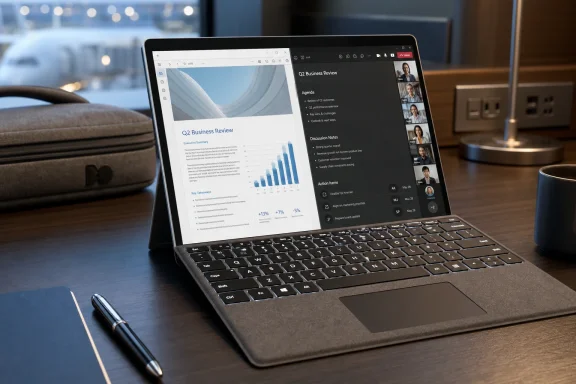 Microsoft’s Work Tablet Still Needs a Desk Identity
The Surface Pro has always lived in two worlds. Microsoft sells it as a tablet when portability and pen input are the headline, then sells it as a laptop replacement when productivity enters the conversation. The Surface Pro 10 for Business continues that tradition, with Intel Core Ultra processors, a 13-inch 3:2 display, business procurement channels, Windows Hello hardware, Thunderbolt-class USB-C connectivity, and the repairability language enterprise customers increasingly expect.But nobody writes a quarterly report on a spec sheet. The difference between a clever slate and a machine someone can live on for eight hours is the typing surface, pointing device, viewing angle, and the boring physical confidence that lets work disappear into muscle memory. That is why the Surface Pro Keyboard with Bold Keyset matters more than its accessory status suggests.
Microsoft’s keyboard covers have long been the Surface Pro’s quiet admission that tablet-first design has limits. A kickstand and magnetic keyboard can make a device more flexible than a clamshell laptop, but they also ask the user to tolerate a thinner typing deck, a smaller lap footprint, and a price structure that often makes the “starting at” device feel incomplete. The Bold Keyset version does not change that equation, but it sharpens Microsoft’s answer to one of its most practical weak spots: readability and everyday comfort.
The Bold Keyset Is an Accessibility Feature Wearing Business Clothes
The most interesting thing about the Bold Keyset is not that it exists. It is that Microsoft can plausibly market it both as an accessibility improvement and as a mainstream productivity feature. Larger, higher-contrast key legends and brighter backlighting help users who struggle with low-contrast keys, but they also help anyone working under the bad lighting of airplanes, conference rooms, hotel desks, or home offices assembled from whatever furniture survived the pandemic.That dual identity is important. Business hardware buyers increasingly want inclusive design without having to route every request through a formal accommodation process. A keyboard that is simply easier to see is not a niche medical device; it is a better default for a workforce that includes older employees, frequent travelers, people with variable vision, and anyone who types after midnight.
Microsoft has spent years trying to make Surface feel premium through restraint: dark keycaps, fabric finishes, thin lines, and understated branding. The Bold Keyset pushes in a different direction. It admits that legibility can be more valuable than elegance, especially when the machine is being deployed as a tool rather than a lifestyle object.
The risk is that “bold” becomes a cosmetic SKU instead of a procurement standard. If the high-contrast version is harder to find, limited by language or market, or treated as a special-order item, the accessibility story weakens. In a business fleet, the best accessibility feature is often the one nobody has to request.
A Laptop Replacement Is Built from Boring Parts
The Surface Pro 10 for Business has enough computing power for the work most office users actually do. Microsoft 365, browser-heavy workflows, Teams calls, remote desktop, VPN clients, dashboards, PDFs, and lightweight creative tasks do not require workstation-class thermals. They require a device that wakes quickly, connects reliably, displays text clearly, and survives being moved between meeting rooms without becoming awkward.That is why the keyboard bundle framing makes sense. The Surface Pro’s detachable nature gives it a unique advantage for note-taking, field work, signing documents, presenting, and cramped travel scenarios. But once the user sits down to produce rather than consume, the device has to become a laptop in all but hinge geometry.
The keyboard cover is where the illusion either works or breaks. Shallow key travel is unavoidable in a thin detachable cover, and no amount of marketing makes it feel like a full desktop mechanical keyboard. Still, layout consistency, backlighting, and a reliable touchpad can matter more than absolute travel distance. A keyboard that lets users type without thinking will beat a theoretically superior input device that forces constant correction.
For IT departments, that familiarity has operational value. When organizations move from traditional laptops to Surface-style 2-in-1 fleets, the question is not just whether the hardware can run the workload. It is whether employees will stop fighting the device quickly enough for the migration to feel like progress.
The Trackpad Is Where Mobility Becomes Productivity
The integrated precision touchpad rarely gets top billing, but it is central to the Surface Pro proposition. A detachable keyboard without a good pointing device becomes a travel keyboard, not a laptop replacement. Microsoft knows this, which is why its newer Surface keyboards emphasize larger touchpads, glass surfaces on some models, gesture support, and tighter integration with Windows.For mobile professionals, the trackpad is not merely a substitute for a mouse. It is the tool used in airport lounges, cramped trains, client sites, conference hallways, and kitchen tables where a mouse is either unavailable or absurd. A good touchpad makes window management, browser navigation, spreadsheet edits, and presentation tweaks feel possible without unpacking a workstation.
This is also where Surface Pro has to compete against modern business laptops that have become very good at being light, quiet, and comfortable. The old argument that a tablet with a keyboard was the only way to get mobility no longer holds. Lenovo, HP, Dell, Apple, and Microsoft’s own Surface Laptop line all offer machines that are thin enough for travel and rigid enough for lap use.
That makes the keyboard cover more than a nice-to-have. It is the part that defends the Surface Pro against the simplest objection: why not just buy a laptop?
The Bundle Is Really About Reducing the Number of Compromises
The ad-hoc-news framing of the Surface Pro 10 for Business keyboard bundle is straightforward: pair Microsoft’s business tablet with the Bold Keyset keyboard and you have a more credible everyday mobile workstation. That is not wrong, but the word “workstation” needs handling with care. In traditional IT language, a workstation implies sustained performance, specialized workloads, and hardware built for engineering, media production, data science, or other demanding tasks.The Surface Pro 10 for Business is better understood as a knowledge-work station. Its natural home is the world of Office documents, Teams meetings, web apps, line-of-business software, cloud desktops, note-taking, and travel productivity. It is a machine for people whose work follows them from desk to meeting to train to hotel, not for users who need a GPU-heavy engineering rig.
That distinction matters because Microsoft’s Surface marketing often benefits from ambiguity. “Workstation” sounds powerful. “Mobile productivity device” sounds ordinary. But the practical buyer should focus less on the label and more on the daily ergonomic chain: screen, keyboard, touchpad, ports, battery, serviceability, and manageability.
The keyboard bundle reduces one of the biggest compromises in that chain. It does not eliminate the others. Lapability remains different from a clamshell laptop, the kickstand still needs space, and the detached design is still less stable on soft surfaces. Surface Pro buyers are not escaping trade-offs; they are choosing which trade-offs they prefer.
Business Buyers Care About the Click More Than the Color
The magnetic connector is one of the Surface Pro line’s most underrated enterprise features. Bluetooth keyboards introduce pairing, batteries, firmware states, and support tickets. A magnetic Surface keyboard is physically obvious: attach it, fold it, type. If it fails, swap it.That kind of simplicity matters during deployment. IT teams rolling out dozens or hundreds of devices do not want a peripheral that requires user education before the first login. They want something that behaves like part of the machine, even if procurement and accounting treat it as a separate line item.
The separateness can still be a nuisance. A Surface Pro without its keyboard is not the device most business users thought they were getting. If keyboards are ordered separately, delayed, mismatched, lost, or treated as optional accessories by purchasing departments, the user experience collapses into avoidable friction.
This is why bundles matter. A bundle is not just a retail trick; it is a way of forcing the configuration to match the use case. If Microsoft and its resellers want the Surface Pro 10 for Business to be judged as a laptop replacement, the keyboard must arrive in the same box, budget cycle, and support model.
Surface Pro 10 Sits Between Two Microsoft Eras
The Surface Pro 10 for Business occupies an interesting place in Microsoft’s hardware timeline. It arrived as part of Microsoft’s first wave of business-focused “AI PC” messaging around Intel Core Ultra chips, before the consumer Copilot+ PC wave shifted much of the attention to Arm-based Snapdragon systems. That leaves the Pro 10 for Business as a pragmatic bridge: modern enough to fit Microsoft’s AI-era branding, conservative enough to satisfy organizations that still want Intel compatibility.That Intel compatibility remains meaningful. Many enterprises have legacy VPN clients, security agents, device management tools, browser extensions, print workflows, and specialized Windows applications that make Arm transitions more complicated than consumer marketing admits. For those buyers, the Surface Pro 10 for Business is less exciting than newer Copilot+ hardware, but safer.
The keyboard bundle reinforces that conservative appeal. It is not trying to sell a radical new interaction model. It is trying to make a flexible device feel familiar enough that users stop noticing the hardware. In enterprise computing, that is often the real win.
Microsoft’s broader Surface strategy depends on this balance. The company wants to push Windows into new form factors, AI-assisted workflows, and cloud-connected services, but its business customers still buy machines to reduce disruption. The Surface Pro 10 for Business with a readable, conventional keyboard is Microsoft telling IT departments: this is still a Windows laptop when you need it to be.
The Accessory Price Is Part of the Product Story
Surface keyboards have always carried a psychological tax. Microsoft can advertise the tablet at one price, while the configuration most users actually need costs more once the keyboard and possibly the pen are included. That model is not unique to Microsoft, but it is especially visible on Surface Pro because the keyboard is so central to the product’s identity.For business buyers, this is not merely a consumer annoyance. Accessories complicate procurement, warranty expectations, refresh planning, and replacement inventory. A $100-to-$300 keyboard cover is easier to approve than a new PC, but it is still a recurring cost across a fleet. When a keyboard wears out before the tablet does, IT needs spares. When a user loses one, productivity takes the hit before accounting does.
The Bold Keyset version may justify itself if it reduces typing errors, improves comfort, or helps users avoid external keyboards in more scenarios. But Microsoft’s premium accessory pricing means the argument has to be made honestly. This is not a cheap fix; it is part of the total cost of making the Surface Pro concept work.
That total cost should be compared against excellent business laptops, not just against the tablet’s base price. A Surface Pro 10 for Business plus keyboard, protection plan, docking gear, pen, and spare charger can quickly move from elegant mobility solution to premium fleet decision. The device may still be worth it, but only if the organization actually uses the flexibility it is paying for.
Hybrid Work Made the Keyboard Cover More Important, Not Less
The pandemic-era fantasy of work-from-anywhere has matured into something more prosaic: work-from-several-places, all of which are imperfect. Employees move between office desks, home setups, meeting rooms, shared spaces, client sites, and travel environments. Hardware now has to be good enough in each location rather than perfect in one.A detachable Surface Pro is well suited to that reality. It can be a tablet for handwritten notes, a presentation screen in a meeting, a light travel computer, and a docked desktop client. But the keyboard determines whether those transitions feel fluid or fussy.
The Bold Keyset’s high-contrast design fits this world because lighting conditions are no longer controlled. A corporate office may have standardized desk lamps and monitors, but a hotel room does not. A train seat does not. A conference room with a dim projector and a glossy table definitely does not.
Microsoft’s bet is that small ergonomic improvements compound. A more legible keyboard does not transform the Surface Pro 10 into a different class of machine, but it removes one more reason to reach for a conventional laptop. In a mature PC market, removing objections is often more important than adding features.
Microsoft’s Ecosystem Logic Is Hard to Miss
The Surface Pro 10 for Business is not just a hardware sale. It is a client endpoint for Microsoft 365, Teams, OneDrive, Entra ID, Intune, Defender, Windows Update for Business, Azure Virtual Desktop, and the growing stack of Copilot-branded services. The more comfortable the endpoint, the more plausible the ecosystem becomes.That is why accessories like the Surface Pro Keyboard with Bold Keyset are strategically useful. They make Microsoft’s own Windows device feel more complete, which in turn makes the company’s software-and-services world feel more coherent. A user who enjoys the hardware is less likely to blame Windows for friction that actually came from bad ergonomics.
There is also a subtle channel story. Business-focused Surface devices are sold through Microsoft and commercial resellers, where bundles, protection plans, and standardized configurations matter. The keyboard is part of that packaged solution, especially when the buyer wants to avoid the chaos of employees choosing their own accessories.
The danger for Microsoft is overclaiming. A better keyboard does not solve Teams fatigue, endpoint sprawl, licensing complexity, battery anxiety, or the administrative burden of modern Windows fleets. It simply makes the local interaction with the device less annoying. That is not everything, but it is not nothing.
Where the Surface Pro Still Loses to the Clamshell
The Surface Pro design remains brilliant in some situations and stubbornly awkward in others. On a desk, the kickstand is flexible and the detachable keyboard gives the device a light, modular feel. On a lap, especially in tight spaces, the footprint can be less forgiving than a laptop hinge.This matters because mobile professionals do not always get a desk. Airplane trays, crowded conference seating, car passenger seats, and couches are hostile environments for kickstand computers. A clamshell laptop wins by being structurally boring. The screen and keyboard support each other, and the user does not have to negotiate angles and surface depth.
The keyboard cover also cannot escape physics. Thinness limits key travel and rigidity. The typing feel may be good for its class, but the class itself is constrained. Users who write thousands of words a day, live in spreadsheets, or spend long stretches in terminal sessions may still prefer a dedicated laptop keyboard or an external mechanical setup.
That does not make the Surface Pro 10 for Business a bad choice. It makes it a specific choice. It is best for people who genuinely benefit from tablet mode, pen input, detachable mobility, or frequent transitions between contexts. If the keyboard will remain attached forever, the buyer should at least test a Surface Laptop before committing.
Repairability Helps, but the Keyboard Is the First Wear Item
Microsoft has improved the repairability story around recent Surface business devices, including replaceable components through authorized channels and clearer service messaging. That matters to enterprise customers trying to extend device lifecycles and reduce waste. It also helps Surface escape its older reputation for sealed elegance at the expense of maintainability.But in everyday fleet life, the keyboard cover may be the first component to show age. Key shine, fabric wear, touchpad issues, connector problems, spills, and physical bending are all more likely on the part users touch constantly. A detachable keyboard makes that easier to handle than a failed laptop keyboard, but only if replacements are stocked and compatible.
The Bold Keyset version adds another inventory question. If an organization standardizes on it for accessibility and readability, IT should avoid mixing it casually with standard keyset models. Consistency matters for user expectations, especially when people move between hot desks or shared devices.
There is a practical upside here. A worn Surface keyboard can be replaced without opening the PC or taking the whole device out of service. That is one of the design’s strongest arguments in a corporate setting. The tablet can remain in rotation while the most abused input surface is refreshed.
The Real Competition Is the Good-Enough Laptop
Surface Pro debates often get trapped in comparisons with tablets, but the real business competition is the good-enough laptop. A modern 13- or 14-inch business notebook is light, fast, sturdy, manageable, and familiar. It usually includes the keyboard in the price, works better on a lap, and may offer more ports without a dock.The Surface Pro fights back with flexibility. It is better for pen workflows, easier to use as a handheld review device, more adaptable in tight spaces when the keyboard is removed, and cleaner for certain field and clinical scenarios. It can be a tablet without requiring a second device.
The Bold Keyset keyboard strengthens the laptop side of that argument. It does not make the Surface Pro more tablet-like; it makes the tablet less costly as a laptop substitute. That is the right move because most Surface Pro business users will spend more hours typing than sketching.
The best buyers for this bundle are not people who vaguely like the idea of a 2-in-1. They are users with a real split workflow: typing-heavy productivity plus meaningful tablet use. Everyone else risks paying a premium to recreate a laptop less elegantly than a laptop already does.
The Small Print Belongs in the Buying Decision
The bundle story should not obscure compatibility and regional details. Surface keyboard naming has become crowded, with standard keyboards, keyboards with pen storage, Flex Keyboard variants, business versions, 12-inch and 13-inch models, and Bold Keyset options that may vary by market. Buyers should verify the exact Surface Pro generation and keyboard model before ordering.That caution is especially important because Microsoft’s Surface lineup has recently included Intel business models, Arm-based Copilot+ models, 12-inch devices, and 13-inch devices with overlapping names. “Surface Pro Keyboard” sounds simple until a procurement cart contains the wrong size, wrong layout, or wrong pen-storage expectation.
Business buyers should also test the keyboard against their actual work. A five-minute store demo cannot reveal whether the typing angle works for long emails, whether the trackpad is comfortable in Excel, or whether the kickstand fits on the user’s preferred travel surfaces. The right pilot group is worth more than a spec comparison.
The biggest mistake would be treating the keyboard as a decorative add-on chosen after the device decision is already made. For a Surface Pro fleet, the keyboard is part of the workstation. It should be evaluated with the same seriousness as memory, storage, processor, display, and warranty.
The Bundle Works Best When IT Treats It as the Computer
The most concrete lesson from the Surface Pro 10 for Business keyboard bundle is that Microsoft’s 2-in-1 vision succeeds only when the whole kit is bought, deployed, and supported as one working machine. The Bold Keyset keyboard is not revolutionary, but it points Surface in the right direction: less fashion, more legibility, fewer daily annoyances.- The Surface Pro 10 for Business is most convincing for workers who need both laptop productivity and genuine tablet flexibility.
- The Surface Pro Keyboard with Bold Keyset should be evaluated as a core input device, not as an optional accessory.
- The high-contrast key legends and brighter backlighting make the keyboard especially relevant for hybrid work, travel, and inclusive fleet design.
- The total cost should include the keyboard, protection plan, pen, dock, spares, and replacement accessories rather than the tablet alone.
- Organizations should pilot the bundle with users who type heavily, travel frequently, and actually use tablet mode before standardizing on it.
- Buyers should verify exact keyboard compatibility because Surface branding now spans multiple sizes, generations, and business configurations.
References
- Primary source: AD HOC NEWS
Published: 2026-06-17T00:03:08.788448
Loading…
www.ad-hoc-news.de - Official source: microsoft.com
Loading…
www.microsoft.com - Official source: support.microsoft.com
Loading…
support.microsoft.com - Related coverage: macys.com
Loading…
www.macys.com - Related coverage: bestbuy.com
Loading…
www.bestbuy.com - Related coverage: techradar.com

Microsoft unveils new Surface for Business laptops and Surface Pro for Business 2 in 1s — showing your next work device will have AI at the core | TechRadar
Microsoft unveils new Surface designed with AI in mindwww.techradar.com