
Microsoft’s Xbox consoles still do not support native VPN apps in 2026, so players who want VPN protection or location spoofing must route the console through a VPN-enabled router, a Windows hotspot, Smart DNS, or another shared connection. That limitation is the quiet fact behind almost every “best VPN for Xbox” guide: the VPN itself is only half the product. The other half is the network workaround, and that is where most of the marketing claims start to wobble.
A VPN can be useful on Xbox, but it is not a magic lag reducer, cheat-proof matchmaking tool, or universal shield against attacks. Used carefully, it can hide your public IP address, help bypass some location restrictions, work around certain throttled networks, and sometimes make subscription or key-redemption arbitrage possible. Used carelessly, it can add latency, break party chat, violate store-region rules, or turn a simple NAT problem into a worse one.
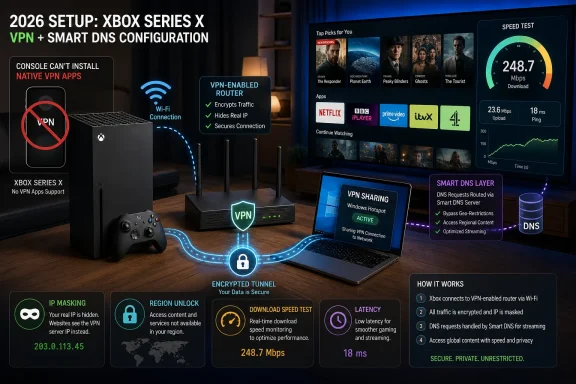
The first thing Xbox owners need to understand is brutally simple: you cannot install ExpressVPN, NordVPN, Surfshark, Proton VPN, Windscribe, or any other normal VPN client directly on an Xbox Series X, Series S, or Xbox One. Microsoft’s console environment does not work like Windows, macOS, Android, or iOS. There is no general-purpose VPN client slot in the network settings, and there is no Xbox Store category full of VPN apps waiting to be installed.
That does not mean VPNs are impossible on Xbox. It means every setup is an indirect setup. The console must connect to a network that is already being routed through the VPN.
For most households, the cleanest paid option is a VPN-compatible router. You configure the VPN once on the router, connect the Xbox to that router, and the console’s traffic exits through the VPN provider. The downside is cost and complexity: not every router supports VPN clients, and running encryption at router level can expose weak router CPUs very quickly.
The more temporary option is connection sharing through a PC or Mac. On Windows 10 or Windows 11, you can connect the computer to a VPN, enable mobile hotspot or Internet Connection Sharing, and then connect the Xbox to that shared network. This works well enough for testing, travel, and dorm rooms, but it is messier than a router and depends on the host machine staying awake and connected.
Smart DNS is the third route, and it is often misunderstood. Smart DNS can help with streaming-region access because it changes how certain location checks resolve, but it does not encrypt Xbox traffic and does not hide your real IP address in the same way a full VPN tunnel does. If the goal is Netflix libraries or BBC iPlayer rather than privacy, Smart DNS may be enough. If the goal is IP masking in multiplayer, it is not.
That is why the best VPNs for Xbox tend to be paid services with large server networks, router support, Smart DNS options, and decent WireGuard-class protocols. ExpressVPN remains popular partly because it has polished router tooling and a well-known Smart DNS feature. NordVPN, Surfshark, Proton VPN, Private Internet Access, and CyberGhost all have reasonable Xbox use cases depending on whether the user cares most about speed, price, privacy, or streaming access.
Free VPNs can still have a place, but the place is narrow. Proton VPN’s free tier is unusually respectable for general privacy, but free users have fewer location choices, which limits region switching. Windscribe’s free plan can be useful for occasional testing, but data caps make it a poor fit for game downloads or long streaming sessions. TunnelBear and similar free plans are more educational than practical for console gaming.
The ugly truth is that many “free VPN for Xbox” recommendations collapse at the first serious test. If a service has tiny data limits, overloaded servers, no router configuration files, no Smart DNS, and no clear privacy posture, it is not really an Xbox VPN. It is a browser VPN being stretched into a console use case.
But the important phrase is if. Most home broadband slowdowns are not targeted throttling. They are congestion, weak Wi-Fi, overloaded routers, poor peering, bad bufferbloat, or a game server having a bad night. A VPN will not fix those problems and may make some of them worse.
The throttling case is more plausible in shared networks: hotels, student housing, military barracks, corporate apartments, public Wi-Fi, or any environment where the network administrator is rationing bandwidth. If Xbox downloads crawl only on a particular managed network, and other high-bandwidth apps seem similarly constrained, a VPN is worth trying. In that scenario, the VPN is less of a gaming optimizer and more of a tunnel through somebody else’s traffic-shaping policy.
Even then, the test is empirical. Run the Xbox speed test without the VPN, then through the VPN, then again without it. If download speed improves and latency remains playable, keep the setup. If latency spikes or packet loss appears, the VPN has solved the wrong problem.
The matchmaking use case is the most controversial because it sits at the intersection of network engineering and competitive gaming folklore. Players often claim that connecting to smaller regions can soften skill-based matchmaking in games such as Call of Duty. The theory is that a lower-population region forces the matchmaking system to prioritize filling a lobby over perfectly matching skill.
Sometimes that may happen. But it is not guaranteed, and it is not clean. Modern matchmaking systems can consider ping, party composition, platform, input type, skill bands, wait time, engagement metrics, and regional population. A VPN changes one or two signals while often making another signal — latency — worse.
There is also the sportsmanship issue. Using a VPN to hunt easier lobbies may not be the same as running cheat software, but it is still a form of matchmaking manipulation. Publishers can and do adjust enforcement, telemetry, and region-detection systems. The more a trick becomes common, the more likely it is to become detectable, unreliable, or explicitly punished.
A VPN adds an extra hop. Your Xbox traffic travels to the VPN server before heading onward to the game server, and the return traffic takes the reverse path. If the VPN provider has unusually good routing to a particular game network, or if your ISP has unusually bad routing, the VPN can accidentally produce a better path. That is the exception, not the default.
For most players, the lowest-latency setup is still wired Ethernet to a stable router, with the shortest sensible route to the game server. If you are in Chicago and playing on a central U.S. server, routing through London is not clever. It is sabotage with branding.
The better way to think about VPN gaming performance is not “Will this lower my ping?” but “How much extra delay does this add, and is the tradeoff worth it?” If the goal is hiding an IP address while streaming a ranked match, a small latency increase may be acceptable. If the goal is competitive play at the lowest possible ping, the VPN should usually stay off.
This use case is less latency-sensitive than multiplayer gaming. A streaming app needs sustained throughput and stable routing, not a 20ms ping. If the VPN server is fast enough and not blocked by the streaming provider, the experience can be excellent.
The practical setup varies. Smart DNS is often the least intrusive option for streaming because it can be configured at the network level and avoids full encryption overhead. A router VPN is more comprehensive but may slow every device on the network unless configured carefully. A Windows hotspot is the quick-and-dirty method, useful when traveling or testing a service.
The cat-and-mouse game remains. Netflix, Disney+, Hulu, BBC iPlayer, and other services regularly block known VPN endpoints. This is one reason paid providers matter: they have the incentive and infrastructure to rotate addresses, maintain streaming-specific servers, and respond when access breaks.
That loophole has not disappeared, but it has narrowed. Microsoft’s October 2025 Game Pass restructuring moved the service into Essential, Premium, and Ultimate tiers and changed the economics around conversion. The old “buy cheap time, convert cheaply, and celebrate” playbook is less powerful than it used to be.
This matters because many VPN guides still write as if it is 2021. They treat regional Game Pass savings as a simple consumer hack rather than a moving target governed by Microsoft’s subscription rules, store-region controls, payment checks, and conversion ratios. The savings may still exist in certain markets, but the risk-adjusted payoff is smaller.
There is also a terms-of-service reality. Region shopping may work technically while still being outside the rules Microsoft wants users to follow. That distinction matters. A guide can explain that a thing is possible without pretending it is endorsed.
The problem is that every step depends on policies that can change. Microsoft can block VPN IP ranges. Marketplaces can sell keys with unclear provenance. A payment method can betray the buyer’s real region. A code can fail because the account, store, and key region do not line up.
This is not the same as buying a discounted physical disc from another retailer. It is a deliberate attempt to route around regional pricing and licensing controls. Many users have done it without consequence, but “I have not been banned” is not a policy guarantee.
If you choose to do it, treat it as a risk decision rather than a standard shopping tip. Use reputable marketplaces, avoid suspiciously cheap listings, and understand that a failed redemption may become your problem rather than Microsoft’s.
There is a kernel of truth here, but it is not the cleanest fix. Sharing a VPN connection through Windows can change how the Xbox appears to the outside world, and in some cases it can bypass a hostile or double-NAT environment. That may help in dorms, hotels, mobile hotspots, or ISPs using carrier-grade NAT.
At home, the better answer is usually to fix the router path. Enable UPnP if you trust your LAN environment. Use DHCP reservation so the Xbox keeps the same local IP address. Configure port forwarding only if you understand the security tradeoff. Avoid double NAT by putting one router in bridge mode or using a proper access point configuration.
A VPN can be a workaround when you do not control the network. It should not be the first tool when you do.
For denial-of-service attacks against a home connection, a VPN can help because the attacker sees the VPN endpoint rather than the residential IP address. If the attack targets the VPN server, the provider’s infrastructure is usually better prepared than a consumer router. At minimum, the user can disconnect, change servers, and emerge with a different visible address.
But this is where marketing often overreaches. A VPN is not an invincibility shield against serious distributed denial-of-service attacks. Large DDoS attacks can overwhelm upstream capacity, target accounts or services rather than IPs, or continue through other exposed infrastructure. Streamers, tournament players, and high-profile creators need operational security, platform moderation tools, and sometimes business-grade mitigation — not just a consumer VPN subscription.
The practical message is modest but useful: a VPN can reduce the exposure of your residential IP address. That is worth having in some contexts. It is not a substitute for better account security, careful voice-chat habits, or a resilient network setup.
For streaming-first users, Smart DNS support is almost as important as the VPN itself. ExpressVPN’s MediaStreamer-style approach, NordVPN’s SmartDNS, Surfshark’s Smart DNS, and similar features can be more convenient than routing the entire console through an encrypted tunnel. The tradeoff is privacy: Smart DNS is for location handling, not IP concealment.
For privacy-first users, router support and protocol quality matter more. WireGuard-based protocols and well-maintained OpenVPN configurations are the baseline. A provider that publishes router guides, supports common firmware, and allows enough simultaneous connections will be easier to live with than a bargain service that technically supports routers but treats them as an afterthought.
For travelers and students, the Windows hotspot method may be the most realistic. It costs nothing beyond the VPN subscription, works without replacing hardware, and can bypass some managed-network restrictions. It is also fragile, so it should be tested before a tournament night or a long download session.
For free users, the recommendation is conservative: use free plans only for testing, not as a permanent Xbox network layer. A free VPN with limited servers and data caps can show whether a VPN solves your problem. If it does, paying for a month of a reputable provider is usually cheaper than wasting hours fighting a throttled or blocked free endpoint.
The setup steps are not glamorous. For a router, subscribe to the VPN, check whether your router supports VPN client mode, import the provider’s configuration, connect the Xbox to that router, and test NAT, latency, and download speed. For a Windows hotspot, connect the PC to the VPN, share that connection through mobile hotspot or adapter sharing, connect the Xbox to the new Wi-Fi network, and retest. For Smart DNS, register your IP with the provider if required, enter the DNS addresses on the Xbox or router, restart the streaming app, and verify the region.
The maintenance matters more than the initial setup. VPN servers get blocked. Store policies change. Game matchmaking changes. A configuration that worked last month can fail quietly after a router firmware update, a Windows update, or a VPN provider rotating infrastructure.
The smart user keeps the VPN setup modular. Do not route the whole household through another country just because the Xbox needs BBC iPlayer for an evening. Do not leave a high-latency VPN server enabled for competitive play because it helped redeem a code last weekend. Treat the VPN as a switchable tool, not a permanent identity.
A VPN can be useful on Xbox, but it is not a magic lag reducer, cheat-proof matchmaking tool, or universal shield against attacks. Used carefully, it can hide your public IP address, help bypass some location restrictions, work around certain throttled networks, and sometimes make subscription or key-redemption arbitrage possible. Used carelessly, it can add latency, break party chat, violate store-region rules, or turn a simple NAT problem into a worse one.
 The Console Is the Catch
The first thing Xbox owners need to understand is brutally simple: you cannot install ExpressVPN, NordVPN, Surfshark, Proton VPN, Windscribe, or any other normal VPN client directly on an Xbox Series X, Series S, or Xbox One. Microsoft’s console environment does not work like Windows, macOS, Android, or iOS. There is no general-purpose VPN client slot in the network settings, and there is no Xbox Store category full of VPN apps waiting to be installed.That does not mean VPNs are impossible on Xbox. It means every setup is an indirect setup. The console must connect to a network that is already being routed through the VPN.
For most households, the cleanest paid option is a VPN-compatible router. You configure the VPN once on the router, connect the Xbox to that router, and the console’s traffic exits through the VPN provider. The downside is cost and complexity: not every router supports VPN clients, and running encryption at router level can expose weak router CPUs very quickly.
The more temporary option is connection sharing through a PC or Mac. On Windows 10 or Windows 11, you can connect the computer to a VPN, enable mobile hotspot or Internet Connection Sharing, and then connect the Xbox to that shared network. This works well enough for testing, travel, and dorm rooms, but it is messier than a router and depends on the host machine staying awake and connected.
Smart DNS is the third route, and it is often misunderstood. Smart DNS can help with streaming-region access because it changes how certain location checks resolve, but it does not encrypt Xbox traffic and does not hide your real IP address in the same way a full VPN tunnel does. If the goal is Netflix libraries or BBC iPlayer rather than privacy, Smart DNS may be enough. If the goal is IP masking in multiplayer, it is not.
Paid VPNs Win Because Xbox Is Unforgiving
The “free versus paid” debate looks different on Xbox than it does on a phone. On a phone, a free VPN can be tolerable for light browsing if the data cap is manageable and the privacy policy is not hostile. On Xbox, the workload is heavier: game downloads are huge, streaming apps run at high bitrates, and multiplayer is sensitive to jitter as much as raw speed.That is why the best VPNs for Xbox tend to be paid services with large server networks, router support, Smart DNS options, and decent WireGuard-class protocols. ExpressVPN remains popular partly because it has polished router tooling and a well-known Smart DNS feature. NordVPN, Surfshark, Proton VPN, Private Internet Access, and CyberGhost all have reasonable Xbox use cases depending on whether the user cares most about speed, price, privacy, or streaming access.
Free VPNs can still have a place, but the place is narrow. Proton VPN’s free tier is unusually respectable for general privacy, but free users have fewer location choices, which limits region switching. Windscribe’s free plan can be useful for occasional testing, but data caps make it a poor fit for game downloads or long streaming sessions. TunnelBear and similar free plans are more educational than practical for console gaming.
The ugly truth is that many “free VPN for Xbox” recommendations collapse at the first serious test. If a service has tiny data limits, overloaded servers, no router configuration files, no Smart DNS, and no clear privacy posture, it is not really an Xbox VPN. It is a browser VPN being stretched into a console use case.
The Throttling Argument Is Real, but Smaller Than Advertised
One of the most common VPN pitches is that a VPN prevents ISP throttling. In principle, that is true. If an ISP or managed network is slowing traffic because it can identify gaming, streaming, or large downloads, a VPN can encrypt the traffic and make that classification harder.But the important phrase is if. Most home broadband slowdowns are not targeted throttling. They are congestion, weak Wi-Fi, overloaded routers, poor peering, bad bufferbloat, or a game server having a bad night. A VPN will not fix those problems and may make some of them worse.
The throttling case is more plausible in shared networks: hotels, student housing, military barracks, corporate apartments, public Wi-Fi, or any environment where the network administrator is rationing bandwidth. If Xbox downloads crawl only on a particular managed network, and other high-bandwidth apps seem similarly constrained, a VPN is worth trying. In that scenario, the VPN is less of a gaming optimizer and more of a tunnel through somebody else’s traffic-shaping policy.
Even then, the test is empirical. Run the Xbox speed test without the VPN, then through the VPN, then again without it. If download speed improves and latency remains playable, keep the setup. If latency spikes or packet loss appears, the VPN has solved the wrong problem.
Region Switching Works, but Matchmaking Is Not a Vending Machine
Changing your apparent location is the Xbox VPN trick that attracts the most attention. Connect through another country, launch a game, and in some cases the game or service sees you as being in that region. That can affect streaming libraries, store behavior, key redemption, and sometimes matchmaking.The matchmaking use case is the most controversial because it sits at the intersection of network engineering and competitive gaming folklore. Players often claim that connecting to smaller regions can soften skill-based matchmaking in games such as Call of Duty. The theory is that a lower-population region forces the matchmaking system to prioritize filling a lobby over perfectly matching skill.
Sometimes that may happen. But it is not guaranteed, and it is not clean. Modern matchmaking systems can consider ping, party composition, platform, input type, skill bands, wait time, engagement metrics, and regional population. A VPN changes one or two signals while often making another signal — latency — worse.
There is also the sportsmanship issue. Using a VPN to hunt easier lobbies may not be the same as running cheat software, but it is still a form of matchmaking manipulation. Publishers can and do adjust enforcement, telemetry, and region-detection systems. The more a trick becomes common, the more likely it is to become detectable, unreliable, or explicitly punished.
The Latency Myth Refuses to Die
The most misleading VPN claim in gaming is that a VPN “reduces lag.” Sometimes it can. Usually it will not.A VPN adds an extra hop. Your Xbox traffic travels to the VPN server before heading onward to the game server, and the return traffic takes the reverse path. If the VPN provider has unusually good routing to a particular game network, or if your ISP has unusually bad routing, the VPN can accidentally produce a better path. That is the exception, not the default.
For most players, the lowest-latency setup is still wired Ethernet to a stable router, with the shortest sensible route to the game server. If you are in Chicago and playing on a central U.S. server, routing through London is not clever. It is sabotage with branding.
The better way to think about VPN gaming performance is not “Will this lower my ping?” but “How much extra delay does this add, and is the tradeoff worth it?” If the goal is hiding an IP address while streaming a ranked match, a small latency increase may be acceptable. If the goal is competitive play at the lowest possible ping, the VPN should usually stay off.
Streaming Is the Cleanest Xbox VPN Use Case
Streaming is where Xbox VPNs make the most ordinary sense. Xbox consoles are living-room media boxes as much as game machines, and streaming services still divide catalogs by country. A VPN or Smart DNS service can make an Xbox appear to be in another region, which may unlock a different Netflix library or allow access to services that are otherwise unavailable from the user’s location.This use case is less latency-sensitive than multiplayer gaming. A streaming app needs sustained throughput and stable routing, not a 20ms ping. If the VPN server is fast enough and not blocked by the streaming provider, the experience can be excellent.
The practical setup varies. Smart DNS is often the least intrusive option for streaming because it can be configured at the network level and avoids full encryption overhead. A router VPN is more comprehensive but may slow every device on the network unless configured carefully. A Windows hotspot is the quick-and-dirty method, useful when traveling or testing a service.
The cat-and-mouse game remains. Netflix, Disney+, Hulu, BBC iPlayer, and other services regularly block known VPN endpoints. This is one reason paid providers matter: they have the incentive and infrastructure to rotate addresses, maintain streaming-specific servers, and respond when access breaks.
Game Pass Arbitrage Is Becoming Less Generous
For years, Xbox subscription arbitrage was one of the platform’s open secrets. Players bought cheaper regional codes, stacked time, converted lower-tier subscriptions into Game Pass Ultimate, and walked away with years of service at a steep discount. VPNs became part of that ritual because region checks often determined what could be purchased or redeemed.That loophole has not disappeared, but it has narrowed. Microsoft’s October 2025 Game Pass restructuring moved the service into Essential, Premium, and Ultimate tiers and changed the economics around conversion. The old “buy cheap time, convert cheaply, and celebrate” playbook is less powerful than it used to be.
This matters because many VPN guides still write as if it is 2021. They treat regional Game Pass savings as a simple consumer hack rather than a moving target governed by Microsoft’s subscription rules, store-region controls, payment checks, and conversion ratios. The savings may still exist in certain markets, but the risk-adjusted payoff is smaller.
There is also a terms-of-service reality. Region shopping may work technically while still being outside the rules Microsoft wants users to follow. That distinction matters. A guide can explain that a thing is possible without pretending it is endorsed.
Game Keys Are the Sharp Edge of the Trick
Region-locked game keys are another area where VPNs can work and still leave the user exposed. The basic idea is straightforward: buy a cheaper key for another country, connect a browser session to a VPN server in that country, redeem the code through the Microsoft account website, and then download the game on Xbox once the license is attached to the account.The problem is that every step depends on policies that can change. Microsoft can block VPN IP ranges. Marketplaces can sell keys with unclear provenance. A payment method can betray the buyer’s real region. A code can fail because the account, store, and key region do not line up.
This is not the same as buying a discounted physical disc from another retailer. It is a deliberate attempt to route around regional pricing and licensing controls. Many users have done it without consequence, but “I have not been banned” is not a policy guarantee.
If you choose to do it, treat it as a risk decision rather than a standard shopping tip. Use reputable marketplaces, avoid suspiciously cheap listings, and understand that a failed redemption may become your problem rather than Microsoft’s.
NAT Problems Need Network Fixes, Not VPN Folklore
Strict NAT is one of the few Xbox networking issues where users are desperate enough to try anything. A strict or moderate NAT can interfere with party chat, peer-to-peer connectivity, and matchmaking in some games. VPN guides sometimes pitch a Windows hotspot as a way to “change” strict NAT to moderate or open.There is a kernel of truth here, but it is not the cleanest fix. Sharing a VPN connection through Windows can change how the Xbox appears to the outside world, and in some cases it can bypass a hostile or double-NAT environment. That may help in dorms, hotels, mobile hotspots, or ISPs using carrier-grade NAT.
At home, the better answer is usually to fix the router path. Enable UPnP if you trust your LAN environment. Use DHCP reservation so the Xbox keeps the same local IP address. Configure port forwarding only if you understand the security tradeoff. Avoid double NAT by putting one router in bridge mode or using a proper access point configuration.
A VPN can be a workaround when you do not control the network. It should not be the first tool when you do.
IP Protection Is Useful, but DDoS Claims Need Discipline
A VPN can hide your home IP address from other players and third-party services that would otherwise see it. That matters more than many people admit. Competitive gaming, streaming, and voice-chat communities can be hostile places, and IP-based harassment remains a real nuisance.For denial-of-service attacks against a home connection, a VPN can help because the attacker sees the VPN endpoint rather than the residential IP address. If the attack targets the VPN server, the provider’s infrastructure is usually better prepared than a consumer router. At minimum, the user can disconnect, change servers, and emerge with a different visible address.
But this is where marketing often overreaches. A VPN is not an invincibility shield against serious distributed denial-of-service attacks. Large DDoS attacks can overwhelm upstream capacity, target accounts or services rather than IPs, or continue through other exposed infrastructure. Streamers, tournament players, and high-profile creators need operational security, platform moderation tools, and sometimes business-grade mitigation — not just a consumer VPN subscription.
The practical message is modest but useful: a VPN can reduce the exposure of your residential IP address. That is worth having in some contexts. It is not a substitute for better account security, careful voice-chat habits, or a resilient network setup.
The Best Setup Depends on the Job
There is no single “best VPN for Xbox” because there is no single Xbox VPN use case. The right answer depends on whether you want streaming access, privacy in multiplayer, cheaper subscriptions, hotel-network survival, or NAT workarounds.For streaming-first users, Smart DNS support is almost as important as the VPN itself. ExpressVPN’s MediaStreamer-style approach, NordVPN’s SmartDNS, Surfshark’s Smart DNS, and similar features can be more convenient than routing the entire console through an encrypted tunnel. The tradeoff is privacy: Smart DNS is for location handling, not IP concealment.
For privacy-first users, router support and protocol quality matter more. WireGuard-based protocols and well-maintained OpenVPN configurations are the baseline. A provider that publishes router guides, supports common firmware, and allows enough simultaneous connections will be easier to live with than a bargain service that technically supports routers but treats them as an afterthought.
For travelers and students, the Windows hotspot method may be the most realistic. It costs nothing beyond the VPN subscription, works without replacing hardware, and can bypass some managed-network restrictions. It is also fragile, so it should be tested before a tournament night or a long download session.
For free users, the recommendation is conservative: use free plans only for testing, not as a permanent Xbox network layer. A free VPN with limited servers and data caps can show whether a VPN solves your problem. If it does, paying for a month of a reputable provider is usually cheaper than wasting hours fighting a throttled or blocked free endpoint.
The Sensible Xbox VPN Playbook Is Narrower Than the Marketing
A good Xbox VPN setup starts with honesty about the target. If you want to watch a foreign streaming catalog, use Smart DNS or a nearby VPN endpoint known to work with that service. If you want to hide your IP while playing, use the closest fast VPN server and accept that latency may rise. If you want to bypass a strict campus network, share a VPN connection from a laptop and test party chat before assuming victory.The setup steps are not glamorous. For a router, subscribe to the VPN, check whether your router supports VPN client mode, import the provider’s configuration, connect the Xbox to that router, and test NAT, latency, and download speed. For a Windows hotspot, connect the PC to the VPN, share that connection through mobile hotspot or adapter sharing, connect the Xbox to the new Wi-Fi network, and retest. For Smart DNS, register your IP with the provider if required, enter the DNS addresses on the Xbox or router, restart the streaming app, and verify the region.
The maintenance matters more than the initial setup. VPN servers get blocked. Store policies change. Game matchmaking changes. A configuration that worked last month can fail quietly after a router firmware update, a Windows update, or a VPN provider rotating infrastructure.
The smart user keeps the VPN setup modular. Do not route the whole household through another country just because the Xbox needs BBC iPlayer for an evening. Do not leave a high-latency VPN server enabled for competitive play because it helped redeem a code last weekend. Treat the VPN as a switchable tool, not a permanent identity.
The Tricks Worth Keeping and the Myths Worth Dropping
The useful parts of Xbox VPN advice are concrete, limited, and testable. The bad parts are vague promises about “better gaming,” “easy lobbies,” and “total protection.” That distinction is the difference between a network tool and snake oil.- A VPN can hide your Xbox’s public-facing IP address only when the console’s traffic is actually routed through the VPN, usually by router configuration or connection sharing.
- A VPN can help with streaming-region access, but Smart DNS may be the cleaner option when encryption and IP masking are not required.
- A VPN can bypass some throttling or filtering on managed networks, but it will not fix ordinary home Wi-Fi congestion, bad routing, or overloaded game servers.
- A VPN can change the region signals seen by some games and services, but it usually increases latency and may violate publisher or platform rules.
- Free VPNs are best treated as short tests for Xbox use, because data caps, limited regions, and weak router support make them poor long-term console tools.
- Game Pass and region-key savings still exist in some forms, but Microsoft’s post-2025 subscription structure and region controls have made the old arbitrage playbook less reliable.
References
- Primary source: Top10VPN
Published: 2026-06-16T14:20:10.676032
How to Use the Best VPNs for Xbox (Free & Paid Options)
Learn how to use a VPN on your Xbox with our easy set up methods and video walkthroughs. We've also covered the best VPNs to use on your Xbox consoles.www.top10vpn.com - Related coverage: gematsu.com
Xbox Game Pass introduces upgraded Essential, Premium, and Ultimate plans, including price increases - Gematsu
Microsoft Gaming has announced three upgraded Xbox Game Pass plans—Essential, Premium, and Ultimate. Essential will replace the existing Core plan…www.gematsu.com - Related coverage: natchecker.com
Xbox NAT Type Guide: Open, Moderate, Strict, and Double NAT
Check NAT type on Xbox Series X/S or Xbox One, understand Open/Moderate/Strict and Double NAT detected, and fix Strict NAT with UPnP, alternate port selection, port forwarding, and upstream checks. natchecker.com
- Related coverage: xboxdynasty.de
Xbox Game Pass: Neue Konvertierungsraten für Premium und Ultimate
Microsoft führt neue Konvertierungsraten für Xbox Game Pass Ultimate und Premium ein – so viel Zeit erhaltet ihr wirklichwww.xboxdynasty.de - Related coverage: wpteq.org
Xbox Game Passの変換率が大幅変更!PremiumとUltimateでどう変わる? - WPTeq
マイクロソフトは2025年10月1日にXbox Game Passを大幅にリニューアルしました。これによりサービス内容、 ... wpteq.org
- Related coverage: en.generacionxbox.com
Xbox toughens up Xbox Game Pass conversions: this is how subscriptions stay – Generacion Xbox
With the arrival of the new Essential, Premium and Ultimate plans, the conversion ratios also change.en.generacionxbox.com
- Related coverage: generacionxbox.com
Xbox endurece las conversiones de Xbox Game Pass: así quedan las suscripciones – Generacion Xbox
Con la llegada de los nuevos planes Essential, Premium y Ultimate, también cambian las proporciones de conversión.generacionxbox.com - Related coverage: windowscentral.com
Xbox Game Pass Ultimate is getting a BIG price increase | Windows Central
Xbox Game Pass is getting a ton of new games today via Ubisoft+, as well as new Fortnite benefits. Ultimate subscribers will have to swallow a 50% price increase to get it, though.www.windowscentral.com - Related coverage: tomsguide.com
Microsoft just raised the price of Xbox Game Pass Ultimate — here’s how much you'll pay now | Tom's Guide
Xbox just announced that it's raising the price of Game Pass. Here's how much the gaming subscription service will cost now.www.tomsguide.com - Related coverage: support.amplex.net
- Related coverage: bgzashtita.es
Troubleshoot Audio in Parties and Issues with Multiplayer Games on Windows 10
PDF documentbgzashtita.es
- Related coverage: fsc.org