
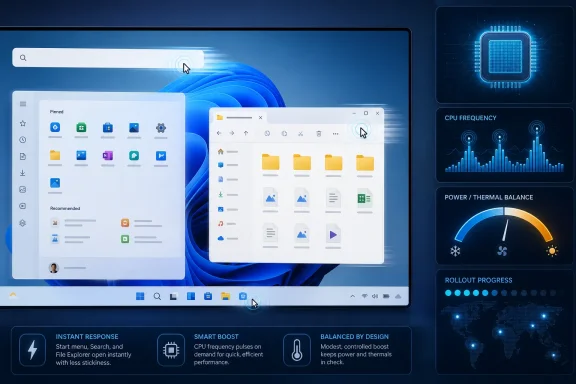
Microsoft’s June 9, 2026 cumulative update KB5094126 for Windows 11 versions 24H2 and 25H2 adds a Low Latency Profile that briefly raises CPU frequency during interactive actions, moving systems to builds 26100.8655 or 26200.8655 while the feature rolls out in stages. The promise is modest but important: Windows should feel less sticky when you open apps, invoke Start, use Search, or pull up common shell surfaces. The controversy is that Microsoft is not fixing “old PC slowness” with magic; it is admitting that responsiveness is now a first-class Windows problem.
For years, Windows performance complaints have lived in a foggy middle ground. Benchmarks could look fine, games could run well, and yet the desktop itself could still feel oddly delayed when opening Start, launching File Explorer, or right-clicking into a context menu. That kind of friction rarely shows up in headline CPU charts, but it defines whether a machine feels modern.
Low Latency Profile is aimed at that exact gap. Instead of improving sustained throughput, it appears to target short interactive bursts by pushing the processor toward higher clocks for a second or three when the user does something that expects an immediate response. In plain English, Windows is trying harder not to dawdle at the moment you click.
That matters because perceived speed is not the same thing as raw speed. A five-year-old laptop may still have enough compute for email, Teams, browsing, and Office, but if every shell action has a half-beat of hesitation, the machine feels older than it is. Microsoft’s bet is that eliminating those pauses can make Windows 11 feel less like an operating system waiting for permission from its own power manager.
The name is dry, but the target is emotional. Low Latency Profile is about trust: when a user clicks, Windows should move.
That distinction matters. A machine constrained by 4GB of RAM, a mechanical disk, thermal throttling, or background malware will not be rescued by a brief CPU boost. If Windows is paging furiously or the storage stack is drowning, faster momentary clocks will not erase the underlying bottleneck.
But many “old” PCs in 2026 are not truly underpowered. They are eighth-, ninth-, tenth-, or eleventh-generation Intel systems, early Ryzen laptops, or budget desktops that meet Windows 11’s requirements but carry years of software accumulation and increasingly complex shell surfaces. On those systems, a smarter latency policy may make the daily experience meaningfully better.
This is why the feature is interesting. Microsoft is not just adding another background service, widget, or AI-facing panel. It is tuning the physical feel of the OS.
The result is an OS that can feel oddly uneven. A high-end desktop may render a game at hundreds of frames per second and still make Search feel lazy. A laptop may wake quickly but hesitate when opening a flyout. These are not catastrophic failures, but they are the sort of papercuts that make users distrust an upgrade.
Low Latency Profile is Microsoft acknowledging that responsiveness cannot be left entirely to hardware vendors and power plans. If the desktop shell is one of the most frequently used “apps” on a PC, then its latency deserves the same attention as battery life, frame pacing, and security hardening.
The question is whether this becomes a one-off optimization or part of a broader correction. Windows does not need more theatrics; it needs fewer moments where the machine appears to think about a simple click.
Modern processors already live in a world of constant boost decisions. They move between low-power and high-performance states many times per second, subject to firmware, operating system hints, thermals, silicon limits, and workload type. The problem is not that CPUs cannot boost; it is that the OS has to decide when boost is worth spending.
A short UI action is a perfect candidate for a smarter nudge. If a task can complete much faster at a higher frequency and then let the CPU return to idle, the user gets a snappier response without necessarily paying a large sustained power penalty. In some cases, finishing quickly can be more efficient than crawling slowly.
That is the theory, anyway. In practice, battery life, fan noise, thermals, and OEM tuning will decide how good the trade-off feels. A desktop with ample cooling may show only upside. A thin laptop already near its thermal limits may produce less dramatic gains, or may mask them behind conservative firmware behavior.
This is why Microsoft’s staged rollout is sensible. Low Latency Profile lives at the intersection of Windows scheduling, processor power management, firmware policy, and device design. That is not a place where a single global toggle behaves identically across every PC.
The build numbers are at least straightforward. Windows 11 24H2 systems move to 26100.8655, while 25H2 systems move to 26200.8655. Users can confirm that in Settings under System and About, or through the usual enterprise inventory channels.
The feature’s rollout pattern is more slippery. Some users may see the responsiveness improvement immediately after installation and reboot. Others may receive the code but not the fully enabled behavior until Microsoft’s rollout service flips the relevant configuration. Enthusiasts will inevitably look for feature IDs and force-enable methods, but that is not the same thing as a supported deployment plan.
For IT departments, this is the uncomfortable modern Windows bargain. Patch compliance no longer means every user has the exact same feature state. Security fixes, quality updates, and feature flags increasingly travel together, but they do not always arrive with the same administrative clarity.
Reports around the June package also point to other changes, including Shared Audio work for compatible Bluetooth LE Audio scenarios, multi-app camera support, Secure Boot certificate updates, and improvements that continue Microsoft’s broader Windows 11 servicing cadence. For home users, those may be invisible until they matter. For managed environments, they are exactly the kind of changes that deserve lab validation.
That is especially true because cumulative updates can expose fragile dependencies. When users report Start, Search, OneDrive integration, WSL, Magnifier, or post-login oddities after a major monthly package, the cause is not always the flashy new feature. It may be a half-installed update, a driver interaction, a shell package mismatch, a policy conflict, or an unrelated regression surfacing at the same time.
The right lesson is not panic. It is discipline. Install the update, monitor the machine, and avoid assuming that every symptom is caused by Low Latency Profile simply because that is the feature with the best headline.
This is where macOS comparisons keep haunting Windows. Apple controls a narrower hardware range, which makes polish easier. Microsoft supports a sprawling ecosystem of OEM designs, driver stacks, peripherals, and legacy software. That complexity is Windows’ superpower and its tax.
Still, the user does not care why the Start menu hesitated. They care that it hesitated. A desktop operating system can survive visual inconsistency more easily than it can survive the impression that basic interactions are late.
Low Latency Profile is a small but symbolic answer. Microsoft is effectively saying that responsiveness is not merely an app developer problem or a hardware vendor problem. It is an operating system responsibility.
But enterprise IT will want knobs, documentation, and predictability. A responsiveness feature tied to power behavior raises obvious questions about battery life, thermal output, fan curves, VDI behavior, remote sessions, accessibility tools, and devices used in kiosks or regulated environments. Even if the default is safe for most users, edge cases matter at fleet scale.
The staged rollout also complicates help desk reality. If one user says the PC feels faster and another on the same KB says nothing changed, that may be expected behavior rather than user imagination. If a troubleshooting script assumes build number equals feature state, it may mislead support teams.
There is also the broader Windows Update problem: every attractive improvement arrives inside the same servicing channel as fixes that must be deployed for security reasons. Organizations cannot simply opt into “the snappy shell part” and decline everything else. That makes testing rings, rollback plans, and telemetry more important than ever.
That scrutiny is useful. Windows responsiveness claims should be tested with high-speed captures, trace tools, and repeatable scenarios rather than vibes alone. The problem is that “feel” is both subjective and real. A 100-millisecond improvement may not look impressive in a spreadsheet but can change how fluid an interaction feels.
The best testing will separate cold app launches from warm launches, shell flyouts from third-party apps, desktop systems from laptops, AC power from battery, and modern CPUs from older ones. It will also account for Windows’ rollout flags, because a machine with the KB installed may not be a machine with the feature fully active.
For now, the safest claim is narrow: Low Latency Profile is designed to reduce short interactive delays, and early reports suggest it can make common Windows 11 actions feel faster. Anything beyond that needs careful measurement on the hardware in question.
Do not expect one reboot to rewrite the laws of aging hardware. A PC with insufficient memory, a saturated SSD, aggressive security software, or broken drivers will still need ordinary maintenance. Low Latency Profile can improve the moment of interaction; it cannot clean up every reason a Windows installation feels tired.
Still, this is the kind of update Windows needed. It focuses on the milliseconds users actually perceive rather than another dashboard, ribbon, feed, or prompt. If Microsoft keeps pushing in this direction, Windows 11 may become less defined by its requirements and more by its responsiveness.
 Microsoft Is Finally Treating Lag as a Product Bug
For years, Windows performance complaints have lived in a foggy middle ground. Benchmarks could look fine, games could run well, and yet the desktop itself could still feel oddly delayed when opening Start, launching File Explorer, or right-clicking into a context menu. That kind of friction rarely shows up in headline CPU charts, but it defines whether a machine feels modern.Low Latency Profile is aimed at that exact gap. Instead of improving sustained throughput, it appears to target short interactive bursts by pushing the processor toward higher clocks for a second or three when the user does something that expects an immediate response. In plain English, Windows is trying harder not to dawdle at the moment you click.
That matters because perceived speed is not the same thing as raw speed. A five-year-old laptop may still have enough compute for email, Teams, browsing, and Office, but if every shell action has a half-beat of hesitation, the machine feels older than it is. Microsoft’s bet is that eliminating those pauses can make Windows 11 feel less like an operating system waiting for permission from its own power manager.
The name is dry, but the target is emotional. Low Latency Profile is about trust: when a user clicks, Windows should move.
The Old PC Angle Is Real, but It Is Also Easy to Oversell
SlashGear’s framing that this could “speed up your old PC” is directionally fair, with one big caveat. Low Latency Profile is not going to turn a dual-core relic with a failing hard drive into a new workstation. It is more likely to help systems that are basically competent but feel sluggish because Windows is being conservative about power and boost behavior during short UI tasks.That distinction matters. A machine constrained by 4GB of RAM, a mechanical disk, thermal throttling, or background malware will not be rescued by a brief CPU boost. If Windows is paging furiously or the storage stack is drowning, faster momentary clocks will not erase the underlying bottleneck.
But many “old” PCs in 2026 are not truly underpowered. They are eighth-, ninth-, tenth-, or eleventh-generation Intel systems, early Ryzen laptops, or budget desktops that meet Windows 11’s requirements but carry years of software accumulation and increasingly complex shell surfaces. On those systems, a smarter latency policy may make the daily experience meaningfully better.
This is why the feature is interesting. Microsoft is not just adding another background service, widget, or AI-facing panel. It is tuning the physical feel of the OS.
Windows 11’s Responsiveness Problem Was Always Bigger Than Start Menu Complaints
Windows 11 has spent much of its life fighting the perception that it looks cleaner while feeling heavier. Some of that criticism is nostalgia; Windows 10 was hardly a minimalist masterpiece by the end. But some of it comes from real architectural complexity: modern Windows is a layered mix of Win32, XAML, web-backed experiences, security isolation, cloud hooks, and compatibility scaffolding.The result is an OS that can feel oddly uneven. A high-end desktop may render a game at hundreds of frames per second and still make Search feel lazy. A laptop may wake quickly but hesitate when opening a flyout. These are not catastrophic failures, but they are the sort of papercuts that make users distrust an upgrade.
Low Latency Profile is Microsoft acknowledging that responsiveness cannot be left entirely to hardware vendors and power plans. If the desktop shell is one of the most frequently used “apps” on a PC, then its latency deserves the same attention as battery life, frame pacing, and security hardening.
The question is whether this becomes a one-off optimization or part of a broader correction. Windows does not need more theatrics; it needs fewer moments where the machine appears to think about a simple click.
The CPU Boost Strategy Is Less Radical Than It Sounds
At first glance, the idea of briefly raising CPU frequency for menus and app launches sounds like a blunt instrument. That is why some early reaction has treated Low Latency Profile as a crude “just run hotter” switch. The reality is more nuanced.Modern processors already live in a world of constant boost decisions. They move between low-power and high-performance states many times per second, subject to firmware, operating system hints, thermals, silicon limits, and workload type. The problem is not that CPUs cannot boost; it is that the OS has to decide when boost is worth spending.
A short UI action is a perfect candidate for a smarter nudge. If a task can complete much faster at a higher frequency and then let the CPU return to idle, the user gets a snappier response without necessarily paying a large sustained power penalty. In some cases, finishing quickly can be more efficient than crawling slowly.
That is the theory, anyway. In practice, battery life, fan noise, thermals, and OEM tuning will decide how good the trade-off feels. A desktop with ample cooling may show only upside. A thin laptop already near its thermal limits may produce less dramatic gains, or may mask them behind conservative firmware behavior.
This is why Microsoft’s staged rollout is sensible. Low Latency Profile lives at the intersection of Windows scheduling, processor power management, firmware policy, and device design. That is not a place where a single global toggle behaves identically across every PC.
Controlled Rollouts Are Now the Windows Update Default
KB5094126 is a cumulative update, but the presence of the package does not guarantee every visible behavior arrives for every user at the same moment. Microsoft’s controlled feature rollout model means two PCs on the same build can sometimes behave differently while features are enabled gradually. For consumers, that can feel maddening. For administrators, it can complicate testing.The build numbers are at least straightforward. Windows 11 24H2 systems move to 26100.8655, while 25H2 systems move to 26200.8655. Users can confirm that in Settings under System and About, or through the usual enterprise inventory channels.
The feature’s rollout pattern is more slippery. Some users may see the responsiveness improvement immediately after installation and reboot. Others may receive the code but not the fully enabled behavior until Microsoft’s rollout service flips the relevant configuration. Enthusiasts will inevitably look for feature IDs and force-enable methods, but that is not the same thing as a supported deployment plan.
For IT departments, this is the uncomfortable modern Windows bargain. Patch compliance no longer means every user has the exact same feature state. Security fixes, quality updates, and feature flags increasingly travel together, but they do not always arrive with the same administrative clarity.
KB5094126 Is Not Just a Performance Patch
Low Latency Profile is the headline because it is easy to feel. But KB5094126 is still a Patch Tuesday cumulative update, which means it carries the usual mix of security fixes, quality changes, and feature work. Treating it as a “speed boost update” undersells both its importance and its risk.Reports around the June package also point to other changes, including Shared Audio work for compatible Bluetooth LE Audio scenarios, multi-app camera support, Secure Boot certificate updates, and improvements that continue Microsoft’s broader Windows 11 servicing cadence. For home users, those may be invisible until they matter. For managed environments, they are exactly the kind of changes that deserve lab validation.
That is especially true because cumulative updates can expose fragile dependencies. When users report Start, Search, OneDrive integration, WSL, Magnifier, or post-login oddities after a major monthly package, the cause is not always the flashy new feature. It may be a half-installed update, a driver interaction, a shell package mismatch, a policy conflict, or an unrelated regression surfacing at the same time.
The right lesson is not panic. It is discipline. Install the update, monitor the machine, and avoid assuming that every symptom is caused by Low Latency Profile simply because that is the feature with the best headline.
Microsoft’s Bigger Admission Is That Windows Needs to Feel Lighter
The most interesting thing about Low Latency Profile is not the implementation. It is the product philosophy behind it. Microsoft has spent the Windows 11 era emphasizing security baselines, hardware requirements, AI integration, cloud-connected experiences, and a more modern interface. Those are strategic priorities. But users judge an operating system first by how it feels under the cursor.This is where macOS comparisons keep haunting Windows. Apple controls a narrower hardware range, which makes polish easier. Microsoft supports a sprawling ecosystem of OEM designs, driver stacks, peripherals, and legacy software. That complexity is Windows’ superpower and its tax.
Still, the user does not care why the Start menu hesitated. They care that it hesitated. A desktop operating system can survive visual inconsistency more easily than it can survive the impression that basic interactions are late.
Low Latency Profile is a small but symbolic answer. Microsoft is effectively saying that responsiveness is not merely an app developer problem or a hardware vendor problem. It is an operating system responsibility.
The Enterprise View Is Cautious Optimism, Not Celebration
For administrators, the best version of this story is simple: older fleet devices feel better without a hardware refresh. That is not a trivial win. Any improvement that extends the useful life of compliant Windows 11 systems can ease budget pressure, reduce e-waste, and soften the operational pain of refresh cycles.But enterprise IT will want knobs, documentation, and predictability. A responsiveness feature tied to power behavior raises obvious questions about battery life, thermal output, fan curves, VDI behavior, remote sessions, accessibility tools, and devices used in kiosks or regulated environments. Even if the default is safe for most users, edge cases matter at fleet scale.
The staged rollout also complicates help desk reality. If one user says the PC feels faster and another on the same KB says nothing changed, that may be expected behavior rather than user imagination. If a troubleshooting script assumes build number equals feature state, it may mislead support teams.
There is also the broader Windows Update problem: every attractive improvement arrives inside the same servicing channel as fixes that must be deployed for security reasons. Organizations cannot simply opt into “the snappy shell part” and decline everything else. That makes testing rings, rollback plans, and telemetry more important than ever.
Enthusiasts Will Measure What Microsoft Has Not Fully Explained
Because Microsoft has not turned Low Latency Profile into a deeply documented public architecture story, enthusiasts will fill the gap. Expect videos comparing Start menu latency before and after KB5094126, CPU clock graphs during shell actions, battery drain tests, and arguments about whether the change is elegant engineering or a workaround for a heavier OS.That scrutiny is useful. Windows responsiveness claims should be tested with high-speed captures, trace tools, and repeatable scenarios rather than vibes alone. The problem is that “feel” is both subjective and real. A 100-millisecond improvement may not look impressive in a spreadsheet but can change how fluid an interaction feels.
The best testing will separate cold app launches from warm launches, shell flyouts from third-party apps, desktop systems from laptops, AC power from battery, and modern CPUs from older ones. It will also account for Windows’ rollout flags, because a machine with the KB installed may not be a machine with the feature fully active.
For now, the safest claim is narrow: Low Latency Profile is designed to reduce short interactive delays, and early reports suggest it can make common Windows 11 actions feel faster. Anything beyond that needs careful measurement on the hardware in question.
The Real Upgrade Is Measured in Fewer Tiny Delays
The practical advice is not glamorous, but it is useful. If you are on Windows 11 24H2 or 25H2, KB5094126 is the update associated with this rollout. After installation, check that your system reports build 26100.8655 for 24H2 or 26200.8655 for 25H2, then use the machine normally before deciding whether the improvement is real.Do not expect one reboot to rewrite the laws of aging hardware. A PC with insufficient memory, a saturated SSD, aggressive security software, or broken drivers will still need ordinary maintenance. Low Latency Profile can improve the moment of interaction; it cannot clean up every reason a Windows installation feels tired.
Still, this is the kind of update Windows needed. It focuses on the milliseconds users actually perceive rather than another dashboard, ribbon, feed, or prompt. If Microsoft keeps pushing in this direction, Windows 11 may become less defined by its requirements and more by its responsiveness.
The KB5094126 Story in Practical Terms
KB5094126 deserves attention because it joins security servicing with a visible attempt to make Windows 11 feel less sluggish. The important details are concrete, and they are worth separating from the marketing glow.- Microsoft released KB5094126 on June 9, 2026 for Windows 11 versions 24H2 and 25H2.
- Windows 11 24H2 systems should report build 26100.8655 after installation, while Windows 11 25H2 systems should report build 26200.8655.
- Low Latency Profile is intended to improve responsiveness during short interactive actions such as opening apps, Start, Search, menus, and shell surfaces.
- The feature appears most useful on systems that are not fundamentally broken but feel slow because of momentary delays and conservative power behavior.
- The rollout is staged, so installing the update may not mean every PC receives the feature behavior at the exact same time.
- Administrators should test the full cumulative update, not just the performance feature, because Patch Tuesday packages can bring unrelated fixes, changes, and regressions.
References
- Primary source: SlashGear
Published: Wed, 17 Jun 2026 16:45:00 GMT
Loading…
www.slashgear.com - Related coverage: windowscentral.com
I dug through the Windows 11 Insider builds for June 2026 and found 7 features worth paying attention to | Windows Central
Microsoft's June Insider preview builds show a growing focus on polishing the OS experience across accessibility, updates, and performance.www.windowscentral.com - Related coverage: allthings.how
KB5094126 for Windows 11 (June 2026): Builds 26200.8655 and 26100.8655
The June Patch Tuesday update brings the Low Latency Profile, Shared Audio, multi-app camera streaming, and the Secure Boot certificate push.allthings.how - Related coverage: windowslatest.com
Windows 11 KB5094126 out with CPU boost for performance, direct download links for offline installer (.msu)
Windows 11 KB5094126 is now rolling out with Low Latency Profile, Shared audio, Secure Boot certificate update, and more. www.windowslatest.com
- Related coverage: digitaltrends.com
The Windows 11 June update makes your Start menu and Search feel much more snappier - Digital Trends
Windows 11's June update rolls out Low Latency Profile to all 24H2 and 25H2 users, a CPU boost technique that makes Start, Search, and Action Center feel noticeably faster.www.digitaltrends.com - Related coverage: windowscult.com
Windows 11 KB5094126: What’s New and How to Install It
Microsoft has released Windows 11 KB5094126 (Build 26100.8655). Here's what's new, including Low Latency Profile, Shared Audio, June 2026 Patch Tuesday security fixes, and known issues.www.windowscult.com
- Related coverage: windowsforum.com
Windows 11 KB5094126 (June 2026) Guide: Low Latency, Shared Audio, Secure Boot | Windows Forum
Microsoft released Windows 11 KB5094126 on June 9, 2026, as the June Patch Tuesday security update for Windows 11 versions 25H2 and 24H2, raising systems to...windowsforum.com - Related coverage: windows-faq.de
Windows 11 KB5094126 Update für 24H2 und 25H2 für Secure Boot & Sicherheit - Windows FAQ
Windows 11 KB5094126 bringt Sicherheitsfixes, Secure Boot Änderungen und Fehlerbehebungen für 24H2 und 25H2.www.windows-faq.de - Related coverage: pcgameshardware.de
Windows 11: Juni-Update schaltet den CPU-Boost scharf
Windows 11: Das Juni-Update KB5094126 schaltet den CPU-Boost frei. So lässt sich das Low Latency Profile überprüfen und per Vivetool aktivieren.www.pcgameshardware.de
- Related coverage: berrall.com
Windows 11 KB5094126 BSODs some PCs (HP?), breaks OneDrive in File Explorer, and other issues confirmed - Peer Networks UK
Wales & West leading provider of PC repairs & IT support for home & business. Peer Networks delivers prompt, no fuss, PC repair services to customers.www.berrall.com
- Related coverage: pcgamer.com
Microsoft rolls out Windows Low Latency Profile, giving older PCs a bit more snap when opening the Start Menu and apps | PC Gamer
Every little helps, even if it really is very little.www.pcgamer.com - Related coverage: techradar.com
Windows 11's June update is here — these are the 3 most important features, including a huge move to make apps and menus load much faster | TechRadar
Low Latency Profile, shared audio, and a boost for searchwww.techradar.com - Related coverage: tomshardware.com
Microsoft staunchly defends its new 'Low Latency Profile' for Windows 11 after community backlash — says every other OS already boosts CPU speeds for quicker load times | Tom's Hardware
The quest to fix Windows 11 is a bumpy one.www.tomshardware.com - Related coverage: techrounder.com
how to fix nvidia gpu performance drop and low fps in windows 11 24h2 and 25h2
PDF documentwww.techrounder.com
- Official source: cdn-dynmedia-1.microsoft.com