
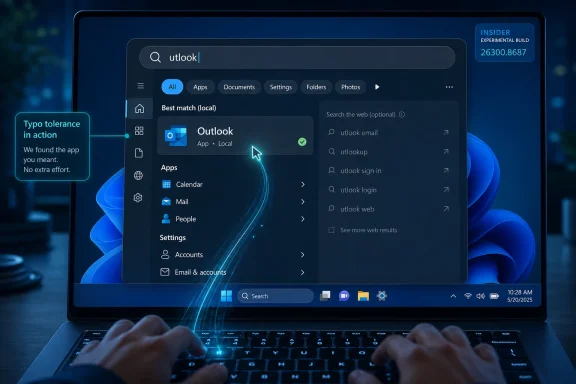
Microsoft’s June 12 Windows 11 Insider Experimental Preview Build 26300.8687 adds a more forgiving Search experience that can match mistyped app names such as “utlook” to Outlook, while also improving Settings result ranking and continuing Microsoft’s broader effort to make Windows Search less web-first and more useful on the PC itself. It is a small change, but it lands on a sore spot Microsoft created for itself. For years, Windows users have treated Search as a coin toss: sometimes a launcher, sometimes a file finder, sometimes a Bing billboard with a keyboard shortcut. The new behavior matters because it suggests Microsoft may finally be rediscovering the oldest rule of desktop computing: when a user searches their PC, the PC should answer first.
Windows Search has always occupied an odd place in the operating system. It is both a utility and a statement of intent. If Start search is fast, predictable, and local-first, Windows feels like a tool; if it diverts a misspelled app name into a web query, Windows feels like a storefront.
That is why the “utlook” example from Microsoft is more revealing than it looks. Nobody expects an operating system to understand every sloppy query, but users reasonably expect a desktop launcher to tolerate missing letters in common app names. A phone can do this. A browser address bar can do this. A twenty-year-old third-party launcher can do this.
The insult was not merely that Windows sometimes failed. It was that the failure mode often sent the user to Bing, as if the user’s typo were an invitation to search the web rather than a clumsy attempt to open something already installed. That is the “snooty Bing results” complaint in miniature: Windows was not just unhelpful, it appeared to misunderstand the relationship between user and machine.
Microsoft’s new search tolerance does not magically resolve the entire Search problem. It applies, at least in the notes for Build 26300.8687, to app discovery, with Settings ranking also getting attention. But the direction of travel is important. The company is teaching Windows to treat typos as human input rather than malformed commands.
Microsoft has often treated that contract as negotiable. The search panel has, over time, become a place where apps, files, settings, suggested web searches, cloud content, promotions, and Microsoft’s strategic priorities all compete for the same few lines of attention. That makes every misfire feel worse than it is, because the user sees not just an error but a hierarchy of incentives.
If Windows cannot find PowerPoint because the query is mistyped, but it can confidently offer a Bing search for the misspelling, the user learns something. They learn that the operating system’s idea of relevance is not necessarily the same as theirs. That lesson is corrosive, especially for IT professionals who spend their days trying to reduce friction rather than decorate it.
The new forgiving search behavior is therefore less about spelling than about priority. A typo-tolerant app result says, “You probably meant the thing on this PC.” A web suggestion says, “You might want to leave.” Those are different product philosophies wearing the same UI chrome.
The problem is that web results have too often appeared before Windows has exhausted the obvious local interpretations. If the query resembles an installed application, a known setting, a recent document, a Control Panel relic, or a file in an indexed location, that should be the top layer of relevance. The web should be the fallback, not the reflex.
This distinction matters because Windows is not a browser tab. It is the shell around work, play, administration, troubleshooting, and recovery. When a sysadmin types a partial tool name, when a developer hunts for a project file, or when a user searches for a presentation five minutes before a meeting, the operating system is not being asked to browse the internet. It is being asked to get out of the way.
Microsoft seems to be acknowledging that distinction, even if cautiously. Reports around the current Insider changes indicate that local files and apps are getting stronger priority over web suggestions. Microsoft’s partner director of design, March Rogers, has also said users can turn off web suggestions entirely if they want. That should not be a niche power-user escape hatch. It should be a visible, respected preference.
Modern desktop interaction is full of these micro-errors. Users type “pwerp” and expect PowerPoint. They type “tskm” and expect Task Manager. They type “devm” and expect Device Manager. Some of these are abbreviations, some are muscle-memory fragments, and some are simply keyboard noise shaped by habit.
A good launcher understands that intent lives in patterns, not perfection. It weighs installed apps, frequency of use, recency, aliases, common omissions, and likely transpositions. It does not require the user to express themselves like a database query unless the user has explicitly entered a database search box.
That is why a “small” Search improvement can feel disproportionately meaningful. It reduces the penalty for moving fast. It makes Windows behave more like a partner and less like a parser.
The modern Windows Insider program is both a testing pipeline and a messaging instrument. Microsoft uses it to float features, gather telemetry, stage controlled rollouts, and sometimes quietly retreat from decisions that do not land well. A feature appearing in an Experimental build is not the same thing as a feature arriving on every Windows 11 PC next month.
That matters for Search because Microsoft has repeatedly tested search-adjacent experiences that users did not ask for, including richer web integration and AI-adjacent surfaces. The company’s challenge is not merely to implement typo tolerance. It is to preserve it through the long funnel from experimental builds to mainstream Windows, without burying it under another layer of “helpful” online suggestions.
For normal users, the practical advice is patience. For Windows enthusiasts, the practical advice is skepticism with receipts. Test the behavior, file feedback, and watch whether the change survives contact with Microsoft’s commercial instincts.
Microsoft has spent years trying to modernize Windows while dragging along decades of compatibility. The result is a platform where some workflows feel polished and others feel like archaeology. Search is supposed to smooth that over. It should let users find the new Settings page without remembering where Microsoft moved the old Control Panel option, launch a legacy tool without remembering its executable name, and open a document without knowing which folder hierarchy swallowed it.
When Search fails, the seams show. Worse, when Search fails into web suggestions, the operating system looks distracted. It becomes the coworker who answers a direct question with an unrelated pitch.
The new Settings ranking improvements in Build 26300.8687 are therefore part of the same story. Windows 11 has been steadily moving more configuration into Settings, but the migration remains uneven. Better ranking is not glamorous, but for administrators and power users, it can mean the difference between typing a term and getting the relevant page or spelunking through renamed categories.
Search quality is not judged by the demo query. It is judged by the second, third, and fourth query after the demo. Users quickly build expectations from successful matches, and inconsistent intelligence can be more frustrating than dumb predictability. If Windows sometimes behaves like a fuzzy launcher and sometimes like a literal string matcher, users must keep guessing which mode they are in.
File search is even harder. App names are a bounded universe; files are messy, personal, duplicated, synced, partially indexed, renamed, and scattered across local drives and cloud-backed folders. A forgiving app launcher is achievable. A forgiving file finder that is fast, private, accurate, and transparent is a much more ambitious project.
Microsoft has been working on adjacent improvements, including better substring matching and semantic search capabilities in Insider builds. But the company must be careful not to conflate “smarter” with “less predictable.” A search system that understands partial words is useful. A search system that appears to guess at meaning without showing its work can become another source of distrust.
Users do not need a chatbot to launch Outlook after a dropped first letter. They do not need an AI companion to rank the relevant Settings page above a web suggestion. They need the shell to handle ordinary human imperfection.
This is not an anti-AI argument. There are plausible uses for local semantic search, document understanding, and natural-language queries across personal files, especially if the work happens on-device and respects enterprise controls. But AI cannot be the alibi for leaving basic interaction rough. If Windows requires a cloud-branded assistant to compensate for poor launcher behavior, the assistant is not magic; it is a patch over product debt.
That is why this small Search story feels bigger than its release-note footprint. It suggests Microsoft may be separating two questions that should never have been merged: how can Windows become more intelligent, and how can Windows stop being annoying? The second question does not always need a model. Sometimes it needs better ranking, better defaults, and fewer detours.
A local-first Search experience is easier to explain and easier to govern. If a user searches for an internal tool, a confidential project codename, or a file with a sensitive name, administrators do not want ambiguity about whether that query is being blended with consumer web behavior. Even when Microsoft provides policy controls, defaults still shape support calls and user perception.
The option to turn off web suggestions matters because it gives administrators and privacy-minded users a clearer line. Search can be a launcher and finder first, while browsers and explicitly web-facing surfaces handle the internet. That is a sane division of labor.
Microsoft’s broader challenge is to make these controls understandable. Windows is already dense with policy surfaces, Settings toggles, registry paths, account-linked experiences, and cloud-managed defaults. If turning Search into a local-first tool requires spelunking through enterprise documentation or third-party tweaking utilities, Microsoft has not really solved the problem for the people most affected by it.
Build 26300.8687 is full of that kind of maintenance work. Alongside Search, Microsoft is coordinating driver, .NET, and firmware updates with monthly quality updates to reduce restart pain. File Explorer is getting middle-click support for folders in tabs from more locations. There are fixes for taskbar reliability, audio problems, Settings reliability, and freezes involving Search and Notepad.
None of that makes for a dramatic product vision. All of it makes Windows less irritating. That is the bargain Microsoft should be making more often.
For Windows 11 in particular, the company is still working against a reputation problem. Many users moved from Windows 10 not because Windows 11 was irresistible, but because hardware cycles, support timelines, and Microsoft’s pressure made the move inevitable. In that context, small quality-of-life fixes are not minor. They are how the OS earns back credibility.
Ranking is where product values become visible. If a local app loses to a web suggestion, that is a value judgment. If a Settings page loses to a support article, that is a value judgment. If a file loses to a promotional tile, that is a value judgment.
Microsoft can argue, fairly, that different users expect different things. Some people use Start search as a general-purpose query box. Others use it almost exclusively to launch apps. But the answer to that diversity is not to force everyone through a blended feed. The answer is to make intent detection better and user control clearer.
A desktop OS should have strong opinions about locality. The machine in front of the user should be privileged over the network unless the user clearly asks otherwise. That is not nostalgia. It is the difference between a personal computer and a terminal for somebody else’s roadmap.
The larger bargain Microsoft is trying to strike is complicated. It wants Windows to remain the default productivity platform, the gaming platform, the enterprise endpoint, the developer workstation, and the front end for its cloud and AI services. Those goals are not always aligned. A feature that helps Microsoft’s services strategy may make the desktop feel less like the user’s own space.
Search sits directly at that fault line. It can either reinforce Windows as a competent local environment or remind users that every surface is a potential upsell. The latest Insider changes lean toward competence, and that is why they deserve attention.
The risk is that Microsoft treats this as a tuning issue rather than a philosophical one. Better typo handling is welcome, but users will still revolt against Search if the results page feels like a negotiation with Bing, Edge, Copilot, and Microsoft Start. The problem is not only whether Windows can understand a malformed query. It is whether Windows respects the obvious intent behind it.
But the symbolic impact is larger. Microsoft is acknowledging that Search needs to be more forgiving, better ranked, and less eager to punish imperfect input. That aligns with what users have been saying for years, often with less polite wording.
If the company follows through, the everyday experience changes in quiet ways. Launching apps becomes less brittle. Settings become easier to reach. Web results stop feeling like the OS correcting your homework. The Start menu becomes a tool again, not a debate.
That is what Windows 11 needs more of: not another layer of spectacle, but a reduction in friction so consistent that users stop noticing the system at all.
 Microsoft Fixes a Problem It Should Never Have Shipped
Windows Search has always occupied an odd place in the operating system. It is both a utility and a statement of intent. If Start search is fast, predictable, and local-first, Windows feels like a tool; if it diverts a misspelled app name into a web query, Windows feels like a storefront.That is why the “utlook” example from Microsoft is more revealing than it looks. Nobody expects an operating system to understand every sloppy query, but users reasonably expect a desktop launcher to tolerate missing letters in common app names. A phone can do this. A browser address bar can do this. A twenty-year-old third-party launcher can do this.
The insult was not merely that Windows sometimes failed. It was that the failure mode often sent the user to Bing, as if the user’s typo were an invitation to search the web rather than a clumsy attempt to open something already installed. That is the “snooty Bing results” complaint in miniature: Windows was not just unhelpful, it appeared to misunderstand the relationship between user and machine.
Microsoft’s new search tolerance does not magically resolve the entire Search problem. It applies, at least in the notes for Build 26300.8687, to app discovery, with Settings ranking also getting attention. But the direction of travel is important. The company is teaching Windows to treat typos as human input rather than malformed commands.
The Desktop Search Box Became a Negotiation
The controversy around Windows Search is not really about search algorithms. It is about trust. When a user presses the Windows key and types a few letters, they are making a tiny contract with the operating system: “I know roughly what I want; help me get there quickly.”Microsoft has often treated that contract as negotiable. The search panel has, over time, become a place where apps, files, settings, suggested web searches, cloud content, promotions, and Microsoft’s strategic priorities all compete for the same few lines of attention. That makes every misfire feel worse than it is, because the user sees not just an error but a hierarchy of incentives.
If Windows cannot find PowerPoint because the query is mistyped, but it can confidently offer a Bing search for the misspelling, the user learns something. They learn that the operating system’s idea of relevance is not necessarily the same as theirs. That lesson is corrosive, especially for IT professionals who spend their days trying to reduce friction rather than decorate it.
The new forgiving search behavior is therefore less about spelling than about priority. A typo-tolerant app result says, “You probably meant the thing on this PC.” A web suggestion says, “You might want to leave.” Those are different product philosophies wearing the same UI chrome.
Bing Was Never the Villain, but It Was in the Wrong Room
It is easy to turn this into another round of Bing-bashing, and the jokes write themselves. But the deeper issue is not that Windows can search the web. Web search from Start can be useful, particularly for casual users who treat the Start menu, taskbar, and browser as one blended command surface.The problem is that web results have too often appeared before Windows has exhausted the obvious local interpretations. If the query resembles an installed application, a known setting, a recent document, a Control Panel relic, or a file in an indexed location, that should be the top layer of relevance. The web should be the fallback, not the reflex.
This distinction matters because Windows is not a browser tab. It is the shell around work, play, administration, troubleshooting, and recovery. When a sysadmin types a partial tool name, when a developer hunts for a project file, or when a user searches for a presentation five minutes before a meeting, the operating system is not being asked to browse the internet. It is being asked to get out of the way.
Microsoft seems to be acknowledging that distinction, even if cautiously. Reports around the current Insider changes indicate that local files and apps are getting stronger priority over web suggestions. Microsoft’s partner director of design, March Rogers, has also said users can turn off web suggestions entirely if they want. That should not be a niche power-user escape hatch. It should be a visible, respected preference.
Typo Tolerance Is Really Latency Tolerance
The most obvious benefit of forgiving Search is that it helps bad spellers. But the more important benefit is that it helps fast users. People do not mistype only because they cannot spell; they mistype because they are moving quickly, because laptop keyboards vary, because their fingers are ahead of their eyes, because the Start menu has trained them to type fragments rather than full names.Modern desktop interaction is full of these micro-errors. Users type “pwerp” and expect PowerPoint. They type “tskm” and expect Task Manager. They type “devm” and expect Device Manager. Some of these are abbreviations, some are muscle-memory fragments, and some are simply keyboard noise shaped by habit.
A good launcher understands that intent lives in patterns, not perfection. It weighs installed apps, frequency of use, recency, aliases, common omissions, and likely transpositions. It does not require the user to express themselves like a database query unless the user has explicitly entered a database search box.
That is why a “small” Search improvement can feel disproportionately meaningful. It reduces the penalty for moving fast. It makes Windows behave more like a partner and less like a parser.
The Insider Channel Is Where Good Ideas Go to Be Ambiguous
Build 26300.8687 is an Experimental Preview build, not a broad stable-channel promise. Microsoft says features in these builds may change, disappear, or never ship. That caveat is not boilerplate; it is central to how Windows is now developed.The modern Windows Insider program is both a testing pipeline and a messaging instrument. Microsoft uses it to float features, gather telemetry, stage controlled rollouts, and sometimes quietly retreat from decisions that do not land well. A feature appearing in an Experimental build is not the same thing as a feature arriving on every Windows 11 PC next month.
That matters for Search because Microsoft has repeatedly tested search-adjacent experiences that users did not ask for, including richer web integration and AI-adjacent surfaces. The company’s challenge is not merely to implement typo tolerance. It is to preserve it through the long funnel from experimental builds to mainstream Windows, without burying it under another layer of “helpful” online suggestions.
For normal users, the practical advice is patience. For Windows enthusiasts, the practical advice is skepticism with receipts. Test the behavior, file feedback, and watch whether the change survives contact with Microsoft’s commercial instincts.
Search Is a Front Door, Not a Feature Checkbox
The reason this topic keeps coming back is that Search is not just another utility. It is one of the front doors into Windows. Alongside the taskbar, Start menu, File Explorer, and Settings app, it defines how the system feels in the first five seconds of use.Microsoft has spent years trying to modernize Windows while dragging along decades of compatibility. The result is a platform where some workflows feel polished and others feel like archaeology. Search is supposed to smooth that over. It should let users find the new Settings page without remembering where Microsoft moved the old Control Panel option, launch a legacy tool without remembering its executable name, and open a document without knowing which folder hierarchy swallowed it.
When Search fails, the seams show. Worse, when Search fails into web suggestions, the operating system looks distracted. It becomes the coworker who answers a direct question with an unrelated pitch.
The new Settings ranking improvements in Build 26300.8687 are therefore part of the same story. Windows 11 has been steadily moving more configuration into Settings, but the migration remains uneven. Better ranking is not glamorous, but for administrators and power users, it can mean the difference between typing a term and getting the relevant page or spelunking through renamed categories.
File Search Still Has to Prove Itself
The PC Gamer report notes that on an older non-Insider build, some forgiving behavior already appears to exist in limited form, with a nonsense-looking query like “pwerp” finding PowerPoint while another test like “tskm” does not reliably resolve to Task Manager. That inconsistency is exactly the problem Microsoft has to solve.Search quality is not judged by the demo query. It is judged by the second, third, and fourth query after the demo. Users quickly build expectations from successful matches, and inconsistent intelligence can be more frustrating than dumb predictability. If Windows sometimes behaves like a fuzzy launcher and sometimes like a literal string matcher, users must keep guessing which mode they are in.
File search is even harder. App names are a bounded universe; files are messy, personal, duplicated, synced, partially indexed, renamed, and scattered across local drives and cloud-backed folders. A forgiving app launcher is achievable. A forgiving file finder that is fast, private, accurate, and transparent is a much more ambitious project.
Microsoft has been working on adjacent improvements, including better substring matching and semantic search capabilities in Insider builds. But the company must be careful not to conflate “smarter” with “less predictable.” A search system that understands partial words is useful. A search system that appears to guess at meaning without showing its work can become another source of distrust.
Copilot Is Not a Substitute for Competence
The most interesting subtext here is Microsoft’s current AI obsession. The company has spent the last few years trying to make Copilot feel like the future interface of Windows. Yet the Search changes in Build 26300.8687 are a reminder that many of the operating system’s most valuable improvements are not agentic, generative, or theatrical.Users do not need a chatbot to launch Outlook after a dropped first letter. They do not need an AI companion to rank the relevant Settings page above a web suggestion. They need the shell to handle ordinary human imperfection.
This is not an anti-AI argument. There are plausible uses for local semantic search, document understanding, and natural-language queries across personal files, especially if the work happens on-device and respects enterprise controls. But AI cannot be the alibi for leaving basic interaction rough. If Windows requires a cloud-branded assistant to compensate for poor launcher behavior, the assistant is not magic; it is a patch over product debt.
That is why this small Search story feels bigger than its release-note footprint. It suggests Microsoft may be separating two questions that should never have been merged: how can Windows become more intelligent, and how can Windows stop being annoying? The second question does not always need a model. Sometimes it needs better ranking, better defaults, and fewer detours.
Enterprise IT Will Care About the Toggle
For consumers, web suggestions in Search are an annoyance. For enterprise IT, they are a policy question. Organizations care about where queries go, what surfaces appear to users, how data is handled, and whether the desktop experience is consistent across managed devices.A local-first Search experience is easier to explain and easier to govern. If a user searches for an internal tool, a confidential project codename, or a file with a sensitive name, administrators do not want ambiguity about whether that query is being blended with consumer web behavior. Even when Microsoft provides policy controls, defaults still shape support calls and user perception.
The option to turn off web suggestions matters because it gives administrators and privacy-minded users a clearer line. Search can be a launcher and finder first, while browsers and explicitly web-facing surfaces handle the internet. That is a sane division of labor.
Microsoft’s broader challenge is to make these controls understandable. Windows is already dense with policy surfaces, Settings toggles, registry paths, account-linked experiences, and cloud-managed defaults. If turning Search into a local-first tool requires spelunking through enterprise documentation or third-party tweaking utilities, Microsoft has not really solved the problem for the people most affected by it.
The Best Windows Improvements Are Often Boring
There is a pattern in Windows development: the features that get the keynote time are not always the features that make the operating system better day to day. Widgets, Copilot integrations, animated panels, and new cloud services may dominate the promotional cycle. But users remember whether File Explorer opens quickly, whether updates reboot once instead of three times, whether audio survives a flight, and whether Search finds the thing they typed badly.Build 26300.8687 is full of that kind of maintenance work. Alongside Search, Microsoft is coordinating driver, .NET, and firmware updates with monthly quality updates to reduce restart pain. File Explorer is getting middle-click support for folders in tabs from more locations. There are fixes for taskbar reliability, audio problems, Settings reliability, and freezes involving Search and Notepad.
None of that makes for a dramatic product vision. All of it makes Windows less irritating. That is the bargain Microsoft should be making more often.
For Windows 11 in particular, the company is still working against a reputation problem. Many users moved from Windows 10 not because Windows 11 was irresistible, but because hardware cycles, support timelines, and Microsoft’s pressure made the move inevitable. In that context, small quality-of-life fixes are not minor. They are how the OS earns back credibility.
The Search Bar Has to Stop Being a Billboard
The core critique of Windows Search has always been that Microsoft tried to make one box serve too many masters. It wants to be an app launcher, a file index, a settings finder, a web search field, a news and recommendation surface, and, increasingly, a bridge to AI experiences. The more jobs it takes on, the more important ranking becomes.Ranking is where product values become visible. If a local app loses to a web suggestion, that is a value judgment. If a Settings page loses to a support article, that is a value judgment. If a file loses to a promotional tile, that is a value judgment.
Microsoft can argue, fairly, that different users expect different things. Some people use Start search as a general-purpose query box. Others use it almost exclusively to launch apps. But the answer to that diversity is not to force everyone through a blended feed. The answer is to make intent detection better and user control clearer.
A desktop OS should have strong opinions about locality. The machine in front of the user should be privileged over the network unless the user clearly asks otherwise. That is not nostalgia. It is the difference between a personal computer and a terminal for somebody else’s roadmap.
A Tiny Fix Exposes the Larger Windows Bargain
The forgiving Search change is easy to mock because it sounds late. Should Windows in 2026 really be celebrating the fact that “utlook” can find Outlook? Probably not. But late fixes can still be meaningful if they mark a change in direction.The larger bargain Microsoft is trying to strike is complicated. It wants Windows to remain the default productivity platform, the gaming platform, the enterprise endpoint, the developer workstation, and the front end for its cloud and AI services. Those goals are not always aligned. A feature that helps Microsoft’s services strategy may make the desktop feel less like the user’s own space.
Search sits directly at that fault line. It can either reinforce Windows as a competent local environment or remind users that every surface is a potential upsell. The latest Insider changes lean toward competence, and that is why they deserve attention.
The risk is that Microsoft treats this as a tuning issue rather than a philosophical one. Better typo handling is welcome, but users will still revolt against Search if the results page feels like a negotiation with Bing, Edge, Copilot, and Microsoft Start. The problem is not only whether Windows can understand a malformed query. It is whether Windows respects the obvious intent behind it.
The Practical Win Is Smaller Than the Symbolic One
For now, the practical impact is limited. The feature is in an Insider Experimental build, rolling out gradually, and focused on app-finding behavior. Most Windows 11 users will not see a clean before-and-after moment this week.But the symbolic impact is larger. Microsoft is acknowledging that Search needs to be more forgiving, better ranked, and less eager to punish imperfect input. That aligns with what users have been saying for years, often with less polite wording.
If the company follows through, the everyday experience changes in quiet ways. Launching apps becomes less brittle. Settings become easier to reach. Web results stop feeling like the OS correcting your homework. The Start menu becomes a tool again, not a debate.
That is what Windows 11 needs more of: not another layer of spectacle, but a reduction in friction so consistent that users stop noticing the system at all.
The “Utlook” Test Is a Small Referendum on Windows 11
The most concrete lesson from Build 26300.8687 is that Windows Search is being trained to absorb ordinary human error rather than bounce users into web results at the first sign of a typo. That does not settle the future of Search, but it gives users and administrators a useful checklist for judging whether Microsoft is serious.- Windows 11 Insider Experimental Preview Build 26300.8687 was released on June 12, 2026, and includes a more forgiving app search experience for typos, dropped letters, extra letters, and partial words.
- Microsoft’s own example is that typing “utlook” can still return Outlook, which signals a shift toward intent-based app discovery rather than strict string matching.
- Settings search ranking is also being improved, which matters because Windows configuration remains split across old and new surfaces.
- Reports indicate Microsoft is also moving Search toward stronger local prioritization, reducing the chance that a misspelled local query becomes a Bing-first experience.
- The feature remains part of an Insider Experimental build, so mainstream availability, final behavior, and enterprise policy details should be treated as unsettled until Microsoft ships them broadly.
- The option to disable web suggestions remains important, because users and IT departments need Search to behave like a local desktop tool when that is what the workflow demands.
References
- Primary source: PC Gamer
Published: Wed, 17 Jun 2026 16:30:10 GMT
Windows 11 Search will soon see through your typos and actually find what you're looking for | PC Gamer
Dotting the 'i's, crossing the 't's.www.pcgamer.com - Related coverage: windowscentral.com
I dug through the Windows 11 Insider builds for June 2026 and found 7 features worth paying attention to | Windows Central
Microsoft's June Insider preview builds show a growing focus on polishing the OS experience across accessibility, updates, and performance.www.windowscentral.com - Official source: learn.microsoft.com
Windows 11 Insider Experimental Preview Build 26300.8687 - Windows Insider Program | Microsoft Learn
Release notes for Windows 11 Insider Experimental Preview Build 26300.8687learn.microsoft.com - Related coverage: windowslatest.com
Microsoft is killing Windows 11 Search's biggest annoyance, lets you find files with just 2 characters
Microsoft is improving Windows 11 Search with a new Substring feature to find files with compound names and fast two-character local indexing. www.windowslatest.com
- Related coverage: windowsforum.com
Windows 11 Insider Build 26300.8687: Explorer Tabs, Unified Updates, Better Search | Windows Forum
Microsoft released Windows 11 Insider Experimental Preview Build 26300.8687 on June 12, 2026, bringing a batch of gradual-rollout changes that include File...windowsforum.com - Related coverage: howtogeek.com
How to Search Quickly on Windows 11
Looking for files in all the wrong places? Here's how to do it the right way. www.howtogeek.com
- Related coverage: windowsblogitalia.com
Download e novità di Windows 11 Insider Preview Build 26300.8687
Microsoft ha rilasciato Windows 11 Insider Preview Build 26300.8687 ai Windows Insider che hanno scelto il canale Canary. www.windowsblogitalia.com
- Related coverage: pcworld.com
Can't find that file? These advanced Windows Search tips can help
Windows Search doesn't look particularly effective. But with a little knowledge and tweaking, you can find almost anything you're looking for. www.pcworld.com