
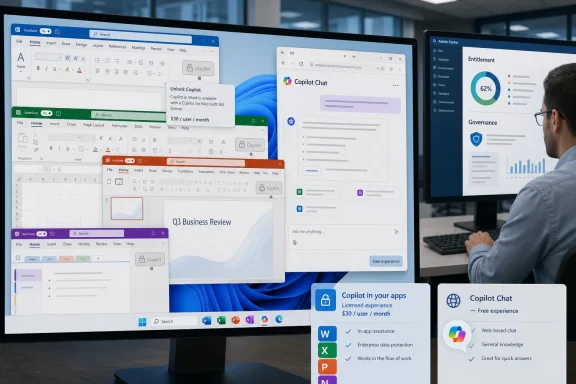
Microsoft has restricted Copilot access inside Word, Excel, PowerPoint, and OneNote for many business and education users in 2026, shifting those in-app AI experiences from broadly available Microsoft 365 Copilot Chat access to paid Microsoft 365 Copilot licensing. The change is less a feature adjustment than a line in the sand: AI inside Office is no longer being treated as a light enhancement to the suite. It is being priced as a second productivity layer, one that sits on top of the subscription customers already thought covered their daily work. For Windows users and IT departments, that makes Copilot less like spellcheck and more like an enterprise software purchase that must earn its seat.
The important shift is not that Microsoft wants money for Copilot. That was always obvious. Microsoft 365 Copilot launched as a premium business add-on, and its enterprise pitch has long been built around grounding AI in emails, files, meetings, chats, and organizational data rather than merely giving users a chatbot with a corporate login.
The more consequential move is where Microsoft has chosen to place the boundary. If Copilot lives in a browser tab or the Microsoft 365 app, it can still be understood as a separate assistant. If it appears inside Word while a user drafts a contract, inside Excel while a finance analyst builds a model, or inside PowerPoint while a sales manager assembles a deck, it becomes part of the workflow itself.
That distinction is what Microsoft is now monetizing. The company is not merely charging for AI in the abstract; it is charging for proximity. Copilot Chat remains available as an entry point, but the more valuable version is the one that sits beside the document, understands the immediate working surface, and can turn a prompt into an edit, summary, formula, slide, or rewrite without forcing the user to leave the application.
For organizations, this changes the procurement conversation. The question is no longer, “Should we allow users to try Copilot?” It becomes, “Which users should receive AI embedded directly into the tools where business artifacts are created?” That is a very different budget argument.
But that answer misses what made the Office integration powerful in the first place. A chatbot that can help with a document is useful. A chatbot that is already inside the document, aware of the open file, able to summarize it, rewrite a section, generate a table, or suggest an Excel formula in context is something closer to a productivity feature.
This is the same pattern Microsoft has used for decades: the platform value is not only in the application, but in the integration. Outlook became stickier because it connected mail, calendars, contacts, search, Teams, and identity. Excel became indispensable because it absorbed data analysis, reporting, automation, and presentation-adjacent work. Copilot follows that same logic, except the integration is now the thing being placed behind a premium license.
That creates a two-tier Office experience. One group of users gets the familiar apps with standard productivity features and access to Copilot Chat elsewhere. Another group gets AI folded into the document canvas. The difference may sound subtle in a licensing matrix, but it is stark in daily work.
A user with embedded Copilot can stay in Word and ask for a section to be tightened. A user without it may need to copy, paste, upload, or manually transfer output from a separate chat surface. One workflow feels native. The other feels like using AI as an external utility.
If Microsoft is allowing some Outlook Copilot experiences to remain available to existing Microsoft 365 subscribers without the same added Copilot license requirement, the decision creates an awkward product story. It suggests that Microsoft is treating communication differently from content creation, or that Outlook’s usage patterns, licensing history, and customer expectations made a harder cutoff less attractive.
There may also be a strategic reason. Outlook is the front door to a huge amount of Microsoft 365 engagement. If users encounter Copilot there, they are more likely to understand the value of AI assistance and eventually justify upgrades elsewhere. In that reading, Outlook becomes the sample counter, while Word and Excel become the paid aisle.
Still, the exception risks confusing administrators and users. Microsoft’s Copilot branding is already dense, spanning personal Copilot, Microsoft 365 Copilot Chat, Microsoft 365 Copilot, Copilot Pro, Copilot Studio, GitHub Copilot, Security Copilot, and role-specific variants. When the answer to “Do we have Copilot?” depends on the app, license label, tenant configuration, and user identity, IT support tickets are inevitable.
This is where Microsoft’s documentation-first approach can collide with the lived reality of enterprises. A licensing table can be technically precise and still operationally frustrating. The administrator has to explain why an employee can use Copilot in one Microsoft 365 surface but not another, and why the button appears for one colleague but behaves differently for another.
That price forces discipline. The first wave of AI enthusiasm encouraged companies to run pilots, hand out licenses to executives and early adopters, and let departments experiment. A broad paywall pushes the next phase toward allocation, measurement, and justification. Copilot becomes less like enabling a feature flag and more like rolling out a costly line-of-business system.
The uncomfortable truth for Microsoft is that not every Office user benefits equally from embedded AI. A communications team that drafts documents all day may find Copilot in Word immediately useful. A finance team living in Excel may see value if the tool reliably helps with formulas, summaries, and data exploration. A frontline worker who opens Word twice a month probably will not justify the same monthly fee.
That means IT departments will be tempted to license Copilot selectively. Microsoft would prefer Copilot to become a broad habit across the organization, but the pricing structure encourages customers to identify high-value cohorts and leave everyone else on included chat. This is rational procurement, but it complicates Microsoft’s ambition to make Copilot feel like the default interface for work.
There is also the perennial enterprise question of shelfware. If a company buys 2,000 Copilot licenses and only a few hundred employees use the features regularly, the economics become ugly very quickly. AI’s novelty can produce impressive demo moments, but license renewal depends on repeatable value.
By placing Copilot inside Microsoft 365, Microsoft can tell administrators that the assistant respects permissions, inherits compliance controls, and works with organizational data according to existing access rules. That is a powerful sales pitch, especially for regulated industries. It also helps explain why Microsoft wants to differentiate between a basic web-grounded chat experience and the paid product grounded in work data.
The licensing change therefore has a carrot-and-stick quality. The carrot is better integration, richer grounding, and more capable in-app assistance. The stick is that the most natural way to use AI with Office files now requires a premium seat.
This will not bother every customer. Some organizations were already paying for Copilot because they wanted Graph-grounded search, Teams recaps, Outlook summaries, and enterprise controls. For them, the consolidation may feel like Microsoft cleaning up a temporary overlap. But for users who had grown accustomed to seeing Copilot inside core Office apps without the add-on, the same move looks like a withdrawal of capability.
Microsoft can argue that the earlier availability was part of an evolving rollout. Customers can counter that users build habits around what appears in their software. Both claims can be true, and that is why this change will produce friction even if Microsoft’s licensing logic is internally consistent.
Microsoft is choosing explicit monetization. Google is choosing bundling. Each approach has advantages. Microsoft can attach a clear price to a premium product and protect revenue per user. Google can tell customers that AI is becoming part of the productivity suite rather than a separate tax on top of it.
For enterprise buyers, that contrast will become useful leverage. Even organizations with no realistic plan to migrate from Microsoft 365 can point to Google’s bundling model during renewal negotiations. Microsoft’s response will be to emphasize security, governance, data grounding, app depth, and the cost of switching. That argument will often win, but it will not make the Copilot line item disappear.
The more interesting question is whether AI becomes a differentiator or a commodity. If Copilot materially outperforms alternatives inside complex Office workflows, Microsoft can sustain premium pricing. If users see it mainly as a competent assistant for drafting, summarizing, and brainstorming, bundling pressure will increase.
That is why the next year matters. Microsoft needs Copilot to become not just visible but indispensable. The company has to prove that the paid Office-integrated experience is meaningfully better than a separate chat assistant, better than copying content into another model, and better than bundled competitors that promise “good enough” AI without an obvious surcharge.
For developers, the Visual Studio angle is especially telling. Agents that can discover and use repository-defined skills suggest a future where AI tooling is not simply a code-completion pane but an environment-aware collaborator. The assistant is expected to understand the project’s conventions, available tasks, and automation hooks.
That fits the same monetization pattern seen in Office. The most valuable AI is not generic. It is contextual, embedded, and close to the work. In software development, that means the repository, build system, tests, issues, and IDE. In Office, it means the document, workbook, deck, notebook, inbox, meeting, and organizational graph.
The danger for Microsoft is fragmentation. If every role gets a different Copilot, every app gets different capabilities, and every license unlocks a different slice of the experience, customers may struggle to understand what they are buying. The company’s branding implies one assistant. The product reality increasingly looks like a fleet of assistants, each with its own boundary.
That is not necessarily bad product strategy. Specialized AI agents may be more useful than one universal chatbot. But Microsoft must make the licensing and user experience simple enough that the value does not get lost in SKU archaeology.
The next challenge is communication. Users do not think in terms of “web-grounded chat,” “Graph-grounded chat,” “standard access,” or “priority access.” They think the Copilot button is either there or not there. If it disappears from one app, changes behavior, or tells them they need a different plan, they will call the help desk.
Then comes policy. Companies that restrict paid Copilot seats may need rules for who qualifies, how requests are approved, and how unused licenses are reclaimed. That sounds mundane, but it is the difference between a controlled AI rollout and an expensive sprawl.
Security teams also have a stake. If users lose embedded AI access but still need assistance with documents and spreadsheets, some will reach for external tools. The more friction Microsoft introduces inside the managed environment, the more important it becomes for organizations to provide acceptable alternatives. A blocked Copilot button does not eliminate demand for AI; it redirects it.
This is the hidden cost of the paywall. Microsoft gets clearer monetization, but customers inherit a new entitlement-management problem. The suite that once simplified procurement by bundling productivity tools now requires finer-grained decisions about who gets AI at the point of work.
That is understandable. AI infrastructure is expensive, model access is costly, and the competitive stakes are enormous. Microsoft has invested heavily in making Copilot the interface through which users interact with Microsoft 365 data. It was never plausible that the richest version of that experience would remain broadly included forever.
But customers are right to scrutinize the transition. Microsoft has a habit of making new capabilities feel like the natural evolution of a product before separating the most valuable parts into premium plans. That pattern is not unique to Microsoft, but Microsoft’s dominance in business productivity makes it especially consequential.
The company’s challenge is to avoid making Copilot feel like a ransom note attached to familiar applications. If users perceive the change as “the button used to work, now pay more,” Microsoft loses goodwill. If they perceive it as “the paid tier gives us capabilities that genuinely change how work gets done,” the licensing story becomes easier to defend.
The burden of proof sits with Microsoft. AI features must be reliable, explainable, governable, and materially useful. They must not merely generate plausible text or pretty decks. They must reduce toil in ways that survive contact with messy spreadsheets, long policy documents, half-structured meeting notes, and the real permissions chaos of enterprise data.
A sensible Copilot rollout now looks less like an all-hands deployment and more like a targeted business program. Start with roles where document creation, spreadsheet analysis, meeting load, and email volume are measurable pain points. Track adoption. Reclaim unused seats. Train users on prompts and workflows. Compare results against cheaper or already-bundled alternatives.
The organizations that get value from Copilot will likely be the ones that treat it as a managed capability rather than a magic button. The organizations that buy it because executives saw a demo may end up with an expensive icon in the ribbon.
For WindowsForum readers, the message is straightforward:
 Microsoft Turns Office AI From Ambient Feature Into Metered Value
The important shift is not that Microsoft wants money for Copilot. That was always obvious. Microsoft 365 Copilot launched as a premium business add-on, and its enterprise pitch has long been built around grounding AI in emails, files, meetings, chats, and organizational data rather than merely giving users a chatbot with a corporate login.The more consequential move is where Microsoft has chosen to place the boundary. If Copilot lives in a browser tab or the Microsoft 365 app, it can still be understood as a separate assistant. If it appears inside Word while a user drafts a contract, inside Excel while a finance analyst builds a model, or inside PowerPoint while a sales manager assembles a deck, it becomes part of the workflow itself.
That distinction is what Microsoft is now monetizing. The company is not merely charging for AI in the abstract; it is charging for proximity. Copilot Chat remains available as an entry point, but the more valuable version is the one that sits beside the document, understands the immediate working surface, and can turn a prompt into an edit, summary, formula, slide, or rewrite without forcing the user to leave the application.
For organizations, this changes the procurement conversation. The question is no longer, “Should we allow users to try Copilot?” It becomes, “Which users should receive AI embedded directly into the tools where business artifacts are created?” That is a very different budget argument.
The Free Chat Survives, But the Workflow Moves Upstairs
Microsoft’s current positioning preserves a free or included Copilot Chat experience for eligible Microsoft 365 work and school users. That matters because it lets Redmond say it has not simply removed AI from Microsoft 365. Users can still ask questions, generate text, analyze pasted or uploaded material, and use web-grounded chat from Microsoft 365 entry points.But that answer misses what made the Office integration powerful in the first place. A chatbot that can help with a document is useful. A chatbot that is already inside the document, aware of the open file, able to summarize it, rewrite a section, generate a table, or suggest an Excel formula in context is something closer to a productivity feature.
This is the same pattern Microsoft has used for decades: the platform value is not only in the application, but in the integration. Outlook became stickier because it connected mail, calendars, contacts, search, Teams, and identity. Excel became indispensable because it absorbed data analysis, reporting, automation, and presentation-adjacent work. Copilot follows that same logic, except the integration is now the thing being placed behind a premium license.
That creates a two-tier Office experience. One group of users gets the familiar apps with standard productivity features and access to Copilot Chat elsewhere. Another group gets AI folded into the document canvas. The difference may sound subtle in a licensing matrix, but it is stark in daily work.
A user with embedded Copilot can stay in Word and ask for a section to be tightened. A user without it may need to copy, paste, upload, or manually transfer output from a separate chat surface. One workflow feels native. The other feels like using AI as an external utility.
Outlook’s Exception Makes the Boundary Messier
Outlook appears to sit in a different bucket from Word, Excel, PowerPoint, and OneNote, and that matters because Outlook is often the most AI-obvious Office app. Email overload is the easiest productivity problem for vendors to explain. Summaries, draft replies, thread catch-up, and meeting preparation are features that map neatly to the daily pain of office work.If Microsoft is allowing some Outlook Copilot experiences to remain available to existing Microsoft 365 subscribers without the same added Copilot license requirement, the decision creates an awkward product story. It suggests that Microsoft is treating communication differently from content creation, or that Outlook’s usage patterns, licensing history, and customer expectations made a harder cutoff less attractive.
There may also be a strategic reason. Outlook is the front door to a huge amount of Microsoft 365 engagement. If users encounter Copilot there, they are more likely to understand the value of AI assistance and eventually justify upgrades elsewhere. In that reading, Outlook becomes the sample counter, while Word and Excel become the paid aisle.
Still, the exception risks confusing administrators and users. Microsoft’s Copilot branding is already dense, spanning personal Copilot, Microsoft 365 Copilot Chat, Microsoft 365 Copilot, Copilot Pro, Copilot Studio, GitHub Copilot, Security Copilot, and role-specific variants. When the answer to “Do we have Copilot?” depends on the app, license label, tenant configuration, and user identity, IT support tickets are inevitable.
This is where Microsoft’s documentation-first approach can collide with the lived reality of enterprises. A licensing table can be technically precise and still operationally frustrating. The administrator has to explain why an employee can use Copilot in one Microsoft 365 surface but not another, and why the button appears for one colleague but behaves differently for another.
The $30 Seat Is the Real Product Decision
For business customers, Microsoft 365 Copilot’s headline enterprise price remains $30 per user per month, generally on top of a qualifying Microsoft 365 plan. That is not a rounding error. For a 500-person organization, broad deployment can mean an additional $15,000 per month before discounts, annual commitments, implementation costs, training, governance work, and support overhead.That price forces discipline. The first wave of AI enthusiasm encouraged companies to run pilots, hand out licenses to executives and early adopters, and let departments experiment. A broad paywall pushes the next phase toward allocation, measurement, and justification. Copilot becomes less like enabling a feature flag and more like rolling out a costly line-of-business system.
The uncomfortable truth for Microsoft is that not every Office user benefits equally from embedded AI. A communications team that drafts documents all day may find Copilot in Word immediately useful. A finance team living in Excel may see value if the tool reliably helps with formulas, summaries, and data exploration. A frontline worker who opens Word twice a month probably will not justify the same monthly fee.
That means IT departments will be tempted to license Copilot selectively. Microsoft would prefer Copilot to become a broad habit across the organization, but the pricing structure encourages customers to identify high-value cohorts and leave everyone else on included chat. This is rational procurement, but it complicates Microsoft’s ambition to make Copilot feel like the default interface for work.
There is also the perennial enterprise question of shelfware. If a company buys 2,000 Copilot licenses and only a few hundred employees use the features regularly, the economics become ugly very quickly. AI’s novelty can produce impressive demo moments, but license renewal depends on repeatable value.
Microsoft Is Selling Governance Alongside Convenience
Microsoft’s stronger argument is not merely that Copilot saves time. It is that enterprise AI should live inside the Microsoft 365 security, compliance, identity, and data governance boundary. That argument lands with IT departments because unmanaged AI use is already a problem. Employees will use AI tools whether or not the company blesses them, and the risk of sensitive data flowing into personal accounts or unsanctioned services is real.By placing Copilot inside Microsoft 365, Microsoft can tell administrators that the assistant respects permissions, inherits compliance controls, and works with organizational data according to existing access rules. That is a powerful sales pitch, especially for regulated industries. It also helps explain why Microsoft wants to differentiate between a basic web-grounded chat experience and the paid product grounded in work data.
The licensing change therefore has a carrot-and-stick quality. The carrot is better integration, richer grounding, and more capable in-app assistance. The stick is that the most natural way to use AI with Office files now requires a premium seat.
This will not bother every customer. Some organizations were already paying for Copilot because they wanted Graph-grounded search, Teams recaps, Outlook summaries, and enterprise controls. For them, the consolidation may feel like Microsoft cleaning up a temporary overlap. But for users who had grown accustomed to seeing Copilot inside core Office apps without the add-on, the same move looks like a withdrawal of capability.
Microsoft can argue that the earlier availability was part of an evolving rollout. Customers can counter that users build habits around what appears in their software. Both claims can be true, and that is why this change will produce friction even if Microsoft’s licensing logic is internally consistent.
Google’s Bundling Strategy Gives Buyers a Convenient Counterargument
The competitive backdrop is impossible to ignore. Google has moved aggressively to fold Gemini features into Workspace plans, reducing the visibility of a separate AI surcharge for many customers. That does not mean Google’s AI is free in any economic sense; the cost is embedded in the broader subscription and product strategy. But procurement optics matter.Microsoft is choosing explicit monetization. Google is choosing bundling. Each approach has advantages. Microsoft can attach a clear price to a premium product and protect revenue per user. Google can tell customers that AI is becoming part of the productivity suite rather than a separate tax on top of it.
For enterprise buyers, that contrast will become useful leverage. Even organizations with no realistic plan to migrate from Microsoft 365 can point to Google’s bundling model during renewal negotiations. Microsoft’s response will be to emphasize security, governance, data grounding, app depth, and the cost of switching. That argument will often win, but it will not make the Copilot line item disappear.
The more interesting question is whether AI becomes a differentiator or a commodity. If Copilot materially outperforms alternatives inside complex Office workflows, Microsoft can sustain premium pricing. If users see it mainly as a competent assistant for drafting, summarizing, and brainstorming, bundling pressure will increase.
That is why the next year matters. Microsoft needs Copilot to become not just visible but indispensable. The company has to prove that the paid Office-integrated experience is meaningfully better than a separate chat assistant, better than copying content into another model, and better than bundled competitors that promise “good enough” AI without an obvious surcharge.
Developers Get Agents While Office Users Get a Gate
The June wave of Copilot updates also points to Microsoft’s broader AI direction: agents, project context, and task execution. Features such as redesigned Copilot interfaces, project-oriented notebooks, improved meeting recaps, and developer-focused agents in Visual Studio are not isolated enhancements. They are evidence that Microsoft wants Copilot to move from answering questions to orchestrating work.For developers, the Visual Studio angle is especially telling. Agents that can discover and use repository-defined skills suggest a future where AI tooling is not simply a code-completion pane but an environment-aware collaborator. The assistant is expected to understand the project’s conventions, available tasks, and automation hooks.
That fits the same monetization pattern seen in Office. The most valuable AI is not generic. It is contextual, embedded, and close to the work. In software development, that means the repository, build system, tests, issues, and IDE. In Office, it means the document, workbook, deck, notebook, inbox, meeting, and organizational graph.
The danger for Microsoft is fragmentation. If every role gets a different Copilot, every app gets different capabilities, and every license unlocks a different slice of the experience, customers may struggle to understand what they are buying. The company’s branding implies one assistant. The product reality increasingly looks like a fleet of assistants, each with its own boundary.
That is not necessarily bad product strategy. Specialized AI agents may be more useful than one universal chatbot. But Microsoft must make the licensing and user experience simple enough that the value does not get lost in SKU archaeology.
The Admin Burden Moves From Enablement to Entitlement
For IT teams, the practical work begins with inventory. Administrators need to know which users currently rely on Copilot inside Word, Excel, PowerPoint, and OneNote, which users only use Copilot Chat, and which business units have built processes around AI-assisted document work. Without that information, license decisions will be driven by executive pressure rather than usage.The next challenge is communication. Users do not think in terms of “web-grounded chat,” “Graph-grounded chat,” “standard access,” or “priority access.” They think the Copilot button is either there or not there. If it disappears from one app, changes behavior, or tells them they need a different plan, they will call the help desk.
Then comes policy. Companies that restrict paid Copilot seats may need rules for who qualifies, how requests are approved, and how unused licenses are reclaimed. That sounds mundane, but it is the difference between a controlled AI rollout and an expensive sprawl.
Security teams also have a stake. If users lose embedded AI access but still need assistance with documents and spreadsheets, some will reach for external tools. The more friction Microsoft introduces inside the managed environment, the more important it becomes for organizations to provide acceptable alternatives. A blocked Copilot button does not eliminate demand for AI; it redirects it.
This is the hidden cost of the paywall. Microsoft gets clearer monetization, but customers inherit a new entitlement-management problem. The suite that once simplified procurement by bundling productivity tools now requires finer-grained decisions about who gets AI at the point of work.
The Old Office Bundle Is Being Rewritten in Real Time
Office has always been a bundle, but the bundle has changed. In the boxed-software era, customers bought applications. In the Microsoft 365 era, they bought apps plus cloud services, storage, identity, collaboration, compliance, and continuous updates. In the Copilot era, Microsoft is trying to add an intelligence layer without giving it away as just another incremental feature.That is understandable. AI infrastructure is expensive, model access is costly, and the competitive stakes are enormous. Microsoft has invested heavily in making Copilot the interface through which users interact with Microsoft 365 data. It was never plausible that the richest version of that experience would remain broadly included forever.
But customers are right to scrutinize the transition. Microsoft has a habit of making new capabilities feel like the natural evolution of a product before separating the most valuable parts into premium plans. That pattern is not unique to Microsoft, but Microsoft’s dominance in business productivity makes it especially consequential.
The company’s challenge is to avoid making Copilot feel like a ransom note attached to familiar applications. If users perceive the change as “the button used to work, now pay more,” Microsoft loses goodwill. If they perceive it as “the paid tier gives us capabilities that genuinely change how work gets done,” the licensing story becomes easier to defend.
The burden of proof sits with Microsoft. AI features must be reliable, explainable, governable, and materially useful. They must not merely generate plausible text or pretty decks. They must reduce toil in ways that survive contact with messy spreadsheets, long policy documents, half-structured meeting notes, and the real permissions chaos of enterprise data.
The Copilot Bill Now Has to Survive the Renewal Meeting
The clearest consequence of the change is that Copilot moves from enthusiasm to accounting. That does not mean organizations will reject it. It means they will ask harder questions, and Microsoft should expect them.A sensible Copilot rollout now looks less like an all-hands deployment and more like a targeted business program. Start with roles where document creation, spreadsheet analysis, meeting load, and email volume are measurable pain points. Track adoption. Reclaim unused seats. Train users on prompts and workflows. Compare results against cheaper or already-bundled alternatives.
The organizations that get value from Copilot will likely be the ones that treat it as a managed capability rather than a magic button. The organizations that buy it because executives saw a demo may end up with an expensive icon in the ribbon.
For WindowsForum readers, the message is straightforward:
- Microsoft is increasingly reserving the most useful in-app Copilot experiences for paid Microsoft 365 Copilot license holders.
- Copilot Chat remains available through Microsoft 365 surfaces, but it is not the same as having AI embedded directly into Word, Excel, PowerPoint, and OneNote.
- Outlook’s different treatment may reduce disruption for email-heavy users, but it also makes the licensing story harder to explain.
- The $30-per-user-per-month business price makes broad deployment costly enough that most organizations should target licenses carefully.
- IT departments should prepare for user confusion, entitlement reviews, support tickets, and renewed pressure to justify AI spending.
- Google’s bundled Gemini strategy gives buyers a ready comparison point, even if switching productivity suites remains difficult.
References
- Primary source: ZoomBangla News
Published: 2026-06-17T18:12:07.649772
Loading…
inews.zoombangla.com - Related coverage: techradar.com
Microsoft makes Copilot Cowork open to everyone, and wants to help you tackle even the trickiest work tasks | TechRadar
Copilot Cowork gets an upgrade as it opens to all userswww.techradar.com - Official source: support.microsoft.com
How Copilot Chat works in Microsoft 365 apps | Microsoft Support
How Copilot Chat works in Microsoft 365 apps support.microsoft.com
- Related coverage: windowscentral.com
Microsoft 365 is paywalling most of Copilot in its Office apps | Windows Central
Commercial customers will soon need a Microsoft 365 Copilot license to use Copilot Chat in Word, Excel, PowerPoint, and OneNote.www.windowscentral.com - Official source: learn.microsoft.com
Decide which Copilot is right for you | Microsoft Learn
Microsoft has several Copilot AI virtual assistants, including Microsoft 365 Copilot Chat, Microsoft 365 Copilot, Microsoft Copilot, Microsoft Security Copilot, GitHub Copilot, and Copilot Studio. Decide which Copilot is right for you and your organization. Which Copilot is right for me?learn.microsoft.com - Official source: microsoft.com
Loading…
www.microsoft.com
- Related coverage: epcgroup.net
Microsoft 365 Copilot Pricing & Licensing Guide 2026 | EPC
Microsoft 365 Copilot pricing & licensing 2026 — full Copilot family matrix, F-SKU sizing, Power BI Copilot, Copilot Studio, Copilot for.www.epcgroup.net - Related coverage: velosio.com
Microsoft 365 Copilot Pricing Calculator (2026) - Your True All-In Cost | Velosio
Calculate your real Microsoft 365 Copilot cost - base plan plus add-on, small-business vs enterprise, and the July 1, 2026 changes. Free, instant, verified pricing.www.velosio.com - Related coverage: crossing.one
M365 Copilot Pricing: Professional Services | The Crossing Report
M365 Copilot for law firms and accounting practices: 2026 plan tiers, real costs, and whether it's worth it for a 5–50 person professional services firm.crossing.one - Related coverage: atonementlicensing.com
Microsoft 365 Copilot Pricing 2026: True Cost Decoded
Microsoft 365 Copilot lists at $30 per user per month. Realised cost lands at $66 to $87 after the E3 or E5 prerequisite. Get the 2026 pricing math.atonementlicensing.com
- Official source: cdn-dynmedia-1.microsoft.com
- Related coverage: comsupport.fau.edu
Microsoft Office 365 Copilot Licensing - Knowledgebase / Office/Windows Support - FAU College of Medicine Support Center
PDF documentcomsupport.fau.edu
- Related coverage: spscc.edu
- Related coverage: hbs.net