
OpenAI launched ChatGPT Tasks in beta on January 14, 2025, for paid ChatGPT Plus, Team, and Pro users, letting subscribers schedule prompts, reminders, and recurring automated runs across ChatGPT’s supported web and mobile experiences. The feature sounds small because calendars and reminders are old software. It is not small. Tasks is OpenAI’s attempt to move ChatGPT from a conversational box into a standing background service — the difference between asking a tool for help and letting the tool decide when help is due.
The original promise of ChatGPT was immediacy: type a question, get an answer, refine the answer, move on. Tasks changes that rhythm. It gives ChatGPT a clock, a queue, and permission to re-enter the user’s life after the tab is closed.
That matters because time has always been one of the boundaries separating chatbots from assistants. Siri, Alexa, Google Assistant, Outlook, Teams, Slack, cron jobs, calendar alerts, and task managers all live in the scheduled world. ChatGPT, by contrast, has mostly lived in the summoned world. You ask; it answers.
With Tasks, OpenAI is not merely adding reminders. It is testing whether users want a large language model to become part of their recurring information diet: the morning digest, the weekly planning prompt, the “check this every day” nudge, the birthday reminder, the market summary, the language practice session, the project follow-up. The intelligence is less important than the habit loop.
The beta label is doing real work here. Tasks is not yet the fully autonomous agent future that AI companies spent 2024 and 2025 pitching. It does not, in its ordinary form, buy the airline ticket, rebalance the portfolio, patch the server, or file the expense report. But it lays the substrate for that future by normalizing a simpler idea: ChatGPT can act later.
OpenAI describes Tasks as a way to run automated prompts and proactively notify the user when the work is complete. It can be one-off or recurring, and OpenAI’s help materials say tasks can execute even when the user is not online. Notifications can arrive through push or email, depending on the user’s setup and permissions.
That makes the feature more flexible than a calendar alert but less deterministic than traditional automation. A task can generate a fresh answer each time it runs, which is powerful for briefings and planning but potentially awkward for environments that require predictable output. The same prompt may produce slightly different framing, emphasis, or omissions on different days.
This is where Tasks becomes interesting for WindowsForum readers. Sysadmins, IT managers, and power users already understand scheduled work. Windows Task Scheduler, cron, Azure Automation, GitHub Actions, Intune remediation scripts, and PowerShell jobs all exist because recurring operations are useful. ChatGPT Tasks borrows the cultural shape of that world but replaces scripts with natural-language prompts.
That is both the attraction and the risk. A prompt is easier to create than a script, but it is also easier to misunderstand, harder to audit, and more dependent on the model’s interpretation. OpenAI is betting that convenience will pull users across that line anyway.
That limit is revealing. Ten active tasks is enough to make the feature useful but not enough to turn ChatGPT into a general automation backbone. It encourages lightweight personal workflows rather than sprawling unattended systems. That is sensible for a beta, especially for a company still trying to understand how proactive AI behaves at consumer scale.
The supported surfaces are also telling. OpenAI’s support material says Tasks works on ChatGPT Web, iOS, Android, and macOS, while the Windows app is still on the roadmap. For a Windows-heavy audience, that is a familiar irritation: the web version gets the management surface first, and the native Windows client follows later.
There is a practical reason for that ordering. Notification permissions, background execution, and task management are easier to standardize through the web and mobile apps OpenAI already controls tightly. But it also underlines how much of modern Windows productivity now routes through browser-first services, even when the users affected are sitting at Windows desktops all day.
That sounds administrative, and it is. But administrative surfaces are how experimental features become products. A chatbot can hide a one-off reminder inside a conversation. A platform needs a dashboard.
The distinction matters because scheduled AI work can quickly become invisible. A user who creates five recurring prompts across five different conversations needs a place to answer basic questions: What is still running? When will it run next? What did I tell it to do? How do I stop it? Without that inventory, proactive software becomes ambient noise.
The Tasks page is OpenAI acknowledging that time-based AI needs governance even at the personal level. For enterprise customers, the governance question is larger. If employees create recurring prompts that summarize customer notes, monitor internal documents, or generate market scans, admins will want retention rules, compliance visibility, and offboarding behavior. A scheduled prompt is still a workflow, even if it was born in a chat window.
That nuance matters. Pulse and Tasks are adjacent, but they are not the same thing. Tasks is a user-defined scheduling mechanism. Pulse is a more opinionated proactive research product that relies on memory, past chats, and feedback to decide what might be useful.
In other words, Tasks is closer to “run this prompt on this schedule.” Pulse is closer to “prepare something for me because you know my context.” One is explicit automation; the other is personalized anticipation.
OpenAI has every incentive to blur those categories over time. A user might begin with a scheduled AI news briefing, then expect ChatGPT to know which AI news matters to them, then expect it to surface items without being asked. The commercial destination is obvious: a personal operating layer that turns memory, scheduling, search, and notification into one paid relationship.
By mid-2026, however, OpenAI’s model lineup has moved on. Its help materials now describe Tasks as supported by all ChatGPT models except Pro models, with plan usage limits applying to tasks. That is a reminder that product features and model names age at different speeds.
For users, this is mostly good news. A feature that survives beyond a specific model label is more likely to become part of the platform rather than a temporary experiment. For IT buyers, it also creates a documentation headache. The workflow a user adopted under one model name may later run under another, with different limits, behavior, or policy controls.
This is now a recurring issue in AI operations. Models are retired, renamed, merged, or demoted while the user-facing feature remains. In traditional enterprise software, a version number anchors expectations. In AI software, the product surface can stay still while the engine underneath changes.
That makes change management harder. A scheduled prompt that produced acceptable daily summaries in February may not behave identically in June if the model, retrieval system, memory behavior, or safety policy has changed. Tasks does not create that problem, but it makes the problem recurring by design.
The deeper issue is that ChatGPT Tasks competes with decades of Windows productivity assumptions. Windows users already have Outlook reminders, Microsoft To Do, Teams notifications, Power Automate, scheduled scripts, widgets, startup apps, background services, and more notification surfaces than most people can sanely manage. ChatGPT enters that crowded field not by being more reliable, but by being more expressive.
A natural-language task can say, “Every Monday, help me plan the week based on the goals we discussed.” Outlook cannot do that without a larger chain of integrations. Power Automate can, but only if the user understands connectors, triggers, permissions, and data mappings. ChatGPT’s pitch is that the prompt is the interface.
That is why Microsoft should be paying close attention despite its partnership with OpenAI. Copilot is already embedded across Windows, Microsoft 365, Edge, and enterprise workflows. If ChatGPT becomes the place users schedule personal and professional nudges, it occupies mental territory Microsoft has spent decades defending.
The irony is thick. Windows taught generations of users to trust background processes. OpenAI is now asking those users to trust background prompts.
Shadow IT used to mean unsanctioned SaaS apps, personal Dropbox folders, rogue Trello boards, or spreadsheet databases that quietly became business-critical. Shadow automation is subtler. It happens when employees create small recurring AI workflows that no one else can see, document, test, or inherit.
A salesperson might schedule a weekly account-risk summary. A product manager might schedule competitive scans. A developer might schedule a daily triage of issue reports. A finance employee might ask for reminders tied to reporting cycles. None of these uses is necessarily reckless. Many are exactly the kind of productivity gains AI vendors advertise.
The problem is lifecycle management. What happens when the employee leaves? What happens when the source context changes? What happens when the generated summary is wrong but persuasive? What happens when a task keeps emailing sensitive conclusions to a device that should no longer receive them?
OpenAI’s inclusion of Tasks in compliance-oriented enterprise materials is important, but it does not erase the cultural issue. Administrators can govern what they know exists. The earliest wave of scheduled AI work will often be created by individual users moving faster than policy.
OpenAI appears to understand this, which is why the feature is still framed conservatively. Usage limits, unsupported tools, and beta positioning are all forms of blast-radius control. Tasks does not support every ChatGPT capability, and OpenAI’s documentation excludes areas such as voice chats, file uploads, and GPTs from the Tasks feature set.
That restraint is wise. The worst version of scheduled AI would be a system that can combine every tool, every connector, every file, and every action with minimal oversight. The best version starts with low-risk prompts and slowly expands as reliability, auditability, and user understanding improve.
But users rarely experience product boundaries as safety design. They experience them as missing features. If Tasks cannot access the thing they want or run on the surface they prefer, they will ask why. The pressure to expand capability will be constant.
This is the recurring trap of agentic software. A limited agent is safer but less magical. A magical agent is useful right up to the point where it does the wrong thing at scale.
Still, crypto is a useful stress test for the feature because it exposes the boundary between information and action. Crypto markets run constantly, narratives move quickly, and users often want alerts tied to price, liquidity, protocol events, governance votes, security incidents, and social signals. A scheduled AI summary sounds attractive in that environment.
It also sounds dangerous if users overtrust it. ChatGPT can miss events, misread sources, summarize stale material, or frame uncertainty too neatly. In financial contexts, the cost of a bad summary can be real. OpenAI’s broader ChatGPT release notes have repeatedly emphasized that ChatGPT should not move money, pay bills, place trades, file taxes, or act as a financial, legal, tax, or investment adviser.
That warning matters more once the assistant becomes proactive. A bad answer you asked for is one thing. A bad briefing that arrives every morning and shapes your decisions before coffee is another.
If users come to rely on recurring prompts, the number of active tasks becomes a monetizable resource. So does frequency. So does access to richer context. So does cross-app execution. So does team-level governance. A user who treats ChatGPT as a once-a-week novelty is worth less than a user who lets it occupy ten repeating slots in daily life.
This is why the task limit matters even if the exact number changes over time. Scarcity teaches users what the company plans to sell. Storage limits taught users the value of cloud capacity. Message limits taught users the value of model access. Task limits may teach users the value of background agency.
For OpenAI, this is a rational path. Chatbot subscriptions are vulnerable to churn because a user can cancel when curiosity fades. Scheduled tasks create ongoing dependency. If ChatGPT becomes the system that reminds you, briefs you, coaches you, and checks on your projects, canceling feels less like dropping a tool and more like losing an assistant.
That is the strategic shift. Tasks is not about reminders. It is about retention.
OpenAI’s challenge is to make its notifications feel earned. A recurring task that produces a genuinely useful daily briefing may become indispensable. A task that produces generic filler will be muted, ignored, or deleted. The assistant does not merely need to be correct; it needs to be worth interrupting the user.
This is where the “no more than once per hour” style of constraint, reported in some early descriptions, makes conceptual sense even when implementation details evolve. A proactive assistant that can constantly interrupt becomes hostile. A proactive assistant that rarely says anything useful becomes irrelevant. The product has to find the narrow band between silence and spam.
Windows users know this problem well. Microsoft has spent years trying to make Windows notifications, Edge prompts, OneDrive nudges, Teams messages, and Copilot surfaces feel helpful rather than needy. The results have been mixed. OpenAI is walking into the same behavioral swamp.
The difference is that ChatGPT’s output can be personalized in language, not just triggered by events. That gives it a better shot at relevance — and a greater risk of seeming intrusive.
Voice assistants are built around quick commands. Tasks is better understood as a bid for routines. The valuable slot is not “remind me in ten minutes.” The valuable slot is “start my day,” “prepare my week,” “keep track of this,” “teach me consistently,” or “tell me when something changes.”
Those routines are where software becomes habit. The first app a user checks in the morning has power. The system that frames the day’s priorities has power. The assistant that summarizes what changed overnight has power. OpenAI wants ChatGPT in that position.
This is also why the feature pairs naturally with memory. A scheduled prompt becomes more useful when ChatGPT knows your projects, preferences, role, calendar rhythms, and past decisions. But the more useful it becomes, the more intimate the data relationship becomes. Convenience and surveillance are not the same thing, but they often share infrastructure.
OpenAI’s challenge is to make proactive personalization feel like service rather than observation. That line will be different for individuals, businesses, schools, and regulated industries.
A task that reminds you to review Patch Tuesday notes is reasonable. A task that claims to determine whether your environment is compliant is not. A task that generates a weekly learning plan is low risk. A task that summarizes confidential customer data needs policy scrutiny. A task that checks a public news topic may be helpful. A task that users mistake for a source-of-truth alerting system is a problem.
The right mental model is “scheduled assistant prompt,” not “automation engine.” That may change over time, especially as ChatGPT gains deeper connectors and agentic capabilities. For now, treating Tasks as a lightweight layer on top of human judgment is the safer approach.
The irony is that lightweight layers have a way of becoming infrastructure. Email started as messaging. Spreadsheets started as calculation grids. Chat apps started as conversation. If enough users build enough daily routines around ChatGPT Tasks, the feature will matter regardless of how modest it looks today.
The model that waits for a prompt can be swapped more easily. The assistant that owns recurring prompts becomes stickier. That stickiness does not come from raw intelligence alone. It comes from schedules, memory, notifications, integrations, and trust accumulated over time.
OpenAI is not alone in seeing this. Microsoft has Copilot and Power Automate. Google has Gemini and Workspace. Apple has its long-delayed Apple Intelligence ambitions and deep platform control. Anthropic, Perplexity, Notion, Slack, Salesforce, and others are all circling versions of proactive work. The winner may not be the model that gives the best single answer. It may be the system users allow to keep coming back.
That is why Tasks deserves more attention than a typical beta feature. It is a small handle attached to a very large door.
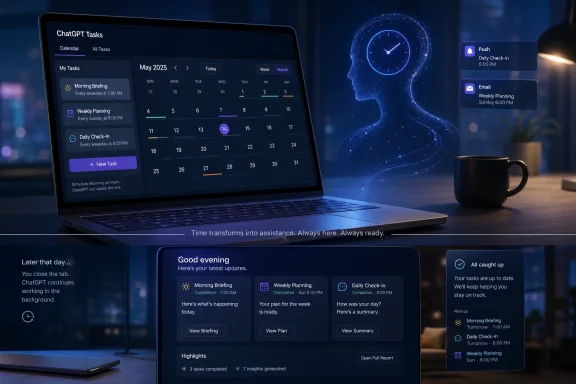 OpenAI Is Teaching ChatGPT to Keep Time
The original promise of ChatGPT was immediacy: type a question, get an answer, refine the answer, move on. Tasks changes that rhythm. It gives ChatGPT a clock, a queue, and permission to re-enter the user’s life after the tab is closed.That matters because time has always been one of the boundaries separating chatbots from assistants. Siri, Alexa, Google Assistant, Outlook, Teams, Slack, cron jobs, calendar alerts, and task managers all live in the scheduled world. ChatGPT, by contrast, has mostly lived in the summoned world. You ask; it answers.
With Tasks, OpenAI is not merely adding reminders. It is testing whether users want a large language model to become part of their recurring information diet: the morning digest, the weekly planning prompt, the “check this every day” nudge, the birthday reminder, the market summary, the language practice session, the project follow-up. The intelligence is less important than the habit loop.
The beta label is doing real work here. Tasks is not yet the fully autonomous agent future that AI companies spent 2024 and 2025 pitching. It does not, in its ordinary form, buy the airline ticket, rebalance the portfolio, patch the server, or file the expense report. But it lays the substrate for that future by normalizing a simpler idea: ChatGPT can act later.
The Feature Looks Like a Reminder App Until You Notice the Prompt
A conventional reminder says, “Take out the trash at 7 p.m.” A ChatGPT Task can say, “Every Friday afternoon, review my notes from this week and suggest three priorities for Monday.” That difference is the entire story.OpenAI describes Tasks as a way to run automated prompts and proactively notify the user when the work is complete. It can be one-off or recurring, and OpenAI’s help materials say tasks can execute even when the user is not online. Notifications can arrive through push or email, depending on the user’s setup and permissions.
That makes the feature more flexible than a calendar alert but less deterministic than traditional automation. A task can generate a fresh answer each time it runs, which is powerful for briefings and planning but potentially awkward for environments that require predictable output. The same prompt may produce slightly different framing, emphasis, or omissions on different days.
This is where Tasks becomes interesting for WindowsForum readers. Sysadmins, IT managers, and power users already understand scheduled work. Windows Task Scheduler, cron, Azure Automation, GitHub Actions, Intune remediation scripts, and PowerShell jobs all exist because recurring operations are useful. ChatGPT Tasks borrows the cultural shape of that world but replaces scripts with natural-language prompts.
That is both the attraction and the risk. A prompt is easier to create than a script, but it is also easier to misunderstand, harder to audit, and more dependent on the model’s interpretation. OpenAI is betting that convenience will pull users across that line anyway.
The Launch Was Narrow, but the Ambition Was Not
At launch, Tasks appeared for paid ChatGPT users on Plus, Team, and Pro plans, with OpenAI positioning it as an early beta. Users could create tasks through a special scheduled-tasks model variant, often described at launch as “GPT-4o with scheduled tasks.” Early reporting placed the active-task ceiling at 10, which remains the limit stated in OpenAI’s current English-language help material.That limit is revealing. Ten active tasks is enough to make the feature useful but not enough to turn ChatGPT into a general automation backbone. It encourages lightweight personal workflows rather than sprawling unattended systems. That is sensible for a beta, especially for a company still trying to understand how proactive AI behaves at consumer scale.
The supported surfaces are also telling. OpenAI’s support material says Tasks works on ChatGPT Web, iOS, Android, and macOS, while the Windows app is still on the roadmap. For a Windows-heavy audience, that is a familiar irritation: the web version gets the management surface first, and the native Windows client follows later.
There is a practical reason for that ordering. Notification permissions, background execution, and task management are easier to standardize through the web and mobile apps OpenAI already controls tightly. But it also underlines how much of modern Windows productivity now routes through browser-first services, even when the users affected are sitting at Windows desktops all day.
The New Tasks Page Is the Product Growing Up
The most important post-launch change is not the ability to create a task. It is the ability to manage tasks in one place. OpenAI’s newer help material describes a Tasks page, available through ChatGPT Web, where users can view, edit, pause, and delete scheduled work.That sounds administrative, and it is. But administrative surfaces are how experimental features become products. A chatbot can hide a one-off reminder inside a conversation. A platform needs a dashboard.
The distinction matters because scheduled AI work can quickly become invisible. A user who creates five recurring prompts across five different conversations needs a place to answer basic questions: What is still running? When will it run next? What did I tell it to do? How do I stop it? Without that inventory, proactive software becomes ambient noise.
The Tasks page is OpenAI acknowledging that time-based AI needs governance even at the personal level. For enterprise customers, the governance question is larger. If employees create recurring prompts that summarize customer notes, monitor internal documents, or generate market scans, admins will want retention rules, compliance visibility, and offboarding behavior. A scheduled prompt is still a workflow, even if it was born in a chat window.
Pulse Complicates the Story Rather Than Replacing It
Some coverage has framed Tasks as absorbing or replacing ChatGPT Pulse, but OpenAI’s current help material presents a more complicated picture. Pulse remains described as a Pro-user experience that performs asynchronous research once a day and delivers proactive visual summaries. Tasks can be managed in Pulse, and Pulse can act as another surface for reviewing or editing them.That nuance matters. Pulse and Tasks are adjacent, but they are not the same thing. Tasks is a user-defined scheduling mechanism. Pulse is a more opinionated proactive research product that relies on memory, past chats, and feedback to decide what might be useful.
In other words, Tasks is closer to “run this prompt on this schedule.” Pulse is closer to “prepare something for me because you know my context.” One is explicit automation; the other is personalized anticipation.
OpenAI has every incentive to blur those categories over time. A user might begin with a scheduled AI news briefing, then expect ChatGPT to know which AI news matters to them, then expect it to surface items without being asked. The commercial destination is obvious: a personal operating layer that turns memory, scheduling, search, and notification into one paid relationship.
The GPT-4o Branding Is Already a Moving Target
The launch coverage described Tasks through the lens of GPT-4o, which made sense in January 2025. GPT-4o was then OpenAI’s flagship general-purpose ChatGPT model, and the scheduled-tasks beta was tied to a variant exposed in the model picker.By mid-2026, however, OpenAI’s model lineup has moved on. Its help materials now describe Tasks as supported by all ChatGPT models except Pro models, with plan usage limits applying to tasks. That is a reminder that product features and model names age at different speeds.
For users, this is mostly good news. A feature that survives beyond a specific model label is more likely to become part of the platform rather than a temporary experiment. For IT buyers, it also creates a documentation headache. The workflow a user adopted under one model name may later run under another, with different limits, behavior, or policy controls.
This is now a recurring issue in AI operations. Models are retired, renamed, merged, or demoted while the user-facing feature remains. In traditional enterprise software, a version number anchors expectations. In AI software, the product surface can stay still while the engine underneath changes.
That makes change management harder. A scheduled prompt that produced acceptable daily summaries in February may not behave identically in June if the model, retrieval system, memory behavior, or safety policy has changed. Tasks does not create that problem, but it makes the problem recurring by design.
The Windows Angle Is Less About the App Than the Workflow
The obvious WindowsForum complaint is that Tasks is not yet fully supported in the ChatGPT Windows app. That is worth noting, but it is not the deepest Windows angle.The deeper issue is that ChatGPT Tasks competes with decades of Windows productivity assumptions. Windows users already have Outlook reminders, Microsoft To Do, Teams notifications, Power Automate, scheduled scripts, widgets, startup apps, background services, and more notification surfaces than most people can sanely manage. ChatGPT enters that crowded field not by being more reliable, but by being more expressive.
A natural-language task can say, “Every Monday, help me plan the week based on the goals we discussed.” Outlook cannot do that without a larger chain of integrations. Power Automate can, but only if the user understands connectors, triggers, permissions, and data mappings. ChatGPT’s pitch is that the prompt is the interface.
That is why Microsoft should be paying close attention despite its partnership with OpenAI. Copilot is already embedded across Windows, Microsoft 365, Edge, and enterprise workflows. If ChatGPT becomes the place users schedule personal and professional nudges, it occupies mental territory Microsoft has spent decades defending.
The irony is thick. Windows taught generations of users to trust background processes. OpenAI is now asking those users to trust background prompts.
IT Departments Will See a Shadow Automation Problem
For home users, Tasks is a convenience feature. For organizations, it looks like the beginning of shadow automation.Shadow IT used to mean unsanctioned SaaS apps, personal Dropbox folders, rogue Trello boards, or spreadsheet databases that quietly became business-critical. Shadow automation is subtler. It happens when employees create small recurring AI workflows that no one else can see, document, test, or inherit.
A salesperson might schedule a weekly account-risk summary. A product manager might schedule competitive scans. A developer might schedule a daily triage of issue reports. A finance employee might ask for reminders tied to reporting cycles. None of these uses is necessarily reckless. Many are exactly the kind of productivity gains AI vendors advertise.
The problem is lifecycle management. What happens when the employee leaves? What happens when the source context changes? What happens when the generated summary is wrong but persuasive? What happens when a task keeps emailing sensitive conclusions to a device that should no longer receive them?
OpenAI’s inclusion of Tasks in compliance-oriented enterprise materials is important, but it does not erase the cultural issue. Administrators can govern what they know exists. The earliest wave of scheduled AI work will often be created by individual users moving faster than policy.
Reliability Is the Product, Not a Footnote
A scheduled AI assistant has a lower tolerance for failure than an interactive chatbot. When ChatGPT gives a weak answer in a live conversation, the user can correct it. When a recurring task runs unattended, the failure may arrive as a confident notification, a missing reminder, or a summary no one questions.OpenAI appears to understand this, which is why the feature is still framed conservatively. Usage limits, unsupported tools, and beta positioning are all forms of blast-radius control. Tasks does not support every ChatGPT capability, and OpenAI’s documentation excludes areas such as voice chats, file uploads, and GPTs from the Tasks feature set.
That restraint is wise. The worst version of scheduled AI would be a system that can combine every tool, every connector, every file, and every action with minimal oversight. The best version starts with low-risk prompts and slowly expands as reliability, auditability, and user understanding improve.
But users rarely experience product boundaries as safety design. They experience them as missing features. If Tasks cannot access the thing they want or run on the surface they prefer, they will ask why. The pressure to expand capability will be constant.
This is the recurring trap of agentic software. A limited agent is safer but less magical. A magical agent is useful right up to the point where it does the wrong thing at scale.
Crypto Users Are a Useful Stress Test, Not the Main Character
Crypto Briefing understandably frames Tasks around crypto investors, but there is no evidence that ChatGPT Tasks currently includes native exchange, wallet, DeFi, or trading integration. That distinction should be made loudly. A scheduled market briefing is not a trading bot. A recurring reminder to check token unlocks is not portfolio management. A prompt that summarizes news is not financial advice.Still, crypto is a useful stress test for the feature because it exposes the boundary between information and action. Crypto markets run constantly, narratives move quickly, and users often want alerts tied to price, liquidity, protocol events, governance votes, security incidents, and social signals. A scheduled AI summary sounds attractive in that environment.
It also sounds dangerous if users overtrust it. ChatGPT can miss events, misread sources, summarize stale material, or frame uncertainty too neatly. In financial contexts, the cost of a bad summary can be real. OpenAI’s broader ChatGPT release notes have repeatedly emphasized that ChatGPT should not move money, pay bills, place trades, file taxes, or act as a financial, legal, tax, or investment adviser.
That warning matters more once the assistant becomes proactive. A bad answer you asked for is one thing. A bad briefing that arrives every morning and shapes your decisions before coffee is another.
The Monetization Signal Is Capacity, Not Intelligence
The most obvious business model for AI assistants has been better models for higher subscription tiers. Tasks points toward another lever: automation capacity.If users come to rely on recurring prompts, the number of active tasks becomes a monetizable resource. So does frequency. So does access to richer context. So does cross-app execution. So does team-level governance. A user who treats ChatGPT as a once-a-week novelty is worth less than a user who lets it occupy ten repeating slots in daily life.
This is why the task limit matters even if the exact number changes over time. Scarcity teaches users what the company plans to sell. Storage limits taught users the value of cloud capacity. Message limits taught users the value of model access. Task limits may teach users the value of background agency.
For OpenAI, this is a rational path. Chatbot subscriptions are vulnerable to churn because a user can cancel when curiosity fades. Scheduled tasks create ongoing dependency. If ChatGPT becomes the system that reminds you, briefs you, coaches you, and checks on your projects, canceling feels less like dropping a tool and more like losing an assistant.
That is the strategic shift. Tasks is not about reminders. It is about retention.
The Notification War Gets Another Combatant
Every proactive product eventually collides with notification fatigue. Email, Slack, Teams, Outlook, phone apps, browser prompts, operating-system badges, and mobile push alerts already compete for attention. ChatGPT now wants a place in that queue.OpenAI’s challenge is to make its notifications feel earned. A recurring task that produces a genuinely useful daily briefing may become indispensable. A task that produces generic filler will be muted, ignored, or deleted. The assistant does not merely need to be correct; it needs to be worth interrupting the user.
This is where the “no more than once per hour” style of constraint, reported in some early descriptions, makes conceptual sense even when implementation details evolve. A proactive assistant that can constantly interrupt becomes hostile. A proactive assistant that rarely says anything useful becomes irrelevant. The product has to find the narrow band between silence and spam.
Windows users know this problem well. Microsoft has spent years trying to make Windows notifications, Edge prompts, OneDrive nudges, Teams messages, and Copilot surfaces feel helpful rather than needy. The results have been mixed. OpenAI is walking into the same behavioral swamp.
The difference is that ChatGPT’s output can be personalized in language, not just triggered by events. That gives it a better shot at relevance — and a greater risk of seeming intrusive.
The Real Competition Is Not Siri, but the Morning Routine
It is tempting to describe Tasks as OpenAI’s answer to Siri, Alexa, or Google Assistant. That comparison is partly right and mostly too narrow.Voice assistants are built around quick commands. Tasks is better understood as a bid for routines. The valuable slot is not “remind me in ten minutes.” The valuable slot is “start my day,” “prepare my week,” “keep track of this,” “teach me consistently,” or “tell me when something changes.”
Those routines are where software becomes habit. The first app a user checks in the morning has power. The system that frames the day’s priorities has power. The assistant that summarizes what changed overnight has power. OpenAI wants ChatGPT in that position.
This is also why the feature pairs naturally with memory. A scheduled prompt becomes more useful when ChatGPT knows your projects, preferences, role, calendar rhythms, and past decisions. But the more useful it becomes, the more intimate the data relationship becomes. Convenience and surveillance are not the same thing, but they often share infrastructure.
OpenAI’s challenge is to make proactive personalization feel like service rather than observation. That line will be different for individuals, businesses, schools, and regulated industries.
The Small Print Is Where Power Users Should Look
For Windows enthusiasts and IT pros, the early version of Tasks is less important than the shape of the control surface. The feature is useful, but it is not yet a replacement for deterministic automation, monitoring, or enterprise workflow tooling.A task that reminds you to review Patch Tuesday notes is reasonable. A task that claims to determine whether your environment is compliant is not. A task that generates a weekly learning plan is low risk. A task that summarizes confidential customer data needs policy scrutiny. A task that checks a public news topic may be helpful. A task that users mistake for a source-of-truth alerting system is a problem.
The right mental model is “scheduled assistant prompt,” not “automation engine.” That may change over time, especially as ChatGPT gains deeper connectors and agentic capabilities. For now, treating Tasks as a lightweight layer on top of human judgment is the safer approach.
The irony is that lightweight layers have a way of becoming infrastructure. Email started as messaging. Spreadsheets started as calculation grids. Chat apps started as conversation. If enough users build enough daily routines around ChatGPT Tasks, the feature will matter regardless of how modest it looks today.
The Calendar Is Now Part of the Model War
The AI race is often described through benchmarks, context windows, multimodal demos, and model names. Tasks suggests another battlefield: who controls the calendar of AI interaction.The model that waits for a prompt can be swapped more easily. The assistant that owns recurring prompts becomes stickier. That stickiness does not come from raw intelligence alone. It comes from schedules, memory, notifications, integrations, and trust accumulated over time.
OpenAI is not alone in seeing this. Microsoft has Copilot and Power Automate. Google has Gemini and Workspace. Apple has its long-delayed Apple Intelligence ambitions and deep platform control. Anthropic, Perplexity, Notion, Slack, Salesforce, and others are all circling versions of proactive work. The winner may not be the model that gives the best single answer. It may be the system users allow to keep coming back.
That is why Tasks deserves more attention than a typical beta feature. It is a small handle attached to a very large door.
The Practical Read Before You Let ChatGPT Nag You
The sensible way to approach ChatGPT Tasks is neither breathless enthusiasm nor reflexive dismissal. It is to treat the feature as a useful beta that becomes more consequential the more personal, recurring, and decision-shaping the task becomes.- ChatGPT Tasks is best suited for recurring prompts, reminders, briefings, practice sessions, and lightweight monitoring that can tolerate occasional imperfection.
- The feature should not be treated as a deterministic replacement for Windows Task Scheduler, enterprise monitoring, financial alerts, compliance workflows, or production automation.
- OpenAI’s current documentation places Tasks across ChatGPT Web, iOS, Android, and macOS, while Windows app support remains on the roadmap.
- The centralized Tasks page is more important than it looks because it turns scattered scheduled prompts into something users can manage and eventually administrators will want to govern.
- Financial, legal, security, and operational uses need extra caution because proactive AI can shape decisions before a human has examined the underlying evidence.
- The strategic value for OpenAI is not the reminder itself, but the recurring relationship that makes ChatGPT harder to leave.
References
- Primary source: Crypto Briefing
Published: 2026-06-17T21:50:13.681202
Loading…
cryptobriefing.com - Independent coverage: Pulse 2.0
Published: Wed, 17 Jun 2026 19:28:54 GMT
Loading…
pulse2.com - Independent coverage: 9to5Mac
Published: Wed, 17 Jun 2026 19:15:00 GMT
Loading…
9to5mac.com - Official source: help.openai.com
Loading…
help.openai.com - Related coverage: techcrunch.com
Loading…
techcrunch.com - Official source: help-lb.openai.com
Loading…
help-lb.openai.com
- Official source: openai.com
Dreaming: Better memory for a more helpful ChatGPT | OpenAI
ChatGPT introduces a new memory system to better remember preferences, keeping context fresh and relevant across conversations.openai.com - Related coverage: arstechnica.com
Loading…
arstechnica.com - Related coverage: androidcentral.com
ChatGPT moves in on Google again as 'Scheduled Tasks' enters beta | Android Central
Tell the AI what you need to be reminded of or what you'd like to stay engaged with.www.androidcentral.com - Related coverage: axios.com
Loading…
www.axios.com - Related coverage: techrepublic.com
Loading…
www.techrepublic.com - Official source: cdn.openai.com
Loading…
cdn.openai.com