
Claude AI users in India and other regions reported trouble accessing Anthropic’s chatbot, website, and mobile apps on Thursday, June 18, 2026, prompting many to look for working alternatives including ChatGPT, Google Gemini, Microsoft Copilot, Perplexity AI, and xAI’s Grok. The immediate story is a service disruption, but the larger one is dependency. AI assistants have become workplace infrastructure before they have earned the reliability expectations that come with that role. When Claude disappears from the browser tab, users are reminded that “AI productivity” is only as resilient as the fallback plan behind it.
The consumer framing of an AI outage is simple: a chatbot is down, people complain, the service returns, and everyone moves on. That framing is increasingly obsolete. Claude is no longer just a place where users ask for poems, summaries, or polite rewrites; for many developers, writers, analysts, students, and support teams, it is part of the day’s workflow.
That is why a Claude outage lands differently from a social app wobble. A failed prompt can mean a blocked code review, a delayed proposal, a stalled research brief, or an interrupted customer response. The user may still have their laptop, browser, documents, and cloud storage, but the cognitive layer they have built around those tools is suddenly missing.
Anthropic’s official status pages and outage monitors have recorded multiple Claude incidents across 2026, including elevated errors, partial outages, and platform availability problems. Some of those incidents affected only particular models or products; others hit Claude.ai, the API, Claude Code, or related services more broadly. The pattern matters because it turns a single bad day into a risk profile.
For WindowsForum readers, the lesson is familiar from decades of cloud computing: the magic is real, but so is the dependency chain. The more useful a hosted service becomes, the more disruptive its absence becomes. Claude’s popularity has made its failures more visible.
But reliability is not a separate checkbox from quality. Once users begin paying for premium plans, integrating APIs, or using Claude Code in development routines, uptime becomes part of the product promise. A brilliant model that cannot be reached during working hours is not better than a merely good model that answers when called.
This is where Anthropic faces the same transition that every successful infrastructure company eventually meets. Early adopters tolerate rough edges because they are buying into capability. Mainstream users and businesses tolerate far less because they are buying continuity.
The pressure is especially acute in India and other fast-growing AI markets, where mobile-first usage, price sensitivity, and professional reliance collide. If a service fails in the middle of a workday, users do not calmly wait for a postmortem. They open another tab.
ChatGPT remains the easiest general-purpose fallback. It is widely available, familiar to nontechnical users, and capable across writing, coding, brainstorming, summarization, image-related tasks, and everyday productivity. If the goal is to keep moving with the least friction, ChatGPT is usually the first place most people will go.
Google Gemini is strongest for users already living inside Google’s ecosystem. Its value is not merely that it can answer questions; it is that it can sit close to Gmail, Docs, Drive, and Android workflows. For people whose working day is already organized around Google accounts and collaborative documents, Gemini can be less of a detour than a continuation.
Microsoft Copilot is the most natural fallback for Windows and Microsoft 365 users. That makes it particularly relevant to this audience. Copilot’s promise is not only conversational AI, but assistance inside the software many offices already use: Word, Excel, PowerPoint, Outlook, Teams, Edge, and Windows itself. For administrators and enterprise users, that integration can matter more than raw chatbot charm.
Perplexity AI is the most obvious substitute when the task is research rather than composition. Its citation-forward style makes it useful when users need to chase sources, compare reports, or build a quick picture of a news event. It is not a perfect research assistant, but its default posture is closer to “show your work” than many general chatbots.
Grok, from xAI, is the more opinionated and socially plugged-in alternative. Its availability and usefulness can depend on region, subscription status, and X integration, but it has become part of the competitive field. For users who want a conversational model tied closely to real-time social discussion, Grok has an angle the office-suite assistants do not.
The service is available on the web and through mobile apps, with free and paid tiers covering a wide range of tasks. It can draft copy, explain code, summarize documents, brainstorm product names, parse error messages, and provide a second opinion on a plan. Its broadness is the point.
For developers and power users, ChatGPT also has the advantage of an extensive surrounding ecosystem. Tutorials, browser extensions, integrations, and workplace policies are already likely to mention it. That makes it easier for a team to say, “Use ChatGPT until Claude is back,” than to assemble a new toolchain on the fly.
The tradeoff is that ChatGPT is not a drop-in clone of Claude. Users who prefer Claude’s tone, long-context handling, or coding style may find OpenAI’s assistant different enough to be noticeable. But in an outage, the best tool is often the one that gets the document, script, or decision over the line.
This matters because AI outages do not usually happen at convenient times. A user who was asking Claude to summarize a long email thread or draft a Google Docs outline can often shift to Gemini with less disruption than to a standalone tool. The workflow stays inside the same account universe.
Gemini also benefits from Google’s long experience in search, mobile distribution, and productivity software. That does not automatically make it the best model for every task, but it gives the product a strong base for everyday use. For students, marketers, analysts, and office workers, that base is often enough.
The caveat is that Google’s AI branding and product boundaries have changed repeatedly over the last few years. Administrators should pay attention to which Gemini features are available under which account types, regions, and paid plans. The assistant may be easy to access, but enterprise capability still depends on licensing and policy.
For Windows users, Copilot’s value is not merely that it can chat. Its potential advantage is context: documents, spreadsheets, meetings, messages, and operating-system surfaces. In a Microsoft 365 environment, the AI assistant is closest to the files and conversations many organizations already govern.
That makes Copilot a pragmatic Claude alternative for business users. If Claude is down and the task is to summarize a Word document, draft an Outlook response, shape a PowerPoint deck, or interrogate an Excel file, Copilot may be the more natural backup. It is not always the most elegant conversational partner, but enterprise software often wins by being where the work already is.
For IT pros, the key is preparation. Copilot should not be introduced for the first time during an outage. Admins need to understand licensing, data access, tenant settings, compliance implications, and user education before treating it as a serious fallback.
This is particularly relevant during an AI outage story. A chatbot can confidently tell users that a service is working or broken, but that confidence is worthless without corroboration. A source-forward tool encourages the user to inspect the trail.
Perplexity is useful for journalists, students, analysts, and professionals who need a fast map of a topic. It can compress the early stage of research into minutes by gathering and summarizing material from multiple places. That does not eliminate verification; it changes where the human effort goes.
The limitation is that citations are not a guarantee of correctness. A sourced answer can still lean on weak pages, outdated material, or context it has misunderstood. Perplexity is best treated as a research accelerator, not an authority machine.
As a Claude fallback, Grok is best understood as situational. It can help draft, summarize, brainstorm, and code, but its most distinctive position is its proximity to X’s information stream and social context. That makes it useful for some tasks and less compelling for others.
The service’s availability can also vary depending on geography, platform access, and subscription model. Users should not assume that Grok is universally available in the same way as a web search engine. In some environments, it will be an option; in others, it may be irrelevant.
Still, Grok’s presence on the shortlist says something important about the market. AI assistants are no longer differentiated only by model benchmarks. They are differentiated by the networks, apps, and habits around them.
A writer might prefer Claude for structure, ChatGPT for rapid drafting, Perplexity for source discovery, and Gemini for Google Docs work. A developer might use Claude Code when available, GitHub Copilot inside the IDE, ChatGPT for debugging explanations, and local tooling for private snippets. An office worker might move between Copilot and Gemini depending on where the document lives.
This is not about chasing novelty. It is about matching tools to failure modes. If one provider has an outage, changes a model, tightens usage limits, or modifies pricing, the work should not grind to a halt.
Businesses should treat AI assistants as third-party services with uptime, data, and procurement implications. That means documenting acceptable alternatives, clarifying what data can be pasted into which tool, and training staff on the difference between public consumer assistants and governed enterprise deployments. The shadow-IT version of AI fallback is convenient until someone pastes sensitive data into the wrong box.
This is why outages feel more disruptive than their duration might suggest. A half-hour loss of access can be trivial for casual users and maddening for someone in the middle of a complex debugging session. The interruption is not just technical, but mental.
Claude’s fans are often fans because they have adapted to its strengths. They know how to prompt it, how it structures answers, how it handles ambiguity, and where it tends to shine. Switching tools means switching collaborators.
That is the hidden cost of platform loyalty in the AI era. The user is not only locked into files or subscriptions, but into patterns of thought. The antidote is deliberate practice across multiple assistants before a crisis forces the move.
Admins need to know which Copilot they are talking about. Consumer Copilot in a browser is not the same as Copilot for Microsoft 365 under enterprise controls. GitHub Copilot has its own developer-focused policies. Security teams should not let a single brand name blur those boundaries.
The same applies to ChatGPT, Gemini, Perplexity, Claude, and Grok. Free consumer tiers, paid individual plans, team subscriptions, and enterprise offerings may handle data, retention, connectors, and administrative controls differently. Users see a chat box; IT sees a data path.
The practical policy should be simple enough for employees to follow. If Claude is down, where may they go? What data may they paste? Which tools are approved for customer information, source code, contracts, financial data, or unpublished documents? A fallback that violates policy is not resilience; it is a new incident waiting to happen.
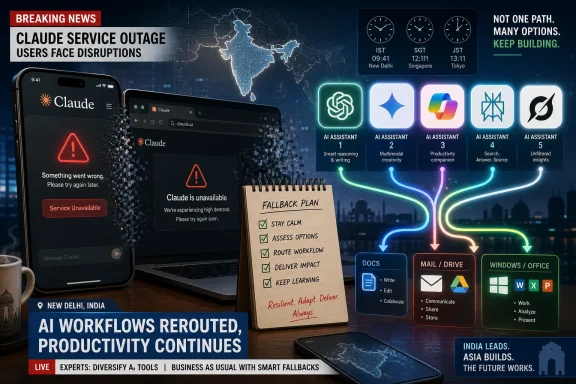 Claude’s Outage Is a Productivity Problem, Not Just a Chatbot Problem
The consumer framing of an AI outage is simple: a chatbot is down, people complain, the service returns, and everyone moves on. That framing is increasingly obsolete. Claude is no longer just a place where users ask for poems, summaries, or polite rewrites; for many developers, writers, analysts, students, and support teams, it is part of the day’s workflow.That is why a Claude outage lands differently from a social app wobble. A failed prompt can mean a blocked code review, a delayed proposal, a stalled research brief, or an interrupted customer response. The user may still have their laptop, browser, documents, and cloud storage, but the cognitive layer they have built around those tools is suddenly missing.
Anthropic’s official status pages and outage monitors have recorded multiple Claude incidents across 2026, including elevated errors, partial outages, and platform availability problems. Some of those incidents affected only particular models or products; others hit Claude.ai, the API, Claude Code, or related services more broadly. The pattern matters because it turns a single bad day into a risk profile.
For WindowsForum readers, the lesson is familiar from decades of cloud computing: the magic is real, but so is the dependency chain. The more useful a hosted service becomes, the more disruptive its absence becomes. Claude’s popularity has made its failures more visible.
Anthropic Built Trust on Quality, but Reliability Is Now Part of the Product
Claude earned its place in the AI shortlist because it often feels careful, capable, and unusually good at long-form reasoning. Many users prefer it for drafting, analysis, coding, and document-heavy work. That is not a small achievement in a market where every major platform now claims to be the assistant for everything.But reliability is not a separate checkbox from quality. Once users begin paying for premium plans, integrating APIs, or using Claude Code in development routines, uptime becomes part of the product promise. A brilliant model that cannot be reached during working hours is not better than a merely good model that answers when called.
This is where Anthropic faces the same transition that every successful infrastructure company eventually meets. Early adopters tolerate rough edges because they are buying into capability. Mainstream users and businesses tolerate far less because they are buying continuity.
The pressure is especially acute in India and other fast-growing AI markets, where mobile-first usage, price sensitivity, and professional reliance collide. If a service fails in the middle of a workday, users do not calmly wait for a postmortem. They open another tab.
The Best Claude Alternative Depends on the Job You Were Trying to Finish
The obvious answer to “what should I use if Claude is down?” is “another chatbot.” The better answer is that the replacement should match the task. The AI market has become broad enough that switching from Claude to a competitor is less like replacing one search engine with another and more like choosing a different workflow surface.ChatGPT remains the easiest general-purpose fallback. It is widely available, familiar to nontechnical users, and capable across writing, coding, brainstorming, summarization, image-related tasks, and everyday productivity. If the goal is to keep moving with the least friction, ChatGPT is usually the first place most people will go.
Google Gemini is strongest for users already living inside Google’s ecosystem. Its value is not merely that it can answer questions; it is that it can sit close to Gmail, Docs, Drive, and Android workflows. For people whose working day is already organized around Google accounts and collaborative documents, Gemini can be less of a detour than a continuation.
Microsoft Copilot is the most natural fallback for Windows and Microsoft 365 users. That makes it particularly relevant to this audience. Copilot’s promise is not only conversational AI, but assistance inside the software many offices already use: Word, Excel, PowerPoint, Outlook, Teams, Edge, and Windows itself. For administrators and enterprise users, that integration can matter more than raw chatbot charm.
Perplexity AI is the most obvious substitute when the task is research rather than composition. Its citation-forward style makes it useful when users need to chase sources, compare reports, or build a quick picture of a news event. It is not a perfect research assistant, but its default posture is closer to “show your work” than many general chatbots.
Grok, from xAI, is the more opinionated and socially plugged-in alternative. Its availability and usefulness can depend on region, subscription status, and X integration, but it has become part of the competitive field. For users who want a conversational model tied closely to real-time social discussion, Grok has an angle the office-suite assistants do not.
ChatGPT Is the Default Escape Hatch Because It Is Boring in the Right Ways
OpenAI’s ChatGPT benefits from being the name most people already know. That sounds like a marketing advantage, and it is, but in an outage scenario it is also operationally useful. Users do not want to learn a new paradigm while a deadline is burning.The service is available on the web and through mobile apps, with free and paid tiers covering a wide range of tasks. It can draft copy, explain code, summarize documents, brainstorm product names, parse error messages, and provide a second opinion on a plan. Its broadness is the point.
For developers and power users, ChatGPT also has the advantage of an extensive surrounding ecosystem. Tutorials, browser extensions, integrations, and workplace policies are already likely to mention it. That makes it easier for a team to say, “Use ChatGPT until Claude is back,” than to assemble a new toolchain on the fly.
The tradeoff is that ChatGPT is not a drop-in clone of Claude. Users who prefer Claude’s tone, long-context handling, or coding style may find OpenAI’s assistant different enough to be noticeable. But in an outage, the best tool is often the one that gets the document, script, or decision over the line.
Gemini Makes the Most Sense When Google Already Owns the Workday
Google Gemini’s strongest argument is proximity. If the user’s source material lives in Gmail, Docs, Sheets, Slides, or Drive, an assistant that connects to that world has an obvious advantage. The less copying and pasting a fallback requires, the more likely users are to actually use it.This matters because AI outages do not usually happen at convenient times. A user who was asking Claude to summarize a long email thread or draft a Google Docs outline can often shift to Gemini with less disruption than to a standalone tool. The workflow stays inside the same account universe.
Gemini also benefits from Google’s long experience in search, mobile distribution, and productivity software. That does not automatically make it the best model for every task, but it gives the product a strong base for everyday use. For students, marketers, analysts, and office workers, that base is often enough.
The caveat is that Google’s AI branding and product boundaries have changed repeatedly over the last few years. Administrators should pay attention to which Gemini features are available under which account types, regions, and paid plans. The assistant may be easy to access, but enterprise capability still depends on licensing and policy.
Copilot Is the Fallback Windows Users Should Actually Test Before They Need It
Microsoft Copilot is easy to underestimate because Microsoft has put the Copilot label on so many things. There is Copilot in Windows, Copilot on the web, Copilot in Edge, Copilot for Microsoft 365, GitHub Copilot for developers, and specialized variants across the company’s portfolio. That branding sprawl can be annoying, but it also signals the scale of Microsoft’s bet.For Windows users, Copilot’s value is not merely that it can chat. Its potential advantage is context: documents, spreadsheets, meetings, messages, and operating-system surfaces. In a Microsoft 365 environment, the AI assistant is closest to the files and conversations many organizations already govern.
That makes Copilot a pragmatic Claude alternative for business users. If Claude is down and the task is to summarize a Word document, draft an Outlook response, shape a PowerPoint deck, or interrogate an Excel file, Copilot may be the more natural backup. It is not always the most elegant conversational partner, but enterprise software often wins by being where the work already is.
For IT pros, the key is preparation. Copilot should not be introduced for the first time during an outage. Admins need to understand licensing, data access, tenant settings, compliance implications, and user education before treating it as a serious fallback.
Perplexity Wins When the Problem Is Evidence, Not Eloquence
Perplexity AI occupies a different lane from the big general assistants. Its main appeal is research with visible sourcing. When users are trying to understand a current event, compare product claims, or gather background for a report, that orientation can be more valuable than a beautifully written answer.This is particularly relevant during an AI outage story. A chatbot can confidently tell users that a service is working or broken, but that confidence is worthless without corroboration. A source-forward tool encourages the user to inspect the trail.
Perplexity is useful for journalists, students, analysts, and professionals who need a fast map of a topic. It can compress the early stage of research into minutes by gathering and summarizing material from multiple places. That does not eliminate verification; it changes where the human effort goes.
The limitation is that citations are not a guarantee of correctness. A sourced answer can still lean on weak pages, outdated material, or context it has misunderstood. Perplexity is best treated as a research accelerator, not an authority machine.
Grok Is the Alternative for Users Who Want the Internet’s Pulse
Grok’s pitch is less about office productivity and more about conversational immediacy. Its association with X gives it a different flavor from assistants rooted in productivity suites or developer platforms. For users tracking social reaction, cultural chatter, or fast-moving commentary, that can be appealing.As a Claude fallback, Grok is best understood as situational. It can help draft, summarize, brainstorm, and code, but its most distinctive position is its proximity to X’s information stream and social context. That makes it useful for some tasks and less compelling for others.
The service’s availability can also vary depending on geography, platform access, and subscription model. Users should not assume that Grok is universally available in the same way as a web search engine. In some environments, it will be an option; in others, it may be irrelevant.
Still, Grok’s presence on the shortlist says something important about the market. AI assistants are no longer differentiated only by model benchmarks. They are differentiated by the networks, apps, and habits around them.
The Real Backup Plan Is Not Another Chatbot but a Portfolio
The strongest lesson from Claude’s disruption is that users should stop thinking in terms of one favorite assistant. That may be emotionally satisfying, but it is operationally fragile. Serious AI users need a portfolio.A writer might prefer Claude for structure, ChatGPT for rapid drafting, Perplexity for source discovery, and Gemini for Google Docs work. A developer might use Claude Code when available, GitHub Copilot inside the IDE, ChatGPT for debugging explanations, and local tooling for private snippets. An office worker might move between Copilot and Gemini depending on where the document lives.
This is not about chasing novelty. It is about matching tools to failure modes. If one provider has an outage, changes a model, tightens usage limits, or modifies pricing, the work should not grind to a halt.
Businesses should treat AI assistants as third-party services with uptime, data, and procurement implications. That means documenting acceptable alternatives, clarifying what data can be pasted into which tool, and training staff on the difference between public consumer assistants and governed enterprise deployments. The shadow-IT version of AI fallback is convenient until someone pastes sensitive data into the wrong box.
Outages Expose the Hidden Cost of AI Muscle Memory
The more often a user asks an AI assistant to think alongside them, the more the assistant becomes part of their cognitive routine. That can be productive, but it also creates a subtle dependency. When the model is unavailable, the user is not merely missing a tool; they are missing a habit.This is why outages feel more disruptive than their duration might suggest. A half-hour loss of access can be trivial for casual users and maddening for someone in the middle of a complex debugging session. The interruption is not just technical, but mental.
Claude’s fans are often fans because they have adapted to its strengths. They know how to prompt it, how it structures answers, how it handles ambiguity, and where it tends to shine. Switching tools means switching collaborators.
That is the hidden cost of platform loyalty in the AI era. The user is not only locked into files or subscriptions, but into patterns of thought. The antidote is deliberate practice across multiple assistants before a crisis forces the move.
Windows and Enterprise Users Need Rules Before the Next Red Status Page
For Windows-heavy organizations, Microsoft Copilot will often be the politically and technically easiest fallback. It sits inside the vendor stack already approved by many IT departments. That does not mean every Copilot use is automatically safe or well configured.Admins need to know which Copilot they are talking about. Consumer Copilot in a browser is not the same as Copilot for Microsoft 365 under enterprise controls. GitHub Copilot has its own developer-focused policies. Security teams should not let a single brand name blur those boundaries.
The same applies to ChatGPT, Gemini, Perplexity, Claude, and Grok. Free consumer tiers, paid individual plans, team subscriptions, and enterprise offerings may handle data, retention, connectors, and administrative controls differently. Users see a chat box; IT sees a data path.
The practical policy should be simple enough for employees to follow. If Claude is down, where may they go? What data may they paste? Which tools are approved for customer information, source code, contracts, financial data, or unpublished documents? A fallback that violates policy is not resilience; it is a new incident waiting to happen.
The Claude Disruption Turns AI Choice into Operational Hygiene
The immediate workaround is easy to state: try ChatGPT, Gemini, Copilot, Perplexity, or Grok until Claude returns. The more durable advice is to make that choice intentional before the next outage. Users and teams should decide which assistant owns which kind of work, and which service replaces it when it fails.- ChatGPT is the safest general-purpose fallback for users who need a familiar assistant for writing, coding, summarizing, and brainstorming.
- Google Gemini is the most natural alternative when the work already lives in Gmail, Docs, Drive, or Android.
- Microsoft Copilot is the most relevant option for Windows and Microsoft 365 users who want AI close to Office documents, Outlook, Teams, Edge, and enterprise controls.
- Perplexity AI is the strongest choice when the job is research that needs visible sources and faster triangulation.
- Grok is worth considering when users want a conversational assistant tied closely to X and real-time social context.
- No single chatbot should be treated as mission-critical infrastructure unless the organization has an outage plan, a data policy, and a tested alternative.
References
- Primary source: News9live
Published: 2026-06-18T09:50:15.454998
Claude AI Outage: 5 Best Alternatives Including ChatGPT, Gemini, Copilot, Perplexity and Grok | Artificial Intelligence News - News9live
Claude AI is experiencing a service outage, with users in India and other regions reporting issues accessing the chatbot, website, and mobile app. As Anthropic works to restore services, users can switch to alternatives like ChatGPT, Google Gemini, Microsoft Copilot, Perplexity AI, and Grok.www.news9live.com
- Related coverage: techtimes.com
Claude Outage: Tenth Disruption in 12 Days Exposes Anthropic Infrastructure Strain
Claude outage on June 16, 2026 marks the tenth significant service disruption since June 5, with Opus 4.8 and Haiku 4.5 errors persisting despite a fix attempt at 2:00 PM ET. Anthropic haswww.techtimes.com - Related coverage: indianexpress.com
Claude AI down: Users report problems accessing chatbot and API
Claude Ai down today:The company acknowledged service interruptions on its status page but had not disclosed the cause of the outage or provided a timeline for full restoration.indianexpress.com - Related coverage: techradar.com
Claude is down for many — here's what we know about the outage | TechRadar
Anthropic has confirmed the "partial outage"www.techradar.com - Official source: status.claude.com

Claude Status - Incident History
Claude's Incident and Scheduled Maintenance History
status.claude.com
- Related coverage: techcrunch.com
Anthropic's Claude reports widespread outage | TechCrunch
Anthropic's AI chatbot Claude experienced widespread service disruptions on Monday morning, with thousands of users reporting issues accessing the bot.techcrunch.com
- Related coverage: tomshardware.com
Anthropic nuked a company's access to Claude, stopping 60 employees dead in their tracks — support via Google Form is the only recourse for vague usage policy violation | Tom's Hardware
One strike and you're out.www.tomshardware.com - Related coverage: tomsguide.com
Claude AI was down — what we know so far about the outage | Tom's Guide
Users report issues accessing the servicewww.tomsguide.com - Related coverage: itpro.com
Anthropic’s Claude AI chatbot is down as company confirms ‘elevated error rates’ for Opus 4.5 and Sonnet 4.5 | IT Pro
Users of Anthropic's Claude Sonnet 4.5 and Opus 4.5 models are being met with "elevated error rates".www.itpro.com - Related coverage: caloes.ca.gov