
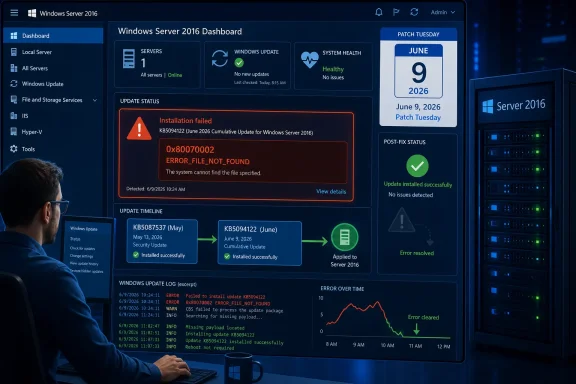
Microsoft has fixed a Windows Server 2016 servicing issue that caused some systems to fail installation of the June 9, 2026 security update KB5094122 when the earlier May update KB5087537 was missing, producing 0x80070002 or ERROR_FILE_NOT_FOUND during deployment. The fix is narrow, but the lesson is broader: even in the supposedly cumulative era of Windows servicing, update history still matters. For administrators nursing Server 2016 estates through their final supported months, this is another reminder that “just install the latest patch” is not always an operational plan. It is a bet on a servicing stack, a dependency chain, and Microsoft’s ability to keep old platforms predictable under modern security pressure.
The immediate news is straightforward. Some Windows Server 2016 machines that were not fully current could not install KB5094122, the June 2026 Patch Tuesday security update for Windows Server 2016 and Windows 10 version 1607-based long-term servicing editions. The failure showed up as 0x80070002, the familiar Windows way of saying a required file could not be found.
Microsoft linked the problem primarily to machines that attempted to jump directly to the June security update without first installing the May 2026 security update, KB5087537. After administrator reports and a service alert in the Microsoft 365 admin center, the company says the issue has now been resolved. Affected systems should be able to install KB5094122 normally.
That is the clean version. The messier version is that the error arrived at exactly the wrong point in the life of Windows Server 2016. This is not a shiny platform in active architectural evolution; it is a deeply deployed, aging server OS that many organizations keep around because applications, licensing, validation cycles, or plain inertia make migration difficult.
Patch failures on old servers are rarely just patch failures. They are maintenance-window failures, compliance failures, vulnerability-management exceptions, and late-night rollback conversations with application owners who already think the infrastructure team touches their systems too often.
In practice, Windows servicing has never escaped prerequisites. Servicing stack updates, safe deployment holds, dynamic update components, update-agent behavior, image state, expired packages, and supersedence metadata all influence whether a patch is truly installable on a given machine. The marketing phrase cumulative update hides a lot of machinery.
The Server 2016 KB5094122 failure is a useful example because it appears to have violated the mental model many admins rely on. If the June update includes the May improvements, why should a missing May update matter? The answer is that cumulative content and cumulative installability are not quite the same thing.
A package may contain prior fixes, but the machine still has to understand, stage, validate, and commit that package. If the servicing stack or component store expects a state that the machine has not reached, the process can fall apart before the “cumulative” promise becomes meaningful.
Its extended support clock is also loud. Windows Server 2016 reaches the end of support in January 2027, which means the June 2026 update lands inside the final stretch for organizations that have not yet completed migration. Every monthly patch now arrives with an undertone: you are not just maintaining this system, you are running out the clock.
That timing changes the risk calculation. A failed update in 2022 might have been an annoying servicing incident. A failed update in mid-2026 is also a migration warning, because it shows how little tolerance remains for fragile patch baselines on platforms nearing retirement.
Some organizations will read this incident as a reason to accelerate Server 2022 or Server 2025 moves. Others will do what enterprises often do: document the workaround, fix the failed machines, and return to the migration project after the next audit finding. The operational truth is that both reactions can exist in the same company.
That ambiguity is part of the pain. A failed patch that says “install KB5087537 first” would be annoying but actionable. A failed patch that returns ERROR_FILE_NOT_FOUND pushes teams toward log spelunking, WSUS checks, Microsoft Update Catalog downloads, DISM scans, SoftwareDistribution resets, and forum searches.
The practical cost is time. Security teams see missing June updates in vulnerability dashboards. Infrastructure teams see maintenance windows closing. Application teams see reboots being rescheduled. Help desks may see nothing at all, which is even worse for servers quietly missing security fixes.
For smaller shops, the same administrator may be doing all of this alone. For larger organizations, the failure becomes a coordination exercise across endpoint management, server operations, security compliance, and change management. A single missing prerequisite can become a meeting.
Still, administrators should resist treating the fix as permission to stop caring about patch sequence. The incident confirms that baseline drift remains dangerous. If some servers are months behind, others are one update behind, and others have inconsistent servicing stack state, a monthly security rollout becomes less like maintenance and more like archaeology.
The right response is not panic. It is inventory. Admins should know which Server 2016 systems have installed KB5087537, which have successfully installed KB5094122, which are failing, and which have not checked in to management tooling recently enough to trust. The gap between “approved in WSUS” and “installed on the server” is where many patch stories go bad.
There is also a reporting lesson here. A dashboard that simply says “KB5094122 missing” is useful, but insufficient. A dashboard that can separate “not offered,” “download failed,” “install failed,” “pending reboot,” and “supersedence confusion” is the difference between a patch process and a patch hope.
For years, security teams have pushed organizations to patch faster. That pressure is rational. Exploits move quickly, perimeter assumptions keep failing, and delayed patching remains one of the easiest ways to convert a known vulnerability into a breach.
But faster patching only works if the servicing pipeline is reliable. When updates trigger recovery screens, fail from network shares, or collapse on machines missing the prior month’s update, administrators become more cautious. Not because they dislike security, but because they are paid to keep systems running.
This is the uncomfortable balance Microsoft must manage. Every Patch Tuesday asks customers to trust that the cure will not become a new outage. When that trust is strained, organizations stretch rings, delay approvals, expand pilots, and build manual checks around what should be routine.
That distinction matters. Microsoft can accurately say that a bug affects only a limited configuration, while administrators can accurately say that the affected configuration is the one they have to support at 2 a.m. Scope statements do not erase operational impact.
BitLocker, Secure Boot, certificate rotation, TPM policy, and boot-chain hardening are all areas where Microsoft is tightening Windows security. Those changes are necessary, especially as firmware and boot-level attacks remain attractive to sophisticated adversaries. But they also make the servicing process more sensitive to edge cases.
This is the modern Windows bargain: more security automation, more cloud-informed targeting, more phased rollout intelligence, and more complexity when the assumptions do not match a real fleet. Server 2016 and Server 2025 may be separated by nearly a decade of platform design, but administrators experience both through the same question: will this month’s update install cleanly?
Over time, the fleet stops being a fleet and becomes a collection of exceptions. That is when a prerequisite bug becomes painful. The machines most likely to fail are often the machines least visible to the people designing the patch process.
This is why mature patch management is less about clicking “approve” and more about enforcing state. The boring disciplines matter: known-good baselines, health checks before deployment, reboot compliance, component-store monitoring, and fast escalation when a subset of machines fails differently from the rest.
Server 2016 makes that harder because many deployments are old enough to have accumulated years of exceptions. The operating system may be stable, but the environment around it is often anything but. Legacy does not mean simple; it often means layered with history.
The WUSA issue Microsoft recently addressed is another reminder that enterprises do not all patch the same way. Some use Windows Update for Business. Some use WSUS. Some use Configuration Manager. Some use third-party tools. Some still move standalone packages around in ways that made sense years ago and now collide with newer assumptions.
This diversity is not a customer flaw. It is the natural result of Microsoft supporting an enormous Windows ecosystem across disconnected networks, regulated environments, branch offices, cloud-managed laptops, domain-bound servers, and industrial systems. The challenge is that every supported path becomes another place for servicing bugs to hide.
Admins should not read the Server 2016 fix as a reason to abandon WSUS or WUSA. They should read it as a reason to test the actual path their organization uses. A patch that installs from Windows Update on a clean lab VM has not necessarily proven it will install through the same chain of approvals, shares, proxies, agents, and reboots used in production.
That is why installation failures deserve serious attention even when they do not involve data loss or crashes. A failed security update creates a quiet risk. Nothing may break immediately, but the asset becomes an exception in vulnerability management, and exceptions have a way of becoming permanent.
For Server 2016, this is especially urgent. As the platform nears end of support, the number of safe ways to defer action shrinks. Organizations that plan to keep Server 2016 running until the final supported date need patch reliability, not heroic troubleshooting every month.
There is also a compliance angle. Auditors rarely care that an update failed because a servicing prerequisite was missing. They care that a security update was not applied. The explanation may be technically valid, but the finding remains.
But the speed and clarity of communication remain crucial. When update failures appear during a maintenance window, administrators need to know whether they are facing local corruption, a bad package, a missing prerequisite, or a known Microsoft-side issue. Every hour of uncertainty increases the chance of unnecessary remediation.
This is one reason community reporting still matters. Administrator reports often surface patterns before official known-issue pages catch up. A half-dozen servers failing with the same error code after the same update is not proof, but it is a signal. In Windows operations, pattern recognition frequently starts in the field.
Microsoft’s challenge is to turn those field signals into actionable guidance quickly. “We are investigating” is useful. “Install the prior update first” is more useful. “The issue has been resolved; retry installation” is better still. The ideal is preventing the failure from reaching customers in the first place, but the second-best outcome is fast, specific, public guidance.
The second move is to verify state rather than assume success. Check installed update history, management-console compliance, pending reboot status, and event logs. If the server is business-critical, confirm the OS build after installation rather than relying solely on an update job marked complete.
The third move is to look backward as well as forward. If missing KB5087537 was a common factor, administrators should ask why those systems missed the May update in the first place. Was it a scheduling exception, a WSUS approval problem, an offline server, a failed reboot, a monitoring blind spot, or a broader patch-process weakness?
The fourth move is strategic. Every Server 2016 patch incident should feed the migration plan. Not every organization can move immediately, but every organization can identify which Server 2016 systems remain, who owns them, what blocks migration, and what the risk is if patching becomes less reliable near the end of support.
 Microsoft Fixes the Patch, but the Scar Tissue Remains
The immediate news is straightforward. Some Windows Server 2016 machines that were not fully current could not install KB5094122, the June 2026 Patch Tuesday security update for Windows Server 2016 and Windows 10 version 1607-based long-term servicing editions. The failure showed up as 0x80070002, the familiar Windows way of saying a required file could not be found.Microsoft linked the problem primarily to machines that attempted to jump directly to the June security update without first installing the May 2026 security update, KB5087537. After administrator reports and a service alert in the Microsoft 365 admin center, the company says the issue has now been resolved. Affected systems should be able to install KB5094122 normally.
That is the clean version. The messier version is that the error arrived at exactly the wrong point in the life of Windows Server 2016. This is not a shiny platform in active architectural evolution; it is a deeply deployed, aging server OS that many organizations keep around because applications, licensing, validation cycles, or plain inertia make migration difficult.
Patch failures on old servers are rarely just patch failures. They are maintenance-window failures, compliance failures, vulnerability-management exceptions, and late-night rollback conversations with application owners who already think the infrastructure team touches their systems too often.
The Cumulative Update Promise Has Always Had Fine Print
Windows cumulative updates were supposed to simplify life. Instead of hunting for a fragile sequence of individual hotfixes, administrators approve one monthly security package and bring a system forward. In theory, the newest cumulative update contains the older fixes needed to reach the current state.In practice, Windows servicing has never escaped prerequisites. Servicing stack updates, safe deployment holds, dynamic update components, update-agent behavior, image state, expired packages, and supersedence metadata all influence whether a patch is truly installable on a given machine. The marketing phrase cumulative update hides a lot of machinery.
The Server 2016 KB5094122 failure is a useful example because it appears to have violated the mental model many admins rely on. If the June update includes the May improvements, why should a missing May update matter? The answer is that cumulative content and cumulative installability are not quite the same thing.
A package may contain prior fixes, but the machine still has to understand, stage, validate, and commit that package. If the servicing stack or component store expects a state that the machine has not reached, the process can fall apart before the “cumulative” promise becomes meaningful.
Server 2016 Is Still Everywhere Because It Solves Boring Problems
Windows Server 2016 is old enough to be unfashionable and new enough to remain business-critical. It sits under line-of-business applications, file services, domain infrastructure, middleware, print roles, vendor appliances, and systems nobody wants to disturb because they work. That makes it a classic enterprise platform: not loved, not celebrated, but depended on.Its extended support clock is also loud. Windows Server 2016 reaches the end of support in January 2027, which means the June 2026 update lands inside the final stretch for organizations that have not yet completed migration. Every monthly patch now arrives with an undertone: you are not just maintaining this system, you are running out the clock.
That timing changes the risk calculation. A failed update in 2022 might have been an annoying servicing incident. A failed update in mid-2026 is also a migration warning, because it shows how little tolerance remains for fragile patch baselines on platforms nearing retirement.
Some organizations will read this incident as a reason to accelerate Server 2022 or Server 2025 moves. Others will do what enterprises often do: document the workaround, fix the failed machines, and return to the migration project after the next audit finding. The operational truth is that both reactions can exist in the same company.
The Error Code Was Small, but the Blast Radius Was Administrative
Error 0x80070002 is not dramatic. It does not sound like a catastrophic kernel panic or a boot-looping domain controller. It is the kind of error administrators see often enough to distrust at first glance, because it can mean missing files, broken downloads, inconsistent component-store state, or a failed handoff between Windows Update components.That ambiguity is part of the pain. A failed patch that says “install KB5087537 first” would be annoying but actionable. A failed patch that returns ERROR_FILE_NOT_FOUND pushes teams toward log spelunking, WSUS checks, Microsoft Update Catalog downloads, DISM scans, SoftwareDistribution resets, and forum searches.
The practical cost is time. Security teams see missing June updates in vulnerability dashboards. Infrastructure teams see maintenance windows closing. Application teams see reboots being rescheduled. Help desks may see nothing at all, which is even worse for servers quietly missing security fixes.
For smaller shops, the same administrator may be doing all of this alone. For larger organizations, the failure becomes a coordination exercise across endpoint management, server operations, security compliance, and change management. A single missing prerequisite can become a meeting.
Microsoft’s Fix Helps, but It Does Not Rewrite the Runbook
The good news is that Microsoft says the deployment issue is resolved and administrators can now install KB5094122 normally, including on systems that previously hit the error. That matters because the alternative would have been a manual prerequisite dance across every affected Server 2016 machine.Still, administrators should resist treating the fix as permission to stop caring about patch sequence. The incident confirms that baseline drift remains dangerous. If some servers are months behind, others are one update behind, and others have inconsistent servicing stack state, a monthly security rollout becomes less like maintenance and more like archaeology.
The right response is not panic. It is inventory. Admins should know which Server 2016 systems have installed KB5087537, which have successfully installed KB5094122, which are failing, and which have not checked in to management tooling recently enough to trust. The gap between “approved in WSUS” and “installed on the server” is where many patch stories go bad.
There is also a reporting lesson here. A dashboard that simply says “KB5094122 missing” is useful, but insufficient. A dashboard that can separate “not offered,” “download failed,” “install failed,” “pending reboot,” and “supersedence confusion” is the difference between a patch process and a patch hope.
Patch Tuesday Has Become a Servicing Reliability Test
June 2026 was not only about Windows Server 2016. Microsoft has also been dealing with other server-side update issues, including BitLocker Recovery prompts affecting some Windows Server 2025 configurations and deployment failures tied to Windows Update Standalone Installer behavior in enterprise environments. These problems are not identical, but they share a theme: the update itself is now only one part of the risk surface.For years, security teams have pushed organizations to patch faster. That pressure is rational. Exploits move quickly, perimeter assumptions keep failing, and delayed patching remains one of the easiest ways to convert a known vulnerability into a breach.
But faster patching only works if the servicing pipeline is reliable. When updates trigger recovery screens, fail from network shares, or collapse on machines missing the prior month’s update, administrators become more cautious. Not because they dislike security, but because they are paid to keep systems running.
This is the uncomfortable balance Microsoft must manage. Every Patch Tuesday asks customers to trust that the cure will not become a new outage. When that trust is strained, organizations stretch rings, delay approvals, expand pilots, and build manual checks around what should be routine.
The Server 2025 BitLocker Fix Shows the Same Pattern in Newer Clothes
The Windows Server 2025 BitLocker Recovery issue sits at the other end of the lifecycle from Server 2016, but it rhymes with this incident. A newer platform, modern security controls, and a specific configuration combined to produce a post-update recovery prompt that administrators did not ask for. In security terms, BitLocker did its job; in operations terms, a surprise recovery-key event is still an outage risk.That distinction matters. Microsoft can accurately say that a bug affects only a limited configuration, while administrators can accurately say that the affected configuration is the one they have to support at 2 a.m. Scope statements do not erase operational impact.
BitLocker, Secure Boot, certificate rotation, TPM policy, and boot-chain hardening are all areas where Microsoft is tightening Windows security. Those changes are necessary, especially as firmware and boot-level attacks remain attractive to sophisticated adversaries. But they also make the servicing process more sensitive to edge cases.
This is the modern Windows bargain: more security automation, more cloud-informed targeting, more phased rollout intelligence, and more complexity when the assumptions do not match a real fleet. Server 2016 and Server 2025 may be separated by nearly a decade of platform design, but administrators experience both through the same question: will this month’s update install cleanly?
The Hidden Enemy Is Baseline Drift
The Server 2016 failure points directly at one of enterprise IT’s oldest problems: baseline drift. Servers that were once identical slowly diverge. One misses a maintenance window because an application owner requested a delay. Another loses contact with WSUS. A third is restored from an old snapshot. A fourth is manually patched from the Microsoft Update Catalog during an incident and never quite rejoins the normal process.Over time, the fleet stops being a fleet and becomes a collection of exceptions. That is when a prerequisite bug becomes painful. The machines most likely to fail are often the machines least visible to the people designing the patch process.
This is why mature patch management is less about clicking “approve” and more about enforcing state. The boring disciplines matter: known-good baselines, health checks before deployment, reboot compliance, component-store monitoring, and fast escalation when a subset of machines fails differently from the rest.
Server 2016 makes that harder because many deployments are old enough to have accumulated years of exceptions. The operating system may be stable, but the environment around it is often anything but. Legacy does not mean simple; it often means layered with history.
WSUS and Standalone Installers Are Still Part of the Story
Microsoft’s documentation for KB5094122 also points WSUS administrators toward the relevant servicing stack update approval alongside the cumulative package. That detail is easy to skim past, but it is often where enterprise patching succeeds or fails. The server does not care that an update exists if the management plane has not approved the pieces needed to install it.The WUSA issue Microsoft recently addressed is another reminder that enterprises do not all patch the same way. Some use Windows Update for Business. Some use WSUS. Some use Configuration Manager. Some use third-party tools. Some still move standalone packages around in ways that made sense years ago and now collide with newer assumptions.
This diversity is not a customer flaw. It is the natural result of Microsoft supporting an enormous Windows ecosystem across disconnected networks, regulated environments, branch offices, cloud-managed laptops, domain-bound servers, and industrial systems. The challenge is that every supported path becomes another place for servicing bugs to hide.
Admins should not read the Server 2016 fix as a reason to abandon WSUS or WUSA. They should read it as a reason to test the actual path their organization uses. A patch that installs from Windows Update on a clean lab VM has not necessarily proven it will install through the same chain of approvals, shares, proxies, agents, and reboots used in production.
Security Fixes Are Only Useful After They Land
The most important line in any Patch Tuesday story is not the CVE count. It is whether the update actually gets installed. Vulnerability disclosures are abstract until a server remains exposed because the update that would close the hole cannot complete.That is why installation failures deserve serious attention even when they do not involve data loss or crashes. A failed security update creates a quiet risk. Nothing may break immediately, but the asset becomes an exception in vulnerability management, and exceptions have a way of becoming permanent.
For Server 2016, this is especially urgent. As the platform nears end of support, the number of safe ways to defer action shrinks. Organizations that plan to keep Server 2016 running until the final supported date need patch reliability, not heroic troubleshooting every month.
There is also a compliance angle. Auditors rarely care that an update failed because a servicing prerequisite was missing. They care that a security update was not applied. The explanation may be technically valid, but the finding remains.
Microsoft’s Messaging Is Better Than Silence, but Admins Need Earlier Signals
To Microsoft’s credit, acknowledging the issue through an admin center service alert gave enterprise customers a central reference point. That is better than leaving administrators to triangulate the problem through Reddit threads, vendor dashboards, and cryptic WindowsUpdate.log fragments.But the speed and clarity of communication remain crucial. When update failures appear during a maintenance window, administrators need to know whether they are facing local corruption, a bad package, a missing prerequisite, or a known Microsoft-side issue. Every hour of uncertainty increases the chance of unnecessary remediation.
This is one reason community reporting still matters. Administrator reports often surface patterns before official known-issue pages catch up. A half-dozen servers failing with the same error code after the same update is not proof, but it is a signal. In Windows operations, pattern recognition frequently starts in the field.
Microsoft’s challenge is to turn those field signals into actionable guidance quickly. “We are investigating” is useful. “Install the prior update first” is more useful. “The issue has been resolved; retry installation” is better still. The ideal is preventing the failure from reaching customers in the first place, but the second-best outcome is fast, specific, public guidance.
The Practical Read for Server 2016 Shops
For administrators, the first move is simple: retry KB5094122 on affected Windows Server 2016 machines if previous attempts failed with 0x80070002 or ERROR_FILE_NOT_FOUND. Microsoft says the issue is fixed, so the update should no longer require the same manual path around the failure.The second move is to verify state rather than assume success. Check installed update history, management-console compliance, pending reboot status, and event logs. If the server is business-critical, confirm the OS build after installation rather than relying solely on an update job marked complete.
The third move is to look backward as well as forward. If missing KB5087537 was a common factor, administrators should ask why those systems missed the May update in the first place. Was it a scheduling exception, a WSUS approval problem, an offline server, a failed reboot, a monitoring blind spot, or a broader patch-process weakness?
The fourth move is strategic. Every Server 2016 patch incident should feed the migration plan. Not every organization can move immediately, but every organization can identify which Server 2016 systems remain, who owns them, what blocks migration, and what the risk is if patching becomes less reliable near the end of support.
The June Fix Draws a Map for the Next Maintenance Window
This incident is not a reason to distrust every Windows update. It is a reason to treat patching as an engineering process rather than a monthly superstition. The difference shows up in the details.- Administrators should retry KB5094122 on affected Windows Server 2016 systems and verify the resulting OS build instead of assuming a successful redeployment.
- Server 2016 machines that skipped KB5087537 deserve special attention because they may reveal deeper baseline drift in the patch process.
- WSUS environments should confirm that required servicing stack updates and cumulative updates are both approved and reaching the intended systems.
- Security teams should distinguish between unpatched systems that are pending deployment and unpatched systems that are failing installation.
- Migration planning for Windows Server 2016 should treat patch reliability as a business risk, not merely an infrastructure housekeeping item.
References
- Primary source: Windows Report
Published: 2026-06-18T13:22:07.561973
Microsoft Fixes Windows Server 2016 June 2026 Update Installation Failures
Microsoft has fixed a bug that caused KB5094122 installation failures on some Windows Server 2016 systems. windowsreport.com
- Official source: support.microsoft.com
- Related coverage: winbuzzer.com
Microsoft Fixes Windows Server 2025 BitLocker Recovery Bug
Microsoft has fixed a Windows Server 2025 BitLocker recovery prompt risk in KB5094125, giving IT admins mitigation paths for affected systems at restart.winbuzzer.com - Related coverage: techzine.eu
Microsoft fixes WUSA bug during Patch Tuesday - Techzine Global
With Patch Tuesday in June 2026, Microsoft resolves the WUSA ERROR_BAD_PATHNAME error in Windows 11 and Windows Server 2025 (KB5079391, KB5094125). www.techzine.eu
- Related coverage: windowscentral.com
Microsoft fixes annoying BitLocker lockout — but only for Windows 11, leaving Windows 10 stuck | Windows Central
Windows 11 25H2 users get a BitLocker bug fix, while Windows 10 remains stuck with recovery headaches until Microsoft rolls out a broader solution.www.windowscentral.com - Related coverage: tomshardware.com
Windows security update triggers BitLocker recovery in some systems — bug mostly impacts Intel PCs with Modern Standby support | Tom's Hardware
You'd better have your encryption key on hand, so you won't lose your data.www.tomshardware.com
