
Microsoft has confirmed that Windows 11 version 26H2 is being prepared for a fall 2026 rollout, with preview builds already delivered by enablement package on top of Windows 11 25H2 rather than as a full platform upgrade. That makes 26H2 less a “new Windows” moment than a servicing checkpoint. The important story is not what users will see on day one, but what Microsoft is asking PC owners and IT departments to accept: Windows feature updates are becoming lifecycle switches, while the real operating-system changes arrive month by month.
The old rhythm of Windows conditioned everyone to expect drama from version numbers. A new H2 release implied new code, new features, new deployment projects, new bugs, and usually a few help-desk tickets with the words “printer,” “VPN,” or “BitLocker” in them. Windows 11 26H2 points in the opposite direction. Microsoft is turning the annual update into a predictable, low-disruption marker in a much longer servicing story.
The confirmation of Windows 11 26H2 matters because it closes the loop on a pattern that began to look deliberate with Windows 11 25H2. Windows 11 24H2, released on October 1, 2024, was the last genuinely major Windows 11 platform update in the conventional sense. It carried the kind of underlying platform movement that could justify treating it as a new baseline.
Windows 11 25H2 did not repeat that model. It shared the same underlying platform code as 24H2, meaning users on 24H2 and 25H2 largely lived on the same functional plane once monthly cumulative updates were installed. The version label still mattered, but mostly because it reset the support clock.
Now 26H2 appears to be following the same playbook. Microsoft’s own Windows Insider flighting material describes preview builds for Windows 11 version 26H2 as being delivered on top of Windows 11 25H2 with an enablement package that increments the build number. In plain English, the machinery is already there; 26H2 is a small switch that tells Windows to identify itself as the new annual release.
That does not make it meaningless. It makes it more administrative than experiential. For consumers, this may feel like a version bump that happens after a reboot and then disappears into Settings. For IT, it is a servicing milestone that changes retirement dates, compliance posture, deployment rings, reporting dashboards, and the set of machines that must be moved before the next end-of-support cliff.
Microsoft’s phrasing is doing a lot of work here. The company is positioning this as a “predictable, low-disruption update experience,” especially for organizations and IT professionals. That is not the language of a company trying to sell a shiny new Start menu. It is the language of a company trying to calm deployment teams that have spent years treating feature updates as miniature operating-system migrations.
That is why reports of 26H2 being a tiny update are plausible and important. These packages are often measured in hundreds of kilobytes rather than gigabytes. The installation can feel closer to a cumulative-update reboot than to the feature-update ordeals that haunted earlier Windows 10 and Windows 11 deployments.
The effect is psychological as much as technical. If Microsoft can make annual updates install in minutes and require only a single reboot, it lowers resistance from both home users and administrators. Fewer visible changes also mean fewer surprises, fewer training notes, and fewer late-night rollbacks.
But the same design also shifts where risk accumulates. If the annual update no longer carries most of the visible change, then monthly cumulative updates become the real action. Features that once would have been gathered into a named release now arrive through optional previews, Patch Tuesday releases, staged rollouts, and controlled feature enablement.
That is a major reversal of how many people still think about Windows. The annual version is increasingly the ledger entry. The monthly update is where Windows actually moves.
That reading is too simple. Windows is still changing, but the container has changed. Microsoft’s “continuous innovation” model means new capabilities can be introduced through normal servicing channels, often appearing first in optional non-security preview updates before being folded into broader monthly security releases.
This is how a feature like a movable taskbar can become less a “26H2 feature” and more a cumulative-update feature. The same is true for lower-level changes such as audio improvements, enterprise policy controls, in-box app management, backup behavior, or device-specific support. The annual release is no longer the only train that matters.
There is a benefit here. Users do not need to wait a year for Microsoft to ship a small but meaningful improvement. Developers and administrators do not need to plan around a single giant payload of changes. Security fixes, bug fixes, and selected features can move through a regular update pipeline.
There is also a cost. Windows becomes harder to describe. Two PCs may both say Windows 11 25H2 but differ based on update cadence, rollout timing, feature flags, region, hardware, account type, and management policy. The version number tells you less than it used to.
Enterprise, Education, and IoT Enterprise editions follow the longer Windows 11 servicing rhythm. Those editions typically receive 36 months of support from general availability, which would put 26H2 support into October 2029. For organizations, that extra year is not a footnote; it is the difference between a manageable fleet plan and a forced sprint.
This is why the “nothing new” critique misses the administrative reality. A version bump can be valuable even when it does not change the desktop. It can keep a machine inside the supported window, maintain access to security updates, satisfy compliance reporting, and align device groups with procurement and refresh cycles.
Microsoft has been training customers to see annual releases this way. The annual feature update marks the start of a new lifecycle. If the payload is small, the support impact is still large. In enterprise Windows, servicing dates are product features.
The irony is that Microsoft may finally have found a way to make feature updates boring just as the lifecycle consequences have become more important. That is probably the point. The less drama attached to the move, the easier it becomes to keep machines current.
That distinction matters because it prevents a false panic. Windows 11 26H1 is not the release most existing users are supposed to chase. If your machine is already running Windows 11 24H2 or 25H2, the mainstream annual path remains 26H2.
This also explains why 26H2 can be small while 26H1 exists as a different platform branch. Microsoft can support new device classes and silicon requirements without forcing every existing Windows 11 PC through the same foundational jump. In theory, that lets the company serve hardware partners without destabilizing the broader installed base.
In practice, it adds another layer of naming confusion. A casual user might reasonably assume 26H1 comes before 26H2 and therefore belongs on the same upgrade road. Microsoft is saying otherwise: 26H1 is scoped to new devices, while 26H2 is the annual update for the established Windows 11 fleet.
That is a subtle message for a product line used by hundreds of millions of people. Microsoft will need to repeat it often, because version numbers are not self-explanatory when one release is a hardware-specific branch and the other is a lifecycle update for existing PCs.
That does not mean every old PC gets invited. Windows 11’s original hardware requirements remain the dividing line. The controversial TPM, Secure Boot, processor, and security-baseline debate did not vanish because 26H2 is an enablement package.
For supported machines, however, the upgrade path should be straightforward. The point of an eKB-style release is that the device is already on the right platform foundation. Moving from 24H2 or 25H2 to 26H2 should look less like an OS installation and more like a short servicing event.
That will be welcome news to administrators who have spent years treating Windows feature updates as risky maintenance windows. It also benefits ordinary users who do not care what version number they are on until Windows Update tells them they must reboot. If Microsoft executes cleanly, many people will notice 26H2 mainly because the Settings app says so afterward.
Still, “supported” should not be confused with “problem-free.” Drivers, security software, endpoint agents, disk encryption, VPN clients, and OEM utilities remain the usual suspects in any Windows update cycle. A small package can still expose assumptions made by software sitting close to the kernel.
Microsoft’s argument is that gradual rollout, known-issue tracking, safeguard holds, enterprise controls, and preview channels make this model safer than the old annual-feature pileup. There is logic in that. Smaller, more frequent changes can be easier to test and reverse than a once-a-year platform leap.
But cumulative updates also blur the boundary between “security maintenance” and “product change.” If a monthly update can introduce a visible new Windows feature, organizations must scrutinize it not only for patch compliance but for user-impact risk. That is why Microsoft’s enterprise feature controls have become so important.
Managed devices can temporarily keep certain disruptive features off until the next annual feature update, giving administrators some breathing room. That is a pragmatic compromise. Microsoft still gets to move Windows faster, while enterprises avoid waking up to a changed workflow on machines they thought were simply receiving security updates.
The trade-off is complexity. Admins now need to understand not just whether a device is patched, but which features are staged, which are enabled, which are blocked by policy, and which are waiting for the next annual release marker. Predictability is possible, but it is no longer automatic.
That is a rational response to enterprise reality. Large Windows estates do not crave surprise. They crave known timelines, stable baselines, support windows long enough to plan against, and update mechanics that do not consume a quarter of the year.
Windows 10’s later years already moved in this direction. Some feature updates became enablement packages that advanced the version without a full reinstall. Windows 11 now appears to be settling into a similar pattern after the more substantial 24H2 release.
For Microsoft, this has business advantages. It reduces the visible trauma of staying current. It also keeps the installed base closer to supported builds, which matters for security, cloud integration, telemetry consistency, and the company’s ability to deliver new platform capabilities without dragging ancient release branches behind it.
For customers, the bargain is mixed but probably favorable. You get less annual drama and more frequent incremental change. You also give Microsoft more freedom to reshape Windows outside the ceremony of the big named release.
Admins will be less sentimental. A fast install, a single reboot, and a predictable support reset are exactly what many enterprise teams want from an annual Windows release. The most exciting feature of 26H2 may be that it does not require a war room.
This divide reflects a broader truth about Windows. It is both a consumer product and global infrastructure. The same operating system that powers gaming rigs and creator laptops also sits on hospital workstations, retail endpoints, classroom devices, factory terminals, and government desktops.
A dramatic update cadence serves the magazine-cover version of Windows. A boring cadence serves the infrastructure version. Microsoft has clearly decided that the infrastructure version has veto power.
That does not mean the enthusiast market no longer matters. It means Microsoft is choosing to ship many visible changes outside the annual naming ritual. The excitement, such as it is, will be scattered across Insider builds, preview updates, and gradual rollouts rather than concentrated in 26H2 itself.
That is a major change for troubleshooting and documentation. In the past, “What Windows version are you on?” could answer a meaningful product question. Increasingly, it is only the first question. The next questions are build number, cumulative update level, feature rollout state, management policy, hardware platform, and whether the device is subject to enterprise feature control.
This will make life harder for support forums, help desks, and admins writing internal guidance. A user may say they are on 26H2 and still lack a feature that another 26H2 user has received. Conversely, a 25H2 machine may already have features people associate with 26H2 because they arrived through cumulative updates before the annual release.
Windows has always had some of this complexity. Feature Experience Packs, staged rollouts, A/B testing, region-specific behavior, and OEM drivers have all muddied the waters. But Microsoft’s current strategy makes that complexity central rather than incidental.
The practical answer is to stop treating the H2 label as the whole story. For troubleshooting, deployment validation, and security reporting, the full build and update state matter. The name on the box is no longer enough.
A modern Windows update system has to service home PCs, enterprise fleets, ARM devices, AI PCs, gaming handhelds, regulated industries, virtual desktops, and hardware platforms that may not fit the same branch schedule. A single yearly payload cannot sensibly be the only vessel for change.
The enablement package is therefore a kind of honesty. It admits that the device has already been evolving through cumulative updates. The annual release simply records that fact, resets the lifecycle, and moves the support boundary forward.
That may not satisfy users who want Windows to feel new. But for a mature desktop operating system, “new” is often overrated. Stable, supported, patched, and predictable are not glamorous adjectives. They are the ones that keep businesses running.
Microsoft’s challenge is to make sure this bargain does not become an excuse for opacity. If features arrive continuously, communication must improve continuously too. If version numbers become servicing labels, Microsoft must make build state, rollout state, and policy state easier to understand.
The old rhythm of Windows conditioned everyone to expect drama from version numbers. A new H2 release implied new code, new features, new deployment projects, new bugs, and usually a few help-desk tickets with the words “printer,” “VPN,” or “BitLocker” in them. Windows 11 26H2 points in the opposite direction. Microsoft is turning the annual update into a predictable, low-disruption marker in a much longer servicing story.
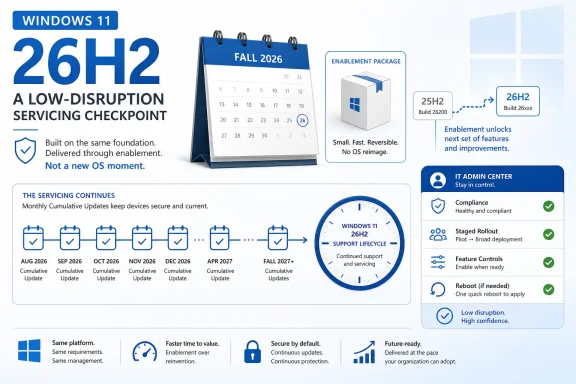 Microsoft Turns the Annual Feature Update Into a Calendar Ritual
The confirmation of Windows 11 26H2 matters because it closes the loop on a pattern that began to look deliberate with Windows 11 25H2. Windows 11 24H2, released on October 1, 2024, was the last genuinely major Windows 11 platform update in the conventional sense. It carried the kind of underlying platform movement that could justify treating it as a new baseline.Windows 11 25H2 did not repeat that model. It shared the same underlying platform code as 24H2, meaning users on 24H2 and 25H2 largely lived on the same functional plane once monthly cumulative updates were installed. The version label still mattered, but mostly because it reset the support clock.
Now 26H2 appears to be following the same playbook. Microsoft’s own Windows Insider flighting material describes preview builds for Windows 11 version 26H2 as being delivered on top of Windows 11 25H2 with an enablement package that increments the build number. In plain English, the machinery is already there; 26H2 is a small switch that tells Windows to identify itself as the new annual release.
That does not make it meaningless. It makes it more administrative than experiential. For consumers, this may feel like a version bump that happens after a reboot and then disappears into Settings. For IT, it is a servicing milestone that changes retirement dates, compliance posture, deployment rings, reporting dashboards, and the set of machines that must be moved before the next end-of-support cliff.
Microsoft’s phrasing is doing a lot of work here. The company is positioning this as a “predictable, low-disruption update experience,” especially for organizations and IT professionals. That is not the language of a company trying to sell a shiny new Start menu. It is the language of a company trying to calm deployment teams that have spent years treating feature updates as miniature operating-system migrations.
The Enablement Package Is the Product Strategy
An enablement package, or eKB, is one of those Windows servicing terms that sounds boring until you realize it explains the strategy. Instead of downloading and installing a full OS upgrade, the device already has most of what it needs through cumulative updates. The enablement package flips dormant state, advances the version, and moves the machine onto a new servicing lifecycle.That is why reports of 26H2 being a tiny update are plausible and important. These packages are often measured in hundreds of kilobytes rather than gigabytes. The installation can feel closer to a cumulative-update reboot than to the feature-update ordeals that haunted earlier Windows 10 and Windows 11 deployments.
The effect is psychological as much as technical. If Microsoft can make annual updates install in minutes and require only a single reboot, it lowers resistance from both home users and administrators. Fewer visible changes also mean fewer surprises, fewer training notes, and fewer late-night rollbacks.
But the same design also shifts where risk accumulates. If the annual update no longer carries most of the visible change, then monthly cumulative updates become the real action. Features that once would have been gathered into a named release now arrive through optional previews, Patch Tuesday releases, staged rollouts, and controlled feature enablement.
That is a major reversal of how many people still think about Windows. The annual version is increasingly the ledger entry. The monthly update is where Windows actually moves.
Windows 11 26H2 Is Not a Feature Drought, but It May Feel Like One
The absence of a flashy 26H2 feature list will annoy a certain kind of Windows enthusiast, and understandably so. Version numbers imply novelty. When a new annual release lands with no obvious difference, it can feel like Microsoft has hollowed out the ritual while keeping the branding.That reading is too simple. Windows is still changing, but the container has changed. Microsoft’s “continuous innovation” model means new capabilities can be introduced through normal servicing channels, often appearing first in optional non-security preview updates before being folded into broader monthly security releases.
This is how a feature like a movable taskbar can become less a “26H2 feature” and more a cumulative-update feature. The same is true for lower-level changes such as audio improvements, enterprise policy controls, in-box app management, backup behavior, or device-specific support. The annual release is no longer the only train that matters.
There is a benefit here. Users do not need to wait a year for Microsoft to ship a small but meaningful improvement. Developers and administrators do not need to plan around a single giant payload of changes. Security fixes, bug fixes, and selected features can move through a regular update pipeline.
There is also a cost. Windows becomes harder to describe. Two PCs may both say Windows 11 25H2 but differ based on update cadence, rollout timing, feature flags, region, hardware, account type, and management policy. The version number tells you less than it used to.
The Support Clock Is the Real Upgrade
For many Windows 11 users, the best reason to install 26H2 will be brutally practical: support. Windows 11 24H2 Home and Pro editions reach end of support on October 13, 2026. Windows 11 25H2 extends that window to October 12, 2027. Windows 11 26H2 is expected to push the clock again, with Home, Pro, Pro Education, and Pro for Workstations editions supported into October 2028.Enterprise, Education, and IoT Enterprise editions follow the longer Windows 11 servicing rhythm. Those editions typically receive 36 months of support from general availability, which would put 26H2 support into October 2029. For organizations, that extra year is not a footnote; it is the difference between a manageable fleet plan and a forced sprint.
This is why the “nothing new” critique misses the administrative reality. A version bump can be valuable even when it does not change the desktop. It can keep a machine inside the supported window, maintain access to security updates, satisfy compliance reporting, and align device groups with procurement and refresh cycles.
Microsoft has been training customers to see annual releases this way. The annual feature update marks the start of a new lifecycle. If the payload is small, the support impact is still large. In enterprise Windows, servicing dates are product features.
The irony is that Microsoft may finally have found a way to make feature updates boring just as the lifecycle consequences have become more important. That is probably the point. The less drama attached to the move, the easier it becomes to keep machines current.
26H1 Is the Fork That Explains the Calm Around 26H2
The confusing sibling in this story is Windows 11 26H1. Microsoft has described 26H1 as a specialized release for new hardware platforms, not as a feature update for existing Windows 11 devices. It is tied to next-generation silicon and ships preinstalled on select new devices rather than arriving through Windows Update for ordinary 24H2 or 25H2 PCs.That distinction matters because it prevents a false panic. Windows 11 26H1 is not the release most existing users are supposed to chase. If your machine is already running Windows 11 24H2 or 25H2, the mainstream annual path remains 26H2.
This also explains why 26H2 can be small while 26H1 exists as a different platform branch. Microsoft can support new device classes and silicon requirements without forcing every existing Windows 11 PC through the same foundational jump. In theory, that lets the company serve hardware partners without destabilizing the broader installed base.
In practice, it adds another layer of naming confusion. A casual user might reasonably assume 26H1 comes before 26H2 and therefore belongs on the same upgrade road. Microsoft is saying otherwise: 26H1 is scoped to new devices, while 26H2 is the annual update for the established Windows 11 fleet.
That is a subtle message for a product line used by hundreds of millions of people. Microsoft will need to repeat it often, because version numbers are not self-explanatory when one release is a hardware-specific branch and the other is a lifecycle update for existing PCs.
The Supported-PC Story Is Mostly “If You Run 24H2 or 25H2, You’re Fine”
The supported hardware message for 26H2 is refreshingly uneventful. If a PC is already supported on Windows 11 24H2 or 25H2, there is no indication that 26H2 introduces a new hardware wall. The familiar Windows 11 baseline remains: 4GB of RAM, 64GB of storage, a compatible 64-bit dual-core processor, and the broader security-era assumptions that have defined Windows 11 since launch.That does not mean every old PC gets invited. Windows 11’s original hardware requirements remain the dividing line. The controversial TPM, Secure Boot, processor, and security-baseline debate did not vanish because 26H2 is an enablement package.
For supported machines, however, the upgrade path should be straightforward. The point of an eKB-style release is that the device is already on the right platform foundation. Moving from 24H2 or 25H2 to 26H2 should look less like an OS installation and more like a short servicing event.
That will be welcome news to administrators who have spent years treating Windows feature updates as risky maintenance windows. It also benefits ordinary users who do not care what version number they are on until Windows Update tells them they must reboot. If Microsoft executes cleanly, many people will notice 26H2 mainly because the Settings app says so afterward.
Still, “supported” should not be confused with “problem-free.” Drivers, security software, endpoint agents, disk encryption, VPN clients, and OEM utilities remain the usual suspects in any Windows update cycle. A small package can still expose assumptions made by software sitting close to the kernel.
Monthly Updates Now Carry the Burden of Trust
The new Windows cadence asks users to trust cumulative updates more than ever. That is a delicate request because cumulative updates have never been merely invisible plumbing. They can fix serious security problems one month and introduce display, printing, performance, or networking regressions the next.Microsoft’s argument is that gradual rollout, known-issue tracking, safeguard holds, enterprise controls, and preview channels make this model safer than the old annual-feature pileup. There is logic in that. Smaller, more frequent changes can be easier to test and reverse than a once-a-year platform leap.
But cumulative updates also blur the boundary between “security maintenance” and “product change.” If a monthly update can introduce a visible new Windows feature, organizations must scrutinize it not only for patch compliance but for user-impact risk. That is why Microsoft’s enterprise feature controls have become so important.
Managed devices can temporarily keep certain disruptive features off until the next annual feature update, giving administrators some breathing room. That is a pragmatic compromise. Microsoft still gets to move Windows faster, while enterprises avoid waking up to a changed workflow on machines they thought were simply receiving security updates.
The trade-off is complexity. Admins now need to understand not just whether a device is patched, but which features are staged, which are enabled, which are blocked by policy, and which are waiting for the next annual release marker. Predictability is possible, but it is no longer automatic.
Microsoft Is Selling Boredom Because Enterprises Asked for It
The most revealing part of Microsoft’s 26H2 posture is the audience. The company is not primarily pitching this as a consumer excitement cycle. It is framing the release around organizations, IT professionals, predictability, and reduced disruption.That is a rational response to enterprise reality. Large Windows estates do not crave surprise. They crave known timelines, stable baselines, support windows long enough to plan against, and update mechanics that do not consume a quarter of the year.
Windows 10’s later years already moved in this direction. Some feature updates became enablement packages that advanced the version without a full reinstall. Windows 11 now appears to be settling into a similar pattern after the more substantial 24H2 release.
For Microsoft, this has business advantages. It reduces the visible trauma of staying current. It also keeps the installed base closer to supported builds, which matters for security, cloud integration, telemetry consistency, and the company’s ability to deliver new platform capabilities without dragging ancient release branches behind it.
For customers, the bargain is mixed but probably favorable. You get less annual drama and more frequent incremental change. You also give Microsoft more freedom to reshape Windows outside the ceremony of the big named release.
Enthusiasts Lose the Spectacle, Admins Gain the Schedule
Windows enthusiasts may miss the old feature-update spectacle. There was something satisfying about installing a new version and immediately seeing what changed. A release like 26H2, if it behaves as expected, will not deliver that hit.Admins will be less sentimental. A fast install, a single reboot, and a predictable support reset are exactly what many enterprise teams want from an annual Windows release. The most exciting feature of 26H2 may be that it does not require a war room.
This divide reflects a broader truth about Windows. It is both a consumer product and global infrastructure. The same operating system that powers gaming rigs and creator laptops also sits on hospital workstations, retail endpoints, classroom devices, factory terminals, and government desktops.
A dramatic update cadence serves the magazine-cover version of Windows. A boring cadence serves the infrastructure version. Microsoft has clearly decided that the infrastructure version has veto power.
That does not mean the enthusiast market no longer matters. It means Microsoft is choosing to ship many visible changes outside the annual naming ritual. The excitement, such as it is, will be scattered across Insider builds, preview updates, and gradual rollouts rather than concentrated in 26H2 itself.
The Version Number Is Becoming a Compliance Label
There is a deeper shift under all of this: the Windows version number is becoming less descriptive and more regulatory. It tells you where the device sits in Microsoft’s lifecycle contract, not necessarily what the user can do with the machine.That is a major change for troubleshooting and documentation. In the past, “What Windows version are you on?” could answer a meaningful product question. Increasingly, it is only the first question. The next questions are build number, cumulative update level, feature rollout state, management policy, hardware platform, and whether the device is subject to enterprise feature control.
This will make life harder for support forums, help desks, and admins writing internal guidance. A user may say they are on 26H2 and still lack a feature that another 26H2 user has received. Conversely, a 25H2 machine may already have features people associate with 26H2 because they arrived through cumulative updates before the annual release.
Windows has always had some of this complexity. Feature Experience Packs, staged rollouts, A/B testing, region-specific behavior, and OEM drivers have all muddied the waters. But Microsoft’s current strategy makes that complexity central rather than incidental.
The practical answer is to stop treating the H2 label as the whole story. For troubleshooting, deployment validation, and security reporting, the full build and update state matter. The name on the box is no longer enough.
The Smallest Windows Update May Be the Most Honest One
The temptation is to mock 26H2 as a fake release: a tiny package, a new number, and not much else. But there is a more generous interpretation. Windows has finally become too large, too distributed, and too operationally important for the annual release to carry the same meaning it once did.A modern Windows update system has to service home PCs, enterprise fleets, ARM devices, AI PCs, gaming handhelds, regulated industries, virtual desktops, and hardware platforms that may not fit the same branch schedule. A single yearly payload cannot sensibly be the only vessel for change.
The enablement package is therefore a kind of honesty. It admits that the device has already been evolving through cumulative updates. The annual release simply records that fact, resets the lifecycle, and moves the support boundary forward.
That may not satisfy users who want Windows to feel new. But for a mature desktop operating system, “new” is often overrated. Stable, supported, patched, and predictable are not glamorous adjectives. They are the ones that keep businesses running.
Microsoft’s challenge is to make sure this bargain does not become an excuse for opacity. If features arrive continuously, communication must improve continuously too. If version numbers become servicing labels, Microsoft must make build state, rollout state, and policy state easier to understand.
The 26H2 Bargain in Plain English
Windows 11 26H2 is shaping up as a small update with large administrative consequences. That is not a contradiction. It is the clearest signal yet that Microsoft wants Windows 11’s annual release cadence to be less about spectacle and more about lifecycle discipline.- Windows 11 26H2 is expected in fall 2026 and is being prepared as an enablement-package release rather than a full platform upgrade.
- PCs already running Windows 11 24H2 or 25H2 should remain on the mainstream upgrade path without new 26H2-specific hardware requirements.
- The most important benefit for many users will be a renewed support window, not a visible redesign or a large new feature bundle.
- Windows 11 26H1 is a separate hardware-focused release for select new devices and is not the normal upgrade target for existing 24H2 or 25H2 PCs.
- Microsoft’s bigger Windows changes are increasingly arriving through monthly cumulative updates, optional previews, and staged feature rollouts.
- IT teams should treat the H2 label as a lifecycle marker and continue tracking build numbers, update levels, feature controls, and device readiness.
References
- Primary source: Windows Latest
Published: Fri, 19 Jun 2026 20:35:26 GMT
Microsoft confirms Windows 11 26H2 for fall 2026 release, reveals supported PCs and other details
Microsoft reveals Windows 11 26H2 will be a 200KB update, killing major feature releases for the second year. www.windowslatest.com
- Official source: learn.microsoft.com
Windows 11 Enterprise and Education - Microsoft Lifecycle | Microsoft Learn
Windows 11 Enterprise and Education follows the Modern Lifecycle Policy.learn.microsoft.com - Related coverage: tomshardware.com
Microsoft to force updates to Windows 11 25H2 for PCs with older Windows 11 OS versions — 'intelligent' update system uses machine learning to determine when a device is ready | Tom's Hardware
Microsoft forces 25H2 rollout ahead of 24H2 end-of-supportwww.tomshardware.com - Related coverage: eol.wiki
Microsoft Windows End of Life (EOL) Dates & Support Status | EOL.Wiki
Microsoft Windows is the world's most widely used desktop operating system for personal computers. eol.wiki
- Related coverage: windowscentral.com
Windows 11 version 25H2: Everything you need to know | Windows Central
The next version of the Windows 11 operating system is now available, with rollout now under way. Here's everything you need to know about version 25H2, including availability, new features, and more.www.windowscentral.com - Related coverage: pcworld.com
Windows 11 26H2 is coming: Meet all the new features | PCWorld
Windows 11 26H2 is the next major free update for all Windows users. Among other things, it brings improvements to Explorer, camera control, and AI. Here's an overview.www.pcworld.com
- Related coverage: allthings.how
Windows 11 support end dates — Home, Pro, Enterprise, and more
There’s no single cutoff; support depends on your edition and the specific Windows 11 version you’re running.allthings.how - Related coverage: pureinfotech.com
Windows 11 lifecycle for Home and Pro - Pureinfotech
Windows 11 Home and Pro lifecycle for version 25H2 ends on 10/13/27, and the 24H2 lifecycle ends on 10/13/26. Enterprise and Education have longer support. pureinfotech.com
- Related coverage: techradar.com
Still on Windows 11 23H2? Microsoft will soon force you to upgrade to 25H2 – for your own good | TechRadar
Support has ended for version 23H2 as of earlier this weekwww.techradar.com - Related coverage: lansweeper.com
Windows 11 End of Life - Lansweeper
On October 14, version 22H2 of Windows 11 Enterprise, Education, and IoT Enterprise will go end of life. Audit affected devices with our free audit.www.lansweeper.com - Related coverage: windowsforum.com
Windows 11 24H2 Moving to 25H2: End of Support, Enablement Updates, and Rollout | Windows Forum
Microsoft is effectively closing the door on Windows 11 24H2 for consumer PCs because the clock is already ticking toward the end of servicing, and 25H2 is...windowsforum.com - Related coverage: technopat.net
- Related coverage: tomsguide.com
Microsoft's next big Windows 11 25H2 update isn't going to make anyone happy — here's why | Tom's Guide
Microsoft has revealed its big Windows 11 25H2 update, but don't expect a full OS upgrade, as it doesn't add any new features. It actually takes some away.www.tomsguide.com - Official source: cdn-dynmedia-1.microsoft.com