
Your organization should allow Google sign-in in Microsoft Edge in July 2026 only for user groups where Google identity materially improves adoption, while keeping browser sync, profile creation, and unsupported account behavior controlled through Edge policies rather than treating the change as harmless convenience. The default enterprise answer should be pilot first, permit narrowly, block where identity governance is unclear. This is not a browser-war story; it is an identity-boundary story arriving inside a faster Edge release train.
For most managed Windows environments, the practical starting point is simple: decide whether Google accounts are a sanctioned identity source for browser profiles. If they are, prepare a limited Edge policy ring that enables the new capability while leaving sync explicitly governed. If they are not, enforce the new control as a deny-by-default setting and document why Edge sign-in remains limited to approved organizational accounts.
The new Edge capability is expected to let users sign in to Microsoft Edge with a Google account, with broad availability planned for July 2026. Microsoft’s rollout messaging says administrators can control the feature with the
The cleanest enterprise decision is to treat Google sign-in as a separate browser identity class. Do not confuse it with signing into Gmail in a tab, using Google Workspace in Edge, or importing bookmarks from Chrome. This is about the account attached to the Edge profile, which can affect user expectations around sync, profile separation, support ownership, and data portability.
The immediate procedure is policy-first. In Group Policy, Intune, or your Edge policy management path, look for the Microsoft Edge policy set that includes the new non-Microsoft account sign-in control once your administrative templates and management surfaces expose it. If your organization does not want Google-backed Edge profiles, configure
Then verify the result on a managed test machine by opening
The second control to review is
The third control is
Browser profiles have become semi-operating systems. They hold passwords, favorites, autofill data, extensions, session state, and the invisible expectations users carry between devices. When a user signs into a browser, they often assume everything important will follow them. When it does not, they blame IT, the browser, or both.
That is why
The support distinction is subtle but important. A user may say, “I signed in with Google, so why are my passwords not there?” The answer may be that Edge sign-in, Edge sync, Google identity, and Microsoft sync services are not the same thing. Admins need that language in their rollout notes before users discover the gap.
For WindowsForum readers who have followed Edge’s long effort to win over reluctant users, this is familiar territory. Edge often improves fastest when Microsoft removes a needless point of friction, but enterprise adoption still depends on whether the improvement can be made predictable. The Google sign-in change reduces one kind of user resistance while creating a new class of identity questions.
That timing should make administrators cautious, not alarmed. A faster cadence means fewer long pauses between feature exposure, policy discovery, pilot feedback, and broad deployment. It also means your Edge ring strategy becomes more important than your first reaction to the feature.
The right July plan is not to wait until users see a new sign-in option and then decide whether it matters. The right plan is to identify a test population before broad availability, confirm what the policy does in your environment, and decide whether the organization will permit, block, or defer non-Microsoft browser profile sign-in.
Edge version 150 is a useful planning marker, not a promise that every tenant, device, platform, and channel will behave identically on the same day. Microsoft’s own rollout language points to broad availability in July 2026, but the public facts do not provide a granular platform-by-platform deployment map beyond Windows and macOS being in scope. If you manage mixed fleets, assume you need validation rather than relying on a date.
This is also where WindowsForum’s earlier discussion of Edge Beta 150 is relevant: the beta appearance gave admins an early signal that Microsoft was moving the feature from experiment to managed product surface. Beta evidence is useful for preparing policy language and support scripts, but it should not be mistaken for final production behavior.
A Google Workspace-heavy company may see the feature as a practical win. Users already live in Google identity, support teams already understand Google account recovery, and the main adoption blocker may be Edge’s historical insistence on Microsoft account sign-in for profile-level experiences. In that case, allowing Google sign-in could make Edge more viable without asking users to split their work identity across ecosystems.
A Microsoft 365-centered enterprise may reach the opposite conclusion. If Conditional Access, device compliance, Entra ID sign-in, Microsoft account restrictions, and Edge enterprise sync are already part of the browser strategy, adding Google profile sign-in may create ambiguity without enough benefit. The user gets another way to attach identity to the browser, but IT gets another place where expectations and policy can diverge.
A school, nonprofit, contractor-heavy shop, or bring-your-own-device environment may need a more nuanced split. Google sign-in could be acceptable for personal or lightly managed devices while remaining blocked on shared workstations, regulated endpoints, kiosks, privileged admin machines, or any system where browser profile persistence creates risk.
The mistake is to answer emotionally. Edge enthusiasts may celebrate the change as overdue. Microsoft-first admins may dismiss it as unnecessary. Neither reaction is a deployment model.
Those are not theoretical concerns. Browser profiles often outlive the original business process that created them. A user signs in for convenience, syncs or stores data according to whatever is permitted, and later expects continuity across devices. If IT has not defined the boundary, the boundary will be defined by user habit.
This is where a policy-first stance protects both sides. If Google sign-in is allowed, it should be allowed because the organization has decided which Google accounts are appropriate, what sync posture applies, and what support can reasonably promise. If the organization cannot answer those questions, blocking non-Microsoft account sign-in is not anti-user; it is honest governance.
Existing Microsoft-account users deserve special attention. The verified rollout facts do not describe a migration path from Microsoft-backed Edge profiles to Google-backed Edge profiles. Admins should not promise one. At minimum, any pilot should assume that switching profile identity may not be equivalent to a seamless account conversion.
That uncertainty matters for power users. Favorites, passwords, extensions, history, workspaces, and profile settings may be entangled in ways users do not understand. If a department has standardized on Edge with Microsoft accounts, the arrival of Google sign-in should not trigger an unmanaged migration experiment.
The support script should avoid saying “Google sign-in means Google sync in Edge” unless Microsoft documents that exact behavior for the released feature and your testing confirms it. The public facts available now do not settle every question about sync, SSO, Windows Hello, account restrictions, or profile migration for Google-backed profiles. The honest answer is that July deployment requires validation.
That does not make the feature unusable. It simply means admins should test the things users will assume. Can a user sign into the Edge profile with Google? Does sync prompt appear? Which sync categories are available? Does the organization’s sync policy override the user experience as expected? Does the browser restart requirement for sign-in policy changes affect rollout timing?
The Windows Hello question is especially likely to surface because users associate modern browser identity with device-bound authentication. But the verified facts do not establish how Windows Hello interacts with Google-backed Edge profile sign-in. Treat it as a test case, not a marketing assumption.
The same goes for SSO. Signing into a browser profile and signing into web properties are adjacent experiences, but they are not identical. Edge’s browser profile identity may reduce friction in some flows, but administrators should not assume it changes every Google, Microsoft, or third-party SSO behavior without proof.
Blocking first does not mean blocking forever. It means the organization refuses to make an identity decision by omission. If the help desk, security team, compliance owner, and endpoint admins cannot describe what Google-backed Edge profiles are for, the feature should not appear on managed endpoints by default.
A reasonable pilot would target users who already rely on Google Workspace and who have a clear reason to use Edge instead of Chrome. That might include departments standardizing on Edge for compatibility, Windows integration, security baselines, or enterprise browser controls while still keeping Google as the productivity identity. The pilot should be small enough that support can observe confusion before it becomes a fleetwide pattern.
The pilot should also include a rollback plan. If disabling
For organizations that decide to permit the feature, the better posture is “allow Google sign-in for approved groups” rather than “allow non-Microsoft sign-in everywhere.” The distinction matters because the policy name itself signals a broader category than just one brand moment. If Edge’s identity surface expands over time, a blanket permission may age badly.
That could help Edge in households and small businesses where Google accounts are the default personal identity. A user who likes Edge’s performance, vertical tabs, PDF handling, or Windows integration no longer has the same account-level reason to bounce back to Chrome. In the consumer market, that friction reduction is meaningful.
But enterprise IT does not get to stop at “users like it.” Convenience features become support surfaces the moment they appear on managed devices. If a user can create a Google-backed browser profile on a corporate laptop, someone must decide whether that profile is acceptable, recoverable, auditable, and removable.
This is where the Edge adoption story keeps looping back on itself. Microsoft can make the browser more welcoming, but administrators still need it to be governable. The presence of
Related WindowsForum coverage of Edge’s market challenges has often centered on user resentment toward forced defaults and Microsoft account pressure. Google sign-in is a partial answer to that resentment. It is not, by itself, a complete answer to enterprise trust.
If the organization permits Google sign-in, policy documentation should say whether personal Google accounts are allowed, whether only enterprise Google accounts are allowed, and what happens on shared or regulated devices. The public facts do not state whether Edge will provide account-domain restrictions for Google-backed sign-in through this specific new policy. Until Microsoft documents such controls, admins should not assume they exist.
That uncertainty pushes many organizations toward either a narrow pilot or a deny-by-default rule. It is easier to explain why a feature is blocked pending governance than to unwind a month of unmanaged profile creation. Users may dislike the block, but they will dislike data loss, sync confusion, or account lockout more.
There is also a recordkeeping issue. If browser profile identity affects where data is stored or synchronized, then the organization needs to know which policy controlled that outcome. “The user clicked Google because it appeared” is not a policy. It is a missing decision.
The best compliance posture is boring: document the allowed account types, document the sync rule, document the support boundary, and make the browser enforce the decision. Edge’s policy model gives admins the first pieces. July testing must fill in the behavior.
In that world, “we’ll look at it when users complain” becomes a weak operating model. The better model is a standing Edge feature intake process: watch Beta and roadmap signals, identify policy controls, test on a small ring, publish user-facing guidance, and only then expand. Google sign-in is a good candidate for that process because the policy and user-visible impact are both obvious.
The July 2026 timing also lands close enough to Edge version 150 that admins should pay attention to release notes and policy template updates. If your organization relies on Group Policy ADMX files, Intune Settings Catalog, or another management surface, the policy must exist there before it can be reliably enforced at scale. A feature announced for broad availability is not useful to IT until the control plane is ready.
This is a place where Windows enthusiasts and sysadmins share the same interest. Enthusiasts want the browser to stop getting in the way. Admins want the browser to stop surprising them. The same policy discipline serves both outcomes.
The feature should also be watched on macOS. Microsoft’s rollout messaging includes Windows and macOS, but the enterprise management paths differ. A Windows GPO decision does not automatically solve the Mac fleet, and a Mac configuration profile does not help a domain-joined Windows estate.
Next, update Edge management templates and verify whether
Then review
Finally, write a short help-desk article before deployment. It should say who is allowed to use Google sign-in, whether sync is available, whether existing Microsoft-backed profiles should be changed, and what users should do if the option appears unexpectedly. The absence of a migration path in the verified facts means the guidance should avoid promising conversion or seamless transfer.
That is the difference between a browser feature and an enterprise rollout. A browser feature ships when Microsoft enables it. An enterprise rollout ships when the organization can explain it.
For most managed Windows environments, the practical starting point is simple: decide whether Google accounts are a sanctioned identity source for browser profiles. If they are, prepare a limited Edge policy ring that enables the new capability while leaving sync explicitly governed. If they are not, enforce the new control as a deny-by-default setting and document why Edge sign-in remains limited to approved organizational accounts.
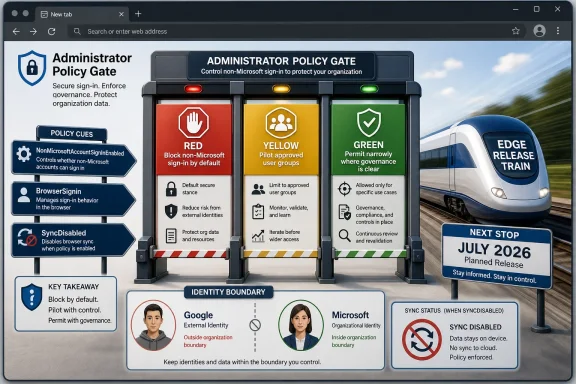 The Policy Decision Comes Before the July Rollout
The new Edge capability is expected to let users sign in to Microsoft Edge with a Google account, with broad availability planned for July 2026. Microsoft’s rollout messaging says administrators can control the feature with the NonMicrosoftAccountSignInEnabled policy. That is the lever IT should be looking for, not the profile button itself.The cleanest enterprise decision is to treat Google sign-in as a separate browser identity class. Do not confuse it with signing into Gmail in a tab, using Google Workspace in Edge, or importing bookmarks from Chrome. This is about the account attached to the Edge profile, which can affect user expectations around sync, profile separation, support ownership, and data portability.
The immediate procedure is policy-first. In Group Policy, Intune, or your Edge policy management path, look for the Microsoft Edge policy set that includes the new non-Microsoft account sign-in control once your administrative templates and management surfaces expose it. If your organization does not want Google-backed Edge profiles, configure
NonMicrosoftAccountSignInEnabled to block them; if you do want them, enable the policy only for the pilot or user population where that decision has been approved.Then verify the result on a managed test machine by opening
edge://policy in Microsoft Edge after policy refresh and browser restart. The exact Edge UI may shift as the feature moves toward broad availability, but edge://policy remains the administrator’s reality check: it tells you what the browser believes, not what the deployment plan intended.The second control to review is
BrowserSignin. Microsoft documents this policy as the setting that specifies whether users can sign in to Edge and use account-related services such as sync and single sign-on. It can disable browser sign-in, enable it, or force users to sign in to a profile to use the browser.The third control is
SyncDisabled. This is the crucial caveat many help-desk tickets will otherwise rediscover the hard way: forcing browser sign-in does not automatically turn sync on. Microsoft’s own policy language separates browser sign-in from sync, and says sync availability is governed separately.Google Sign-In Is Not a Sync Strategy
The tempting reaction is to see Google sign-in as Microsoft finally removing friction for Chrome switchers. That is partly true for unmanaged users and enthusiasts. But in a company, the more important question is whether a Google-backed Edge profile creates a better managed experience or just a more confusing one.Browser profiles have become semi-operating systems. They hold passwords, favorites, autofill data, extensions, session state, and the invisible expectations users carry between devices. When a user signs into a browser, they often assume everything important will follow them. When it does not, they blame IT, the browser, or both.
That is why
BrowserSignin and SyncDisabled matter more than the announcement headline. An organization can force users to sign in to Edge without granting free rein to sync. Conversely, an organization can allow sign-in while disabling sync if the compliance posture requires browser data to stay local or under a different governance model.The support distinction is subtle but important. A user may say, “I signed in with Google, so why are my passwords not there?” The answer may be that Edge sign-in, Edge sync, Google identity, and Microsoft sync services are not the same thing. Admins need that language in their rollout notes before users discover the gap.
For WindowsForum readers who have followed Edge’s long effort to win over reluctant users, this is familiar territory. Edge often improves fastest when Microsoft removes a needless point of friction, but enterprise adoption still depends on whether the improvement can be made predictable. The Google sign-in change reduces one kind of user resistance while creating a new class of identity questions.
The July Timing Lands Inside a Faster Edge Train
The rollout environment matters because Edge itself is speeding up. Microsoft’s release schedule says Stable moves to a two-week major cadence starting with version 152, while version 150 is targeted for the week of July 2, 2026. That puts this Google sign-in change near a transition point for how quickly Edge major versions will arrive.That timing should make administrators cautious, not alarmed. A faster cadence means fewer long pauses between feature exposure, policy discovery, pilot feedback, and broad deployment. It also means your Edge ring strategy becomes more important than your first reaction to the feature.
The right July plan is not to wait until users see a new sign-in option and then decide whether it matters. The right plan is to identify a test population before broad availability, confirm what the policy does in your environment, and decide whether the organization will permit, block, or defer non-Microsoft browser profile sign-in.
Edge version 150 is a useful planning marker, not a promise that every tenant, device, platform, and channel will behave identically on the same day. Microsoft’s own rollout language points to broad availability in July 2026, but the public facts do not provide a granular platform-by-platform deployment map beyond Windows and macOS being in scope. If you manage mixed fleets, assume you need validation rather than relying on a date.
This is also where WindowsForum’s earlier discussion of Edge Beta 150 is relevant: the beta appearance gave admins an early signal that Microsoft was moving the feature from experiment to managed product surface. Beta evidence is useful for preparing policy language and support scripts, but it should not be mistaken for final production behavior.
The Real Enterprise Test Is Identity Ownership
The central question is not whether Google sign-in is good or bad. The question is whether your organization is prepared to support a browser profile whose sign-in identity is not a Microsoft account. That answer changes by environment.A Google Workspace-heavy company may see the feature as a practical win. Users already live in Google identity, support teams already understand Google account recovery, and the main adoption blocker may be Edge’s historical insistence on Microsoft account sign-in for profile-level experiences. In that case, allowing Google sign-in could make Edge more viable without asking users to split their work identity across ecosystems.
A Microsoft 365-centered enterprise may reach the opposite conclusion. If Conditional Access, device compliance, Entra ID sign-in, Microsoft account restrictions, and Edge enterprise sync are already part of the browser strategy, adding Google profile sign-in may create ambiguity without enough benefit. The user gets another way to attach identity to the browser, but IT gets another place where expectations and policy can diverge.
A school, nonprofit, contractor-heavy shop, or bring-your-own-device environment may need a more nuanced split. Google sign-in could be acceptable for personal or lightly managed devices while remaining blocked on shared workstations, regulated endpoints, kiosks, privileged admin machines, or any system where browser profile persistence creates risk.
The mistake is to answer emotionally. Edge enthusiasts may celebrate the change as overdue. Microsoft-first admins may dismiss it as unnecessary. Neither reaction is a deployment model.
Profile Management Becomes the Hidden Cost
Every browser sign-in option creates a profile-management story. Who owns the profile? Who can recover it? What happens when a user leaves? What happens when a device is reimaged? What happens when a user signs into Edge with a personal Google account on a work machine because the UI allows it?Those are not theoretical concerns. Browser profiles often outlive the original business process that created them. A user signs in for convenience, syncs or stores data according to whatever is permitted, and later expects continuity across devices. If IT has not defined the boundary, the boundary will be defined by user habit.
This is where a policy-first stance protects both sides. If Google sign-in is allowed, it should be allowed because the organization has decided which Google accounts are appropriate, what sync posture applies, and what support can reasonably promise. If the organization cannot answer those questions, blocking non-Microsoft account sign-in is not anti-user; it is honest governance.
Existing Microsoft-account users deserve special attention. The verified rollout facts do not describe a migration path from Microsoft-backed Edge profiles to Google-backed Edge profiles. Admins should not promise one. At minimum, any pilot should assume that switching profile identity may not be equivalent to a seamless account conversion.
That uncertainty matters for power users. Favorites, passwords, extensions, history, workspaces, and profile settings may be entangled in ways users do not understand. If a department has standardized on Edge with Microsoft accounts, the arrival of Google sign-in should not trigger an unmanaged migration experiment.
Browser Sign-In, SSO, and Sync Must Stay Separate in the Runbook
Microsoft’sBrowserSignin documentation describes sign-in as enabling account-related services such as sync and single sign-on, but it also explicitly separates sync control into SyncDisabled. That separation should shape the admin runbook.The support script should avoid saying “Google sign-in means Google sync in Edge” unless Microsoft documents that exact behavior for the released feature and your testing confirms it. The public facts available now do not settle every question about sync, SSO, Windows Hello, account restrictions, or profile migration for Google-backed profiles. The honest answer is that July deployment requires validation.
That does not make the feature unusable. It simply means admins should test the things users will assume. Can a user sign into the Edge profile with Google? Does sync prompt appear? Which sync categories are available? Does the organization’s sync policy override the user experience as expected? Does the browser restart requirement for sign-in policy changes affect rollout timing?
The Windows Hello question is especially likely to surface because users associate modern browser identity with device-bound authentication. But the verified facts do not establish how Windows Hello interacts with Google-backed Edge profile sign-in. Treat it as a test case, not a marketing assumption.
The same goes for SSO. Signing into a browser profile and signing into web properties are adjacent experiences, but they are not identical. Edge’s browser profile identity may reduce friction in some flows, but administrators should not assume it changes every Google, Microsoft, or third-party SSO behavior without proof.
The Right Default Is Block, Pilot, Then Permit by Exception
For a managed enterprise, the safest default is to block Google sign-in in Edge until there is an affirmative business case for allowing it. That may sound conservative, but it is the same logic many organizations already apply to consumer Microsoft accounts, unmanaged extension stores, personal sync, and browser password managers.Blocking first does not mean blocking forever. It means the organization refuses to make an identity decision by omission. If the help desk, security team, compliance owner, and endpoint admins cannot describe what Google-backed Edge profiles are for, the feature should not appear on managed endpoints by default.
A reasonable pilot would target users who already rely on Google Workspace and who have a clear reason to use Edge instead of Chrome. That might include departments standardizing on Edge for compatibility, Windows integration, security baselines, or enterprise browser controls while still keeping Google as the productivity identity. The pilot should be small enough that support can observe confusion before it becomes a fleetwide pattern.
The pilot should also include a rollback plan. If disabling
NonMicrosoftAccountSignInEnabled after a pilot leaves users with existing profiles, cached data, or expectations that need cleanup, IT should know that before expanding. The public rollout facts do not provide enough detail to assume rollback will be painless.For organizations that decide to permit the feature, the better posture is “allow Google sign-in for approved groups” rather than “allow non-Microsoft sign-in everywhere.” The distinction matters because the policy name itself signals a broader category than just one brand moment. If Edge’s identity surface expands over time, a blanket permission may age badly.
Enthusiasts Get Convenience; Admins Get Another Boundary
For individual Windows users, this is mostly good news. Edge has long suffered from the perception that it is technically capable but strategically pushy. Letting users attach a Google account to an Edge profile reduces the sense that Microsoft is forcing a parallel identity just to use a Chromium browser with Microsoft’s integrations.That could help Edge in households and small businesses where Google accounts are the default personal identity. A user who likes Edge’s performance, vertical tabs, PDF handling, or Windows integration no longer has the same account-level reason to bounce back to Chrome. In the consumer market, that friction reduction is meaningful.
But enterprise IT does not get to stop at “users like it.” Convenience features become support surfaces the moment they appear on managed devices. If a user can create a Google-backed browser profile on a corporate laptop, someone must decide whether that profile is acceptable, recoverable, auditable, and removable.
This is where the Edge adoption story keeps looping back on itself. Microsoft can make the browser more welcoming, but administrators still need it to be governable. The presence of
NonMicrosoftAccountSignInEnabled is therefore not a footnote; it is the feature that makes the feature deployable.Related WindowsForum coverage of Edge’s market challenges has often centered on user resentment toward forced defaults and Microsoft account pressure. Google sign-in is a partial answer to that resentment. It is not, by itself, a complete answer to enterprise trust.
Compliance Teams Will Care About the Account Users Actually Choose
Compliance teams are unlikely to object to Google sign-in as a concept. They will object to unmanaged identity pathways that make data behavior harder to explain. The browser profile is now one of the places where personal and work contexts can blur fastest.If the organization permits Google sign-in, policy documentation should say whether personal Google accounts are allowed, whether only enterprise Google accounts are allowed, and what happens on shared or regulated devices. The public facts do not state whether Edge will provide account-domain restrictions for Google-backed sign-in through this specific new policy. Until Microsoft documents such controls, admins should not assume they exist.
That uncertainty pushes many organizations toward either a narrow pilot or a deny-by-default rule. It is easier to explain why a feature is blocked pending governance than to unwind a month of unmanaged profile creation. Users may dislike the block, but they will dislike data loss, sync confusion, or account lockout more.
There is also a recordkeeping issue. If browser profile identity affects where data is stored or synchronized, then the organization needs to know which policy controlled that outcome. “The user clicked Google because it appeared” is not a policy. It is a missing decision.
The best compliance posture is boring: document the allowed account types, document the sync rule, document the support boundary, and make the browser enforce the decision. Edge’s policy model gives admins the first pieces. July testing must fill in the behavior.
The Faster Cadence Raises the Cost of Waiting
The move toward a two-week major Stable cadence starting with Edge 152 changes how admins should think about browser governance. Features will not necessarily wait around for quarterly review boards. Even if security fixes and enterprise controls remain manageable, the perception of pace will change.In that world, “we’ll look at it when users complain” becomes a weak operating model. The better model is a standing Edge feature intake process: watch Beta and roadmap signals, identify policy controls, test on a small ring, publish user-facing guidance, and only then expand. Google sign-in is a good candidate for that process because the policy and user-visible impact are both obvious.
The July 2026 timing also lands close enough to Edge version 150 that admins should pay attention to release notes and policy template updates. If your organization relies on Group Policy ADMX files, Intune Settings Catalog, or another management surface, the policy must exist there before it can be reliably enforced at scale. A feature announced for broad availability is not useful to IT until the control plane is ready.
This is a place where Windows enthusiasts and sysadmins share the same interest. Enthusiasts want the browser to stop getting in the way. Admins want the browser to stop surprising them. The same policy discipline serves both outcomes.
The feature should also be watched on macOS. Microsoft’s rollout messaging includes Windows and macOS, but the enterprise management paths differ. A Windows GPO decision does not automatically solve the Mac fleet, and a Mac configuration profile does not help a domain-joined Windows estate.
July’s Edge Decision Fits on One Change Ticket
The practical deployment plan is not complicated, but it needs to be explicit. Start by classifying your organization into one of three groups: Google identity is approved for browser profiles, Google identity is not approved for browser profiles, or the answer is unknown. The third category should be treated as “block until decided,” not “allow until someone objects.”Next, update Edge management templates and verify whether
NonMicrosoftAccountSignInEnabled is available in your management toolchain. If it is not visible yet, track it as a release-readiness dependency. Do not rely on user education alone to control a sign-in surface.Then review
BrowserSignin and SyncDisabled together. If you force Edge sign-in, decide what kind of sign-in you are forcing and whether non-Microsoft account sign-in undermines that goal. If you disable sync, confirm that the user experience reflects the policy clearly enough that support can explain it.Finally, write a short help-desk article before deployment. It should say who is allowed to use Google sign-in, whether sync is available, whether existing Microsoft-backed profiles should be changed, and what users should do if the option appears unexpectedly. The absence of a migration path in the verified facts means the guidance should avoid promising conversion or seamless transfer.
That is the difference between a browser feature and an enterprise rollout. A browser feature ships when Microsoft enables it. An enterprise rollout ships when the organization can explain it.
The Admin Answer Is Conditional, Not Ambiguous
Here is the decision WindowsForum readers should carry into July: permit Google sign-in in Edge only where it aligns with your sanctioned identity model, and block it everywhere else until the support and compliance story is written. That is not fence-sitting. It is the only answer that respects both the user benefit and the operational risk.- Organizations standardized on Google Workspace should pilot Google sign-in in Edge with a small user group before broad enablement.
- Microsoft 365-first environments should block non-Microsoft browser profile sign-in unless a department can justify a specific business need.
- Administrators should manage
NonMicrosoftAccountSignInEnabled,BrowserSignin, andSyncDisabledas a set rather than treating any one policy as the whole answer. - Help desks should be prepared to explain that browser sign-in and browser sync are related but separately controlled.
- Existing Edge users should not be told to migrate profile identity until Microsoft documents the supported behavior and the organization validates it.
- Mixed Windows and macOS fleets should test both platforms because broad availability does not eliminate platform-specific management differences.
References
- Primary source: learn.microsoft.com
Microsoft Edge Browser Policy Documentation BrowserSignin | Microsoft Learn
Windows and Mac documentation for supported Microsoft Edge Browser policy: Browser sign-in settingslearn.microsoft.com - Independent coverage: windowscentral.com
Microsoft kills mandatory MSA Edge sign‑in after years of complaints, and Google login support will arrive in July | Windows Central
Microsoft Edge will soon support Google account sign‑in, ending years of frustration over forced Microsoft accounts.www.windowscentral.com - Independent coverage: windowsreport.com
Loading…
windowsreport.com - Independent coverage: blogs.windows.com
Faster updates, enterprise-friendly schedule: the new Microsoft Edge release cycle
Microsoft Edge is moving to a two-week release cycle, bringing new features and improvements to users and organizations faster than ever. This is great news for teams that thrive on innovation: instead of waiting a full month for the next update, youblogs.windows.com - Primary source: WindowsForum
Loading…
windowsforum.com