
The folio stand cover case advertised for Surface Pro 8, Surface Pro 7, Surface Pro 7 Plus, Surface Pro 6, Surface Pro 5, Surface Pro 4, Surface Go 4, Surface Go 3, Surface Go 2, and Surface Go is being marketed as a one-size-fits-many protective bundle with a tempered-glass screen protector included. That claim is the story, because Surface hardware is not a generic slab market where dimensions, cutouts, kickstands, ports, cameras, and keyboard behavior can be waved away with a single compatibility sentence. The listing is less interesting as a bargain accessory than as a reminder that cheap Surface cases often sell certainty where buyers most need precision. For Windows users trying to stretch the life of aging 2-in-1s, the right question is not whether this case is inexpensive; it is whether it was designed for your Surface.
Surface devices look deceptively similar from across a desk. They are rectangular Windows tablets with kickstands, magnetic keyboard connectors, cameras, side buttons, and a Microsoft logo on the rear. That sameness is exactly what lets accessory listings make broad claims with an air of plausibility.
But the Surface Pro and Surface Go families are not interchangeable in any practical case-design sense. The Surface Pro line is built around a larger 12-to-13-inch class tablet body, while the Surface Go line is a smaller 10.5-inch class device. A folio that physically wraps one family cannot neatly wrap the other without either leaving a device loose or forcing another into a shell that does not belong to it.
The advertised spread is especially aggressive because it spans not only different generations, but different chassis eras. Surface Pro 4 through Surface Pro 7 Plus share a broadly similar body size, which is why many older Pro accessories legitimately cover that range. Surface Pro 8, however, moved to a newer design with a larger 13-inch display, different dimensions, slimmer bezels, and a different accessory ecosystem.
Surface Go models also have their own size class. The Go, Go 2, Go 3, and Go 4 are far smaller than the Pro models, even if the product language presents them as just another set of Surface names in the same sentence. That makes the listing’s “it probably fits” spirit more than casual marketing. It is the kind of ambiguity that can turn a protective case into a return label.
That matters more on a Surface than on many conventional laptops. A laptop sleeve can be a little generic because it is mostly storage and transit protection. A Surface folio is expected to become part of the device while it is being used, propped up, charged, typed on, carried, docked, and maybe signed into with Windows Hello.
For Surface Pro 4 through Pro 7 Plus owners, case compatibility often comes down to whether the shell respects the older chassis’ port and button layout. For Surface Pro 8 owners, the problem changes. The Pro 8’s redesigned body and 13-inch screen make it a poor fit for older Pro 7-era shells, even before considering the way newer keyboards and pens changed the daily workflow.
For Surface Go users, the mismatch is even more obvious. A case large enough to accommodate a Surface Pro would not cradle a Surface Go correctly, and a case sized for a Go would not take a Pro. The listing’s range makes sense only if it is being used as a search-net rather than a precise fitment table.
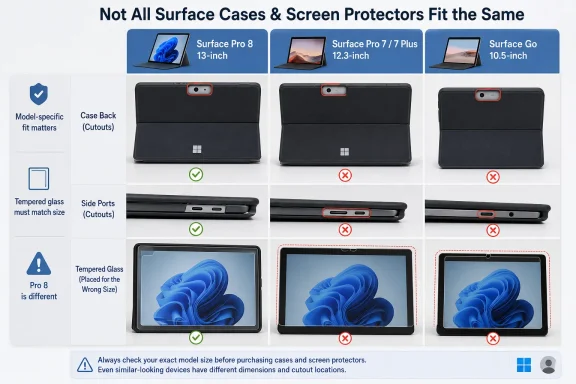
Surface Pro 8 has a 13-inch display. Surface Pro 7 and earlier mainstream Pro models use a 12.3-inch display. Surface Go devices use a smaller display again. One glass protector cannot be properly sized for all of those screens.
That does not mean the product cannot include a protector; it means buyers should not assume the protector is correct merely because the listing says so. If the seller ships different variants under one listing, the buyer needs to select the exact model. If the seller ships one universal kit, the glass protector is likely to be wrong for at least some of the devices named.
The phrase “explosion-proof” is also classic accessory-market theater. Tempered glass can crack in a controlled way and resist scratches better than bare display glass in some conditions, but no thin tablet screen protector should be treated as armor. It is a sacrificial layer, not a warranty against impact damage.
The Pro 8’s footprint is shorter and wider than the Pro 7 family, with a slightly thicker body and a larger 13-inch display. That combination is deadly for imprecise case listings. A folio that relies on elastic straps may technically hold multiple models, but that is a very different proposition from a fitted shell with aligned cutouts and stable corners.
This is where the bargain accessory market often muddies the water. The word “fits” can mean a molded case snaps cleanly around the device, or it can mean the tablet can be shoved into a folio without falling out immediately. Surface owners should care deeply about the difference.
A poorly fitted Pro 8 case can block vents, misalign cameras, interfere with USB-C or Surface Connect access, fight the kickstand, or add stress to corners during travel. None of those failures requires dramatic incompetence. They can come from just a few millimeters of design mismatch.
Even there, “compatible” deserves scrutiny. Case cutouts must line up with the power button, volume rocker, cameras, Surface Connect, USB ports, headphone jack, microSD slot, and rear kickstand. A case designed loosely may work across the range, but it may also compromise one model more than another.
The Pro 7 and Pro 7 Plus also occupy an awkward place in the market because they look like the older generation but remain common in business, education, and refurbished channels. That makes them frequent targets for accessory bundles that chase search traffic. A buyer with a fleet of Pro 7 Plus devices should not assume a consumer-oriented listing has done enterprise-grade fitment work.
There is also the Type Cover question. Surface buyers often want protection without sacrificing the keyboard experience, because the Type Cover is not an optional flourish for many owners. If a folio prevents the keyboard from attaching cleanly, folding naturally, or lying at the right typing angle, the case has failed the Surface use case even if the tablet itself fits.
A bulky universal folio can undermine that advantage quickly. If the case is sized for the Pro family, a Go owner may end up with a loose-fitting binder rather than a protective cover. If it is sized for the Go family, a Pro owner has the opposite problem.
The listing names Surface Go 4, Go 3, Go 2, and the original Go. That narrower claim is more plausible within the Go family than across Go and Pro together, though even Go-era differences can affect camera openings and screen protector alignment. The buyer still needs a variant selector or a seller confirmation tied to the exact model.
There is a larger lesson here for anyone buying accessories for Windows tablets. The Surface brand name is not a size. “Surface” is a product family, not a compatibility standard, and Microsoft has used that family name across devices with very different dimensions and use cases.
The problem is that inexpensive protection has to clear a minimum bar: it must fit. Once fit becomes uncertain, the savings get eaten by returns, wasted time, damaged corners, blocked ports, and a worse typing setup. For a device that may already be several years old, buyers are often trying to avoid spending more money than the Surface is worth; that makes a wrong accessory especially irritating.
The listing’s broad language also leans on reassuring adjectives. “Shockproof,” “anti-scratch,” “impact-resistant,” and “quality materials” sound useful, but they are not specifications. Without drop-test standards, material details, exact model SKUs, photos for each device variant, or a clear return policy, those claims are marketing atmosphere.
That does not mean the case is bad. It means the listing has not earned the buyer’s trust in the way a fitted accessory should. A good Surface case listing should reduce ambiguity, not invite the customer to gamble.
But protection is one of those categories where the wrong product can create the exact hazard it claims to solve. A loose device can slide inside a folio and hit the floor at an exposed angle. A misaligned shell can place pressure on corners. A thick cover can make a tablet harder to grip, encouraging the drops it was meant to prevent.
Surface devices also rely heavily on thermal and mechanical design. Blocking ventilation paths, restricting the kickstand, or encouraging use at awkward angles can make the device less pleasant over time. These are not catastrophic engineering failures, but they are the small frictions that make a 2-in-1 feel worse every day.
For IT departments, that matters because accessories become support issues. A classroom or small business that buys a batch of ambiguous cases may end up troubleshooting “Surface problems” that are actually case problems. Cameras blocked by a protector, keyboards that do not sit correctly, or chargers that do not connect cleanly all become help-desk noise.
The downside is that search visibility can blur product truth. A single listing may contain multiple variants, but the title may present them as one universal item. Or the listing may be assembled from copied compatibility language that has not been checked against current devices.
This is especially common around older hardware because accessory inventories linger. Surface Pro 4-era case molds may continue to circulate long after the device has left the spotlight. Sellers may add newer model names to keep the listing alive, even when the physical design has not changed.
Surface Pro 8 is exactly the kind of device that exposes that practice. If an old shell is being relabeled for a newer chassis, the mismatch will show up immediately. If the listing truly offers a Pro 8-specific variant, the seller should say so clearly and provide model-specific photos.
The model name matters because Surface Pro 7, Surface Pro 7 Plus, Surface Pro 8, Surface Go 3, and Surface Go 4 are not just marketing labels. They correspond to physical hardware differences that determine whether a case, keyboard, screen protector, or dock behaves properly.
The listing’s casual “check yours” tone is right in principle, even if the surrounding compatibility claim is overbroad. Buyers should not check only whether their model appears somewhere in the title. They should check whether the purchasing option, product photos, dimensions, and screen protector size match that exact device.
If the seller cannot confirm that, the safest assumption is that the listing is generic. Generic can be acceptable for sleeves, pouches, and carry bags. It is much less acceptable for fitted folio cases and adhesive glass.
That bundle logic is powerful because Surface accessories can feel overpriced relative to the value of older devices. Spending heavily on a case for a Surface Pro 6 or original Surface Go may not make sense. A cheaper kit can be rational if the owner understands its limits.
The unbranded nature of the product is not automatically a red flag. Plenty of competent accessories ship without famous names. The issue is that unbranded products depend even more on fitment clarity, customer photos, measured dimensions, and return policies because buyers cannot lean on brand reputation.
A bargain is still a bargain only if the part is correct. If the case does not fit, the included protector is not a bonus; it is another piece of e-waste.
That changes the accessory market. Owners are less likely to buy first-party accessories and more likely to search for cheap covers, replacement chargers, pens, and screen protectors. Sellers respond by creating broad listings that sweep up as many model names as possible.
Surface Go devices intensify this effect because they often serve cost-sensitive deployments. A Go bought for a child, kiosk, or light office role invites the same accessory question: how much protection is enough without overspending on the device?
This is where WindowsForum readers should be especially skeptical and practical. The Surface ecosystem remains excellent when the parts match. It becomes maddening when low-cost accessories treat precision hardware as if it were a generic tablet category.
The listing becomes harder to recommend if it is a single universal case. No credible one-piece fitted folio should be expected to serve both Surface Pro 8 and the Surface Go line well. The difference is too large, and the screen protector claim makes the mismatch more glaring.
The ideal buyer is someone who can tolerate some uncertainty, verify the exact option before checkout, and return the product if the fit is wrong. The wrong buyer is anyone purchasing in bulk, buying for a deadline, or protecting a mission-critical device where blocked ports or unreliable fit would create operational problems.
In other words, this is not a “never buy” situation. It is a “do not buy casually” situation.
 The Compatibility Claim Is Doing Too Much Work
Surface devices look deceptively similar from across a desk. They are rectangular Windows tablets with kickstands, magnetic keyboard connectors, cameras, side buttons, and a Microsoft logo on the rear. That sameness is exactly what lets accessory listings make broad claims with an air of plausibility.But the Surface Pro and Surface Go families are not interchangeable in any practical case-design sense. The Surface Pro line is built around a larger 12-to-13-inch class tablet body, while the Surface Go line is a smaller 10.5-inch class device. A folio that physically wraps one family cannot neatly wrap the other without either leaving a device loose or forcing another into a shell that does not belong to it.
The advertised spread is especially aggressive because it spans not only different generations, but different chassis eras. Surface Pro 4 through Surface Pro 7 Plus share a broadly similar body size, which is why many older Pro accessories legitimately cover that range. Surface Pro 8, however, moved to a newer design with a larger 13-inch display, different dimensions, slimmer bezels, and a different accessory ecosystem.
Surface Go models also have their own size class. The Go, Go 2, Go 3, and Go 4 are far smaller than the Pro models, even if the product language presents them as just another set of Surface names in the same sentence. That makes the listing’s “it probably fits” spirit more than casual marketing. It is the kind of ambiguity that can turn a protective case into a return label.
Surface Buyers Know the Shape Is the Product
The Surface Pro’s appeal has always depended on geometry. Microsoft’s tablet is useful because the kickstand, keyboard connector, pen placement, cameras, ports, and screen ratio work together as a system. A case that interferes with one of those pieces does not merely add bulk; it changes how the machine behaves.That matters more on a Surface than on many conventional laptops. A laptop sleeve can be a little generic because it is mostly storage and transit protection. A Surface folio is expected to become part of the device while it is being used, propped up, charged, typed on, carried, docked, and maybe signed into with Windows Hello.
For Surface Pro 4 through Pro 7 Plus owners, case compatibility often comes down to whether the shell respects the older chassis’ port and button layout. For Surface Pro 8 owners, the problem changes. The Pro 8’s redesigned body and 13-inch screen make it a poor fit for older Pro 7-era shells, even before considering the way newer keyboards and pens changed the daily workflow.
For Surface Go users, the mismatch is even more obvious. A case large enough to accommodate a Surface Pro would not cradle a Surface Go correctly, and a case sized for a Go would not take a Pro. The listing’s range makes sense only if it is being used as a search-net rather than a precise fitment table.
The Screen Protector Makes the Promise Even Harder to Believe
The bundled tempered-glass screen protector is presented as a value-add, but it introduces another compatibility problem. Glass protectors are not forgiving accessories. They must match the display size, camera placement, bezel shape, sensor areas, and edge geometry closely enough to avoid lifting, bubbling, blocking the camera, or making touch input feel worse.Surface Pro 8 has a 13-inch display. Surface Pro 7 and earlier mainstream Pro models use a 12.3-inch display. Surface Go devices use a smaller display again. One glass protector cannot be properly sized for all of those screens.
That does not mean the product cannot include a protector; it means buyers should not assume the protector is correct merely because the listing says so. If the seller ships different variants under one listing, the buyer needs to select the exact model. If the seller ships one universal kit, the glass protector is likely to be wrong for at least some of the devices named.
The phrase “explosion-proof” is also classic accessory-market theater. Tempered glass can crack in a controlled way and resist scratches better than bare display glass in some conditions, but no thin tablet screen protector should be treated as armor. It is a sacrificial layer, not a warranty against impact damage.
The Surface Pro 8 Breaks the Old Accessory Assumption
The Surface Pro 8 is the most important dividing line in the listing. Microsoft’s move from the long-running Pro 4-through-Pro 7-style body to the Pro 8 design was not cosmetic trivia. It changed enough about the device that accessory buyers should treat Pro 8 compatibility as a separate category.The Pro 8’s footprint is shorter and wider than the Pro 7 family, with a slightly thicker body and a larger 13-inch display. That combination is deadly for imprecise case listings. A folio that relies on elastic straps may technically hold multiple models, but that is a very different proposition from a fitted shell with aligned cutouts and stable corners.
This is where the bargain accessory market often muddies the water. The word “fits” can mean a molded case snaps cleanly around the device, or it can mean the tablet can be shoved into a folio without falling out immediately. Surface owners should care deeply about the difference.
A poorly fitted Pro 8 case can block vents, misalign cameras, interfere with USB-C or Surface Connect access, fight the kickstand, or add stress to corners during travel. None of those failures requires dramatic incompetence. They can come from just a few millimeters of design mismatch.
Older Surface Pro Owners Still Need to Read the Fine Print
The listing is not automatically implausible for every model it names. Surface Pro 4, Surface Pro 5, Surface Pro 6, Surface Pro 7, and Surface Pro 7 Plus are close enough in overall body design that many accessories legitimately serve that family. This is the zone where the product’s claim may have the most credibility.Even there, “compatible” deserves scrutiny. Case cutouts must line up with the power button, volume rocker, cameras, Surface Connect, USB ports, headphone jack, microSD slot, and rear kickstand. A case designed loosely may work across the range, but it may also compromise one model more than another.
The Pro 7 and Pro 7 Plus also occupy an awkward place in the market because they look like the older generation but remain common in business, education, and refurbished channels. That makes them frequent targets for accessory bundles that chase search traffic. A buyer with a fleet of Pro 7 Plus devices should not assume a consumer-oriented listing has done enterprise-grade fitment work.
There is also the Type Cover question. Surface buyers often want protection without sacrificing the keyboard experience, because the Type Cover is not an optional flourish for many owners. If a folio prevents the keyboard from attaching cleanly, folding naturally, or lying at the right typing angle, the case has failed the Surface use case even if the tablet itself fits.
Surface Go Is Not Just a Smaller Surface Pro
Surface Go devices occupy a different role from Surface Pro devices. They are smaller, lighter, and often deployed for students, point-of-sale work, field check-ins, note-taking, or travel. Their portability is the point.A bulky universal folio can undermine that advantage quickly. If the case is sized for the Pro family, a Go owner may end up with a loose-fitting binder rather than a protective cover. If it is sized for the Go family, a Pro owner has the opposite problem.
The listing names Surface Go 4, Go 3, Go 2, and the original Go. That narrower claim is more plausible within the Go family than across Go and Pro together, though even Go-era differences can affect camera openings and screen protector alignment. The buyer still needs a variant selector or a seller confirmation tied to the exact model.
There is a larger lesson here for anyone buying accessories for Windows tablets. The Surface brand name is not a size. “Surface” is a product family, not a compatibility standard, and Microsoft has used that family name across devices with very different dimensions and use cases.
Cheap Protection Can Become Expensive Friction
There is nothing inherently wrong with a low-cost, unbranded Surface case. Many users do not need premium leather, military certification, retail packaging, or a Microsoft logo. Students, travelers, and parents buying for school devices may reasonably want basic drop and scratch protection without spending premium-accessory money.The problem is that inexpensive protection has to clear a minimum bar: it must fit. Once fit becomes uncertain, the savings get eaten by returns, wasted time, damaged corners, blocked ports, and a worse typing setup. For a device that may already be several years old, buyers are often trying to avoid spending more money than the Surface is worth; that makes a wrong accessory especially irritating.
The listing’s broad language also leans on reassuring adjectives. “Shockproof,” “anti-scratch,” “impact-resistant,” and “quality materials” sound useful, but they are not specifications. Without drop-test standards, material details, exact model SKUs, photos for each device variant, or a clear return policy, those claims are marketing atmosphere.
That does not mean the case is bad. It means the listing has not earned the buyer’s trust in the way a fitted accessory should. A good Surface case listing should reduce ambiguity, not invite the customer to gamble.
The Real Risk Is Not the Fall, but the False Sense of Fit
Accessory sellers know that Surface owners are often searching under pressure. A cracked screen, a school requirement, a refurbished-device purchase, or a new work assignment can send someone looking for a case quickly. Broad compatibility titles are designed to catch that search.But protection is one of those categories where the wrong product can create the exact hazard it claims to solve. A loose device can slide inside a folio and hit the floor at an exposed angle. A misaligned shell can place pressure on corners. A thick cover can make a tablet harder to grip, encouraging the drops it was meant to prevent.
Surface devices also rely heavily on thermal and mechanical design. Blocking ventilation paths, restricting the kickstand, or encouraging use at awkward angles can make the device less pleasant over time. These are not catastrophic engineering failures, but they are the small frictions that make a 2-in-1 feel worse every day.
For IT departments, that matters because accessories become support issues. A classroom or small business that buys a batch of ambiguous cases may end up troubleshooting “Surface problems” that are actually case problems. Cameras blocked by a protector, keyboards that do not sit correctly, or chargers that do not connect cleanly all become help-desk noise.
Marketplace Listings Reward Search Reach Over Specificity
The title reads like a compressed search-engine strategy: Surface Pro 8, 7, 6, Surface Go 4, 3, tempered glass, screen protector, included. That is not unusual in online accessory retail. Sellers often pack titles with model names so the product appears in as many searches as possible.The downside is that search visibility can blur product truth. A single listing may contain multiple variants, but the title may present them as one universal item. Or the listing may be assembled from copied compatibility language that has not been checked against current devices.
This is especially common around older hardware because accessory inventories linger. Surface Pro 4-era case molds may continue to circulate long after the device has left the spotlight. Sellers may add newer model names to keep the listing alive, even when the physical design has not changed.
Surface Pro 8 is exactly the kind of device that exposes that practice. If an old shell is being relabeled for a newer chassis, the mismatch will show up immediately. If the listing truly offers a Pro 8-specific variant, the seller should say so clearly and provide model-specific photos.
Buyers Should Treat Model Detection as Step One
The best defense is boring: identify the exact Surface model before buying anything. Microsoft makes this possible through Windows settings, the Surface app, serial-number lookup, and physical cues, but many owners still know only that they have “a Surface.” That is not enough.The model name matters because Surface Pro 7, Surface Pro 7 Plus, Surface Pro 8, Surface Go 3, and Surface Go 4 are not just marketing labels. They correspond to physical hardware differences that determine whether a case, keyboard, screen protector, or dock behaves properly.
The listing’s casual “check yours” tone is right in principle, even if the surrounding compatibility claim is overbroad. Buyers should not check only whether their model appears somewhere in the title. They should check whether the purchasing option, product photos, dimensions, and screen protector size match that exact device.
If the seller cannot confirm that, the safest assumption is that the listing is generic. Generic can be acceptable for sleeves, pouches, and carry bags. It is much less acceptable for fitted folio cases and adhesive glass.
The Bundle Economics Are Tempting for a Reason
The appeal of this product is obvious. A folio case plus a glass screen protector sounds like a complete protection kit, especially for refurbished Surfaces bought for school or field work. The buyer gets a stand, closure, screen layer, and a promise of drop resistance in one package.That bundle logic is powerful because Surface accessories can feel overpriced relative to the value of older devices. Spending heavily on a case for a Surface Pro 6 or original Surface Go may not make sense. A cheaper kit can be rational if the owner understands its limits.
The unbranded nature of the product is not automatically a red flag. Plenty of competent accessories ship without famous names. The issue is that unbranded products depend even more on fitment clarity, customer photos, measured dimensions, and return policies because buyers cannot lean on brand reputation.
A bargain is still a bargain only if the part is correct. If the case does not fit, the included protector is not a bonus; it is another piece of e-waste.
The Surface Accessory Market Has Entered Its Refurbished Era
The listing also says something about where the Surface installed base is now. Surface Pro 4 through Pro 7 Plus machines are still in circulation, often outside the original premium-buying context. They live in classrooms, home offices, small businesses, repair shops, and secondary markets.That changes the accessory market. Owners are less likely to buy first-party accessories and more likely to search for cheap covers, replacement chargers, pens, and screen protectors. Sellers respond by creating broad listings that sweep up as many model names as possible.
Surface Go devices intensify this effect because they often serve cost-sensitive deployments. A Go bought for a child, kiosk, or light office role invites the same accessory question: how much protection is enough without overspending on the device?
This is where WindowsForum readers should be especially skeptical and practical. The Surface ecosystem remains excellent when the parts match. It becomes maddening when low-cost accessories treat precision hardware as if it were a generic tablet category.
The Smart Buy Depends on the Variant, Not the Headline
There are scenarios where this product could make sense. If the seller offers separate variants for Surface Pro 4–7 Plus, Surface Pro 8, and Surface Go models, and the buyer selects the right one, a low-cost folio bundle may be perfectly serviceable. The integrated stand and magnetic closure could be useful for commuting, schoolwork, or light office use.The listing becomes harder to recommend if it is a single universal case. No credible one-piece fitted folio should be expected to serve both Surface Pro 8 and the Surface Go line well. The difference is too large, and the screen protector claim makes the mismatch more glaring.
The ideal buyer is someone who can tolerate some uncertainty, verify the exact option before checkout, and return the product if the fit is wrong. The wrong buyer is anyone purchasing in bulk, buying for a deadline, or protecting a mission-critical device where blocked ports or unreliable fit would create operational problems.
In other words, this is not a “never buy” situation. It is a “do not buy casually” situation.
The Fine Print Is the Feature Here
This listing should push Surface owners toward a more disciplined accessory checklist before hitting the buy button.- Confirm the exact Surface model in Windows or the Surface app before assuming that a title match is enough.
- Treat Surface Pro 8 as a separate fitment category from Surface Pro 4, Pro 5, Pro 6, Pro 7, and Pro 7 Plus.
- Do not assume any glass screen protector can fit both Surface Pro and Surface Go devices.
- Look for model-specific photos that show port cutouts, camera openings, kickstand access, and keyboard compatibility.
- Prefer sellers with clear variant selection and a practical return policy when buying unbranded fitted accessories.
- Avoid bulk purchases until one unit has been physically tested on the exact device fleet.