
Otter.ai, Fireflies.ai, Fathom, tl;dv, Avoma, Grain, and Read AI are among the leading AI meeting assistants for remote teams in 2026, offering combinations of transcription, summaries, action items, CRM sync, searchable archives, engagement analytics, and shareable meeting clips across Zoom, Google Meet, and Microsoft Teams. The real story is not that these tools can write notes; it is that they are quietly becoming the memory layer for distributed work. For remote teams, the meeting assistant is no longer a convenience app sitting beside the calendar. It is becoming infrastructure.
Remote work did not kill meetings. It multiplied them, stretched them across time zones, and made the follow-up trail harder to trust. The old compromise was simple: someone took notes, someone forgot to share them, and half the team reconstructed decisions later from Slack fragments and calendar invites.
AI meeting assistants emerged because that system was always brittle. Otter.ai, Fireflies.ai, Fathom, tl;dv, Avoma, Grain, and Read AI all attack the same pain point from slightly different angles: record the conversation, convert it into structured text, summarize what happened, and make the result searchable or shareable.
That sounds mundane until you consider what the meeting has become inside modern organizations. It is where product decisions happen, customer objections surface, sales opportunities are qualified, engineering trade-offs are negotiated, and managers make commitments that rarely fit neatly into a project-management ticket.
The meeting assistant is therefore not just a transcription product. It is an attempt to turn live conversation into durable organizational data.
That matters because remote work often fails in the gap between what was said and what was understood. A searchable transcript gives absent teammates a way to catch up without asking for a recap. A live transcript also helps participants who joined late, missed a phrase, or are working in a second language.
Otter’s more recent positioning points toward a broader ambition: not just capturing one meeting, but allowing users to query meeting history. That shift is important. Once the transcript archive becomes searchable through natural language, the assistant stops being a passive recorder and starts looking like a workplace knowledge system.
The risk is the same one that follows every expanding productivity platform. The more Otter becomes a memory bank, the more organizations must ask who controls that memory, how long it is retained, and whether every participant meaningfully consented to being part of it.
A remote team does not merely need to know what happened in a call. It needs the next step to land somewhere useful. Fireflies’ value is in pushing meeting intelligence into the systems where teams already work: the CRM, the task tracker, the collaboration channel, or the shared knowledge base.
That workflow orientation is why Fireflies often appeals to managers who care about follow-through. It can identify themes, surface action items, and help teams inspect recurring patterns across calls. For customer-facing teams, that can mean spotting objections, tracking competitor mentions, or finding coaching opportunities.
But workflow automation also raises the stakes. A bad summary sitting in an email is annoying. A bad summary pushed into a CRM record, used to judge a sales rep, or treated as the official account of a customer commitment becomes a governance problem.
That simplicity is not trivial. Remote teams already live inside too many apps. A meeting assistant that requires too much configuration risks becoming another piece of abandoned SaaS in the stack. Fathom’s generous free tier has also helped it spread through teams from the bottom up, particularly among consultants, founders, salespeople, and managers who just want reliable notes without procurement friction.
The strategic question is whether lightweight adoption can survive team-scale governance. Individuals love tools that join calls automatically and summarize everything. IT departments tend to ask harder questions about retention, permissions, recordings, and whether sensitive discussions are being captured by default.
That tension is now central to the category. The easiest AI meeting assistant to adopt may also be the one most likely to appear in an organization before security, legal, or compliance teams have approved it.
This is a crucial distinction. A transcript is useful, but it can also become another unread artifact. A five-minute clip of the exact decision, demo, objection, or customer quote can travel through an organization faster than a 60-minute recording or a long summary.
For product teams, that can mean sharing a customer pain point with engineering. For distributed leadership teams, it can mean preserving the context behind a decision without dragging everyone into another meeting. For training, it can mean building a library of examples rather than asking new hires to shadow endless calls.
The risk is editorial. Once meetings become clips, someone is choosing which moments matter. AI can help identify highlights, but teams still need judgment about context, privacy, and whether a short excerpt fairly represents the conversation.
That makes Avoma particularly relevant for sales and customer-facing teams. In those environments, meetings are revenue events. The notes are not just documentation; they are inputs into forecasting, coaching, account planning, and performance review.
This is where the category becomes more powerful and more uncomfortable. A tool that helps a rep remember a next step is useful. A tool that analyzes talk ratios, objections, topics, and meeting quality starts to reshape how work is measured.
For managers, that can create visibility. For employees, it can feel like surveillance dressed as productivity. The difference depends less on the AI model and more on how transparently the organization deploys it.
A customer saying, “This is the part that blocks us,” carries more weight when the product team can hear the frustration. A candidate explaining what attracted them to a role may be more useful as a clip than as a paraphrased sentence. A leadership decision may be easier to trust when the rationale is visible in the original exchange.
Grain’s model fits teams that treat meetings as a source of institutional storytelling. It preserves moments, not just minutes. That can be valuable for product research, customer advocacy, internal training, and executive alignment.
The drawback is that video is heavier than text in every sense. It is more sensitive, more personal, harder to skim, and more likely to trigger privacy concerns. A transcript can feel like documentation; a video clip feels like evidence.
This reflects a broader shift in remote-work tooling. The first wave of meeting assistants asked whether people could remember the meeting. The next wave asks whether the meeting should have happened at all, whether the right people participated, and whether the discussion produced a decision.
For managers drowning in recurring calls, that is tempting. A dashboard that shows talk time, engagement, sentiment, or participation can expose unhealthy meeting habits. It can reveal that one person dominates every discussion or that a supposedly critical weekly sync produces few concrete actions.
But analytics can easily overclaim. Engagement is not the same as attention, silence is not always disengagement, and sentiment detection can be culturally noisy. Remote teams should treat these metrics as signals, not verdicts.
Microsoft Teams, Google Meet, and Zoom have all been adding AI capabilities into their own collaboration suites. The platform-native assistant has an obvious advantage: it is already present, already tied to identity, and often easier for IT to manage. For organizations standardized on Microsoft 365 or Google Workspace, the default option may be “good enough” simply because it is governed centrally.
Independent tools still have a strong argument. They often work across multiple meeting platforms, specialize in sales or research workflows, and move faster on cross-meeting search, clip sharing, and CRM sync. In mixed environments, that independence is not a luxury; it is the point.
This competition will define the next phase. The question is not whether AI notes become standard. They will. The question is whether teams want them as a feature inside a collaboration suite or as a specialized layer that travels across every meeting system.
A meeting assistant can reduce that context loss. It can make decisions searchable, preserve customer language, and turn vague follow-ups into action items. It can also help non-native speakers, neurodivergent workers, and overloaded managers participate with less pressure to capture every word.
Yet the same feature set can become reckless without norms. Recording everything is not the same as understanding everything. A transcript can contain sensitive employee issues, customer data, legal strategy, security details, or casual remarks that were never meant to become permanent corporate records.
The practical answer is not to reject these tools. It is to deploy them deliberately. Teams need clear expectations about when assistants are allowed, who can access recordings, how long data is retained, and whether summaries are reviewed before being treated as official.
Otter.ai fits teams that need strong real-time transcription and searchable meeting memory. Fireflies.ai is compelling when the meeting needs to feed a workflow. Fathom is attractive for users who want quick adoption and low friction. tl;dv and Grain are strongest when clips and async sharing matter. Avoma is built for revenue and customer-facing discipline. Read AI is aimed at teams that want to analyze meeting behavior itself.
The buying mistake is to compare only summary quality. Most leading products can generate a plausible recap. The harder question is where that recap goes, who trusts it, who audits it, and whether it improves the team’s behavior after the call ends.
That is why IT leaders should evaluate these tools less like note-taking apps and more like collaboration systems. They touch identity, data retention, compliance, employee monitoring, customer records, and knowledge management. That is infrastructure territory.
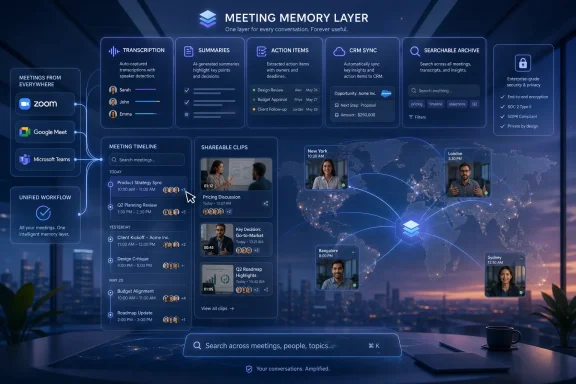 The AI Note-Taker Has Become the New Meeting Room
Remote work did not kill meetings. It multiplied them, stretched them across time zones, and made the follow-up trail harder to trust. The old compromise was simple: someone took notes, someone forgot to share them, and half the team reconstructed decisions later from Slack fragments and calendar invites.AI meeting assistants emerged because that system was always brittle. Otter.ai, Fireflies.ai, Fathom, tl;dv, Avoma, Grain, and Read AI all attack the same pain point from slightly different angles: record the conversation, convert it into structured text, summarize what happened, and make the result searchable or shareable.
That sounds mundane until you consider what the meeting has become inside modern organizations. It is where product decisions happen, customer objections surface, sales opportunities are qualified, engineering trade-offs are negotiated, and managers make commitments that rarely fit neatly into a project-management ticket.
The meeting assistant is therefore not just a transcription product. It is an attempt to turn live conversation into durable organizational data.
Otter.ai Still Owns the Transcription Instinct
Otter.ai remains one of the most recognizable names in the category because it began with a clear, easily understood promise: turn speech into searchable notes. Its strength for remote teams is still that immediacy. Real-time transcription, live collaboration, AI-generated summaries, and support across major meeting platforms make it a natural fit for teams that want a shared record without building a new workflow around every call.That matters because remote work often fails in the gap between what was said and what was understood. A searchable transcript gives absent teammates a way to catch up without asking for a recap. A live transcript also helps participants who joined late, missed a phrase, or are working in a second language.
Otter’s more recent positioning points toward a broader ambition: not just capturing one meeting, but allowing users to query meeting history. That shift is important. Once the transcript archive becomes searchable through natural language, the assistant stops being a passive recorder and starts looking like a workplace knowledge system.
The risk is the same one that follows every expanding productivity platform. The more Otter becomes a memory bank, the more organizations must ask who controls that memory, how long it is retained, and whether every participant meaningfully consented to being part of it.
Fireflies.ai Turns the Meeting Into a Workflow Trigger
Fireflies.ai is strongest when the meeting is not the end of the process but the beginning of one. Its pitch centers on recording, transcription, summaries, action items, topic tracking, and integrations with business tools, including CRM systems. For sales, customer success, recruiting, and operations teams, that matters more than a beautiful transcript.A remote team does not merely need to know what happened in a call. It needs the next step to land somewhere useful. Fireflies’ value is in pushing meeting intelligence into the systems where teams already work: the CRM, the task tracker, the collaboration channel, or the shared knowledge base.
That workflow orientation is why Fireflies often appeals to managers who care about follow-through. It can identify themes, surface action items, and help teams inspect recurring patterns across calls. For customer-facing teams, that can mean spotting objections, tracking competitor mentions, or finding coaching opportunities.
But workflow automation also raises the stakes. A bad summary sitting in an email is annoying. A bad summary pushed into a CRM record, used to judge a sales rep, or treated as the official account of a customer commitment becomes a governance problem.
Fathom Wins by Making the Assistant Feel Lightweight
Fathom’s appeal is almost the opposite of the enterprise-heavy pitch. It is popular because it feels easy. The product records meetings, produces summaries, highlights important moments, and syncs notes into productivity or CRM tools without demanding that the user become an administrator first.That simplicity is not trivial. Remote teams already live inside too many apps. A meeting assistant that requires too much configuration risks becoming another piece of abandoned SaaS in the stack. Fathom’s generous free tier has also helped it spread through teams from the bottom up, particularly among consultants, founders, salespeople, and managers who just want reliable notes without procurement friction.
The strategic question is whether lightweight adoption can survive team-scale governance. Individuals love tools that join calls automatically and summarize everything. IT departments tend to ask harder questions about retention, permissions, recordings, and whether sensitive discussions are being captured by default.
That tension is now central to the category. The easiest AI meeting assistant to adopt may also be the one most likely to appear in an organization before security, legal, or compliance teams have approved it.
tl;dv Understands That Not Everyone Needs the Whole Meeting
tl;dv’s name gestures at the product’s core insight: remote teams often do not need a full replay. They need the relevant moment. Recording, AI notes, and shareable clips make tl;dv well suited for asynchronous collaboration, especially across time zones.This is a crucial distinction. A transcript is useful, but it can also become another unread artifact. A five-minute clip of the exact decision, demo, objection, or customer quote can travel through an organization faster than a 60-minute recording or a long summary.
For product teams, that can mean sharing a customer pain point with engineering. For distributed leadership teams, it can mean preserving the context behind a decision without dragging everyone into another meeting. For training, it can mean building a library of examples rather than asking new hires to shadow endless calls.
The risk is editorial. Once meetings become clips, someone is choosing which moments matter. AI can help identify highlights, but teams still need judgment about context, privacy, and whether a short excerpt fairly represents the conversation.
Avoma Shows Where Meeting Assistants Become Management Software
Avoma pushes furthest into the world of conversation intelligence, agenda management, coaching, and revenue-team workflows. It is not merely asking, “What happened in this meeting?” It is asking whether the meeting was run well, whether the seller asked the right questions, whether the customer’s concerns were captured, and whether the next step is clear.That makes Avoma particularly relevant for sales and customer-facing teams. In those environments, meetings are revenue events. The notes are not just documentation; they are inputs into forecasting, coaching, account planning, and performance review.
This is where the category becomes more powerful and more uncomfortable. A tool that helps a rep remember a next step is useful. A tool that analyzes talk ratios, objections, topics, and meeting quality starts to reshape how work is measured.
For managers, that can create visibility. For employees, it can feel like surveillance dressed as productivity. The difference depends less on the AI model and more on how transparently the organization deploys it.
Grain Makes Video the Artifact, Not Just the Transcript
Grain’s strength is its focus on highlights and shareable video snippets. That may sound narrower than a full meeting-intelligence platform, but it solves a real problem for distributed organizations: text often strips away tone, hesitation, urgency, and emotion.A customer saying, “This is the part that blocks us,” carries more weight when the product team can hear the frustration. A candidate explaining what attracted them to a role may be more useful as a clip than as a paraphrased sentence. A leadership decision may be easier to trust when the rationale is visible in the original exchange.
Grain’s model fits teams that treat meetings as a source of institutional storytelling. It preserves moments, not just minutes. That can be valuable for product research, customer advocacy, internal training, and executive alignment.
The drawback is that video is heavier than text in every sense. It is more sensitive, more personal, harder to skim, and more likely to trigger privacy concerns. A transcript can feel like documentation; a video clip feels like evidence.
Read AI Makes the Meeting Itself the Subject
Read AI stands out because it leans into engagement analytics and meeting metrics as much as notes. It summarizes meetings, tracks participation patterns, and provides productivity insights that are meant to improve how teams meet, not merely document what they said.This reflects a broader shift in remote-work tooling. The first wave of meeting assistants asked whether people could remember the meeting. The next wave asks whether the meeting should have happened at all, whether the right people participated, and whether the discussion produced a decision.
For managers drowning in recurring calls, that is tempting. A dashboard that shows talk time, engagement, sentiment, or participation can expose unhealthy meeting habits. It can reveal that one person dominates every discussion or that a supposedly critical weekly sync produces few concrete actions.
But analytics can easily overclaim. Engagement is not the same as attention, silence is not always disengagement, and sentiment detection can be culturally noisy. Remote teams should treat these metrics as signals, not verdicts.
The Platform Giants Are Closing In
Independent meeting assistants built this category by moving faster than Microsoft, Google, and Zoom. They worked across platforms, joined calls as bots, and offered AI summaries before native meeting software fully caught up. That advantage is narrowing.Microsoft Teams, Google Meet, and Zoom have all been adding AI capabilities into their own collaboration suites. The platform-native assistant has an obvious advantage: it is already present, already tied to identity, and often easier for IT to manage. For organizations standardized on Microsoft 365 or Google Workspace, the default option may be “good enough” simply because it is governed centrally.
Independent tools still have a strong argument. They often work across multiple meeting platforms, specialize in sales or research workflows, and move faster on cross-meeting search, clip sharing, and CRM sync. In mixed environments, that independence is not a luxury; it is the point.
This competition will define the next phase. The question is not whether AI notes become standard. They will. The question is whether teams want them as a feature inside a collaboration suite or as a specialized layer that travels across every meeting system.
Remote Teams Need Memory, but They Also Need Rules
The case for AI meeting assistants is strongest in remote organizations because remote work creates more gaps in shared context. People miss calls. Time zones fragment attendance. Decisions happen in smaller groups. New employees inherit projects without the hallway conversations that once filled in the blanks.A meeting assistant can reduce that context loss. It can make decisions searchable, preserve customer language, and turn vague follow-ups into action items. It can also help non-native speakers, neurodivergent workers, and overloaded managers participate with less pressure to capture every word.
Yet the same feature set can become reckless without norms. Recording everything is not the same as understanding everything. A transcript can contain sensitive employee issues, customer data, legal strategy, security details, or casual remarks that were never meant to become permanent corporate records.
The practical answer is not to reject these tools. It is to deploy them deliberately. Teams need clear expectations about when assistants are allowed, who can access recordings, how long data is retained, and whether summaries are reviewed before being treated as official.
The Best Tool Depends on the Meeting You Are Trying to Save
There is no single “best” AI meeting assistant for every remote team because meetings themselves are not one category. A daily engineering stand-up, a board update, a sales discovery call, a user interview, and a hiring panel all create different kinds of risk and value.Otter.ai fits teams that need strong real-time transcription and searchable meeting memory. Fireflies.ai is compelling when the meeting needs to feed a workflow. Fathom is attractive for users who want quick adoption and low friction. tl;dv and Grain are strongest when clips and async sharing matter. Avoma is built for revenue and customer-facing discipline. Read AI is aimed at teams that want to analyze meeting behavior itself.
The buying mistake is to compare only summary quality. Most leading products can generate a plausible recap. The harder question is where that recap goes, who trusts it, who audits it, and whether it improves the team’s behavior after the call ends.
That is why IT leaders should evaluate these tools less like note-taking apps and more like collaboration systems. They touch identity, data retention, compliance, employee monitoring, customer records, and knowledge management. That is infrastructure territory.
The Shortlist Is Really a Map of Your Meeting Culture
The current field of AI meeting assistants reveals what different teams value most. The choice is less about picking the cleverest bot and more about admitting what your organization expects meetings to do.- Otter.ai is best suited to teams that want real-time transcription, searchable notes, and a broad meeting-memory layer across common conferencing platforms.
- Fireflies.ai is strongest when summaries, action items, and conversation intelligence need to flow into CRM and productivity systems.
- Fathom is a strong fit for individuals and teams that want fast adoption, clean summaries, and minimal setup friction.
- tl;dv and Grain are useful when asynchronous collaboration depends on sharing the right moment rather than replaying an entire meeting.
- Avoma is built for customer-facing teams that treat meetings as coachable, measurable revenue conversations.
- Read AI is most useful when a team wants to inspect meeting quality, participation, and engagement patterns, not just preserve notes.
References
- Primary source: Analytics Insight
Published: 2026-06-19T18:42:07.845051
Loading…
www.analyticsinsight.net - Related coverage: otter.ai
Loading…
otter.ai - Related coverage: read.ai
Loading…
www.read.ai - Related coverage: meetingpick.com
Loading…
meetingpick.com - Related coverage: axios.com
Loading…
www.axios.com - Related coverage: techradar.com
Loading…
www.techradar.com
- Related coverage: hedy.ai
Loading…
www.hedy.ai