
Battle.net Setup 2026 is a Windows 11 installation and configuration guide for Blizzard’s desktop launcher, covering the official installer, account security, game downloads, cache repair, update-agent troubleshooting, and Microsoft’s expanding use of Battle.net for Activision Blizzard, Bethesda, and Xbox-published PC games. The practical story is bigger than a 12-step checklist. Battle.net has become a small but revealing test of Microsoft’s post-acquisition PC gaming strategy: keep the old Blizzard machinery, bolt more catalog onto it, and hope Windows users tolerate one more client because the integration is good enough. For enthusiasts and admins, the installer is no longer just a path to World of Warcraft or Diablo IV; it is a case study in how legacy launchers survive platform consolidation.
The obvious prediction after Microsoft closed its Activision Blizzard deal was that Battle.net would eventually fade into the Xbox app. That has not happened. Instead, Microsoft has treated Battle.net less like a duplicate storefront and more like a specialized delivery system with an audience that already understands its rituals: login, patch, scan, repair, launch, repeat.
That decision makes more sense than it first appears. The Xbox app on Windows remains the Game Pass front door, but Battle.net is still where Blizzard’s PC-native social graph, patching pipeline, authentication habits, and community muscle live. Killing it quickly would create more friction than it removes.
The arrival of games such as Avowed and Doom: The Dark Ages on Battle.net showed the direction of travel. Microsoft is not merely preserving Blizzard’s launcher as a museum piece. It is testing whether Battle.net can serve as a curated Microsoft PC game lane for users who would rather avoid the Microsoft Store plumbing.
That does not mean Battle.net is becoming Steam. It is not a broad marketplace, and its value proposition remains narrow. But narrow is not the same as weak. For players who live inside Blizzard and Activision titles, Battle.net’s launcher, friends list, authenticator, patching agent, and cross-game messaging form a coherent ecosystem in a way many publisher launchers never managed.
Windows users have been trained to search, click, and run. That habit is dangerous with game launchers because third-party download sites often wrap real installers in unwanted bundles or serve stale versions that immediately trigger update failures. Battle.net’s own update agent is already complex enough without beginning from a compromised or outdated executable.
The user-supplied guide’s emphasis on file integrity is well placed, even if ordinary home users rarely verify hashes before launching an installer. For managed machines, shared gaming PCs, LAN centers, and security-conscious power users, checking the downloaded executable is not paranoia. It is the difference between installing Blizzard’s client and granting admin privileges to something merely wearing Blizzard’s name.
Running the installer with administrator rights is similarly mundane but consequential. Battle.net writes into protected Windows locations, relies on a background update agent, and keeps shared state outside a single user profile. If setup stalls at zero, fails silently, or loops during agent initialization, permissions are one of the first things to suspect.
That design is not unusual for a mature Windows application, but it matters because Battle.net troubleshooting often fails when users delete only the obvious folder. Removing the launcher directory while leaving stale ProgramData or AppData state behind can reproduce the same broken behavior after a reinstall. The “clean reinstall” many users think they performed is often nothing of the sort.
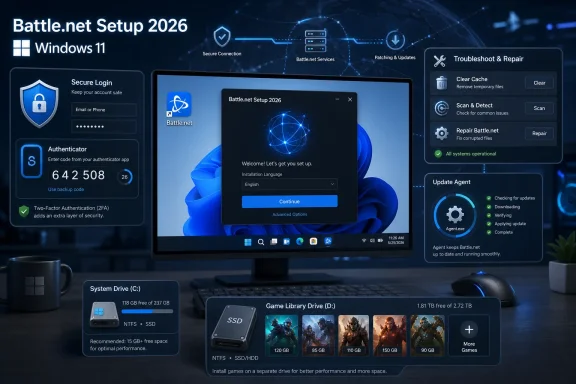
The ProgramData dependency is especially important for PCs with small system drives. Even if games live on a large secondary SSD, Battle.net still uses the C: drive for shared update components and cache. That is the sort of detail that punishes compact Windows installs, especially on machines where the OS drive is a 256GB SSD and the game library lives elsewhere.
The update agent, Agent.exe, is the piece users most often misunderstand. It runs in the background because patching and validation are not handled entirely by the visible launcher window. When it breaks, Battle.net may appear to hang, sleep, wake, loop, or lose track of installed games. When users delete it because it “looks suspicious,” they usually make the launcher less functional, not more secure.
The Battle.net Authenticator remains one of Blizzard’s strongest platform advantages. Many publisher launchers support some form of two-factor login, but Blizzard’s system is deeply woven into the account culture. Longtime players already understand that losing an account is not like resetting a forum password; it can mean losing access to characters, guild roles, purchased expansions, and social credibility.
The move to app-based authentication also reflects the broader industry shift away from SMS. Time-based one-time password systems are not perfect, but they are much better than password-only login and less exposed to SIM-swap attacks than text messages. For Windows users setting up Battle.net on a new PC, enabling the authenticator before installing a large library is the right order of operations.
There is an operational caveat: clock drift still matters. Authentication codes depend on time synchronization, and a badly skewed phone or Windows clock can turn the correct code into a failed login. That is the kind of failure that feels like an account problem when it is really a timekeeping problem.
The correct move on a Windows 11 gaming PC is to set the default game install directory before the first large download. That sounds obvious, yet it is one of the most common mistakes because users often accept defaults during setup and only think about storage once the first 100GB title lands on C:. Moving games later is possible, but validation takes time and mistakes can trigger full re-downloads.
SSD placement also matters more than launcher placement. The Battle.net app itself does not need a high-performance drive, but games such as Diablo IV, Call of Duty, and World of Warcraft benefit from SSD storage during patching, loading, and file validation. Mechanical hard drives still work for some libraries, but they turn scan-and-repair operations into long coffee breaks.
Streaming install support, where available, is a useful compromise rather than magic. It lets players begin before every asset is present, but it assumes stable bandwidth and predictable background downloading. On slower or shared connections, a complete install before first launch may still provide the better experience.
This is the classic bargain of PC game launchers. Users want games patched before they click Play, but they do not want background processes consuming CPU, memory, network bandwidth, or attention. Agent.exe exists because that work has to happen somewhere. The problem is that when it fails, the error language often sounds like folklore: the agent went to sleep, the launcher is waking it, the cache is stale, the manifest is bad.
For Windows troubleshooters, the practical model is simple. If Battle.net cannot install, patch, detect, or launch games, assume the visible app and the update agent may disagree about state. Close both, kill remaining processes, clear the relevant cache folders, and then relaunch from a known-good installer.
That advice is not elegant, but it is realistic. Battle.net’s cache architecture is designed to be rebuildable. Deleting cache while the launcher is closed is often safer than trying to reason from a half-updated manifest left behind after a crash, power loss, VPN drop, or interrupted patch.
The Visual C++ Redistributable remains a classic example. A missing runtime can make an app look broken even though the installer and executable are perfectly legitimate. Users tend to blame the most visible thing, which is Battle.net, when the failure is really a shared Windows component problem.
Hardware acceleration creates another predictable class of Windows 11 complaints. GPU-rendered launcher interfaces are now normal because they make rich storefronts, animations, and embedded web content feel smoother. But on systems with outdated or fragile graphics drivers, the result can be black windows, flicker, green artifacts, or blank panels. Disabling acceleration is a workaround; updating drivers is the fix.
Security software adds yet another layer. Antivirus products and endpoint suites are right to treat auto-updating executables and anti-cheat-adjacent game files with suspicion. But aggressive scanning can stall downloads, block patch writes, or interfere with game launch. On personal PCs, exclusions may be a nuisance. On managed networks, they are policy decisions.
Battle.net survives that cynicism because it predates the modern launcher backlash and because, within its own domain, it actually does something. Blizzard’s cross-game chat, friends presence, authenticator integration, and patching workflows have years of user expectation behind them. It is not just a shopping cart with a Play button.
That history gives Microsoft an asset the Xbox app does not fully replicate. The Xbox app is a subscription and catalog gateway. Battle.net is a community habit. For many players, the launcher is where raid groups, guild friends, seasonal Diablo partners, and old Overwatch contacts already exist.
The risk is that Microsoft overextends it. A launcher that feels coherent with Blizzard, Activision, and a few adjacent Microsoft-published titles could become irritating if it turns into another generalized storefront without the breadth of Steam or the subscription logic of Game Pass. Battle.net’s strength is focus. Diluting that focus would make it just another icon in the tray.
Its larger implication is more interesting than its checklist. Battle.net setup in 2026 is not just about installing a launcher; it is about choosing which Microsoft-controlled PC gaming path you want to inhabit. Steam may still be the default for many PC players, and the Xbox app remains central to Game Pass, but Battle.net has become a parallel route into parts of Microsoft’s catalog.
That route is especially attractive for users already invested in Blizzard’s ecosystem. If your gaming life revolves around World of Warcraft, Diablo IV, Overwatch 2, Hearthstone, or Call of Duty, Battle.net is not optional friction. It is the native control panel for the games you actually play.
For everyone else, the calculus is less generous. Installing Battle.net just for one Microsoft-published title may feel like launcher sprawl, especially if that same title is available through Steam or the Xbox app. Microsoft’s challenge is to make Battle.net feel like a sensible choice rather than a corporate detour.
 Microsoft Keeps the Blizzard Launcher Because It Still Solves a Real Problem
The obvious prediction after Microsoft closed its Activision Blizzard deal was that Battle.net would eventually fade into the Xbox app. That has not happened. Instead, Microsoft has treated Battle.net less like a duplicate storefront and more like a specialized delivery system with an audience that already understands its rituals: login, patch, scan, repair, launch, repeat.That decision makes more sense than it first appears. The Xbox app on Windows remains the Game Pass front door, but Battle.net is still where Blizzard’s PC-native social graph, patching pipeline, authentication habits, and community muscle live. Killing it quickly would create more friction than it removes.
The arrival of games such as Avowed and Doom: The Dark Ages on Battle.net showed the direction of travel. Microsoft is not merely preserving Blizzard’s launcher as a museum piece. It is testing whether Battle.net can serve as a curated Microsoft PC game lane for users who would rather avoid the Microsoft Store plumbing.
That does not mean Battle.net is becoming Steam. It is not a broad marketplace, and its value proposition remains narrow. But narrow is not the same as weak. For players who live inside Blizzard and Activision titles, Battle.net’s launcher, friends list, authenticator, patching agent, and cross-game messaging form a coherent ecosystem in a way many publisher launchers never managed.
The First Installation Decision Is Trust, Not Storage
The most important installation step is also the least glamorous: download the installer from Blizzard’s official source and nowhere else. Battle.net is an account-bearing executable tied to payment details, game licenses, chat history, and sometimes years of character progress. That makes fake installers and repackaged download mirrors a more serious threat than ordinary bloatware.Windows users have been trained to search, click, and run. That habit is dangerous with game launchers because third-party download sites often wrap real installers in unwanted bundles or serve stale versions that immediately trigger update failures. Battle.net’s own update agent is already complex enough without beginning from a compromised or outdated executable.
The user-supplied guide’s emphasis on file integrity is well placed, even if ordinary home users rarely verify hashes before launching an installer. For managed machines, shared gaming PCs, LAN centers, and security-conscious power users, checking the downloaded executable is not paranoia. It is the difference between installing Blizzard’s client and granting admin privileges to something merely wearing Blizzard’s name.
Running the installer with administrator rights is similarly mundane but consequential. Battle.net writes into protected Windows locations, relies on a background update agent, and keeps shared state outside a single user profile. If setup stalls at zero, fails silently, or loops during agent initialization, permissions are one of the first things to suspect.
Battle.net’s Windows Footprint Is Messier Than the Installer Suggests
The launcher may present itself as a single app, but on Windows it is really a small constellation of folders, services, caches, and per-user configuration files. The visible install directory is only part of the story. Program Files holds the launcher binaries, ProgramData holds shared update and cache data, and AppData stores user-specific settings and session material.That design is not unusual for a mature Windows application, but it matters because Battle.net troubleshooting often fails when users delete only the obvious folder. Removing the launcher directory while leaving stale ProgramData or AppData state behind can reproduce the same broken behavior after a reinstall. The “clean reinstall” many users think they performed is often nothing of the sort.
The ProgramData dependency is especially important for PCs with small system drives. Even if games live on a large secondary SSD, Battle.net still uses the C: drive for shared update components and cache. That is the sort of detail that punishes compact Windows installs, especially on machines where the OS drive is a 256GB SSD and the game library lives elsewhere.
The update agent, Agent.exe, is the piece users most often misunderstand. It runs in the background because patching and validation are not handled entirely by the visible launcher window. When it breaks, Battle.net may appear to hang, sleep, wake, loop, or lose track of installed games. When users delete it because it “looks suspicious,” they usually make the launcher less functional, not more secure.
The Account Setup Is Where Convenience and Risk Collide
Battle.net accounts are high-value targets because they combine identity, purchases, rare cosmetics, social trust, and in some cases decades of player history. A compromised account can be used for fraud, spam, resale, harassment, or simple theft of in-game assets. That makes two-factor authentication less of an optional extra and more of a baseline requirement.The Battle.net Authenticator remains one of Blizzard’s strongest platform advantages. Many publisher launchers support some form of two-factor login, but Blizzard’s system is deeply woven into the account culture. Longtime players already understand that losing an account is not like resetting a forum password; it can mean losing access to characters, guild roles, purchased expansions, and social credibility.
The move to app-based authentication also reflects the broader industry shift away from SMS. Time-based one-time password systems are not perfect, but they are much better than password-only login and less exposed to SIM-swap attacks than text messages. For Windows users setting up Battle.net on a new PC, enabling the authenticator before installing a large library is the right order of operations.
There is an operational caveat: clock drift still matters. Authentication codes depend on time synchronization, and a badly skewed phone or Windows clock can turn the correct code into a failed login. That is the kind of failure that feels like an account problem when it is really a timekeeping problem.
Game Installs Are Now a Storage Planning Exercise
Battle.net’s installation wizard may be simple, but the modern game library behind it is not. Blizzard and Activision games routinely occupy tens or hundreds of gigabytes, and the difference between “the launcher fits” and “the library fits” is enormous. A user who treats Battle.net like a lightweight chat client will discover very quickly that the launcher is only the tip of the storage iceberg.The correct move on a Windows 11 gaming PC is to set the default game install directory before the first large download. That sounds obvious, yet it is one of the most common mistakes because users often accept defaults during setup and only think about storage once the first 100GB title lands on C:. Moving games later is possible, but validation takes time and mistakes can trigger full re-downloads.
SSD placement also matters more than launcher placement. The Battle.net app itself does not need a high-performance drive, but games such as Diablo IV, Call of Duty, and World of Warcraft benefit from SSD storage during patching, loading, and file validation. Mechanical hard drives still work for some libraries, but they turn scan-and-repair operations into long coffee breaks.
Streaming install support, where available, is a useful compromise rather than magic. It lets players begin before every asset is present, but it assumes stable bandwidth and predictable background downloading. On slower or shared connections, a complete install before first launch may still provide the better experience.
The Update Agent Is the Launcher’s Least Loved but Most Important Component
Battle.net’s update agent is the hidden machinery that keeps the platform tolerable. It downloads patches, validates files, rebuilds manifests, and helps the launcher recover when a game install is incomplete. It is also the component most associated with stuck installs, cache corruption, and mysterious background activity.This is the classic bargain of PC game launchers. Users want games patched before they click Play, but they do not want background processes consuming CPU, memory, network bandwidth, or attention. Agent.exe exists because that work has to happen somewhere. The problem is that when it fails, the error language often sounds like folklore: the agent went to sleep, the launcher is waking it, the cache is stale, the manifest is bad.
For Windows troubleshooters, the practical model is simple. If Battle.net cannot install, patch, detect, or launch games, assume the visible app and the update agent may disagree about state. Close both, kill remaining processes, clear the relevant cache folders, and then relaunch from a known-good installer.
That advice is not elegant, but it is realistic. Battle.net’s cache architecture is designed to be rebuildable. Deleting cache while the launcher is closed is often safer than trying to reason from a half-updated manifest left behind after a crash, power loss, VPN drop, or interrupted patch.
Windows 11 Compatibility Is Not the Hard Part
Battle.net works on Windows 11, and that is not the interesting issue. The interesting issue is the layered dependency stack beneath a modern launcher: Visual C++ runtimes, GPU drivers, TLS support, firewall rules, DNS behavior, antivirus hooks, overlay software, and user account permissions. When the launcher fails, the user often sees one symptom for a dozen possible causes.The Visual C++ Redistributable remains a classic example. A missing runtime can make an app look broken even though the installer and executable are perfectly legitimate. Users tend to blame the most visible thing, which is Battle.net, when the failure is really a shared Windows component problem.
Hardware acceleration creates another predictable class of Windows 11 complaints. GPU-rendered launcher interfaces are now normal because they make rich storefronts, animations, and embedded web content feel smoother. But on systems with outdated or fragile graphics drivers, the result can be black windows, flicker, green artifacts, or blank panels. Disabling acceleration is a workaround; updating drivers is the fix.
Security software adds yet another layer. Antivirus products and endpoint suites are right to treat auto-updating executables and anti-cheat-adjacent game files with suspicion. But aggressive scanning can stall downloads, block patch writes, or interfere with game launch. On personal PCs, exclusions may be a nuisance. On managed networks, they are policy decisions.
The Launcher War Is Really a Trust War
PC gamers complain about launchers because they experience them as friction. Every publisher wants an account, an updater, a store page, a telemetry path, and a social layer. The result is a desktop littered with clients that all claim to improve the experience while mostly serving the publisher’s need for control.Battle.net survives that cynicism because it predates the modern launcher backlash and because, within its own domain, it actually does something. Blizzard’s cross-game chat, friends presence, authenticator integration, and patching workflows have years of user expectation behind them. It is not just a shopping cart with a Play button.
That history gives Microsoft an asset the Xbox app does not fully replicate. The Xbox app is a subscription and catalog gateway. Battle.net is a community habit. For many players, the launcher is where raid groups, guild friends, seasonal Diablo partners, and old Overwatch contacts already exist.
The risk is that Microsoft overextends it. A launcher that feels coherent with Blizzard, Activision, and a few adjacent Microsoft-published titles could become irritating if it turns into another generalized storefront without the breadth of Steam or the subscription logic of Game Pass. Battle.net’s strength is focus. Diluting that focus would make it just another icon in the tray.
The 12-Step Guide Gets the Shape Right, Even When the Bigger Story Is Missing
The submitted setup guide is strongest when it treats Battle.net as a Windows application with real failure modes rather than a marketing surface. Download from the official source. Run with appropriate permissions. Set the game install directory early. Enable two-factor authentication. Learn where the cache lives. Use Scan and Repair before reinstalling a 100GB game. Those are the habits that save users time.Its larger implication is more interesting than its checklist. Battle.net setup in 2026 is not just about installing a launcher; it is about choosing which Microsoft-controlled PC gaming path you want to inhabit. Steam may still be the default for many PC players, and the Xbox app remains central to Game Pass, but Battle.net has become a parallel route into parts of Microsoft’s catalog.
That route is especially attractive for users already invested in Blizzard’s ecosystem. If your gaming life revolves around World of Warcraft, Diablo IV, Overwatch 2, Hearthstone, or Call of Duty, Battle.net is not optional friction. It is the native control panel for the games you actually play.
For everyone else, the calculus is less generous. Installing Battle.net just for one Microsoft-published title may feel like launcher sprawl, especially if that same title is available through Steam or the Xbox app. Microsoft’s challenge is to make Battle.net feel like a sensible choice rather than a corporate detour.
The Practical Read for WindowsForum Readers
For Windows enthusiasts and IT pros, the best way to approach Battle.net is neither blind trust nor reflexive launcher hatred. Treat it like any other privileged, auto-updating Windows client that handles authentication, content delivery, background services, and large-file mutation. That means install it cleanly, secure the account, understand its folders, and document the repair path before the next patch night.- Use Blizzard’s official installer and avoid third-party mirrors, because a game launcher is an account-security boundary as much as an application.
- Configure the default game directory before downloading anything large, because moving Battle.net games later is possible but slower than doing it right up front.
- Enable two-factor authentication before attaching payment methods or investing time in a new library, because Battle.net accounts remain attractive targets.
- Keep enough free space on the Windows system drive even when games live elsewhere, because Battle.net’s shared cache and update components still depend on C:.
- Treat Agent.exe as required infrastructure rather than suspicious debris, because deleting it breaks the patching and validation model the launcher relies on.
- Clear cache and use Scan and Repair before reinstalling full games, because most Battle.net failures are state problems rather than corrupted entire libraries.
References
- Primary source: tech-insider.org
Published: Sat, 20 Jun 2026 16:13:35 GMT
Loading…
tech-insider.org - Related coverage: us.forums.blizzard.com
Loading…
us.forums.blizzard.com - Related coverage: gamespot.com
Loading…
www.gamespot.com - Related coverage: makeuseof.com
Loading…
www.makeuseof.com - Related coverage: download.battle.net
Download Battle.net for Windows and Mac | Battle.net
Download Battle.net to connect with friends and launch games.download.battle.net - Related coverage: news.blizzard.com
Loading…
news.blizzard.com
- Related coverage: techyorker.com
Loading…
techyorker.com