
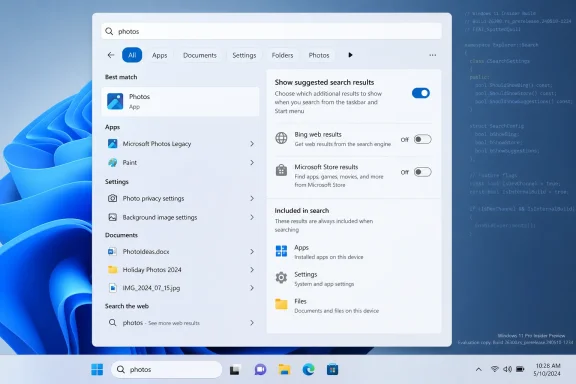
Microsoft is testing a Windows 11 Search setting that lets users disable Bing-powered web results and Microsoft Store suggestions from the taskbar and Start search interface, with the option appearing in leaked Insider build 26300.8697 on June 19, 2026. If it ships broadly, it would mark a rare retreat from one of Windows 11’s most persistent irritations: the operating system’s habit of treating a local search box as a web traffic funnel. The change is not just cosmetic. It is a tacit admission that Windows Search became less trustworthy when Microsoft blurred the line between finding your own files and promoting Microsoft’s online services.
Windows Search has always carried an implicit promise: type a thing, get the thing. A file, an app, a setting, a Control Panel relic, a recently installed utility — the box existed because the modern Windows shell is too sprawling to navigate purely by memory. That promise weakened in Windows 10 and became harder to defend in Windows 11, where the search surface increasingly behaved like a small Bing portal stapled to the taskbar.
The leaked setting in build 26300.8697 matters because it appears to restore a basic distinction Microsoft should never have allowed to collapse. A user searching for “Device Manager” is usually not asking for a web result. A sysadmin searching for a local script is not asking for a shopping prompt from the Microsoft Store. A desktop search box should not require the same skepticism users apply to a browser address bar.
The new section reportedly called “Show suggested search results” appears designed to let users disable web results with a normal Settings toggle rather than a registry value, Group Policy object, or third-party debloating tool. That matters more than the toggle itself. Windows has long allowed determined administrators to suppress pieces of the web-search experience, but the fact that it took administrative plumbing to express such an ordinary preference was the problem.
Microsoft also appears to be testing a separate control for Microsoft Store results. That is a small but telling distinction. The company is not merely offering to hide Bing links; it is acknowledging that Store suggestions are part of the same trust problem when they appear in a context users experience as local search.
That distinction matters because defaults are policy. When Microsoft buries a setting in administrative tooling instead of exposing it in Settings, it is making a product decision about whose preferences count. The company may have argued that web-enhanced search was useful, but the lack of a simple off switch made the argument feel less like confidence and more like compulsion.
The registry workaround most commonly associated with disabling search suggestions was not hard for IT pros, but it was still a poor answer for consumers. Registry edits are brittle, intimidating, and easy to misapply. They also carry an unspoken message: if you want your local search box to behave locally, you are stepping outside the intended path.
That is why this leak feels bigger than a checkbox. A visible toggle changes the legitimacy of the preference. It says that wanting Windows Search to search Windows is not a hack, not a niche enterprise posture, and not an anti-Microsoft tantrum. It is a normal way to use a PC.
Search is one of the few operating system surfaces where users type with intent and expectation. They expect immediacy and locality. When Windows responds with web suggestions, promotional cards, or Store entries, it turns a high-intent system interaction into a mixed commercial surface. That weakens the mental model of the OS.
This is especially damaging for power users because search is often the fastest path to privileged tools. The Windows key followed by a few letters is muscle memory. If the shell sometimes interprets that input as a Bing query or a Store discovery session, the user has to pause and visually parse the results. That tiny hesitation is the tax Microsoft imposed on users to support a strategy they did not ask for.
The same applies in business environments, though the stakes are different. IT departments care about predictability, supportability, and data boundaries. A search surface that reaches outward when users are trying to work inward creates governance questions, even if the individual query is mundane. It also complicates training: “Press Start and type the app name” is clean guidance until the interface offers cloud suggestions, web links, or Store results that do not match the organization’s software policy.
That distinction has practical consequences. In managed environments, the Microsoft Store may be restricted, replaced by Company Portal, or irrelevant to the software deployment model. In home environments, Store suggestions can confuse less technical users who may not understand why Windows is offering an app they do not have instead of finding the one they do.
Microsoft has spent years trying to make the Store more central to Windows, and some of that work has been genuinely useful. The Store is better than it was, and the Windows Package Manager ecosystem has made software acquisition less chaotic for many users. But that does not mean Store promotion belongs inside every search result set.
A separate Store-results control would recognize that software discovery and local search are different jobs. That is the kind of boundary Windows needs more of, not less.
Search Highlights were always a strange fit for Windows. The feature could be charming in theory — a rotating set of dates, events, images, and suggested topics — but it treated the search panel as a content destination. Most users do not open Search to browse. They open it to leave as quickly as possible with the thing they came for.
A cleaner recent page would help restore Search as a tool rather than a feed. That distinction has become increasingly important as Microsoft layers more surfaces into Windows: Widgets, Copilot, Edge promotions, Microsoft 365 prompts, Store placements, account nudges, and OneDrive reminders. Each surface may have a product rationale. Together, they create an OS that often feels like it is negotiating with the user.
The reported richer local result cards are also a smarter direction. Showing more metadata, file paths, and contextual details gives Search a reason to exist beyond being a launcher. If Windows can help users distinguish between similarly named files, identify where something lives, or preview useful system information without opening another window, that is a genuine productivity win.
The irony is that this is exactly where Microsoft’s search investment should have gone all along. Users did not reject a smarter search box. They rejected a search box that seemed smarter about Microsoft’s business priorities than about their local machine.
Still, this is not a random string discovered in an obscure binary with no visible UI. The option reportedly appeared in screenshots from a real build and was shown in the context of Windows Insider activity. That suggests Microsoft is at least far enough along to test the experience publicly or semi-publicly, not merely experimenting with a dormant policy hook.
The earlier 26300 builds also matter because they have been associated with broader shell work, including Start menu and taskbar changes. Microsoft appears to be using this development branch to revisit some of Windows 11’s launch-era rigidity. That does not guarantee the search toggles will arrive in the next stable feature update, but it places them inside a wider pattern: Windows 11 is slowly giving back controls it should not have removed or obscured.
There is also a timing question. If Microsoft wants these controls in a major Windows 11 feature update, it needs telemetry, localization, enterprise policy mapping, documentation, and a stable Settings location. A toggle that works in an experimental build is not the same as a supportable feature for hundreds of millions of PCs. The optimistic read is that the hard product decision has been made. The cautious read is that the implementation still has plenty of gates to clear.
But it is worth being sober about what that means. Feature flags are not hidden settings in the same sense as a finished preference waiting for a marketing announcement. They can expose incomplete UI, half-wired backend behavior, missing policy interactions, or features that conflict with later cumulative updates. They are a way to observe Microsoft’s work in progress, not a promise of day-to-day reliability.
For production machines, the advice remains boring because boring is correct. Do not enable experimental shell features on a PC you need for work. Do not roll this into an image. Do not tell users a fix is available just because it can be coaxed out of an Insider build. If the feature matters to your organization, track it, test it in a lab, and wait for Microsoft to put it in a supported channel.
That caution does not diminish the importance of the leak. If anything, it reinforces it. The right outcome is not a better ViveTool recipe. The right outcome is a supported Settings toggle, a matching policy surface for administrators, and clear documentation about what gets disabled.
It would be too neat to say this search toggle exists only because of regulators. Users have complained about Bing in Windows Search for years, and Microsoft has also been trying to repair some of Windows 11’s rougher edges as the OS matures. But it would be naïve to ignore the climate. Platform owners are being asked, more aggressively than before, to justify why their own services are privileged inside operating-system surfaces.
The interesting question is whether Microsoft treats this as a global user-control feature or another regionally constrained compliance valve. Windows has sometimes exposed different options depending on market, build, and policy environment. That approach may satisfy legal requirements, but it fragments the experience and irritates users who can see that someone else’s copy of Windows is more configurable than theirs.
A global toggle would be the cleaner decision. It would let Microsoft frame the change as product maturity rather than reluctant compliance. More importantly, it would avoid the absurdity of making local-first search a regional privilege.
The company also needs to avoid the classic Windows problem of overlapping controls. Windows already has settings for search permissions, cloud content search, search history, safe search, indexing behavior, and search highlights. Add Group Policy, mobile device management, region rules, and Microsoft account differences, and the configuration surface becomes a maze. A web-search toggle should simplify that maze, not become another partially redundant switch.
Enterprise mapping will be just as important. Administrators will want to know whether the new UI corresponds to existing policies or introduces new ones. They will want predictable behavior across editions and regions. They will want assurance that disabling web results actually disables outbound web query behavior from the Windows Search surface, not merely hides a class of results after the fact.
Then there is the Copilot question. Microsoft is moving aggressively to integrate AI assistance into Windows, Microsoft 365, Edge, and developer tools. If Windows Search becomes cleaner while another nearby surface becomes the new suggestion engine, users will notice. A local-search toggle should not become a shell game where Bing disappears from one panel and reappears under a different brand.
A good Windows Search experience should be boring by default and extensible by choice. It should find local apps quickly. It should rank installed software above speculative web matches. It should make indexed files easy to distinguish from cloud content. It should treat Store discovery, Bing results, and AI assistance as optional layers rather than inseparable ingredients.
That kind of restraint is hard for modern platform companies because every surface is a distribution opportunity. The Start menu can promote apps. The taskbar can promote services. The browser can promote accounts. The search panel can promote content. But the PC remains personal in a way that phones and web apps often are not. Users still expect a desktop operating system to serve the machine in front of them first.
If Microsoft follows through, the new toggle would be a small example of a larger design principle Windows badly needs: the OS should stop confusing integration with intrusion. Integrated features are available when needed. Intrusive features appear when not asked for and make users hunt for the off switch.
 Microsoft Finally Separates Search From Suggestion
Windows Search has always carried an implicit promise: type a thing, get the thing. A file, an app, a setting, a Control Panel relic, a recently installed utility — the box existed because the modern Windows shell is too sprawling to navigate purely by memory. That promise weakened in Windows 10 and became harder to defend in Windows 11, where the search surface increasingly behaved like a small Bing portal stapled to the taskbar.The leaked setting in build 26300.8697 matters because it appears to restore a basic distinction Microsoft should never have allowed to collapse. A user searching for “Device Manager” is usually not asking for a web result. A sysadmin searching for a local script is not asking for a shopping prompt from the Microsoft Store. A desktop search box should not require the same skepticism users apply to a browser address bar.
The new section reportedly called “Show suggested search results” appears designed to let users disable web results with a normal Settings toggle rather than a registry value, Group Policy object, or third-party debloating tool. That matters more than the toggle itself. Windows has long allowed determined administrators to suppress pieces of the web-search experience, but the fact that it took administrative plumbing to express such an ordinary preference was the problem.
Microsoft also appears to be testing a separate control for Microsoft Store results. That is a small but telling distinction. The company is not merely offering to hide Bing links; it is acknowledging that Store suggestions are part of the same trust problem when they appear in a context users experience as local search.
The Old Workarounds Were a Policy Disguised as a Missing Feature
For years, disabling web results in Windows Search was possible in the same way many Windows annoyances are “possible” to fix: technically, awkwardly, and with just enough friction that ordinary users would never do it. Windows 11 Pro users could lean on Group Policy. Windows 11 Home users were often pushed toward Registry Editor. Enthusiasts used tools like ViveTool, O&O ShutUp10++, ExplorerPatcher, or Start menu replacements to tame what should have been a first-party preference.That distinction matters because defaults are policy. When Microsoft buries a setting in administrative tooling instead of exposing it in Settings, it is making a product decision about whose preferences count. The company may have argued that web-enhanced search was useful, but the lack of a simple off switch made the argument feel less like confidence and more like compulsion.
The registry workaround most commonly associated with disabling search suggestions was not hard for IT pros, but it was still a poor answer for consumers. Registry edits are brittle, intimidating, and easy to misapply. They also carry an unspoken message: if you want your local search box to behave locally, you are stepping outside the intended path.
That is why this leak feels bigger than a checkbox. A visible toggle changes the legitimacy of the preference. It says that wanting Windows Search to search Windows is not a hack, not a niche enterprise posture, and not an anti-Microsoft tantrum. It is a normal way to use a PC.
Windows Search Became a Trust Problem Before It Became a UX Problem
The loudest complaints about Bing in Windows Search are usually framed as annoyance: clutter, bad relevance, unwanted news cards, or the absurdity of web results outranking installed apps. Those complaints are valid. But the deeper issue is trust.Search is one of the few operating system surfaces where users type with intent and expectation. They expect immediacy and locality. When Windows responds with web suggestions, promotional cards, or Store entries, it turns a high-intent system interaction into a mixed commercial surface. That weakens the mental model of the OS.
This is especially damaging for power users because search is often the fastest path to privileged tools. The Windows key followed by a few letters is muscle memory. If the shell sometimes interprets that input as a Bing query or a Store discovery session, the user has to pause and visually parse the results. That tiny hesitation is the tax Microsoft imposed on users to support a strategy they did not ask for.
The same applies in business environments, though the stakes are different. IT departments care about predictability, supportability, and data boundaries. A search surface that reaches outward when users are trying to work inward creates governance questions, even if the individual query is mundane. It also complicates training: “Press Start and type the app name” is clean guidance until the interface offers cloud suggestions, web links, or Store results that do not match the organization’s software policy.
The Store Toggle Is the Quietly Important Part
The reported ability to disable Microsoft Store results may prove just as important as the web-search toggle. Store suggestions in Windows Search occupy an uncomfortable middle ground. They are not quite ads in the old banner sense, but they are not local results either. They are prompts to acquire something from Microsoft’s distribution channel, shown in a place where the user may simply be trying to launch what is already installed.That distinction has practical consequences. In managed environments, the Microsoft Store may be restricted, replaced by Company Portal, or irrelevant to the software deployment model. In home environments, Store suggestions can confuse less technical users who may not understand why Windows is offering an app they do not have instead of finding the one they do.
Microsoft has spent years trying to make the Store more central to Windows, and some of that work has been genuinely useful. The Store is better than it was, and the Windows Package Manager ecosystem has made software acquisition less chaotic for many users. But that does not mean Store promotion belongs inside every search result set.
A separate Store-results control would recognize that software discovery and local search are different jobs. That is the kind of boundary Windows needs more of, not less.
A Cleaner Search UI Is Microsoft Admitting the Panel Got Too Loud
The leaked build reportedly includes a “highlight-less” recent and suggested page, stripping away the Bing-flavored Search Highlights that have made the Windows Search flyout feel busier than necessary. This is not just a visual refresh. It is a philosophical correction.Search Highlights were always a strange fit for Windows. The feature could be charming in theory — a rotating set of dates, events, images, and suggested topics — but it treated the search panel as a content destination. Most users do not open Search to browse. They open it to leave as quickly as possible with the thing they came for.
A cleaner recent page would help restore Search as a tool rather than a feed. That distinction has become increasingly important as Microsoft layers more surfaces into Windows: Widgets, Copilot, Edge promotions, Microsoft 365 prompts, Store placements, account nudges, and OneDrive reminders. Each surface may have a product rationale. Together, they create an OS that often feels like it is negotiating with the user.
The reported richer local result cards are also a smarter direction. Showing more metadata, file paths, and contextual details gives Search a reason to exist beyond being a launcher. If Windows can help users distinguish between similarly named files, identify where something lives, or preview useful system information without opening another window, that is a genuine productivity win.
The irony is that this is exactly where Microsoft’s search investment should have gone all along. Users did not reject a smarter search box. They rejected a search box that seemed smarter about Microsoft’s business priorities than about their local machine.
Build 26300 Is a Signal, Not a Shipping Promise
The fact that this appears in Windows 11 Insider Preview build 26300.8697 should temper expectations. Insider builds are not contracts. Hidden feature flags are even less binding. Microsoft routinely tests interface changes, exposes them to small rings, hides them again, or ships them months later in altered form.Still, this is not a random string discovered in an obscure binary with no visible UI. The option reportedly appeared in screenshots from a real build and was shown in the context of Windows Insider activity. That suggests Microsoft is at least far enough along to test the experience publicly or semi-publicly, not merely experimenting with a dormant policy hook.
The earlier 26300 builds also matter because they have been associated with broader shell work, including Start menu and taskbar changes. Microsoft appears to be using this development branch to revisit some of Windows 11’s launch-era rigidity. That does not guarantee the search toggles will arrive in the next stable feature update, but it places them inside a wider pattern: Windows 11 is slowly giving back controls it should not have removed or obscured.
There is also a timing question. If Microsoft wants these controls in a major Windows 11 feature update, it needs telemetry, localization, enterprise policy mapping, documentation, and a stable Settings location. A toggle that works in an experimental build is not the same as a supportable feature for hundreds of millions of PCs. The optimistic read is that the hard product decision has been made. The cautious read is that the implementation still has plenty of gates to clear.
ViveTool Is for Testers, Not a Shortcut to Stability
The leaked feature can reportedly be enabled with ViveTool using a set of feature IDs on build 26300.8697. That will be irresistible to enthusiasts, and WindowsForum readers know the drill: download ViveTool, run an elevated command prompt, flip the hidden IDs, reboot, and go exploring. It is part of the fun of following Windows development.But it is worth being sober about what that means. Feature flags are not hidden settings in the same sense as a finished preference waiting for a marketing announcement. They can expose incomplete UI, half-wired backend behavior, missing policy interactions, or features that conflict with later cumulative updates. They are a way to observe Microsoft’s work in progress, not a promise of day-to-day reliability.
For production machines, the advice remains boring because boring is correct. Do not enable experimental shell features on a PC you need for work. Do not roll this into an image. Do not tell users a fix is available just because it can be coaxed out of an Insider build. If the feature matters to your organization, track it, test it in a lab, and wait for Microsoft to put it in a supported channel.
That caution does not diminish the importance of the leak. If anything, it reinforces it. The right outcome is not a better ViveTool recipe. The right outcome is a supported Settings toggle, a matching policy surface for administrators, and clear documentation about what gets disabled.
Europe’s Shadow Hangs Over This Toggle
Microsoft’s broader Windows unbundling moves have not happened in a vacuum. In recent years, regulatory pressure in Europe has pushed large platform vendors to loosen defaults, expose choice screens, and separate services that were previously treated as inseparable. Windows has already seen region-specific behavior around browsers, search providers, and system components.It would be too neat to say this search toggle exists only because of regulators. Users have complained about Bing in Windows Search for years, and Microsoft has also been trying to repair some of Windows 11’s rougher edges as the OS matures. But it would be naïve to ignore the climate. Platform owners are being asked, more aggressively than before, to justify why their own services are privileged inside operating-system surfaces.
The interesting question is whether Microsoft treats this as a global user-control feature or another regionally constrained compliance valve. Windows has sometimes exposed different options depending on market, build, and policy environment. That approach may satisfy legal requirements, but it fragments the experience and irritates users who can see that someone else’s copy of Windows is more configurable than theirs.
A global toggle would be the cleaner decision. It would let Microsoft frame the change as product maturity rather than reluctant compliance. More importantly, it would avoid the absurdity of making local-first search a regional privilege.
Microsoft Can Still Mess This Up
The danger now is that Microsoft ships the toggle but preserves ambiguity. If the setting says “Show suggested search results,” many users may not immediately understand whether that means Bing results, Store suggestions, Search Highlights, AI-generated suggestions, cloud files, work results, or some mixture of all of them. Microsoft’s wording will matter.The company also needs to avoid the classic Windows problem of overlapping controls. Windows already has settings for search permissions, cloud content search, search history, safe search, indexing behavior, and search highlights. Add Group Policy, mobile device management, region rules, and Microsoft account differences, and the configuration surface becomes a maze. A web-search toggle should simplify that maze, not become another partially redundant switch.
Enterprise mapping will be just as important. Administrators will want to know whether the new UI corresponds to existing policies or introduces new ones. They will want predictable behavior across editions and regions. They will want assurance that disabling web results actually disables outbound web query behavior from the Windows Search surface, not merely hides a class of results after the fact.
Then there is the Copilot question. Microsoft is moving aggressively to integrate AI assistance into Windows, Microsoft 365, Edge, and developer tools. If Windows Search becomes cleaner while another nearby surface becomes the new suggestion engine, users will notice. A local-search toggle should not become a shell game where Bing disappears from one panel and reappears under a different brand.
The Best Version of Windows Search Is Boring
The lesson here is not that Windows Search should never touch the internet. Some users like web suggestions. Some use Search as a quick way to launch browser queries. Microsoft’s cloud services can be useful when they surface the right work file, email, or document in the right context. The issue is consent and clarity.A good Windows Search experience should be boring by default and extensible by choice. It should find local apps quickly. It should rank installed software above speculative web matches. It should make indexed files easy to distinguish from cloud content. It should treat Store discovery, Bing results, and AI assistance as optional layers rather than inseparable ingredients.
That kind of restraint is hard for modern platform companies because every surface is a distribution opportunity. The Start menu can promote apps. The taskbar can promote services. The browser can promote accounts. The search panel can promote content. But the PC remains personal in a way that phones and web apps often are not. Users still expect a desktop operating system to serve the machine in front of them first.
If Microsoft follows through, the new toggle would be a small example of a larger design principle Windows badly needs: the OS should stop confusing integration with intrusion. Integrated features are available when needed. Intrusive features appear when not asked for and make users hunt for the off switch.
The 26300 Leak Gives Windows Users a Rarely Clear Win
The most concrete read of build 26300.8697 is that Microsoft is testing a more honest Windows Search: one that can be local-first, less cluttered, and less commercially noisy. That does not make the feature guaranteed, and it does not erase years of frustration. But it is still a meaningful shift in the right direction.- Microsoft is testing a native Windows 11 Settings control to disable Bing-powered web results in Windows Search.
- The same leaked Search work appears to include a way to suppress Microsoft Store results from the local search experience.
- The refreshed Search interface reportedly removes Search Highlights-style clutter and presents a cleaner recent and suggested view.
- Richer local result cards could make Search more useful for finding files, apps, paths, and system details without opening extra windows.
- The feature is still hidden in an experimental Insider build, so ViveTool activation is best treated as lab work rather than a production fix.
- The real test will be whether Microsoft ships the toggle globally, documents it clearly, and maps it cleanly to enterprise policy.
References
- Primary source: thewincentral.com
Published: 2026-06-20T05:10:08.246727
Microsoft Windows 11 Search Update: Disable Web (Bing) & Store Results. How to Enable using ViveTool - WinCentral
Microsoft is finally adding a native toggle to turn off web (Bing) searches and Microsoft Store results in Windows 11 Search. How to enable using the ViveTool - Read in Windows 11 News on WinCentral thewincentral.com
- Related coverage: windowscentral.com
How to stop internet results in Search for Windows 11 | Windows Central
Turn off online suggestions inside the Windows Search feature and regain a local-only experience on Windows 11.www.windowscentral.com - Related coverage: techrepublic.com
Windows 11 Search Could Get a Bing Results Toggle - TechRepublic
Microsoft is testing a Windows 11 Search toggle for Bing web results and Store suggestions, but the setting is not publicly available yet.www.techrepublic.com
- Related coverage: tomshardware.com
How to Disable Windows Web Search and Speed Up Your PC | Tom's Hardware
Stop Windows from showing you web results when you just want files and apps.www.tomshardware.com - Related coverage: techradar.com
Is Microsoft finally going to de-spam Windows 11 search? It looks that way — and I'm shocked that my most-wanted change could be incoming | TechRadar
Another crowd-pleasing move from Microsoft (hopefully)www.techradar.com - Related coverage: windowslatest.com
Microsoft is letting you kill Bing in Windows 11 Search, after years of forcing it on every PC
Microsoft is testing a new Windows 11 Search toggle that disables Bing, MSN, and Microsoft Store results, ending years of forced web results. www.windowslatest.com
- Related coverage: ubergizmo.com
Microsoft Introduces Option To Disable Bing Web Results In Windows 11 | Ubergizmo
Microsoft has announced a long-awaited update for Windows 11 that addresses a persistent user complaint: the forced integration of Bing web results...www.ubergizmo.com - Related coverage: techbout.com
How to Disable Web Results in Windows Search - Techbout
You can disable Web Results in Windows Search (Taskbar or Start Menu Search Box) by creating a New Registry key on your computer.www.techbout.com - Related coverage: tech.yahoo.com
Microsoft to Let Windows 11 Users Disable Web Results in Search
At a Windows Insider meetup in San Francisco, Microsoft previewed a few upcoming enhancements to the OS, including a way to shut off web search from the main search function.tech.yahoo.com - Related coverage: windowsforum.com
Windows 11 Let Users Turn Off Web Results in Search: Settings Toggle | Windows Forum
Microsoft is developing a Windows 11 setting that will let users turn off web results in the operating system’s built-in search interface, with the option...windowsforum.com - Related coverage: universalbusinesscouncil.org
Microsoft to Allow Users to Disable Web Search in Windows 11
Learn how Microsoft’s latest Windows 11 update lets users disable web search results, offering greater privacy, control, and a more focused search experience.www.universalbusinesscouncil.org - Related coverage: startupnews.fyi