
Microsoft’s Office apps for Mac, iPhone, and iPad need a licensing-certificate update before July 13, 2026, or affected installations of Word, Excel, PowerPoint, Outlook, and OneNote may fall into reduced functionality mode, where documents can be opened and printed but not edited, saved, or created. The apps are not being deleted, and the files are not being encrypted or confiscated. But for users on older Apple hardware, unsupported operating systems, or abandoned Office builds, that distinction may feel academic the first time Word opens a document and refuses to let them change it.
The story is being framed in some corners as a sudden Microsoft rug-pull, and there is truth in the frustration. A productivity suite sold as desktop software is about to demonstrate how dependent even “local” applications have become on remote licensing, certificates, app-store-era signing rules, and vendor support calendars. The real lesson is larger than Office: the modern personal computer is increasingly a stack of expiring promises.
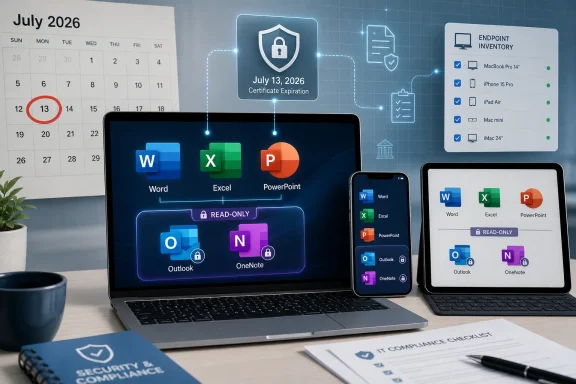
The immediate trigger is mundane in the way enterprise IT problems often are: a certificate used to validate Office licensing on Apple platforms expires on July 13, 2026. Microsoft has published guidance telling users and administrators to update affected Office apps before that date. If they do not, the apps may enter reduced functionality mode, allowing users to open, view, and print existing files but blocking editing, saving, saving as, and creating new documents.
That phrase, reduced functionality mode, is doing a lot of work. It sounds like a graceful fallback, and in one sense it is. Word is not crashing on launch, Excel is not deleting spreadsheets, and Outlook is not necessarily vanishing from the Dock.
But in practical terms, an office suite that can read but not write is no longer an office suite. It is a document viewer with a familiar ribbon.
The controversy is sharpened by the fact that this affects both Microsoft 365 subscribers and owners of one-time-purchase Office releases, including Office 2019 and Office 2021 for Mac. For subscription users, the fix is conceptually simple: update the operating system if needed, then update Office. For perpetual-license users on unsupported builds, especially Office 2019 for Mac, the answer is far less satisfying.
Microsoft can accurately say the issue is tied to licensing validation and certificate expiration. Users can just as accurately say that a product they bought to edit documents may stop editing them because a vendor-controlled trust mechanism aged out. Both things can be true, which is why this story has such a long tail.
The operating-system requirement is where confusion begins. Microsoft’s consumer-facing support guidance says users should be on macOS 12 Monterey or later, or iOS/iPadOS 17 or later, before updating the Office apps. Microsoft’s managed-device guidance for enterprise administrators is stricter in practice because current Microsoft 365 app servicing on Mac follows Microsoft’s rolling support policy for recent macOS releases. That is why some summaries point to macOS 14 Sonoma as the safer practical baseline for ongoing support, even though the certificate-update floor in Microsoft’s support article is macOS 12.
This distinction matters. A home user on Monterey may still be able to update to the certificate-carrying Office build and avoid the July problem. An IT department managing a fleet has to think beyond one patch event and ask whether that Mac will continue to receive Microsoft 365 app updates, security fixes, and support through the next servicing cycle.
The user-facing symptom, however, is simple enough. If the app version is too old after July 13, Office may still launch, but it may no longer behave like licensed software. For people who only occasionally open a Word document, the failure may arrive as an annoyance. For a student, a legal office, a small business bookkeeper, or a nonprofit running old donated Macs, it can become a work stoppage.
Microsoft’s support lifecycle tells a different story. Office 2019 for Mac exited mainstream support years before this 2026 certificate deadline. Once a product falls out of support, Microsoft generally does not owe it feature updates, bug fixes, compatibility updates, or new trust-chain plumbing. From Redmond’s point of view, the calendar closed before the certificate did.
That may be legally and contractually defensible, but it is emotionally combustible. A user who bought Office 2019 to avoid subscriptions is unlikely to be persuaded by a lifecycle matrix. They will see a local app that worked yesterday and refuses to edit tomorrow.
This is where “perpetual” software becomes a word of art rather than a plain-English promise. The license may be perpetual, but the activation services, certificates, operating-system compatibility, security frameworks, and update channels around it are not. The license can outlive the machinery required to make the licensed thing useful.
Office 2021 for Mac users are in a somewhat better position if they can update to a supported build before July 13. But the broader lesson still applies. A one-time purchase no longer necessarily means software that remains functionally independent of vendor infrastructure for a decade. It often means a longer runway before the next forced migration.
Modern Apple operating systems are built around code signing, notarization, sandboxing, app entitlements, hardened runtime checks, privacy prompts, and certificate trust chains. These mechanisms improve security and make malware harder to distribute. They also make old software more dependent on credentials and validation systems that can expire, be revoked, or become incompatible with newer platform requirements.
On iOS and iPadOS, the walls are even higher. Users generally cannot sideload or preserve old productivity apps in the same flexible way they might preserve an old Windows desktop application. The App Store update pipeline is the support pipeline. Once an app can no longer be updated on a device because the operating system is too old, the user’s options narrow quickly.
That is the trade-off Apple has sold successfully for years: a more controlled computing environment in exchange for better security, simpler updates, and less user-facing maintenance. But the bill comes due when hardware falls off the supported operating-system list. A perfectly functional iPad can become a poor home for modern productivity software not because the processor cannot render a document, but because the platform stack around the document editor has moved on.
Microsoft is responsible for its own certificate and licensing architecture. Apple is responsible for the lifecycle pressure exerted by its platforms. Users are caught in the seam between the two.
That does not mean Windows is immune to the same underlying trend. Microsoft has spent years tying Windows, Office, OneDrive, Teams, Edge, and Microsoft 365 together through accounts, cloud entitlements, activation checks, and policy-managed services. Windows users know perfectly well what it feels like when the local PC becomes a client for something remote.
Still, Windows has historically been more tolerant of old desktop software. Win32 compatibility is one of Microsoft’s great strengths and great burdens. Ancient line-of-business applications can limp along for years on Windows in a way that would be unimaginable on iOS and increasingly awkward on macOS.
That compatibility culture is why this Mac Office issue feels so alien to some Windows users. The idea that a locally installed productivity suite could suddenly become read-only because a certificate used for licensing validation expired cuts against the old desktop bargain. Install the app, keep the installer, keep the license key, and run it until the hardware dies.
That bargain has been weakening for a long time. July 13 is just a date that makes the erosion visible.
Microsoft’s guidance points administrators toward management tools such as Intune, Configuration Manager, and inventory systems to identify Macs and mobile devices running Office app versions below the required threshold. That is sensible advice, but it assumes the organization already has decent endpoint management in place. Many schools, nonprofits, small businesses, and local offices do not.
The ugly scenario is a mixed Apple fleet where some devices update automatically, some are pinned for compatibility, some belong to users, some are managed by mobile-device-management profiles, and some are old enough that nobody is quite sure why they are still in service. In that environment, a certificate deadline becomes a discovery mechanism. The organization learns what it owns when the helpdesk queue lights up.
The right response is not merely to push Office updates. Administrators need to map three overlapping support states: the Apple hardware model, the operating-system version, and the Office app version. A Mac capable of running a supported macOS release is a patching problem. A Mac stuck below the minimum OS is a replacement or workaround problem. An Office 2019 installation that cannot receive the relevant build is a licensing and procurement problem.
The July deadline should also prompt a review of update deferral policies. Many IT shops delay Office and macOS updates to avoid breaking workflows. That caution is rational. But when the deferred update contains a licensing certificate that preserves editing rights, delay becomes its own outage risk.
The danger is assuming that App Store updates, Microsoft AutoUpdate, and operating-system updates are all the same thing. They are not. A Mac can be on a recent macOS release while Office itself remains stale. An iPhone can have automatic app updates disabled. A managed school or work device may block updates until an administrator approves them.
Users should also distinguish file access from app functionality. Existing Word, Excel, and PowerPoint files are not expected to disappear. They can be copied, backed up, opened in other compatible applications, uploaded to cloud editors, or moved to a newer machine. The risk is losing full editing capability in Microsoft’s installed Office apps on the affected device.
That makes backups essential but not sufficient. A Time Machine backup of a Mac running an unsupported Office build preserves the files and the old app, but it does not magically renew the certificate that Office needs to validate the license. Backups protect data. They do not always preserve software ecosystems.
For users with older hardware that cannot update far enough, the choices become less pleasant. They can move documents to Microsoft 365 on the web if browser support allows it, switch to Apple’s iWork apps, try LibreOffice, use another machine, or upgrade hardware. None of those is the same as “keep using the thing I paid for exactly as before.”
But users are right to notice the asymmetry. When a certificate expires, the vendor controls whether an old product receives the update needed to survive that expiration. If the product is still in support, the fix is an update. If it is out of support, the fix may be a new product.
That is where security and commercial lifecycle management blur. Vendors are not inventing certificate expiration as a conspiracy to sell subscriptions. But certificate expiration creates moments where unsupported software becomes visibly unsupported, and the practical remedy often aligns with the vendor’s preferred business model.
The same dynamic appears across the industry. Browsers drop old operating systems. Messaging apps abandon old phones. Cloud sync clients require newer authentication libraries. Games lose servers. Smart-home devices become e-waste when a backend shuts down. The Office case stings because Word and Excel feel like foundational tools, not ephemeral services.
The uncomfortable truth is that security maintenance is now part of the product. A document editor that cannot keep its signing, licensing, and compatibility infrastructure current is not fully maintained, even if its visible feature set has not changed. The industry has not done a good job explaining that to people who still think of software as a durable good.
There may be good engineering, security, or policy reasons. The old activation stack may be tied to unsupported code. Issuing a special update for an out-of-support suite may create testing obligations Microsoft does not want. Apple platform requirements may complicate distribution. Supporting the fix may require supporting more than the fix.
But if that is the case, Microsoft should say so plainly. Otherwise the story writes itself: Microsoft sold perpetual Office, declined to update a certificate, and pushed users toward Microsoft 365. That may be an oversimplification, but it is a powerful one because it fits a decade of subscription fatigue.
The company also has to contend with the difference between enterprise expectations and consumer expectations. Businesses understand support lifecycles, even when they dislike them. Consumers often do not. A perpetual license sold through retail channels lands differently from a volume-license agreement managed by IT.
For Windows enthusiasts, this is a familiar Microsoft weakness. The company can produce technically accurate documentation that fails the human explanation test. In 2026, that is not a small problem. Trust in software platforms is built as much through lifecycle communication as through code.
That is especially galling because document editing is not computationally exotic. A decade-old Mac can still handle a resume, a school essay, or a household budget. The limiting factor is not raw performance. It is support status.
This is the dark side of secure-by-default ecosystems. They raise the baseline for everyone, but they also shorten the useful life of devices for users whose needs are modest. A machine can be fast enough, the screen can be fine, the keyboard can be fine, the battery can be acceptable, and the software ecosystem can still say no.
There is also an environmental angle that vendors prefer to discuss in carefully curated sustainability reports rather than lifecycle edge cases. If certificate, operating-system, and app-support cutoffs push users away from otherwise usable hardware, then the industry’s upgrade treadmill is not just a consumer-budget issue. It is an e-waste issue.
None of this means old devices should receive full support forever. Security teams cannot maintain every version indefinitely, and users cannot reasonably expect modern cloud-connected software to support every platform Apple has ever shipped. But the industry needs more honest language for the point at which “secure lifecycle management” becomes “replacement pressure.”
The story is being framed in some corners as a sudden Microsoft rug-pull, and there is truth in the frustration. A productivity suite sold as desktop software is about to demonstrate how dependent even “local” applications have become on remote licensing, certificates, app-store-era signing rules, and vendor support calendars. The real lesson is larger than Office: the modern personal computer is increasingly a stack of expiring promises.
 Microsoft’s Certificate Problem Is Also a Trust Problem
The immediate trigger is mundane in the way enterprise IT problems often are: a certificate used to validate Office licensing on Apple platforms expires on July 13, 2026. Microsoft has published guidance telling users and administrators to update affected Office apps before that date. If they do not, the apps may enter reduced functionality mode, allowing users to open, view, and print existing files but blocking editing, saving, saving as, and creating new documents.That phrase, reduced functionality mode, is doing a lot of work. It sounds like a graceful fallback, and in one sense it is. Word is not crashing on launch, Excel is not deleting spreadsheets, and Outlook is not necessarily vanishing from the Dock.
But in practical terms, an office suite that can read but not write is no longer an office suite. It is a document viewer with a familiar ribbon.
The controversy is sharpened by the fact that this affects both Microsoft 365 subscribers and owners of one-time-purchase Office releases, including Office 2019 and Office 2021 for Mac. For subscription users, the fix is conceptually simple: update the operating system if needed, then update Office. For perpetual-license users on unsupported builds, especially Office 2019 for Mac, the answer is far less satisfying.
Microsoft can accurately say the issue is tied to licensing validation and certificate expiration. Users can just as accurately say that a product they bought to edit documents may stop editing them because a vendor-controlled trust mechanism aged out. Both things can be true, which is why this story has such a long tail.
The Deadline Is Narrow, but the Blast Radius Is Messy
The July 13 deadline does not mean every Mac, iPhone, or iPad running Office will stop editing files. It means devices running affected Office app versions without the updated certificate are at risk. On macOS, Microsoft’s guidance identifies Office version 16.83 or later as the relevant threshold. On iPhone and iPad, version 2.93 or later is the threshold.The operating-system requirement is where confusion begins. Microsoft’s consumer-facing support guidance says users should be on macOS 12 Monterey or later, or iOS/iPadOS 17 or later, before updating the Office apps. Microsoft’s managed-device guidance for enterprise administrators is stricter in practice because current Microsoft 365 app servicing on Mac follows Microsoft’s rolling support policy for recent macOS releases. That is why some summaries point to macOS 14 Sonoma as the safer practical baseline for ongoing support, even though the certificate-update floor in Microsoft’s support article is macOS 12.
This distinction matters. A home user on Monterey may still be able to update to the certificate-carrying Office build and avoid the July problem. An IT department managing a fleet has to think beyond one patch event and ask whether that Mac will continue to receive Microsoft 365 app updates, security fixes, and support through the next servicing cycle.
The user-facing symptom, however, is simple enough. If the app version is too old after July 13, Office may still launch, but it may no longer behave like licensed software. For people who only occasionally open a Word document, the failure may arrive as an annoyance. For a student, a legal office, a small business bookkeeper, or a nonprofit running old donated Macs, it can become a work stoppage.
The Perpetual-License Crowd Has the Strongest Complaint
The angriest reaction is likely to come from Office 2019 for Mac users, and understandably so. Office 2019 was sold as a one-time purchase, not a forever subscription. Many buyers interpreted that to mean the software would keep doing what it did on the day it was installed, at least as long as the operating system could run it.Microsoft’s support lifecycle tells a different story. Office 2019 for Mac exited mainstream support years before this 2026 certificate deadline. Once a product falls out of support, Microsoft generally does not owe it feature updates, bug fixes, compatibility updates, or new trust-chain plumbing. From Redmond’s point of view, the calendar closed before the certificate did.
That may be legally and contractually defensible, but it is emotionally combustible. A user who bought Office 2019 to avoid subscriptions is unlikely to be persuaded by a lifecycle matrix. They will see a local app that worked yesterday and refuses to edit tomorrow.
This is where “perpetual” software becomes a word of art rather than a plain-English promise. The license may be perpetual, but the activation services, certificates, operating-system compatibility, security frameworks, and update channels around it are not. The license can outlive the machinery required to make the licensed thing useful.
Office 2021 for Mac users are in a somewhat better position if they can update to a supported build before July 13. But the broader lesson still applies. A one-time purchase no longer necessarily means software that remains functionally independent of vendor infrastructure for a decade. It often means a longer runway before the next forced migration.
Apple’s Platform Rules Make Old Software Age Faster
It is tempting to make this only a Microsoft story. That would be too neat. Apple’s own platform model is a major reason old Mac, iPhone, and iPad software ages out in abrupt ways.Modern Apple operating systems are built around code signing, notarization, sandboxing, app entitlements, hardened runtime checks, privacy prompts, and certificate trust chains. These mechanisms improve security and make malware harder to distribute. They also make old software more dependent on credentials and validation systems that can expire, be revoked, or become incompatible with newer platform requirements.
On iOS and iPadOS, the walls are even higher. Users generally cannot sideload or preserve old productivity apps in the same flexible way they might preserve an old Windows desktop application. The App Store update pipeline is the support pipeline. Once an app can no longer be updated on a device because the operating system is too old, the user’s options narrow quickly.
That is the trade-off Apple has sold successfully for years: a more controlled computing environment in exchange for better security, simpler updates, and less user-facing maintenance. But the bill comes due when hardware falls off the supported operating-system list. A perfectly functional iPad can become a poor home for modern productivity software not because the processor cannot render a document, but because the platform stack around the document editor has moved on.
Microsoft is responsible for its own certificate and licensing architecture. Apple is responsible for the lifecycle pressure exerted by its platforms. Users are caught in the seam between the two.
The Windows Comparison Is Uncomfortable for Everyone
For a WindowsForum.com audience, the obvious question is why Windows Office users are not facing the same July 13 drama. The short answer is that this certificate expiration is specific to Office and Microsoft 365 apps on macOS, iOS, and iPadOS. Windows and Android are not part of this particular advisory.That does not mean Windows is immune to the same underlying trend. Microsoft has spent years tying Windows, Office, OneDrive, Teams, Edge, and Microsoft 365 together through accounts, cloud entitlements, activation checks, and policy-managed services. Windows users know perfectly well what it feels like when the local PC becomes a client for something remote.
Still, Windows has historically been more tolerant of old desktop software. Win32 compatibility is one of Microsoft’s great strengths and great burdens. Ancient line-of-business applications can limp along for years on Windows in a way that would be unimaginable on iOS and increasingly awkward on macOS.
That compatibility culture is why this Mac Office issue feels so alien to some Windows users. The idea that a locally installed productivity suite could suddenly become read-only because a certificate used for licensing validation expired cuts against the old desktop bargain. Install the app, keep the installer, keep the license key, and run it until the hardware dies.
That bargain has been weakening for a long time. July 13 is just a date that makes the erosion visible.
IT Departments Should Treat This as an Asset Inventory Test
For enterprise and education administrators, the Office certificate deadline is less a philosophical debate than a fleet-management exercise. The organizations most at risk are not necessarily the ones with the oldest devices; they are the ones without accurate visibility into what those devices are running.Microsoft’s guidance points administrators toward management tools such as Intune, Configuration Manager, and inventory systems to identify Macs and mobile devices running Office app versions below the required threshold. That is sensible advice, but it assumes the organization already has decent endpoint management in place. Many schools, nonprofits, small businesses, and local offices do not.
The ugly scenario is a mixed Apple fleet where some devices update automatically, some are pinned for compatibility, some belong to users, some are managed by mobile-device-management profiles, and some are old enough that nobody is quite sure why they are still in service. In that environment, a certificate deadline becomes a discovery mechanism. The organization learns what it owns when the helpdesk queue lights up.
The right response is not merely to push Office updates. Administrators need to map three overlapping support states: the Apple hardware model, the operating-system version, and the Office app version. A Mac capable of running a supported macOS release is a patching problem. A Mac stuck below the minimum OS is a replacement or workaround problem. An Office 2019 installation that cannot receive the relevant build is a licensing and procurement problem.
The July deadline should also prompt a review of update deferral policies. Many IT shops delay Office and macOS updates to avoid breaking workflows. That caution is rational. But when the deferred update contains a licensing certificate that preserves editing rights, delay becomes its own outage risk.
Home Users Need a Version Check, Not Panic
For individuals, the action plan is less dramatic than the headlines. Open the Office apps, check for updates, and make sure the Mac, iPhone, or iPad is running a supported operating system. If the device can update to a current-enough OS and the Office apps can update to the required builds, the July deadline should pass quietly.The danger is assuming that App Store updates, Microsoft AutoUpdate, and operating-system updates are all the same thing. They are not. A Mac can be on a recent macOS release while Office itself remains stale. An iPhone can have automatic app updates disabled. A managed school or work device may block updates until an administrator approves them.
Users should also distinguish file access from app functionality. Existing Word, Excel, and PowerPoint files are not expected to disappear. They can be copied, backed up, opened in other compatible applications, uploaded to cloud editors, or moved to a newer machine. The risk is losing full editing capability in Microsoft’s installed Office apps on the affected device.
That makes backups essential but not sufficient. A Time Machine backup of a Mac running an unsupported Office build preserves the files and the old app, but it does not magically renew the certificate that Office needs to validate the license. Backups protect data. They do not always preserve software ecosystems.
For users with older hardware that cannot update far enough, the choices become less pleasant. They can move documents to Microsoft 365 on the web if browser support allows it, switch to Apple’s iWork apps, try LibreOffice, use another machine, or upgrade hardware. None of those is the same as “keep using the thing I paid for exactly as before.”
Security Is the Reason Given, but Lifecycle Control Is the Result
Microsoft’s certificate explanation is credible. Certificates expire. Trust chains need renewal. Licensing systems depend on cryptographic validation. No serious software vendor can run a modern productivity suite as if certificates are optional decorations.But users are right to notice the asymmetry. When a certificate expires, the vendor controls whether an old product receives the update needed to survive that expiration. If the product is still in support, the fix is an update. If it is out of support, the fix may be a new product.
That is where security and commercial lifecycle management blur. Vendors are not inventing certificate expiration as a conspiracy to sell subscriptions. But certificate expiration creates moments where unsupported software becomes visibly unsupported, and the practical remedy often aligns with the vendor’s preferred business model.
The same dynamic appears across the industry. Browsers drop old operating systems. Messaging apps abandon old phones. Cloud sync clients require newer authentication libraries. Games lose servers. Smart-home devices become e-waste when a backend shuts down. The Office case stings because Word and Excel feel like foundational tools, not ephemeral services.
The uncomfortable truth is that security maintenance is now part of the product. A document editor that cannot keep its signing, licensing, and compatibility infrastructure current is not fully maintained, even if its visible feature set has not changed. The industry has not done a good job explaining that to people who still think of software as a durable good.
Microsoft’s Messaging Leaves Too Much Room for Outrage
Microsoft could have reduced some of the anger by saying the quiet part more clearly. The company’s support language explains what will happen and what versions are required, but it does not fully confront the user expectation problem. People who bought Office 2019 for Mac do not want to be told only that the product is out of support. They want to know why an expiring certificate cannot be renewed once more for software that still launches.There may be good engineering, security, or policy reasons. The old activation stack may be tied to unsupported code. Issuing a special update for an out-of-support suite may create testing obligations Microsoft does not want. Apple platform requirements may complicate distribution. Supporting the fix may require supporting more than the fix.
But if that is the case, Microsoft should say so plainly. Otherwise the story writes itself: Microsoft sold perpetual Office, declined to update a certificate, and pushed users toward Microsoft 365. That may be an oversimplification, but it is a powerful one because it fits a decade of subscription fatigue.
The company also has to contend with the difference between enterprise expectations and consumer expectations. Businesses understand support lifecycles, even when they dislike them. Consumers often do not. A perpetual license sold through retail channels lands differently from a volume-license agreement managed by IT.
For Windows enthusiasts, this is a familiar Microsoft weakness. The company can produce technically accurate documentation that fails the human explanation test. In 2026, that is not a small problem. Trust in software platforms is built as much through lifecycle communication as through code.
The Hardware Upgrade Path Is the Most Expensive “Fix”
The bluntest consequence of the July deadline is that some users will be told, directly or indirectly, to buy newer hardware. If a Mac cannot run a supported macOS version, and therefore cannot run an Office build with the renewed certificate, the software problem becomes a hardware problem. On iPhone and iPad, the logic is similar: if the device cannot reach iOS or iPadOS 17 and cannot install the required app version, full Office functionality may be out of reach.That is especially galling because document editing is not computationally exotic. A decade-old Mac can still handle a resume, a school essay, or a household budget. The limiting factor is not raw performance. It is support status.
This is the dark side of secure-by-default ecosystems. They raise the baseline for everyone, but they also shorten the useful life of devices for users whose needs are modest. A machine can be fast enough, the screen can be fine, the keyboard can be fine, the battery can be acceptable, and the software ecosystem can still say no.
There is also an environmental angle that vendors prefer to discuss in carefully curated sustainability reports rather than lifecycle edge cases. If certificate, operating-system, and app-support cutoffs push users away from otherwise usable hardware, then the industry’s upgrade treadmill is not just a consumer-budget issue. It is an e-waste issue.
None of this means old devices should receive full support forever. Security teams cannot maintain every version indefinitely, and users cannot reasonably expect modern cloud-connected software to support every platform Apple has ever shipped. But the industry needs more honest language for the point at which “secure lifecycle management” becomes “replacement pressure.”
The July 13 Office Deadline Tells Users What They Really Own
The practical advice is straightforward, but the implications are not. This deadline is a reminder that software ownership now depends on layers most users never see until they fail. Before July 13, the safest path is to audit devices, update Office, update the operating system where possible, and decide what to do with machines that cannot cross the line.- Users on Mac should verify both their macOS version and their Office app version, because updating one does not guarantee the other is current.
- Users on iPhone and iPad should confirm that the device can run iOS or iPadOS 17 or later and that the Office apps are at version 2.93 or newer.
- Administrators should inventory Apple devices for hardware model, operating-system version, Office version, license type, and update-channel status before the deadline.
- Office 2019 for Mac users should assume they are in the highest-risk group, because the product is already outside Microsoft’s normal support lifecycle.
- Existing documents should be backed up and tested in alternative editors before July 13, not after an urgent deadline has already turned into a productivity outage.
- Organizations relying on old Macs for critical workflows should treat this as a procurement and continuity issue, not merely a helpdesk ticket.
References
- Primary source: Rolling Out
Published: 2026-06-20T21:31:08.914604
Why your Mac may lose Microsoft Office access
A July 13 deadline could cut off full Microsoft Office access for older Mac, iPhone and iPad users, with an update the only fix for most.rollingout.com - Official source: learn.microsoft.com
Certificate update for Microsoft 365 apps on managed macOS and iOS devices - Microsoft 365 Apps | Microsoft Learn
A licensing update for Microsoft 365 apps on macOS and iOSlearn.microsoft.com - Official source: support.microsoft.com
Update Microsoft 365 or Office on your macOS or iOS device - Microsoft Support
 support.microsoft.com
- Related coverage: its.wsu.edu
Update Microsoft 365 Apps on Mac and iOS by July 13 | Information Technology Services | Washington State University
Please see the following scheduled Microsoft change: Date: Monday, July 13, 2026 The following work is being completed: Microsoft is replacing an expiring licensing certificate used by Microsoft 365 apps on Mac, iOS, and iPadOS devices. Microsoft 365 apps on macOS, iOS, and iPadOS must be... its.wsu.edu
- Related coverage: windowscentral.com
“You can’t edit Office 2019 for Mac after July 13.” Microsoft blames certificates, but critics call it obsolescence | Windows Central
Office 2019 for Mac will stop letting you edit documents in apps like Microsoft Word and Excel.www.windowscentral.com - Related coverage: devdigest.org
Microsoft Office 2019 for Mac Forced to View-Only July 2026 | Devdigest
Microsoft will remotely degrade perpetually-licensed Office 2019 for Mac and iOS to view-only mode on July 13, 2026, due to an expiring license-validation certidevdigest.org
- Related coverage: macrumors.com
Microsoft Office 2019 for Mac Will Soon Stop Letting You Edit Documents
Microsoft will prevent Office 2019 for Mac owners from editing their documents from July 13, a restriction the company is attributing to the productivity suite's expiring digital certificate. The Office 2019 apps affected include Word, Excel, PowerPoint, Outlook, and OneNote. Once the...www.macrumors.com - Related coverage: techspot.com
Microsoft Office 2019 for Mac will no longer edit documents after July 13 | TechSpot
Microsoft recently warned Office users on Apple devices that older versions of the company's productivity apps running on outdated operating systems will lose the ability to edit...www.techspot.com - Related coverage: macworld.com
Microsoft warns that some Office files might not work on your Mac next month | Macworld
The fix involves updating iOS, macOS, and Microsoft 365 or Office.www.macworld.com - Related coverage: applemagazine.com
Microsoft Office Ends Editing on Older Macs and iPhones - AppleMagazine
Microsoft Office will enter reduced functionality mode on older Macs, iPhones, and iPads, limiting users to viewing and printing files.applemagazine.com