
IT teams should prepare now but wait for broad production deployment: Microsoft says Ask Copilot is expected to reach the Windows 11 taskbar and Start menu in mid-2026 through a new Composer experience, but the feature is not yet generally available. The practical move is not to promise users a new button on a fixed date. It is to treat the next several months as a governance and readiness window.
That distinction matters because Microsoft is not merely adding another shortcut to Windows. The company is positioning Windows as a launch surface for Microsoft 365 Copilot and AI agents, with the taskbar and Start menu becoming entry points into work data, apps, files, chat, and agentic workflows. For IT, the question is less “Should we turn this on?” than “Which users, licenses, policies, and data boundaries must be ready before Microsoft makes it easy to invoke Copilot from the most visible strip of the desktop?”
The near-term recommendation is straightforward: pilot the existing Microsoft 365 Copilot taskbar pinning controls now, but do not treat Ask Copilot Composer integration as a generally available Windows feature yet. Microsoft’s own material frames Ask Copilot on the taskbar as expected in mid-2026 and explicitly not generally available, which means timing, scope, and final behavior can still move.
What admins can do today is more concrete. Microsoft Learn already documents how organizations can pin the Microsoft 365 Copilot app and companion apps to the Windows 11 taskbar on Intune-managed devices. That is not the same thing as the future Composer-based Ask Copilot entry point, but it is the closest live administrative rehearsal for the policy questions that Composer will sharpen.
The current Microsoft 365 admin center path is: sign in to the Microsoft 365 admin center, go to Copilot > Settings > User access, select the taskbar pinning option for Microsoft 365 Copilot and its companion apps, choose the pinning behavior, and save the setting. Microsoft says the setting is off by default, requires appropriate administrative permissions, and applies to eligible Intune-managed Windows 11 devices where the required apps are installed.
That gives IT a useful, low-drama place to start. Pick a limited group, validate licensing and app installation, confirm how the taskbar behaves on supported Windows 11 23H2 and 24H2 devices, and document how users respond when Copilot becomes a persistent taskbar presence. Then hold the line on wider deployment until Microsoft publishes final general availability details for the Composer experience.
Microsoft’s stated direction is to surface Microsoft 365 Copilot and AI agents directly in Windows through a new Composer experience. That makes the operating system less of a neutral launcher and more of an AI-mediated work surface. If the plan lands as described, users will not need to remember where Copilot lives; Windows will offer it where users already begin searches, launch apps, and resume work.
That is a meaningful shift from existing Copilot app launch paths. A pinned app is still just an app, even if it has a privileged location. A Composer entry point in taskbar and Start is closer to a new front door for work: a place where local intent, Microsoft 365 context, and agents may converge.
WindowsForum readers have already been tracking the broader arc, from Copilot’s expansion across Windows to Insider-era taskbar experiments and Start menu changes. The new mid-2026 framing gives that discussion a sharper enterprise edge: admins need to separate visible UI experiments from the governance implications of making Copilot the default place users ask for help.
Today’s Microsoft Learn guidance is about pinning the Microsoft 365 Copilot app and companion apps to the Windows taskbar on Intune-managed Windows 11 devices. The Microsoft 365 Copilot app provides access to experiences such as Chat, Search, Agents when enabled, Notebooks, and Create. Companion apps can provide quick access to files, people, and calendar information from the taskbar when installed and configured.
That is valuable, but it remains a deployment and discoverability control. IT decides whether eligible devices receive pinned entry points. Users can still understand the change as “these apps appeared on my taskbar.”
Composer is a larger UX proposition. If Windows surfaces Microsoft 365 Copilot and agents through taskbar and Start as Microsoft describes, the experience becomes less about opening an app and more about asking Windows to route intent. The operating system starts to become the launchpad for AI-assisted work.
That is why a pinning pilot is useful but insufficient. It tests policy plumbing, user communication, taskbar clutter, and support readiness. It does not fully test the behavioral effect of users treating Windows search, Start, and Copilot as one blended work interface.
Start with an Intune-managed Windows 11 test ring whose users already have legitimate business reasons to use Microsoft 365 Copilot. Confirm that the Microsoft 365 Copilot app is installed before applying the pinning setting, because Microsoft says the setting has no effect if the app is absent. If companion apps are part of the test, install them deliberately rather than assuming they exist by default.
Then validate the basics: does the taskbar pin appear, how long does policy take to apply, does the device honor user unpin preferences where supported, and what happens when existing Start or taskbar layout policies are already in force? Microsoft’s documentation notes that conflicts with existing Start layout management can prevent changes from being made in the Microsoft 365 admin center, which is exactly the kind of administrative edge case a pilot should uncover before a broad rollout.
The communication plan should be equally plain. Tell users what was pinned, why it was pinned, which data sources Copilot can access under the organization’s policies, and how they can remove or ignore the entry point if allowed. A surprise Copilot icon on a regulated user’s taskbar is not adoption; it is a help desk ticket waiting to happen.
Microsoft’s current taskbar pinning guidance already puts Intune management at the center of the administrative story. It also makes clear that app installation, service dependencies, and the right administrative roles matter. In other words, this is not a consumer-style toggle that enterprise admins can evaluate only by looking at the shell.
That matters because user expectation will outrun entitlement. If Ask Copilot appears in the most prominent Windows surfaces, users may assume their license includes the same capabilities as a colleague’s. Some may see chat and search; others may see agents; others may hit access boundaries that look like errors unless the organization has explained the difference.
The licensing review should happen before the Composer rollout becomes urgent. Map which user groups are entitled to Microsoft 365 Copilot capabilities, which groups should see only limited experiences, and which groups should not be steered toward Copilot at all. If those answers are not clear today, a mid-2026 Windows integration will not make them clearer.
That can be productive, but it also turns governance into a front-line user experience issue. If permissions are messy, Copilot may reflect that mess. If users do not understand what content is indexed or retrievable, they may misinterpret what Copilot can and cannot see. If agents are enabled without ownership, users may treat experimental workflows as sanctioned business processes.
The sensible preparation is not to block everything until the last possible moment. It is to use the current pinning controls as a forcing function for governance review. If the organization is uncomfortable pinning Copilot today because it has not settled data access, retention, acceptable use, or agent ownership, that discomfort is the point.
Composer will not reduce those concerns. It will make them more visible.
That elevates a familiar endpoint control into something closer to information architecture. The question is not only where the icon sits. It is whether the organization wants Windows itself to promote Copilot as a primary work entry point.
This is where the current Microsoft 365 admin center control is useful but narrow. It lets admins pin Microsoft 365 Copilot and companion apps on eligible managed devices. It does not answer the broader question of whether every department should receive the same AI surface, whether regulated users need a different Start layout, or whether power users should be given early access while the rest of the company waits.
By mid-2026, IT teams should have a written position on those questions. Without one, the default will be whatever Microsoft ships, whatever users discover, and whatever support can clean up afterward.
For administrators, the more important question is the contract Microsoft publishes around availability and control. Microsoft says Ask Copilot on the taskbar is expected in mid-2026, but it is not generally available. That leaves open the practical details that matter most: eligible editions, regional handling, tenant requirements, policy controls, rollback options, and the final relationship between Copilot app pinning and Composer-based launch.
Those omissions are not a scandal; they are a warning against premature rollout planning. Treat the mid-2026 marker as directional, not contractual. Build readiness around what exists, and keep a change budget for what Microsoft has not yet specified.
WindowsForum’s ongoing coverage of Copilot taskbar experiments, Start menu redesigns, and OS-level AI integration fits into this pattern. The surface is changing in increments, but the destination is increasingly clear: Microsoft wants Copilot and agents to be reachable from the places where Windows users already begin their day.
Users will ask why Copilot is on one machine and not another. They will ask why a colleague can access an agent they cannot see. They will ask whether taskbar search, the Copilot app, Microsoft 365 Copilot Chat, and companion apps are the same thing. If IT has not named and explained the differences, the help desk will become the translation layer.
That is why pilot documentation should be written for support staff before it is written for executives. A good internal note should explain what was enabled, which users are included, what the expected taskbar behavior looks like, and which issues are known policy outcomes rather than break/fix incidents.
The distinction between “not installed,” “not licensed,” “not enabled,” and “not generally available” will matter. Ask Copilot Composer integration belongs in the last category today. Microsoft 365 Copilot app pinning belongs in the “available to configure under the documented prerequisites” category.
Those are boring distinctions until a user opens a ticket. Then they are the difference between a two-minute answer and a week of confused escalation.
If Windows becomes a place where users launch agents directly from taskbar or Start, organizations will need to know who owns those agents, what data they can reach, what actions they can take, and how failures are audited. That is not a question to answer after the button arrives.
Security teams should use the current period to align Copilot governance with identity, information protection, and endpoint management. The goal is not to make Copilot disappear. The goal is to prevent the Windows shell from becoming a glossy shortcut into workflows nobody has reviewed.
The safest assumption is that discoverability will increase usage. If an agent is easy to launch from the taskbar, more users will try it. If more users try it, edge cases will appear sooner. That is good for well-governed pilots and dangerous for accidental deployments.
That is the sharpest difference between this story and ordinary Copilot coverage. The current app, existing shortcuts, voice and file features, and taskbar pinning options are all worth understanding, but they are not the strategic hinge. The hinge is Microsoft’s intent to make Windows itself a Composer entry point for Copilot and agents.
The honest answer for IT is therefore deliberately split. Prepare now, but do not overcommit. Pilot the controls that exist, but do not describe the future Composer experience to users as if it were shipping tomorrow. Track Microsoft’s general availability language closely, because “expected” and “available” are not synonyms.
This is also where enthusiasts should be careful. Insider and preview behavior can show Microsoft’s direction, but enterprise deployment depends on documented support, policy controls, and licensing realities. A feature appearing in a build or discussion thread is not the same as an admin-ready service.
That distinction matters because Microsoft is not merely adding another shortcut to Windows. The company is positioning Windows as a launch surface for Microsoft 365 Copilot and AI agents, with the taskbar and Start menu becoming entry points into work data, apps, files, chat, and agentic workflows. For IT, the question is less “Should we turn this on?” than “Which users, licenses, policies, and data boundaries must be ready before Microsoft makes it easy to invoke Copilot from the most visible strip of the desktop?”
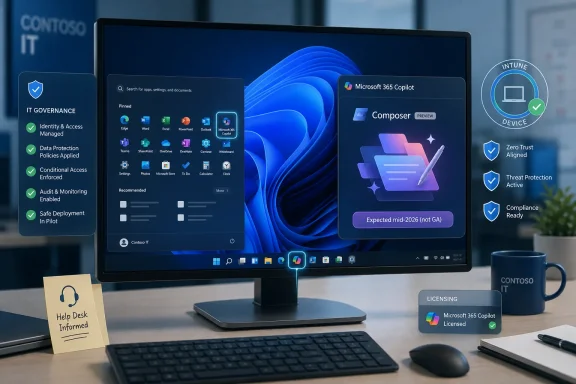 The Answer Is Pilot the Controls, Not the Mid-2026 Button
The near-term recommendation is straightforward: pilot the existing Microsoft 365 Copilot taskbar pinning controls now, but do not treat Ask Copilot Composer integration as a generally available Windows feature yet. Microsoft’s own material frames Ask Copilot on the taskbar as expected in mid-2026 and explicitly not generally available, which means timing, scope, and final behavior can still move.What admins can do today is more concrete. Microsoft Learn already documents how organizations can pin the Microsoft 365 Copilot app and companion apps to the Windows 11 taskbar on Intune-managed devices. That is not the same thing as the future Composer-based Ask Copilot entry point, but it is the closest live administrative rehearsal for the policy questions that Composer will sharpen.
The current Microsoft 365 admin center path is: sign in to the Microsoft 365 admin center, go to Copilot > Settings > User access, select the taskbar pinning option for Microsoft 365 Copilot and its companion apps, choose the pinning behavior, and save the setting. Microsoft says the setting is off by default, requires appropriate administrative permissions, and applies to eligible Intune-managed Windows 11 devices where the required apps are installed.
That gives IT a useful, low-drama place to start. Pick a limited group, validate licensing and app installation, confirm how the taskbar behaves on supported Windows 11 23H2 and 24H2 devices, and document how users respond when Copilot becomes a persistent taskbar presence. Then hold the line on wider deployment until Microsoft publishes final general availability details for the Composer experience.
Microsoft Is Moving Copilot From App to Habit
The reason this deserves more attention than another taskbar tweak is that Windows is a habit machine. Users may ignore a portal, forget a keyboard shortcut, or never open a dedicated Copilot app. They do not ignore the taskbar and Start menu for long.Microsoft’s stated direction is to surface Microsoft 365 Copilot and AI agents directly in Windows through a new Composer experience. That makes the operating system less of a neutral launcher and more of an AI-mediated work surface. If the plan lands as described, users will not need to remember where Copilot lives; Windows will offer it where users already begin searches, launch apps, and resume work.
That is a meaningful shift from existing Copilot app launch paths. A pinned app is still just an app, even if it has a privileged location. A Composer entry point in taskbar and Start is closer to a new front door for work: a place where local intent, Microsoft 365 context, and agents may converge.
WindowsForum readers have already been tracking the broader arc, from Copilot’s expansion across Windows to Insider-era taskbar experiments and Start menu changes. The new mid-2026 framing gives that discussion a sharper enterprise edge: admins need to separate visible UI experiments from the governance implications of making Copilot the default place users ask for help.
Pinning Is the Rehearsal, Composer Is the Main Event
The most common mistake in early coverage is to blur app pinning and native integration into one generic “Copilot on the taskbar” story. They are related, but they are not the same operational problem.Today’s Microsoft Learn guidance is about pinning the Microsoft 365 Copilot app and companion apps to the Windows taskbar on Intune-managed Windows 11 devices. The Microsoft 365 Copilot app provides access to experiences such as Chat, Search, Agents when enabled, Notebooks, and Create. Companion apps can provide quick access to files, people, and calendar information from the taskbar when installed and configured.
That is valuable, but it remains a deployment and discoverability control. IT decides whether eligible devices receive pinned entry points. Users can still understand the change as “these apps appeared on my taskbar.”
Composer is a larger UX proposition. If Windows surfaces Microsoft 365 Copilot and agents through taskbar and Start as Microsoft describes, the experience becomes less about opening an app and more about asking Windows to route intent. The operating system starts to become the launchpad for AI-assisted work.
That is why a pinning pilot is useful but insufficient. It tests policy plumbing, user communication, taskbar clutter, and support readiness. It does not fully test the behavioral effect of users treating Windows search, Start, and Copilot as one blended work interface.
The First Pilot Should Be Boring on Purpose
The best pilot is not a flashy Copilot roadshow. It is a controlled test of whether the organization can make Copilot visible without confusing users, overexposing data, or creating support noise.Start with an Intune-managed Windows 11 test ring whose users already have legitimate business reasons to use Microsoft 365 Copilot. Confirm that the Microsoft 365 Copilot app is installed before applying the pinning setting, because Microsoft says the setting has no effect if the app is absent. If companion apps are part of the test, install them deliberately rather than assuming they exist by default.
Then validate the basics: does the taskbar pin appear, how long does policy take to apply, does the device honor user unpin preferences where supported, and what happens when existing Start or taskbar layout policies are already in force? Microsoft’s documentation notes that conflicts with existing Start layout management can prevent changes from being made in the Microsoft 365 admin center, which is exactly the kind of administrative edge case a pilot should uncover before a broad rollout.
The communication plan should be equally plain. Tell users what was pinned, why it was pinned, which data sources Copilot can access under the organization’s policies, and how they can remove or ignore the entry point if allowed. A surprise Copilot icon on a regulated user’s taskbar is not adoption; it is a help desk ticket waiting to happen.
Licensing Is the Gate That Will Decide the Real Rollout
The mid-2026 Composer story will sound like a Windows feature to many users, but IT should treat it as a Microsoft 365 and licensing feature that happens to surface in Windows. The visible button is only the last inch of a much longer chain.Microsoft’s current taskbar pinning guidance already puts Intune management at the center of the administrative story. It also makes clear that app installation, service dependencies, and the right administrative roles matter. In other words, this is not a consumer-style toggle that enterprise admins can evaluate only by looking at the shell.
That matters because user expectation will outrun entitlement. If Ask Copilot appears in the most prominent Windows surfaces, users may assume their license includes the same capabilities as a colleague’s. Some may see chat and search; others may see agents; others may hit access boundaries that look like errors unless the organization has explained the difference.
The licensing review should happen before the Composer rollout becomes urgent. Map which user groups are entitled to Microsoft 365 Copilot capabilities, which groups should see only limited experiences, and which groups should not be steered toward Copilot at all. If those answers are not clear today, a mid-2026 Windows integration will not make them clearer.
Governance Has to Meet Users at the Taskbar
The taskbar is not just a convenience surface. It is a behavioral nudge. Once Copilot and agents are placed there, the organization is encouraging users to ask work questions through an AI interface before they open a document, search a SharePoint site, or message a colleague.That can be productive, but it also turns governance into a front-line user experience issue. If permissions are messy, Copilot may reflect that mess. If users do not understand what content is indexed or retrievable, they may misinterpret what Copilot can and cannot see. If agents are enabled without ownership, users may treat experimental workflows as sanctioned business processes.
The sensible preparation is not to block everything until the last possible moment. It is to use the current pinning controls as a forcing function for governance review. If the organization is uncomfortable pinning Copilot today because it has not settled data access, retention, acceptable use, or agent ownership, that discomfort is the point.
Composer will not reduce those concerns. It will make them more visible.
Start and Taskbar Policy Will Become AI Policy
For years, Start and taskbar policy has been treated as endpoint hygiene: pin the browser, pin Teams, remove consumer clutter, standardize the experience for frontline or kiosk users. Copilot changes that policy category. A taskbar decision can now influence how users discover AI, launch agents, and interact with organizational knowledge.That elevates a familiar endpoint control into something closer to information architecture. The question is not only where the icon sits. It is whether the organization wants Windows itself to promote Copilot as a primary work entry point.
This is where the current Microsoft 365 admin center control is useful but narrow. It lets admins pin Microsoft 365 Copilot and companion apps on eligible managed devices. It does not answer the broader question of whether every department should receive the same AI surface, whether regulated users need a different Start layout, or whether power users should be given early access while the rest of the company waits.
By mid-2026, IT teams should have a written position on those questions. Without one, the default will be whatever Microsoft ships, whatever users discover, and whatever support can clean up afterward.
Enthusiasts Should Watch the Shell, Admins Should Watch the Contract
For Windows enthusiasts, the interesting part will be how Composer changes the feel of Windows. Does Ask Copilot replace familiar search affordances, sit beside them, or blend into them? Does it make Start more useful, or does it add another layer of ambiguity between local search, web results, Microsoft 365 content, and AI answers?For administrators, the more important question is the contract Microsoft publishes around availability and control. Microsoft says Ask Copilot on the taskbar is expected in mid-2026, but it is not generally available. That leaves open the practical details that matter most: eligible editions, regional handling, tenant requirements, policy controls, rollback options, and the final relationship between Copilot app pinning and Composer-based launch.
Those omissions are not a scandal; they are a warning against premature rollout planning. Treat the mid-2026 marker as directional, not contractual. Build readiness around what exists, and keep a change budget for what Microsoft has not yet specified.
WindowsForum’s ongoing coverage of Copilot taskbar experiments, Start menu redesigns, and OS-level AI integration fits into this pattern. The surface is changing in increments, but the destination is increasingly clear: Microsoft wants Copilot and agents to be reachable from the places where Windows users already begin their day.
The Support Desk Will Feel the Difference First
The first operational impact may not be productivity. It may be confusion.Users will ask why Copilot is on one machine and not another. They will ask why a colleague can access an agent they cannot see. They will ask whether taskbar search, the Copilot app, Microsoft 365 Copilot Chat, and companion apps are the same thing. If IT has not named and explained the differences, the help desk will become the translation layer.
That is why pilot documentation should be written for support staff before it is written for executives. A good internal note should explain what was enabled, which users are included, what the expected taskbar behavior looks like, and which issues are known policy outcomes rather than break/fix incidents.
The distinction between “not installed,” “not licensed,” “not enabled,” and “not generally available” will matter. Ask Copilot Composer integration belongs in the last category today. Microsoft 365 Copilot app pinning belongs in the “available to configure under the documented prerequisites” category.
Those are boring distinctions until a user opens a ticket. Then they are the difference between a two-minute answer and a week of confused escalation.
Security Teams Should Treat Agents as a Launch Surface, Not a Feature Checkbox
The mention of AI agents is the most consequential part of Microsoft’s positioning. Chat is familiar now. Search is familiar. Agents imply delegated workflows, structured actions, and repeated patterns of automation.If Windows becomes a place where users launch agents directly from taskbar or Start, organizations will need to know who owns those agents, what data they can reach, what actions they can take, and how failures are audited. That is not a question to answer after the button arrives.
Security teams should use the current period to align Copilot governance with identity, information protection, and endpoint management. The goal is not to make Copilot disappear. The goal is to prevent the Windows shell from becoming a glossy shortcut into workflows nobody has reviewed.
The safest assumption is that discoverability will increase usage. If an agent is easy to launch from the taskbar, more users will try it. If more users try it, edge cases will appear sooner. That is good for well-governed pilots and dangerous for accidental deployments.
The Calendar Is Useful, but the Caveat Is the Story
“Expected in mid-2026” is a planning signal, not a deployment date. Microsoft has given enough direction for IT to start preparing, but not enough final detail for organizations to freeze their rollout design.That is the sharpest difference between this story and ordinary Copilot coverage. The current app, existing shortcuts, voice and file features, and taskbar pinning options are all worth understanding, but they are not the strategic hinge. The hinge is Microsoft’s intent to make Windows itself a Composer entry point for Copilot and agents.
The honest answer for IT is therefore deliberately split. Prepare now, but do not overcommit. Pilot the controls that exist, but do not describe the future Composer experience to users as if it were shipping tomorrow. Track Microsoft’s general availability language closely, because “expected” and “available” are not synonyms.
This is also where enthusiasts should be careful. Insider and preview behavior can show Microsoft’s direction, but enterprise deployment depends on documented support, policy controls, and licensing realities. A feature appearing in a build or discussion thread is not the same as an admin-ready service.
The Sensible Plan Before Composer Arrives
The organizations that handle this well will not be the ones that wait passively for mid-2026. They will be the ones that use the gap between now and general availability to make boring decisions while the stakes are still manageable.- Run a small pilot of the existing Microsoft 365 Copilot taskbar pinning policy on Intune-managed Windows 11 devices before considering any broad deployment.
- Confirm which users have the right Microsoft 365 Copilot licensing and which groups should not be encouraged toward Copilot from the Windows shell.
- Test how current Start and taskbar layout policies interact with Microsoft 365 Copilot app pinning before adding another AI entry point to production desktops.
- Write help desk guidance that distinguishes app pinning, Copilot Chat, companion apps, agents, and the future Ask Copilot Composer experience.
- Treat Microsoft’s mid-2026 timing as provisional until the feature is generally available and Microsoft publishes final scope, eligibility, and policy details.
- Review agent governance now, because taskbar and Start discoverability will make poorly governed agents much easier for users to find.
References
- Primary source: learn.microsoft.com
Pin Microsoft 365 Copilot and its companion apps to the Windows taskbar | Microsoft Learn
Learn how to improve the use of Microsoft 365 Copilot across your organization by pinning the Copilot app to the Windows taskbar.learn.microsoft.com - Independent coverage: support.microsoft.com
Access Microsoft 365 Copilot on Windows | Microsoft Support
Learn different methods you can use to quickly access the Microsoft 365 Copilot app on your Windows PC.support.microsoft.com - Independent coverage: microsoft.com
Windows 11: Windows Copilot, Features and Benefits | Microsoft Windows
Discover Copilot on Windows 11 and features that boost productivity, creativity, and more. Upgrade your everyday with the latest version of Windows 11 from Microsoft.www.microsoft.com - Independent coverage: techcommunity.microsoft.com
AI in Windows 11 | Microsoft Community Hub
Access Copilot and agents right from the taskbar; find answers across your files, email, and meetings, and turn ideas into polished content using voice or... techcommunity.microsoft.com
- Primary source: WindowsForum
Ask Copilot Comes to Windows 11 Taskbar: Copilot Composer in Mid-2026 | Windows Forum
Microsoft plans to bring Ask Copilot to the Windows 11 taskbar and Start menu in mid-2026, turning the optional taskbar search experience into a Copilot...windowsforum.com