
Adobe began rolling out Firefly AI Assistant in public beta across Photoshop, Premiere Pro, Illustrator, InDesign, and Frame.io on June 18, 2026, turning its generative AI system from a standalone prompt box into an in-app production assistant for creative workflows. The move is less about another image generator and more about Adobe trying to make natural-language commands part of the operating layer of Creative Cloud. For Windows users, creative shops, marketing departments, and IT admins, the question is no longer whether AI can make a picture; it is whether AI can safely touch the working files, timelines, brands, and approval chains that businesses depend on.
For the first wave of generative AI, Adobe’s pitch was familiar: type what you want, get an image, extend a background, recolor a vector, remove an object, or produce something that previously required either manual effort or a stock subscription. That was useful, but it was also bounded. The AI was a tool inside a tool, usually invoked for a specific creative act.
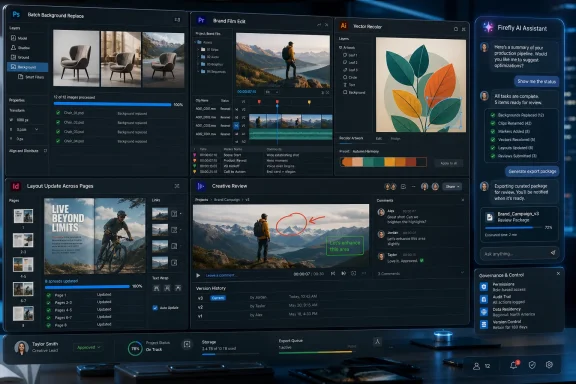
Firefly AI Assistant changes the posture. Adobe is now presenting the assistant as a conversational layer that can understand what the user is doing inside a project and then string together multiple app actions. In Photoshop, that may mean replacing backgrounds, resizing assets for several platforms, or applying repetitive edits across a batch of images. In Premiere Pro, it may mean organizing footage, renaming clips, detecting interview questions, placing timeline markers, and preparing the first rough shape of an edit.
That distinction matters because most professional creative work is not a single dramatic act of inspiration. It is file prep, versioning, resizing, renaming, relinking, reviewing, exporting, and fixing the maddening small things that happen between concept and delivery. Adobe is betting that if AI can reduce that grind without stripping professionals of control, Creative Cloud becomes harder to replace rather than easier to disrupt.
The timing is not accidental. ChatGPT, Claude, Gemini, Copilot, Canva, CapCut, Runway, and a swarm of specialist tools have been teaching users that software should respond to intent, not just clicks. Adobe’s answer is to say: yes, but the intent still has to land inside the applications where real production work happens.
Adobe cannot ignore that shift. It has already announced integrations that bring Adobe creative capabilities into ChatGPT, Microsoft Copilot, and Anthropic Claude, with Google Gemini and Slack support planned. That sounds like platform openness, and in part it is. But it is also a concession to the new reality: the first place a user describes work may not be Photoshop, Premiere, or Illustrator.
The risk for Adobe is obvious. If the prompt interface becomes the primary interface, the company that owns the prompt owns the customer relationship. Adobe’s counter-move is to make Firefly the assistant that understands Adobe files, Adobe tools, Adobe review systems, and Adobe production constraints better than a general-purpose chatbot can.
That is why the in-app sidebar matters. A Photoshop assistant that can see the document context, layers, artboards, masks, and export goals is a different proposition from a chatbot that merely tells you how to do something. A Premiere assistant that can inspect clips, markers, transcript-like structures, timeline order, and rough-cut logic is not just answering a question. It is acting on the project.
This is Adobe’s version of agentic AI, a term that has already been abused into near meaninglessness. In the useful sense, it means software that can perform multi-step tasks rather than merely produce a response. In the risky sense, it means software that may touch files, change assets, and create new failure modes at scale.
Firefly AI Assistant slots neatly into that world. A user can describe a desired output rather than moving through menus, panels, and manual operations one by one. The assistant can help replace a background, resize image sets, or apply edits across a project. That does not eliminate the need for visual judgment, but it reduces the amount of hand labor required before judgment even begins.
The danger is that convenience can blur the line between controlled editing and automated drift. A creative director may want a clean batch resize, not a subtle reinterpretation of the image. A brand team may want background replacement without accidental changes to product shape, color, texture, or compliance markings. In commercial imaging, “close enough” can become expensive very quickly.
That is why Adobe’s insistence on human control is not just marketing language. It is a requirement if the assistant is going to be trusted in professional settings. The user needs to see what changed, undo it, compare it, and decide whether the output is production-ready. Without that chain of control, AI assistance becomes a liability dressed as productivity.
For WindowsForum readers, there is also a workstation angle. Photoshop users already know that AI features can stress GPUs, memory, cloud connections, and local storage workflows. As assistants move from one-off generation to multi-step batch operations, organizations will need to think about performance, version control, and whether creative endpoints are provisioned for a heavier AI-assisted workload.
Adobe says the assistant can help organize footage, rename clips, identify interview questions, add markers, and prepare a rough first cut. That is exactly where AI has a plausible near-term role. It does not need to become Walter Murch to be useful. It only needs to save an editor from spending half a day sorting a bin.
The rough-cut promise is more sensitive. A first assembly is not the finished work, but it sets momentum. If the assistant can turn raw material into a workable starting point, editors may treat it like a junior assistant editor: useful, fast, and occasionally wrong in ways that require supervision. If it guesses badly, misses context, or overemphasizes easy-to-detect moments, it may create as much rework as it saves.
The real test will be whether Firefly AI Assistant can understand editorial intent beyond labels. “Find the best answer” is not the same as “find the cleanest audio,” “find the most emotionally honest moment,” or “build a cut that protects the client from saying the quiet part out loud.” Professional video editing is full of tacit judgment. AI can accelerate the mechanical steps, but it should not be mistaken for the person responsible for the cut.
Still, the practical benefit is hard to dismiss. For small creators, marketing departments, educators, and internal comms teams, anything that reduces timeline setup and clip triage is valuable. Adobe is aiming at the part of video production where the pain is obvious and the creative risk is comparatively manageable.
In Illustrator, Adobe describes tasks such as generating multiple versions of artwork from spreadsheet data and checking files for potential printing issues before export. That is not glamorous, but it is the sort of work that determines whether a campaign ships cleanly or a production vendor sends back a problem file. Versioning artwork from structured data is particularly interesting because it pushes AI into the space between design and automation.
InDesign follows a similar logic. Updating layouts with new branding across multiple pages sounds simple until someone has to do it across a large document set with inconsistent templates, legacy styles, and last-minute stakeholder edits. If the assistant can apply changes coherently while preserving layout integrity, it could save real time in publishing and marketing departments.
Frame.io brings the review-and-approval layer into the same story. Creative work rarely ends when the file looks good on one user’s machine. It must be shared, reviewed, annotated, revised, and approved. By placing Firefly AI Assistant into Frame.io’s orbit, Adobe is signaling that it wants AI involved not only in creation, but also in the messy collaboration that surrounds creation.
This is where IT departments should pay attention. The assistant is not just a new button in a desktop app. It is a workflow actor that may interact with assets, comments, versions, and brand instructions. That means governance, auditability, identity management, and data handling become central questions, especially for regulated industries or clients with strict confidentiality requirements.
This addresses one of generative AI’s most persistent weaknesses. Image and video models are impressive at producing isolated outputs, but professional creative work often requires continuity. A character must look like the same character. A location must remain recognizable. A campaign must feel like a campaign rather than a folder of unrelated lucky accidents.
Elements and Projects are Adobe’s answer to that continuity problem. Instead of treating each prompt as a fresh roll of the dice, the system is meant to preserve creative context. For agencies, brand teams, and content studios, that is the difference between a novelty generator and something that can contribute to a sustained body of work.
The private beta status of the redesigned studio is important. Adobe is previewing the direction, not declaring the problem solved. Anyone who has tried to maintain character consistency across AI-generated imagery knows how difficult it remains. The promise is credible because Adobe understands professional asset management, but the execution will have to prove itself under deadline pressure.
This also nudges Firefly closer to competing with broader creative platforms, not just AI model providers. Adobe is not merely selling outputs. It is trying to sell a workspace where ideas, generated assets, edits, brand systems, and approvals live together. That is a much more defensible business than charging users to press “generate” in a crowded market.
Brand work is unusually sensitive because consistency is the product. A slightly wrong color, distorted logo, inappropriate type treatment, or off-brand composition can make a company look careless. If AI is going to help propagate brand identity, it needs to obey rules with more discipline than most generative systems have historically shown.
The upside is obvious. A small team could produce campaign variants, social assets, presentation materials, video boards, and design explorations without rebuilding the same system repeatedly. A larger organization could use the assistant to enforce templates and reduce tedious production work. The assistant becomes less a creative genius and more a tireless brand production coordinator.
The downside is that brand systems are full of exceptions. Legal disclaimers vary by region. Product names change. Accessibility requirements constrain color choices. Local markets need different imagery. Partners may have co-branding rules. An AI assistant that does not understand these constraints could scale mistakes faster than humans can catch them.
Adobe’s challenge is to make the assistant conservative where it matters and flexible where it helps. That is not an easy balance. Creative users want speed and variation; enterprise owners want consistency and control. Firefly AI Assistant will be judged by how well it handles the tension between those two demands.
The first question is who gets access. Public beta does not mean every organization should enable it for every user on day one. Admins may want to pilot the assistant with a small group of trusted creative professionals, compare outputs against existing workflows, and document where it helps or misfires. The right deployment model is probably closer to a managed feature rollout than a casual app update.
The second question is what data the assistant can see and use. Creative files often contain unreleased products, confidential campaigns, client materials, employee footage, regulated medical or financial content, or legal review notes. Even when a vendor offers commercial protections, organizations need to understand exactly how prompts, assets, generated outputs, and telemetry are handled.
The third question is support. If an assistant renames clips, reorganizes layers, generates alternate layouts, or updates brand elements across pages, users will call IT when something goes wrong. That means help desks and creative operations teams need a basic understanding of the feature set. “The AI did it” is not a ticket resolution.
There is also a training burden. The best users of these systems are not necessarily the people who type the most elaborate prompts. They are the people who know how to ask for constrained work, inspect the result, and stop the assistant before it turns a manageable task into a weird automated excursion. Prompting becomes part of production literacy, but so does skepticism.
That compromise is also politically useful for Adobe. The company needs to reassure users that it is not trying to automate them out of relevance. It also needs to reassure investors that it has a credible AI strategy. “AI helps creators spend more time on craft” is the safest possible framing.
The truth is messier. Some repetitive production work will be automated. Some junior tasks will shrink. Some creators will produce more with fewer people. Some organizations will use AI assistance to increase volume rather than quality. Others will waste time trying to make AI perform work that a skilled human could do faster.
But Adobe is right that the final decision remains the key boundary. In professional creative work, accountability cannot be delegated to a model. A client will not accept “the assistant chose that.” A print vendor will not care that an AI missed an issue. A legal department will not treat a generated variant as blameless because it came from a beta feature.
The most honest reading is that Firefly AI Assistant moves more tasks into the zone of machine assistance while leaving responsibility exactly where it was: with the human and the organization. That is productivity, but it is not absolution.
Public beta gives Adobe room to learn how people actually use the assistant. It also gives users room to experiment without assuming the feature is fully mature. The danger is that the phrase “available now” tends to travel faster than the phrase “public beta,” especially when productivity-hungry managers see demos of rough cuts, instant layouts, and automated asset variants.
The sane approach is to treat the assistant as a supervised production aid. It can draft, organize, suggest, prepare, and accelerate. It should not be the unreviewed final step before export, publication, client delivery, or print. That may sound obvious, but workflow automation has a way of becoming invisible once teams get used to it.
Adobe’s private beta for the redesigned Firefly creative studio reinforces that the broader vision is still under construction. Elements, Projects, storyboards-to-video, brand identity propagation, and cross-app assistance are pieces of a larger system. Some pieces are arriving in public beta now; others are being tested behind a waitlist. The platform is moving, but it is not finished.
For early adopters, that is part of the appeal. For enterprise admins, it is the warning label. Beta features can be useful, but they need boundaries.
Firefly AI Assistant is Adobe’s attempt to convert that threat into reinforcement. Instead of competing only on model output, Adobe is competing on workflow depth. The assistant is more valuable if it can operate across Photoshop layers, Premiere timelines, Illustrator artwork, InDesign layouts, Frame.io reviews, Creative Cloud storage, and brand systems. That is terrain where pure AI startups have less leverage.
This does not mean Adobe is safe from disruption. Canva has built a strong case around simplicity and collaboration. Video-first tools are expanding rapidly. Chatbot platforms are becoming increasingly capable front ends for creative requests. Younger creators may not have the same attachment to Adobe’s professional desktop metaphors.
But Adobe still has the advantage of being where a vast amount of professional work already happens. The company does not need to convince every user to abandon prompts. It needs to convince them that prompts are more useful when attached to real production tools. Firefly AI Assistant is the clearest expression of that strategy so far.
The broader pattern is familiar across the software industry. Microsoft is embedding Copilot into Office and Windows. Developer platforms are embedding coding agents into IDEs. Adobe is embedding creative agents into Creative Cloud. The application is becoming less a place where users manually execute every step and more a place where users supervise increasingly capable assistants.
The tasks Adobe highlights are exactly the tasks that often train junior staff. Organizing footage, preparing rough cuts, resizing assets, checking files, applying layout changes, generating variants, and setting up project structures are not glamorous, but they are how many people learn the craft. If AI absorbs too much of that work, the industry may gain speed while weakening its apprenticeship pipeline.
There is a counterargument. Repetitive production work can also be exploitative, tedious, and creatively deadening. If assistants free junior staff to think, experiment, and learn higher-value skills sooner, the shift could be positive. The outcome depends less on the tool than on how studios and companies choose to reorganize work around it.
The danger is that management will see only the output metric. If one designer can now produce five times as many variants, the temptation will be to demand five times as many variants. AI productivity gains often become throughput expectations. The work gets faster, but not necessarily saner.
Creative professionals should therefore treat the assistant as both a tool and a negotiation point. If it saves hours, the question becomes what those hours are for. Better work? More review? More experimentation? Or just more content poured into the same exhausted channels?
Continuity is the hard problem. A campaign needs coherent style. A video needs structure. A design system needs repeatability. A publication needs consistent layout. A review process needs traceable changes. Adobe’s new Firefly direction is built around the idea that AI becomes more useful when it can remember and manipulate the context around the asset.
That is also where the highest stakes sit. If the assistant becomes a trusted layer in professional work, Adobe gains a powerful new interface for Creative Cloud. If it remains a clever but unreliable helper, users will treat it as another beta toy. The gap between those outcomes will be determined by reliability, transparency, control, and how well Adobe handles the unglamorous edge cases.
For Windows users, this is not just a creative industry story. It is another example of AI becoming a feature of heavyweight desktop software rather than a separate destination. The AI PC narrative often focuses on NPUs and local inference, but the practical user experience may be more prosaic: assistants inside the apps people already run all day.
 Adobe Moves the Prompt Box Into the Production Line
For the first wave of generative AI, Adobe’s pitch was familiar: type what you want, get an image, extend a background, recolor a vector, remove an object, or produce something that previously required either manual effort or a stock subscription. That was useful, but it was also bounded. The AI was a tool inside a tool, usually invoked for a specific creative act.Firefly AI Assistant changes the posture. Adobe is now presenting the assistant as a conversational layer that can understand what the user is doing inside a project and then string together multiple app actions. In Photoshop, that may mean replacing backgrounds, resizing assets for several platforms, or applying repetitive edits across a batch of images. In Premiere Pro, it may mean organizing footage, renaming clips, detecting interview questions, placing timeline markers, and preparing the first rough shape of an edit.
That distinction matters because most professional creative work is not a single dramatic act of inspiration. It is file prep, versioning, resizing, renaming, relinking, reviewing, exporting, and fixing the maddening small things that happen between concept and delivery. Adobe is betting that if AI can reduce that grind without stripping professionals of control, Creative Cloud becomes harder to replace rather than easier to disrupt.
The timing is not accidental. ChatGPT, Claude, Gemini, Copilot, Canva, CapCut, Runway, and a swarm of specialist tools have been teaching users that software should respond to intent, not just clicks. Adobe’s answer is to say: yes, but the intent still has to land inside the applications where real production work happens.
The Assistant Is Adobe’s Defense Against the Chatbot Front Door
The most important thing about Firefly AI Assistant is not that it can generate or modify media. It is that Adobe is trying to prevent the creative workflow from being captured by someone else’s chat window. If users begin every project in ChatGPT, Copilot, Claude, or Gemini, the traditional application becomes a rendering engine behind the curtain.Adobe cannot ignore that shift. It has already announced integrations that bring Adobe creative capabilities into ChatGPT, Microsoft Copilot, and Anthropic Claude, with Google Gemini and Slack support planned. That sounds like platform openness, and in part it is. But it is also a concession to the new reality: the first place a user describes work may not be Photoshop, Premiere, or Illustrator.
The risk for Adobe is obvious. If the prompt interface becomes the primary interface, the company that owns the prompt owns the customer relationship. Adobe’s counter-move is to make Firefly the assistant that understands Adobe files, Adobe tools, Adobe review systems, and Adobe production constraints better than a general-purpose chatbot can.
That is why the in-app sidebar matters. A Photoshop assistant that can see the document context, layers, artboards, masks, and export goals is a different proposition from a chatbot that merely tells you how to do something. A Premiere assistant that can inspect clips, markers, transcript-like structures, timeline order, and rough-cut logic is not just answering a question. It is acting on the project.
This is Adobe’s version of agentic AI, a term that has already been abused into near meaninglessness. In the useful sense, it means software that can perform multi-step tasks rather than merely produce a response. In the risky sense, it means software that may touch files, change assets, and create new failure modes at scale.
Photoshop Gets an Intern That Never Stops Resizing
Photoshop is the easiest place to understand the appeal. Much of image editing remains highly skilled work, but much of image production is repetition masquerading as craftsmanship. Campaign assets need multiple crops. Product shots need consistent backgrounds. Social posts need platform-specific dimensions. Teams need alternates, variants, and last-minute corrections.Firefly AI Assistant slots neatly into that world. A user can describe a desired output rather than moving through menus, panels, and manual operations one by one. The assistant can help replace a background, resize image sets, or apply edits across a project. That does not eliminate the need for visual judgment, but it reduces the amount of hand labor required before judgment even begins.
The danger is that convenience can blur the line between controlled editing and automated drift. A creative director may want a clean batch resize, not a subtle reinterpretation of the image. A brand team may want background replacement without accidental changes to product shape, color, texture, or compliance markings. In commercial imaging, “close enough” can become expensive very quickly.
That is why Adobe’s insistence on human control is not just marketing language. It is a requirement if the assistant is going to be trusted in professional settings. The user needs to see what changed, undo it, compare it, and decide whether the output is production-ready. Without that chain of control, AI assistance becomes a liability dressed as productivity.
For WindowsForum readers, there is also a workstation angle. Photoshop users already know that AI features can stress GPUs, memory, cloud connections, and local storage workflows. As assistants move from one-off generation to multi-step batch operations, organizations will need to think about performance, version control, and whether creative endpoints are provisioned for a heavier AI-assisted workload.
Premiere Pro Shows Why AI Wants the Boring Jobs First
Premiere Pro may be the most consequential integration because video work contains so much logistical overhead. A documentary, interview package, product video, or social campaign can involve hundreds of clips, multiple cameras, separate audio, transcripts, selects, markers, and review notes. Before an editor makes a meaningful creative decision, someone often has to impose order on chaos.Adobe says the assistant can help organize footage, rename clips, identify interview questions, add markers, and prepare a rough first cut. That is exactly where AI has a plausible near-term role. It does not need to become Walter Murch to be useful. It only needs to save an editor from spending half a day sorting a bin.
The rough-cut promise is more sensitive. A first assembly is not the finished work, but it sets momentum. If the assistant can turn raw material into a workable starting point, editors may treat it like a junior assistant editor: useful, fast, and occasionally wrong in ways that require supervision. If it guesses badly, misses context, or overemphasizes easy-to-detect moments, it may create as much rework as it saves.
The real test will be whether Firefly AI Assistant can understand editorial intent beyond labels. “Find the best answer” is not the same as “find the cleanest audio,” “find the most emotionally honest moment,” or “build a cut that protects the client from saying the quiet part out loud.” Professional video editing is full of tacit judgment. AI can accelerate the mechanical steps, but it should not be mistaken for the person responsible for the cut.
Still, the practical benefit is hard to dismiss. For small creators, marketing departments, educators, and internal comms teams, anything that reduces timeline setup and clip triage is valuable. Adobe is aiming at the part of video production where the pain is obvious and the creative risk is comparatively manageable.
Illustrator and InDesign Reveal the Enterprise Play
Photoshop and Premiere get the attention, but Illustrator and InDesign expose the business logic. These are not merely creative apps; they are production systems for packaging, print, branding, publications, catalogs, manuals, and corporate identity. If AI can safely handle repetitive layout and prepress tasks, Adobe has a serious enterprise productivity story.In Illustrator, Adobe describes tasks such as generating multiple versions of artwork from spreadsheet data and checking files for potential printing issues before export. That is not glamorous, but it is the sort of work that determines whether a campaign ships cleanly or a production vendor sends back a problem file. Versioning artwork from structured data is particularly interesting because it pushes AI into the space between design and automation.
InDesign follows a similar logic. Updating layouts with new branding across multiple pages sounds simple until someone has to do it across a large document set with inconsistent templates, legacy styles, and last-minute stakeholder edits. If the assistant can apply changes coherently while preserving layout integrity, it could save real time in publishing and marketing departments.
Frame.io brings the review-and-approval layer into the same story. Creative work rarely ends when the file looks good on one user’s machine. It must be shared, reviewed, annotated, revised, and approved. By placing Firefly AI Assistant into Frame.io’s orbit, Adobe is signaling that it wants AI involved not only in creation, but also in the messy collaboration that surrounds creation.
This is where IT departments should pay attention. The assistant is not just a new button in a desktop app. It is a workflow actor that may interact with assets, comments, versions, and brand instructions. That means governance, auditability, identity management, and data handling become central questions, especially for regulated industries or clients with strict confidentiality requirements.
Firefly’s New Studio Is a Bet on Memory, Not Just Generation
Adobe’s expanded Firefly features point toward a larger ambition: AI that remembers the project. Elements lets users save AI-generated characters, objects, and locations so they can be reused later. Projects organizes related AI-generated assets so users can return to work without hunting through disconnected generations. The redesigned Firefly creative studio aims to bring ideation, creation, and production into a more unified environment.This addresses one of generative AI’s most persistent weaknesses. Image and video models are impressive at producing isolated outputs, but professional creative work often requires continuity. A character must look like the same character. A location must remain recognizable. A campaign must feel like a campaign rather than a folder of unrelated lucky accidents.
Elements and Projects are Adobe’s answer to that continuity problem. Instead of treating each prompt as a fresh roll of the dice, the system is meant to preserve creative context. For agencies, brand teams, and content studios, that is the difference between a novelty generator and something that can contribute to a sustained body of work.
The private beta status of the redesigned studio is important. Adobe is previewing the direction, not declaring the problem solved. Anyone who has tried to maintain character consistency across AI-generated imagery knows how difficult it remains. The promise is credible because Adobe understands professional asset management, but the execution will have to prove itself under deadline pressure.
This also nudges Firefly closer to competing with broader creative platforms, not just AI model providers. Adobe is not merely selling outputs. It is trying to sell a workspace where ideas, generated assets, edits, brand systems, and approvals live together. That is a much more defensible business than charging users to press “generate” in a crowded market.
The Brand Identity Pitch Is Powerful and Dangerous
One of the more ambitious claims around the updated Firefly system is that it can help create complete brand identities and carry logos, colors, and styling across different pieces of content. For small businesses and creators, this sounds liberating. For established brands, it sounds like both a productivity boost and a governance headache.Brand work is unusually sensitive because consistency is the product. A slightly wrong color, distorted logo, inappropriate type treatment, or off-brand composition can make a company look careless. If AI is going to help propagate brand identity, it needs to obey rules with more discipline than most generative systems have historically shown.
The upside is obvious. A small team could produce campaign variants, social assets, presentation materials, video boards, and design explorations without rebuilding the same system repeatedly. A larger organization could use the assistant to enforce templates and reduce tedious production work. The assistant becomes less a creative genius and more a tireless brand production coordinator.
The downside is that brand systems are full of exceptions. Legal disclaimers vary by region. Product names change. Accessibility requirements constrain color choices. Local markets need different imagery. Partners may have co-branding rules. An AI assistant that does not understand these constraints could scale mistakes faster than humans can catch them.
Adobe’s challenge is to make the assistant conservative where it matters and flexible where it helps. That is not an easy balance. Creative users want speed and variation; enterprise owners want consistency and control. Firefly AI Assistant will be judged by how well it handles the tension between those two demands.
Windows Shops Will Judge the Assistant by Controls, Not Demos
Creative AI demos are built to look effortless. IT operations are built around the suspicion that effortless tools often hide complicated consequences. For Windows-based creative teams, Adobe’s rollout raises familiar questions about deployment, identity, data access, licensing, endpoint performance, and support.The first question is who gets access. Public beta does not mean every organization should enable it for every user on day one. Admins may want to pilot the assistant with a small group of trusted creative professionals, compare outputs against existing workflows, and document where it helps or misfires. The right deployment model is probably closer to a managed feature rollout than a casual app update.
The second question is what data the assistant can see and use. Creative files often contain unreleased products, confidential campaigns, client materials, employee footage, regulated medical or financial content, or legal review notes. Even when a vendor offers commercial protections, organizations need to understand exactly how prompts, assets, generated outputs, and telemetry are handled.
The third question is support. If an assistant renames clips, reorganizes layers, generates alternate layouts, or updates brand elements across pages, users will call IT when something goes wrong. That means help desks and creative operations teams need a basic understanding of the feature set. “The AI did it” is not a ticket resolution.
There is also a training burden. The best users of these systems are not necessarily the people who type the most elaborate prompts. They are the people who know how to ask for constrained work, inspect the result, and stop the assistant before it turns a manageable task into a weird automated excursion. Prompting becomes part of production literacy, but so does skepticism.
Adobe’s Survey Numbers Tell a Convenient but Plausible Story
Adobe says a survey of more than 16,000 creators found that 75 percent consider AI an important part of their creative workflow, while 85 percent believe the final creative decision should remain with the person using the tools. Those numbers are unsurprising, but they are revealing. They capture the compromise most creative professionals are trying to make: use AI for leverage, not authorship.That compromise is also politically useful for Adobe. The company needs to reassure users that it is not trying to automate them out of relevance. It also needs to reassure investors that it has a credible AI strategy. “AI helps creators spend more time on craft” is the safest possible framing.
The truth is messier. Some repetitive production work will be automated. Some junior tasks will shrink. Some creators will produce more with fewer people. Some organizations will use AI assistance to increase volume rather than quality. Others will waste time trying to make AI perform work that a skilled human could do faster.
But Adobe is right that the final decision remains the key boundary. In professional creative work, accountability cannot be delegated to a model. A client will not accept “the assistant chose that.” A print vendor will not care that an AI missed an issue. A legal department will not treat a generated variant as blameless because it came from a beta feature.
The most honest reading is that Firefly AI Assistant moves more tasks into the zone of machine assistance while leaving responsibility exactly where it was: with the human and the organization. That is productivity, but it is not absolution.
The Public Beta Label Is Doing Real Work
It is tempting to treat public beta as a marketing footnote, but in this rollout it matters. Adobe is inserting an assistant into applications used for professional deliverables. Bugs, hallucinated edits, misunderstood commands, and inconsistent outputs are not hypothetical annoyances. They are reasons for caution.Public beta gives Adobe room to learn how people actually use the assistant. It also gives users room to experiment without assuming the feature is fully mature. The danger is that the phrase “available now” tends to travel faster than the phrase “public beta,” especially when productivity-hungry managers see demos of rough cuts, instant layouts, and automated asset variants.
The sane approach is to treat the assistant as a supervised production aid. It can draft, organize, suggest, prepare, and accelerate. It should not be the unreviewed final step before export, publication, client delivery, or print. That may sound obvious, but workflow automation has a way of becoming invisible once teams get used to it.
Adobe’s private beta for the redesigned Firefly creative studio reinforces that the broader vision is still under construction. Elements, Projects, storyboards-to-video, brand identity propagation, and cross-app assistance are pieces of a larger system. Some pieces are arriving in public beta now; others are being tested behind a waitlist. The platform is moving, but it is not finished.
For early adopters, that is part of the appeal. For enterprise admins, it is the warning label. Beta features can be useful, but they need boundaries.
The Creative Cloud Moat Gets Reinforced With Automation
For years, Adobe’s moat was file formats, professional habit, plugins, training, institutional procurement, and the simple fact that creative teams knew the software. Generative AI threatened that moat by making creation feel less dependent on traditional expertise. If anyone could generate a usable asset in a browser, why pay for a professional suite?Firefly AI Assistant is Adobe’s attempt to convert that threat into reinforcement. Instead of competing only on model output, Adobe is competing on workflow depth. The assistant is more valuable if it can operate across Photoshop layers, Premiere timelines, Illustrator artwork, InDesign layouts, Frame.io reviews, Creative Cloud storage, and brand systems. That is terrain where pure AI startups have less leverage.
This does not mean Adobe is safe from disruption. Canva has built a strong case around simplicity and collaboration. Video-first tools are expanding rapidly. Chatbot platforms are becoming increasingly capable front ends for creative requests. Younger creators may not have the same attachment to Adobe’s professional desktop metaphors.
But Adobe still has the advantage of being where a vast amount of professional work already happens. The company does not need to convince every user to abandon prompts. It needs to convince them that prompts are more useful when attached to real production tools. Firefly AI Assistant is the clearest expression of that strategy so far.
The broader pattern is familiar across the software industry. Microsoft is embedding Copilot into Office and Windows. Developer platforms are embedding coding agents into IDEs. Adobe is embedding creative agents into Creative Cloud. The application is becoming less a place where users manually execute every step and more a place where users supervise increasingly capable assistants.
The Labor Question Will Not Stay in the Background
Adobe is careful to say the assistant is intended to reduce repetitive work, not replace creative judgment. That is the right answer, and it is probably sincere at the product-design level. But the labor implications are still unavoidable.The tasks Adobe highlights are exactly the tasks that often train junior staff. Organizing footage, preparing rough cuts, resizing assets, checking files, applying layout changes, generating variants, and setting up project structures are not glamorous, but they are how many people learn the craft. If AI absorbs too much of that work, the industry may gain speed while weakening its apprenticeship pipeline.
There is a counterargument. Repetitive production work can also be exploitative, tedious, and creatively deadening. If assistants free junior staff to think, experiment, and learn higher-value skills sooner, the shift could be positive. The outcome depends less on the tool than on how studios and companies choose to reorganize work around it.
The danger is that management will see only the output metric. If one designer can now produce five times as many variants, the temptation will be to demand five times as many variants. AI productivity gains often become throughput expectations. The work gets faster, but not necessarily saner.
Creative professionals should therefore treat the assistant as both a tool and a negotiation point. If it saves hours, the question becomes what those hours are for. Better work? More review? More experimentation? Or just more content poured into the same exhausted channels?
The Real Feature Is Not Creation, but Continuity
The most compelling part of Adobe’s announcement is not a single capability. It is the attempt to connect creation, editing, organization, brand consistency, review, and export into one AI-assisted loop. That is what separates a production assistant from a novelty generator.Continuity is the hard problem. A campaign needs coherent style. A video needs structure. A design system needs repeatability. A publication needs consistent layout. A review process needs traceable changes. Adobe’s new Firefly direction is built around the idea that AI becomes more useful when it can remember and manipulate the context around the asset.
That is also where the highest stakes sit. If the assistant becomes a trusted layer in professional work, Adobe gains a powerful new interface for Creative Cloud. If it remains a clever but unreliable helper, users will treat it as another beta toy. The gap between those outcomes will be determined by reliability, transparency, control, and how well Adobe handles the unglamorous edge cases.
For Windows users, this is not just a creative industry story. It is another example of AI becoming a feature of heavyweight desktop software rather than a separate destination. The AI PC narrative often focuses on NPUs and local inference, but the practical user experience may be more prosaic: assistants inside the apps people already run all day.
The Adobe Assistant Era Arrives With Strings Attached
Adobe’s Firefly AI Assistant rollout is best understood as an early but serious move from generative features toward workflow automation. The value is real, but so are the boundaries. Creative teams should approach the public beta with curiosity, discipline, and a clear sense of what work the assistant is allowed to touch.- Adobe’s June 18 rollout brings Firefly AI Assistant into public beta across Photoshop, Premiere Pro, Illustrator, InDesign, and Frame.io.
- The assistant is designed to execute multi-step creative and production tasks from natural-language instructions inside Adobe apps.
- Photoshop and Premiere Pro show the near-term value most clearly by targeting repetitive edits, asset organization, clip labeling, markers, and rough-cut preparation.
- Illustrator, InDesign, and Frame.io make the feature more significant for businesses because they connect AI assistance to versioning, layout, prepress, branding, and review workflows.
- Firefly’s Elements, Projects, and redesigned creative studio point toward AI systems that preserve creative context across campaigns rather than generating isolated one-off assets.
- IT and creative operations teams should treat the rollout as a managed beta, with attention to permissions, confidentiality, auditability, training, and human review.
References
- Primary source: Techlusive
Published: 2026-06-21T06:50:07.780704
- Related coverage: creativebloq.com
Adobe solves one of AI's most maddening problems amongst a ton of other announcements | Creative Bloq
The software giant is upgrading AI, from character consistency to app-specific AI assistants.www.creativebloq.com - Related coverage: digitalcameraworld.com
AI can now handle the boring parts of photo and video editing for you as Adobe’s AI Assistant officially arrives inside Photoshop and Premiere | Digital Camera World
The Photoshop AI Assistant, first teased in October, is officially rolling out in public beta, along with AI for Premiere, toowww.digitalcameraworld.com - Related coverage: techcrunch.com
Adobe adds its AI assistant to Premiere, Illustrator, and InDesign | TechCrunch
Adobe is updating its Firefly AI assistant with new chops, and adding it to Premiere, Illustrator, InDesign, and Frame.io.techcrunch.com - Related coverage: blog.adobe.com
Adobe Firefly introduces new agentic capabilities and an upgraded creative AI studio built for the way you work
.Adobe Firefly narrows the distance between imagination and finished work with new agentic capabilities and a reimagined AI studioblog.adobe.com - Related coverage: news.adobe.com
Adobe Ushers in a New Era of Creativity with New Creative Agent and Generative AI Innovations in Adobe Firefly
Adobe unveils Firefly AI Assistant, powered by its creative agent, enabling users to direct the assistant to orchestrate multi-step workflows across Creative Cloud apps with their words to achieve desired outcomes, alongside expanded AI-powered video and image editing capabilities.news.adobe.com
- Related coverage: techfastforward.com
Adobe's Firefly AI Assistant Isn't Just Generating Images... | TechFastForward
Adobe's Firefly AI Assistant orchestrates 60+ pro tools across Photoshop, Premiere and Lightroom from a single prompt, now in public beta for Creative...techfastforward.com - Related coverage: aipedia.wiki
Adobe Launches Firefly AI Assistant: Agentic Creative Workflow Across Photoshop, Premiere, Illustrator, aipedia.wiki News
Adobe announced Firefly AI Assistant on April 15, 2026, a conversational agent that orchestrates multi-step tasks across Photoshop, Premiere, Lightroom,... aipedia.wiki
- Related coverage: 9to5mac.com
Adobe launches Firefly AI Assistant public beta with cross-app workflow automation - 9to5Mac
Adobe's Firefly AI Assistant, a cross-app AI agent that coordinates actions and workflows across its Creative Cloud suite is now available in public beta.9to5mac.com - Related coverage: axios.com
Exclusive: Adobe brings agentic AI to Firefly, with Claude next
The move comes as chatbots are increasingly able to automate tasks that once required dedicated design tools.www.axios.com
- Related coverage: cincodias.elpais.com
- Related coverage: adobe.com