
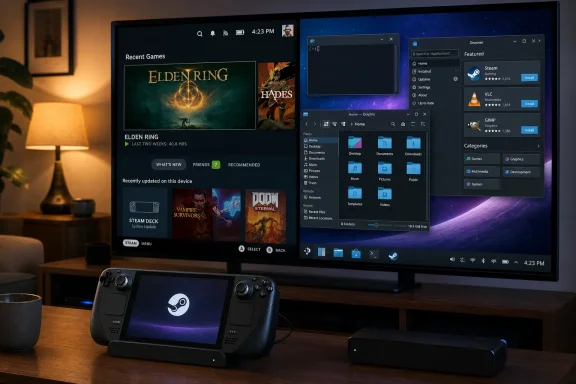
Valve’s Steam Deck and the incoming Steam Machine run SteamOS, a Linux-based operating system that lets users leave the console-like Gaming Mode, enter KDE Plasma Desktop Mode, install Linux apps, browse files, connect peripherals, run emulators, and use the device as a general-purpose PC. That is the practical truth hiding behind Valve’s friendly interface: SteamOS is not merely a launcher, and the Deck is not merely a handheld console. It is a small Linux computer with a carefully designed escape hatch. The opportunity — and the risk — is that Valve has made PC freedom feel like a menu option.
The Steam Deck succeeded partly because it did not ask buyers to care about Linux. Valve sold the thing as a handheld that played Steam games, not as a KDE Plasma machine with an AMD APU, Flatpak apps, and a terminal lurking beneath the surface. That was the right call. Most people do not buy game hardware because they want to think about package formats.
But SteamOS has reached the point where the operating system itself is becoming part of the story. The Steam Deck made Linux gaming feel ordinary. The Steam Machine is positioned to take that same idea into the living room, where the comparison is no longer just with Windows handhelds but with PlayStation, Xbox, Nintendo, and the mini-PC crowd.
That is why Desktop Mode matters. It is not a curiosity for tinkerers, even if tinkerers were the first people to recognize its value. It is Valve’s proof that a console-style interface does not have to come at the cost of the personal computer’s old bargain: you own the machine, you can change what it does, and you can break it if you insist.
The Deck’s secret is not that it runs Linux. Valve has never hidden that. The more interesting secret is that SteamOS makes Linux feel less like an ideology and more like a feature.
That design decision carries more weight than it first appears to. A locked-down console can have a browser, a media app, and cloud saves. A PC has a file system, removable storage, window management, third-party apps, and a user who can make decisions the platform holder did not pre-approve. SteamOS sits awkwardly and productively between those worlds.
Valve also solved one of the oldest living-room PC problems by making the desktop navigable with game controls. The Deck’s trackpads, sticks, triggers, touchscreen, and on-screen keyboard are not a perfect replacement for a keyboard and mouse, but they are enough to make the desktop reachable without a dock. That matters because the feature people cannot easily reach might as well not exist.
The experience is still more “small laptop with a controller glued to it” than iPad. Touch targets can be tiny, text entry can be slow, and a 7- or 7.4-inch screen is not the natural habitat for desktop Linux. But the friction is low enough that a casual user can cross the bridge, install a browser, move files around, and begin to understand that the Deck is not sealed in the way a Switch or PlayStation is sealed.
For WindowsForum readers, Plasma’s appeal is easy to understand. It does not ask you to learn a radically alien desktop metaphor. The application launcher sits where many Windows users expect a Start-menu-like button to sit. The file manager behaves like a file manager. The system settings app exposes knobs and sliders rather than hiding everything behind mobile-style assumptions.
That does not mean SteamOS is “Windows, but free.” It is not. The software model is different, the compatibility story is different, and the system architecture is deliberately more appliance-like in some places than a typical desktop Linux distribution. SteamOS uses an immutable-style approach for the base system, which helps keep updates and recovery manageable but also makes deep system changes less persistent and less advisable.
This is Valve’s balancing act. It wants the openness of a PC without the support burden of every user treating the operating system like a rolling Arch Linux workstation. Desktop Mode says “yes, you can.” The read-only system base quietly adds, “but please do not make us regret it.”
SteamOS handles that side of the equation better than skeptics might expect. Through the Discover software center, users can install common browsers without opening a terminal or learning a package manager. Once installed, those browsers behave like their Linux desktop versions because that is what they are.
There are limitations, and they are worth naming. DRM and streaming-service support on Linux can still be worse than on Windows, macOS, or dedicated streaming boxes. Netflix resolution limits in mainstream Linux browsers are a reminder that the open PC model still collides with entertainment-industry control systems. A Steam Deck can be a surprisingly good web machine, but it is not automatically the best Netflix box in the house.
Still, the broader point stands. A console browser is usually a grudging checkbox. A desktop browser on SteamOS is a doorway into banking, email, cloud documents, web-based productivity tools, forums, admin portals, media libraries, and everything else that makes a PC feel like a PC.
Flatpak is a sensible fit for SteamOS because it lets Valve keep the base operating system stable while allowing users to install desktop applications in a relatively contained way. Discord, Spotify, VLC, LibreOffice, VPN clients, image editors, note-taking tools, and countless open-source utilities can be added without transforming the device into a fragile science project. It is not quite the Windows model of downloading random installers from the web, and that is largely a good thing.
The result is a form of Linux that feels less punitive to newcomers. Users can search, click install, update through a central interface, and remove software without memorizing terminal commands. That is not glamorous, but it is how platforms become usable beyond their founding tribe.
For sysadmins and power users, this also hints at SteamOS’ limits as a general desktop. Flatpak-first software distribution is convenient, but not every tool fits neatly into that model. Some workflows still want native packages, background services, kernel modules, development stacks, or enterprise management hooks. SteamOS can be stretched, but it was not designed to be the new corporate desktop image.
Users can browse the home directory, manage downloads, inspect removable media, copy files from a microSD card, and treat the machine like something they control. That matters for emulation, media playback, modding, screenshots, configuration files, and the ordinary messiness of computing. It also matters psychologically. A visible file system tells users that the device is not merely renting them access to content.
This is also where SteamOS asks for a little responsibility. The full file system is visible, and the Linux directory layout will not feel familiar to everyone coming from Windows. The home folder is safe territory. System directories are another matter. Valve’s read-only base reduces the blast radius, but curiosity can still make a mess.
That tension is healthy. A real PC should expose enough of itself to be useful and enough guardrails to prevent casual disaster. SteamOS is not perfect at this, but it comes closer than most console operating systems ever try to come.
This is where Valve’s broader hardware strategy starts to make sense. A handheld that can become a desktop is useful. A Steam Machine that begins life in the living room but can also operate like a small PC is more interesting. SteamOS is not simply chasing the console market; it is trying to normalize a gaming-first PC that does not need Windows to justify itself.
For everyday work, expectations should remain grounded. The Steam Deck’s AMD APU was built for efficiency and gaming within a handheld power envelope, not workstation workloads. Web browsing, media playback, light document editing, messaging, and file management are well within reach. Heavy 4K editing, large software builds, pro-grade content creation, and demanding multitasking are not the point.
The docked Deck is therefore not a desktop replacement for everyone. It is a desktop replacement for more people than the console-shaped marketing would lead you to believe.
This is not just a hobbyist footnote. The games industry has done a poor job preserving its own history, and modern storefront licensing remains inconsistent, temporary, and fragmented. Players often discover that the hardware they bought to play games is artificially prevented from running software that the underlying components could handle easily.
SteamOS does not solve the legal and ethical issues around game preservation. It does, however, avoid pretending that the user’s machine must be locked down to protect them from themselves. That is a meaningful distinction.
The same openness extends to non-Steam games, though with more caveats. Lutris and related tools can help install games from Battle.net, GOG, Epic, and other Windows-centric ecosystems, using Proton and Wine-based compatibility layers to bridge the gap. Many titles work. Some do not. Anti-cheat systems remain one of the most stubborn barriers, especially when publishers choose Windows-only kernel-level assumptions.
That does not make compatibility universal. Anti-cheat, launchers, media codecs, unusual middleware, and day-one regressions can still spoil the party. But the center of gravity has shifted. Linux gaming is no longer defined by what technically might run after a weekend of forum spelunking. It is defined by whether the Play button works.
For Windows users, this should be taken seriously. Windows remains the dominant PC gaming platform, and it still has the broadest compatibility. But SteamOS has made the alternative credible enough that Microsoft has to compete not only with performance and compatibility, but with user experience. A handheld that resumes quickly, updates cleanly, avoids much of the Windows desktop overhead, and still plays thousands of PC games is a genuine platform threat.
The irony is that SteamOS wins by being less general than Windows in Gaming Mode and more general than a console in Desktop Mode. That combination is exactly why it feels fresh.
With enough knowledge, users can inspect the system, run scripts, use development tools, manipulate files, and push beyond the polite boundaries of the graphical interface. They can also disable protections, make system-level changes, and create problems that survive just long enough to ruin an evening before the next update reasserts Valve’s preferred state.
Valve’s immutable base system complicates old-school Linux tinkering. System directories are read-only by default, and while users can work around that, Valve does not recommend treating SteamOS like a conventional modifiable distro. Updates may overwrite system changes, and unsupported tweaks can produce unsupported outcomes.
That is the right compromise for this device class. The Deck is not a locked console, but it also is not trying to be Fedora Workstation, Arch, or Debian. It is an appliance-like gaming OS with a real desktop attached. Power users can go deeper. Everyone else can stop before the floor gives way.
On that question, Valve has a strong argument. SteamOS starts from the game library and builds outward. Windows starts from the general-purpose desktop and asks gaming to coexist with everything else Microsoft wants the operating system to be. The Steam Deck’s popularity suggests that many players prefer Valve’s order of operations, at least on handheld hardware.
For IT pros, the lesson is more subtle. SteamOS is not about replacing managed Windows fleets. It lacks the enterprise ecosystem, hardware breadth, legacy software compatibility, domain integration expectations, and management tooling that keep Windows entrenched. But it does demonstrate that a Linux desktop can succeed when it is attached to a clear product, a coherent update model, and a user problem people actually have.
Linux on the desktop has often been sold as freedom in the abstract. SteamOS sells freedom after the game boots.
A SteamOS box that can play PC games, run a browser, install media apps, use emulators, connect to peripherals, and behave like a compact Linux PC is not just a console competitor. It is a small-form-factor PC with a console’s manners. That is a category Microsoft has never fully controlled and traditional console makers have never wanted to allow.
Valve’s challenge is support discipline. The more it encourages users to see SteamOS devices as PCs, the more it inherits PC expectations. People will want better printer support, smoother Bluetooth behavior, broader monitor compatibility, stronger accessibility features, better streaming DRM, easier non-Steam launcher handling, and clearer recovery tools when experiments go wrong.
The company cannot simply say “it’s open” and walk away. Openness is valuable, but consumers judge products by what works. SteamOS’ next stage depends on whether Valve can preserve the tinkerer magic while reducing the number of places where ordinary users feel abandoned.
That wager will become more important as SteamOS moves beyond the Deck. The Steam Machine, Steam Frame, and any future third-party devices will test whether Valve can scale this hybrid identity without losing its clarity. A handheld can survive as an enthusiast darling with mainstream appeal. A living-room PC platform has to be boringly reliable, visibly useful, and easy to recover when users inevitably experiment.
The best thing about SteamOS is not that it turns every Steam Deck owner into a Linux user. It is that it lets them become one accidentally, gradually, and only as far as they want to go. In a market full of devices that behave like rented appliances, Valve’s most radical feature may be the simplest one: it still lets a gaming machine become a computer.
 Valve’s Console Trick Was Always a PC Trick
The Steam Deck succeeded partly because it did not ask buyers to care about Linux. Valve sold the thing as a handheld that played Steam games, not as a KDE Plasma machine with an AMD APU, Flatpak apps, and a terminal lurking beneath the surface. That was the right call. Most people do not buy game hardware because they want to think about package formats.But SteamOS has reached the point where the operating system itself is becoming part of the story. The Steam Deck made Linux gaming feel ordinary. The Steam Machine is positioned to take that same idea into the living room, where the comparison is no longer just with Windows handhelds but with PlayStation, Xbox, Nintendo, and the mini-PC crowd.
That is why Desktop Mode matters. It is not a curiosity for tinkerers, even if tinkerers were the first people to recognize its value. It is Valve’s proof that a console-style interface does not have to come at the cost of the personal computer’s old bargain: you own the machine, you can change what it does, and you can break it if you insist.
The Deck’s secret is not that it runs Linux. Valve has never hidden that. The more interesting secret is that SteamOS makes Linux feel less like an ideology and more like a feature.
Desktop Mode Is the Door Valve Left Unlocked
The path into the Deck’s second life is deliberately mundane. Press the Steam button, open the power menu, switch to desktop, and the console mask falls away. What appears next is not a stripped-down maintenance shell or a developer-only back room. It is a working KDE Plasma desktop, complete with a launcher, taskbar, file manager, settings panels, browser installation prompts, and the usual furniture of a modern PC.That design decision carries more weight than it first appears to. A locked-down console can have a browser, a media app, and cloud saves. A PC has a file system, removable storage, window management, third-party apps, and a user who can make decisions the platform holder did not pre-approve. SteamOS sits awkwardly and productively between those worlds.
Valve also solved one of the oldest living-room PC problems by making the desktop navigable with game controls. The Deck’s trackpads, sticks, triggers, touchscreen, and on-screen keyboard are not a perfect replacement for a keyboard and mouse, but they are enough to make the desktop reachable without a dock. That matters because the feature people cannot easily reach might as well not exist.
The experience is still more “small laptop with a controller glued to it” than iPad. Touch targets can be tiny, text entry can be slow, and a 7- or 7.4-inch screen is not the natural habitat for desktop Linux. But the friction is low enough that a casual user can cross the bridge, install a browser, move files around, and begin to understand that the Deck is not sealed in the way a Switch or PlayStation is sealed.
KDE Plasma Gives SteamOS Its Familiar Disguise
Valve’s choice of KDE Plasma was not incidental. Plasma is configurable, mature, relatively Windows-like in its default shape, and comfortable on devices that may alternate between handheld, docked desktop, and living-room display. That makes it a useful counterpart to Gaming Mode: one environment is optimized for a controller and a couch; the other is optimized for windows, panels, files, and settings.For WindowsForum readers, Plasma’s appeal is easy to understand. It does not ask you to learn a radically alien desktop metaphor. The application launcher sits where many Windows users expect a Start-menu-like button to sit. The file manager behaves like a file manager. The system settings app exposes knobs and sliders rather than hiding everything behind mobile-style assumptions.
That does not mean SteamOS is “Windows, but free.” It is not. The software model is different, the compatibility story is different, and the system architecture is deliberately more appliance-like in some places than a typical desktop Linux distribution. SteamOS uses an immutable-style approach for the base system, which helps keep updates and recovery manageable but also makes deep system changes less persistent and less advisable.
This is Valve’s balancing act. It wants the openness of a PC without the support burden of every user treating the operating system like a rolling Arch Linux workstation. Desktop Mode says “yes, you can.” The read-only system base quietly adds, “but please do not make us regret it.”
The Browser Turns a Handheld Into a Real Computer
Installing Firefox, Chrome, Brave, Vivaldi, or another Linux browser is the moment many users will stop thinking of the Deck as a console. The web remains the lowest common denominator of modern computing. If a device has a capable browser, a file picker, downloads, extensions, and web apps, it can already perform a large portion of what ordinary PCs do every day.SteamOS handles that side of the equation better than skeptics might expect. Through the Discover software center, users can install common browsers without opening a terminal or learning a package manager. Once installed, those browsers behave like their Linux desktop versions because that is what they are.
There are limitations, and they are worth naming. DRM and streaming-service support on Linux can still be worse than on Windows, macOS, or dedicated streaming boxes. Netflix resolution limits in mainstream Linux browsers are a reminder that the open PC model still collides with entertainment-industry control systems. A Steam Deck can be a surprisingly good web machine, but it is not automatically the best Netflix box in the house.
Still, the broader point stands. A console browser is usually a grudging checkbox. A desktop browser on SteamOS is a doorway into banking, email, cloud documents, web-based productivity tools, forums, admin portals, media libraries, and everything else that makes a PC feel like a PC.
Discover Is the Friendly Face of Linux Software
The Discover app is doing more strategic work than its modest interface suggests. To a Linux veteran, it is a software center built around Flatpak and repositories. To a normal Steam Deck owner, it is simply the app store for Desktop Mode. That translation is essential.Flatpak is a sensible fit for SteamOS because it lets Valve keep the base operating system stable while allowing users to install desktop applications in a relatively contained way. Discord, Spotify, VLC, LibreOffice, VPN clients, image editors, note-taking tools, and countless open-source utilities can be added without transforming the device into a fragile science project. It is not quite the Windows model of downloading random installers from the web, and that is largely a good thing.
The result is a form of Linux that feels less punitive to newcomers. Users can search, click install, update through a central interface, and remove software without memorizing terminal commands. That is not glamorous, but it is how platforms become usable beyond their founding tribe.
For sysadmins and power users, this also hints at SteamOS’ limits as a general desktop. Flatpak-first software distribution is convenient, but not every tool fits neatly into that model. Some workflows still want native packages, background services, kernel modules, development stacks, or enterprise management hooks. SteamOS can be stretched, but it was not designed to be the new corporate desktop image.
The File Manager Is Where the Console Illusion Breaks
Dolphin, KDE’s file manager, may be the most philosophically important app on the Steam Deck. Consoles hide storage behind tiles and save-data menus. PCs show you folders. Once Dolphin opens, the Deck’s identity shifts.Users can browse the home directory, manage downloads, inspect removable media, copy files from a microSD card, and treat the machine like something they control. That matters for emulation, media playback, modding, screenshots, configuration files, and the ordinary messiness of computing. It also matters psychologically. A visible file system tells users that the device is not merely renting them access to content.
This is also where SteamOS asks for a little responsibility. The full file system is visible, and the Linux directory layout will not feel familiar to everyone coming from Windows. The home folder is safe territory. System directories are another matter. Valve’s read-only base reduces the blast radius, but curiosity can still make a mess.
That tension is healthy. A real PC should expose enough of itself to be useful and enough guardrails to prevent casual disaster. SteamOS is not perfect at this, but it comes closer than most console operating systems ever try to come.
A Dock Changes the Category of the Device
The Steam Deck’s desktop case becomes much stronger the moment it is attached to a USB-C dock, monitor, keyboard, and mouse. In handheld mode, Desktop Mode is impressive but cramped. Docked, it becomes an unexpectedly conventional Linux desktop with Steam waiting in the wings.This is where Valve’s broader hardware strategy starts to make sense. A handheld that can become a desktop is useful. A Steam Machine that begins life in the living room but can also operate like a small PC is more interesting. SteamOS is not simply chasing the console market; it is trying to normalize a gaming-first PC that does not need Windows to justify itself.
For everyday work, expectations should remain grounded. The Steam Deck’s AMD APU was built for efficiency and gaming within a handheld power envelope, not workstation workloads. Web browsing, media playback, light document editing, messaging, and file management are well within reach. Heavy 4K editing, large software builds, pro-grade content creation, and demanding multitasking are not the point.
The docked Deck is therefore not a desktop replacement for everyone. It is a desktop replacement for more people than the console-shaped marketing would lead you to believe.
Emulation Shows Why Openness Still Matters
Emulation is one of the clearest examples of what an open gaming device can do that a conventional console usually refuses to do. Through Discover and related tools, SteamOS users can install emulators, configure controllers, and turn the Deck into a compact museum of older game systems. The legal status of ROM files remains its own minefield, but the technical capability is undeniable.This is not just a hobbyist footnote. The games industry has done a poor job preserving its own history, and modern storefront licensing remains inconsistent, temporary, and fragmented. Players often discover that the hardware they bought to play games is artificially prevented from running software that the underlying components could handle easily.
SteamOS does not solve the legal and ethical issues around game preservation. It does, however, avoid pretending that the user’s machine must be locked down to protect them from themselves. That is a meaningful distinction.
The same openness extends to non-Steam games, though with more caveats. Lutris and related tools can help install games from Battle.net, GOG, Epic, and other Windows-centric ecosystems, using Proton and Wine-based compatibility layers to bridge the gap. Many titles work. Some do not. Anti-cheat systems remain one of the most stubborn barriers, especially when publishers choose Windows-only kernel-level assumptions.
Proton Made Linux Gaming Boring, Which Is the Breakthrough
The reason SteamOS can have this conversation at all is Proton. Valve’s compatibility layer turned Linux gaming from a pledge drive into a product strategy. Instead of waiting for every publisher to ship a native Linux build, Proton translates enough of the Windows gaming stack to make a large part of the Steam library work on Linux with minimal user intervention.That does not make compatibility universal. Anti-cheat, launchers, media codecs, unusual middleware, and day-one regressions can still spoil the party. But the center of gravity has shifted. Linux gaming is no longer defined by what technically might run after a weekend of forum spelunking. It is defined by whether the Play button works.
For Windows users, this should be taken seriously. Windows remains the dominant PC gaming platform, and it still has the broadest compatibility. But SteamOS has made the alternative credible enough that Microsoft has to compete not only with performance and compatibility, but with user experience. A handheld that resumes quickly, updates cleanly, avoids much of the Windows desktop overhead, and still plays thousands of PC games is a genuine platform threat.
The irony is that SteamOS wins by being less general than Windows in Gaming Mode and more general than a console in Desktop Mode. That combination is exactly why it feels fresh.
The Terminal Is Power With a Warning Label
Konsole, KDE’s terminal app, is the final door. Most users will never need it, and that is a sign of progress. A consumer Linux device should not require command-line fluency for basic tasks. But the terminal’s presence matters because it confirms the device’s status as a real computer.With enough knowledge, users can inspect the system, run scripts, use development tools, manipulate files, and push beyond the polite boundaries of the graphical interface. They can also disable protections, make system-level changes, and create problems that survive just long enough to ruin an evening before the next update reasserts Valve’s preferred state.
Valve’s immutable base system complicates old-school Linux tinkering. System directories are read-only by default, and while users can work around that, Valve does not recommend treating SteamOS like a conventional modifiable distro. Updates may overwrite system changes, and unsupported tweaks can produce unsupported outcomes.
That is the right compromise for this device class. The Deck is not a locked console, but it also is not trying to be Fedora Workstation, Arch, or Debian. It is an appliance-like gaming OS with a real desktop attached. Power users can go deeper. Everyone else can stop before the floor gives way.
SteamOS Is Not Windows, and That Is the Point
It is tempting to frame SteamOS as a Windows replacement, especially now that more users are frustrated with ads, account nudges, telemetry debates, AI integration, and the growing sense that the Windows desktop is less neutral territory than it used to be. But SteamOS is not a clean one-for-one swap. It is better understood as an alternate answer to a narrower question: what should a gaming-first PC feel like?On that question, Valve has a strong argument. SteamOS starts from the game library and builds outward. Windows starts from the general-purpose desktop and asks gaming to coexist with everything else Microsoft wants the operating system to be. The Steam Deck’s popularity suggests that many players prefer Valve’s order of operations, at least on handheld hardware.
For IT pros, the lesson is more subtle. SteamOS is not about replacing managed Windows fleets. It lacks the enterprise ecosystem, hardware breadth, legacy software compatibility, domain integration expectations, and management tooling that keep Windows entrenched. But it does demonstrate that a Linux desktop can succeed when it is attached to a clear product, a coherent update model, and a user problem people actually have.
Linux on the desktop has often been sold as freedom in the abstract. SteamOS sells freedom after the game boots.
The Steam Machine Raises the Stakes Beyond the Handheld
The Steam Machine changes the meaning of all this. On the Deck, Desktop Mode can be dismissed as a bonus: useful, charming, occasionally powerful, but secondary to handheld gaming. In the living room, attached to a television or monitor, the desktop becomes harder to ignore.A SteamOS box that can play PC games, run a browser, install media apps, use emulators, connect to peripherals, and behave like a compact Linux PC is not just a console competitor. It is a small-form-factor PC with a console’s manners. That is a category Microsoft has never fully controlled and traditional console makers have never wanted to allow.
Valve’s challenge is support discipline. The more it encourages users to see SteamOS devices as PCs, the more it inherits PC expectations. People will want better printer support, smoother Bluetooth behavior, broader monitor compatibility, stronger accessibility features, better streaming DRM, easier non-Steam launcher handling, and clearer recovery tools when experiments go wrong.
The company cannot simply say “it’s open” and walk away. Openness is valuable, but consumers judge products by what works. SteamOS’ next stage depends on whether Valve can preserve the tinkerer magic while reducing the number of places where ordinary users feel abandoned.
The Real Unlock Is Knowing Where to Stop
The smartest way to use SteamOS Desktop Mode is not to turn the Steam Deck into something it is not. It is to recognize the surprising amount of ordinary computing it can already do, then avoid confusing possibility with suitability. The machine is powerful enough to be useful, open enough to be interesting, and constrained enough to remain mostly sane.- SteamOS devices are PCs first in architecture, even when Valve presents them with a console-like interface.
- Desktop Mode turns the Steam Deck into a KDE Plasma computer that can browse the web, manage files, and run many Linux applications.
- The Discover software center and Flatpak model make app installation approachable without requiring most users to learn terminal commands.
- Docking a Steam Deck changes Desktop Mode from a clever handheld trick into a credible light-desktop setup.
- Emulation and non-Steam game launchers show the value of openness, but legal limits, anti-cheat systems, and compatibility gaps still matter.
- The terminal and writable system workarounds are there for power users, but SteamOS is healthiest when its base system remains treated as Valve intends.
Valve’s Quiet Bet Is That Users Still Want Computers
SteamOS is having its breakout moment because it offers something the rest of the consumer hardware market has spent years sanding away: a friendly default experience that does not eliminate the user’s ability to wander off-script. Apple, Nintendo, Sony, Microsoft, Google, and the streaming platforms have all built profitable worlds by narrowing what users can touch. Valve’s wager is that gamers, at least, still value a door marked Desktop.That wager will become more important as SteamOS moves beyond the Deck. The Steam Machine, Steam Frame, and any future third-party devices will test whether Valve can scale this hybrid identity without losing its clarity. A handheld can survive as an enthusiast darling with mainstream appeal. A living-room PC platform has to be boringly reliable, visibly useful, and easy to recover when users inevitably experiment.
The best thing about SteamOS is not that it turns every Steam Deck owner into a Linux user. It is that it lets them become one accidentally, gradually, and only as far as they want to go. In a market full of devices that behave like rented appliances, Valve’s most radical feature may be the simplest one: it still lets a gaming machine become a computer.
References
- Primary source: PCMag
Published: 2026-06-21T12:22:07.065949
Loading…
www.pcmag.com - Related coverage: techradar.com
Loading…
www.techradar.com - Related coverage: gamesradar.com
SteamOS now plays nice with Intel handhelds, and that could help a shunned portable become a solid Steam Deck alternative | GamesRadar+
Now that SteamOS is working and improving on Intel handheld gaming PCs, it could help the OG MSI Claw shine as a makeshift Steam Deck.www.gamesradar.com - Related coverage: pcgamer.com
Loading…
www.pcgamer.com - Related coverage: windowscentral.com
"Context matters a lot": New Steam Machine CPU benchmark numbers are underwhelming, but they're far from the full picture | Windows Central
Gaming handhelds we tested have more CPU power than the Steam Machine, but that doesn't mean it's time to panic.www.windowscentral.com - Related coverage: t3.com
Loading…
www.t3.com
- Related coverage: gematsu.com
Valve announces Steam Machine, Steam Frame, and Steam Controller - Gematsu
Valve has announced three new additions to the Steam hardware family—Steam Machine, Steam Frame, and Steam Controller. All three will launch in early 2026.www.gematsu.com - Related coverage: gameinformer.com
Loading…
gameinformer.com - Related coverage: pcworld.com
Loading…
www.pcworld.com - Related coverage: straitstimes.com
Loading…
www.straitstimes.com - Related coverage: dataconomy.com
Loading…
dataconomy.com - Related coverage: tomshardware.com
Loading…
www.tomshardware.com - Related coverage: tomsguide.com
Loading…
www.tomsguide.com - Related coverage: pulsegeek.com
Loading…
pulsegeek.com - Related coverage: gigazine.net
Loading…
gigazine.net - Related coverage: jmac.org
Loading…
jmac.org