
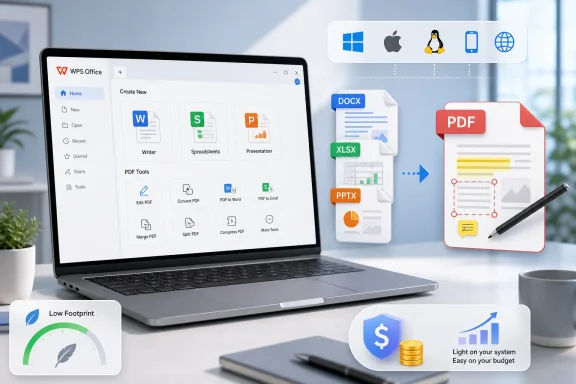
WPS Office, the Kingsoft productivity suite reviewed by ad hoc news on June 21, 2026, remains popular because it gives Windows, macOS, Linux, mobile, and web users a familiar document editor, spreadsheet, presentation app, PDF toolkit, cloud sync, and Microsoft-format compatibility at little or no upfront cost. That is not a glamorous pitch in the age of AI copilots and subscription bundles, but it is a durable one. WPS wins not by replacing Microsoft 365 for everyone, but by being good enough for the vast middle of everyday document work. Its quiet grip comes from a simple bargain: less weight, less cost, and fewer reasons to think about office software at all.
The old office-suite contest used to be easy to describe. Microsoft Office was the standard, LibreOffice was the open-source alternative, Google Docs was the browser-native insurgent, and everything else fought for scraps. WPS Office complicates that map because it does not ask users to join a movement or rethink how documents should work.
Instead, it copies the grammar of the modern office suite closely enough that most users can sit down and begin typing. Writer, Spreadsheets, and Presentation are not trying to teach a new mental model. They are trying to avoid becoming the reason a student misses a deadline, a freelancer botches an invoice, or a small-business owner cannot open a client’s spreadsheet.
That sounds modest, but modesty is the product strategy. The average office document is not a heavily automated financial model or a 200-page legal filing with custom styles and macros. It is a résumé, a meeting agenda, a classroom handout, a price list, a pitch deck, a scanned form, or a spreadsheet that exists because nobody wanted to build a database.
WPS Office is built for that world. It is not the center of a Fortune 500 collaboration stack. It is the office suite people install when they need documents to open today, on the laptop they already own, without first negotiating a subscription, an admin policy, or a philosophical position on cloud computing.
The more Microsoft 365 becomes an operating layer for work, the more room there is beneath it for a lighter tool that just handles files. WPS Office lives in that gap. It gives users a ribbon-style interface, Microsoft Office file compatibility, PDF functions, templates, and cloud sync, but without demanding that every document become part of a broader corporate productivity graph.
That is why the suite has particular appeal in price-sensitive markets, on older PCs, and among users who are not deeply embedded in Microsoft’s business ecosystem. The software’s long history matters here. Kingsoft has been in the office-software business since the late 1980s, and WPS has had decades to become familiar in China and other Asian markets where price, localization, and platform flexibility are not side issues.
The result is a product that feels less like an upstart and more like a long-running parallel universe. To many Windows users in the West, WPS Office may seem like a Microsoft Office alternative. In other markets, it is simply one of the office suites people have always known.
That is more valuable than software makers often admit. Productivity suites are not entertainment products; users do not open them hoping to be delighted by surprise. They open them because a document stands between them and something else they would rather be doing.
WPS Office’s interface therefore walks a careful line. It is familiar enough to reduce switching friction, but not so bloated that it feels like a corporate portal disguised as a word processor. On older hardware, that restraint can make the suite feel more responsive than heavier competitors, especially when opening common files or moving between documents.
This is also where WPS’s all-in-one packaging helps. Writer, Spreadsheets, Presentation, and PDF tools live under one roof, so the user does not need to assemble a toolkit from separate apps. That may not impress a sysadmin managing thousands of endpoints, but it matters enormously to people who just want one installer that solves most document problems.
But free software has to be paid for somehow. In WPS Office, that can mean ads, prompts, feature gates, and reminders that the premium tier exists. For casual use, those interruptions may be tolerable. In a professional setting, they can feel like a tax on concentration.
This is the uncomfortable bargain behind many “free Office alternative” recommendations. The software may cost nothing at the point of installation, but the user pays in attention, friction, and uncertainty about which feature will be free at the moment they need it. That is especially visible in PDF workflows, where viewing and annotation are often free enough, while more advanced editing and conversion features tend to move users toward paid plans.
Kingsoft’s premium subscriptions answer that problem by removing ads and unlocking more advanced PDF, conversion, cloud, template, and AI functions. The pricing is generally positioned below Microsoft 365 for individuals and small teams, but the comparison is not perfectly symmetrical. Microsoft sells an ecosystem; WPS sells a lighter office suite with enough cloud and AI features to remain current.
Microsoft Office and Google Workspace both handle parts of this world, but WPS makes PDF capability feel central to the package. For users who live between Word files, Excel sheets, slide decks, and PDFs, that integration is practical. It reduces the need to install a separate PDF editor or trust a random web converter with sensitive documents.
This is also a clever competitive move. Microsoft-format compatibility gets WPS into the conversation, but PDF tools keep it useful even when the user is not writing a traditional document. A small business might not need enterprise collaboration controls, but it almost certainly needs to edit, annotate, or convert PDFs.
The catch is that PDF functionality is also where free users may most quickly encounter limits. The more WPS becomes a document utility belt, the more Kingsoft has an incentive to reserve the most convenient tools for paying subscribers. That does not make the product unfair, but it does make the “free office suite” label less complete than it first appears.
The trouble begins where office documents become less like documents and more like applications. Complex spreadsheets with macros, unusual fonts, advanced formatting, linked data sources, embedded objects, and corporate templates can expose the limits of any non-Microsoft suite. Layout shifts that are invisible in a simple letter can become unacceptable in a contract, proposal, or regulated filing.
That is not a unique WPS problem. LibreOffice, OnlyOffice, Google Docs, and Apple’s iWork all face versions of the same issue. Microsoft Office formats are widely documented, but Microsoft Office remains the reference implementation in the real world because so many organizations author, test, and approve documents inside it.
For WindowsForum readers, this is the key practical distinction. WPS Office may be perfectly sensible for personal documents, schoolwork, light business use, and routine spreadsheets. It is a riskier default when the document itself is the business process, especially in finance, law, engineering, government, healthcare, or any workflow where formatting fidelity is not cosmetic.
Yet WPS still feels more offline-first than Google Docs and less institutionally cloud-bound than Microsoft 365. That middle position is important. Many users want cloud sync as a convenience, not as the operating assumption behind every document.
This is especially relevant in regions with inconsistent broadband, on commuter laptops, and in small organizations where document work is still file-based. A locally installed suite that can continue working when the network drops is not old-fashioned; it is resilient. The cloud should catch up later, not hold the document hostage.
The limitation is that WPS collaboration is not as mature as the ecosystems built around Microsoft 365 and Google Workspace. Real-time co-editing, comments, sharing, and cloud storage are useful, but they do not automatically replace SharePoint governance, Google’s browser-native collaboration model, or the enormous third-party add-in markets around the dominant platforms.
But AI is not why WPS earned its user base. The original attraction was mundane: a small install, familiar tools, Microsoft-format compatibility, and low cost. AI may help retain subscribers, especially around PDF summarization, slide creation, translation, and first-draft writing, but it does not erase the more basic buying decision.
That distinction matters because AI features can make lightweight software feel heavier in both interface and business model. Users who came to WPS to avoid the subscription sprawl of bigger suites may not welcome constant nudges toward AI plans. The product has to avoid becoming a smaller version of the very thing it was chosen to escape.
The best use of AI in WPS would be quiet and task-specific. Summarize this PDF. Translate this paragraph. Draft this memo. Turn this outline into slides. If Kingsoft keeps the feature set practical rather than theatrical, AI can strengthen WPS’s everyday-document identity instead of diluting it.
Security-minded users should start with the same questions they would ask of any productivity suite. Where are documents stored? Which features require cloud upload? What telemetry is collected? Are AI features processing sensitive files? Can ads or prompts be disabled through a paid plan? Are installers being obtained from official channels?
Those questions are not unique to WPS. Microsoft 365, Google Workspace, Adobe Acrobat, and countless web-based PDF tools raise their own privacy and control issues. The difference is that Microsoft and Google are already embedded in many organizations’ compliance reviews, while WPS may require fresh scrutiny.
For personal use, the risk calculation may be straightforward: install from a trusted source, avoid uploading sensitive files unnecessarily, and understand which features are local versus cloud-backed. For managed environments, IT should test WPS like any other application that handles business documents, including update behavior, file associations, network activity, policy controls, and compatibility with endpoint security tools.
That mesh is hard to replicate. A company that has standardized on Entra ID, Exchange Online, Teams, SharePoint, OneDrive, Intune, Purview, Defender, and Power Platform does not evaluate an office suite as a standalone app. It evaluates the consequences of introducing another document surface into an already governed environment.
WPS can still fit in some business contexts, especially where cost matters more than centralized policy sophistication. It may be attractive for smaller teams, contractors, education scenarios, regional deployments, or devices that need to open and edit standard documents without the full Microsoft stack. But in regulated enterprises, the burden of proof is higher.
This is where WPS’s strength becomes its ceiling. Being light, familiar, and inexpensive is enough for millions of users. It is not automatically enough for organizations where every document may be discoverable, audited, classified, retained, encrypted, or blocked from leaving a tenant.
That pluralism is not a temporary glitch. It is the natural result of billions of people needing to create, edit, sign, convert, and share files under different economic and technical conditions. A student in Manila, a consultant in Berlin, a shop owner in Jakarta, a Linux user in Nairobi, and a retiree on an older Windows laptop are not all shopping for the same productivity stack.
WPS Office thrives because it does not need to win the enterprise standardization war to matter. It only needs to be present at the moment someone searches for a free or cheaper way to open an Office file and discovers that the alternative is polished enough to keep. That is a quieter kind of market power, but it is still market power.
Kingsoft’s investor story rests partly on that durability. WPS Office is not a novelty product chasing a single hype cycle. It is a decades-old productivity franchise being pulled toward subscriptions, cloud services, templates, PDFs, collaboration, and AI. The business challenge is to monetize that base without making the software feel like just another nagging subscription shell.
 The Office Suite War Is No Longer About Word Processors
The old office-suite contest used to be easy to describe. Microsoft Office was the standard, LibreOffice was the open-source alternative, Google Docs was the browser-native insurgent, and everything else fought for scraps. WPS Office complicates that map because it does not ask users to join a movement or rethink how documents should work.Instead, it copies the grammar of the modern office suite closely enough that most users can sit down and begin typing. Writer, Spreadsheets, and Presentation are not trying to teach a new mental model. They are trying to avoid becoming the reason a student misses a deadline, a freelancer botches an invoice, or a small-business owner cannot open a client’s spreadsheet.
That sounds modest, but modesty is the product strategy. The average office document is not a heavily automated financial model or a 200-page legal filing with custom styles and macros. It is a résumé, a meeting agenda, a classroom handout, a price list, a pitch deck, a scanned form, or a spreadsheet that exists because nobody wanted to build a database.
WPS Office is built for that world. It is not the center of a Fortune 500 collaboration stack. It is the office suite people install when they need documents to open today, on the laptop they already own, without first negotiating a subscription, an admin policy, or a philosophical position on cloud computing.
Kingsoft Found a Durable Niche in the Space Microsoft Left Behind
Microsoft 365 is no longer just a suite of desktop apps. It is identity, storage, compliance, Teams, Exchange, SharePoint, device management, security posture, audit logs, data-loss prevention, and increasingly Copilot. For enterprise IT, that bundling is often the point. For many individuals and smaller organizations, it is also the problem.The more Microsoft 365 becomes an operating layer for work, the more room there is beneath it for a lighter tool that just handles files. WPS Office lives in that gap. It gives users a ribbon-style interface, Microsoft Office file compatibility, PDF functions, templates, and cloud sync, but without demanding that every document become part of a broader corporate productivity graph.
That is why the suite has particular appeal in price-sensitive markets, on older PCs, and among users who are not deeply embedded in Microsoft’s business ecosystem. The software’s long history matters here. Kingsoft has been in the office-software business since the late 1980s, and WPS has had decades to become familiar in China and other Asian markets where price, localization, and platform flexibility are not side issues.
The result is a product that feels less like an upstart and more like a long-running parallel universe. To many Windows users in the West, WPS Office may seem like a Microsoft Office alternative. In other markets, it is simply one of the office suites people have always known.
Familiarity Is the Feature Users Actually Pay For
The most important thing WPS Office does is not novel. It makes itself unsurprising. The ribbon-like interface, the document tabs, the templates, the Excel-style grids, the PowerPoint-like slide workflow, and the bundled PDF tools all communicate the same message: you already know enough to use this.That is more valuable than software makers often admit. Productivity suites are not entertainment products; users do not open them hoping to be delighted by surprise. They open them because a document stands between them and something else they would rather be doing.
WPS Office’s interface therefore walks a careful line. It is familiar enough to reduce switching friction, but not so bloated that it feels like a corporate portal disguised as a word processor. On older hardware, that restraint can make the suite feel more responsive than heavier competitors, especially when opening common files or moving between documents.
This is also where WPS’s all-in-one packaging helps. Writer, Spreadsheets, Presentation, and PDF tools live under one roof, so the user does not need to assemble a toolkit from separate apps. That may not impress a sysadmin managing thousands of endpoints, but it matters enormously to people who just want one installer that solves most document problems.
The Free Tier Is Both the Hook and the Irritant
WPS Office’s freemium model is central to its success and to many of its complaints. The free version gives users enough functionality to make the suite a serious option for daily work. That generosity is why WPS keeps appearing on machines owned by students, freelancers, home users, and small firms that cannot justify a full Microsoft 365 subscription for every seat.But free software has to be paid for somehow. In WPS Office, that can mean ads, prompts, feature gates, and reminders that the premium tier exists. For casual use, those interruptions may be tolerable. In a professional setting, they can feel like a tax on concentration.
This is the uncomfortable bargain behind many “free Office alternative” recommendations. The software may cost nothing at the point of installation, but the user pays in attention, friction, and uncertainty about which feature will be free at the moment they need it. That is especially visible in PDF workflows, where viewing and annotation are often free enough, while more advanced editing and conversion features tend to move users toward paid plans.
Kingsoft’s premium subscriptions answer that problem by removing ads and unlocking more advanced PDF, conversion, cloud, template, and AI functions. The pricing is generally positioned below Microsoft 365 for individuals and small teams, but the comparison is not perfectly symmetrical. Microsoft sells an ecosystem; WPS sells a lighter office suite with enough cloud and AI features to remain current.
PDF Became the Trojan Horse for Everyday Productivity
One reason WPS Office still feels relevant is that it treats PDF work as part of ordinary office work rather than a separate specialist task. That reflects how people actually use documents in 2026. They receive PDFs, sign forms, annotate drafts, export reports, compress files, convert pages, and merge materials into something that can be sent without formatting surprises.Microsoft Office and Google Workspace both handle parts of this world, but WPS makes PDF capability feel central to the package. For users who live between Word files, Excel sheets, slide decks, and PDFs, that integration is practical. It reduces the need to install a separate PDF editor or trust a random web converter with sensitive documents.
This is also a clever competitive move. Microsoft-format compatibility gets WPS into the conversation, but PDF tools keep it useful even when the user is not writing a traditional document. A small business might not need enterprise collaboration controls, but it almost certainly needs to edit, annotate, or convert PDFs.
The catch is that PDF functionality is also where free users may most quickly encounter limits. The more WPS becomes a document utility belt, the more Kingsoft has an incentive to reserve the most convenient tools for paying subscribers. That does not make the product unfair, but it does make the “free office suite” label less complete than it first appears.
Compatibility Is Good Enough Until the Document Gets Weird
WPS Office’s claim to Microsoft Office compatibility is the foundation of its appeal. Most users do not want an abstractly excellent word processor; they want to open DOCX files from clients, edit XLSX files from colleagues, and send PPTX decks that do not fall apart on someone else’s machine. For ordinary files, WPS often clears that bar.The trouble begins where office documents become less like documents and more like applications. Complex spreadsheets with macros, unusual fonts, advanced formatting, linked data sources, embedded objects, and corporate templates can expose the limits of any non-Microsoft suite. Layout shifts that are invisible in a simple letter can become unacceptable in a contract, proposal, or regulated filing.
That is not a unique WPS problem. LibreOffice, OnlyOffice, Google Docs, and Apple’s iWork all face versions of the same issue. Microsoft Office formats are widely documented, but Microsoft Office remains the reference implementation in the real world because so many organizations author, test, and approve documents inside it.
For WindowsForum readers, this is the key practical distinction. WPS Office may be perfectly sensible for personal documents, schoolwork, light business use, and routine spreadsheets. It is a riskier default when the document itself is the business process, especially in finance, law, engineering, government, healthcare, or any workflow where formatting fidelity is not cosmetic.
The Cloud Layer Is Useful Because It Does Not Fully Take Over
WPS Office has moved beyond offline desktop software. With a Kingsoft account, users can sync files, share links, collaborate on selected documents, and move between devices. Its current positioning also leans into AI-assisted writing, summarization, translation, PDF chat, and slide generation.Yet WPS still feels more offline-first than Google Docs and less institutionally cloud-bound than Microsoft 365. That middle position is important. Many users want cloud sync as a convenience, not as the operating assumption behind every document.
This is especially relevant in regions with inconsistent broadband, on commuter laptops, and in small organizations where document work is still file-based. A locally installed suite that can continue working when the network drops is not old-fashioned; it is resilient. The cloud should catch up later, not hold the document hostage.
The limitation is that WPS collaboration is not as mature as the ecosystems built around Microsoft 365 and Google Workspace. Real-time co-editing, comments, sharing, and cloud storage are useful, but they do not automatically replace SharePoint governance, Google’s browser-native collaboration model, or the enormous third-party add-in markets around the dominant platforms.
AI Is the New Upsell, Not the Original Reason to Install
WPS Office now markets AI features prominently, and that is not surprising. Every productivity suite in 2026 is under pressure to explain how it will write, summarize, translate, analyze, and generate content faster than last year’s version. WPS AI gives Kingsoft a way to keep the suite in the same conversation as Microsoft Copilot and Google Gemini-powered Workspace features.But AI is not why WPS earned its user base. The original attraction was mundane: a small install, familiar tools, Microsoft-format compatibility, and low cost. AI may help retain subscribers, especially around PDF summarization, slide creation, translation, and first-draft writing, but it does not erase the more basic buying decision.
That distinction matters because AI features can make lightweight software feel heavier in both interface and business model. Users who came to WPS to avoid the subscription sprawl of bigger suites may not welcome constant nudges toward AI plans. The product has to avoid becoming a smaller version of the very thing it was chosen to escape.
The best use of AI in WPS would be quiet and task-specific. Summarize this PDF. Translate this paragraph. Draft this memo. Turn this outline into slides. If Kingsoft keeps the feature set practical rather than theatrical, AI can strengthen WPS’s everyday-document identity instead of diluting it.
Windows Users Should Treat WPS as a Tool, Not a Tribe
For Windows users, the sensible approach is neither boosterism nor suspicion by default. WPS Office is proprietary software from a major Chinese vendor, and that alone will make some organizations cautious. It also delivers a polished, capable office environment that may be more than enough for large numbers of non-enterprise users.Security-minded users should start with the same questions they would ask of any productivity suite. Where are documents stored? Which features require cloud upload? What telemetry is collected? Are AI features processing sensitive files? Can ads or prompts be disabled through a paid plan? Are installers being obtained from official channels?
Those questions are not unique to WPS. Microsoft 365, Google Workspace, Adobe Acrobat, and countless web-based PDF tools raise their own privacy and control issues. The difference is that Microsoft and Google are already embedded in many organizations’ compliance reviews, while WPS may require fresh scrutiny.
For personal use, the risk calculation may be straightforward: install from a trusted source, avoid uploading sensitive files unnecessarily, and understand which features are local versus cloud-backed. For managed environments, IT should test WPS like any other application that handles business documents, including update behavior, file associations, network activity, policy controls, and compatibility with endpoint security tools.
The Enterprise Gap Is Real, and It Is Not Just About Features
It is tempting to say WPS Office lacks some enterprise features and leave the comparison there. But the deeper issue is ecosystem gravity. Microsoft 365 is not dominant merely because Word, Excel, and PowerPoint are strong; it is dominant because they sit inside a mesh of identity, storage, compliance, communication, automation, and administration.That mesh is hard to replicate. A company that has standardized on Entra ID, Exchange Online, Teams, SharePoint, OneDrive, Intune, Purview, Defender, and Power Platform does not evaluate an office suite as a standalone app. It evaluates the consequences of introducing another document surface into an already governed environment.
WPS can still fit in some business contexts, especially where cost matters more than centralized policy sophistication. It may be attractive for smaller teams, contractors, education scenarios, regional deployments, or devices that need to open and edit standard documents without the full Microsoft stack. But in regulated enterprises, the burden of proof is higher.
This is where WPS’s strength becomes its ceiling. Being light, familiar, and inexpensive is enough for millions of users. It is not automatically enough for organizations where every document may be discoverable, audited, classified, retained, encrypted, or blocked from leaving a tenant.
The Longseller Survives Because the Market Is Bigger Than Microsoft
The office-suite market often gets discussed as if there can be only one winner. In practice, documents are too universal for that. The same world can contain Microsoft 365 for enterprises, Google Workspace for browser-native collaboration, LibreOffice for open-source users, Apple iWork for Mac loyalists, OnlyOffice for certain self-hosted workflows, and WPS Office for users who want familiar tools without a heavy footprint or high subscription cost.That pluralism is not a temporary glitch. It is the natural result of billions of people needing to create, edit, sign, convert, and share files under different economic and technical conditions. A student in Manila, a consultant in Berlin, a shop owner in Jakarta, a Linux user in Nairobi, and a retiree on an older Windows laptop are not all shopping for the same productivity stack.
WPS Office thrives because it does not need to win the enterprise standardization war to matter. It only needs to be present at the moment someone searches for a free or cheaper way to open an Office file and discovers that the alternative is polished enough to keep. That is a quieter kind of market power, but it is still market power.
Kingsoft’s investor story rests partly on that durability. WPS Office is not a novelty product chasing a single hype cycle. It is a decades-old productivity franchise being pulled toward subscriptions, cloud services, templates, PDFs, collaboration, and AI. The business challenge is to monetize that base without making the software feel like just another nagging subscription shell.
The Quiet Bargain WPS Asks Users to Accept
WPS Office makes the most sense when judged by the work most people actually do, not by the edge cases that dominate enterprise procurement. It is a practical suite for common documents, and its compromises are manageable when users understand them before they standardize on it.- WPS Office is strongest for everyday writing, spreadsheets, presentations, PDF handling, templates, and Microsoft-format files that do not rely on complex macros or unusual formatting.
- The free version is useful enough to explain the suite’s popularity, but ads, prompts, and premium-only features can become distracting in professional workflows.
- The paid tiers are best understood as a lower-cost productivity subscription, not as a full replacement for the Microsoft 365 enterprise platform.
- WPS Cloud and collaboration features add convenience, but they do not match the administrative depth of Microsoft 365 or the browser-native simplicity of Google Workspace.
- Security-conscious users and IT departments should distinguish between local editing, cloud sync, AI processing, and document-sharing features before using WPS with sensitive files.
- The suite’s biggest advantage remains its balance of familiarity, speed, platform coverage, and cost, especially on modest hardware and in price-sensitive environments.
References
- Primary source: AD HOC NEWS
Published: 2026-06-21T23:47:10.607044
Loading…
www.ad-hoc-news.de - Related coverage: explore.wps.com
Loading…
explore.wps.com - Related coverage: xpay.sh
Loading…
www.xpay.sh - Related coverage: windowsmode.com
Loading…
www.windowsmode.com - Related coverage: techradar.com
Best Microsoft Office alternative of 2026 | TechRadar
Get better features from your office softwarewww.techradar.com - Related coverage: lincomilo.weebly.com
Loading…
lincomilo.weebly.com