
On June 22, 2026, reports highlighted that Microsoft’s modern Windows 11 Media Player can consume about 377MB of memory while idle, compared with roughly 103MB for Windows Media Player Legacy, even as Microsoft continues updating the app through Insider builds. That delta is not catastrophic on a 32GB desktop, but it is revealing. Microsoft is trying to make the modern inbox app the obvious default, yet the old optional component still looks faster, lighter, and in some cases more predictable. The story is not simply that one app uses more RAM; it is that Windows 11’s default media experience increasingly feels like a policy decision disguised as modernization.
The modern Media Player is supposed to be the sensible Windows 11 answer to a messy legacy: one app for music, video playback, playlists, and media library management, wrapped in the design language of the current operating system. It replaced the old Groove Music path and sits where many users expect the default media handler to be. In Microsoft’s own framing, Windows Media Player Legacy remains available, but it is no longer the future-facing experience.
That is the problem. When the newer app is slower to open a local video and sits at more than three times the idle memory footprint of the older app in a comparative test, the modernization argument starts to wobble. A media player is one of the rare desktop apps where users judge quality in milliseconds: double-click file, see picture, hear sound, move on.
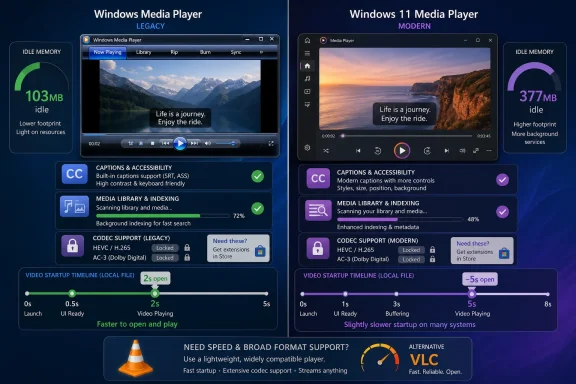
The reported comparison is stark. Windows Media Player Legacy idled around 103MB with no content playing, while the current Media Player used around 377MB. Opening local video reportedly took about three seconds in the modern app, about two seconds in Legacy, and nearly instant playback in VLC.
No single benchmark should be treated as universal truth. Memory use varies by library size, background indexing, graphics stack, Store app state, shell integration, codecs, and the test machine itself. But the numbers align with a broader Windows 11 complaint: too many first-party apps feel like they were built for a design showcase before they were built for the basic workbench.
That is a good change. Captions are not decoration, and a media player that ignores system accessibility preferences is not really integrated into the operating system. For users who rely on captions or who regularly watch content in noisy, shared, or muted environments, consistent caption rendering matters.
The update also adds an indexing banner in the play queue when the media library is still being scanned. That is the sort of small transparency feature Windows often lacks. If files are missing because the app has not finished discovering them, the user should not have to guess whether the library is broken, the file path is wrong, or the app is simply slow.
Microsoft also says the build improves supported-format recognition, blocks blank playlist names, fixes selected-item display glitches, cleans up empty playlist presentation, and addresses a crash that could occur while editing the play queue during session switching. These are not trivial. They are the maintenance work of turning an inbox app from “good enough for demos” into something a user can trust.
But the update does not settle the complaint now attached to the app. A clearer missing-codec dialog is useful, but it does not make the codec missing. Better file-type recognition is welcome, but it does not make the app faster than the thing it replaced. Caption integration is overdue polish, not an answer to why an idle media player should occupy hundreds of megabytes before it has played anything.
That authority comes with an implicit promise: this is the safe, boring, reliable way to do the common thing. A default media player should be able to open common files quickly, avoid surprising codec traps, and stay out of the way when it is not being used. If it cannot do those things better than a legacy optional feature, users will not care how consistent its icons look beside Settings and Photos.
Microsoft has been here before. Windows 11’s most controversial app transitions have rarely failed because the new app had no features. They failed because the new app changed the contract. It looked cleaner but did less, integrated more deeply but responded more slowly, or removed old affordances before the replacement behavior was mature.
Media Player is a quieter example because media playback no longer defines the PC the way it did in the Windows XP and Windows 7 eras. Most people stream through browsers and platform apps. But local playback still matters to enthusiasts, admins, creators, archivists, classrooms, labs, home theater PCs, and anyone who has a folder full of video files that did not originate inside a subscription service.
For those users, the old bargain was simple. Windows could play a lot of ordinary files, and when it could not, third-party players were a click away. The new bargain is less elegant: the default app may look more modern, the legacy app may still be hiding in optional features, and the thing that actually plays everything may still be VLC, MPC-HC, or another community-favored tool.
Microsoft’s support materials identify HEVC support as an extension available through the Microsoft Store. That reflects the licensing reality around patented video codecs, but the user experience is still a paywall at the exact moment the default media player is expected to play media. The fee may be small, and many OEM systems may ship with licensed support, but the friction is memorable.
AC-3 makes the picture messier. Microsoft says AC-3, or Dolby Digital, was included in Windows versions before Windows 11 version 24H2, but beginning with 24H2 it is no longer included by default. Systems upgraded from earlier versions may retain it, and device makers may preinstall it, so users can have different playback results on machines that appear to be running the same operating system.
That inconsistency is poison for support desks. A helpdesk technician does not want to explain that one Windows 11 laptop plays a training video because of an OEM image, another plays it because it was upgraded from an earlier build, and a third fails because it is a clean 24H2 installation without the codec. From the user’s seat, “Windows 11” is the product. The invisible licensing history of the device is not.
The modern Media Player’s improved missing-codec message is therefore both useful and slightly damning. It acknowledges that the failure mode is common enough to need better guidance. But guidance is not the same as capability, and Microsoft’s default player now competes with free alternatives whose entire reputation rests on making codec problems disappear.
That does not mean VLC is perfect, nor does it mean every enterprise wants unmanaged media players installed across its fleet. But its existence sharpens the critique of Microsoft’s app. A third-party, cross-platform, open-source player can feel more immediate for a local file than the operating system’s chosen default.
This is not merely a contest over RAM. It is a contest over confidence. VLC users expect the app to open the file. Windows Media Player users increasingly expect a negotiation: Is the library indexed? Is this file recognized? Is the codec installed? Is this the modern app or Legacy? Did an update change the behavior?
Microsoft’s defenders will argue, correctly, that unused RAM is not automatically wasted RAM. Modern apps cache, preload, maintain indexes, integrate with system components, and trade memory for responsiveness. On a contemporary PC with 16GB or 32GB of memory, a few hundred megabytes may not matter in isolation.
But that defense misses why the comparison stings. A media player is not a heavyweight creative suite. It is not a browser with dozens of processes and hostile web content. When the old optional app appears lighter and the third-party app appears faster, users do not ask whether the memory allocation is technically defensible. They ask why the new default feels less disciplined.
But optional availability is not the same as strategic commitment. Legacy exists in the way many old Windows components exist: useful, familiar, and faintly marked for eventual disappearance. Microsoft recommends the modern Media Player for modern video features, including 4K-oriented scenarios, while the old app persists for compatibility and user preference.
This split personality is typical of Windows. The platform’s strength is that old things keep working. Its weakness is that old things keep working because new things often arrive before they have fully earned replacement status. Control Panel and Settings told this story for years. Paint, Photos, Notepad, Outlook, Teams, and various inbox utilities have each had their own version of the transition.
Media Player now sits in that lineage. Microsoft wants a modern app aligned with Windows 11 design, Store delivery, accessibility settings, and current app architecture. Users want the file to open instantly. Both goals are reasonable, but only one of them is visible at the moment of use.
The survival of Legacy therefore becomes a quiet indictment of the new player. If the old app is still necessary because the new app is heavier, slower, or less codec-capable in practical terms, then Microsoft has not completed the migration. It has merely changed the default.
Still, the better argument is not that 377MB is inherently outrageous. The better argument is that Microsoft has not clearly explained what users get in exchange. If the modern app used more memory but opened files faster, handled more formats, and delivered a visibly superior library experience, the trade would be easier to defend.
Instead, the visible trade appears inverted. Users see higher idle memory, slower local startup in at least one comparative test, and codec limitations that third-party players often avoid. Microsoft sees a platform-aligned app with accessibility improvements, library indexing, Store-based servicing, and a cleaner UI. The gap between those perspectives is the story.
There is also a cumulative effect. Windows 11 has spent years fighting the perception that it is heavier than Windows 10 and more interested in engagement surfaces than user agency. Every app that consumes more, nags more, preloads more, or hides old functionality behind a new interface feeds that perception, even when the individual technical rationale is defensible.
For enthusiasts, this is irritating. For IT administrators, it is operational. They need predictable defaults, stable file associations, consistent codec behavior, and apps that do not create avoidable helpdesk tickets. A media player should not be strategic infrastructure, but in organizations that use local training videos, archived recordings, surveillance exports, or offline media kits, it can become one by accident.
That is the right direction. The old Microsoft might have buried these changes in a Store update with little explanation. Publishing app release notes for Insider flights gives testers and admins a clearer view into what is changing before it hits broader channels.
But the release cadence also reveals the risk of inbox apps becoming perpetually half-finished. If Windows ships a default experience that needs repeated post hoc fixes to basic playback, library visibility, and queue editing, users reasonably ask why the replacement became the default so early. The answer, in modern Windows, is often that app delivery and OS delivery have been separated. Microsoft can ship the shell and keep iterating the apps.
That model works for services. It is less satisfying for utilities. Nobody wants their calculator, media player, screen recorder, or photo viewer to behave like a beta channel unless they intentionally joined one. The more Microsoft routes core Windows experiences through continuously updated app pipelines, the more it must make those apps feel boringly excellent.
The irony is that the Media Player team appears to be doing the kind of maintenance users want. Accessibility integration, clearer status messages, fewer playback failures, and crash fixes are all signs of a product moving in the right direction. But the app is being judged against decades of muscle memory, not against its previous Insider build.
The AC-3 change in Windows 11 version 24H2 is a good example. A clean installation may lack built-in AC-3 support, while an upgraded machine may retain it. OEM devices may include it. That means a media file with Dolby Digital audio can become a diagnostic exercise rather than a playback event.
HEVC has similar support implications. If an organization uses HEVC for efficient storage or high-resolution internal video, admins must decide whether to license Microsoft’s extension, standardize on a third-party player, transcode content to a safer format, or control device procurement so the right codec support is preinstalled. None of those decisions is impossible, but all of them are more work than “Windows plays the file.”
There is also the policy layer. Store-delivered extensions may be blocked or restricted. Third-party media players may raise security review questions. Codec packs can be unacceptable in managed environments because they modify playback paths broadly and may complicate support. In that world, Microsoft’s default player should be the low-friction answer. Right now, it may instead be the start of a decision tree.
The memory footprint matters here too, though not always dramatically. On a single workstation, 377MB idle is an annoyance. In virtual desktop infrastructure, classrooms, kiosks, or shared devices with constrained RAM, multiplied overhead matters. IT departments spend years shaving background consumption only to watch modern inbox apps claim more headroom by default.
That expectation has been shaped by phones. iOS and Android users generally assume their device can play videos captured by modern devices, especially their own. The PC has always been more flexible but also more fragmented. Microsoft’s challenge is to make Windows feel less like a codec archaeology project without absorbing every licensing cost into the base OS.
The memory issue is less visible but still contributes to a feeling of sluggishness. A user on an older 8GB laptop may not open Task Manager and blame Media Player by name. They may simply feel that Windows 11 is heavier, that apps open more slowly, and that older tools were snappier. Perception becomes product reality.
This is where Microsoft’s design-first modernization can backfire. A polished interface buys goodwill only if the core action is immediate. With media playback, the core action is brutally simple. The app either gets out of the way or it becomes the story.
 Microsoft’s New Player Has the Wrong Kind of Modern Feel
The modern Media Player is supposed to be the sensible Windows 11 answer to a messy legacy: one app for music, video playback, playlists, and media library management, wrapped in the design language of the current operating system. It replaced the old Groove Music path and sits where many users expect the default media handler to be. In Microsoft’s own framing, Windows Media Player Legacy remains available, but it is no longer the future-facing experience.That is the problem. When the newer app is slower to open a local video and sits at more than three times the idle memory footprint of the older app in a comparative test, the modernization argument starts to wobble. A media player is one of the rare desktop apps where users judge quality in milliseconds: double-click file, see picture, hear sound, move on.
The reported comparison is stark. Windows Media Player Legacy idled around 103MB with no content playing, while the current Media Player used around 377MB. Opening local video reportedly took about three seconds in the modern app, about two seconds in Legacy, and nearly instant playback in VLC.
No single benchmark should be treated as universal truth. Memory use varies by library size, background indexing, graphics stack, Store app state, shell integration, codecs, and the test machine itself. But the numbers align with a broader Windows 11 complaint: too many first-party apps feel like they were built for a design showcase before they were built for the basic workbench.
The June Insider Build Fixes Real Problems Without Answering the Main One
Microsoft has not abandoned Media Player. On June 12, 2026, it released Media Player version 11.2605.14.0 to Windows Insiders in Experimental channels, and the changelog contains several practical fixes. The app now respects Windows caption styling for subtitle size, color, and background, and it provides a direct route into the related accessibility settings.That is a good change. Captions are not decoration, and a media player that ignores system accessibility preferences is not really integrated into the operating system. For users who rely on captions or who regularly watch content in noisy, shared, or muted environments, consistent caption rendering matters.
The update also adds an indexing banner in the play queue when the media library is still being scanned. That is the sort of small transparency feature Windows often lacks. If files are missing because the app has not finished discovering them, the user should not have to guess whether the library is broken, the file path is wrong, or the app is simply slow.
Microsoft also says the build improves supported-format recognition, blocks blank playlist names, fixes selected-item display glitches, cleans up empty playlist presentation, and addresses a crash that could occur while editing the play queue during session switching. These are not trivial. They are the maintenance work of turning an inbox app from “good enough for demos” into something a user can trust.
But the update does not settle the complaint now attached to the app. A clearer missing-codec dialog is useful, but it does not make the codec missing. Better file-type recognition is welcome, but it does not make the app faster than the thing it replaced. Caption integration is overdue polish, not an answer to why an idle media player should occupy hundreds of megabytes before it has played anything.
Windows 11 Keeps Learning That Defaults Are Judged More Harshly
The standard for a default Windows app is harsher than the standard for an optional download. Users forgive VLC eccentricities because they choose VLC. They forgive specialist tools because those tools solve specialist problems. An inbox app, by contrast, inherits the authority of the operating system.That authority comes with an implicit promise: this is the safe, boring, reliable way to do the common thing. A default media player should be able to open common files quickly, avoid surprising codec traps, and stay out of the way when it is not being used. If it cannot do those things better than a legacy optional feature, users will not care how consistent its icons look beside Settings and Photos.
Microsoft has been here before. Windows 11’s most controversial app transitions have rarely failed because the new app had no features. They failed because the new app changed the contract. It looked cleaner but did less, integrated more deeply but responded more slowly, or removed old affordances before the replacement behavior was mature.
Media Player is a quieter example because media playback no longer defines the PC the way it did in the Windows XP and Windows 7 eras. Most people stream through browsers and platform apps. But local playback still matters to enthusiasts, admins, creators, archivists, classrooms, labs, home theater PCs, and anyone who has a folder full of video files that did not originate inside a subscription service.
For those users, the old bargain was simple. Windows could play a lot of ordinary files, and when it could not, third-party players were a click away. The new bargain is less elegant: the default app may look more modern, the legacy app may still be hiding in optional features, and the thing that actually plays everything may still be VLC, MPC-HC, or another community-favored tool.
The Codec Story Is Where Convenience Turns Into Friction
The codec issue is more complicated than the headline version suggests, but it is also more damaging to user trust. HEVC, also known as H.265, is not just an obscure professional format. It is common in modern phones, cameras, 4K video workflows, and compressed media libraries. Many users discover it not by reading codec charts but by double-clicking a file and being told Windows needs something else.Microsoft’s support materials identify HEVC support as an extension available through the Microsoft Store. That reflects the licensing reality around patented video codecs, but the user experience is still a paywall at the exact moment the default media player is expected to play media. The fee may be small, and many OEM systems may ship with licensed support, but the friction is memorable.
AC-3 makes the picture messier. Microsoft says AC-3, or Dolby Digital, was included in Windows versions before Windows 11 version 24H2, but beginning with 24H2 it is no longer included by default. Systems upgraded from earlier versions may retain it, and device makers may preinstall it, so users can have different playback results on machines that appear to be running the same operating system.
That inconsistency is poison for support desks. A helpdesk technician does not want to explain that one Windows 11 laptop plays a training video because of an OEM image, another plays it because it was upgraded from an earlier build, and a third fails because it is a clean 24H2 installation without the codec. From the user’s seat, “Windows 11” is the product. The invisible licensing history of the device is not.
The modern Media Player’s improved missing-codec message is therefore both useful and slightly damning. It acknowledges that the failure mode is common enough to need better guidance. But guidance is not the same as capability, and Microsoft’s default player now competes with free alternatives whose entire reputation rests on making codec problems disappear.
VLC Is Not Just a Rival App; It Is a Referendum
The predictable response from power users is simple: install VLC. That answer has been around for so long that it has become part of Windows culture. If a file will not play, try VLC. If the default app stutters, try VLC. If codecs become a maze, try VLC.That does not mean VLC is perfect, nor does it mean every enterprise wants unmanaged media players installed across its fleet. But its existence sharpens the critique of Microsoft’s app. A third-party, cross-platform, open-source player can feel more immediate for a local file than the operating system’s chosen default.
This is not merely a contest over RAM. It is a contest over confidence. VLC users expect the app to open the file. Windows Media Player users increasingly expect a negotiation: Is the library indexed? Is this file recognized? Is the codec installed? Is this the modern app or Legacy? Did an update change the behavior?
Microsoft’s defenders will argue, correctly, that unused RAM is not automatically wasted RAM. Modern apps cache, preload, maintain indexes, integrate with system components, and trade memory for responsiveness. On a contemporary PC with 16GB or 32GB of memory, a few hundred megabytes may not matter in isolation.
But that defense misses why the comparison stings. A media player is not a heavyweight creative suite. It is not a browser with dozens of processes and hostile web content. When the old optional app appears lighter and the third-party app appears faster, users do not ask whether the memory allocation is technically defensible. They ask why the new default feels less disciplined.
Legacy Still Survives Because It Solves a Political Problem
Windows Media Player Legacy remains available as an optional feature in at least some Windows 11 editions. That fact is important because it gives Microsoft a pressure valve. Users who need the older app can still enable it, and organizations with workflows built around it are not yet forced into an abrupt cutover.But optional availability is not the same as strategic commitment. Legacy exists in the way many old Windows components exist: useful, familiar, and faintly marked for eventual disappearance. Microsoft recommends the modern Media Player for modern video features, including 4K-oriented scenarios, while the old app persists for compatibility and user preference.
This split personality is typical of Windows. The platform’s strength is that old things keep working. Its weakness is that old things keep working because new things often arrive before they have fully earned replacement status. Control Panel and Settings told this story for years. Paint, Photos, Notepad, Outlook, Teams, and various inbox utilities have each had their own version of the transition.
Media Player now sits in that lineage. Microsoft wants a modern app aligned with Windows 11 design, Store delivery, accessibility settings, and current app architecture. Users want the file to open instantly. Both goals are reasonable, but only one of them is visible at the moment of use.
The survival of Legacy therefore becomes a quiet indictment of the new player. If the old app is still necessary because the new app is heavier, slower, or less codec-capable in practical terms, then Microsoft has not completed the migration. It has merely changed the default.
The Memory Number Is a Symbol, Not the Whole Case
The 3.5x memory figure is the headline because it is easy to grasp. About 377MB versus about 103MB sounds like waste, and in some contexts it is. On low-end machines, virtual desktops, shared lab systems, thinly provisioned VMs, and aging consumer laptops, hundreds of megabytes across several modern inbox apps can add up.Still, the better argument is not that 377MB is inherently outrageous. The better argument is that Microsoft has not clearly explained what users get in exchange. If the modern app used more memory but opened files faster, handled more formats, and delivered a visibly superior library experience, the trade would be easier to defend.
Instead, the visible trade appears inverted. Users see higher idle memory, slower local startup in at least one comparative test, and codec limitations that third-party players often avoid. Microsoft sees a platform-aligned app with accessibility improvements, library indexing, Store-based servicing, and a cleaner UI. The gap between those perspectives is the story.
There is also a cumulative effect. Windows 11 has spent years fighting the perception that it is heavier than Windows 10 and more interested in engagement surfaces than user agency. Every app that consumes more, nags more, preloads more, or hides old functionality behind a new interface feeds that perception, even when the individual technical rationale is defensible.
For enthusiasts, this is irritating. For IT administrators, it is operational. They need predictable defaults, stable file associations, consistent codec behavior, and apps that do not create avoidable helpdesk tickets. A media player should not be strategic infrastructure, but in organizations that use local training videos, archived recordings, surveillance exports, or offline media kits, it can become one by accident.
The Insider Changelog Shows Microsoft Knows the App Is Not Finished
The June 12 Insider update is best read as evidence that Microsoft understands the app still needs work. The fixes are practical, not flashy. They address confusion around indexing, improve playback reliability, clean up playlist behavior, and make missing-codec messages more understandable.That is the right direction. The old Microsoft might have buried these changes in a Store update with little explanation. Publishing app release notes for Insider flights gives testers and admins a clearer view into what is changing before it hits broader channels.
But the release cadence also reveals the risk of inbox apps becoming perpetually half-finished. If Windows ships a default experience that needs repeated post hoc fixes to basic playback, library visibility, and queue editing, users reasonably ask why the replacement became the default so early. The answer, in modern Windows, is often that app delivery and OS delivery have been separated. Microsoft can ship the shell and keep iterating the apps.
That model works for services. It is less satisfying for utilities. Nobody wants their calculator, media player, screen recorder, or photo viewer to behave like a beta channel unless they intentionally joined one. The more Microsoft routes core Windows experiences through continuously updated app pipelines, the more it must make those apps feel boringly excellent.
The irony is that the Media Player team appears to be doing the kind of maintenance users want. Accessibility integration, clearer status messages, fewer playback failures, and crash fixes are all signs of a product moving in the right direction. But the app is being judged against decades of muscle memory, not against its previous Insider build.
Where Enterprise IT Sees the Hidden Cost
For enterprise administrators, the problem is less emotional and more procedural. A default media player with inconsistent codec behavior can disrupt training, compliance, onboarding, and support workflows. The issue is not that employees cannot watch movies at work; it is that organizations often distribute legitimate video content in formats that Windows may or may not handle depending on build, device image, and licensing state.The AC-3 change in Windows 11 version 24H2 is a good example. A clean installation may lack built-in AC-3 support, while an upgraded machine may retain it. OEM devices may include it. That means a media file with Dolby Digital audio can become a diagnostic exercise rather than a playback event.
HEVC has similar support implications. If an organization uses HEVC for efficient storage or high-resolution internal video, admins must decide whether to license Microsoft’s extension, standardize on a third-party player, transcode content to a safer format, or control device procurement so the right codec support is preinstalled. None of those decisions is impossible, but all of them are more work than “Windows plays the file.”
There is also the policy layer. Store-delivered extensions may be blocked or restricted. Third-party media players may raise security review questions. Codec packs can be unacceptable in managed environments because they modify playback paths broadly and may complicate support. In that world, Microsoft’s default player should be the low-friction answer. Right now, it may instead be the start of a decision tree.
The memory footprint matters here too, though not always dramatically. On a single workstation, 377MB idle is an annoyance. In virtual desktop infrastructure, classrooms, kiosks, or shared devices with constrained RAM, multiplied overhead matters. IT departments spend years shaving background consumption only to watch modern inbox apps claim more headroom by default.
The Consumer Impact Is Annoyance at the Worst Possible Moment
For home users, this lands differently. They may not know what HEVC or AC-3 means. They know that a video from a phone, camera, drone, family member, or downloaded archive either plays or does not. If the default Windows app asks them to acquire a codec, the OS has failed at the level of expectation, regardless of licensing nuance.That expectation has been shaped by phones. iOS and Android users generally assume their device can play videos captured by modern devices, especially their own. The PC has always been more flexible but also more fragmented. Microsoft’s challenge is to make Windows feel less like a codec archaeology project without absorbing every licensing cost into the base OS.
The memory issue is less visible but still contributes to a feeling of sluggishness. A user on an older 8GB laptop may not open Task Manager and blame Media Player by name. They may simply feel that Windows 11 is heavier, that apps open more slowly, and that older tools were snappier. Perception becomes product reality.
This is where Microsoft’s design-first modernization can backfire. A polished interface buys goodwill only if the core action is immediate. With media playback, the core action is brutally simple. The app either gets out of the way or it becomes the story.
Redmond’s Media Bet Now Comes Down to Discipline
The practical reading is not that everyone should uninstall the modern Media Player or retreat permanently to Legacy. Microsoft is still actively improving the app, and the June Insider build addresses real usability problems. The issue is that the default player needs to win on fundamentals before it asks users to appreciate its architecture.- Microsoft’s modern Media Player version 11.2605.14.0 began rolling out to Windows Insider Experimental channels on June 12, 2026.
- The update adds caption styling tied to Windows accessibility settings, an indexing banner for media libraries, improved file-type recognition, and several playlist and queue fixes.
- Independent testing reported about 377MB of idle memory use for the modern Media Player versus about 103MB for Windows Media Player Legacy.
- The same testing reported slower local video startup for the modern app than Legacy, while VLC appeared faster still.
- HEVC playback still depends on the Microsoft Store extension or other installed support, and Windows 11 version 24H2 no longer includes AC-3 by default on clean installs.
- Windows Media Player Legacy remains available as an optional feature, which gives users and administrators a fallback while Microsoft continues developing the newer app.
References
- Primary source: GIGAZINE
Published: 2026-06-22T02:10:09.061597
- Official source: learn.microsoft.com
Media Player release notes - Windows Insider Program | Microsoft Learn
Release notes for Media Player updates in Windows Insider builds.learn.microsoft.com - Official source: blogs.windows.com
Announcing new builds for 12 June 2026
Hello Windows Insiders, We have a number of releases today with new builds across Beta, Experimental and Release Preview. Release notes for inbox Windows 11 apps Windows 11 inbox apps are now getting their own release notes sectioblogs.windows.com - Related coverage: berrall.com
Microsoft reveals Windows 11’s Media Player isn’t dead, but Legacy still opens videos instantly - Peer Networks UK
Wales & West leading provider of PC repairs & IT support for home & business. Peer Networks delivers prompt, no fuss, PC repair services to customers.www.berrall.com
- Related coverage: windowslatest.com
I tested Windows 11 June 2026 Updates: Here's everything new, improved, and fixed
Windows 11 June 2026 Patch Tuesday update brings Low Latency Profile, Shared Audio, Multi-App Camera, NPU tracking, and Secure Boot updates. www.windowslatest.com
- Related coverage: videoproc.com
HEVC Codec for Windows 11: Free Download & Install (2026)
To play HEVC files on Windows 11, getting HEVC codec for Windows 11 is necessary. Here I share with you 8 ways to download HEVC codec (extension) on Windows 11.www.videoproc.com
- Official source: support.microsoft.com
Troubleshoot Windows Media Player Errors - Microsoft Support
Learn how to troubleshoot Windows Media Player errors. Explore resources for general help with Windows Media Player. support.microsoft.com
- Related coverage: tomshardware.com
Windows Media Player’s ‘find album information’ functionality has been removed — you’ll have to find other software for playing and ripping CDs with relevant track information | Tom's Hardware
Even the new Media Player app in Windows 11 has the same issue as the Legacy version, with audio CDs.www.tomshardware.com - Related coverage: tashamulew.wordpress.com
Windows Media Player Manual Update 12 For Vista
</rdf:Alt> </dc:description> <dc:creator> <rdf:Seq> <rdf:li>1tashamulew.wordpress.com