
A Cloudflare error page on SekberNews’ “Major Fiber Cut Triggers Widespread Global Internet Outage” story means the browser reached Cloudflare, but Cloudflare could not get a valid response from SekberNews’ origin server at the time the page was requested. That is not proof that the global outage described in the headline is still underway, nor proof that Cloudflare itself caused the incident. It is a smaller but revealing failure mode: the modern web now depends on several layers of infrastructure, and when one layer cannot talk to the next, the user sees a generic apology instead of the news.
The message shown to readers is Cloudflare’s familiar “unknown connection issue between Cloudflare and the origin web server” page. In practical terms, Cloudflare is saying: we are online, your request reached us, but the server behind us did not answer in a way we can pass back to you. For a visitor, the advice is brutally simple: wait, refresh later, or try another source.
For the site owner, the message is more consequential. It points to a break somewhere between Cloudflare’s edge network and the origin server that hosts the website. That could mean the origin is down, overloaded, misconfigured, blocking Cloudflare IP ranges, suffering from TLS trouble, or returning malformed responses. It can also mean the origin’s hosting provider is having a network incident of its own.
That distinction matters because outage headlines often flatten the internet into one thing. Users say “the internet is down,” status pages say “degraded performance,” and infrastructure providers say “some customers may experience errors.” But the web is a chain of dependencies, and the error page you saw is a link-level failure, not a full diagnosis.
A fiber cut can cause genuine regional or international disruption. So can a bot-management bug, a DNS error, a route leak, a bad firewall rule, or a database change that accidentally knocks over an edge service. The user experience may look identical: sites do not load, apps time out, and everyone starts checking Downdetector — unless Downdetector is affected too.
When a Cloudflare-protected site fails, the orange-cloud page becomes the public face of the incident even if the origin server is the guilty party. The visitor does not see the hosting company, the overloaded PHP worker pool, the failed database node, or the firewall rule that blocked Cloudflare’s IPs. They see Cloudflare.
That design is both a strength and a liability. Cloudflare absorbs abuse, caches content, terminates TLS, accelerates delivery, and hides origin infrastructure from attackers. But it also becomes a diagnostic choke point. When something goes wrong, the error page must compress a messy distributed systems problem into a few lines of copy.
The SekberNews page shown here appears to be one of those cases: Cloudflare is reachable, but the origin path is not healthy. That may be temporary. It may be an issue with the publisher’s host. It may be related to a broader network event if the origin’s provider or region is affected. But the page alone does not establish the cause.
When a major fiber route is severed, traffic does not simply disappear in all cases. Networks often reroute around the damage using BGP, alternate carriers, backup transit, or submarine cable diversity. The problem is that rerouting is not magic. It can increase latency, congest alternate paths, expose weaker peering arrangements, or strand networks that lack adequate redundancy.
That is why the same physical incident can feel uneven. One user sees no problem. Another loses access to a specific site. A third can reach the site from mobile data but not from home broadband. A fourth can load the home page but cannot authenticate because the login service depends on a different region or provider.
The public tends to look for a single culprit. Operators know better. A backhoe can start the incident, but poor route diversity, overloaded failover paths, brittle DNS, centralized authentication, and overloaded support channels decide how bad the incident becomes.
That uncertainty is frustrating but honest. Cloudflare may not know whether the origin application crashed, the TCP connection reset, the TLS handshake failed, a firewall interfered, or a hosting provider dropped packets. It only knows that it could not produce a normal page for the visitor.
For a website owner, that means the Ray ID at the bottom of the error page matters. It gives Cloudflare support and the site operator a correlation handle. With that ID and the timestamp, the owner can compare Cloudflare’s edge logs, origin web server logs, firewall logs, load balancer metrics, and hosting-provider status reports.
For an ordinary visitor, the Ray ID is less useful unless the site owner asks for it. The practical move is to retry later, test another network, or check whether the same page is reachable from a different region. If the problem persists for hours, the site is probably dealing with more than a momentary hiccup.
That history makes users quick to blame Cloudflare whenever a Cloudflare page appears. Sometimes that instinct is right. Often it is not. In the SekberNews case, the displayed message specifically says the issue is between Cloudflare’s cache and the origin web server, which points attention toward the site’s backend path rather than a verified Cloudflare-wide collapse.
The more accurate lesson is less satisfying: centralization makes diagnosis harder for everyone outside the operations room. A single branded error surface can represent dozens of underlying causes. The same browser page can appear during an origin outage, a firewall mistake, a TLS mismatch, a host-network issue, or a global edge-provider event.
This is why sysadmins hate vague incident reports. “Website down” is not a condition; it is a symptom. The important questions are where the request failed, whether the failure is reproducible from multiple networks, whether cached assets still serve, whether DNS is resolving, whether TLS terminates, and whether the origin is accepting traffic from the proxy.
Start with the simplest test: refresh after a few minutes. Cloudflare-origin errors often clear when an overloaded backend recovers, a deploy is rolled back, or a hosting provider resolves a transient network fault. If refreshing does not work, try a different network, such as switching from Wi-Fi to mobile data. That helps separate a local ISP routing problem from a site-side outage.
Clearing your browser cache is usually not the decisive fix for this class of error, but it can remove stale redirects or cached failure states. Trying a private window or another browser can also rule out extensions, broken cookies, or local DNS oddities. Still, if Cloudflare is telling you it cannot reach the origin, the center of gravity is almost certainly not your laptop.
Searching for the headline elsewhere is often faster than waiting. Syndicated or scraped versions of outage stories tend to appear quickly, and other outlets may have independent confirmation. The risk is that secondary write-ups often repeat the same claim without verifying the underlying network event, so treat them as pointers rather than proof.
Next, check whether the origin is blocking Cloudflare. A surprisingly common failure is a firewall, security plugin, hosting control panel, or rate-limit rule that starts treating Cloudflare edge IPs as abusive. From the origin’s perspective, all traffic appears to come from a smaller set of proxy addresses, so bad filtering can cut off legitimate users at scale.
TLS configuration is another common offender. If Cloudflare expects one certificate behavior and the origin presents another, the connection can fail before the application has a chance to answer. Changes to “Full,” “Full strict,” origin certificates, SNI handling, or expired certs can turn a healthy server into an unreachable one from Cloudflare’s point of view.
Then there is the application itself. A PHP fatal error, exhausted worker pool, dead database connection, broken upstream service, or overloaded container can produce empty, reset, or malformed responses. Cloudflare cannot cache its way around every dynamic failure, especially on pages that require origin generation.
The Ray ID and timestamp should be preserved. They let the site owner line up Cloudflare’s request with origin access logs, error logs, and provider telemetry. Without that correlation, troubleshooting becomes guesswork conducted under pressure.
Responsible outage reporting needs multiple signals. Carrier statements matter. Cloudflare Radar or other traffic telemetry can show country-level or network-level drops. Submarine cable operators may issue notices. National regulators sometimes confirm disruptions. Large cloud and CDN status pages may show knock-on effects. BGP monitors can reveal route withdrawals or instability.
The difficulty is timing. Early outage reports are often written while operators are still guessing. A “fiber cut” may later become “multiple terrestrial cable cuts,” “power failure at an exchange,” “planned maintenance gone wrong,” or “provider-side routing issue.” Conversely, a suspected cyberattack may turn out to be a mundane misconfiguration.
That uncertainty should not be hidden. If the article’s source was unavailable because of a Cloudflare-origin failure, the better framing is: the report claims a major fiber cut, but the accessible evidence at the time of reading is a Cloudflare error preventing review of the article. That is not pedantry. It is the difference between reporting an incident and amplifying a broken page.
That makes troubleshooting noisy. Windows has several layers that can plausibly be blamed: local DNS cache, browser cache, proxy settings, VPN adapters, endpoint security, Wi-Fi drivers, IPv6, corporate filtering, and the ISP. A Cloudflare origin error usefully narrows the field because it proves the user reached at least part of the public web path.
The practical Windows-side checks are modest. Test another site. Run the same URL from another browser. Disable a VPN briefly if policy allows. Try mobile hotspot. Flush DNS only after confirming DNS is actually suspect, because it is over-prescribed as a cure-all. If the error page includes a Cloudflare Ray ID, screenshot it before it disappears.
Administrators should resist the help-desk death spiral where every outage becomes a local-device troubleshooting script. If many users across different networks report the same Cloudflare error for the same domain, the endpoint is not the story. The right escalation is to the site owner, SaaS provider, CDN status page, or network provider.
A CDN can reduce risk, but it can also concentrate risk. A single DNS provider simplifies management, but it can turn provider failure into total unreachability. A single identity provider centralizes policy, but it can convert login trouble into business paralysis. A single cloud region keeps architecture simple until a regional incident turns simple into unavailable.
None of this means every organization needs an expensive multi-CDN, multi-cloud, active-active architecture. Many do not. But every organization needs to know which services are critical, which dependencies are single points of failure, and which incident procedures actually work when the dashboard is unreachable.
The Cloudflare-era web rewards teams that design for partial failure. Static status pages should live somewhere independent of the primary stack. DNS credentials should not be locked behind the identity system they may be needed to repair. Runbooks should include “vendor dashboard unavailable” as a normal condition, not an exotic disaster. Communications should be able to move without the main website.
This concentration happened for rational reasons. Specialized providers are better at absorbing DDoS attacks than small businesses. Hyperscale clouds are better at provisioning capacity than a server closet. Managed DNS is better than a neglected BIND server under someone’s desk. The problem is not that these services exist; the problem is that their success makes them systemic.
When a major provider fails, the blast radius is cultural as well as technical. Users perceive the web itself as broken. Businesses discover their failover plan depends on the same provider. Journalists chase a cause while the affected status page is also behind the affected network. Support teams drown in tickets they cannot resolve.
A fiber cut is the physical version of the same lesson. One route fails, and the question becomes whether the ecosystem around it was built to absorb the loss. Redundancy is not a property you buy once. It is a habit of architecture, testing, contracts, monitoring, and operational discipline.
If you are a visitor, treat the page as a temporary availability failure unless it persists. If you are the site owner, treat it as an origin-path incident and start with logs, reachability, firewall rules, TLS, and hosting status. If you are an IT admin, use the error to stop wasting time on endpoint superstition and start checking shared dependencies.
The concrete takeaways are straightforward:
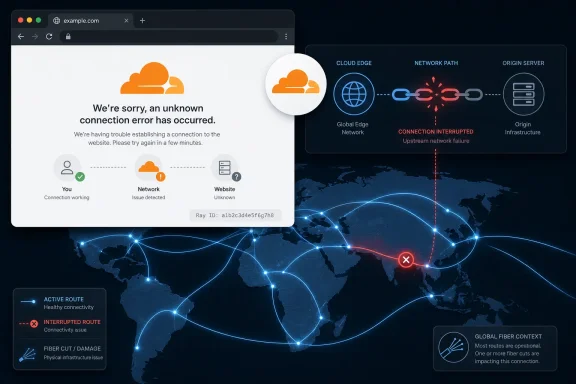 The Error Page Is Not the Outage, but It Tells the Same Story
The message shown to readers is Cloudflare’s familiar “unknown connection issue between Cloudflare and the origin web server” page. In practical terms, Cloudflare is saying: we are online, your request reached us, but the server behind us did not answer in a way we can pass back to you. For a visitor, the advice is brutally simple: wait, refresh later, or try another source.For the site owner, the message is more consequential. It points to a break somewhere between Cloudflare’s edge network and the origin server that hosts the website. That could mean the origin is down, overloaded, misconfigured, blocking Cloudflare IP ranges, suffering from TLS trouble, or returning malformed responses. It can also mean the origin’s hosting provider is having a network incident of its own.
That distinction matters because outage headlines often flatten the internet into one thing. Users say “the internet is down,” status pages say “degraded performance,” and infrastructure providers say “some customers may experience errors.” But the web is a chain of dependencies, and the error page you saw is a link-level failure, not a full diagnosis.
A fiber cut can cause genuine regional or international disruption. So can a bot-management bug, a DNS error, a route leak, a bad firewall rule, or a database change that accidentally knocks over an edge service. The user experience may look identical: sites do not load, apps time out, and everyone starts checking Downdetector — unless Downdetector is affected too.
Cloudflare Has Become the Internet’s Waiting Room
Cloudflare sits in front of millions of websites as a reverse proxy, content delivery network, DNS provider, web application firewall, DDoS shield, bot gatekeeper, and increasingly as an identity and access layer. That makes it useful precisely because it is between the user and the origin. It also means many failures are first experienced through Cloudflare’s branding.When a Cloudflare-protected site fails, the orange-cloud page becomes the public face of the incident even if the origin server is the guilty party. The visitor does not see the hosting company, the overloaded PHP worker pool, the failed database node, or the firewall rule that blocked Cloudflare’s IPs. They see Cloudflare.
That design is both a strength and a liability. Cloudflare absorbs abuse, caches content, terminates TLS, accelerates delivery, and hides origin infrastructure from attackers. But it also becomes a diagnostic choke point. When something goes wrong, the error page must compress a messy distributed systems problem into a few lines of copy.
The SekberNews page shown here appears to be one of those cases: Cloudflare is reachable, but the origin path is not healthy. That may be temporary. It may be an issue with the publisher’s host. It may be related to a broader network event if the origin’s provider or region is affected. But the page alone does not establish the cause.
A Fiber Cut Is a Physical Failure in a Logical World
The phrase “fiber cut” sounds almost quaint in 2026, as if the cloud could not possibly depend on something as mundane as glass in the ground or under the sea. It does. The internet is marketed as elastic, self-healing, and globally redundant, but it still rests on ducts, landing stations, data centers, power feeds, routers, and optical transport systems.When a major fiber route is severed, traffic does not simply disappear in all cases. Networks often reroute around the damage using BGP, alternate carriers, backup transit, or submarine cable diversity. The problem is that rerouting is not magic. It can increase latency, congest alternate paths, expose weaker peering arrangements, or strand networks that lack adequate redundancy.
That is why the same physical incident can feel uneven. One user sees no problem. Another loses access to a specific site. A third can reach the site from mobile data but not from home broadband. A fourth can load the home page but cannot authenticate because the login service depends on a different region or provider.
The public tends to look for a single culprit. Operators know better. A backhoe can start the incident, but poor route diversity, overloaded failover paths, brittle DNS, centralized authentication, and overloaded support channels decide how bad the incident becomes.
The Cloudflare 520 Family Is the Web’s Shrug Emoji
The error text in the user’s report resembles Cloudflare’s origin-connection class of failures, often associated with the 520 family of errors. These are not as clean as a 404 “not found” or a 403 “forbidden.” They are more like Cloudflare saying: the origin did something unexpected, or nothing useful came back.That uncertainty is frustrating but honest. Cloudflare may not know whether the origin application crashed, the TCP connection reset, the TLS handshake failed, a firewall interfered, or a hosting provider dropped packets. It only knows that it could not produce a normal page for the visitor.
For a website owner, that means the Ray ID at the bottom of the error page matters. It gives Cloudflare support and the site operator a correlation handle. With that ID and the timestamp, the owner can compare Cloudflare’s edge logs, origin web server logs, firewall logs, load balancer metrics, and hosting-provider status reports.
For an ordinary visitor, the Ray ID is less useful unless the site owner asks for it. The practical move is to retry later, test another network, or check whether the same page is reachable from a different region. If the problem persists for hours, the site is probably dealing with more than a momentary hiccup.
The Wrong Lesson Is “Cloudflare Broke the Internet”
Cloudflare has had major incidents, including outages where its own systems were the cause. One widely reported 2025 incident involved widespread HTTP 500 errors after an internal change affected Cloudflare’s Bot Management pipeline and caused failures in core traffic handling. That episode was not a fiber cut; it was a software and systems-design failure inside an infrastructure giant.That history makes users quick to blame Cloudflare whenever a Cloudflare page appears. Sometimes that instinct is right. Often it is not. In the SekberNews case, the displayed message specifically says the issue is between Cloudflare’s cache and the origin web server, which points attention toward the site’s backend path rather than a verified Cloudflare-wide collapse.
The more accurate lesson is less satisfying: centralization makes diagnosis harder for everyone outside the operations room. A single branded error surface can represent dozens of underlying causes. The same browser page can appear during an origin outage, a firewall mistake, a TLS mismatch, a host-network issue, or a global edge-provider event.
This is why sysadmins hate vague incident reports. “Website down” is not a condition; it is a symptom. The important questions are where the request failed, whether the failure is reproducible from multiple networks, whether cached assets still serve, whether DNS is resolving, whether TLS terminates, and whether the origin is accepting traffic from the proxy.
The Visitor’s Playbook Is Boring Because It Works
If you are just trying to read the article, there is no heroic fix. You cannot repair the connection between Cloudflare and the publisher’s origin server from your browser. You can only determine whether the problem is local to you, temporary, or broader.Start with the simplest test: refresh after a few minutes. Cloudflare-origin errors often clear when an overloaded backend recovers, a deploy is rolled back, or a hosting provider resolves a transient network fault. If refreshing does not work, try a different network, such as switching from Wi-Fi to mobile data. That helps separate a local ISP routing problem from a site-side outage.
Clearing your browser cache is usually not the decisive fix for this class of error, but it can remove stale redirects or cached failure states. Trying a private window or another browser can also rule out extensions, broken cookies, or local DNS oddities. Still, if Cloudflare is telling you it cannot reach the origin, the center of gravity is almost certainly not your laptop.
Searching for the headline elsewhere is often faster than waiting. Syndicated or scraped versions of outage stories tend to appear quickly, and other outlets may have independent confirmation. The risk is that secondary write-ups often repeat the same claim without verifying the underlying network event, so treat them as pointers rather than proof.
The Site Owner Has a Real Incident to Triage
If you own the affected website, the Cloudflare page is an operational alarm. The first question is whether the origin server is reachable directly from a trusted network. If it is down without Cloudflare in the path, Cloudflare is only the messenger.Next, check whether the origin is blocking Cloudflare. A surprisingly common failure is a firewall, security plugin, hosting control panel, or rate-limit rule that starts treating Cloudflare edge IPs as abusive. From the origin’s perspective, all traffic appears to come from a smaller set of proxy addresses, so bad filtering can cut off legitimate users at scale.
TLS configuration is another common offender. If Cloudflare expects one certificate behavior and the origin presents another, the connection can fail before the application has a chance to answer. Changes to “Full,” “Full strict,” origin certificates, SNI handling, or expired certs can turn a healthy server into an unreachable one from Cloudflare’s point of view.
Then there is the application itself. A PHP fatal error, exhausted worker pool, dead database connection, broken upstream service, or overloaded container can produce empty, reset, or malformed responses. Cloudflare cannot cache its way around every dynamic failure, especially on pages that require origin generation.
The Ray ID and timestamp should be preserved. They let the site owner line up Cloudflare’s request with origin access logs, error logs, and provider telemetry. Without that correlation, troubleshooting becomes guesswork conducted under pressure.
Outage Journalism Has a Verification Problem
The submitted source is itself inaccessible through the error page, which creates a neat little media problem: a story about a global outage cannot be evaluated from the page because the page will not load. That does not make the story false. It does mean the headline cannot be treated as verified solely from the failed page.Responsible outage reporting needs multiple signals. Carrier statements matter. Cloudflare Radar or other traffic telemetry can show country-level or network-level drops. Submarine cable operators may issue notices. National regulators sometimes confirm disruptions. Large cloud and CDN status pages may show knock-on effects. BGP monitors can reveal route withdrawals or instability.
The difficulty is timing. Early outage reports are often written while operators are still guessing. A “fiber cut” may later become “multiple terrestrial cable cuts,” “power failure at an exchange,” “planned maintenance gone wrong,” or “provider-side routing issue.” Conversely, a suspected cyberattack may turn out to be a mundane misconfiguration.
That uncertainty should not be hidden. If the article’s source was unavailable because of a Cloudflare-origin failure, the better framing is: the report claims a major fiber cut, but the accessible evidence at the time of reading is a Cloudflare error preventing review of the article. That is not pedantry. It is the difference between reporting an incident and amplifying a broken page.
Windows Users Feel Internet Outages as App Failures
For Windows users, this kind of disruption rarely announces itself as “a transit provider lost a route” or “Cloudflare cannot reach an origin.” It shows up as Teams failing to load a tab, Outlook refusing to authenticate, a game launcher spinning forever, a VPN client reporting a vague tunnel error, or a browser throwing an HTTP 500.That makes troubleshooting noisy. Windows has several layers that can plausibly be blamed: local DNS cache, browser cache, proxy settings, VPN adapters, endpoint security, Wi-Fi drivers, IPv6, corporate filtering, and the ISP. A Cloudflare origin error usefully narrows the field because it proves the user reached at least part of the public web path.
The practical Windows-side checks are modest. Test another site. Run the same URL from another browser. Disable a VPN briefly if policy allows. Try mobile hotspot. Flush DNS only after confirming DNS is actually suspect, because it is over-prescribed as a cure-all. If the error page includes a Cloudflare Ray ID, screenshot it before it disappears.
Administrators should resist the help-desk death spiral where every outage becomes a local-device troubleshooting script. If many users across different networks report the same Cloudflare error for the same domain, the endpoint is not the story. The right escalation is to the site owner, SaaS provider, CDN status page, or network provider.
Enterprise IT Cannot Outsource Resilience to a Logo
The deeper issue is not whether this one page failed because of a fiber cut, an origin outage, or a Cloudflare edge condition. The deeper issue is that organizations keep treating infrastructure vendors as if a contract converts dependency into resilience. It does not.A CDN can reduce risk, but it can also concentrate risk. A single DNS provider simplifies management, but it can turn provider failure into total unreachability. A single identity provider centralizes policy, but it can convert login trouble into business paralysis. A single cloud region keeps architecture simple until a regional incident turns simple into unavailable.
None of this means every organization needs an expensive multi-CDN, multi-cloud, active-active architecture. Many do not. But every organization needs to know which services are critical, which dependencies are single points of failure, and which incident procedures actually work when the dashboard is unreachable.
The Cloudflare-era web rewards teams that design for partial failure. Static status pages should live somewhere independent of the primary stack. DNS credentials should not be locked behind the identity system they may be needed to repair. Runbooks should include “vendor dashboard unavailable” as a normal condition, not an exotic disaster. Communications should be able to move without the main website.
The Internet Is Redundant Until Everyone Uses the Same Shortcut
The internet’s founding myth is decentralization. Its commercial reality is managed concentration. Cloudflare, AWS, Azure, Google Cloud, Akamai, Fastly, major DNS providers, certificate authorities, and a handful of transit networks now form the common substrate beneath a huge share of daily online life.This concentration happened for rational reasons. Specialized providers are better at absorbing DDoS attacks than small businesses. Hyperscale clouds are better at provisioning capacity than a server closet. Managed DNS is better than a neglected BIND server under someone’s desk. The problem is not that these services exist; the problem is that their success makes them systemic.
When a major provider fails, the blast radius is cultural as well as technical. Users perceive the web itself as broken. Businesses discover their failover plan depends on the same provider. Journalists chase a cause while the affected status page is also behind the affected network. Support teams drown in tickets they cannot resolve.
A fiber cut is the physical version of the same lesson. One route fails, and the question becomes whether the ecosystem around it was built to absorb the loss. Redundancy is not a property you buy once. It is a habit of architecture, testing, contracts, monitoring, and operational discipline.
The Practical Reading of This Cloudflare Page
The most useful interpretation of the SekberNews error is neither panic nor dismissal. It is a small incident report rendered in consumer language: the edge could not get a usable answer from the origin. That is enough to guide action, but not enough to prove the headline’s broader claim.If you are a visitor, treat the page as a temporary availability failure unless it persists. If you are the site owner, treat it as an origin-path incident and start with logs, reachability, firewall rules, TLS, and hosting status. If you are an IT admin, use the error to stop wasting time on endpoint superstition and start checking shared dependencies.
The concrete takeaways are straightforward:
- The Cloudflare page means the request reached Cloudflare, but Cloudflare could not retrieve a valid response from the website’s origin server.
- The error does not, by itself, prove that a global fiber-cut outage is ongoing or that Cloudflare is the root cause.
- Visitors can retry later, test another network, or look for independent reporting, but they cannot fix the origin connection from their browser.
- Site owners should preserve the Ray ID, compare it with origin logs, and check hosting reachability, firewall rules, TLS configuration, and application health.
- IT teams should treat repeated Cloudflare-origin errors across users as a shared-service incident rather than a local Windows troubleshooting problem.
References
- Primary source: sekbernews.id
Published: 2026-06-22T15:42:07.587211
Loading…
www.sekbernews.id - Related coverage: tomshardware.com
Loading…
www.tomshardware.com - Related coverage: techcrunch.com
Loading…
techcrunch.com - Related coverage: datacenterdynamics.com
Loading…
www.datacenterdynamics.com - Related coverage: cybernews.com
Loading…
cybernews.com - Related coverage: arstechnica.com
Loading…
arstechnica.com
- Related coverage: blog.cloudflare.com
Loading…
blog.cloudflare.com - Related coverage: techspot.com
Loading…
www.techspot.com - Related coverage: techradar.com
Loading…
www.techradar.com - Related coverage: axios.com
Cloudflare says outage caused by a single oversized file
ChatGPT, X, Spotify and several other major online services were dark on Tuesday due to the outagewww.axios.com
- Related coverage: computerweekly.com
Loading…
www.computerweekly.com - Related coverage: aljazeera.com
Loading…
www.aljazeera.com - Related coverage: androidcentral.com
Cloudflare causes internet chaos: ChatGPT, X, Spotify, and dozens of major sites suddenly vanished – here's what happened | Android Central
It's not just you — Cloudfare takes down a lot of big sites, here's whywww.androidcentral.com - Related coverage: pcgamer.com
Loading…
www.pcgamer.com - Related coverage: cert-mu.govmu.org
Microsoft Word - Security Alert - Google Cloud and Cloudflare hit by widespread service outages.docx
PDF documentcert-mu.govmu.org
- Related coverage: techxplore.com
Loading…
techxplore.com - Related coverage: thousandeyes.com
Loading…
www.thousandeyes.com - Related coverage: digitaltrends.com
Loading…
www.digitaltrends.com - Related coverage: ostechnix.com
Loading…
ostechnix.com - Related coverage: logicweb.com
Loading…
www.logicweb.com - Related coverage: exenmind.com
Loading…
www.exenmind.com - Related coverage: cybersecuritynews.com
Loading…
cybersecuritynews.com - Related coverage: ts2.tech
Loading…
ts2.tech - Related coverage: support.bostonmit.com
Loading…
support.bostonmit.com