
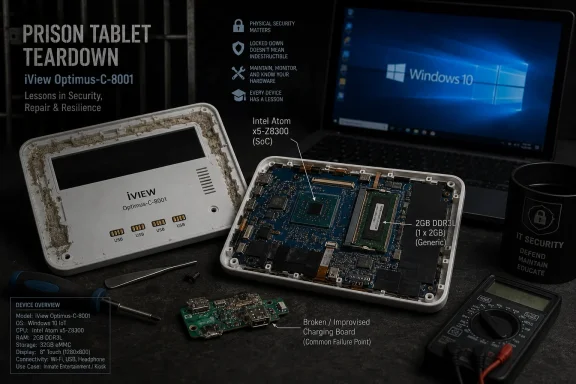
On June 22, 2026, Hackaday highlighted a teardown in which repair YouTuber Hugh Jeffreys opened a sealed U.S. prison tablet, bypassed its locked-down Windows 10 kiosk setup, and identified the underlying machine as an iView Optimus-C-8001 with an Intel Atom Z8350 and 2GB of RAM. The story is fun because it turns “jailbreaking” into a literal hardware exercise. It matters because the tablet is not exotic at all: underneath the institutional casing sits the same low-end Windows commodity hardware that has powered school carts, point-of-sale terminals, digital signage, and forgotten drawers for a decade. The prison shell makes the device look specialized, but the software lesson is broader and more uncomfortable.
The most revealing detail in the teardown is not the hacksaw, the foam, or the improvised charger board. It is the moment the device stops being a prison gadget and becomes a cheap Windows tablet with a damaged accessory ecosystem around it.
That distinction matters. Institutional devices often acquire an aura of purpose-built security because they are ugly, sealed, restricted, and deployed in environments where normal user agency is intentionally curtailed. But a plastic enclosure and a kiosk browser do not turn consumer hardware into a hardened endpoint. They turn it into consumer hardware that is harder to service.
In this case, the tablet reportedly presented only four exposed metal pads on the outside of the case. Those pads corresponded to USB wiring, but the device would only briefly attempt to power on when a charger was connected. That failure mode pushed the work from normal troubleshooting into destructive disassembly, because the casing was sealed rather than screwed together.
Once opened, the mystery became mundane. The tablet inside had its back cover removed, apparently to expose or extend USB connectivity, and it was packed into the outer case with foam and adhesive. The likely culprit was not a defeated security controller or a tamper event. It was a bad third-party charging board.
That is the entire genre in miniature: a product whose “security” depends heavily on physical inconvenience, but whose actual failure is ordinary electronics. The system looked like a locked institutional appliance. It behaved like e-waste with a bad charging path.
That kind of configuration is useful, but it should not be mistaken for deep security. Kiosk mode is a policy layer. It constrains what the logged-in user can do while the operating system, boot chain, storage, firmware, and physical interfaces remain governed by whatever protections the OEM and administrator actually enabled.
Here, the reported installation was Windows 10 Home, not an enterprise SKU with the richer management assumptions one might expect in a high-control deployment. More importantly, there was apparently no drive encryption standing between the operator and the installed system. Once the device could be powered reliably and accessed as a normal PC, the locked-down experience became a configuration to work around rather than a boundary that defined ownership.
That is not an indictment of kiosk deployments as such. Windows kiosk configurations can be legitimate, useful, and reasonably secure when paired with managed identities, secure boot policies, restricted firmware settings, encrypted storage, and a lifecycle plan. The problem is when the kiosk becomes the whole security story.
A locked browser window can keep an intended user inside a permitted workflow. It cannot compensate for exposed USB, removable or readable storage, weak firmware controls, no encryption, and hardware that eventually leaves custody.
That is common in institutional technology markets. A base tablet becomes a healthcare tablet, a restaurant tablet, a classroom tablet, a fleet tablet, or a prison tablet by adding an enclosure, a charger, management software, branding, and a procurement contract. The economics reward reuse. The risk is that every added layer becomes another thing that can fail, age, or be misunderstood by the people who inherit the device later.
The bad charger board is an especially good metaphor because it is neither glamorous nor rare. Many locked-down devices die not because their operating systems become impossible to break, but because the charging dock, barrel connector, pogo-pin board, cable harness, battery, or glue-encrusted daughterboard fails first. The security model may assume custody and control; the maintenance reality is heat, dirt, drops, swollen batteries, and bargain-bin power electronics.
There is a practical consequence for administrators outside corrections. If your organization deploys Windows devices inside custom cases or appliance shells, you do not merely own the Windows image. You own every undocumented physical modification between the wall socket and the motherboard.
That means asset records need to include the enclosure, charging hardware, port modifications, firmware settings, and recovery process. Otherwise, the organization eventually discovers that its endpoint fleet contains machines nobody can cleanly service and nobody can confidently retire.
The more consequential specification is Windows 10 Home. Home editions can be locked down in various ways, and third-party tooling can impose plenty of restrictions, but the edition choice tells us something about the deployment philosophy. It suggests a system built around cost and application control rather than the full enterprise endpoint stack.
For a prison-services tablet, that may have seemed rational at the time. The users were not supposed to install software. The device was supposed to run a narrowly controlled browser experience. The outer case physically constrained casual tampering. Why pay for capabilities the user would never see?
The answer arrives years later, when the device is discarded, recovered, repaired, and examined. Without encryption, the storage is just storage. Without a durable management lifecycle, the installed image can sit untouched since 2018. Without serviceable construction, a failed charging add-on can condemn the whole device until someone cuts it open.
The cheap choice is not always wrong. But in constrained environments, cheap choices compound. A low-end tablet, a consumer OS edition, a custom enclosure, a kiosk shell, and a weak update story can function adequately on day one while aging into a perfect artifact of neglected endpoint governance.
An unpatched Windows 10 installation from 2018 is not merely old. It belongs to a different security era. Browser engines, certificate handling, remote code execution mitigations, driver blocklists, Defender behavior, and Windows servicing expectations have all moved on. Even if the tablet was isolated behind a narrow browser interface, the underlying platform would have depended on timely patching to remain trustworthy.
The timing is even sharper in 2026. Windows 10 reached the end of ordinary support in October 2025, meaning free security updates are no longer the baseline for unmanaged consumer systems. Extended programs exist for some scenarios, but an abandoned 2018 Home image on Atom hardware is the opposite of a planned transition.
This is where the story stops being a curiosity and becomes a warning. There are countless devices in the world that are “single purpose” only because the organization forgot they were computers. They sit behind menus, shells, agent software, full-screen browsers, or custom launchers, quietly aging out of support while still being trusted with accounts, traffic, documents, messages, or payments.
A kiosk is not less of a computer because its desktop is hidden. It is often a more dangerous computer because nobody thinks to patch it like one.
But low-end hardware is exactly where Windows has always had a strange afterlife. A machine that feels miserable as a daily PC can still serve as a serial console, dashboard, recipe display, thin client, retro utility box, lab controller, or Linux experiment. The very limitations that make it unappealing for general computing can make it acceptable for narrow hobbyist work.
That is why the e-waste angle is compelling. If the tablet can be charged through its original USB port and freed from its casing, it becomes a usable piece of scrap computing. The device is not valuable in the normal market sense, but it is not necessarily garbage either.
For Windows enthusiasts, the trick is to avoid confusing “can be made useful” with “should be trusted.” A recovered prison tablet running an old Windows 10 Home image should be treated as untrusted media and untrusted hardware until wiped, inspected, and rebuilt. The interesting project is recovery, not preservation of the original install.
There is also a driver problem lurking behind every cheap Windows tablet rescue. These devices often depended on vendor-specific touch, rotation, Wi-Fi, audio, and power-management drivers. A clean install can be safer but may produce a partially broken tablet unless the driver store is exported first or equivalent packages can be found. Anyone rescuing similar hardware should image before experimenting.
But the case also protected the service model. Prison tablets are not just devices; they are terminals in a controlled marketplace for communications, entertainment, education, account access, and institutional services. The hardware becomes a gatekeeper for software and billing. When the device is sealed, the user cannot easily inspect, repair, repurpose, or bypass the arrangement.
That is not unique to prisons. We see the same pattern in point-of-sale systems, school devices, rental equipment, medical terminals, and industrial tablets. The casing, charger, firmware, and operating system are arranged to keep the device inside a business workflow. Security, support, and revenue control become hard to separate.
The prison context makes the ethics harder to ignore because the users are literally captive. A locked tablet may be safer and easier for a facility to manage than open computing access, but it can also concentrate power in the vendor and institution. The more the device mediates communication and services, the more its design choices matter.
From a Windows perspective, the lesson is blunt: if a device’s main defense is that the user cannot get to the port, the defense expires when the device leaves the institution. At retirement, resale, disposal, or loss, the machine becomes just another endpoint with whatever protections were actually configured.
This teardown is a reminder of the older world: physical access plus no encryption plus a commodity OS equals practical ownership. The hard part was not defeating cryptography. It was opening the case without destroying the tablet.
That distinction should be uncomfortable for anyone deploying Windows appliances. If the goal is only to stop normal users during normal operation, kiosk lockdown may be enough. If the goal is to protect data, credentials, device identity, service access, or institutional configuration after theft or disposal, kiosk lockdown is nowhere near enough.
The minimum bar is not mysterious. Storage should be encrypted. Firmware settings should be locked. Boot order should be controlled. Recovery paths should be documented. Device identities and service tokens should be revocable. The update channel should be alive. The retirement process should assume devices will eventually appear in someone else’s workshop.
None of that requires turning every kiosk into a fortress. It requires admitting that the endpoint remains an endpoint even when it is bolted into a plastic costume.
But prison tablets are not ordinary consumer gadgets. Their restrictions exist partly because the deployment environment has real safety, abuse, contraband, and communication-control concerns. A jail or prison cannot simply hand out unmanaged PCs and hope for the best. The repair instinct and the institutional security instinct are in genuine tension here.
The useful position is not to pretend one side is obviously right. It is to insist that secure institutional hardware can still be designed with accountable servicing, documented disposal, and privacy-preserving data controls. “Sealed forever” is a lazy substitute for a mature lifecycle. So is “just wipe and reuse it” when the original context may involve sensitive communications, accounts, or facility configuration.
A better design would make the tablet difficult for unauthorized users to alter while still allowing authorized technicians to replace charging boards, batteries, and screens without destructive surgery. It would encrypt storage by default, separate user data from device configuration, and make deprovisioning a normal administrative step rather than an archaeological event.
Repairability and security are often framed as enemies because bad designs force them into conflict. Good endpoint design treats both as requirements.
You see it at reception desks, warehouse stations, time clocks, patient check-in kiosks, menu boards, industrial controllers, classroom carts, conference-room panels, and retail counters. Many of those devices began life as cheap Windows PCs or tablets because Windows offered broad driver support, familiar management tools, and easy application compatibility. Then they were forgotten because they stopped looking like PCs.
That forgetting is dangerous. A Windows endpoint does not stop needing inventory, patching, monitoring, backup strategy, credential hygiene, and retirement handling because it lacks a visible Start menu. In some organizations, appliance-like Windows boxes become the least governed machines in the estate precisely because they are considered operational equipment rather than IT assets.
The tablet teardown gives administrators a useful mental exercise. If someone found one of your kiosks in an e-waste bin, what would they learn? Would the storage be encrypted? Would credentials or tokens remain? Would the OS be current? Would the device still be enrolled in management? Would anyone in IT know it had gone missing?
If the answers are vague, the problem is not the hacker with the screwdriver. The problem is the asset lifecycle.
That kind of design is expensive in ways procurement spreadsheets often miss. A sealed device may reduce tampering and simplify cleaning, but it can also increase replacement rates, complicate warranty work, and push minor faults into disposal. When thousands of devices are deployed, small serviceability decisions become major lifecycle costs.
For sysadmins, the procurement question is not merely whether a device can survive abuse. It is whether the organization can maintain it without heroics. Can a battery be replaced? Can a charging connector be swapped? Can the OS be reimaged from known-good media? Can the device be securely wiped if the display fails? Can it be audited after years in service?
The answer cannot be “cut it open and find out.” That is fine for YouTube. It is not a fleet management strategy.
This is especially important as Windows 10-era hardware ages out. Many low-end tablets and mini-PCs cannot make a clean jump to modern Windows requirements, and their value as supported Windows endpoints is shrinking. Organizations that keep them in service need a deliberate security exception; organizations that retire them need a deliberate disposal process.
The concrete lessons are not complicated, but they are easy to ignore until a teardown makes them visible.
 The Prison Tablet Was Never Really a Prison Tablet
The most revealing detail in the teardown is not the hacksaw, the foam, or the improvised charger board. It is the moment the device stops being a prison gadget and becomes a cheap Windows tablet with a damaged accessory ecosystem around it.That distinction matters. Institutional devices often acquire an aura of purpose-built security because they are ugly, sealed, restricted, and deployed in environments where normal user agency is intentionally curtailed. But a plastic enclosure and a kiosk browser do not turn consumer hardware into a hardened endpoint. They turn it into consumer hardware that is harder to service.
In this case, the tablet reportedly presented only four exposed metal pads on the outside of the case. Those pads corresponded to USB wiring, but the device would only briefly attempt to power on when a charger was connected. That failure mode pushed the work from normal troubleshooting into destructive disassembly, because the casing was sealed rather than screwed together.
Once opened, the mystery became mundane. The tablet inside had its back cover removed, apparently to expose or extend USB connectivity, and it was packed into the outer case with foam and adhesive. The likely culprit was not a defeated security controller or a tamper event. It was a bad third-party charging board.
That is the entire genre in miniature: a product whose “security” depends heavily on physical inconvenience, but whose actual failure is ordinary electronics. The system looked like a locked institutional appliance. It behaved like e-waste with a bad charging path.
Kiosk Mode Is a Policy, Not a Wall
The Windows installation was locked down into a browser-based prison-services experience, which is exactly what one would expect from a tablet issued in a correctional environment. The device was not meant to be a general-purpose PC. It was meant to expose a narrow set of permitted services and nothing else.That kind of configuration is useful, but it should not be mistaken for deep security. Kiosk mode is a policy layer. It constrains what the logged-in user can do while the operating system, boot chain, storage, firmware, and physical interfaces remain governed by whatever protections the OEM and administrator actually enabled.
Here, the reported installation was Windows 10 Home, not an enterprise SKU with the richer management assumptions one might expect in a high-control deployment. More importantly, there was apparently no drive encryption standing between the operator and the installed system. Once the device could be powered reliably and accessed as a normal PC, the locked-down experience became a configuration to work around rather than a boundary that defined ownership.
That is not an indictment of kiosk deployments as such. Windows kiosk configurations can be legitimate, useful, and reasonably secure when paired with managed identities, secure boot policies, restricted firmware settings, encrypted storage, and a lifecycle plan. The problem is when the kiosk becomes the whole security story.
A locked browser window can keep an intended user inside a permitted workflow. It cannot compensate for exposed USB, removable or readable storage, weak firmware controls, no encryption, and hardware that eventually leaves custody.
The Weakest Link Was the Supply Chain Around the Tablet
The improvised construction is part of the fascination. A sealed opaque case, foam packing, adhesive, modified USB access, and an added charger board all suggest a device that was adapted rather than designed from first principles.That is common in institutional technology markets. A base tablet becomes a healthcare tablet, a restaurant tablet, a classroom tablet, a fleet tablet, or a prison tablet by adding an enclosure, a charger, management software, branding, and a procurement contract. The economics reward reuse. The risk is that every added layer becomes another thing that can fail, age, or be misunderstood by the people who inherit the device later.
The bad charger board is an especially good metaphor because it is neither glamorous nor rare. Many locked-down devices die not because their operating systems become impossible to break, but because the charging dock, barrel connector, pogo-pin board, cable harness, battery, or glue-encrusted daughterboard fails first. The security model may assume custody and control; the maintenance reality is heat, dirt, drops, swollen batteries, and bargain-bin power electronics.
There is a practical consequence for administrators outside corrections. If your organization deploys Windows devices inside custom cases or appliance shells, you do not merely own the Windows image. You own every undocumented physical modification between the wall socket and the motherboard.
That means asset records need to include the enclosure, charging hardware, port modifications, firmware settings, and recovery process. Otherwise, the organization eventually discovers that its endpoint fleet contains machines nobody can cleanly service and nobody can confidently retire.
Windows 10 Home Was the Tell
The recovered specifications are modest even by the standards of Windows tablets: an Intel Atom Z8350 clocked at 1.44GHz and 2GB of RAM. That class of hardware was built for cheap mobility, basic browsing, light apps, and price-sensitive deployments. It was never a great foundation for long-lived managed computing.The more consequential specification is Windows 10 Home. Home editions can be locked down in various ways, and third-party tooling can impose plenty of restrictions, but the edition choice tells us something about the deployment philosophy. It suggests a system built around cost and application control rather than the full enterprise endpoint stack.
For a prison-services tablet, that may have seemed rational at the time. The users were not supposed to install software. The device was supposed to run a narrowly controlled browser experience. The outer case physically constrained casual tampering. Why pay for capabilities the user would never see?
The answer arrives years later, when the device is discarded, recovered, repaired, and examined. Without encryption, the storage is just storage. Without a durable management lifecycle, the installed image can sit untouched since 2018. Without serviceable construction, a failed charging add-on can condemn the whole device until someone cuts it open.
The cheap choice is not always wrong. But in constrained environments, cheap choices compound. A low-end tablet, a consumer OS edition, a custom enclosure, a kiosk shell, and a weak update story can function adequately on day one while aging into a perfect artifact of neglected endpoint governance.
The 2018 Install Date Is the Real Security Story
The teardown reportedly found a Windows installation dating from 2018, with no obvious evidence of updates since. That detail should make Windows administrators wince more than the hacksaw.An unpatched Windows 10 installation from 2018 is not merely old. It belongs to a different security era. Browser engines, certificate handling, remote code execution mitigations, driver blocklists, Defender behavior, and Windows servicing expectations have all moved on. Even if the tablet was isolated behind a narrow browser interface, the underlying platform would have depended on timely patching to remain trustworthy.
The timing is even sharper in 2026. Windows 10 reached the end of ordinary support in October 2025, meaning free security updates are no longer the baseline for unmanaged consumer systems. Extended programs exist for some scenarios, but an abandoned 2018 Home image on Atom hardware is the opposite of a planned transition.
This is where the story stops being a curiosity and becomes a warning. There are countless devices in the world that are “single purpose” only because the organization forgot they were computers. They sit behind menus, shells, agent software, full-screen browsers, or custom launchers, quietly aging out of support while still being trusted with accounts, traffic, documents, messages, or payments.
A kiosk is not less of a computer because its desktop is hidden. It is often a more dangerous computer because nobody thinks to patch it like one.
The Hardware Is Too Weak for Nostalgia and Too Useful to Ignore
It is tempting to laugh at the Atom Z8350 and 2GB of RAM, and the tablet invites it. Windows 10 on that configuration was never luxurious. In 2026, it is a patience test.But low-end hardware is exactly where Windows has always had a strange afterlife. A machine that feels miserable as a daily PC can still serve as a serial console, dashboard, recipe display, thin client, retro utility box, lab controller, or Linux experiment. The very limitations that make it unappealing for general computing can make it acceptable for narrow hobbyist work.
That is why the e-waste angle is compelling. If the tablet can be charged through its original USB port and freed from its casing, it becomes a usable piece of scrap computing. The device is not valuable in the normal market sense, but it is not necessarily garbage either.
For Windows enthusiasts, the trick is to avoid confusing “can be made useful” with “should be trusted.” A recovered prison tablet running an old Windows 10 Home image should be treated as untrusted media and untrusted hardware until wiped, inspected, and rebuilt. The interesting project is recovery, not preservation of the original install.
There is also a driver problem lurking behind every cheap Windows tablet rescue. These devices often depended on vendor-specific touch, rotation, Wi-Fi, audio, and power-management drivers. A clean install can be safer but may produce a partially broken tablet unless the driver store is exported first or equivalent packages can be found. Anyone rescuing similar hardware should image before experimenting.
The Sealed Case Protected the Business Model Better Than the Computer
The opaque sealed shell did its job against the intended user. It made casual opening difficult, hid the ordinary tablet inside, and converted access to basic ports into a controlled external interface. In a correctional setting, that physical restriction has obvious operational logic.But the case also protected the service model. Prison tablets are not just devices; they are terminals in a controlled marketplace for communications, entertainment, education, account access, and institutional services. The hardware becomes a gatekeeper for software and billing. When the device is sealed, the user cannot easily inspect, repair, repurpose, or bypass the arrangement.
That is not unique to prisons. We see the same pattern in point-of-sale systems, school devices, rental equipment, medical terminals, and industrial tablets. The casing, charger, firmware, and operating system are arranged to keep the device inside a business workflow. Security, support, and revenue control become hard to separate.
The prison context makes the ethics harder to ignore because the users are literally captive. A locked tablet may be safer and easier for a facility to manage than open computing access, but it can also concentrate power in the vendor and institution. The more the device mediates communication and services, the more its design choices matter.
From a Windows perspective, the lesson is blunt: if a device’s main defense is that the user cannot get to the port, the defense expires when the device leaves the institution. At retirement, resale, disposal, or loss, the machine becomes just another endpoint with whatever protections were actually configured.
Physical Access Still Wins When the Stack Is Thin
Security people have repeated “physical access is game over” for decades, sometimes too casually. Modern devices complicate that rule with secure enclaves, encrypted storage, measured boot, firmware locks, remote attestation, and mobile-device-management controls. Physical access is not automatically game over when the stack is designed to resist it.This teardown is a reminder of the older world: physical access plus no encryption plus a commodity OS equals practical ownership. The hard part was not defeating cryptography. It was opening the case without destroying the tablet.
That distinction should be uncomfortable for anyone deploying Windows appliances. If the goal is only to stop normal users during normal operation, kiosk lockdown may be enough. If the goal is to protect data, credentials, device identity, service access, or institutional configuration after theft or disposal, kiosk lockdown is nowhere near enough.
The minimum bar is not mysterious. Storage should be encrypted. Firmware settings should be locked. Boot order should be controlled. Recovery paths should be documented. Device identities and service tokens should be revocable. The update channel should be alive. The retirement process should assume devices will eventually appear in someone else’s workshop.
None of that requires turning every kiosk into a fortress. It requires admitting that the endpoint remains an endpoint even when it is bolted into a plastic costume.
The Right-to-Repair Angle Cuts Both Ways
The teardown is satisfying because it restores agency. A dead-looking institutional tablet becomes a working computer because someone was willing to investigate the charging path, cut open the enclosure, and challenge the locked-down install. That is the emotional core of repair culture.But prison tablets are not ordinary consumer gadgets. Their restrictions exist partly because the deployment environment has real safety, abuse, contraband, and communication-control concerns. A jail or prison cannot simply hand out unmanaged PCs and hope for the best. The repair instinct and the institutional security instinct are in genuine tension here.
The useful position is not to pretend one side is obviously right. It is to insist that secure institutional hardware can still be designed with accountable servicing, documented disposal, and privacy-preserving data controls. “Sealed forever” is a lazy substitute for a mature lifecycle. So is “just wipe and reuse it” when the original context may involve sensitive communications, accounts, or facility configuration.
A better design would make the tablet difficult for unauthorized users to alter while still allowing authorized technicians to replace charging boards, batteries, and screens without destructive surgery. It would encrypt storage by default, separate user data from device configuration, and make deprovisioning a normal administrative step rather than an archaeological event.
Repairability and security are often framed as enemies because bad designs force them into conflict. Good endpoint design treats both as requirements.
Cheap Windows Appliances Are Everywhere
The prison tablet is unusual only because of its setting. The architecture is everywhere: an inexpensive Windows device, a single-purpose shell, a controlled app or browser, and a physical enclosure that discourages curiosity.You see it at reception desks, warehouse stations, time clocks, patient check-in kiosks, menu boards, industrial controllers, classroom carts, conference-room panels, and retail counters. Many of those devices began life as cheap Windows PCs or tablets because Windows offered broad driver support, familiar management tools, and easy application compatibility. Then they were forgotten because they stopped looking like PCs.
That forgetting is dangerous. A Windows endpoint does not stop needing inventory, patching, monitoring, backup strategy, credential hygiene, and retirement handling because it lacks a visible Start menu. In some organizations, appliance-like Windows boxes become the least governed machines in the estate precisely because they are considered operational equipment rather than IT assets.
The tablet teardown gives administrators a useful mental exercise. If someone found one of your kiosks in an e-waste bin, what would they learn? Would the storage be encrypted? Would credentials or tokens remain? Would the OS be current? Would the device still be enrolled in management? Would anyone in IT know it had gone missing?
If the answers are vague, the problem is not the hacker with the screwdriver. The problem is the asset lifecycle.
The Hacksaw Should Not Be the Recovery Tool
There is comedy in using a hacksaw to open a tablet, but there is also institutional waste. A bad charging board apparently turned a working tablet into junk because the enclosure made normal repair impractical.That kind of design is expensive in ways procurement spreadsheets often miss. A sealed device may reduce tampering and simplify cleaning, but it can also increase replacement rates, complicate warranty work, and push minor faults into disposal. When thousands of devices are deployed, small serviceability decisions become major lifecycle costs.
For sysadmins, the procurement question is not merely whether a device can survive abuse. It is whether the organization can maintain it without heroics. Can a battery be replaced? Can a charging connector be swapped? Can the OS be reimaged from known-good media? Can the device be securely wiped if the display fails? Can it be audited after years in service?
The answer cannot be “cut it open and find out.” That is fine for YouTube. It is not a fleet management strategy.
This is especially important as Windows 10-era hardware ages out. Many low-end tablets and mini-PCs cannot make a clean jump to modern Windows requirements, and their value as supported Windows endpoints is shrinking. Organizations that keep them in service need a deliberate security exception; organizations that retire them need a deliberate disposal process.
What This Little Atom Tablet Tells the Rest of the Windows Estate
The prison tablet is a small story with a large shadow. It compresses a decade of Windows endpoint compromises into one object: cheap hardware, kiosk assumptions, weak serviceability, old software, and a business process that depended on the device staying inside its assigned role.The concrete lessons are not complicated, but they are easy to ignore until a teardown makes them visible.
- A kiosk interface should be treated as a user-experience restriction, not as a substitute for encryption, firmware controls, and managed boot policy.
- A Windows device inside a custom enclosure still needs the same inventory, patching, credential management, and retirement discipline as any other endpoint.
- A sealed case can reduce casual tampering while making legitimate repair so difficult that minor hardware faults become e-waste.
- A low-end Windows 10 tablet recovered in 2026 should be wiped and rebuilt before reuse, because the original image is both unsupported and untrusted.
- Organizations should design disposal workflows on the assumption that retired institutional devices will eventually be opened by someone outside the institution.