
OpenAI’s Codex CLI and related Codex desktop/IDE components are facing an open GitHub bug report, first filed in April 2026 and amplified by a June 2026 Notebookcheck report, alleging that excessive TRACE-level SQLite logging can write tens of terabytes to local SSDs in weeks. The claim is not that Codex is maliciously “killing” drives, but that a production diagnostic path appears to be behaving like a stress test. For a tool marketed as a daily coding companion, that distinction will not comfort anyone watching their laptop run hot, their disk activity spike, or their SSD endurance counter tick down. The larger story is not one noisy log file; it is what happens when AI developer tools ship with cloud-scale telemetry habits inside consumer machines.
The sharp version of the Notebookcheck headline is easy to mock: software rarely “kills” an SSD in the cinematic sense, and modern drives do not expire the moment a warranty number is crossed. But the underlying arithmetic is ugly enough that the alarm is justified. A user report highlighted by Notebookcheck described roughly 37 TB of writes over 21 days of uptime, which extrapolates to around 640 TB per year if the same workload continues.
That number matters because many mainstream 1 TB consumer SSDs are warranted for roughly 600 TBW, or terabytes written, over their rated service life. TBW is not a cliff, and drives often exceed their warranty endurance. Still, using up a nominal lifetime write budget in less than a year is not a rounding error; it is the kind of thing administrators normally associate with video scratch disks, database servers, or badly configured logging daemons, not a coding assistant.
The local file at the center of the complaint is
That distinction is important because the bug is not merely “Codex keeps a history.” Users expect modern developer tools to store settings, session metadata, caches, and sometimes searchable transcripts. The complaint here is narrower and more damning: routine streaming appears to persist low-level TRACE events that ordinary users neither asked for nor can easily disable.
The GitHub report says the Codex extension process had
That is the part that turns an engineering oversight into a trust problem. A developer can forgive a chatty log during a beta if the switch to quiet it down works. What is harder to forgive is a logging path that appears to ignore the standard knob while continuing to write aggressively to persistent storage.
The examples cited in the report are not user-facing errors. They include internal networking and filesystem noise, the kind of ambient chatter produced by libraries and runtimes doing normal work. Persisting that material by default is not just inefficient; it suggests that the boundary between diagnostic instrumentation and product behavior was not drawn clearly enough before release.
SQLite’s write-ahead logging mode is designed to make local databases more robust and performant, especially when reads and writes coexist. But WAL files still represent disk activity, and repeated insert-delete churn can produce far more physical writes than a user would infer from the final database size. That is the ugly trap in this report: the database file may not grow in proportion to the amount of NAND being burned.
The GitHub issue describes rows being rapidly inserted and pruned, with the maximum row ID jumping by thousands during a short interaction while the total row count remains roughly stable. To a casual user, that can look harmless because the file is not necessarily ballooning without limit. To anyone who has debugged write amplification, it is exactly the pattern that deserves attention.
This is why “just delete the log” is not a satisfying answer. If the application immediately resumes the same write pattern, the visible symptom is temporarily reset while the underlying I/O behavior remains. For sysadmins, the right question is not how large
But the absence of a universal failure curve does not weaken the story as much as OpenAI might hope. A developer tool that can plausibly write multiple terabytes per week under normal interactive use has already crossed the line into operational relevance. Even if only heavy users, long-running sessions, or specific Codex components are affected, those are exactly the users most likely to rely on the tool professionally.
Consumer SSD endurance ratings also vary. A cheap QLC drive in a laptop, a soldered SSD in a thin-and-light machine, and a high-end workstation NVMe device do not face the same risk profile. Warranty TBW is not the same as physical death, but it is a manufacturer’s published endurance budget, and software that burns through it casually deserves scrutiny.
The WindowsForum audience should also notice the platform wrinkle. The earliest issue text cited Linux and VSCodium, while other Codex-related database and locking complaints have involved Windows, WSL, and desktop app builds. The specific excessive-write report should not be blindly generalized to every Windows install, but neither should Windows users assume immunity simply because the most detailed reproduction used Linux paths.
The problem is that somewhere is often the user’s machine, and the user is not always told what is being stored, how fast it grows, how long it lives, or whether it can be safely discarded. The industry has spent the last two years telling developers that AI agents are not just chat boxes but junior collaborators. Junior collaborators, apparently, also leave enormous piles of paperwork on the floor.
This matters more for AI coding tools than for many ordinary desktop apps because they sit inside high-churn environments. They watch workspaces, stream responses, inspect files, call shell commands, parse errors, and sometimes integrate with IDEs that already have their own indexing and telemetry layers. A bad logging default in that context can multiply quickly.
It also complicates privacy and compliance. Notebookcheck’s report says the file at issue holds diagnostic logs rather than conversation data, and the GitHub issue’s workaround says losing it on reboot is acceptable. Even so, diagnostic logs can contain local paths, command output, project names, payload fragments, and other operational details. When logging is too verbose, storage endurance is only one side of the risk.
The GitHub report suggests redirecting
For Linux and macOS users comfortable with symlinks, sending
A product-grade answer would be straightforward: ship a build that respects the configured log level for every sink, cap the write rate, rotate or disable diagnostic persistence by default, and document what the local databases contain. Anything less leaves users trying to decide whether their AI assistant is worth a background I/O tax they did not consent to pay.
This is where AI-tool incident response can get slippery. A vendor can truthfully fix “SQLite issues” while leaving the most damaging operational behavior intact. Users, meanwhile, see the same family of files, the same
For administrators, the correct reading is narrower. Unless OpenAI explicitly says the logging sink now honors production log levels and stops persisting TRACE noise by default, users should not assume that unrelated SQLite fixes remove the endurance risk. The practical test is not a changelog noun; it is disk write activity during normal Codex use.
That is also why the bug report’s reproduction method matters. It does not rely only on subjective complaints about heat or slowness. It points to process environment, write syscalls, WAL file activity, and database row-level behavior. Those are the kinds of artifacts that turn a forum gripe into an engineering issue.
That hybrid stack is exactly where storage surprises happen. A write that appears to be happening “inside Linux” may still land on the Windows host’s physical SSD. A WSL path, a mounted project directory, or a hidden application state directory can all end up consuming the same finite NAND endurance. The drive does not care which layer generated the syscall.
Windows users can start with observation rather than panic. Resource Monitor, Task Manager’s disk columns, vendor SSD utilities, SMART data, and tools such as Sysinternals Process Monitor can help identify whether Codex-related processes are producing sustained writes. In WSL-heavy setups, Linux tools such as
The key is duration. A short burst of disk activity during startup, indexing, or a model response is normal. Sustained writes continuing across long sessions, especially when Codex appears idle or merely streaming text, are the pattern that deserves action.
A browser extension that logs too much might waste disk space. A build tool that logs too much might slow a terminal. An AI coding agent that logs too much can sit in the background for days, observe a firehose of activity, and persist low-level traces at a rate that looks more like infrastructure telemetry than desktop software. The blast radius is larger because the tool’s ambitions are larger.
There is also a cultural issue. AI product teams often move as if iteration speed is the highest virtue, and for model behavior that may be defensible. But local resource consumption is not an abstract quality metric. It affects battery life, fan noise, disk endurance, laptop thermals, VM performance, and user trust.
This is where enterprise IT becomes less forgiving than hobbyist early adopters. A sysadmin evaluating Codex-like tools has to ask whether the application can be centrally configured, whether logs can be capped, whether local state can be redirected, and whether vendor defaults are safe for fleets of machines. “Open a GitHub issue and symlink a SQLite file to tmpfs” is not fleet management.
A user should be able to see how much Codex state exists, where it is stored, what categories of data it contains, and which pieces can be safely deleted or redirected. Administrators should be able to disable persistent diagnostic logging entirely unless they are actively collecting a support bundle. The product should expose this as a supported setting, not as folklore scattered across GitHub comments and Reddit threads.
There should also be guardrails. If a log database is generating sustained write rates above a sane threshold, the tool should degrade its logging, rotate aggressively, or warn the user. Operating systems and SSD firmware can absorb a lot, but applications should not treat local storage as an infinite telemetry sink.
The privacy version of the same argument is just as important. If logs can include raw payloads, local paths, or tool output, users need a clear support-safe export path and a clear default retention policy. Verbose logs are sometimes necessary to debug agent behavior, but they should be opt-in, time-limited, and visible.
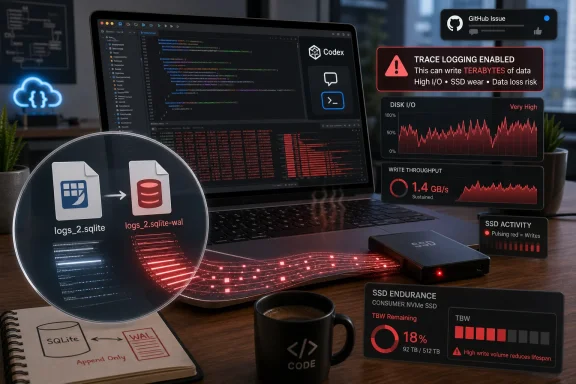 Codex Turns a Log File Into a Wear Item
The sharp version of the Notebookcheck headline is easy to mock: software rarely “kills” an SSD in the cinematic sense, and modern drives do not expire the moment a warranty number is crossed. But the underlying arithmetic is ugly enough that the alarm is justified. A user report highlighted by Notebookcheck described roughly 37 TB of writes over 21 days of uptime, which extrapolates to around 640 TB per year if the same workload continues.That number matters because many mainstream 1 TB consumer SSDs are warranted for roughly 600 TBW, or terabytes written, over their rated service life. TBW is not a cliff, and drives often exceed their warranty endurance. Still, using up a nominal lifetime write budget in less than a year is not a rounding error; it is the kind of thing administrators normally associate with video scratch disks, database servers, or badly configured logging daemons, not a coding assistant.
The local file at the center of the complaint is
~/.codex/logs_2.sqlite, with write activity observed particularly around SQLite’s write-ahead log file. The GitHub issue describes Codex’s app-server process writing repeatedly to logs_2.sqlite-wal during streaming responses, even when the environment is set to suppress verbose Rust logs. The reporter’s core allegation is simple: the visible log level says one thing, while the persistent SQLite sink does another.That distinction is important because the bug is not merely “Codex keeps a history.” Users expect modern developer tools to store settings, session metadata, caches, and sometimes searchable transcripts. The complaint here is narrower and more damning: routine streaming appears to persist low-level TRACE events that ordinary users neither asked for nor can easily disable.
TRACE Is the Setting You Use Before You Ship, Not After
Logging levels exist because observability has a cost. ERROR and WARN logs are meant to survive in production because they flag things a user, admin, or developer might need to diagnose. DEBUG and TRACE are different animals. They are often noisy by design, exposing implementation details that help engineers chase elusive bugs but should not become a default background workload.The GitHub report says the Codex extension process had
RUST_LOG=warn set, which should normally suppress DEBUG and TRACE output in Rust applications using conventional logging filters. Yet TRACE records reportedly continued to appear in the SQLite database. The issue author’s query showed TRACE entries dominating the database, with the majority of logged rows consisting of low-level events rather than actionable diagnostics.That is the part that turns an engineering oversight into a trust problem. A developer can forgive a chatty log during a beta if the switch to quiet it down works. What is harder to forgive is a logging path that appears to ignore the standard knob while continuing to write aggressively to persistent storage.
The examples cited in the report are not user-facing errors. They include internal networking and filesystem noise, the kind of ambient chatter produced by libraries and runtimes doing normal work. Persisting that material by default is not just inefficient; it suggests that the boundary between diagnostic instrumentation and product behavior was not drawn clearly enough before release.
SQLite Is Not the Villain Here
It would be tempting to turn this into another “SQLite is not for serious workloads” morality play, but that would be lazy. SQLite is an extraordinarily capable embedded database, and it is exactly the sort of tool you would expect a local developer assistant to use for lightweight state. The problem is not that Codex uses SQLite. The problem is what Codex is apparently asking SQLite to do.SQLite’s write-ahead logging mode is designed to make local databases more robust and performant, especially when reads and writes coexist. But WAL files still represent disk activity, and repeated insert-delete churn can produce far more physical writes than a user would infer from the final database size. That is the ugly trap in this report: the database file may not grow in proportion to the amount of NAND being burned.
The GitHub issue describes rows being rapidly inserted and pruned, with the maximum row ID jumping by thousands during a short interaction while the total row count remains roughly stable. To a casual user, that can look harmless because the file is not necessarily ballooning without limit. To anyone who has debugged write amplification, it is exactly the pattern that deserves attention.
This is why “just delete the log” is not a satisfying answer. If the application immediately resumes the same write pattern, the visible symptom is temporarily reset while the underlying I/O behavior remains. For sysadmins, the right question is not how large
logs_2.sqlite looks at the moment; it is how much data the storage stack says has actually been written.The SSD Math Is Crude, But the Risk Is Real
Notebookcheck’s annualized 640 TB figure comes from extrapolating one user’s 37 TB over 21 days. That is not a controlled benchmark, and it should not be treated as a universal prediction for every Codex installation. Different workflows, different versions, different platforms, and different session lengths can produce very different write rates.But the absence of a universal failure curve does not weaken the story as much as OpenAI might hope. A developer tool that can plausibly write multiple terabytes per week under normal interactive use has already crossed the line into operational relevance. Even if only heavy users, long-running sessions, or specific Codex components are affected, those are exactly the users most likely to rely on the tool professionally.
Consumer SSD endurance ratings also vary. A cheap QLC drive in a laptop, a soldered SSD in a thin-and-light machine, and a high-end workstation NVMe device do not face the same risk profile. Warranty TBW is not the same as physical death, but it is a manufacturer’s published endurance budget, and software that burns through it casually deserves scrutiny.
The WindowsForum audience should also notice the platform wrinkle. The earliest issue text cited Linux and VSCodium, while other Codex-related database and locking complaints have involved Windows, WSL, and desktop app builds. The specific excessive-write report should not be blindly generalized to every Windows install, but neither should Windows users assume immunity simply because the most detailed reproduction used Linux paths.
The AI Coding Boom Has a Local-State Problem
Codex is not alone in accumulating local state. AI coding tools increasingly keep session histories, embeddings, caches, indexes, tool-call traces, model metadata, and telemetry-adjacent diagnostics. That is partly because the tools are becoming more ambitious. A glorified autocomplete plugin can be stateless; an agent that edits files, runs commands, resumes tasks, and explains its own reasoning needs memory somewhere.The problem is that somewhere is often the user’s machine, and the user is not always told what is being stored, how fast it grows, how long it lives, or whether it can be safely discarded. The industry has spent the last two years telling developers that AI agents are not just chat boxes but junior collaborators. Junior collaborators, apparently, also leave enormous piles of paperwork on the floor.
This matters more for AI coding tools than for many ordinary desktop apps because they sit inside high-churn environments. They watch workspaces, stream responses, inspect files, call shell commands, parse errors, and sometimes integrate with IDEs that already have their own indexing and telemetry layers. A bad logging default in that context can multiply quickly.
It also complicates privacy and compliance. Notebookcheck’s report says the file at issue holds diagnostic logs rather than conversation data, and the GitHub issue’s workaround says losing it on reboot is acceptable. Even so, diagnostic logs can contain local paths, command output, project names, payload fragments, and other operational details. When logging is too verbose, storage endurance is only one side of the risk.
OpenAI’s Silence Leaves Users Doing Ops Work
The most frustrating part of the episode is not that a bug exists. Complex developer tools have bugs, and AI coding agents are being built on top of fast-moving stacks. The frustrating part is that, as of the reporting, the issue remained open and the user-visible mitigation story was being assembled by the community rather than delivered as a clean product control.The GitHub report suggests redirecting
logs_2.sqlite to tmpfs on Linux or macOS, effectively moving the log writes into memory-backed temporary storage. Another workaround proposed in the issue uses a SQLite trigger to ignore inserts into the log table. Both are clever. Neither is the kind of fix a mainstream developer tool should expect ordinary users to discover on a GitHub issue page.For Linux and macOS users comfortable with symlinks, sending
logs_2.sqlite to /tmp may be a reasonable temporary defense, assuming their environment backs /tmp with memory or otherwise avoids the affected disk path. For Windows users, especially those using WSL or the desktop app, the practical workaround is murkier and depends on how Codex is installed and where its state directory lives. That ambiguity is exactly why the vendor needs to own the remediation message.A product-grade answer would be straightforward: ship a build that respects the configured log level for every sink, cap the write rate, rotate or disable diagnostic persistence by default, and document what the local databases contain. Anything less leaves users trying to decide whether their AI assistant is worth a background I/O tax they did not consent to pay.
The Changelog Fixes Around SQLite Do Not Settle the Write-Rate Question
Notebookcheck notes that OpenAI’s recent changelog has touched SQLite reliability fixes but has not, according to the report, resolved the excessive write-rate problem. That distinction matters. Database lock contention, migration failures, startup crashes, and WAL churn can all involve SQLite, but they are not the same defect.This is where AI-tool incident response can get slippery. A vendor can truthfully fix “SQLite issues” while leaving the most damaging operational behavior intact. Users, meanwhile, see the same family of files, the same
.sqlite suffixes, and the same app behaving badly, and assume the problem was either fixed or ignored wholesale.For administrators, the correct reading is narrower. Unless OpenAI explicitly says the logging sink now honors production log levels and stops persisting TRACE noise by default, users should not assume that unrelated SQLite fixes remove the endurance risk. The practical test is not a changelog noun; it is disk write activity during normal Codex use.
That is also why the bug report’s reproduction method matters. It does not rely only on subjective complaints about heat or slowness. It points to process environment, write syscalls, WAL file activity, and database row-level behavior. Those are the kinds of artifacts that turn a forum gripe into an engineering issue.
Windows Users Should Treat This as a Watchlist Item, Not Somebody Else’s Linux Problem
The reported path,~/.codex/logs_2.sqlite, looks Unix-like, and the most detailed original reproduction involved a Linux desktop environment. But Codex’s growing footprint includes CLI, IDE, desktop, and WSL-adjacent usage patterns. Many Windows developers now run AI coding tools across a hybrid stack: Windows host, WSL filesystem, VS Code or a fork, terminal sessions, and background agent processes.That hybrid stack is exactly where storage surprises happen. A write that appears to be happening “inside Linux” may still land on the Windows host’s physical SSD. A WSL path, a mounted project directory, or a hidden application state directory can all end up consuming the same finite NAND endurance. The drive does not care which layer generated the syscall.
Windows users can start with observation rather than panic. Resource Monitor, Task Manager’s disk columns, vendor SSD utilities, SMART data, and tools such as Sysinternals Process Monitor can help identify whether Codex-related processes are producing sustained writes. In WSL-heavy setups, Linux tools such as
iotop, strace, and lsof may provide the clearer view from inside the environment.The key is duration. A short burst of disk activity during startup, indexing, or a model response is normal. Sustained writes continuing across long sessions, especially when Codex appears idle or merely streaming text, are the pattern that deserves action.
This Is a QA Failure With a Familiar Shape
The Codex logging bug, if confirmed as described, has the signature of a development-time setting escaping into production. That happens in every software era. What is different now is the intensity of the workload and the pace at which AI tooling is being pushed into daily professional use.A browser extension that logs too much might waste disk space. A build tool that logs too much might slow a terminal. An AI coding agent that logs too much can sit in the background for days, observe a firehose of activity, and persist low-level traces at a rate that looks more like infrastructure telemetry than desktop software. The blast radius is larger because the tool’s ambitions are larger.
There is also a cultural issue. AI product teams often move as if iteration speed is the highest virtue, and for model behavior that may be defensible. But local resource consumption is not an abstract quality metric. It affects battery life, fan noise, disk endurance, laptop thermals, VM performance, and user trust.
This is where enterprise IT becomes less forgiving than hobbyist early adopters. A sysadmin evaluating Codex-like tools has to ask whether the application can be centrally configured, whether logs can be capped, whether local state can be redirected, and whether vendor defaults are safe for fleets of machines. “Open a GitHub issue and symlink a SQLite file to tmpfs” is not fleet management.
OpenAI Needs a Kill Switch, Not Just a Patch
The immediate engineering fix should be obvious: make the SQLite logging sink obey the same filtering rules as the rest of the application, and stop writing TRACE and DEBUG logs by default in production builds. But OpenAI should go further. AI coding tools need explicit local-state controls because their footprint is becoming too large to hide behind dot-directories.A user should be able to see how much Codex state exists, where it is stored, what categories of data it contains, and which pieces can be safely deleted or redirected. Administrators should be able to disable persistent diagnostic logging entirely unless they are actively collecting a support bundle. The product should expose this as a supported setting, not as folklore scattered across GitHub comments and Reddit threads.
There should also be guardrails. If a log database is generating sustained write rates above a sane threshold, the tool should degrade its logging, rotate aggressively, or warn the user. Operating systems and SSD firmware can absorb a lot, but applications should not treat local storage as an infinite telemetry sink.
The privacy version of the same argument is just as important. If logs can include raw payloads, local paths, or tool output, users need a clear support-safe export path and a clear default retention policy. Verbose logs are sometimes necessary to debug agent behavior, but they should be opt-in, time-limited, and visible.
The Practical Read for Codex Users Right Now
For heavy Codex users, the right response is measured suspicion. Do not assume your SSD is doomed, but do not assume this is harmless because the database file is small. Look at actual disk writes, check whether Codex processes are active for long periods, and treat persistent TRACE logging as something to eliminate until OpenAI ships a definitive fix.- If you use Codex CLI, the Codex desktop app, or an IDE extension for long sessions, you should check whether
~/.codex/logs_2.sqliteand its WAL companion are seeing constant write activity. - If your system shows terabytes of unexpected host writes over days or weeks, you should consider Codex a suspect until process-level monitoring proves otherwise.
- If you are on Linux or macOS and understand the trade-off, redirecting the diagnostic SQLite log to temporary storage can reduce SSD wear, but it is a workaround rather than a vendor fix.
- If you manage Windows or WSL developer machines, you should test Codex under representative workloads before allowing it to run unattended across a fleet.
- If you open support tickets or GitHub issues, you should avoid uploading raw diagnostic databases unless you have inspected them for sensitive paths, payloads, prompts, or command output.
- If OpenAI releases a fix, the meaningful verification will be reduced sustained write activity during streaming, not merely a changelog line mentioning SQLite.
References
- Primary source: Notebookcheck
Published: Mon, 22 Jun 2026 08:25:00 GMT
Loading…
www.notebookcheck.net - Official source: github.com
Loading…
github.com - Related coverage: smartscope.blog
Loading…
smartscope.blog - Related coverage: r2clickthrough.com
Loading…
www.r2clickthrough.com - Related coverage: gstars.dev
Loading…
www.gstars.dev - Related coverage: ai4curation.io
Loading…
ai4curation.io