
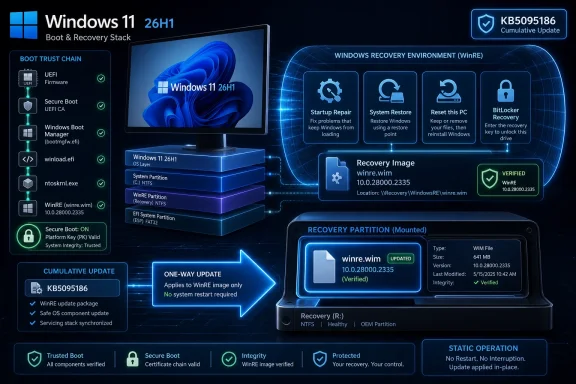
Microsoft released KB5095186 on June 23, 2026 as a Safe OS Dynamic Update for Windows 11 version 26H1, delivering improvements to the Windows Recovery Environment through Windows Update and the Microsoft Update Catalog, with no prerequisites, no required restart, and no supported removal path.
That sounds like the smallest possible Windows update story: a recovery-environment patch with a dry support page and a catalog package. It is not. KB5095186 is the kind of update that reminds administrators that Windows is not one operating system but a stack of boot paths, recovery images, servicing channels, and trust anchors that all have to keep moving together. The desktop may be where users notice Windows, but WinRE is where Windows has to prove it can still save itself.
The headline detail is straightforward: KB5095186 targets Windows 11, version 26H1. Its job is to improve the Windows Recovery Environment, the stripped-down repair environment used for startup repair, system restore, recovery tools, reset workflows, BitLocker recovery scenarios, and other break-glass operations.
That target alone makes the update interesting. Windows 11 version 26H1 sits in the forward-looking part of Microsoft’s release map, where support pages often appear before broad public attention catches up. For most users, the name “26H1” will not yet mean much. For OEMs, enterprise imaging teams, and deployment engineers, it is already the sort of label that matters because images, recovery partitions, and install media have to be prepared before a fleet ever lands on desks.
Safe OS Dynamic Updates are not feature drops. They do not add a new Start menu behavior, change Copilot placement, or alter the taskbar. They update the environment Windows uses when the normal OS cannot boot cleanly or when setup and recovery operations need a trusted minimal system.
That is exactly why they deserve more attention than they get. The recovery environment is invisible until it is urgent. By the time a user sees it, the machine is already in trouble.
Those are routine servicing facts, but together they describe a very particular kind of Windows maintenance. This is not an optional convenience patch. It is a one-way update to the recovery image, applied so that the repair layer beneath Windows is aligned with the platform above it.
The stated post-installation verification point is WinRE version 10.0.28000.2335. That number is the practical anchor for administrators. If a device or image claims to be current but WinRE reports an older build, the system’s visible Windows installation and its recovery environment may no longer be in sync.
That mismatch is more than cosmetic. A stale recovery image can mean missing storage drivers, incomplete servicing components, outdated boot logic, or recovery behavior that diverges from the OS it is supposed to repair. In consumer scenarios, that may show up as a failed reset or an unhelpful recovery loop. In enterprise scenarios, it can turn into a fleet-wide support ticket multiplier.
The problem is that WinRE is not just a spare tire. It is closer to an insurance policy written in executable code. It has to understand the disk layout, boot configuration, encryption state, recovery tools, and update baseline of the Windows installation it is meant to rescue.
When Microsoft updates WinRE, it is often doing maintenance on the path back from failure. That may involve fixes for recovery behavior, compatibility with newer setup flows, servicing logic, driver handling, or security-related changes. Microsoft’s KB text does not enumerate every internal improvement here, and that restraint is typical for this class of update.
For administrators, the lack of drama should not be mistaken for lack of consequence. A recovery image that lags behind production Windows is technical debt. It may sit harmlessly for months, then reveal itself at exactly the moment when the organization can least afford ambiguity.
Recovery images are not updated in the same way a running desktop session is updated. They are mounted, serviced, committed, and reintegrated. Once a package is baked into that image, removal is not part of the normal operational model. The answer is not to treat the update casually; it is to test it in the same disciplined pipeline used for install media and golden images.
This is where Microsoft’s wording matters. There are no prerequisites, and there is no restart requirement after applying the update. That makes the patch operationally easy. It does not make it strategically trivial.
A no-restart update that modifies WinRE can still affect the next disaster-recovery workflow, the next bare-metal deployment, or the next encrypted laptop that lands in a help desk queue. The machine does not need to reboot today for the consequences to matter tomorrow.
That is carefully calming language, and it should be read as such. Microsoft is not saying every unmanaged device will suddenly fail to boot because a certificate date arrives. It is saying the trust chain underneath modern Windows is changing, and devices need to be brought forward over time.
This matters for KB5095186 because recovery environments participate in the same broader trust story as the rest of Windows. Boot, recovery, encryption, repair, and servicing all depend on the system being able to trust what it loads and execute the right code in the right order. As Secure Boot certificate transitions move from background plumbing to operational reality, stale recovery components become less defensible.
The Windows servicing model has spent years pushing administrators to think beyond the monthly cumulative update. Firmware, bootloaders, recovery partitions, setup media, and certificate state now belong in the same conversation. KB5095186 is a small package in that larger argument.
But automatic delivery only solves the easy half of the problem. The harder half lives in deployment shares, offline images, reference builds, custom recovery partitions, task sequences, and installation media that may sit untouched long after Microsoft has moved the servicing baseline forward.
That distinction matters in enterprise IT. A laptop that has been online and updating regularly may receive the refreshed WinRE package without drama. A gold image captured months earlier, an offline WIM stored in a deployment system, or a recovery image customized by an OEM may not.
Microsoft’s own servicing guidance treats Safe OS Dynamic Updates as part of the media-maintenance workflow. When administrators update installation media, WinRE is a specific servicing target, not an incidental passenger. The practical message is simple: if you are preparing Windows 11 26H1 media, KB5095186 belongs in the checklist.
Manual installation means mounting WinRE, applying the package, validating that the package is installed, cleaning up the image, and committing the result. On a running PC, Microsoft’s documented approach uses ReAgentC to mount and unmount the recovery image. For offline images, the process requires mounting the Windows image and then mounting the embedded winre.wim.
That workflow is unforgiving in the usual DISM way. Paths matter. Image indexes matter. Mounted images have to be committed or discarded cleanly. File Explorer windows pointed at mount directories can ruin your afternoon.
Still, this is the work that separates “we installed Windows” from “we can recover Windows.” Organizations that build their own media but skip recovery-image servicing are betting that the recovery environment they captured earlier will remain good enough. Sometimes it will. Sometimes it will be the weakest link in the only workflow that matters during an outage.
Administrators should treat that number as a verification target rather than a footnote. Windows Update history may tell you an update was installed, but WinRE servicing has enough moving parts that checking the recovery image itself is more reassuring. For Dynamic Update packages, Microsoft’s broader guidance also emphasizes validating the package list in the mounted image.
That distinction is important because WinRE version reporting and package state do not always communicate the same thing for every servicing scenario. A cumulative update may change the version number. A Dynamic Update may be better confirmed by checking installed packages. The safe operational habit is to verify the image, not merely the servicing event.
This is particularly true for BitLocker-protected or device-encrypted machines. Microsoft’s servicing guidance notes that after updating the recovery image on such systems, disabling and re-enabling Windows RE can ensure the updated image is correctly configured. That is not glamorous work, but it is the sort of detail that prevents recovery surprises later.
KB5095186’s support note does not call out a known partition-size failure. That is good. But administrators should not forget the broader lesson: recovery partitions are small, old, and frequently inherited from whatever image, OEM layout, or upgrade path created them.
This is where Windows’ long hardware tail becomes a servicing liability. A new Windows 11 system deployed with a clean partition layout may absorb WinRE updates quietly. A machine upgraded through several Windows generations, imaged by a vendor, encrypted by policy, and customized by IT may be far more fragile.
The update’s no-prerequisite language should therefore be read narrowly. It means Microsoft is not requiring another package before KB5095186. It does not mean every endpoint’s recovery partition is guaranteed to be spacious, healthy, enabled, and ready for clean servicing.
That split has defined modern Windows. Microsoft markets experiences; administrators inherit mechanisms. The public sees a version name. IT sees enablement packages, dynamic updates, cumulative updates, driver baselines, Autopilot dependencies, recovery partitions, and known-issue dashboards.
KB5095186 belongs to the second world. It will not trend on social media, and it will not be the update users blame for moving a button. But it is part of the infrastructure that makes a Windows release viable outside a demo.
There is also a subtle timing signal here. Releasing a Safe OS Dynamic Update for 26H1 on June 23, 2026 tells us Microsoft is actively servicing the recovery layer as the version line matures. That is not surprising, but it is useful evidence that 26H1’s supporting ecosystem is being built in public, one quiet KB at a time.
There are reasons Microsoft keeps these notes terse. Safe OS Dynamic Updates may include low-level changes that are not meaningful to most users, and over-describing recovery fixes can create unnecessary alarm. But the pendulum has swung too far toward opacity.
Administrators do not need marketing prose. They need enough context to prioritize testing. Did the update address a recovery failure, a security hardening change, a driver compatibility issue, a setup edge case, or preparatory work for future servicing? Even broad categories would help.
This is an old Windows problem. The less visible the component, the less explanatory the KB tends to be. Yet the less visible components are often the ones where troubleshooting is hardest when something goes wrong.
Dynamic Update servicing is not just about adding the newest file to a folder. It is about maintaining a coherent set of packages that correspond to the Windows release and servicing month. Microsoft’s media-servicing guidance has long urged administrators to keep Dynamic Update packages aligned with the latest cumulative update where possible, or to use the most recent available package when exact monthly alignment does not exist.
That replacement chain also gives IT a way to reason about drift. If an image has KB5095185 but not KB5095186, it is not catastrophically unknowable; it is one Safe OS Dynamic Update behind. If it has neither, the question becomes how stale the image really is.
The more mature the Windows deployment process, the less this feels like trivia. Package supersedence is how administrators keep deployment media from becoming archaeological sites.
The impact appears later, if it appears at all. It appears when a reset operation works cleanly. It appears when Advanced startup loads the expected tools. It appears when the system can repair boot configuration, enter recovery, or interact properly with encryption and firmware state.
This delayed impact is why users underestimate these updates. A browser update offers immediate proof of change. A graphics driver update may show itself in performance or bugs. A WinRE update is judged only in failure scenarios, and successful recovery is usually remembered as relief rather than as the result of prior maintenance.
Microsoft’s challenge is that invisible resilience is hard to sell. Windows users complain loudly when updates disrupt them, but they rarely praise the update that made a future recovery less painful. That does not make the work optional.
That means checking whether Windows Update-managed devices receive it normally. It means pulling the standalone package where offline media must be serviced. It means validating WinRE version or package state after applying the update. It means paying attention to recovery partition health before assuming deployment success.
It also means documenting the recovery path as carefully as the installation path. Too many organizations can describe how a device is provisioned in exquisite detail but cannot describe exactly what happens when that device fails to boot after a firmware update, disk event, or failed configuration change.
KB5095186 is a reminder that recovery is not an afterthought tacked onto Windows. It is part of the product’s operational contract. If the contract matters, the recovery image has to be serviced like the rest of the estate.
That sounds like the smallest possible Windows update story: a recovery-environment patch with a dry support page and a catalog package. It is not. KB5095186 is the kind of update that reminds administrators that Windows is not one operating system but a stack of boot paths, recovery images, servicing channels, and trust anchors that all have to keep moving together. The desktop may be where users notice Windows, but WinRE is where Windows has to prove it can still save itself.
 Microsoft Ships a Recovery Update for an Operating System Most Users Have Not Met Yet
The headline detail is straightforward: KB5095186 targets Windows 11, version 26H1. Its job is to improve the Windows Recovery Environment, the stripped-down repair environment used for startup repair, system restore, recovery tools, reset workflows, BitLocker recovery scenarios, and other break-glass operations.That target alone makes the update interesting. Windows 11 version 26H1 sits in the forward-looking part of Microsoft’s release map, where support pages often appear before broad public attention catches up. For most users, the name “26H1” will not yet mean much. For OEMs, enterprise imaging teams, and deployment engineers, it is already the sort of label that matters because images, recovery partitions, and install media have to be prepared before a fleet ever lands on desks.
Safe OS Dynamic Updates are not feature drops. They do not add a new Start menu behavior, change Copilot placement, or alter the taskbar. They update the environment Windows uses when the normal OS cannot boot cleanly or when setup and recovery operations need a trusted minimal system.
That is exactly why they deserve more attention than they get. The recovery environment is invisible until it is urgent. By the time a user sees it, the machine is already in trouble.
The Boring Update Is Usually the One You Needed Before the Outage
Microsoft’s support note for KB5095186 is characteristically spare. The summary says the update improves WinRE. The installation matrix says Windows Update will download and install it automatically, while standalone packages are available through the Microsoft Update Catalog. The package replaces KB5095185, requires no restart, and cannot be removed once applied to a Windows image.Those are routine servicing facts, but together they describe a very particular kind of Windows maintenance. This is not an optional convenience patch. It is a one-way update to the recovery image, applied so that the repair layer beneath Windows is aligned with the platform above it.
The stated post-installation verification point is WinRE version 10.0.28000.2335. That number is the practical anchor for administrators. If a device or image claims to be current but WinRE reports an older build, the system’s visible Windows installation and its recovery environment may no longer be in sync.
That mismatch is more than cosmetic. A stale recovery image can mean missing storage drivers, incomplete servicing components, outdated boot logic, or recovery behavior that diverges from the OS it is supposed to repair. In consumer scenarios, that may show up as a failed reset or an unhelpful recovery loop. In enterprise scenarios, it can turn into a fleet-wide support ticket multiplier.
WinRE Is Windows’ Insurance Policy, Not Its Spare Tire
Windows Recovery Environment has always occupied an odd place in the Windows architecture. It is essential enough that Microsoft ships and services it, but quiet enough that even many power users only think about it when a machine fails to boot. That invisibility has made WinRE one of the most neglected pieces of the Windows estate.The problem is that WinRE is not just a spare tire. It is closer to an insurance policy written in executable code. It has to understand the disk layout, boot configuration, encryption state, recovery tools, and update baseline of the Windows installation it is meant to rescue.
When Microsoft updates WinRE, it is often doing maintenance on the path back from failure. That may involve fixes for recovery behavior, compatibility with newer setup flows, servicing logic, driver handling, or security-related changes. Microsoft’s KB text does not enumerate every internal improvement here, and that restraint is typical for this class of update.
For administrators, the lack of drama should not be mistaken for lack of consequence. A recovery image that lags behind production Windows is technical debt. It may sit harmlessly for months, then reveal itself at exactly the moment when the organization can least afford ambiguity.
The One-Way Door Is the Point
KB5095186 cannot be removed once it is applied to a Windows image. That line will make some cautious administrators pause, because rollback is a comforting word in update management. But in the context of WinRE servicing, the one-way nature is not surprising.Recovery images are not updated in the same way a running desktop session is updated. They are mounted, serviced, committed, and reintegrated. Once a package is baked into that image, removal is not part of the normal operational model. The answer is not to treat the update casually; it is to test it in the same disciplined pipeline used for install media and golden images.
This is where Microsoft’s wording matters. There are no prerequisites, and there is no restart requirement after applying the update. That makes the patch operationally easy. It does not make it strategically trivial.
A no-restart update that modifies WinRE can still affect the next disaster-recovery workflow, the next bare-metal deployment, or the next encrypted laptop that lands in a help desk queue. The machine does not need to reboot today for the consequences to matter tomorrow.
The Secure Boot Clock Makes Recovery Servicing Harder to Ignore
Microsoft’s related-topic note points to the coming expiration of Secure Boot certificates used by most Windows devices, beginning in June 2026. Microsoft says newer certificates have been rolling out to consumer and non-managed business devices, and that devices without the newer certificates should continue to start and operate normally while standard Windows updates continue to install.That is carefully calming language, and it should be read as such. Microsoft is not saying every unmanaged device will suddenly fail to boot because a certificate date arrives. It is saying the trust chain underneath modern Windows is changing, and devices need to be brought forward over time.
This matters for KB5095186 because recovery environments participate in the same broader trust story as the rest of Windows. Boot, recovery, encryption, repair, and servicing all depend on the system being able to trust what it loads and execute the right code in the right order. As Secure Boot certificate transitions move from background plumbing to operational reality, stale recovery components become less defensible.
The Windows servicing model has spent years pushing administrators to think beyond the monthly cumulative update. Firmware, bootloaders, recovery partitions, setup media, and certificate state now belong in the same conversation. KB5095186 is a small package in that larger argument.
Automatic Delivery Solves the Easy Half
For ordinary Windows Update-managed systems, KB5095186 should download and install automatically. That is the right default. Most users should not have to know what Safe OS Dynamic Update means, and they should not be expected to mount recovery images by hand.But automatic delivery only solves the easy half of the problem. The harder half lives in deployment shares, offline images, reference builds, custom recovery partitions, task sequences, and installation media that may sit untouched long after Microsoft has moved the servicing baseline forward.
That distinction matters in enterprise IT. A laptop that has been online and updating regularly may receive the refreshed WinRE package without drama. A gold image captured months earlier, an offline WIM stored in a deployment system, or a recovery image customized by an OEM may not.
Microsoft’s own servicing guidance treats Safe OS Dynamic Updates as part of the media-maintenance workflow. When administrators update installation media, WinRE is a specific servicing target, not an incidental passenger. The practical message is simple: if you are preparing Windows 11 26H1 media, KB5095186 belongs in the checklist.
The Catalog Package Is for the People Who Own the Image
The standalone Microsoft Update Catalog package exists for a reason. It is not primarily there for home users to collect update files like trading cards. It is there for administrators, deployment engineers, OEMs, and support teams who need deterministic control over offline images and recovery environments.Manual installation means mounting WinRE, applying the package, validating that the package is installed, cleaning up the image, and committing the result. On a running PC, Microsoft’s documented approach uses ReAgentC to mount and unmount the recovery image. For offline images, the process requires mounting the Windows image and then mounting the embedded winre.wim.
That workflow is unforgiving in the usual DISM way. Paths matter. Image indexes matter. Mounted images have to be committed or discarded cleanly. File Explorer windows pointed at mount directories can ruin your afternoon.
Still, this is the work that separates “we installed Windows” from “we can recover Windows.” Organizations that build their own media but skip recovery-image servicing are betting that the recovery environment they captured earlier will remain good enough. Sometimes it will. Sometimes it will be the weakest link in the only workflow that matters during an outage.
Verification Is the Administrator’s Escape Hatch
The most useful line in the KB article may be the WinRE version check: after installation, the installed WinRE version should be 10.0.28000.2335. In a servicing ecosystem full of vague success states, that is refreshingly concrete.Administrators should treat that number as a verification target rather than a footnote. Windows Update history may tell you an update was installed, but WinRE servicing has enough moving parts that checking the recovery image itself is more reassuring. For Dynamic Update packages, Microsoft’s broader guidance also emphasizes validating the package list in the mounted image.
That distinction is important because WinRE version reporting and package state do not always communicate the same thing for every servicing scenario. A cumulative update may change the version number. A Dynamic Update may be better confirmed by checking installed packages. The safe operational habit is to verify the image, not merely the servicing event.
This is particularly true for BitLocker-protected or device-encrypted machines. Microsoft’s servicing guidance notes that after updating the recovery image on such systems, disabling and re-enabling Windows RE can ensure the updated image is correctly configured. That is not glamorous work, but it is the sort of detail that prevents recovery surprises later.
Recovery Partitions Remain the Place Windows Updates Go to Get Weird
Anyone who managed the WinRE partition issues around earlier Windows updates knows the pattern. A machine can be perfectly healthy, fully patched, and still fail a recovery-environment update because the recovery partition lacks enough free space. Microsoft has previously recommended having sufficient free space for WinRE updates and has documented resizing approaches for systems that fall short.KB5095186’s support note does not call out a known partition-size failure. That is good. But administrators should not forget the broader lesson: recovery partitions are small, old, and frequently inherited from whatever image, OEM layout, or upgrade path created them.
This is where Windows’ long hardware tail becomes a servicing liability. A new Windows 11 system deployed with a clean partition layout may absorb WinRE updates quietly. A machine upgraded through several Windows generations, imaged by a vendor, encrypted by policy, and customized by IT may be far more fragile.
The update’s no-prerequisite language should therefore be read narrowly. It means Microsoft is not requiring another package before KB5095186. It does not mean every endpoint’s recovery partition is guaranteed to be spacious, healthy, enabled, and ready for clean servicing.
Windows 11 26H1 Is Already a Servicing Story Before It Is a User Story
The user-facing story of Windows 11 26H1 will eventually be about features, AI integration, hardware requirements, Settings changes, and whatever Microsoft decides to promote at launch. The administrative story is already different. It is about whether the servicing stack, install media, recovery environment, and trust chain are aligned.That split has defined modern Windows. Microsoft markets experiences; administrators inherit mechanisms. The public sees a version name. IT sees enablement packages, dynamic updates, cumulative updates, driver baselines, Autopilot dependencies, recovery partitions, and known-issue dashboards.
KB5095186 belongs to the second world. It will not trend on social media, and it will not be the update users blame for moving a button. But it is part of the infrastructure that makes a Windows release viable outside a demo.
There is also a subtle timing signal here. Releasing a Safe OS Dynamic Update for 26H1 on June 23, 2026 tells us Microsoft is actively servicing the recovery layer as the version line matures. That is not surprising, but it is useful evidence that 26H1’s supporting ecosystem is being built in public, one quiet KB at a time.
Microsoft’s Minimal Notes Leave Too Much Room for Guesswork
The weakest part of KB5095186 is not the update itself. It is the disclosure style around it. “This update makes improvements to the Windows recovery environment” is accurate but thin, and it forces administrators to infer operational relevance from update class, version number, replacement chain, and install behavior.There are reasons Microsoft keeps these notes terse. Safe OS Dynamic Updates may include low-level changes that are not meaningful to most users, and over-describing recovery fixes can create unnecessary alarm. But the pendulum has swung too far toward opacity.
Administrators do not need marketing prose. They need enough context to prioritize testing. Did the update address a recovery failure, a security hardening change, a driver compatibility issue, a setup edge case, or preparatory work for future servicing? Even broad categories would help.
This is an old Windows problem. The less visible the component, the less explanatory the KB tends to be. Yet the less visible components are often the ones where troubleshooting is hardest when something goes wrong.
The Replacement Chain Is a Small Clue With Real Operational Value
KB5095186 replaces KB5095185. That single line is easy to skip, but it matters for anyone maintaining offline repositories or deployment packages. It tells administrators which package should win when refreshing images and avoids the accumulation of obsolete recovery updates.Dynamic Update servicing is not just about adding the newest file to a folder. It is about maintaining a coherent set of packages that correspond to the Windows release and servicing month. Microsoft’s media-servicing guidance has long urged administrators to keep Dynamic Update packages aligned with the latest cumulative update where possible, or to use the most recent available package when exact monthly alignment does not exist.
That replacement chain also gives IT a way to reason about drift. If an image has KB5095185 but not KB5095186, it is not catastrophically unknowable; it is one Safe OS Dynamic Update behind. If it has neither, the question becomes how stale the image really is.
The more mature the Windows deployment process, the less this feels like trivia. Package supersedence is how administrators keep deployment media from becoming archaeological sites.
The Consumer Impact Is Mostly Delayed, Which Is Why It Matters
For home users, KB5095186 should be nearly invisible. It should arrive through Windows Update, install without a restart, and never announce itself. That is the ideal experience for a recovery-environment update.The impact appears later, if it appears at all. It appears when a reset operation works cleanly. It appears when Advanced startup loads the expected tools. It appears when the system can repair boot configuration, enter recovery, or interact properly with encryption and firmware state.
This delayed impact is why users underestimate these updates. A browser update offers immediate proof of change. A graphics driver update may show itself in performance or bugs. A WinRE update is judged only in failure scenarios, and successful recovery is usually remembered as relief rather than as the result of prior maintenance.
Microsoft’s challenge is that invisible resilience is hard to sell. Windows users complain loudly when updates disrupt them, but they rarely praise the update that made a future recovery less painful. That does not make the work optional.
Enterprise IT Should Treat KB5095186 as Image Hygiene
The practical recommendation for managed environments is not panic. It is hygiene. If Windows 11 26H1 is in your lab, pilot ring, OEM validation process, or deployment roadmap, KB5095186 should be part of the image-servicing conversation now.That means checking whether Windows Update-managed devices receive it normally. It means pulling the standalone package where offline media must be serviced. It means validating WinRE version or package state after applying the update. It means paying attention to recovery partition health before assuming deployment success.
It also means documenting the recovery path as carefully as the installation path. Too many organizations can describe how a device is provisioned in exquisite detail but cannot describe exactly what happens when that device fails to boot after a firmware update, disk event, or failed configuration change.
KB5095186 is a reminder that recovery is not an afterthought tacked onto Windows. It is part of the product’s operational contract. If the contract matters, the recovery image has to be serviced like the rest of the estate.
The Real Story Is the Recovery Layer Moving in Step With 26H1
The concrete lesson from KB5095186 is that Windows 11 26H1 servicing is not only about the live operating system. Microsoft is already refreshing the repair environment that will sit underneath it, and administrators should treat that as part of release readiness rather than background noise.- KB5095186 was released on June 23, 2026 for Windows 11 version 26H1 and improves the Windows Recovery Environment.
- The update is delivered automatically through Windows Update, with standalone packages available from the Microsoft Update Catalog for manual and offline servicing.
- Microsoft says the update has no prerequisites, does not require a restart, replaces KB5095185, and cannot be removed once applied to a Windows image.
- The expected WinRE version after installation is 10.0.28000.2335, giving administrators a concrete verification target.
- Deployment teams should update offline images, installation media, and recovery environments rather than assuming the main Windows image tells the whole servicing story.
- The broader Secure Boot certificate transition makes recovery-layer maintenance more important, not less, because boot trust and repair workflows are increasingly intertwined.
References
- Primary source: Microsoft Support
Published: Tue, 23 Jun 2026 17:02:36 Z
Loading…
support.microsoft.com