
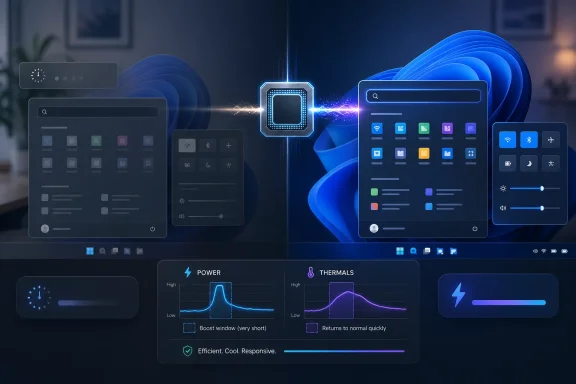
Microsoft is testing and gradually rolling out a Windows 11 performance feature known as Low Latency Profile in 2026 builds, using short CPU boost windows to make app launches and shell actions such as Start, Search, and Action Center feel faster. The practical promise is simple: Windows stops waiting for the machine to “notice” that the user is doing something important. The political problem is just as simple: if Windows needs a sprint mode to open its own menus, then Microsoft is admitting the desktop has become too sluggish to defend on elegance alone. Low Latency Profile may be a real improvement, but it is also a confession.
For years, Windows performance debates have been trapped between benchmark charts and lived experience. A Windows 11 PC can produce excellent Cinebench scores, chew through game workloads, and still feel faintly syrupy when a user opens Search, right-clicks the desktop, or waits for a modern inbox app to appear. That gap between throughput and responsiveness is where Low Latency Profile lives.
Microsoft’s newer performance language matters because it shifts attention from raw speed to latency. The company’s own release notes for recent Windows 11 preview builds describe improvements that “accelerate app launch and core shell experiences such as Start menu, Search, and Action Center.” That is not the usual vague servicing language about reliability. It is an unusually direct admission that the everyday surface of Windows needed attention.
The mechanism, as reported by Windows-focused outlets and observed by testers, appears to be a short, aggressive CPU-frequency boost when Windows detects certain high-priority foreground interactions. Instead of letting the normal power-management stack gradually ramp clocks as work accumulates, the system briefly asks the processor to move now. The user clicks; the machine sprints; then it returns to a lower-power state.
That is not exotic computing theory. Phones, tablets, and modern laptops have long used variations of the same idea. The novelty is that Windows 11, on machines whose cooling systems and silicon vary wildly, is now trying to make the desktop feel less like a polite request to the scheduler and more like an immediate response.
Modern processors already change clocks constantly. Intel, AMD, and Arm chips move between power states, boost bins, and efficiency modes in response to load, thermals, firmware rules, operating-system hints, and platform policy. Windows has always participated in that negotiation through power plans, scheduler behavior, and hardware-aware policy decisions.
Low Latency Profile appears to sharpen one particular class of hint: the user has just initiated a visible foreground action. Opening Start is not the same kind of workload as exporting a video or compiling a large project. It is short, bursty, and psychologically important. If the first 300 milliseconds feel bad, the rest of the machine’s performance story is already damaged.
That makes the feature a race-to-idle play. Finish the small visible job quickly, then get out of the way. A short spike can be more efficient than a longer period of middling work if it lets the CPU return to lower-power states sooner.
The risk is that this explanation can sound like marketing cover for brute force. It is fair to ask why the operating system should need maximum-frequency nudges for menus and shell surfaces. But it is also fair to note that user-interface latency is not solved by moral purity. If the work exists, and if the power cost is small, a precise boost may be a better answer than pretending users should be patient.
Those delays are small enough to evade casual measurement but frequent enough to shape perception. They are the difference between a system that feels direct and one that feels mediated. Enthusiasts notice them because they remember how older Windows shells behaved on weaker hardware. Administrators notice them because users complain in language that ticketing systems handle poorly: “It just feels slow.”
Low Latency Profile targets exactly that class of annoyance. Reported testing has claimed large gains in shell surfaces and meaningful gains in app launches, with figures around 70 percent faster for some menus and roughly 40 percent faster for some launch paths. Those numbers should be treated as scenario-dependent rather than universal. A low-end laptop, a virtual machine, and a high-refresh desktop will not show the same gains.
Still, the direction is believable because the bottleneck is not always total compute capacity. Sometimes the bottleneck is how quickly the system commits resources to work that matters right now. Windows has long been good at being many things to many workloads. It has been less good at making the topmost interaction feel sacred.
That matters because Windows 11’s reputation problem is not merely technical. Many users believe the operating system has grown heavier while delivering fewer obvious benefits over Windows 10. The shell is prettier, security baselines are stronger, and the platform is more modern in several important ways. But when those virtues arrive alongside delayed context menus and inconsistent Settings surfaces, the emotional ledger goes negative.
Microsoft seems to understand that responsiveness is a trust signal. A snappy system suggests competence even before the user knows what changed. A laggy system suggests bloat even when the underlying cause is complicated. Low Latency Profile is therefore not just a scheduler tweak; it is a credibility maneuver.
The timing also matters. As Windows 10 exits mainstream support for most consumers in October 2025, Windows 11 must absorb users who did not necessarily choose it out of enthusiasm. Microsoft cannot afford for their first impression to be that the new operating system feels slower on the same machine. A small, targeted responsiveness feature may do more for adoption sentiment than another redesigned settings page.
Windows 11 contains too many layers that feel heavier than they need to be. Some legacy surfaces remain. Some modern surfaces are web-backed or framework-heavy. Some transitions look designed for demo polish rather than input immediacy. Even where the architecture is defensible, the result can feel like the operating system is carrying historical baggage and modern abstraction at the same time.
Low Latency Profile does not refactor that code. It does not magically make Outlook lighter, Search simpler, or the shell more coherent. It cannot turn a badly behaved startup ecosystem into a disciplined one. It is not a replacement for removing unnecessary work from hot paths.
But the band-aid critique misses something important: users do not experience architectural purity. They experience delay. If Microsoft can eliminate a measurable chunk of perceived latency while longer-term cleanup continues, it should. The correct criticism is not that Low Latency Profile exists. The correct criticism is that it must not become an excuse to stop there.
That argument is effective because it punctures the idea that boosting is inherently cheating. A computer is not a moral test of how slowly software can run at base frequency. It is a tool whose job is to make the user’s intention happen quickly, reliably, and efficiently. If a short boost improves that experience without meaningful cost, the technique is legitimate.
The problem is that Windows is not macOS running on a tightly controlled hardware stack. Microsoft has to support bargain laptops with timid cooling, gaming desktops with aggressive boost behavior, enterprise images with security agents, and virtual machines that do not map neatly to consumer power assumptions. A policy that feels invisible on one device may produce fan noise on another.
That is where Microsoft’s implementation discipline will matter. Low Latency Profile should be conservative enough to avoid turning every shell interaction into a thermal event. It should be observable enough for power users and administrators to diagnose. And it should be adjustable enough, at least indirectly through power policy, for fleets where acoustics, battery life, or predictability matter more than shaving milliseconds from Start.
The reported IDs associated with the feature, including 60716524 and 61391826, have circulated as ways to force-enable parts of the behavior on supported builds. Other IDs have appeared in later guides as the feature moved through staged rollout channels. This is useful for testers and dangerous for everyone else.
ViveTool is not magic; it flips feature configuration states that Microsoft may be A/B testing, gating, or holding back for a reason. A feature can be present in the codebase without being ready for every device. It can depend on other servicing changes. It can behave differently across Insider, Release Preview, optional preview, and stable cumulative update channels.
That does not mean enthusiasts should avoid experimentation. WindowsForum readers, of all audiences, understand the appeal of turning the key before the official announcement. But a hidden feature that touches power behavior should be treated with more caution than a redesigned icon or a new Settings page. If your laptop’s fan curve is already jumpy, your battery is degraded, or your device is thermally constrained, forcing a CPU boost policy is not the same as enabling a harmless cosmetic flag.
The first wave of claims around the feature emphasizes minimal battery drain and negligible heat increases because the boost windows are short. That is plausible, but enterprises will test it on their own hardware anyway. They will want telemetry, repeatable measurements, and a clear understanding of whether the behavior is enabled by default, staged by Microsoft, or exposed through policy.
The most interesting deployment cases may be lower-end hardware and virtual desktops. Budget laptops often suffer most from slow ramp behavior because every foreground action competes with limited thermal and power headroom. Virtual machines can exaggerate UI latency because the guest operating system’s view of CPU responsiveness is mediated by the host. If Low Latency Profile helps those machines feel less constrained, it could extend the useful life of hardware that would otherwise be blamed on Windows 11.
Security teams will also watch the hidden-toggle ecosystem warily. The feature itself is not a security problem. But telling users to download third-party tools and run elevated commands to chase performance is not a healthy default support model. Microsoft should make the state of this feature transparent in official channels before the workaround culture becomes the documentation.
That does not make Low Latency Profile a bad idea. It means the policy has to respect platform behavior. Windows already receives information from firmware and silicon about performance states, power modes, and thermal constraints. The feature should be integrated with those signals rather than imposed as a universal “max clocks now” rule.
Battery life is the second concern. Short boosts can be efficient if they reduce total work time, but that depends on workload, frequency-voltage curves, and how often the trigger fires. A user who opens Start a dozen times per day is not the same as a user who lives in shell surfaces all day. A machine in Best Performance mode is not the same as one in Battery Saver.
Silicon wear is the least persuasive concern for most users. Modern processors are designed to boost within specified limits, and a policy-level nudge should not mean unsafe voltage. The more realistic long-term issue is not wear but comfort: heat, acoustics, and battery predictability. If Microsoft gets those right, the feature will disappear into the background, which is exactly where it belongs.
Windows developers have had too many incentives to optimize for feature velocity rather than immediacy. Electron, WebView-heavy shells, background updaters, telemetry frameworks, and sprawling startup paths have all contributed to a desktop that can feel more expensive than it should. Microsoft is hardly innocent here; some of its own apps have become symbols of the problem.
The danger is that developers see Low Latency Profile as free headroom. That would be the worst outcome. A short CPU sprint can mask small delays, but it cannot redeem an app that blocks the UI thread, performs expensive startup work before showing a window, or treats every launch as an opportunity to initialize half the internet.
The better reading is that Microsoft is trying to protect the first few moments of interaction. Developers should do the same. Show something fast. Defer nonessential work. Avoid stealing focus. Treat the user’s click as a deadline, not a suggestion.
Still, Windows has a long history of hiding consequential behavior behind vague power modes. “Best power efficiency,” “Balanced,” and “Best performance” are understandable at a high level, but they do not tell users exactly how responsiveness, boost aggressiveness, thermals, and battery life are being balanced. Low Latency Profile could make that ambiguity worse if it silently behaves differently across devices and update waves.
The right answer is probably not a giant Settings page called Low Latency Profile. It is better observability. Task Manager, power reports, or Windows Performance Recorder should make it possible to tell when the profile is active and what triggered it. Administrators should eventually have policy clarity. Enthusiasts should not have to infer state from clock-speed jumps alone.
Consumer Windows works best when the default is good and the escape hatch exists. Low Latency Profile should be enabled where Microsoft has confidence, restrained where the platform says restraint is needed, and documented well enough that power users are not left spelunking feature IDs.
That is why the feature’s success should be judged by consistency rather than peak improvement claims. The best version of this technology is not the one that wins a cherry-picked benchmark. It is the one that makes ordinary interaction boringly immediate across cheap laptops, enterprise images, and enthusiast desktops.
It also needs to coexist with Microsoft’s broader ambitions. Windows is absorbing more AI features, more cloud-connected surfaces, and more security isolation. Each of those can add background work, prompts, services, and abstraction. If Microsoft wants users to accept that future, it has to prove the operating system can carry the load without feeling heavier every year.
Low Latency Profile is therefore a symbolic feature. It says Microsoft knows the desktop’s feel matters. But symbolism will curdle quickly if the company uses a scheduler tweak to excuse slow apps, noisy background services, or shell regressions. The boost is welcome. The cleanup still has to happen.
Low Latency Profile looks like one of the rare Windows 11 changes that could improve the operating system not by adding another visible feature, but by removing a feeling: the tiny pause that makes a fast PC seem less fast than it is. If Microsoft treats this as the first move in a broader latency campaign, Windows 11 may finally start to feel lighter without pretending it has become smaller. If it treats the boost as the solution, the desktop will get a little quicker while the argument about bloat gets louder.
 Microsoft Finally Treats “Feels Slow” as a Bug
For years, Windows performance debates have been trapped between benchmark charts and lived experience. A Windows 11 PC can produce excellent Cinebench scores, chew through game workloads, and still feel faintly syrupy when a user opens Search, right-clicks the desktop, or waits for a modern inbox app to appear. That gap between throughput and responsiveness is where Low Latency Profile lives.Microsoft’s newer performance language matters because it shifts attention from raw speed to latency. The company’s own release notes for recent Windows 11 preview builds describe improvements that “accelerate app launch and core shell experiences such as Start menu, Search, and Action Center.” That is not the usual vague servicing language about reliability. It is an unusually direct admission that the everyday surface of Windows needed attention.
The mechanism, as reported by Windows-focused outlets and observed by testers, appears to be a short, aggressive CPU-frequency boost when Windows detects certain high-priority foreground interactions. Instead of letting the normal power-management stack gradually ramp clocks as work accumulates, the system briefly asks the processor to move now. The user clicks; the machine sprints; then it returns to a lower-power state.
That is not exotic computing theory. Phones, tablets, and modern laptops have long used variations of the same idea. The novelty is that Windows 11, on machines whose cooling systems and silicon vary wildly, is now trying to make the desktop feel less like a polite request to the scheduler and more like an immediate response.
The Three-Second Sprint Is Less Crude Than It Sounds
The phrase “boost the CPU” makes Low Latency Profile sound like a gamer utility from 2009. In reality, the important part is not the peak frequency. It is the timing.Modern processors already change clocks constantly. Intel, AMD, and Arm chips move between power states, boost bins, and efficiency modes in response to load, thermals, firmware rules, operating-system hints, and platform policy. Windows has always participated in that negotiation through power plans, scheduler behavior, and hardware-aware policy decisions.
Low Latency Profile appears to sharpen one particular class of hint: the user has just initiated a visible foreground action. Opening Start is not the same kind of workload as exporting a video or compiling a large project. It is short, bursty, and psychologically important. If the first 300 milliseconds feel bad, the rest of the machine’s performance story is already damaged.
That makes the feature a race-to-idle play. Finish the small visible job quickly, then get out of the way. A short spike can be more efficient than a longer period of middling work if it lets the CPU return to lower-power states sooner.
The risk is that this explanation can sound like marketing cover for brute force. It is fair to ask why the operating system should need maximum-frequency nudges for menus and shell surfaces. But it is also fair to note that user-interface latency is not solved by moral purity. If the work exists, and if the power cost is small, a precise boost may be a better answer than pretending users should be patient.
Windows 11’s Real Enemy Is the Micro-Stutter
Windows 11’s problem has rarely been that it is unusably slow. The complaint is subtler and more corrosive: it often feels inconsistent. A menu opens instantly one moment and hesitates the next. Search appears fast on a clean boot and then drags under background load. File Explorer can feel crisp on one machine and strangely reluctant on another with objectively better hardware.Those delays are small enough to evade casual measurement but frequent enough to shape perception. They are the difference between a system that feels direct and one that feels mediated. Enthusiasts notice them because they remember how older Windows shells behaved on weaker hardware. Administrators notice them because users complain in language that ticketing systems handle poorly: “It just feels slow.”
Low Latency Profile targets exactly that class of annoyance. Reported testing has claimed large gains in shell surfaces and meaningful gains in app launches, with figures around 70 percent faster for some menus and roughly 40 percent faster for some launch paths. Those numbers should be treated as scenario-dependent rather than universal. A low-end laptop, a virtual machine, and a high-refresh desktop will not show the same gains.
Still, the direction is believable because the bottleneck is not always total compute capacity. Sometimes the bottleneck is how quickly the system commits resources to work that matters right now. Windows has long been good at being many things to many workloads. It has been less good at making the topmost interaction feel sacred.
Project K2 Is Microsoft’s Reputation Repair Job
Low Latency Profile is being discussed as part of a broader Windows performance push often referred to as Windows K2. The branding itself is less important than the shift in priorities. Windows 11 has spent much of its life arguing with its own users about defaults, ads, AI surfaces, account prompts, and hardware requirements. Performance improvements are a different kind of message: they give something back.That matters because Windows 11’s reputation problem is not merely technical. Many users believe the operating system has grown heavier while delivering fewer obvious benefits over Windows 10. The shell is prettier, security baselines are stronger, and the platform is more modern in several important ways. But when those virtues arrive alongside delayed context menus and inconsistent Settings surfaces, the emotional ledger goes negative.
Microsoft seems to understand that responsiveness is a trust signal. A snappy system suggests competence even before the user knows what changed. A laggy system suggests bloat even when the underlying cause is complicated. Low Latency Profile is therefore not just a scheduler tweak; it is a credibility maneuver.
The timing also matters. As Windows 10 exits mainstream support for most consumers in October 2025, Windows 11 must absorb users who did not necessarily choose it out of enthusiasm. Microsoft cannot afford for their first impression to be that the new operating system feels slower on the same machine. A small, targeted responsiveness feature may do more for adoption sentiment than another redesigned settings page.
The Band-Aid Critique Is Right, but Incomplete
The loudest criticism of Low Latency Profile is that it treats symptoms rather than causes. If Windows 11’s shell and first-party apps were leaner, the argument goes, Microsoft would not need to kick the CPU into high gear for routine actions. There is truth here, and Microsoft should not be allowed to hide from it.Windows 11 contains too many layers that feel heavier than they need to be. Some legacy surfaces remain. Some modern surfaces are web-backed or framework-heavy. Some transitions look designed for demo polish rather than input immediacy. Even where the architecture is defensible, the result can feel like the operating system is carrying historical baggage and modern abstraction at the same time.
Low Latency Profile does not refactor that code. It does not magically make Outlook lighter, Search simpler, or the shell more coherent. It cannot turn a badly behaved startup ecosystem into a disciplined one. It is not a replacement for removing unnecessary work from hot paths.
But the band-aid critique misses something important: users do not experience architectural purity. They experience delay. If Microsoft can eliminate a measurable chunk of perceived latency while longer-term cleanup continues, it should. The correct criticism is not that Low Latency Profile exists. The correct criticism is that it must not become an excuse to stop there.
Scott Hanselman’s Defense Lands Because Everyone Else Already Does This
Microsoft’s public defense of the feature, including comments from developer-facing leadership, has leaned on a simple point: modern operating systems already use boost behavior to make interactive work feel fast. Apple does it. Mobile platforms do it. Performance-sensitive systems routinely bias resources toward the foreground task.That argument is effective because it punctures the idea that boosting is inherently cheating. A computer is not a moral test of how slowly software can run at base frequency. It is a tool whose job is to make the user’s intention happen quickly, reliably, and efficiently. If a short boost improves that experience without meaningful cost, the technique is legitimate.
The problem is that Windows is not macOS running on a tightly controlled hardware stack. Microsoft has to support bargain laptops with timid cooling, gaming desktops with aggressive boost behavior, enterprise images with security agents, and virtual machines that do not map neatly to consumer power assumptions. A policy that feels invisible on one device may produce fan noise on another.
That is where Microsoft’s implementation discipline will matter. Low Latency Profile should be conservative enough to avoid turning every shell interaction into a thermal event. It should be observable enough for power users and administrators to diagnose. And it should be adjustable enough, at least indirectly through power policy, for fleets where acoustics, battery life, or predictability matter more than shaving milliseconds from Start.
The Hidden-Feature Culture Makes the Story Messier
Much of the excitement around Low Latency Profile has been driven by hidden feature IDs and ViveTool commands. That is normal in the Windows enthusiast world, where experimental flags routinely surface before Microsoft explains them. It is also a terrible way for ordinary users to learn about performance changes.The reported IDs associated with the feature, including 60716524 and 61391826, have circulated as ways to force-enable parts of the behavior on supported builds. Other IDs have appeared in later guides as the feature moved through staged rollout channels. This is useful for testers and dangerous for everyone else.
ViveTool is not magic; it flips feature configuration states that Microsoft may be A/B testing, gating, or holding back for a reason. A feature can be present in the codebase without being ready for every device. It can depend on other servicing changes. It can behave differently across Insider, Release Preview, optional preview, and stable cumulative update channels.
That does not mean enthusiasts should avoid experimentation. WindowsForum readers, of all audiences, understand the appeal of turning the key before the official announcement. But a hidden feature that touches power behavior should be treated with more caution than a redesigned icon or a new Settings page. If your laptop’s fan curve is already jumpy, your battery is degraded, or your device is thermally constrained, forcing a CPU boost policy is not the same as enabling a harmless cosmetic flag.
Enterprise IT Will Want Proof, Not Vibes
For managed environments, Low Latency Profile raises a familiar question: who benefits, and who pays? A snappier Start menu is nice. A measurable increase in fan noise across a call-center fleet is not. A faster Outlook launch may be welcome. A subtle battery regression on field devices could be expensive.The first wave of claims around the feature emphasizes minimal battery drain and negligible heat increases because the boost windows are short. That is plausible, but enterprises will test it on their own hardware anyway. They will want telemetry, repeatable measurements, and a clear understanding of whether the behavior is enabled by default, staged by Microsoft, or exposed through policy.
The most interesting deployment cases may be lower-end hardware and virtual desktops. Budget laptops often suffer most from slow ramp behavior because every foreground action competes with limited thermal and power headroom. Virtual machines can exaggerate UI latency because the guest operating system’s view of CPU responsiveness is mediated by the host. If Low Latency Profile helps those machines feel less constrained, it could extend the useful life of hardware that would otherwise be blamed on Windows 11.
Security teams will also watch the hidden-toggle ecosystem warily. The feature itself is not a security problem. But telling users to download third-party tools and run elevated commands to chase performance is not a healthy default support model. Microsoft should make the state of this feature transparent in official channels before the workaround culture becomes the documentation.
The Battery and Fan Questions Are Real, but Probably Not Fatal
The most obvious fear is fan noise. Some laptops respond to short CPU spikes with sudden acoustic drama, especially thin-and-light models tuned for impressive burst performance but limited sustained cooling. A three-second sprint that is silent on one machine could produce a tiny whoosh on another.That does not make Low Latency Profile a bad idea. It means the policy has to respect platform behavior. Windows already receives information from firmware and silicon about performance states, power modes, and thermal constraints. The feature should be integrated with those signals rather than imposed as a universal “max clocks now” rule.
Battery life is the second concern. Short boosts can be efficient if they reduce total work time, but that depends on workload, frequency-voltage curves, and how often the trigger fires. A user who opens Start a dozen times per day is not the same as a user who lives in shell surfaces all day. A machine in Best Performance mode is not the same as one in Battery Saver.
Silicon wear is the least persuasive concern for most users. Modern processors are designed to boost within specified limits, and a policy-level nudge should not mean unsafe voltage. The more realistic long-term issue is not wear but comfort: heat, acoustics, and battery predictability. If Microsoft gets those right, the feature will disappear into the background, which is exactly where it belongs.
Developers Should Read the Feature as a Warning Shot
Low Latency Profile is aimed at Windows itself, but third-party developers should pay attention. If Microsoft is bending the power scheduler to make visible interactions feel faster, it is implicitly telling the ecosystem that responsiveness is once again a first-class requirement. App launch time, first-window paint, menu latency, and perceived readiness are not cosmetic metrics.Windows developers have had too many incentives to optimize for feature velocity rather than immediacy. Electron, WebView-heavy shells, background updaters, telemetry frameworks, and sprawling startup paths have all contributed to a desktop that can feel more expensive than it should. Microsoft is hardly innocent here; some of its own apps have become symbols of the problem.
The danger is that developers see Low Latency Profile as free headroom. That would be the worst outcome. A short CPU sprint can mask small delays, but it cannot redeem an app that blocks the UI thread, performs expensive startup work before showing a window, or treats every launch as an opportunity to initialize half the internet.
The better reading is that Microsoft is trying to protect the first few moments of interaction. Developers should do the same. Show something fast. Defer nonessential work. Avoid stealing focus. Treat the user’s click as a deadline, not a suggestion.
Windows Needs Knobs, but Not Another Power-Plan Maze
One of the open questions is whether users will eventually get a visible control for Low Latency Profile. Microsoft may decide that exposing it would create more confusion than value. Most users do not want another toggle with an ambiguous name and unclear tradeoffs.Still, Windows has a long history of hiding consequential behavior behind vague power modes. “Best power efficiency,” “Balanced,” and “Best performance” are understandable at a high level, but they do not tell users exactly how responsiveness, boost aggressiveness, thermals, and battery life are being balanced. Low Latency Profile could make that ambiguity worse if it silently behaves differently across devices and update waves.
The right answer is probably not a giant Settings page called Low Latency Profile. It is better observability. Task Manager, power reports, or Windows Performance Recorder should make it possible to tell when the profile is active and what triggered it. Administrators should eventually have policy clarity. Enthusiasts should not have to infer state from clock-speed jumps alone.
Consumer Windows works best when the default is good and the escape hatch exists. Low Latency Profile should be enabled where Microsoft has confidence, restrained where the platform says restraint is needed, and documented well enough that power users are not left spelunking feature IDs.
The Snappier Start Menu Is Only the Beginning of the Argument
Low Latency Profile is easy to frame as a Start menu story, but the deeper issue is whether Microsoft can make Windows 11 feel modern without simply adding more modern-looking layers. Performance credibility is cumulative. One fast menu helps. Ten fewer hesitations change the personality of the OS.That is why the feature’s success should be judged by consistency rather than peak improvement claims. The best version of this technology is not the one that wins a cherry-picked benchmark. It is the one that makes ordinary interaction boringly immediate across cheap laptops, enterprise images, and enthusiast desktops.
It also needs to coexist with Microsoft’s broader ambitions. Windows is absorbing more AI features, more cloud-connected surfaces, and more security isolation. Each of those can add background work, prompts, services, and abstraction. If Microsoft wants users to accept that future, it has to prove the operating system can carry the load without feeling heavier every year.
Low Latency Profile is therefore a symbolic feature. It says Microsoft knows the desktop’s feel matters. But symbolism will curdle quickly if the company uses a scheduler tweak to excuse slow apps, noisy background services, or shell regressions. The boost is welcome. The cleanup still has to happen.
The Windows 11 Performance Bargain Users Should Accept Carefully
The practical story is less dramatic than the name suggests, but more important than a typical Windows tweak. Low Latency Profile is not a secret turbo button that transforms every workload. It is a targeted responsiveness strategy for the moments where users are most likely to notice hesitation.- Low Latency Profile appears to use short CPU boost windows to improve foreground interactions such as app launches and core Windows shell surfaces.
- Microsoft has described recent Windows 11 preview improvements as accelerating app launch and Start, Search, and Action Center experiences.
- Reported gains of up to 70 percent for some shell actions and around 40 percent for some app launches should be treated as scenario-specific, not guaranteed.
- Enthusiasts can force hidden feature states with ViveTool on some builds, but doing so may bypass Microsoft’s rollout safeguards.
- The likely downsides are not catastrophic silicon wear but device-specific fan behavior, battery variance, and uncertainty in managed environments.
- The feature is useful only if Microsoft continues reducing underlying shell and app overhead rather than relying on boost behavior as a permanent crutch.
Low Latency Profile looks like one of the rare Windows 11 changes that could improve the operating system not by adding another visible feature, but by removing a feeling: the tiny pause that makes a fast PC seem less fast than it is. If Microsoft treats this as the first move in a broader latency campaign, Windows 11 may finally start to feel lighter without pretending it has become smaller. If it treats the boost as the solution, the desktop will get a little quicker while the argument about bloat gets louder.
References
- Primary source: thewincentral.com
Published: 2026-06-23T13:10:17.376012
Windows 11 Low Latency Profile: Instant Speed Boost- WinCentral
Windows 11’s new Low Latency Profile boosts CPU speeds for 70% faster menus. Learn how to enable this performance hack today. - Read in Windows 11 News on WinCentral thewincentral.com
- Related coverage: windowscentral.com
Confused about Windows 11’s Low Latency Profile? Here is what it actually does and what we know so far about it. | Windows Central
If you are confused about Windows 11’s Low Latency Profile, you are not alone.www.windowscentral.com - Related coverage: techbullion.com
Loading…
techbullion.com - Related coverage: allthings.how
Turn on Windows 11’s Low Latency Profile CPU Boost (June 2026 Update)
Install the June 2026 update or use ViVeTool to switch on the short CPU bursts that speed up the Start menu, Search, and Action Center.allthings.how - Related coverage: fdaytalk.com
How to Enable Low Latency Profile (CPU Boost) on Windows 11
Windows 11 Low Latency Profile boosts your CPU for 1 to 3 seconds during app launches and Start menu interactions. Here is how to enable it now using ViveTool.www.fdaytalk.com - Related coverage: coreiten.com
Loading…
coreiten.com
- Related coverage: techradar.com
Microsoft's rumored 'Low Latency Profile' CPU trick could make Windows 11's menus and apps load up to 70% faster | TechRadar
A brief turbo mode for apps and menuswww.techradar.com - Related coverage: pcgamesn.com
Windows 11's new performance boosting Low Latency mode is now available, and here's what it does - PCGamesN
A new Low Latency Profile has been added to the latest Windows 11 update, providing a boost in performance for a range of apps and features.www.pcgamesn.com - Related coverage: windowslatest.com
I forced Windows 11's CPU boost on a 10-year-old PC, and it feels surprisingly new
I tested Windows 11's Low Latency Profile on a ThinkCentre M700 with an Intel i3-6100 and 8GB RAM. Here's what it does on old hardware. www.windowslatest.com
- Related coverage: games.gg
Windows 11 Low Latency Profile: Up to 70% Faster Load Times | GAMES.GG
Microsoft's rumored Windows 11 Low Latency Profile promises up to 70% faster interface loads and 40% quicker app launches by briefly maxing out your CPU.games.gg - Related coverage: techgear-guide.com
Windows 11に「Low Latency Profile」——アプリ起動が最大40%、スタートメニューが最大70%高速化か
MicrosoftがWindows 11向けに開発中の「Low Latency Profile」は、CPUクロックを1〜3秒間最大化することでEdge・Outlookの起動を最大40%、スタートメニュー等のUIを最大70%高速化する可能性があると報じられています。 techgear-guide.com
- Related coverage: tomshardware.com
Microsoft staunchly defends its new 'Low Latency Profile' for Windows 11 after community backlash — says every other OS already boosts CPU speeds for quicker load times | Tom's Hardware
The quest to fix Windows 11 is a bumpy one.www.tomshardware.com - Related coverage: meterpreter.org
Loading…
meterpreter.org - Related coverage: pureinfotech.com
How to check if Low Latency Profile is active on Windows 11 - Pureinfotech
Learn how to check if Windows 11 Low Latency Profile is active using HWiNFO, CPU spikes, and shell behavior tests on supported updates. pureinfotech.com
- Related coverage: pcgamer.com
'Apple does this and y’all love it': Microsoft defends new Low Latency feature in Windows 11 | PC Gamer
The new mode is reportedly snappier.www.pcgamer.com