
Computerworld’s June 24, 2026 Android dark-mode guide argues that a better phone screen setup comes from treating dark mode not as a permanent identity choice, but as a configurable system behavior shaped by apps, websites, schedules, ambient light, and wallpaper. That is the right lens. The interesting story is not that Android can become darker; it is that Google’s mobile platform is slowly admitting the obvious: appearance is now part of usability, accessibility, battery discipline, and attention management. Dark mode has grown from a cosmetic toggle into a small but revealing test of how much control users should have over the machines they stare at all day.
For years, dark mode was sold as taste. Some users liked the black-and-gray interface because it felt calmer, cleaner, or more futuristic. Others found it muddy, lower contrast, or simply unpleasant in daylight. The debate had the emotional tone of font wars: technically trivial, oddly personal, and somehow capable of making otherwise rational people sound like they were defending a constitutional principle.
But the modern phone screen is no longer a passive slab of pixels. It is a work surface, a reading device, a nighttime alarm clock, a navigation panel, a payment terminal, a camera viewfinder, and the thing many people check before they have turned on a lamp. In that context, the light-versus-dark decision is not merely aesthetic. It is situational ergonomics.
That is why the most useful idea in the Computerworld piece is not any single setting. It is the larger claim that Android dark mode should be treated as a dynamic configuration layer. The right setup is not necessarily “dark mode on” or “dark mode off.” The right setup is having the interface respond intelligently to where you are, what you are doing, and which software is refusing to play along.
This is a very Android solution to a very Android problem. Google’s mobile OS has always been powerful partly because it permits rough edges, hidden switches, third-party utilities, and manufacturer variation. The same freedom that gives users control also guarantees inconsistency. Dark mode exposes that trade-off in miniature.
That matters because dark mode has suffered from a classic platform-fragmentation problem. The system can look dark. Google’s own apps can look dark. A user can flip the global toggle and expect a consistent experience. Then one neglected banking app, shopping app, carrier app, or restaurant loyalty app detonates a white screen at midnight and ruins the whole premise.
For users, this feels like a bug in Android. For developers, it is often technical debt, brand stubbornness, or sheer neglect. For Google, it is a platform credibility problem. A global setting that works only until the next app ignores it is not really global.
Expanded dark theme is therefore less a flourish than a corrective. It says the platform’s preference hierarchy is changing. If the user has requested a darker environment, Android can increasingly treat that request as more important than an individual app’s indifference.
There are risks. Forced darkening can invert colors badly, flatten visual hierarchy, damage brand assets, or make text less readable when an app was never designed for it. That is why per-app exceptions and developer opt-outs matter. But the direction of travel is clear: Android is moving from developer-supported personalization toward system-enforced consistency.
For WindowsForum readers, the analogy is obvious. Windows has lived with this tension for decades. The OS can expose a system theme, but legacy apps, Win32 oddities, Electron shells, web wrappers, and vendor utilities all interpret that signal differently. Anyone who has opened a bright installer or control panel relic inside an otherwise dark Windows environment knows the same jarring effect. Android’s expanded dark theme is what happens when a platform vendor decides that polite hints are no longer enough.
Chrome on Android has long had experimental and semi-hidden ways to darken web content, including flags that surface a “darken websites” option inside theme settings. The Computerworld guide points users toward the browser-level switch that makes websites follow the phone’s dark state where possible. In practice, this can make the difference between a coherent nighttime setup and a system that merely wears a dark hat while blasting white pages underneath.
This is also where the problem gets philosophically messier. A website is not an app in the traditional sense. It is remote content, styled by its publisher, rendered by the browser, often stitched together with ads, embedded media, analytics scripts, cookie banners, and design systems of varying competence. When a browser forces dark styling onto a page, it is intervening in somebody else’s presentation layer.
Sometimes that intervention is wonderful. A text-heavy article becomes easier to read in bed. A search-results page stops feeling like a flashlight. A documentation site becomes less punishing during a late-night troubleshooting session. The web finally feels like part of the same device environment as everything else.
Sometimes it is ugly. Logos disappear. charts invert badly. Buttons lose contrast. Images remain bright while surrounding page elements darken. Forms can become confusing. The result can feel less like a native dark theme and more like a browser wearing night-vision goggles.
Still, the feature is worth caring about because it reveals a deeper truth: user agents are becoming user advocates again. The browser is not merely a neutral rendering window. It is increasingly a place where users expect privacy controls, reader modes, translation, password management, ad mitigation, accessibility features, and now appearance correction. Darkening the web fits into that broader shift.
The reason is simple. Many users do not actually prefer dark mode all the time. They prefer not being assaulted by a bright screen in a dark room. They prefer their phone to feel softer at night. They may like a bright interface outdoors, at work, or during the day, then want the whole device to calm down after dinner.
A schedule turns dark mode from a preference into a rhythm. It accepts that the phone is used in different contexts across a day and that the same screen style is not optimal for all of them. This is the point at which dark mode stops being tribal and starts being practical.
The sunset-to-sunrise option is particularly elegant because it maps to environmental reality without asking the user to micromanage clock times. A 9 p.m. dark-mode trigger may make sense in June and feel wrong in December. Sunset varies by season and location. The device already knows enough to adjust.
There is a lesson here for platform design more broadly. Users often say they want options, but what they really want is sane automation with escape hatches. A toggle is control. A schedule is control that respects human forgetfulness.
Phones already adjust brightness based on ambient light. They already know whether you are in a bright room, a dim bedroom, a car at night, or a windowless conference room. The leap from adaptive brightness to adaptive theme is conceptually tiny. Yet in stock Android, the system generally treats brightness and theme as separate decisions.
That separation made sense when dark mode was framed as an aesthetic preference. It makes less sense when dark mode is treated as a comfort and accessibility feature. A user sitting in a dark room at 2 p.m. may benefit from a darker interface. A user standing outside at 9 p.m. may not. The clock is a crude proxy for the thing the phone can already measure.
Third-party automation fills the gap, but it also shows the limits of Android’s built-in intelligence. Users who want ambient-light-aware dark mode must trust another app, grant permissions, and complete a setup process that many ordinary users will never attempt. Enthusiasts will tolerate that. IT departments may not. Mainstream users may never know it exists.
This is exactly the sort of feature that should eventually become a first-party setting. Not because everyone would use it, but because the underlying principle is sound. The phone should be able to say: when the surrounding environment crosses a user-defined dimness threshold, shift the interface into a less glaring mode. That is not a gimmick. That is basic environmental adaptation.
Wallpaper is not chrome in the decorative sense. It is the visual base layer users return to constantly. It sits behind icons, widgets, folders, search bars, and glanceable information. If the rest of the interface moves into a dark state while the wallpaper remains visually loud, the phone still feels bright.
The suggested fix, a wallpaper scheduler that swaps backgrounds based on light or dark mode, is another example of Android’s modular strength. Users can create a paired visual identity: a brighter wallpaper during the day, a quieter one at night. It is a small change, but it makes the whole system feel more intentional.
This is also where Google’s Material You ambitions become relevant. Android has spent years extracting color palettes from wallpaper and applying them across the interface. That makes wallpaper more than a backdrop; it is a design input. If the wallpaper drives system color, then wallpaper should probably participate in theme state too.
There is an enterprise angle here as well. Managed devices often use corporate wallpapers, lock-screen branding, or standardized home-screen layouts. If dark mode is being encouraged for accessibility or battery reasons, administrators should remember that a bright mandated wallpaper can undercut the entire effort. Design consistency is not only a consumer nicety.
On modern OLED phones, a dark interface can help, particularly at higher brightness levels and in apps with large static backgrounds. But dark mode is not a magic battery extender. Streaming video, cellular signal strength, gaming, navigation, background sync, and camera use can dwarf the savings from theme color. Users expecting dark mode to rescue a dying battery may be disappointed.
The better argument is comfort and consistency. A phone that automatically becomes less glaring in dark environments is easier to live with. A browser that stops flashing white pages at night reduces friction. Apps that honor system theme make the device feel coherent. Wallpaper that changes with the theme completes the effect.
Battery savings are a useful side benefit. They are not the soul of the feature. The soul of the feature is that screens should adapt to humans rather than forcing humans to adapt to screens.
This distinction matters because it affects how vendors should talk about dark mode. If dark mode is sold primarily as a power-saving hack, it becomes vulnerable to benchmarks and caveats. If it is framed as a usability layer, the value is easier to understand. People know what it feels like to open a white app in a dark room. They do not need a lab chart to validate the annoyance.
This is why Android’s march toward expanded dark theme must be handled carefully. Forcing apps into compliance can improve consistency, but it can also create new readability failures. A native dark theme designed by an app developer is usually better than an algorithmic conversion applied after the fact. Usually is not always.
The same applies to forced website darkening. A browser can make a page less glaring, but it cannot always understand the semantic intent of every color, image, icon, or chart. Inverting or recoloring content may help one user while making the page less usable for another.
The responsible position is not anti-dark-mode. It is anti-absolutism. The best implementations give users control at multiple levels: system-wide defaults, schedules, per-app exceptions, browser toggles, accessibility settings, and easy reversal. Dark mode should be powerful because it is flexible, not because it steamrolls everything.
This is where Android’s complexity is both a burden and an advantage. The settings can be scattered, the naming can vary by manufacturer, and Chrome flags are not exactly consumer-friendly. But the platform’s openness allows users to build combinations that would be impossible on a more rigid system.
Dark mode can reduce complaints in some contexts, especially for shift workers, field technicians, healthcare environments, transportation, security operations, and anyone using devices at night. But inconsistent theming can also create support confusion. A forced dark app may render a barcode, document preview, dashboard chart, or approval screen incorrectly. A darkened website may obscure a button a helpdesk script expects the user to tap.
Administrators should not necessarily block these features. They should understand them. A user reporting that an app “looks wrong” may not be seeing the app’s native interface at all. They may be seeing Android’s expanded dark theme or Chrome’s forced web darkening. That distinction matters when troubleshooting.
Documentation should account for it. If an organization supports Android devices, internal guides should mention dark theme, browser darkening, and accessibility appearance settings where relevant. Screenshots captured in light mode may not match a user’s device. The mismatch can slow support even when nothing is technically broken.
There is also a policy question. If a business relies on line-of-business web apps that render poorly under forced dark mode, administrators may need to test those apps and issue guidance. The same goes for Android apps that were never designed for theme enforcement. User comfort is good; broken workflows are not.
This is classic Android. The capability exists, but the path to it resembles a scavenger hunt. Enthusiasts enjoy that. Normal users do not. The platform’s long tail of manufacturer skins, Android versions, beta features, Pixel-first rollouts, and app-specific quirks makes the problem worse.
Google has made progress by making dark theme a standard quick setting and integrating it into the system display menu. But the more advanced story remains fragmented. There is no single “screen comfort” control center that brings together dark mode, night light, adaptive brightness, extra dim, bedtime mode, wallpaper behavior, and browser content handling. There should be.
Windows has a similar scattering problem, with dark theme, night light, HDR, color filters, contrast themes, app modes, browser themes, and vendor GPU/display utilities living in different corners. The broader industry pattern is obvious: display comfort has become important faster than operating systems have organized their controls around it.
A smarter Android would treat these settings as related. It would ask whether the user wants the phone to adapt to time, ambient light, bedtime routines, battery conditions, or manual toggles. It would offer per-app and per-site exceptions in plain language. It would make dark mode less of a toggle and more of a profile.
That shift aligns with a broader trend across consumer and enterprise software. Users expect devices to adapt without constant supervision. They expect focus modes, sleep modes, driving modes, battery modes, and notification rules. Dark mode belongs in that family. It is not merely a color preference; it is a behavioral mode.
The name undersells it. “Dark mode” sounds like a paint job. What users increasingly want is context mode: a screen that knows when it should be bright, dim, colorful, muted, attention-grabbing, or quiet. Dark mode is the most visible piece of that puzzle because color is immediately felt.
Android is well positioned for this because it has the sensors, the automation culture, and the permission model to experiment. It is also poorly positioned because too many features depend on hidden settings, fragmented rollouts, and third-party glue. The power is there. The coherence is still catching up.
 Dark Mode Stopped Being a Vibe and Became Infrastructure
For years, dark mode was sold as taste. Some users liked the black-and-gray interface because it felt calmer, cleaner, or more futuristic. Others found it muddy, lower contrast, or simply unpleasant in daylight. The debate had the emotional tone of font wars: technically trivial, oddly personal, and somehow capable of making otherwise rational people sound like they were defending a constitutional principle.But the modern phone screen is no longer a passive slab of pixels. It is a work surface, a reading device, a nighttime alarm clock, a navigation panel, a payment terminal, a camera viewfinder, and the thing many people check before they have turned on a lamp. In that context, the light-versus-dark decision is not merely aesthetic. It is situational ergonomics.
That is why the most useful idea in the Computerworld piece is not any single setting. It is the larger claim that Android dark mode should be treated as a dynamic configuration layer. The right setup is not necessarily “dark mode on” or “dark mode off.” The right setup is having the interface respond intelligently to where you are, what you are doing, and which software is refusing to play along.
This is a very Android solution to a very Android problem. Google’s mobile OS has always been powerful partly because it permits rough edges, hidden switches, third-party utilities, and manufacturer variation. The same freedom that gives users control also guarantees inconsistency. Dark mode exposes that trade-off in miniature.
Google’s Newest Trick Is Really an Admission of Developer Failure
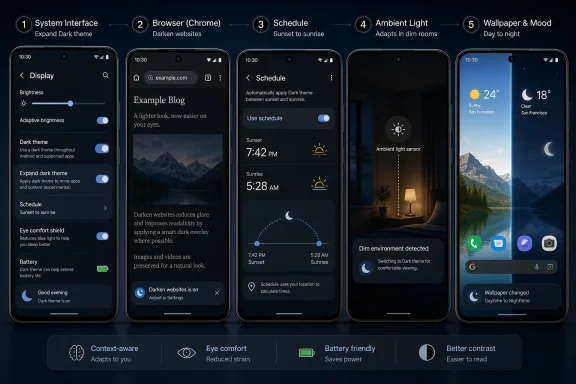
The first power-up in the guide is the most consequential: Android’s expanded dark theme option, which forces more apps to follow the system dark-mode preference even when those apps do not properly support it themselves. On recent Android builds, especially on Pixel devices and Android 17-era software, the setting represents a quiet escalation in the relationship between the OS and app developers. Android is no longer simply asking apps to honor the user’s theme preference. It is preparing to impose that preference when apps do not cooperate.That matters because dark mode has suffered from a classic platform-fragmentation problem. The system can look dark. Google’s own apps can look dark. A user can flip the global toggle and expect a consistent experience. Then one neglected banking app, shopping app, carrier app, or restaurant loyalty app detonates a white screen at midnight and ruins the whole premise.
For users, this feels like a bug in Android. For developers, it is often technical debt, brand stubbornness, or sheer neglect. For Google, it is a platform credibility problem. A global setting that works only until the next app ignores it is not really global.
Expanded dark theme is therefore less a flourish than a corrective. It says the platform’s preference hierarchy is changing. If the user has requested a darker environment, Android can increasingly treat that request as more important than an individual app’s indifference.
There are risks. Forced darkening can invert colors badly, flatten visual hierarchy, damage brand assets, or make text less readable when an app was never designed for it. That is why per-app exceptions and developer opt-outs matter. But the direction of travel is clear: Android is moving from developer-supported personalization toward system-enforced consistency.
For WindowsForum readers, the analogy is obvious. Windows has lived with this tension for decades. The OS can expose a system theme, but legacy apps, Win32 oddities, Electron shells, web wrappers, and vendor utilities all interpret that signal differently. Anyone who has opened a bright installer or control panel relic inside an otherwise dark Windows environment knows the same jarring effect. Android’s expanded dark theme is what happens when a platform vendor decides that polite hints are no longer enough.
The Browser Was Always the Missing Half of the Theme
The second dark-mode power-up targets the web, and it may be the one that changes daily use most visibly. Apps are only part of the phone experience. A huge share of reading, shopping, troubleshooting, searching, and doomscrolling still happens inside the browser, where the system dark theme often stops at the toolbar.Chrome on Android has long had experimental and semi-hidden ways to darken web content, including flags that surface a “darken websites” option inside theme settings. The Computerworld guide points users toward the browser-level switch that makes websites follow the phone’s dark state where possible. In practice, this can make the difference between a coherent nighttime setup and a system that merely wears a dark hat while blasting white pages underneath.
This is also where the problem gets philosophically messier. A website is not an app in the traditional sense. It is remote content, styled by its publisher, rendered by the browser, often stitched together with ads, embedded media, analytics scripts, cookie banners, and design systems of varying competence. When a browser forces dark styling onto a page, it is intervening in somebody else’s presentation layer.
Sometimes that intervention is wonderful. A text-heavy article becomes easier to read in bed. A search-results page stops feeling like a flashlight. A documentation site becomes less punishing during a late-night troubleshooting session. The web finally feels like part of the same device environment as everything else.
Sometimes it is ugly. Logos disappear. charts invert badly. Buttons lose contrast. Images remain bright while surrounding page elements darken. Forms can become confusing. The result can feel less like a native dark theme and more like a browser wearing night-vision goggles.
Still, the feature is worth caring about because it reveals a deeper truth: user agents are becoming user advocates again. The browser is not merely a neutral rendering window. It is increasingly a place where users expect privacy controls, reader modes, translation, password management, ad mitigation, accessibility features, and now appearance correction. Darkening the web fits into that broader shift.
Scheduling Is the Sensible Default Most People Never Configure
The third power-up is the oldest and probably the most underused: scheduling dark mode. Android has supported automatic dark-theme scheduling for years, including custom times and sunset-to-sunrise behavior on many devices. It is not flashy. It does not require a new app. It does not make for a dramatic product keynote. It is also the setting that probably fits the most people.The reason is simple. Many users do not actually prefer dark mode all the time. They prefer not being assaulted by a bright screen in a dark room. They prefer their phone to feel softer at night. They may like a bright interface outdoors, at work, or during the day, then want the whole device to calm down after dinner.
A schedule turns dark mode from a preference into a rhythm. It accepts that the phone is used in different contexts across a day and that the same screen style is not optimal for all of them. This is the point at which dark mode stops being tribal and starts being practical.
The sunset-to-sunrise option is particularly elegant because it maps to environmental reality without asking the user to micromanage clock times. A 9 p.m. dark-mode trigger may make sense in June and feel wrong in December. Sunset varies by season and location. The device already knows enough to adjust.
There is a lesson here for platform design more broadly. Users often say they want options, but what they really want is sane automation with escape hatches. A toggle is control. A schedule is control that respects human forgetfulness.
Ambient Light Is the Feature Android Should Have Built Itself
The fourth power-up, using a third-party app such as Adaptive Theme to trigger dark mode based on ambient light, is the most Android-ish recommendation in the collection. It is clever, slightly fiddly, and almost embarrassingly logical once you think about it. If the purpose of dark mode is often to reduce glare in dark environments, why should the trigger be the clock rather than the light sensor?Phones already adjust brightness based on ambient light. They already know whether you are in a bright room, a dim bedroom, a car at night, or a windowless conference room. The leap from adaptive brightness to adaptive theme is conceptually tiny. Yet in stock Android, the system generally treats brightness and theme as separate decisions.
That separation made sense when dark mode was framed as an aesthetic preference. It makes less sense when dark mode is treated as a comfort and accessibility feature. A user sitting in a dark room at 2 p.m. may benefit from a darker interface. A user standing outside at 9 p.m. may not. The clock is a crude proxy for the thing the phone can already measure.
Third-party automation fills the gap, but it also shows the limits of Android’s built-in intelligence. Users who want ambient-light-aware dark mode must trust another app, grant permissions, and complete a setup process that many ordinary users will never attempt. Enthusiasts will tolerate that. IT departments may not. Mainstream users may never know it exists.
This is exactly the sort of feature that should eventually become a first-party setting. Not because everyone would use it, but because the underlying principle is sound. The phone should be able to say: when the surrounding environment crosses a user-defined dimness threshold, shift the interface into a less glaring mode. That is not a gimmick. That is basic environmental adaptation.
Wallpaper Is the Forgotten Blast Radius of Theme Changes
The fifth power-up seems superficial until you use a phone at night with a bright wallpaper. Android’s system dark theme can dim menus, notifications, settings pages, supported apps, and browser content, but the home screen background may remain a full-brightness photograph, illustration, or color field. That breaks the illusion instantly.Wallpaper is not chrome in the decorative sense. It is the visual base layer users return to constantly. It sits behind icons, widgets, folders, search bars, and glanceable information. If the rest of the interface moves into a dark state while the wallpaper remains visually loud, the phone still feels bright.
The suggested fix, a wallpaper scheduler that swaps backgrounds based on light or dark mode, is another example of Android’s modular strength. Users can create a paired visual identity: a brighter wallpaper during the day, a quieter one at night. It is a small change, but it makes the whole system feel more intentional.
This is also where Google’s Material You ambitions become relevant. Android has spent years extracting color palettes from wallpaper and applying them across the interface. That makes wallpaper more than a backdrop; it is a design input. If the wallpaper drives system color, then wallpaper should probably participate in theme state too.
There is an enterprise angle here as well. Managed devices often use corporate wallpapers, lock-screen branding, or standardized home-screen layouts. If dark mode is being encouraged for accessibility or battery reasons, administrators should remember that a bright mandated wallpaper can undercut the entire effort. Design consistency is not only a consumer nicety.
The Battery Argument Is Real, but It Is Not the Whole Story
Dark mode is often justified with battery savings, especially on OLED screens where black pixels can consume less power than illuminated ones. That argument is broadly true but frequently overstated. The actual benefit depends on display technology, brightness level, app design, content, and whether the dark theme uses true black or dark gray.On modern OLED phones, a dark interface can help, particularly at higher brightness levels and in apps with large static backgrounds. But dark mode is not a magic battery extender. Streaming video, cellular signal strength, gaming, navigation, background sync, and camera use can dwarf the savings from theme color. Users expecting dark mode to rescue a dying battery may be disappointed.
The better argument is comfort and consistency. A phone that automatically becomes less glaring in dark environments is easier to live with. A browser that stops flashing white pages at night reduces friction. Apps that honor system theme make the device feel coherent. Wallpaper that changes with the theme completes the effect.
Battery savings are a useful side benefit. They are not the soul of the feature. The soul of the feature is that screens should adapt to humans rather than forcing humans to adapt to screens.
This distinction matters because it affects how vendors should talk about dark mode. If dark mode is sold primarily as a power-saving hack, it becomes vulnerable to benchmarks and caveats. If it is framed as a usability layer, the value is easier to understand. People know what it feels like to open a white app in a dark room. They do not need a lab chart to validate the annoyance.
Forced Darkness Has an Accessibility Trap
There is a temptation among dark-mode enthusiasts to assume darker is always easier on the eyes. That is not universally true. Some users read better with dark text on a light background. Some struggle with halation, contrast issues, astigmatism, or poorly chosen gray-on-black palettes. Others prefer dark mode for menus but not for long-form reading.This is why Android’s march toward expanded dark theme must be handled carefully. Forcing apps into compliance can improve consistency, but it can also create new readability failures. A native dark theme designed by an app developer is usually better than an algorithmic conversion applied after the fact. Usually is not always.
The same applies to forced website darkening. A browser can make a page less glaring, but it cannot always understand the semantic intent of every color, image, icon, or chart. Inverting or recoloring content may help one user while making the page less usable for another.
The responsible position is not anti-dark-mode. It is anti-absolutism. The best implementations give users control at multiple levels: system-wide defaults, schedules, per-app exceptions, browser toggles, accessibility settings, and easy reversal. Dark mode should be powerful because it is flexible, not because it steamrolls everything.
This is where Android’s complexity is both a burden and an advantage. The settings can be scattered, the naming can vary by manufacturer, and Chrome flags are not exactly consumer-friendly. But the platform’s openness allows users to build combinations that would be impossible on a more rigid system.
The IT Lesson Is That Consumer Comfort Features Become Support Issues
At first glance, a dark-mode guide might seem like pure consumer advice. For WindowsForum’s audience, it is more than that. Phones are work devices. Android handsets connect to Microsoft 365, Teams, Outlook, Intune-managed apps, VPNs, remote desktops, ticketing systems, admin portals, and identity workflows. If users interact with those tools for hours, screen ergonomics becomes a productivity variable.Dark mode can reduce complaints in some contexts, especially for shift workers, field technicians, healthcare environments, transportation, security operations, and anyone using devices at night. But inconsistent theming can also create support confusion. A forced dark app may render a barcode, document preview, dashboard chart, or approval screen incorrectly. A darkened website may obscure a button a helpdesk script expects the user to tap.
Administrators should not necessarily block these features. They should understand them. A user reporting that an app “looks wrong” may not be seeing the app’s native interface at all. They may be seeing Android’s expanded dark theme or Chrome’s forced web darkening. That distinction matters when troubleshooting.
Documentation should account for it. If an organization supports Android devices, internal guides should mention dark theme, browser darkening, and accessibility appearance settings where relevant. Screenshots captured in light mode may not match a user’s device. The mismatch can slow support even when nothing is technically broken.
There is also a policy question. If a business relies on line-of-business web apps that render poorly under forced dark mode, administrators may need to test those apps and issue guidance. The same goes for Android apps that were never designed for theme enforcement. User comfort is good; broken workflows are not.
The Hidden Settings Problem Is Still Android’s Oldest Weakness
The Computerworld guide is useful partly because so much of this power is poorly surfaced. Android’s dark-mode schedule lives in settings many users will never explore. Expanded dark theme may appear only on certain versions or devices. Chrome’s website darkening can require flags or buried appearance settings. Ambient-light automation requires a third-party app. Wallpaper switching requires another specialized utility.This is classic Android. The capability exists, but the path to it resembles a scavenger hunt. Enthusiasts enjoy that. Normal users do not. The platform’s long tail of manufacturer skins, Android versions, beta features, Pixel-first rollouts, and app-specific quirks makes the problem worse.
Google has made progress by making dark theme a standard quick setting and integrating it into the system display menu. But the more advanced story remains fragmented. There is no single “screen comfort” control center that brings together dark mode, night light, adaptive brightness, extra dim, bedtime mode, wallpaper behavior, and browser content handling. There should be.
Windows has a similar scattering problem, with dark theme, night light, HDR, color filters, contrast themes, app modes, browser themes, and vendor GPU/display utilities living in different corners. The broader industry pattern is obvious: display comfort has become important faster than operating systems have organized their controls around it.
A smarter Android would treat these settings as related. It would ask whether the user wants the phone to adapt to time, ambient light, bedtime routines, battery conditions, or manual toggles. It would offer per-app and per-site exceptions in plain language. It would make dark mode less of a toggle and more of a profile.
The Five Tweaks Point to One Bigger Platform Shift
The five recommendations in the Computerworld piece look like tips, but together they sketch the next phase of mobile interface design. The operating system is becoming more assertive about visual coherence. The browser is becoming more willing to modify the web for user comfort. Automation is replacing manual toggles. Third-party apps are filling gaps in environmental awareness. Wallpaper is being treated as part of the system state rather than decorative residue.That shift aligns with a broader trend across consumer and enterprise software. Users expect devices to adapt without constant supervision. They expect focus modes, sleep modes, driving modes, battery modes, and notification rules. Dark mode belongs in that family. It is not merely a color preference; it is a behavioral mode.
The name undersells it. “Dark mode” sounds like a paint job. What users increasingly want is context mode: a screen that knows when it should be bright, dim, colorful, muted, attention-grabbing, or quiet. Dark mode is the most visible piece of that puzzle because color is immediately felt.
Android is well positioned for this because it has the sensors, the automation culture, and the permission model to experiment. It is also poorly positioned because too many features depend on hidden settings, fragmented rollouts, and third-party glue. The power is there. The coherence is still catching up.
This Power-Pack Is Really a Blueprint for a Less Oblivious Phone
The practical message is not that every Android user should turn on every dark-mode enhancement immediately. The practical message is that each layer solves a different break in the chain. A complete setup requires the OS, apps, browser, schedule, environment, and wallpaper to stop contradicting one another.- Android’s expanded dark theme is the most important step for users frustrated by apps that ignore the system-wide dark-mode setting.
- Chrome’s darkened website option matters because the browser is where many bright-screen surprises still happen.
- Scheduled dark mode is the best low-effort setup for users who want a calmer phone at night without committing to darkness all day.
- Ambient-light-based switching is the most logical automation model, even if it still depends on third-party tooling for many users.
- Wallpaper switching is not cosmetic fluff, because a bright home screen can defeat the comfort gains of an otherwise dark interface.
- Forced darkening should be treated as a convenience with exceptions, not as a guarantee that every app or website will remain perfectly readable.
References
- Primary source: Computerworld
Published: 2026-06-24T09:49:17.280781
Loading…
www.computerworld.com - Official source: 9to5google.com
Loading…
9to5google.com - Related coverage: techdows.com
Loading…
techdows.com - Related coverage: androidauthority.com
Loading…
www.androidauthority.com - Related coverage: techfoogle.com
Loading…
www.techfoogle.com - Related coverage: howtogeek.com
Loading…
www.howtogeek.com
- Official source: support.google.com
Loading…
support.google.com - Related coverage: androidheadlines.com
Loading…
www.androidheadlines.com - Related coverage: dataconomy.com
Loading…
dataconomy.com - Related coverage: androidsage.com
Loading…
www.androidsage.com - Related coverage: droidcon.com
Loading…
www.droidcon.com - Related coverage: androidcentral.com
Loading…
www.androidcentral.com - Related coverage: content-static.olybet.dev
Loading…
content-static.olybet.dev