
Paul Thurrott’s June 23, 2026 “cellular-07” post is an attachment page for a Windows 11 Field Guide image connected to Windows 11’s Internet connectivity and cellular networking settings. That sounds minor, almost comically so: a single screenshot, a navigation stub, a breadcrumb in a much larger book project. But the timing is useful because Windows cellular networking has quietly become one of the more revealing places to see Microsoft’s modern PC strategy at work. The company wants Windows laptops to behave more like always-connected devices, yet the experience still carries the baggage of PC hardware variation, carrier provisioning, driver fragility, and enterprise policy.
A screenshot attachment page is not a product launch. It is not a Windows Insider build announcement, a Surface press release, or a carrier partnership. But it points to a part of Windows 11 that has become increasingly important as Microsoft, Qualcomm, Intel, OEMs, and mobile operators all try to make the Windows laptop less dependent on borrowed phone connectivity.
For years, cellular on Windows was a niche feature: useful for executives, field workers, journalists, public-sector deployments, and the occasional Surface buyer who paid extra for LTE. Everyone else tethered to a phone, fought with hotel Wi-Fi, or waited until they were back at a desk. That was tolerable when the Windows laptop was mainly an office machine with occasional travel duties.
That world is gone. Hybrid work made connectivity a baseline expectation, not a perk. Copilot-era Windows makes the network feel even more central, because the operating system increasingly assumes cloud services, identity, sync, telemetry, AI features, account recovery, device management, and app distribution are always within reach.
Cellular is Microsoft’s attempt to close the gap between the PC and the phone without turning Windows into a phone OS. The problem is that cellular is not just another toggle under Network & Internet. It is a chain of dependencies, and Windows is only one link.
The difficulty is that Windows has to serve two masters. It has to behave simply enough for a consumer who expects cellular to work like it does on an iPad. It also has to expose enough control for IT departments that need to manage roaming, data usage, VPN behavior, APNs, eSIM profiles, provisioning packages, MDM policy, and compliance boundaries.
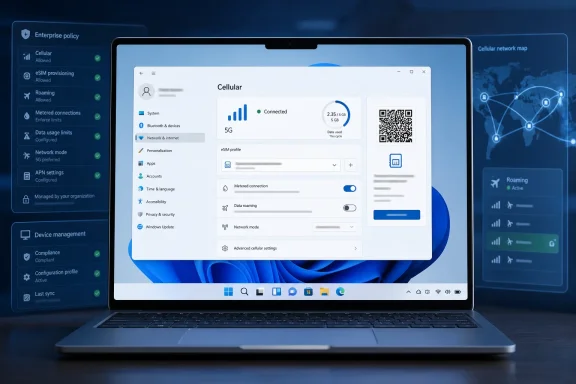
That tension shows up in the Settings app. Windows 11’s cellular pages try to make the first-run experience approachable: choose a SIM or eSIM, connect automatically, manage profiles, control roaming, and decide whether Windows should use cellular when Wi-Fi is poor. Behind those plain-English controls sits a thicket of registry-backed preferences, mobile broadband interfaces, carrier-specific behavior, and policy surfaces.
This is why cellular in Windows can look deceptively polished in a guide screenshot and still feel brittle in the field. The user sees a toggle. The admin sees a support queue waiting to happen.
Microsoft has clearly moved in that direction. Windows 11 supports eSIM management in Settings, and Microsoft’s enterprise documentation increasingly favors eSIM download server workflows for managed Windows 11 devices over older activation-code approaches. That matters because it turns cellular provisioning from a one-device-at-a-time ritual into something closer to cloud-managed configuration.
But eSIM also changes who gets blamed when something fails. With a physical SIM, the troubleshooting tree was crude but visible: check the card, check the slot, check the carrier, check the driver. With eSIM, failure may involve an activation code, a carrier download server, an EID, a profile state, a policy payload, a Windows service, a modem firmware issue, or a management platform setting.
The best version of eSIM feels magical. The worst version feels like identity federation for your modem.
That is not a reason to reject it. It is a reason to treat eSIM as infrastructure, not convenience. For consumers, it means the carrier purchase flow matters as much as Windows Settings. For enterprises, it means cellular onboarding has to be tested with the same seriousness as Autopilot, VPN, certificates, and conditional access.
The Cellular page has to answer practical questions quickly. Which SIM is being used for data? Is the connection metered? Will the PC roam? Should Windows keep the device connected automatically? Are eSIM profiles available? Is the current network allowed to carry background traffic?
These are not aesthetic preferences. They decide whether a device racks up roaming charges, whether Windows Update behaves conservatively, whether Store apps defer downloads, whether a VPN-dependent workflow survives a commute, and whether a user can get online when airport Wi-Fi collapses under conference traffic.
That makes the Settings app a trust surface. If the wording is vague, users make expensive mistakes. If the defaults are too aggressive, Windows burns through data. If the defaults are too cautious, the supposedly always-connected laptop becomes another offline slab at the worst possible moment.
Microsoft’s challenge is not adding more toggles. It is making the existing ones legible enough that a non-specialist can understand the consequence before changing them.
A metered connection tells Windows and apps to behave with restraint. Updates may be deferred, background transfers may be reduced, cloud sync may become more selective, and large downloads may wait. This is one of the few places where Windows acknowledges that bandwidth is not an abstraction; it is a bill, a quota, a throttling threshold, or a shared field connection.
The problem is that metered behavior is both essential and confusing. Users often do not know which apps respect it. Admins may not know which update paths still move data under certain policies. Developers may treat it inconsistently. And Microsoft has to balance security against cost: defer too much and devices become vulnerable; download too much and users lose trust.
Cellular exposes the contradiction at the heart of modern Windows servicing. Microsoft wants the OS patched, synced, and cloud-aware. Users on limited data want the machine to keep its hands in its pockets unless explicitly told otherwise.
There is no perfect default. There is only a defensible one, clearly explained.
For organizations, the calculus is different. Cellular can be the difference between a managed device that is reachable and one that disappears as soon as the user leaves trusted Wi-Fi. It can support field service, healthcare, logistics, public safety, construction, travel-heavy sales teams, and executives who expect the laptop to be online without improvisation.
It also gives IT more control. A corporate cellular plan can be governed, audited, and provisioned. Devices can be preconfigured. Roaming can be restricted. Profiles can be deployed. Support can standardize on known modem models and carrier combinations.
The catch is that the Windows hardware ecosystem is not as vertically integrated as Apple’s. A Surface with a tested modem, firmware bundle, and Microsoft support lifecycle is one thing. A mixed fleet of laptops with different WWAN modules, carrier firmware, drivers, BIOS settings, and regional SKUs is another.
That diversity is Windows’ strength in procurement and its weakness in support. Cellular magnifies both.
Firmware updates for cellular-enabled Surface devices have not merely delivered generic stability improvements. They have addressed real-world issues such as cellular connectivity problems in VPN scenarios and cases where SIM/eSIM selection could be disturbed. Those are not exotic edge cases. VPNs are normal in business environments, and SIM selection is the foundation of the feature.
This is the part of the story that should interest IT pros most. Cellular failures are rarely glamorous, but they are operationally expensive. A laptop that cannot connect over mobile broadband during a travel day does not merely lose a feature; it may lose the user’s trust in the entire managed device.
Microsoft can improve Windows all it wants, but the experience still depends on modem firmware, carrier certification, OEM update discipline, and the messy real-world interaction between VPN clients and network adapters. The Surface line can compress that complexity. The broader PC market cannot eliminate it.
This is the sort of feature that rarely gets mainstream attention, but it is exactly the kind of polish cellular needs. Users should not have to understand the architecture of eSIM provisioning to activate a plan. They should be able to scan a QR code, click a carrier-provided link, confirm what is happening, and land in the right Windows Settings flow.
The significance is bigger than convenience. It lets mobile operators integrate Windows PCs into web-based purchase flows more naturally. It also gives OEMs and carriers a cleaner path to explain activation without writing support documents that look like they were assembled from engineering notes.
That said, QR and link activation do not solve the business deployment problem by themselves. Enterprises still need bulk provisioning, policy support, reporting, and repeatability. Consumer-grade activation is a better front door, not a complete building.
A cellular-enabled PC is an endpoint with another network path, another cost center, another identity surface, and another failure mode. It should be planned accordingly. That means choosing hardware deliberately, validating carrier support before rollout, documenting eSIM activation procedures, testing VPN behavior, and deciding how metered policies interact with update rings and app deployment.
It also means being honest about support boundaries. If IT buys a laptop SKU with a modem but leaves activation to the user, the help desk will still inherit the confusion. If procurement selects devices across multiple modem vendors, IT should expect inconsistent behavior. If security requires an always-on VPN, cellular testing is not optional.
Windows 11 gives administrators more management hooks than the consumer UI suggests. But management hooks are not outcomes. The outcome depends on whether the organization treats cellular as production infrastructure or a nice-to-have checkbox on the spec sheet.
That includes whether a plan supports laptops, whether eSIM activation is smooth, whether the carrier’s systems recognize the device identifiers, whether roaming behaves predictably, whether APN settings are automatic, and whether support staff know what a Windows PC eSIM is. A user may blame Windows when the actual failure is carrier-side provisioning. A carrier may blame Windows when the device firmware is stale. The OEM may point to the plan.
This is familiar to anyone who lived through the early smartphone era, but PC buyers are less conditioned to accept carrier entanglement. They expect a laptop to be theirs in a way a phone often is not. Cellular complicates that expectation.
The market will not mature until carriers treat Windows PCs as first-class connected devices rather than odd tablets with keyboards. Microsoft can help by making activation standards easier to support and by pushing OEMs toward more consistent experiences. But the last mile belongs to the operator, and the operator’s incentives are not always aligned with clean PC UX.
Always-connected devices create more opportunities for background communication. They may expose device identifiers during provisioning. They may be subject to carrier metadata collection. They may remain reachable in scenarios where a Wi-Fi-only laptop would simply be offline. None of that is inherently sinister, but it changes the privacy posture of the machine.
For enterprises, the security upside is often decisive. A managed laptop that can receive policy, report compliance, and obtain urgent updates away from Wi-Fi is easier to defend. For consumers, the equation is more personal. Convenience, cost, privacy, and control sit closer together.
This is where Windows must avoid hiding too much. Simplification is good; opacity is not. Users should be able to understand which SIM is active, whether roaming is enabled, whether a network is metered, and how much data has been used. Admins should be able to enforce policy without turning troubleshooting into archaeology.
The best cellular experience is not the one with the fewest visible controls. It is the one where the visible controls map cleanly to reality.
Windows does not get that simplicity for free. It has more hardware combinations, more enterprise requirements, more legacy networking behavior, more third-party security tools, and a broader range of price points. A $600 business laptop with an optional WWAN module and a $1,800 Surface Pro 5G are both Windows PCs, but they are not the same cellular product.
That does not mean Microsoft cannot compete. It means Windows cellular should be judged on Windows terms. The goal is not to mimic an iPad perfectly. The goal is to make a PC that preserves Windows’ flexibility while removing the avoidable pain from activation, switching, roaming, metering, and management.
The encouraging sign is that Microsoft is working on exactly those layers. The cautionary sign is that the experience remains only as good as the weakest participant in the chain.
The cellular story is one of those changes. It is not glamorous, but it touches the future Microsoft keeps describing: portable PCs that are cloud-connected, AI-assisted, policy-managed, secure, and ready wherever the user opens the lid. That future needs better batteries and faster NPUs, but it also needs boring, reliable networking.
The Windows community should watch cellular not because every enthusiast needs a 5G laptop, but because it reveals how modern Windows is being rebuilt around assumptions of continuous connectivity. When that works, the PC feels less stranded. When it fails, the whole cloud-first strategy looks fragile.
 The Screenshot Is Small, but the Bet Behind It Is Not
A screenshot attachment page is not a product launch. It is not a Windows Insider build announcement, a Surface press release, or a carrier partnership. But it points to a part of Windows 11 that has become increasingly important as Microsoft, Qualcomm, Intel, OEMs, and mobile operators all try to make the Windows laptop less dependent on borrowed phone connectivity.For years, cellular on Windows was a niche feature: useful for executives, field workers, journalists, public-sector deployments, and the occasional Surface buyer who paid extra for LTE. Everyone else tethered to a phone, fought with hotel Wi-Fi, or waited until they were back at a desk. That was tolerable when the Windows laptop was mainly an office machine with occasional travel duties.
That world is gone. Hybrid work made connectivity a baseline expectation, not a perk. Copilot-era Windows makes the network feel even more central, because the operating system increasingly assumes cloud services, identity, sync, telemetry, AI features, account recovery, device management, and app distribution are always within reach.
Cellular is Microsoft’s attempt to close the gap between the PC and the phone without turning Windows into a phone OS. The problem is that cellular is not just another toggle under Network & Internet. It is a chain of dependencies, and Windows is only one link.
Windows Wants to Be Always Connected Without Admitting the PC Is Still a PC
The phrase Always Connected PC has been around long enough to feel like old marketing, but the underlying ambition has not gone away. Microsoft still wants Windows machines that wake instantly, stay current in the background, maintain cloud identity, and connect from almost anywhere. That vision becomes much more credible when a laptop has its own LTE or 5G connection instead of relying on a phone hotspot.The difficulty is that Windows has to serve two masters. It has to behave simply enough for a consumer who expects cellular to work like it does on an iPad. It also has to expose enough control for IT departments that need to manage roaming, data usage, VPN behavior, APNs, eSIM profiles, provisioning packages, MDM policy, and compliance boundaries.
That tension shows up in the Settings app. Windows 11’s cellular pages try to make the first-run experience approachable: choose a SIM or eSIM, connect automatically, manage profiles, control roaming, and decide whether Windows should use cellular when Wi-Fi is poor. Behind those plain-English controls sits a thicket of registry-backed preferences, mobile broadband interfaces, carrier-specific behavior, and policy surfaces.
This is why cellular in Windows can look deceptively polished in a guide screenshot and still feel brittle in the field. The user sees a toggle. The admin sees a support queue waiting to happen.
eSIM Is the Right Answer, but It Moved the Complexity Upstairs
The most important shift is from physical SIM cards to eSIM profiles. On paper, eSIM is exactly what Windows laptops need. It removes the plastic-card logistics, allows profiles to be downloaded, supports multiple plans, and gives enterprises a cleaner path for provisioning fleets without mailing SIMs or cracking open device trays.Microsoft has clearly moved in that direction. Windows 11 supports eSIM management in Settings, and Microsoft’s enterprise documentation increasingly favors eSIM download server workflows for managed Windows 11 devices over older activation-code approaches. That matters because it turns cellular provisioning from a one-device-at-a-time ritual into something closer to cloud-managed configuration.
But eSIM also changes who gets blamed when something fails. With a physical SIM, the troubleshooting tree was crude but visible: check the card, check the slot, check the carrier, check the driver. With eSIM, failure may involve an activation code, a carrier download server, an EID, a profile state, a policy payload, a Windows service, a modem firmware issue, or a management platform setting.
The best version of eSIM feels magical. The worst version feels like identity federation for your modem.
That is not a reason to reject it. It is a reason to treat eSIM as infrastructure, not convenience. For consumers, it means the carrier purchase flow matters as much as Windows Settings. For enterprises, it means cellular onboarding has to be tested with the same seriousness as Autopilot, VPN, certificates, and conditional access.
The Settings App Is Becoming the Control Plane for Real Hardware
Windows veterans sometimes dismiss Settings pages as cosmetic wrappers over deeper system plumbing. That critique is not entirely wrong, but it misses how important Settings has become as Microsoft retires more Control Panel-era assumptions. For cellular, Settings is not merely a prettier front end. It is the place where Windows exposes the consumer and enterprise contract for mobile broadband.The Cellular page has to answer practical questions quickly. Which SIM is being used for data? Is the connection metered? Will the PC roam? Should Windows keep the device connected automatically? Are eSIM profiles available? Is the current network allowed to carry background traffic?
These are not aesthetic preferences. They decide whether a device racks up roaming charges, whether Windows Update behaves conservatively, whether Store apps defer downloads, whether a VPN-dependent workflow survives a commute, and whether a user can get online when airport Wi-Fi collapses under conference traffic.
That makes the Settings app a trust surface. If the wording is vague, users make expensive mistakes. If the defaults are too aggressive, Windows burns through data. If the defaults are too cautious, the supposedly always-connected laptop becomes another offline slab at the worst possible moment.
Microsoft’s challenge is not adding more toggles. It is making the existing ones legible enough that a non-specialist can understand the consequence before changing them.
Metered Networking Is the Old Windows Compromise That Still Matters
The most underappreciated cellular feature in Windows is not eSIM. It is the metered connection model. Windows has spent years learning, sometimes painfully, that not every network should be treated like unlimited office Ethernet. Cellular makes that lesson unavoidable.A metered connection tells Windows and apps to behave with restraint. Updates may be deferred, background transfers may be reduced, cloud sync may become more selective, and large downloads may wait. This is one of the few places where Windows acknowledges that bandwidth is not an abstraction; it is a bill, a quota, a throttling threshold, or a shared field connection.
The problem is that metered behavior is both essential and confusing. Users often do not know which apps respect it. Admins may not know which update paths still move data under certain policies. Developers may treat it inconsistently. And Microsoft has to balance security against cost: defer too much and devices become vulnerable; download too much and users lose trust.
Cellular exposes the contradiction at the heart of modern Windows servicing. Microsoft wants the OS patched, synced, and cloud-aware. Users on limited data want the machine to keep its hands in its pockets unless explicitly told otherwise.
There is no perfect default. There is only a defensible one, clearly explained.
The Enterprise Case Is Stronger Than the Consumer Pitch
For consumers, built-in cellular is often a luxury. Many phone plans include hotspot data, and the phone is already activated, charged, familiar, and nearby. A 5G laptop can be wonderful, but it must compete with the fact that tethering is good enough for many people.For organizations, the calculus is different. Cellular can be the difference between a managed device that is reachable and one that disappears as soon as the user leaves trusted Wi-Fi. It can support field service, healthcare, logistics, public safety, construction, travel-heavy sales teams, and executives who expect the laptop to be online without improvisation.
It also gives IT more control. A corporate cellular plan can be governed, audited, and provisioned. Devices can be preconfigured. Roaming can be restricted. Profiles can be deployed. Support can standardize on known modem models and carrier combinations.
The catch is that the Windows hardware ecosystem is not as vertically integrated as Apple’s. A Surface with a tested modem, firmware bundle, and Microsoft support lifecycle is one thing. A mixed fleet of laptops with different WWAN modules, carrier firmware, drivers, BIOS settings, and regional SKUs is another.
That diversity is Windows’ strength in procurement and its weakness in support. Cellular magnifies both.
Surface Shows the Promise and the Fragility
Surface has long been Microsoft’s proof-of-concept line for premium Windows mobility. The LTE and 5G Surface models demonstrate what Windows cellular can feel like when hardware and software are designed together. They also show why this feature is hard.Firmware updates for cellular-enabled Surface devices have not merely delivered generic stability improvements. They have addressed real-world issues such as cellular connectivity problems in VPN scenarios and cases where SIM/eSIM selection could be disturbed. Those are not exotic edge cases. VPNs are normal in business environments, and SIM selection is the foundation of the feature.
This is the part of the story that should interest IT pros most. Cellular failures are rarely glamorous, but they are operationally expensive. A laptop that cannot connect over mobile broadband during a travel day does not merely lose a feature; it may lose the user’s trust in the entire managed device.
Microsoft can improve Windows all it wants, but the experience still depends on modem firmware, carrier certification, OEM update discipline, and the messy real-world interaction between VPN clients and network adapters. The Surface line can compress that complexity. The broader PC market cannot eliminate it.
Windows 11 24H2 Made eSIM Activation Feel More Like a Phone
One of the more practical improvements in recent Windows releases is support for activation links using thelpa: URI scheme. In plain English, Windows can recognize an eSIM activation link or QR-code flow and hand it off to the eSIM activation experience in Settings. That matters because it reduces the gap between buying a data plan and making the PC use it.This is the sort of feature that rarely gets mainstream attention, but it is exactly the kind of polish cellular needs. Users should not have to understand the architecture of eSIM provisioning to activate a plan. They should be able to scan a QR code, click a carrier-provided link, confirm what is happening, and land in the right Windows Settings flow.
The significance is bigger than convenience. It lets mobile operators integrate Windows PCs into web-based purchase flows more naturally. It also gives OEMs and carriers a cleaner path to explain activation without writing support documents that look like they were assembled from engineering notes.
That said, QR and link activation do not solve the business deployment problem by themselves. Enterprises still need bulk provisioning, policy support, reporting, and repeatability. Consumer-grade activation is a better front door, not a complete building.
Admins Need to Treat Cellular as Part of Endpoint Management
The old mental model treated cellular as a user accessory. If the laptop had it, great. If it did not, tether. That model is increasingly inadequate for managed Windows 11 fleets.A cellular-enabled PC is an endpoint with another network path, another cost center, another identity surface, and another failure mode. It should be planned accordingly. That means choosing hardware deliberately, validating carrier support before rollout, documenting eSIM activation procedures, testing VPN behavior, and deciding how metered policies interact with update rings and app deployment.
It also means being honest about support boundaries. If IT buys a laptop SKU with a modem but leaves activation to the user, the help desk will still inherit the confusion. If procurement selects devices across multiple modem vendors, IT should expect inconsistent behavior. If security requires an always-on VPN, cellular testing is not optional.
Windows 11 gives administrators more management hooks than the consumer UI suggests. But management hooks are not outcomes. The outcome depends on whether the organization treats cellular as production infrastructure or a nice-to-have checkbox on the spec sheet.
The Carrier Is Now Part of the Windows Experience
Microsoft controls Windows. OEMs control the device. But the carrier controls a surprising amount of the user’s actual experience.That includes whether a plan supports laptops, whether eSIM activation is smooth, whether the carrier’s systems recognize the device identifiers, whether roaming behaves predictably, whether APN settings are automatic, and whether support staff know what a Windows PC eSIM is. A user may blame Windows when the actual failure is carrier-side provisioning. A carrier may blame Windows when the device firmware is stale. The OEM may point to the plan.
This is familiar to anyone who lived through the early smartphone era, but PC buyers are less conditioned to accept carrier entanglement. They expect a laptop to be theirs in a way a phone often is not. Cellular complicates that expectation.
The market will not mature until carriers treat Windows PCs as first-class connected devices rather than odd tablets with keyboards. Microsoft can help by making activation standards easier to support and by pushing OEMs toward more consistent experiences. But the last mile belongs to the operator, and the operator’s incentives are not always aligned with clean PC UX.
The Privacy and Security Trade-Off Is Not Theoretical
A cellular PC is easier to keep online, manage, locate, patch, and support. Those are advantages. They are also reasons security-minded users pay attention.Always-connected devices create more opportunities for background communication. They may expose device identifiers during provisioning. They may be subject to carrier metadata collection. They may remain reachable in scenarios where a Wi-Fi-only laptop would simply be offline. None of that is inherently sinister, but it changes the privacy posture of the machine.
For enterprises, the security upside is often decisive. A managed laptop that can receive policy, report compliance, and obtain urgent updates away from Wi-Fi is easier to defend. For consumers, the equation is more personal. Convenience, cost, privacy, and control sit closer together.
This is where Windows must avoid hiding too much. Simplification is good; opacity is not. Users should be able to understand which SIM is active, whether roaming is enabled, whether a network is metered, and how much data has been used. Admins should be able to enforce policy without turning troubleshooting into archaeology.
The best cellular experience is not the one with the fewest visible controls. It is the one where the visible controls map cleanly to reality.
The PC Industry Still Has to Earn the iPad Comparison
The obvious benchmark for Windows cellular is the iPad. Apple’s cellular tablets made mobile data feel ordinary: buy the right model, add a plan, and use it. There are exceptions and carrier annoyances, but the overall mental model is simple.Windows does not get that simplicity for free. It has more hardware combinations, more enterprise requirements, more legacy networking behavior, more third-party security tools, and a broader range of price points. A $600 business laptop with an optional WWAN module and a $1,800 Surface Pro 5G are both Windows PCs, but they are not the same cellular product.
That does not mean Microsoft cannot compete. It means Windows cellular should be judged on Windows terms. The goal is not to mimic an iPad perfectly. The goal is to make a PC that preserves Windows’ flexibility while removing the avoidable pain from activation, switching, roaming, metering, and management.
The encouraging sign is that Microsoft is working on exactly those layers. The cautionary sign is that the experience remains only as good as the weakest participant in the chain.
The Real Lesson Hidden in a Field Guide Attachment
A single Field Guide image is a reminder that Windows 11’s most important changes are not always announced on stage. Sometimes they are buried in Settings pages, support documents, provisioning flows, and small UX refinements that make a complicated subsystem less hostile.The cellular story is one of those changes. It is not glamorous, but it touches the future Microsoft keeps describing: portable PCs that are cloud-connected, AI-assisted, policy-managed, secure, and ready wherever the user opens the lid. That future needs better batteries and faster NPUs, but it also needs boring, reliable networking.
The Windows community should watch cellular not because every enthusiast needs a 5G laptop, but because it reveals how modern Windows is being rebuilt around assumptions of continuous connectivity. When that works, the PC feels less stranded. When it fails, the whole cloud-first strategy looks fragile.
The Few Things Windows Users Should Actually Remember
The cellular story can get buried under acronyms, but the practical lessons are straightforward. Windows 11 is better equipped for cellular and eSIM than earlier versions, yet the experience still depends heavily on hardware, carrier support, firmware, and management choices.- Built-in cellular is most valuable when the PC needs independent connectivity rather than occasional phone tethering.
- eSIM is the direction of travel for Windows 11, especially in managed deployments, but it requires carrier and provisioning readiness.
- Metered connection behavior remains essential because Windows can otherwise treat cellular data too much like ordinary broadband.
- IT departments should test cellular with VPN, roaming, update policies, and device management before deploying it broadly.
- Consumers should verify that the exact laptop model, carrier, and plan support Windows PC activation before paying extra for cellular hardware.
- Microsoft’s improvements matter, but OEM firmware and carrier systems still decide whether the experience feels seamless or brittle.
References
- Primary source: thurrott.com
Published: 2026-06-23T22:10:17.494266
Loading…
www.thurrott.com - Official source: support.microsoft.com
Cellular settings in Windows - Microsoft Support
Learn how to find cellular settings on your Windows PC and change them if you need to.support.microsoft.com - Official source: learn.microsoft.com
Configure cellular settings | Microsoft Learn
Learn how to provision cellular settings for devices with built-in modems or plug-in USB modem dongles.learn.microsoft.com - Related coverage: support.cleverit.tech
Loading…
support.cleverit.tech - Related coverage: windowscentral.com
Loading…
www.windowscentral.com - Related coverage: dmi.es
XPS 15 Touch 2-in-1 Notebook
Dell XPS 15 (Model 9575) touch 2-in-1 notebook computer, codename La Ferrari.www.dmi.es
- Related coverage: nfm.com
XPS 15 Touch 2-in-1 Notebook
Dell XPS 15 (Model 9575) touch 2-in-1 notebook computer, codename La Ferrari.www.nfm.com