
Microsoft 365 can deliver measurable productivity, security, automation, and AI gains, but organizations often fail to realize that value when licensing, governance, data protection, access controls, and user adoption are left to drift after deployment. The problem is not that Microsoft’s cloud suite lacks capability. It is that too many businesses treat a living operating environment as if it were a completed migration project. That mistake turns one of the most important platforms in modern work into a quiet source of waste, risk, and executive disappointment.
Microsoft 365 has become so ordinary inside business computing that its complexity is easy to underestimate. It is email, documents, chat, meetings, identity, device management, records retention, endpoint security, automation, analytics, and now AI. For many organizations, it is less a software subscription than the nervous system of the company.
That scale is precisely why adoption can mislead. A tenant can be live, users can be sending mail, Teams channels can be busy, SharePoint sites can be multiplying, and Power Automate flows can be running in the background. From a distance, this looks like transformation.
But operational value is not the same as platform activity. A company can be fully “on Microsoft 365” while still overpaying for licenses, underusing security controls, exposing data through unsanctioned AI tools, and assuming Microsoft is backing up business data in ways it is not. The gap between deployed and managed is where the promised return on investment leaks away.
The uncomfortable truth is that cloud suites do not stay aligned with a business by default. People change roles, contractors come and go, departments reorganize, new compliance obligations appear, and threat actors adapt faster than procurement cycles. A Microsoft 365 environment that is not continuously reviewed becomes a historical record of decisions made at go-live.
That makes sense for project accounting. It makes very little sense for platform stewardship.
Microsoft 365 is not a server refresh or a one-off software rollout. It is a continually changing set of services, policies, defaults, SKU entitlements, security recommendations, and administrative surfaces. Microsoft changes the platform. The business changes around it. Users invent their own workflows. Old assumptions expire.
Yet many organizations still run Microsoft 365 as if the state of the tenant on deployment day were an acceptable baseline forever. License assignments are inherited rather than questioned. Security settings remain close to defaults because nobody wants to break productivity. Data governance is postponed because collaboration feels more urgent. Backup is deferred because Exchange Online and SharePoint Online have a reputation for resilience.
That is how Microsoft 365 becomes both indispensable and neglected. It runs too well to attract attention until the cost report, audit finding, security incident, or eDiscovery request makes neglect visible.
A company may standardize on a higher tier because it simplifies deployment. That can be defensible during migration, especially when IT is trying to reduce friction. But a temporary simplification often becomes a permanent expense.
The mismatch usually looks mundane. Frontline users may receive licenses designed for knowledge workers. Users who only need email and basic collaboration may sit on enterprise plans that include capabilities they never touch. Former employees, dormant accounts, test accounts, shared mailboxes, or role-changed staff can continue consuming entitlements long after the business case has disappeared.
This is not merely a procurement problem. It is an identity and lifecycle problem. If HR, IT, finance, and security are not aligned around joiner-mover-leaver processes, licensing drift becomes inevitable. Every reorganization becomes a small billing error. Every acquisition becomes a SKU puzzle. Every “temporary” exception becomes tomorrow’s baseline.
The savings can be material because Microsoft 365 is priced per user and paid month after month. Cutting a few dollars per user does not sound strategic until it is multiplied across hundreds or thousands of employees for three years. For smaller businesses, the same discipline can free budget for security controls, backup, training, or device management that would produce more value than unused premium features.
The hard part is not discovering that license optimization matters. The hard part is making it routine. A quarterly license review is unglamorous, but so is paying for shelfware in a cloud product that was supposed to make IT more efficient.
Microsoft Secure Score is useful because it turns configuration into a visible metric. It gives administrators a continuously updated view of recommended actions and the environment’s alignment with Microsoft’s security guidance. For executives, it can translate invisible configuration debt into a number.
But a number is not a strategy. Secure Score can help reveal missing multifactor authentication coverage, risky legacy authentication patterns, weak administrative separation, insufficient audit logging, or unmanaged devices. It cannot decide the organization’s risk appetite, clean up years of access sprawl, or force business units to accept friction where security requires it.
The recurring failure is assuming that cloud defaults are the vendor’s final answer. Defaults are designed to get tenants running, not to satisfy every organization’s regulatory, security, and operational needs. What is acceptable for a small business may be reckless for a healthcare provider, law firm, financial services company, school district, or government contractor.
Improving the score quickly is often possible because many environments leave basic controls unused. Multifactor authentication, conditional access, privileged account hygiene, sign-in risk policies, device compliance, external sharing restrictions, and mailbox protections can all move the needle. But the real win is not the score itself. It is the governance habit behind it.
A mature organization should be able to explain why a control is enabled, why an exception exists, who owns the exception, and when it expires. Without that discipline, Secure Score becomes another dashboard people admire without changing behavior.
That is the new grey AI problem. It is not always malicious. Most of the time, it is pragmatic. Workers are under pressure, AI tools are useful, and the sanctioned corporate process is either unclear or too slow.
The risk is that data leaves the governance boundary. Sensitive commercial information, personal data, source material, internal deliberations, client records, credentials, or confidential strategy can end up in services that were never approved by security, legal, privacy, or procurement. Even when a tool’s consumer version is not training directly on user inputs, the organization may still lack contractual protections, audit visibility, retention controls, data residency assurances, and administrative enforcement.
This is where Microsoft’s AI pitch intersects with the less glamorous work of Microsoft 365 management. Microsoft 365 Copilot is attractive to enterprises precisely because it is meant to operate inside Microsoft’s commercial data protection and permission model. But Copilot does not magically fix bad information architecture.
If SharePoint permissions are chaotic, Copilot can make that chaos easier to discover. If confidential files are overshared, AI can surface them faster. If stale Teams, abandoned sites, and poorly labeled documents have accumulated for years, an AI assistant becomes a mirror held up to the organization’s data hygiene.
The irony is that many companies want AI value before they have done the platform housekeeping that makes AI safe. They want summarization, drafting, search, and automation, but they have not cleaned up access controls, sensitivity labels, retention policies, external sharing, or identity governance. That is not an AI strategy. It is a data exposure strategy with better demos.
The caveat is buried in the operating assumptions. A well-governed tenant is not incidental to the ROI story. It is the substrate on which the ROI depends.
Copilot’s usefulness depends on clean identity, accurate permissions, current content, sensible information architecture, and users who understand where the tool helps and where human judgment remains essential. Without those foundations, AI adoption can produce a strange form of productivity theater: more generated text, more summarized meetings, more automated activity, but not necessarily better decisions or lower risk.
There is also a measurement problem. Time saved is not automatically value captured. If an employee saves 30 minutes drafting a document but spends the time in more meetings, the organization has not necessarily gained capacity. If Copilot accelerates access to outdated or overshared information, the speed is not an unqualified benefit.
This does not make Microsoft 365 Copilot a bad investment. It makes it a dependent investment. The business case for AI is strongest when it rides on top of an environment that already has strong governance, documented ownership, and a realistic view of user workflows.
The companies most likely to see value are not the ones that merely buy licenses first. They are the ones that know which processes they want to improve, which data should be available, which data should be restricted, and how they will measure whether AI changes the work rather than decorating it.
But service resilience is not the same thing as customer-controlled backup.
The distinction matters after accidental deletion, malicious insider activity, ransomware, compromised administrator accounts, misconfigured retention policies, or legal discovery problems. Microsoft is responsible for running the service. The customer remains responsible for many of the decisions that determine whether data can be restored in the required state, within the required time, and under the required compliance conditions.
Native recycle bins and retention tools are useful, but they are not a universal substitute for backup architecture. Retention is often about preserving or deleting data according to policy. Backup is about recoverability from a known point in time. The two overlap, but they are not identical.
This is where many organizations discover that their recovery plan is more aspirational than operational. They may have no tested process for restoring a large SharePoint site, recovering Teams-related data, rolling back mass deletion, or responding to a compromised account that tampered with content before anyone noticed. They may also discover that the person who knew how the tenant was configured left the company 18 months ago.
A credible Microsoft 365 data protection strategy should answer practical questions before an incident. What data is protected? How often is it captured? How quickly can it be restored? Who can initiate recovery? Are backups isolated from compromised credentials? Has restoration been tested? Which workloads are excluded? What happens if retention policies conflict with recovery needs?
The point is not that every organization needs the same third-party tool or the same retention schedule. The point is that “Microsoft runs the cloud” is not a recovery plan.
A weak provider can reproduce the same problems at arm’s length. They can keep the lights on, close tickets, reset passwords, and renew licenses while leaving governance untouched. That is support, not stewardship.
A strong provider should bring cadence and accountability. It should review licensing against actual usage. It should maintain a security roadmap. It should document exceptions. It should test backup and recovery. It should help govern external sharing, privileged access, conditional access, device compliance, data lifecycle rules, and AI readiness. It should be able to explain what changed in the tenant, why it changed, and what risk remains.
The best partner relationship also preserves internal ownership. Microsoft 365 is too embedded in business process to be thrown entirely over the wall. IT can outsource specialist execution, but the organization still has to decide who should access data, which collaboration patterns are acceptable, how much friction security can impose, and which workflows deserve automation.
That is the difference between buying administration and buying outcomes. The former keeps Microsoft 365 running. The latter keeps it aligned.
But Microsoft 365 value compounds less like a single project and more like operational fitness. The gains come from repeated alignment: licenses matched to roles, access matched to responsibility, controls matched to risk, data structures matched to work, and automation matched to measurable pain points.
That compounding effect is easy to miss because the improvements are distributed. A cleaner license estate reduces waste. A stronger identity posture reduces breach probability. Better device management reduces support time. A tested backup plan reduces incident impact. Well-governed data makes AI safer and more useful. None of these alone is the whole Microsoft 365 business case. Together, they are the business case.
The inverse is also true. Neglect compounds. Unused licenses accumulate. External sharing expands. Guest accounts linger. Teams sprawl grows. Legacy authentication survives. Stale content remains discoverable. Employees route around official tools. Backup assumptions go untested. Then a security incident or audit turns years of small omissions into one expensive event.
This is why the adoption discussion should move away from whether Microsoft 365 is “worth it” in the abstract. The better question is whether the organization is operating it in a way that can plausibly produce the value it expects.
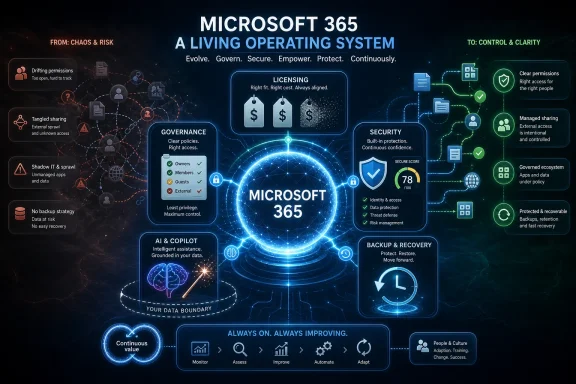 The Platform Works, but the Operating Model Often Does Not
Microsoft 365 has become so ordinary inside business computing that its complexity is easy to underestimate. It is email, documents, chat, meetings, identity, device management, records retention, endpoint security, automation, analytics, and now AI. For many organizations, it is less a software subscription than the nervous system of the company.That scale is precisely why adoption can mislead. A tenant can be live, users can be sending mail, Teams channels can be busy, SharePoint sites can be multiplying, and Power Automate flows can be running in the background. From a distance, this looks like transformation.
But operational value is not the same as platform activity. A company can be fully “on Microsoft 365” while still overpaying for licenses, underusing security controls, exposing data through unsanctioned AI tools, and assuming Microsoft is backing up business data in ways it is not. The gap between deployed and managed is where the promised return on investment leaks away.
The uncomfortable truth is that cloud suites do not stay aligned with a business by default. People change roles, contractors come and go, departments reorganize, new compliance obligations appear, and threat actors adapt faster than procurement cycles. A Microsoft 365 environment that is not continuously reviewed becomes a historical record of decisions made at go-live.
The Go-Live Myth Is Still Costing Companies Money
The original sin in many Microsoft 365 deployments is treating migration as the finish line. The project plan has milestones: assess, migrate, validate, train, go live, close. The budget is approved, the tenant is configured, the licenses are assigned, and the organization moves on.That makes sense for project accounting. It makes very little sense for platform stewardship.
Microsoft 365 is not a server refresh or a one-off software rollout. It is a continually changing set of services, policies, defaults, SKU entitlements, security recommendations, and administrative surfaces. Microsoft changes the platform. The business changes around it. Users invent their own workflows. Old assumptions expire.
Yet many organizations still run Microsoft 365 as if the state of the tenant on deployment day were an acceptable baseline forever. License assignments are inherited rather than questioned. Security settings remain close to defaults because nobody wants to break productivity. Data governance is postponed because collaboration feels more urgent. Backup is deferred because Exchange Online and SharePoint Online have a reputation for resilience.
That is how Microsoft 365 becomes both indispensable and neglected. It runs too well to attract attention until the cost report, audit finding, security incident, or eDiscovery request makes neglect visible.
Licensing Is the Easiest Waste to Find and the Hardest Habit to Break
The most immediate problem is licensing, because it appears in the budget before it appears in a breach report. Microsoft 365 licensing is powerful, but it is also a maze of overlapping plans, add-ons, bundles, security entitlements, device management rights, and role-specific needs. In that maze, overbuying is common.A company may standardize on a higher tier because it simplifies deployment. That can be defensible during migration, especially when IT is trying to reduce friction. But a temporary simplification often becomes a permanent expense.
The mismatch usually looks mundane. Frontline users may receive licenses designed for knowledge workers. Users who only need email and basic collaboration may sit on enterprise plans that include capabilities they never touch. Former employees, dormant accounts, test accounts, shared mailboxes, or role-changed staff can continue consuming entitlements long after the business case has disappeared.
This is not merely a procurement problem. It is an identity and lifecycle problem. If HR, IT, finance, and security are not aligned around joiner-mover-leaver processes, licensing drift becomes inevitable. Every reorganization becomes a small billing error. Every acquisition becomes a SKU puzzle. Every “temporary” exception becomes tomorrow’s baseline.
The savings can be material because Microsoft 365 is priced per user and paid month after month. Cutting a few dollars per user does not sound strategic until it is multiplied across hundreds or thousands of employees for three years. For smaller businesses, the same discipline can free budget for security controls, backup, training, or device management that would produce more value than unused premium features.
The hard part is not discovering that license optimization matters. The hard part is making it routine. A quarterly license review is unglamorous, but so is paying for shelfware in a cloud product that was supposed to make IT more efficient.
Secure Score Is a Compass, Not a Security Program
Security is the second place where Microsoft 365 adoption often flatters to deceive. Microsoft provides a deep security stack across Entra ID, Defender, Purview, Exchange Online Protection, Intune, and administrative auditing. But those controls do not protect an organization simply because they exist in the SKU.Microsoft Secure Score is useful because it turns configuration into a visible metric. It gives administrators a continuously updated view of recommended actions and the environment’s alignment with Microsoft’s security guidance. For executives, it can translate invisible configuration debt into a number.
But a number is not a strategy. Secure Score can help reveal missing multifactor authentication coverage, risky legacy authentication patterns, weak administrative separation, insufficient audit logging, or unmanaged devices. It cannot decide the organization’s risk appetite, clean up years of access sprawl, or force business units to accept friction where security requires it.
The recurring failure is assuming that cloud defaults are the vendor’s final answer. Defaults are designed to get tenants running, not to satisfy every organization’s regulatory, security, and operational needs. What is acceptable for a small business may be reckless for a healthcare provider, law firm, financial services company, school district, or government contractor.
Improving the score quickly is often possible because many environments leave basic controls unused. Multifactor authentication, conditional access, privileged account hygiene, sign-in risk policies, device compliance, external sharing restrictions, and mailbox protections can all move the needle. But the real win is not the score itself. It is the governance habit behind it.
A mature organization should be able to explain why a control is enabled, why an exception exists, who owns the exception, and when it expires. Without that discipline, Secure Score becomes another dashboard people admire without changing behavior.
Grey AI Is the New Shadow IT, Only Faster and More Convincing
The rise of generative AI has made Microsoft 365 governance more urgent, not less. Employees are not waiting for enterprise AI strategies to mature. They are pasting text into public chatbots, summarizing customer material, asking for help with spreadsheets, rewriting legal-adjacent language, and turning meeting notes into action plans using whatever tool is easiest to reach.That is the new grey AI problem. It is not always malicious. Most of the time, it is pragmatic. Workers are under pressure, AI tools are useful, and the sanctioned corporate process is either unclear or too slow.
The risk is that data leaves the governance boundary. Sensitive commercial information, personal data, source material, internal deliberations, client records, credentials, or confidential strategy can end up in services that were never approved by security, legal, privacy, or procurement. Even when a tool’s consumer version is not training directly on user inputs, the organization may still lack contractual protections, audit visibility, retention controls, data residency assurances, and administrative enforcement.
This is where Microsoft’s AI pitch intersects with the less glamorous work of Microsoft 365 management. Microsoft 365 Copilot is attractive to enterprises precisely because it is meant to operate inside Microsoft’s commercial data protection and permission model. But Copilot does not magically fix bad information architecture.
If SharePoint permissions are chaotic, Copilot can make that chaos easier to discover. If confidential files are overshared, AI can surface them faster. If stale Teams, abandoned sites, and poorly labeled documents have accumulated for years, an AI assistant becomes a mirror held up to the organization’s data hygiene.
The irony is that many companies want AI value before they have done the platform housekeeping that makes AI safe. They want summarization, drafting, search, and automation, but they have not cleaned up access controls, sensitivity labels, retention policies, external sharing, or identity governance. That is not an AI strategy. It is a data exposure strategy with better demos.
Copilot’s ROI Depends on Boring Prerequisites
The Forrester studies commissioned around Microsoft 365 and Microsoft 365 Copilot point to real potential value: time savings, faster help desk resolution, automation gains, and three-year returns that look compelling in executive presentations. These figures matter because they show why organizations keep investing. Microsoft 365 can reduce friction in daily work, and Copilot can amplify that effect when the environment is ready.The caveat is buried in the operating assumptions. A well-governed tenant is not incidental to the ROI story. It is the substrate on which the ROI depends.
Copilot’s usefulness depends on clean identity, accurate permissions, current content, sensible information architecture, and users who understand where the tool helps and where human judgment remains essential. Without those foundations, AI adoption can produce a strange form of productivity theater: more generated text, more summarized meetings, more automated activity, but not necessarily better decisions or lower risk.
There is also a measurement problem. Time saved is not automatically value captured. If an employee saves 30 minutes drafting a document but spends the time in more meetings, the organization has not necessarily gained capacity. If Copilot accelerates access to outdated or overshared information, the speed is not an unqualified benefit.
This does not make Microsoft 365 Copilot a bad investment. It makes it a dependent investment. The business case for AI is strongest when it rides on top of an environment that already has strong governance, documented ownership, and a realistic view of user workflows.
The companies most likely to see value are not the ones that merely buy licenses first. They are the ones that know which processes they want to improve, which data should be available, which data should be restricted, and how they will measure whether AI changes the work rather than decorating it.
Backup Is Where Cloud Confidence Becomes Dangerous
Few Microsoft 365 assumptions are as persistent as the belief that Microsoft “has the data covered.” In one sense, that belief is understandable. Microsoft operates resilient global infrastructure, replicates services, invests heavily in availability, and provides native retention and recovery capabilities across workloads.But service resilience is not the same thing as customer-controlled backup.
The distinction matters after accidental deletion, malicious insider activity, ransomware, compromised administrator accounts, misconfigured retention policies, or legal discovery problems. Microsoft is responsible for running the service. The customer remains responsible for many of the decisions that determine whether data can be restored in the required state, within the required time, and under the required compliance conditions.
Native recycle bins and retention tools are useful, but they are not a universal substitute for backup architecture. Retention is often about preserving or deleting data according to policy. Backup is about recoverability from a known point in time. The two overlap, but they are not identical.
This is where many organizations discover that their recovery plan is more aspirational than operational. They may have no tested process for restoring a large SharePoint site, recovering Teams-related data, rolling back mass deletion, or responding to a compromised account that tampered with content before anyone noticed. They may also discover that the person who knew how the tenant was configured left the company 18 months ago.
A credible Microsoft 365 data protection strategy should answer practical questions before an incident. What data is protected? How often is it captured? How quickly can it be restored? Who can initiate recovery? Are backups isolated from compromised credentials? Has restoration been tested? Which workloads are excluded? What happens if retention policies conflict with recovery needs?
The point is not that every organization needs the same third-party tool or the same retention schedule. The point is that “Microsoft runs the cloud” is not a recovery plan.
Managed Services Are Not a Shortcut Unless They Manage the Right Things
The source argument for using a managed services provider is reasonable, but it deserves scrutiny. Outsourcing Microsoft 365 administration can help, especially for organizations that lack dedicated cloud security, licensing, endpoint management, and compliance expertise. But “managed services” is not a magic phrase.A weak provider can reproduce the same problems at arm’s length. They can keep the lights on, close tickets, reset passwords, and renew licenses while leaving governance untouched. That is support, not stewardship.
A strong provider should bring cadence and accountability. It should review licensing against actual usage. It should maintain a security roadmap. It should document exceptions. It should test backup and recovery. It should help govern external sharing, privileged access, conditional access, device compliance, data lifecycle rules, and AI readiness. It should be able to explain what changed in the tenant, why it changed, and what risk remains.
The best partner relationship also preserves internal ownership. Microsoft 365 is too embedded in business process to be thrown entirely over the wall. IT can outsource specialist execution, but the organization still has to decide who should access data, which collaboration patterns are acceptable, how much friction security can impose, and which workflows deserve automation.
That is the difference between buying administration and buying outcomes. The former keeps Microsoft 365 running. The latter keeps it aligned.
The Real ROI Is Governance Compounding Over Time
The technology industry likes clean ROI numbers because they make complex transformation look measurable. Executives want a percentage, a payback period, and a line in the board pack that says the investment produced a positive financial impact. Vendors understandably supply those numbers.But Microsoft 365 value compounds less like a single project and more like operational fitness. The gains come from repeated alignment: licenses matched to roles, access matched to responsibility, controls matched to risk, data structures matched to work, and automation matched to measurable pain points.
That compounding effect is easy to miss because the improvements are distributed. A cleaner license estate reduces waste. A stronger identity posture reduces breach probability. Better device management reduces support time. A tested backup plan reduces incident impact. Well-governed data makes AI safer and more useful. None of these alone is the whole Microsoft 365 business case. Together, they are the business case.
The inverse is also true. Neglect compounds. Unused licenses accumulate. External sharing expands. Guest accounts linger. Teams sprawl grows. Legacy authentication survives. Stale content remains discoverable. Employees route around official tools. Backup assumptions go untested. Then a security incident or audit turns years of small omissions into one expensive event.
This is why the adoption discussion should move away from whether Microsoft 365 is “worth it” in the abstract. The better question is whether the organization is operating it in a way that can plausibly produce the value it expects.
The Microsoft 365 Value Gap Has a Familiar Shape
The practical lessons are not exotic, but they are often deferred because they require ownership across IT, security, finance, legal, and business leadership. Microsoft 365 does not fail quietly because the software is obscure. It fails quietly because everyone assumes someone else is managing the boring parts.- Microsoft 365 adoption should be measured by business outcomes, not by whether mailboxes migrated and Teams usage increased.
- License reviews should be recurring financial hygiene, because role changes and inactive accounts turn yesterday’s deployment choices into today’s waste.
- Security improvement should be tied to documented control decisions, not treated as a one-time push to improve a dashboard score.
- AI readiness depends on permission hygiene, data governance, and user guidance before Copilot or any rival tool can safely deliver value.
- Backup and recovery plans should be tested against realistic Microsoft 365 failure scenarios, not assumed from Microsoft’s infrastructure resilience.
- Managed services only close the value gap when they provide governance, documentation, optimization, and accountability rather than basic ticket handling.
References
- Primary source: Lifestyle & Tech
Published: 2026-06-25T09:30:10.907039
Loading…
lifestyleandtech.co.za - Related coverage: avepoint.com
The Microsoft 365 Shared Responsibility Model Explained: Who Is Responsible for Your Data? | AvePoint
The shared responsibility model is a framework that divides security and data protection duties between a cloud provider and the customer. In Microsoft 365, Microsoft covers physical infrastructure, platform uptime, and service-level security. www.avepoint.com
- Related coverage: tei.forrester.com
Loading…
tei.forrester.com - Official source: microsoft.com
Loading…
www.microsoft.com - Official source: learn.microsoft.com
Overview of Microsoft 365 Backup
Learn about the backup and recovery capabilities for OneDrive, SharePoint, and Exchange Online using Microsoft 365 Backup.learn.microsoft.com - Official source: news.microsoft.com
Loading…
news.microsoft.com
- Related coverage: windowscentral.com
Only 3.3% of Microsoft 365 users pay for Copilot | Windows Central
A new report suggests that only a fraction of the Microsoft 365 and Office 365 users who interact with Copilot Chat actually pay for it.www.windowscentral.com - Related coverage: systoolsgroup.com
Loading…
www.systoolsgroup.com - Official source: wwps.microsoft.com
- Official source: download.microsoft.com
Loading…
download.microsoft.com - Official source: info.microsoft.com
Loading…
info.microsoft.com - Official source: marketingassets.microsoft.com
Loading…
marketingassets.microsoft.com