
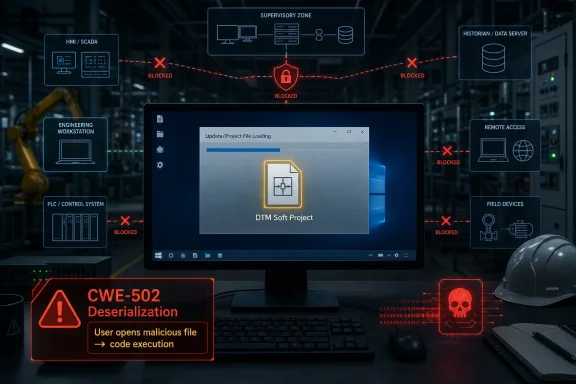
CISA on June 25, 2026, republished a Delta Electronics advisory for DTM Soft, warning that all versions are affected by CVE-2026-12578, a high-severity deserialization flaw that can allow arbitrary code execution when a user opens a malicious project file. The headline is not that another industrial engineering tool has a file-parser bug. The headline is that the same old desktop trust model still sits inside operational technology environments that otherwise talk a big game about segmentation, hardening, and zero trust. This is a local, user-assisted vulnerability, but in an engineering workstation, “local” is often where the blast radius begins.
Delta Electronics DTM Soft is not the kind of software that makes consumer headlines. It lives in the less glamorous layer of industrial operations: configuration, engineering, maintenance, and vendor-support workflows around automation equipment. That is precisely why a bug like CVE-2026-12578 matters more than its “not remotely exploitable” label might imply.
CISA rates the vulnerability at 7.8 under CVSS 3.1 and 8.4 under CVSS 4.0. The attack requires user interaction, and the advisory says there is no known public exploitation targeting the flaw at this time. On paper, that sounds like a meaningful limitation.
In practice, engineering software is built around opening files from other people. Project files move between OEMs, integrators, contractors, support desks, plant engineers, and sometimes email inboxes that should never have become part of the OT workflow but did anyway. If an attacker can persuade the right person to open the wrong file, the “local” boundary collapses into code execution on a machine that may already be trusted by the environment.
That is the uncomfortable lesson here. The weakest link is not always an exposed PLC, a forgotten VPN appliance, or a flat network. Sometimes it is a workstation running specialized Windows software that treats a project file as a trusted object instead of hostile input.
Deserialization bugs are especially dangerous because they often sit in features users consider routine. Opening a project, importing a configuration, loading a saved workspace, or restoring a device profile can all involve parsing complex internal formats. When those formats can trigger unsafe object creation or execution behavior, a file stops being a document and becomes a delivery mechanism.
The CVSS vector tells the same story in compressed form. The attack vector is local, complexity is low, privileges are not required, and user interaction is required. Confidentiality, integrity, and availability impacts are all rated high.
That combination should get the attention of Windows administrators who manage engineering workstations. It means the exploit path is not necessarily exotic. It does not require prior access, elevated privileges, or a deep chain of dependencies. It requires a crafted file and a user persuaded to open it.
But “not remotely exploitable” is too often misread as “not urgent.” In industrial environments, the path from an external attacker to an internal workstation is often social rather than technical. Email, file-sharing portals, USB media, remote support sessions, and contractor handoffs all create opportunities for a malicious project file to cross the boundary.
The attacker’s challenge is not to scan the internet for DTM Soft. The challenge is to identify someone who uses it. In a supply-chain-heavy industrial sector, that may be easier than defenders would like.
This is why CISA’s mitigations emphasize file hygiene as much as network architecture. Do not open unsolicited project files. Do not import unexpected attachments. Verify the source before opening files from email, shares, internet links, or removable media. Those recommendations sound basic because they are basic; they also remain necessary because engineering workflows routinely violate them.
Many industrial software packages are still launched with elevated rights because “that’s how it works,” because legacy drivers demand it, because old setup guides said so, or because users discovered that standard accounts produced weird failures. Over time, elevation becomes a habit rather than a conscious exception. In a deserialization flaw, that habit can turn arbitrary code execution from a user-context compromise into a much more damaging host compromise.
Running as a standard user does not make the vulnerability disappear. It limits what malicious code can do after exploitation. That distinction matters enormously on a workstation that may hold project files, credentials, VPN profiles, device configuration utilities, remote-access tools, and cached access to shared engineering repositories.
For Windows shops, this is a familiar argument in an OT costume. Least privilege is not a compliance slogan; it is the difference between a bad afternoon and a rebuild with incident-response counsel on the call.
The affected product line is listed broadly as all versions of Delta Electronics DTMSoft. That is a sweeping exposure statement. It also means asset inventory becomes the first real control. Organizations cannot mitigate software they do not know they have, especially when engineering tools may be installed on laptops, lab machines, vendor workstations, and jump hosts outside the normal enterprise software catalog.
The lack of known public exploitation is useful context, not a reason to wait. Vulnerability disclosure changes attacker incentives. Once the class of bug, affected product, and exploitation shape are public, defenders should assume proof-of-concept work becomes more attractive.
That does not mean panic. It means shrinking the window. Remove unnecessary installations, restrict who can run the software, isolate workstations that need it, and treat incoming project files as untrusted until proven otherwise.
But advisories like this show why perimeter thinking is incomplete. The engineering workstation is both a productivity tool and a bridge. It may connect to enterprise email on Monday, a vendor portal on Tuesday, a control network on Wednesday, and a maintenance laptop on Thursday. Its value comes from crossing boundaries.
That makes it hard to defend with a single rule. If the machine is too locked down, the plant cannot work. If it is too open, it becomes the attacker’s preferred pivot point. The security job is not to pretend engineering workstations are ordinary office PCs, but also not to exempt them from ordinary endpoint discipline.
Windows administrators have a meaningful role here. Application control, standard-user operation, controlled folders, endpoint detection, removable-media restrictions, and sane patching policy are not “IT-only” concerns. They are part of OT resilience when the vulnerable software runs on Windows.
That may sound excessive until you compare it with how organizations handle executable downloads. Nobody serious tells users to download random binaries and run them because the sender sounded familiar. Yet project files for specialized industrial tools often receive less scrutiny, even though many are parsed by complex native applications with long histories of memory-safety and input-validation problems.
A better workflow starts with ownership. Who is allowed to send DTM Soft project files? Which channels are approved? Where are files staged before use? Are they scanned, logged, and retained? Can users open them only inside a constrained workstation or virtualized environment?
The point is not to make engineering slow. The point is to stop treating a project file as inherently safer than an executable. In 2026, that distinction is increasingly fictional.
In enterprise IT, a high-severity desktop application vulnerability usually triggers a familiar chain: identify installations, test the update, deploy the update, verify compliance. In OT, that chain is often tangled by production schedules, vendor qualification, offline machines, and fear of breaking tools used for maintenance.
Those constraints are real. They are also why mitigations must begin before the patch ships. If a plant discovers after the fix arrives that it does not know where DTM Soft is installed, who uses it, or which accounts launch it with administrator rights, the advisory has already exposed a governance failure.
Patch culture in OT cannot mean reckless installation. But it also cannot mean indefinite deferral. The right standard is controlled urgency: understand the operational impact, test quickly, deploy where possible, and apply compensating controls where not.
That pattern should change how defenders prioritize. It is tempting to focus vulnerability management on servers, firewalls, VPNs, and internet-facing systems because those are easy to enumerate and obviously exposed. Engineering tools are messier. They may be installed irregularly, updated manually, and used by a small group of specialists.
Attackers do not care that an asset is hard to manage. They care whether it gives them useful access. A Windows laptop with engineering software, saved project files, and trusted network routes may be more valuable than a better-hardened server.
The security community has spent years warning that OT compromise does not always begin with the controller. Increasingly, it begins with the tooling around the controller.
For this vulnerability, the most relevant defensive move is segmentation with realism. If a DTM Soft workstation needs to communicate with control assets, that does not mean it needs broad access to business systems, email, internet browsing, and removable media. If it needs vendor file exchange, that does not mean every file path should lead directly into the production engineering environment.
The practical answer is layered inconvenience. Force files through a controlled ingress point. Require standard-user execution. Keep the workstation off general-purpose browsing where possible. Monitor for unusual child processes spawned by engineering tools. Restrict outbound connectivity that the software does not need.
None of that is glamorous. All of it makes exploitation harder to turn into consequence.
The vulnerable application runs in the world that Windows admins understand: user privileges, file associations, application launch behavior, endpoint protection, local logging, software inventory, and patch deployment. The difference is that the business impact of compromise may reach beyond data loss into production disruption, safety procedures, and expensive downtime.
That does not mean every Windows admin needs to become an automation engineer. It means IT and OT teams need a shared operating model for the machines that sit between their domains. Who owns patching? Who approves software updates? Who controls local admin? Who reviews vendor files? Who receives alerts when an engineering tool behaves like a malware loader?
If those questions do not have answers before an advisory drops, the advisory becomes the least of the organization’s problems.
Delta’s DTM Soft advisory will probably not be remembered as the biggest ICS security story of 2026. It should still be treated as a clear signal. The next compromise of an industrial environment may not start with a dramatic remote exploit against a controller; it may start with a trusted engineer, a familiar file extension, and a desktop application that was never supposed to be part of the attack surface.
 The Dangerous File Is Still the Softest Target in the Plant
Delta Electronics DTM Soft is not the kind of software that makes consumer headlines. It lives in the less glamorous layer of industrial operations: configuration, engineering, maintenance, and vendor-support workflows around automation equipment. That is precisely why a bug like CVE-2026-12578 matters more than its “not remotely exploitable” label might imply.CISA rates the vulnerability at 7.8 under CVSS 3.1 and 8.4 under CVSS 4.0. The attack requires user interaction, and the advisory says there is no known public exploitation targeting the flaw at this time. On paper, that sounds like a meaningful limitation.
In practice, engineering software is built around opening files from other people. Project files move between OEMs, integrators, contractors, support desks, plant engineers, and sometimes email inboxes that should never have become part of the OT workflow but did anyway. If an attacker can persuade the right person to open the wrong file, the “local” boundary collapses into code execution on a machine that may already be trusted by the environment.
That is the uncomfortable lesson here. The weakest link is not always an exposed PLC, a forgotten VPN appliance, or a flat network. Sometimes it is a workstation running specialized Windows software that treats a project file as a trusted object instead of hostile input.
Deserialization Turns Convenience Into an Execution Path
The vulnerability class is CWE-502, deserialization of untrusted data. That phrase sounds academic, but the underlying problem is brutally practical: software takes structured data, reconstructs it into live objects, and fails to properly constrain what that data is allowed to become.Deserialization bugs are especially dangerous because they often sit in features users consider routine. Opening a project, importing a configuration, loading a saved workspace, or restoring a device profile can all involve parsing complex internal formats. When those formats can trigger unsafe object creation or execution behavior, a file stops being a document and becomes a delivery mechanism.
The CVSS vector tells the same story in compressed form. The attack vector is local, complexity is low, privileges are not required, and user interaction is required. Confidentiality, integrity, and availability impacts are all rated high.
That combination should get the attention of Windows administrators who manage engineering workstations. It means the exploit path is not necessarily exotic. It does not require prior access, elevated privileges, or a deep chain of dependencies. It requires a crafted file and a user persuaded to open it.
“Not Remotely Exploitable” Is Not a Comfort Blanket
CISA explicitly says this vulnerability is not exploitable remotely. That matters, and it should prevent lazy exaggeration. This is not a wormable internet-facing service bug, and organizations should not treat it like one.But “not remotely exploitable” is too often misread as “not urgent.” In industrial environments, the path from an external attacker to an internal workstation is often social rather than technical. Email, file-sharing portals, USB media, remote support sessions, and contractor handoffs all create opportunities for a malicious project file to cross the boundary.
The attacker’s challenge is not to scan the internet for DTM Soft. The challenge is to identify someone who uses it. In a supply-chain-heavy industrial sector, that may be easier than defenders would like.
This is why CISA’s mitigations emphasize file hygiene as much as network architecture. Do not open unsolicited project files. Do not import unexpected attachments. Verify the source before opening files from email, shares, internet links, or removable media. Those recommendations sound basic because they are basic; they also remain necessary because engineering workflows routinely violate them.
The Admin Button Makes the Difference Between Bad and Worse
Delta’s most immediately useful mitigation is also one of the least glamorous: avoid running DTM Soft as administrator. That advice deserves more attention than it will probably receive.Many industrial software packages are still launched with elevated rights because “that’s how it works,” because legacy drivers demand it, because old setup guides said so, or because users discovered that standard accounts produced weird failures. Over time, elevation becomes a habit rather than a conscious exception. In a deserialization flaw, that habit can turn arbitrary code execution from a user-context compromise into a much more damaging host compromise.
Running as a standard user does not make the vulnerability disappear. It limits what malicious code can do after exploitation. That distinction matters enormously on a workstation that may hold project files, credentials, VPN profiles, device configuration utilities, remote-access tools, and cached access to shared engineering repositories.
For Windows shops, this is a familiar argument in an OT costume. Least privilege is not a compliance slogan; it is the difference between a bad afternoon and a rebuild with incident-response counsel on the call.
A Fix Is Coming, but the Risk Window Is Already Open
Delta says it is aware of the vulnerability and is working on a fix. Until that fix arrives, the advisory leans on mitigations rather than a patch. That creates the usual industrial-security problem: defenders must manage a real risk without the clean endpoint of “install this version and move on.”The affected product line is listed broadly as all versions of Delta Electronics DTMSoft. That is a sweeping exposure statement. It also means asset inventory becomes the first real control. Organizations cannot mitigate software they do not know they have, especially when engineering tools may be installed on laptops, lab machines, vendor workstations, and jump hosts outside the normal enterprise software catalog.
The lack of known public exploitation is useful context, not a reason to wait. Vulnerability disclosure changes attacker incentives. Once the class of bug, affected product, and exploitation shape are public, defenders should assume proof-of-concept work becomes more attractive.
That does not mean panic. It means shrinking the window. Remove unnecessary installations, restrict who can run the software, isolate workstations that need it, and treat incoming project files as untrusted until proven otherwise.
Industrial Windows Workstations Are Now the Real Perimeter
For years, the default OT security story focused on keeping control systems off the internet. That still matters. CISA repeats the standard guidance: minimize exposure, place control system networks and remote devices behind firewalls, isolate them from business networks, and use secure remote access where required.But advisories like this show why perimeter thinking is incomplete. The engineering workstation is both a productivity tool and a bridge. It may connect to enterprise email on Monday, a vendor portal on Tuesday, a control network on Wednesday, and a maintenance laptop on Thursday. Its value comes from crossing boundaries.
That makes it hard to defend with a single rule. If the machine is too locked down, the plant cannot work. If it is too open, it becomes the attacker’s preferred pivot point. The security job is not to pretend engineering workstations are ordinary office PCs, but also not to exempt them from ordinary endpoint discipline.
Windows administrators have a meaningful role here. Application control, standard-user operation, controlled folders, endpoint detection, removable-media restrictions, and sane patching policy are not “IT-only” concerns. They are part of OT resilience when the vulnerable software runs on Windows.
File Trust Needs a Real Workflow, Not a Warning Poster
“Do not open unsolicited files” is good advice, but it is not a process. Plants need a workable way to receive, validate, quarantine, and approve project files before they reach engineering software.That may sound excessive until you compare it with how organizations handle executable downloads. Nobody serious tells users to download random binaries and run them because the sender sounded familiar. Yet project files for specialized industrial tools often receive less scrutiny, even though many are parsed by complex native applications with long histories of memory-safety and input-validation problems.
A better workflow starts with ownership. Who is allowed to send DTM Soft project files? Which channels are approved? Where are files staged before use? Are they scanned, logged, and retained? Can users open them only inside a constrained workstation or virtualized environment?
The point is not to make engineering slow. The point is to stop treating a project file as inherently safer than an executable. In 2026, that distinction is increasingly fictional.
The Vendor Advisory Is Also a Test of Patch Culture
Delta’s current position is that a fix is in progress. That puts customers in an awkward middle state, but it also sets up an important test: how quickly industrial organizations can move once a fixed release appears.In enterprise IT, a high-severity desktop application vulnerability usually triggers a familiar chain: identify installations, test the update, deploy the update, verify compliance. In OT, that chain is often tangled by production schedules, vendor qualification, offline machines, and fear of breaking tools used for maintenance.
Those constraints are real. They are also why mitigations must begin before the patch ships. If a plant discovers after the fix arrives that it does not know where DTM Soft is installed, who uses it, or which accounts launch it with administrator rights, the advisory has already exposed a governance failure.
Patch culture in OT cannot mean reckless installation. But it also cannot mean indefinite deferral. The right standard is controlled urgency: understand the operational impact, test quickly, deploy where possible, and apply compensating controls where not.
The Pattern Around Engineering Tools Is Getting Hard to Ignore
This advisory does not exist in isolation. Delta Electronics industrial software has appeared in prior CISA advisories involving file parsing, memory corruption, and deserialization issues across engineering and configuration tools. The broader pattern is not unique to Delta, either. Industrial desktop applications have become a recurring source of high-impact vulnerabilities because they sit at the intersection of legacy code, proprietary formats, and privileged operational workflows.That pattern should change how defenders prioritize. It is tempting to focus vulnerability management on servers, firewalls, VPNs, and internet-facing systems because those are easy to enumerate and obviously exposed. Engineering tools are messier. They may be installed irregularly, updated manually, and used by a small group of specialists.
Attackers do not care that an asset is hard to manage. They care whether it gives them useful access. A Windows laptop with engineering software, saved project files, and trusted network routes may be more valuable than a better-hardened server.
The security community has spent years warning that OT compromise does not always begin with the controller. Increasingly, it begins with the tooling around the controller.
CISA’s Generic Advice Is Generic Because the Failures Repeat
Some readers will skim CISA’s recommended practices and see boilerplate. Minimize network exposure. Use firewalls. Isolate control networks. Keep VPNs updated. Watch for phishing. Perform impact analysis before deploying defensive measures. These lines appear again and again in ICS advisories because the underlying failures appear again and again.For this vulnerability, the most relevant defensive move is segmentation with realism. If a DTM Soft workstation needs to communicate with control assets, that does not mean it needs broad access to business systems, email, internet browsing, and removable media. If it needs vendor file exchange, that does not mean every file path should lead directly into the production engineering environment.
The practical answer is layered inconvenience. Force files through a controlled ingress point. Require standard-user execution. Keep the workstation off general-purpose browsing where possible. Monitor for unusual child processes spawned by engineering tools. Restrict outbound connectivity that the software does not need.
None of that is glamorous. All of it makes exploitation harder to turn into consequence.
The WindowsForum Angle Is Endpoint Reality, Not OT Theater
For WindowsForum readers, the important point is that this is not only an OT story. It is a Windows endpoint story wearing an industrial badge.The vulnerable application runs in the world that Windows admins understand: user privileges, file associations, application launch behavior, endpoint protection, local logging, software inventory, and patch deployment. The difference is that the business impact of compromise may reach beyond data loss into production disruption, safety procedures, and expensive downtime.
That does not mean every Windows admin needs to become an automation engineer. It means IT and OT teams need a shared operating model for the machines that sit between their domains. Who owns patching? Who approves software updates? Who controls local admin? Who reviews vendor files? Who receives alerts when an engineering tool behaves like a malware loader?
If those questions do not have answers before an advisory drops, the advisory becomes the least of the organization’s problems.
The Practical Reading of Delta’s DTM Soft Warning
This is a high-severity advisory with a constrained exploit path, not a reason for panic and not a reason for complacency. The smart response is to treat DTM Soft project files as active content, reduce the privileges of the software, and prepare for a vendor fix without waiting for one.- Organizations should identify every Windows system running Delta Electronics DTM Soft, including engineering laptops, lab machines, jump hosts, and vendor-maintained systems.
- Users should not open or import DTM Soft project files received through unsolicited email, unknown links, untrusted shares, or removable media.
- Administrators should remove routine administrator execution for DTM Soft and run it under standard user privileges wherever operationally possible.
- Security teams should restrict and monitor engineering workstations as high-value systems, especially where they bridge business and control-system networks.
- OT owners should plan now for testing and deploying Delta’s eventual fix rather than waiting until the patched release appears.
- Incident responders should treat suspicious project-file activity as a potential execution event, not merely as a failed document open.
Delta’s DTM Soft advisory will probably not be remembered as the biggest ICS security story of 2026. It should still be treated as a clear signal. The next compromise of an industrial environment may not start with a dramatic remote exploit against a controller; it may start with a trusted engineer, a familiar file extension, and a desktop application that was never supposed to be part of the attack surface.
References
- Primary source: CISA
Published: 2026-06-25T12:00:00+00:00
Delta Electronics DTM Soft | CISA
www.cisa.gov
- Related coverage: tisalabs.com
- Related coverage: incibe.es
Desbordamiento de búfer en ASDA-Soft de Delta Electronics | INCIBE-CERT | INCIBE
Feng Xiong de TrendAI Zero Day Initiative informó sobre 1 vulnerabilidad de severidad alta que, en caswww.incibe.es
- Related coverage: otwarden.com
Delta Electronics ICS Security Advisories — 95 Vulnerabilities | OTWarden
Delta Electronics has 95 CISA ICS security advisories: 17 critical, 66 high severity. Track Delta Electronics OT/SCADA vulnerabilities with OTWarden.otwarden.com
- Related coverage: vulners.com
Delta Electronics ASDA-Soft - vulnerability database | Vulners.com
1. RISK EVALUATION Successful exploitation of these vulnerabilities could allow an attacker to write data outside of the allocated memory buffer. 2. RECOMMENDED PRACTICES CISA reminds organizations to perform proper impact analysis and risk assess...vulners.com - Related coverage: filecenter.deltaww.com
Microsoft Word - Delta-PCSA-2024-00016_DTM Soft Deserialization of Untrusted Data Vulnerability_EN.docx
PDF documentfilecenter.deltaww.com

