
On June 23, 2026, Microsoft began previewing a Windows 11 update that brings calendar-based update pausing, point-in-time restore, accessibility tinting, Bluetooth fixes, quieter Widgets, and smaller usability repairs ahead of the automatic July 14 Patch Tuesday rollout. The important part is not that Windows 11 is getting more features. It is that Microsoft is spending a monthly update cycle on the kind of everyday friction that makes users distrust the operating system in the first place.
That makes this release feel unusually grounded for the current Windows era. After two years in which the Windows roadmap has often sounded like an AI product-management memo, July’s Windows 11 update is built around reboots, recovery, headset behavior, taskbar annoyance, File Explorer edge cases, and touchpad control. In other words: the stuff people actually curse at.
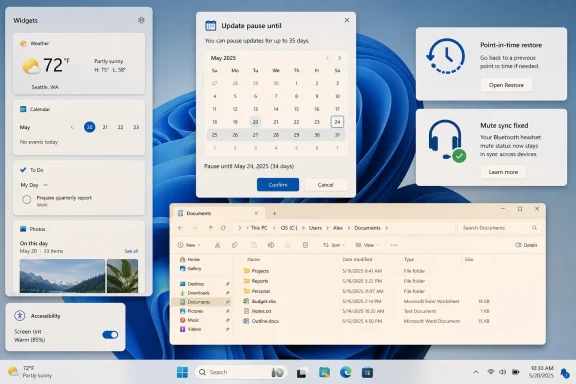
The most telling change in this update is the new Windows Update pause experience. Windows 11 is moving from a blunt five-week pause ceiling to a calendar picker that lets users choose a specific end date, up to 35 days out, and then pause again when that period expires. That may sound like a small UI adjustment, but in Windows politics, it is close to a constitutional amendment.
For years, Microsoft has treated update compliance as a security necessity and user deferral as a risk to be constrained. That position was not irrational. Unpatched Windows PCs have been part of botnets, ransomware incidents, lateral movement campaigns, and office-wide “why is everything broken?” mornings for as long as administrators have been imaging machines.
But the company’s implementation has often confused “secure by default” with “annoying by design.” The old pause model gave users a short reprieve and then insisted on catching up before they could pause again. The message was clear: Windows would let you negotiate with the calendar, but only briefly, and only on its terms.
The new model does not turn Windows Update into a free-for-all. It still works in 35-day blocks, and Microsoft is not abandoning the idea that machines should eventually receive security updates. What changes is the social contract. A user who is traveling, teaching, editing video, running a lab instrument, managing a kiosk, or simply trying not to reboot during a work crunch now gets a more honest control: pick the date, plan around it, and repeat if necessary.
That is not just convenience. It is a tacit admission that the old update bargain was too paternalistic for a platform that runs everything from gaming rigs to medical front desks to family laptops with one functioning printer driver.
Microsoft has spent years trying to soften that perception with active hours, restart warnings, faster update installation, smaller packages, and more resilient servicing. Those improvements matter, especially in enterprise environments where update orchestration is a discipline rather than a preference. Still, none of them entirely solved the emotional problem: the user sitting in front of the machine wants to feel that “not now” means not now.
The calendar picker matters because it maps update control to the way people think. They do not think in servicing-policy abstractions. They think in conferences, exams, payroll weeks, maintenance windows, vacations, project deadlines, and “I need this laptop to survive until Friday.”
For IT departments, the change is less radical than the consumer headlines suggest. Managed fleets already have tools for deferral, rings, approvals, deadlines, and compliance reporting through enterprise management stacks. But the optics still matter, because many organizations contain a gray zone of lightly managed or bring-your-own Windows devices where the default Settings experience shapes behavior.
The risk is obvious: if pausing becomes too easy, some users will keep kicking the can. Microsoft is betting that repeatable 35-day control can coexist with the security model because the alternative is not universal compliance. The alternative is registry hacks, third-party update blockers, metered connection tricks, and resentment.
That immediately invites comparison to System Restore, one of those classic Windows features that has survived partly because everyone knows what it is supposed to do and partly because nobody fully trusts it to save them. Traditional System Restore can be useful, but it is limited. It is not a true whole-machine undo button, and it does not protect personal files in the way ordinary users often assume.
Point-in-time restore appears to be Microsoft’s attempt to close that expectation gap. Built on Volume Shadow Copy technology, it is meant to run locally in the background and function without needing a cloud restore path. That distinction matters: Windows Backup, OneDrive sync, cloud recovery, and device reset all have roles, but none replaces the ability to say, “put this PC back the way it was this morning.”
For update confidence, the psychological effect could be significant. Users defer updates not only because reboots are inconvenient, but because they have been trained by experience to fear driver regressions, broken peripherals, app incompatibilities, and mysterious post-update slowdowns. A short-retention rollback system does not eliminate those risks, but it changes the cost of trying.
The catch is storage, scope, and clarity. Whole-system snapshots are not magic; they consume space, depend on underlying disk health, and need understandable recovery semantics. Microsoft will need to explain what is captured, what is not, how restore interacts with BitLocker, how long snapshots survive under disk pressure, and what administrators can govern. If the feature is marketed as a universal undo button and behaves like a best-effort safety net, disappointment will follow.
Point-in-time restore suggests Microsoft understands that modern Windows stability is not just about preventing failures. It is about making failures reversible. That is a subtle but important change in platform design.
Apple users have long had Time Machine as a conceptual model, even if the technical implementation and use cases differ. Linux users in certain distributions have had snapshot-based rollback options tied to file systems and package management. Enterprise Windows administrators have their own backup, imaging, virtualization, and endpoint recovery strategies. But the average Windows 11 user has lived in a murkier place, somewhere between OneDrive folder sync and “hope the restore point works.”
If Microsoft can make point-in-time restore ordinary, it could reduce the fear tax attached to updates. A PC that can recover cleanly is a PC users are more willing to patch. That helps Microsoft’s security goals, but it also helps Windows feel less brittle.
Still, this is a feature that will be judged during bad moments. Nobody praises recovery tooling when things are fine. They praise it when a graphics driver breaks display scaling before a presentation, when a cumulative update trips over a niche VPN client, or when an app installer makes a mess of services and startup entries. The July rollout will not prove the feature’s worth; the first major faulty update cycle after it ships will.
The July update’s Bluetooth changes are therefore less glamorous than they are overdue. Microsoft is reportedly addressing mute-state synchronization for Bluetooth headsets, faster AirPods pairing visibility, more reliable Beats Studio Pro microphones, quicker Bluetooth LE audio reconnection after dropouts, and better Phone Link behavior for calls. In isolation, each item is a footnote. In daily use, they are exactly the kinds of footnotes that determine whether someone says Windows is polished or flaky.
The headset mute fix is especially emblematic. Remote work has made mute state a trust issue. If the hardware button says muted and Windows thinks otherwise, the user is forced to mentally track two realities during a meeting. That is not a power-user edge case; it is Tuesday morning.
Phone Link’s call-audio behavior falls into the same bucket. Moving call audio to the PC the moment a call starts ringing may be clever in a demo, but it is presumptuous in real life. Keeping the call on the phone until the user actually answers from the PC is not a technological breakthrough. It is Microsoft learning to wait for consent.
These changes also point to the increasing complexity of the Windows hardware universe. Microsoft does not control most of the devices, radios, firmware stacks, codecs, and accessories attached to Windows PCs. But users do not experience that fragmentation as a supply-chain story. They experience it as “my headphones are broken on Windows.”
That is a retreat from one of Windows 11’s more irritating assumptions: that the desktop should constantly offer engagement. The Widgets entry point has often felt less like a utility and more like an attention trap parked on the taskbar. Weather is useful. Calendar glimpses can be useful. A panel that opens because your mouse grazed it is not useful; it is a tiny act of software trespass.
The shift away from a default MSN-heavy experience is also notable. Microsoft has every business incentive to turn Windows surfaces into distribution channels for news, ads, subscriptions, recommendations, and first-party services. The problem is that Windows is not just another app. It is the floor under every app, and users resent it when the floor starts selling things.
A calmer Widgets experience does not mean Microsoft has given up on using Windows as a services funnel. It means the company may be recognizing that over-eager surfaces create backlash disproportionate to their revenue upside. People tolerate a lot from an operating system, but they are exquisitely sensitive to anything that feels like it moved without permission.
This is where the July update’s practicality becomes a broader design critique. The best Windows features are often the ones that disappear into the background. The worst are the ones that insist on being noticed.
That matters for users with light sensitivity, visual-processing differences, migraines, eye strain, or preferences that do not fit the warm-cool spectrum. A “Calm amber” preset may sound like a small comfort feature, but the ability to tint the entire display can change whether a machine is usable for long sessions. Accessibility features are often framed as specialized accommodations; in practice, they frequently become mainstream quality-of-life improvements.
The better Windows gets at this layer, the more it chips away at the idea that accessibility belongs in a separate corner of Settings. Display comfort, input control, captions, voice typing, focus behavior, and visual effects are all part of the same question: can this PC adapt to the person using it, rather than forcing the person to adapt to Windows?
The July update also expands voice typing with live grammar correction in French, German, and Spanish. That is a reminder that accessibility and productivity increasingly overlap. Dictation is not only for users who cannot type. It is also for users who are mobile, multilingual, injured, tired, or simply faster speaking than typing.
Microsoft’s challenge is consistency. Windows has accumulated many accessibility and input features over time, but discovery remains uneven. A powerful setting buried three clicks deeper than expected might as well not exist for the user who needs it today.
None of that will headline a keynote. All of it matters.
File Explorer path handling is one of those details that reveals whether an operating system respects people who work with files for a living. Developers, administrators, analysts, and power users routinely paste paths from scripts, documentation, terminals, network shares, logs, and chat messages. If Explorer chokes on formatting that humans commonly copy, the user does not think “edge case.” The user thinks Windows got in the way.
Printer setup occupies a different but equally painful category. Printing remains the undead subsystem of personal computing: supposedly solved, eternally troublesome, and capable of making modern software feel like 2003. A simpler default connection flow is not glamorous, but reducing one decision point during setup can prevent a support call.
The touchpad right-click zone adjustment is another reminder that hardware ergonomics are personal. Windows laptops vary enormously in touchpad size, placement, sensitivity, palm rejection, and driver quality. Giving users more control over where a right-click begins is the kind of option that should not need a campaign to exist.
The GIF provider switch is more of a maintenance story than a product vision. Still, it shows how Windows is now entangled with web-service dependencies even in small UI surfaces. When an upstream provider changes direction, an operating system feature may need to adapt. The desktop is no longer sealed software; it is an ecosystem of APIs wearing a Start menu.
That absence is meaningful because Microsoft has spent the last several years making Copilot the connective tissue of its consumer and commercial story. Windows has been pitched as an AI endpoint, a productivity assistant, a recall-capable memory layer, a natural-language interface, and a canvas for experiences that work best on new hardware. Some of that work may prove valuable over time. Much of it has landed before users were convinced the basics were getting enough care.
The July update therefore reads like a course correction, even if Microsoft would never describe it that way. It suggests that the company understands Windows 11 cannot be carried by AI branding if the platform still irritates users in familiar ways. A smarter assistant does not compensate for a headset mute mismatch. A generated summary does not make an unexpected reboot less disruptive. A local AI feature does not help if the user is afraid the next update will break their machine.
There is also a market reality here. The Windows installed base is vast, diverse, and slow-moving. Many users will not buy Copilot+ hardware this year. Many businesses are still standardizing on conventional Windows 11 devices or finishing migrations from Windows 10. If Microsoft wants goodwill across that base, it needs improvements that land on the PCs people already own.
That is why a no-AI update can feel more important than an AI showcase. It addresses Windows as lived infrastructure, not as a demo environment.
The enterprise concern is not that these features exist. It is whether Microsoft exposes the right controls and documents the failure modes clearly. A recovery feature that works beautifully on a consumer laptop may require guardrails on shared workstations, regulated devices, encrypted endpoints, and machines with strict data-retention policies.
Update pausing has similar nuance. In a home setting, repeatable 35-day pauses are empowerment. In a business setting, they can be a loophole if not governed. The distinction between user choice and administrative policy must remain sharp, especially as attackers continue to exploit known vulnerabilities long after patches ship.
Still, Microsoft’s direction aligns with what IT teams often want: fewer surprises. A predictable pause model, better rollback tooling, less jumpy UI behavior, and more reliable peripherals all reduce the ambient support burden. Not every improvement has to be a management-console feature to make administrators’ lives easier.
The best outcome is a Windows 11 that gives consumers more humane defaults while preserving enterprise control where it matters. That balance is hard, but it is also the core job of Windows. It is the operating system for both the living room and the domain-joined fleet.
Windows 11 launched with a strong point of view. It emphasized visual calm, centered layouts, rounded corners, simplified menus, and a more curated experience. Some of that made Windows feel more modern. Some of it made Windows feel less capable than Windows 10 in ways users noticed immediately.
The lesson Microsoft keeps relearning is that simplicity in an operating system cannot mean removing the escape hatches. Windows users span too many workflows for one clean path to satisfy everyone. The platform’s strength has always been that it can be bent into shape, even if that flexibility sometimes makes it inelegant.
July’s update does not fully reverse Windows 11’s early minimalism, but it does soften it. The calendar picker is more explicit. The recovery system is more comprehensive. Widgets are less aggressive. Input and display settings are more personal. Explorer is more tolerant of messy reality.
That is the right kind of complexity: not clutter for its own sake, but control placed where users have repeatedly shown they need it.
But Windows does not usually win trust through dramatic transformations. It wins trust by becoming less annoying in repeated, almost invisible ways. The headset reconnects. The widget panel stays put. The path opens. The update waits. The restore point is there when needed.
That is why this update is interesting beyond its changelog. It shows Microsoft working on the negative space of the operating system: the interruptions, mismatches, edge cases, and tiny betrayals that accumulate into user hostility. Fix enough of them, and Windows 11 starts to feel less like a platform trying to manage the user and more like a tool the user manages.
The company should take the hint from its own release. The Windows features most likely to improve sentiment are not always the ones that photograph well. They are the ones that remove a reason to complain.
That makes this release feel unusually grounded for the current Windows era. After two years in which the Windows roadmap has often sounded like an AI product-management memo, July’s Windows 11 update is built around reboots, recovery, headset behavior, taskbar annoyance, File Explorer edge cases, and touchpad control. In other words: the stuff people actually curse at.
 Microsoft Finally Notices the Pebble in the Shoe
The most telling change in this update is the new Windows Update pause experience. Windows 11 is moving from a blunt five-week pause ceiling to a calendar picker that lets users choose a specific end date, up to 35 days out, and then pause again when that period expires. That may sound like a small UI adjustment, but in Windows politics, it is close to a constitutional amendment.For years, Microsoft has treated update compliance as a security necessity and user deferral as a risk to be constrained. That position was not irrational. Unpatched Windows PCs have been part of botnets, ransomware incidents, lateral movement campaigns, and office-wide “why is everything broken?” mornings for as long as administrators have been imaging machines.
But the company’s implementation has often confused “secure by default” with “annoying by design.” The old pause model gave users a short reprieve and then insisted on catching up before they could pause again. The message was clear: Windows would let you negotiate with the calendar, but only briefly, and only on its terms.
The new model does not turn Windows Update into a free-for-all. It still works in 35-day blocks, and Microsoft is not abandoning the idea that machines should eventually receive security updates. What changes is the social contract. A user who is traveling, teaching, editing video, running a lab instrument, managing a kiosk, or simply trying not to reboot during a work crunch now gets a more honest control: pick the date, plan around it, and repeat if necessary.
That is not just convenience. It is a tacit admission that the old update bargain was too paternalistic for a platform that runs everything from gaming rigs to medical front desks to family laptops with one functioning printer driver.
The 35-Day Limit Was Never Just About 35 Days
The fight over Windows updates has always been about trust. Users do not hate updates in the abstract; they hate updates that arrive at the wrong time, change behavior without warning, or leave the machine in a worse state than before. Every forced reboot story, whether exaggerated or not, feeds a larger suspicion that Windows is not fully under the owner’s control.Microsoft has spent years trying to soften that perception with active hours, restart warnings, faster update installation, smaller packages, and more resilient servicing. Those improvements matter, especially in enterprise environments where update orchestration is a discipline rather than a preference. Still, none of them entirely solved the emotional problem: the user sitting in front of the machine wants to feel that “not now” means not now.
The calendar picker matters because it maps update control to the way people think. They do not think in servicing-policy abstractions. They think in conferences, exams, payroll weeks, maintenance windows, vacations, project deadlines, and “I need this laptop to survive until Friday.”
For IT departments, the change is less radical than the consumer headlines suggest. Managed fleets already have tools for deferral, rings, approvals, deadlines, and compliance reporting through enterprise management stacks. But the optics still matter, because many organizations contain a gray zone of lightly managed or bring-your-own Windows devices where the default Settings experience shapes behavior.
The risk is obvious: if pausing becomes too easy, some users will keep kicking the can. Microsoft is betting that repeatable 35-day control can coexist with the security model because the alternative is not universal compliance. The alternative is registry hacks, third-party update blockers, metered connection tricks, and resentment.
Point-in-Time Restore Is the Safety Net Windows Should Have Had
The second big change, point-in-time restore, is more ambitious. The feature is designed to snapshot the full state of a Windows 11 PC — not just selected system files or registry settings — so a user can roll back after an update, driver, app install, or configuration change goes sideways. By default, reporting indicates restore points are retained for up to 72 hours, with settings to adjust how frequently snapshots are created and how long they remain available.That immediately invites comparison to System Restore, one of those classic Windows features that has survived partly because everyone knows what it is supposed to do and partly because nobody fully trusts it to save them. Traditional System Restore can be useful, but it is limited. It is not a true whole-machine undo button, and it does not protect personal files in the way ordinary users often assume.
Point-in-time restore appears to be Microsoft’s attempt to close that expectation gap. Built on Volume Shadow Copy technology, it is meant to run locally in the background and function without needing a cloud restore path. That distinction matters: Windows Backup, OneDrive sync, cloud recovery, and device reset all have roles, but none replaces the ability to say, “put this PC back the way it was this morning.”
For update confidence, the psychological effect could be significant. Users defer updates not only because reboots are inconvenient, but because they have been trained by experience to fear driver regressions, broken peripherals, app incompatibilities, and mysterious post-update slowdowns. A short-retention rollback system does not eliminate those risks, but it changes the cost of trying.
The catch is storage, scope, and clarity. Whole-system snapshots are not magic; they consume space, depend on underlying disk health, and need understandable recovery semantics. Microsoft will need to explain what is captured, what is not, how restore interacts with BitLocker, how long snapshots survive under disk pressure, and what administrators can govern. If the feature is marketed as a universal undo button and behaves like a best-effort safety net, disappointment will follow.
Recovery Becomes a Product Feature, Not a Support Article
The deeper shift is that Microsoft is turning recovery into a visible user-facing feature instead of burying it in support flows. For decades, Windows troubleshooting has had a ritual quality: boot into recovery, try Startup Repair, run System Restore, uninstall the latest update, reset the PC, restore from backup, or give up and reinstall. The tools exist, but they feel like emergency exits in a building designed by different architects.Point-in-time restore suggests Microsoft understands that modern Windows stability is not just about preventing failures. It is about making failures reversible. That is a subtle but important change in platform design.
Apple users have long had Time Machine as a conceptual model, even if the technical implementation and use cases differ. Linux users in certain distributions have had snapshot-based rollback options tied to file systems and package management. Enterprise Windows administrators have their own backup, imaging, virtualization, and endpoint recovery strategies. But the average Windows 11 user has lived in a murkier place, somewhere between OneDrive folder sync and “hope the restore point works.”
If Microsoft can make point-in-time restore ordinary, it could reduce the fear tax attached to updates. A PC that can recover cleanly is a PC users are more willing to patch. That helps Microsoft’s security goals, but it also helps Windows feel less brittle.
Still, this is a feature that will be judged during bad moments. Nobody praises recovery tooling when things are fine. They praise it when a graphics driver breaks display scaling before a presentation, when a cumulative update trips over a niche VPN client, or when an app installer makes a mess of services and startup entries. The July rollout will not prove the feature’s worth; the first major faulty update cycle after it ships will.
The Bluetooth Fixes Are Small Only If Your Headset Works
Bluetooth is one of the places where Windows still feels weirdly unfinished. A device pairs, then does not. A headset connects, then chooses the wrong profile. A microphone mutes in one place but not another. AirPods work just well enough to remind you they were designed for a different ecosystem. Low Energy audio promises efficiency and modernity, then a reconnection hiccup drags the user back into settings.The July update’s Bluetooth changes are therefore less glamorous than they are overdue. Microsoft is reportedly addressing mute-state synchronization for Bluetooth headsets, faster AirPods pairing visibility, more reliable Beats Studio Pro microphones, quicker Bluetooth LE audio reconnection after dropouts, and better Phone Link behavior for calls. In isolation, each item is a footnote. In daily use, they are exactly the kinds of footnotes that determine whether someone says Windows is polished or flaky.
The headset mute fix is especially emblematic. Remote work has made mute state a trust issue. If the hardware button says muted and Windows thinks otherwise, the user is forced to mentally track two realities during a meeting. That is not a power-user edge case; it is Tuesday morning.
Phone Link’s call-audio behavior falls into the same bucket. Moving call audio to the PC the moment a call starts ringing may be clever in a demo, but it is presumptuous in real life. Keeping the call on the phone until the user actually answers from the PC is not a technological breakthrough. It is Microsoft learning to wait for consent.
These changes also point to the increasing complexity of the Windows hardware universe. Microsoft does not control most of the devices, radios, firmware stacks, codecs, and accessories attached to Windows PCs. But users do not experience that fragmentation as a supply-chain story. They experience it as “my headphones are broken on Windows.”
Widgets Retreat From the War for Attention
The Widgets board is getting quieter, and that may be the most philosophically interesting minor change in the update. Microsoft is reportedly stopping Widgets from expanding the instant a cursor brushes past them, toning down notification badges, recoloring those badges to match the user’s accent color, and giving new users a plain dashboard instead of immediately presenting the MSN news feed.That is a retreat from one of Windows 11’s more irritating assumptions: that the desktop should constantly offer engagement. The Widgets entry point has often felt less like a utility and more like an attention trap parked on the taskbar. Weather is useful. Calendar glimpses can be useful. A panel that opens because your mouse grazed it is not useful; it is a tiny act of software trespass.
The shift away from a default MSN-heavy experience is also notable. Microsoft has every business incentive to turn Windows surfaces into distribution channels for news, ads, subscriptions, recommendations, and first-party services. The problem is that Windows is not just another app. It is the floor under every app, and users resent it when the floor starts selling things.
A calmer Widgets experience does not mean Microsoft has given up on using Windows as a services funnel. It means the company may be recognizing that over-eager surfaces create backlash disproportionate to their revenue upside. People tolerate a lot from an operating system, but they are exquisitely sensitive to anything that feels like it moved without permission.
This is where the July update’s practicality becomes a broader design critique. The best Windows features are often the ones that disappear into the background. The worst are the ones that insist on being noticed.
Accessibility Gets a Real Color Control Instead of Another Warmth Slider
The new screen tint option is an accessibility feature, but it also reflects a broader maturation of display controls in Windows. Night Light has been around for years, but it is a narrow tool: warmer here, cooler there, mostly aimed at reducing blue light in the evening. Screen tint is different because it applies a full-screen color overlay with presets, a custom color option, and intensity control.That matters for users with light sensitivity, visual-processing differences, migraines, eye strain, or preferences that do not fit the warm-cool spectrum. A “Calm amber” preset may sound like a small comfort feature, but the ability to tint the entire display can change whether a machine is usable for long sessions. Accessibility features are often framed as specialized accommodations; in practice, they frequently become mainstream quality-of-life improvements.
The better Windows gets at this layer, the more it chips away at the idea that accessibility belongs in a separate corner of Settings. Display comfort, input control, captions, voice typing, focus behavior, and visual effects are all part of the same question: can this PC adapt to the person using it, rather than forcing the person to adapt to Windows?
The July update also expands voice typing with live grammar correction in French, German, and Spanish. That is a reminder that accessibility and productivity increasingly overlap. Dictation is not only for users who cannot type. It is also for users who are mobile, multilingual, injured, tired, or simply faster speaking than typing.
Microsoft’s challenge is consistency. Windows has accumulated many accessibility and input features over time, but discovery remains uneven. A powerful setting buried three clicks deeper than expected might as well not exist for the user who needs it today.
File Explorer and the Printer Wizard Get the Unsexy Repairs That Matter
Some of July’s changes are almost comically mundane. File Explorer’s address bar is being improved so it can handle paths with double backslashes and quotation marks more gracefully. New printer setups are moving toward a simpler default connection method. Touchpads are getting an adjustable right-click zone. The emoji panel is switching its GIF provider to GIPHY after Google deprecated Tenor.None of that will headline a keynote. All of it matters.
File Explorer path handling is one of those details that reveals whether an operating system respects people who work with files for a living. Developers, administrators, analysts, and power users routinely paste paths from scripts, documentation, terminals, network shares, logs, and chat messages. If Explorer chokes on formatting that humans commonly copy, the user does not think “edge case.” The user thinks Windows got in the way.
Printer setup occupies a different but equally painful category. Printing remains the undead subsystem of personal computing: supposedly solved, eternally troublesome, and capable of making modern software feel like 2003. A simpler default connection flow is not glamorous, but reducing one decision point during setup can prevent a support call.
The touchpad right-click zone adjustment is another reminder that hardware ergonomics are personal. Windows laptops vary enormously in touchpad size, placement, sensitivity, palm rejection, and driver quality. Giving users more control over where a right-click begins is the kind of option that should not need a campaign to exist.
The GIF provider switch is more of a maintenance story than a product vision. Still, it shows how Windows is now entangled with web-service dependencies even in small UI surfaces. When an upstream provider changes direction, an operating system feature may need to adapt. The desktop is no longer sealed software; it is an ecosystem of APIs wearing a Start menu.
The Copilot Silence Is the Loudest Part
The most striking thing about this update is what it does not require. The headline features do not depend on a Copilot+ PC, an NPU, a subscription, a cloud model, or a promotional tour through the AI stack. They are ordinary Windows features for ordinary Windows machines.That absence is meaningful because Microsoft has spent the last several years making Copilot the connective tissue of its consumer and commercial story. Windows has been pitched as an AI endpoint, a productivity assistant, a recall-capable memory layer, a natural-language interface, and a canvas for experiences that work best on new hardware. Some of that work may prove valuable over time. Much of it has landed before users were convinced the basics were getting enough care.
The July update therefore reads like a course correction, even if Microsoft would never describe it that way. It suggests that the company understands Windows 11 cannot be carried by AI branding if the platform still irritates users in familiar ways. A smarter assistant does not compensate for a headset mute mismatch. A generated summary does not make an unexpected reboot less disruptive. A local AI feature does not help if the user is afraid the next update will break their machine.
There is also a market reality here. The Windows installed base is vast, diverse, and slow-moving. Many users will not buy Copilot+ hardware this year. Many businesses are still standardizing on conventional Windows 11 devices or finishing migrations from Windows 10. If Microsoft wants goodwill across that base, it needs improvements that land on the PCs people already own.
That is why a no-AI update can feel more important than an AI showcase. It addresses Windows as lived infrastructure, not as a demo environment.
Enterprise IT Will Like the Direction and Worry About the Edges
For administrators, July’s Windows 11 changes are a mixed but mostly welcome signal. More user control over update pausing can reduce panic and improve scheduling, but unmanaged pausing can also complicate compliance. Point-in-time restore can shorten troubleshooting, but it raises questions about policy, storage, auditability, and user expectations. Bluetooth fixes will reduce tickets, but only after real-world device fleets prove they behave as promised.The enterprise concern is not that these features exist. It is whether Microsoft exposes the right controls and documents the failure modes clearly. A recovery feature that works beautifully on a consumer laptop may require guardrails on shared workstations, regulated devices, encrypted endpoints, and machines with strict data-retention policies.
Update pausing has similar nuance. In a home setting, repeatable 35-day pauses are empowerment. In a business setting, they can be a loophole if not governed. The distinction between user choice and administrative policy must remain sharp, especially as attackers continue to exploit known vulnerabilities long after patches ship.
Still, Microsoft’s direction aligns with what IT teams often want: fewer surprises. A predictable pause model, better rollback tooling, less jumpy UI behavior, and more reliable peripherals all reduce the ambient support burden. Not every improvement has to be a management-console feature to make administrators’ lives easier.
The best outcome is a Windows 11 that gives consumers more humane defaults while preserving enterprise control where it matters. That balance is hard, but it is also the core job of Windows. It is the operating system for both the living room and the domain-joined fleet.
Microsoft Is Fixing Decisions, Not Just Bugs
A thread runs through many of these changes: Microsoft is backing away from earlier choices that were defended as simplification. The restrictive update pause model, the overactive Widgets hover behavior, the limited display tinting, and the lack of granular touchpad control were not all bugs. Some were design decisions. Others were omissions created by prioritizing a cleaner surface over a more adaptable one.Windows 11 launched with a strong point of view. It emphasized visual calm, centered layouts, rounded corners, simplified menus, and a more curated experience. Some of that made Windows feel more modern. Some of it made Windows feel less capable than Windows 10 in ways users noticed immediately.
The lesson Microsoft keeps relearning is that simplicity in an operating system cannot mean removing the escape hatches. Windows users span too many workflows for one clean path to satisfy everyone. The platform’s strength has always been that it can be bent into shape, even if that flexibility sometimes makes it inelegant.
July’s update does not fully reverse Windows 11’s early minimalism, but it does soften it. The calendar picker is more explicit. The recovery system is more comprehensive. Widgets are less aggressive. Input and display settings are more personal. Explorer is more tolerant of messy reality.
That is the right kind of complexity: not clutter for its own sake, but control placed where users have repeatedly shown they need it.
The July Update Is a Reminder That Trust Is Built in Millimeters
This release should not be oversold. It is still a Windows cumulative update with staged rollout behavior, feature gating, and the usual possibility that not every device sees every change on day one. Some features may arrive gradually, and some may vary by edition, region, hardware, or management state. Anyone expecting a single dramatic transformation will be disappointed.But Windows does not usually win trust through dramatic transformations. It wins trust by becoming less annoying in repeated, almost invisible ways. The headset reconnects. The widget panel stays put. The path opens. The update waits. The restore point is there when needed.
That is why this update is interesting beyond its changelog. It shows Microsoft working on the negative space of the operating system: the interruptions, mismatches, edge cases, and tiny betrayals that accumulate into user hostility. Fix enough of them, and Windows 11 starts to feel less like a platform trying to manage the user and more like a tool the user manages.
The company should take the hint from its own release. The Windows features most likely to improve sentiment are not always the ones that photograph well. They are the ones that remove a reason to complain.
The July Build Wins by Getting Out of the User’s Way
The practical message for Windows 11 users is that July’s update deserves attention not because it reinvents the desktop, but because it repairs several parts of the desktop that had become needlessly irritating. It is a maintenance release with unusually clear product judgment.- The new update pause calendar gives users a more realistic way to schedule around work, travel, school, and maintenance windows.
- Point-in-time restore could become one of Windows 11’s most important reliability features if it proves dependable during real update failures.
- The Bluetooth fixes target meeting-era annoyances that make PCs feel unreliable even when the underlying hardware is fine.
- The quieter Widgets behavior suggests Microsoft is learning that taskbar surfaces should wait for user intent instead of chasing engagement.
- The accessibility, touchpad, File Explorer, printer, voice typing, and emoji changes are small individually, but together they make Windows 11 feel more attentive to daily use.
- The lack of Copilot+ or subscription requirements is part of the story, because these improvements are aimed at the Windows base rather than only the newest AI-branded machines.
References
- Primary source: TechRepublic
Published: Thu, 25 Jun 2026 16:41:51 GMT
Loading…
www.techrepublic.com - Official source: support.microsoft.com
Pause updates in Windows - Microsoft Support
Under Settings, you can pause the Windows Update from being downloaded and installed for a period of time. You can also select a convenient time to restart your device after the updates are downloaded and installed. support.microsoft.com
- Related coverage: allthings.how
Windows 11 KB5095093 preview brings Point-in-time Restore (build 26200.8728)
The July 2026 preview update adds system recovery snapshots, calendar-based update pausing, and quieter Widgets across 25H2 and 24H2.allthings.how - Related coverage: techspot.com
Windows Insiders can now pause updates indefinitely, in 35-day increments | TechSpot
A new Windows update, currently rolling out to Dev Channel and Experimental Channel Insiders, overhauls how users manage system updates. Windows Update now allows indefinite postponements, the...www.techspot.com - Related coverage: windowslatest.com
Microsoft reveals 5 long-overdue Windows 11 features arriving in 30 days, no AI required
Windows 11 is getting 5 good features in 30 days, including quieter Widgets, a calendar-based update pause, Point-in-time Restore, and more. www.windowslatest.com
- Related coverage: windowscentral.com
Loading…
www.windowscentral.com
- Related coverage: techradar.com
Loading…
www.techradar.com - Related coverage: tomshardware.com
Microsoft will allow users to indefinitely pause updates in Windows 11 — first change in over a decade to the mandatory update policy | Tom's Hardware
No more automatic restarts during important meetings or gaming sessionswww.tomshardware.com - Related coverage: heise.de
Loading…
www.heise.de - Related coverage: tomsguide.com
Loading…
www.tomsguide.com