
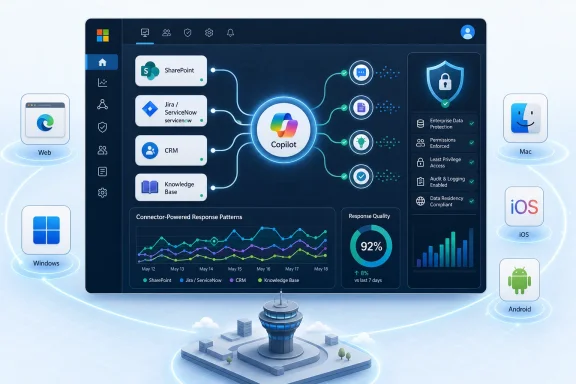
Microsoft is adding a Microsoft 365 admin center usage report for Microsoft 365 Copilot Connectors, with preview targeted for June 2026 and general availability planned for September 2026 across worldwide standard multi-tenant environments on web, desktop, Mac, iOS, and Android. The feature sounds narrow, almost clerical, but it marks an important shift in how Microsoft expects enterprises to govern Copilot. Connectors are where Microsoft 365 Copilot stops being a polished demo over Outlook and Teams and starts touching the messy systems where real business knowledge lives. Reporting is Microsoft’s way of admitting that adoption without observability is not governance.
Copilot Connectors are not glamorous in the way frontier models are glamorous. They are plumbing: links into ticketing systems, wikis, file stores, CRM platforms, knowledge bases, and other repositories that sit outside Microsoft 365 but increasingly define whether Copilot gives a useful answer or a generic one.
That plumbing is also where many organizations will decide whether Copilot is worth its licensing cost. A chatbot that summarizes a Teams thread is convenient; a Copilot instance that can answer a sales engineer’s question using SharePoint, Salesforce, ServiceNow, and an internal product wiki is closer to the pitch Microsoft has been making for enterprise AI.
Until now, much of the admin-side reporting story has been centered on whether people are using Copilot, which apps they use it in, and how adoption trends over time. The new connector report moves the lens from who opened Copilot to what enterprise knowledge Copilot is drawing on. That is a more operational question, and a more dangerous one.
The report Microsoft describes will expose overall connector activity, connector-powered response patterns over time, and user-level connector adoption data. In plain English, admins should get a clearer view of whether connected data sources are actually contributing to Copilot responses and which users are engaging with those capabilities.
That matters because connectors can fail quietly. A connector may be configured, crawled, indexed, and visible in an admin console while still not meaningfully improving user outcomes. Usage reporting cannot prove answer quality, but it can expose the difference between a connector that exists and a connector that is doing work.
That changes the administrative problem. Search relevance is annoying when it is poor, but AI relevance can be misleading when it is poor. If Copilot answers from incomplete connected sources, users may treat partial information as organizational truth.
This is why the phrase “connector powered response patterns” is more interesting than it first appears. Microsoft is not merely promising a count of configured connectors or indexed items. It is pointing toward telemetry that tells administrators whether Copilot’s answers are being influenced by connector-backed knowledge over time.
For IT teams, that can become a new adoption signal. If a company spends weeks configuring a ServiceNow connector and sees little connector-powered response activity, the issue may be user training, permissions, content quality, indexing scope, or simply that employees do not ask questions that invoke that source. Without a report, all of those possibilities blur together.
The report also fits Microsoft’s broader move to make Copilot feel less like a black box. Admins already have readiness and usage reporting, Viva Insights analytics, agent usage reporting, and related controls. Connector reporting fills a specific gap: the external knowledge layer.
The second curve is where connector usage reporting belongs. If Copilot Connectors are enabled but barely used, the organization may be overestimating its AI maturity. If they are heavily used by a small set of departments, the organization may need to expand governance and training before scaling further.
There is also a security subtext. Microsoft’s connector model is built around respecting existing access permissions, but “respects permissions” does not mean “the organization has good permissions.” Copilot makes oversharing easier to notice because it makes retrieval easier to perform. A connector usage report will not fix permissions sprawl, but it may help administrators see which connected sources are becoming part of daily AI workflows.
That visibility is especially important for systems outside Microsoft 365. Many enterprises have spent years treating third-party SaaS repositories as departmental silos. Copilot Connectors make those silos searchable and conversational. The report gives central IT one more way to see whether those silos are becoming enterprise-wide knowledge inputs.
The catch is that visibility can create new tensions. User-level connector adoption data is useful for rollout planning, but it also touches the long-running workplace analytics debate: how much should employers know about individual technology use? Microsoft typically anonymizes or role-gates some admin reporting experiences, but the roadmap wording suggests admins will gain detailed adoption views, not just tenant-level charts.
The feature is also listed for Microsoft Copilot in Microsoft 365 and the Microsoft 365 admin center across Android, desktop, iOS, Mac, and web. That platform spread is less about admins reading charts on every device and more about Microsoft’s claim that connector-backed Copilot usage is not confined to a single surface. Employees can invoke Copilot from many places, and reporting has to follow the service, not the client.
This is consistent with Microsoft’s broader Copilot control system narrative. The company has been building an administrative layer around Copilot that includes readiness checks, usage analytics, agent controls, connector management, and security integrations. The connector usage report is another brick in that wall.
The practical implication is that Microsoft no longer expects organizations to simply buy Copilot licenses and hope productivity happens. It expects them to operate Copilot as a managed enterprise service. That means lifecycle management, adoption campaigns, data hygiene, permission reviews, and usage reporting.
For WindowsForum readers who live in admin centers, that is both welcome and exhausting. Copilot is becoming less of a product you “turn on” and more of a platform you continuously tune.
Connectors are especially vulnerable to this. An organization can announce that Copilot now connects to Jira, ServiceNow, Confluence, or a line-of-business knowledge base, but users may still get better answers from a colleague in chat. The existence of a connector says little about whether users trust it.
A connector usage report should help separate administrative activity from behavioral adoption. If users repeatedly trigger connector-backed responses, that suggests the connected source is discoverable and relevant. If activity drops after an initial spike, that may signal poor answer quality, permission gaps, or a mismatch between the connector and real workflows.
Still, Microsoft should be careful not to oversell usage as value. A connector can be frequently used because Copilot keeps reaching for it, not because it improves the answer. Conversely, a highly valuable connector might be used occasionally for specialized work. Admins will need to treat the report as an investigative tool, not a scoreboard.
The most useful version of this report would let IT correlate connector activity with adoption cohorts, departments, data sources, and time periods. The least useful version would be another static chart that proves only that something happened. Microsoft’s wording suggests trend and user-level detail, but the quality of the experience will depend on how actionable the data really is.
It can also be misused. If connector adoption data becomes another way to rank employees by AI usage, organizations will have turned an operations metric into a surveillance proxy. That is not a Microsoft-only problem; it is a management problem that appears whenever workplace analytics becomes granular.
Microsoft’s existing usage reporting often includes role-based access controls and, in some cases, anonymization defaults. The connector report will need similar care. Admins need enough specificity to troubleshoot adoption and configuration problems, but not a culture where every prompt-adjacent metric becomes a productivity KPI.
The healthier interpretation is operational. If finance users are not using the ERP connector, maybe the connector is not enabled for the right audience. If support engineers are leaning heavily on a knowledge-base connector, maybe that source deserves better curation. If only power users are getting value, the rollout plan may need more examples and training.
The danger is executive oversimplification. “Why is this employee not using Copilot Connectors?” is a worse question than “Which workflows are failing to produce connector-backed value?” The report can support the second question, but organizations may be tempted by the first.
Copilot Connectors drag that mess into the foreground. If a connector indexes a knowledge base full of outdated procedures, Copilot may confidently summarize old processes. If a CRM is inconsistent, Copilot may produce answers that reflect inconsistent data. If access controls are broad, Copilot may make oversharing feel newly immediate.
A usage report cannot clean any of that up. What it can do is identify where the mess matters. A poorly maintained system that nobody uses through Copilot is a backlog item. A poorly maintained system that powers hundreds of Copilot responses a week is a risk.
This is where connector analytics could become genuinely valuable to IT. Instead of guessing which repositories deserve governance attention, admins can focus on sources that are actively shaping AI-assisted work. Usage becomes a prioritization signal.
That is also why Microsoft’s report should not be read as merely an adoption feature. It is a data governance feature wearing an adoption feature’s clothes. The more Copilot depends on connected enterprise content, the more reporting becomes a map of organizational knowledge risk.
Connector reporting belongs in that control tower because connectors sit between Copilot and the non-Microsoft world. They are one of the places where Microsoft’s ecosystem strategy meets customer reality. Few large organizations live entirely inside Microsoft 365, no matter how much Microsoft might prefer it.
By putting this report in the Microsoft 365 admin center, Microsoft is signaling that connector adoption is not just a developer concern or a search administrator concern. It is a tenant-level operational concern. That is the right place for it, even if the admin center becomes more crowded as a result.
The challenge will be integration. Admins should not have to jump between separate reports for Copilot usage, agent usage, connector health, search indexing, and security posture to answer a basic question: “Is Copilot using the right data safely and effectively?” Microsoft is assembling the pieces, but the coherence of the control plane will matter more than the number of dashboards.
This is where smaller details become important. Export options, Graph API availability, retention periods, role requirements, anonymization behavior, and latency will determine whether the report is useful for serious operations or merely acceptable for screenshots in quarterly business reviews.
But enterprise software often changes through reports. A new report formalizes what a vendor thinks customers should manage. Once Microsoft gives admins connector activity and adoption data, it becomes harder for organizations to treat connectors as experimental add-ons. They become measurable infrastructure.
This also gives Microsoft a better story for Copilot return on investment. One of the hardest questions for customers is whether Copilot is delivering value beyond generic productivity anecdotes. Connector usage does not answer that by itself, but it helps organizations show whether Copilot is being used against business-specific knowledge, which is closer to the promised value proposition.
The report may also influence how departments request connectors. Today, a business unit might ask IT to connect a system because “Copilot should know about it.” Tomorrow, IT may be able to ask what happened after the connector went live. Did users engage? Did response patterns change? Did adoption spread?
That feedback loop is essential. Without it, connector sprawl becomes the AI-era version of app sprawl: every system wants integration, few integrations are measured, and nobody knows which ones matter.
That means inventorying connectors, understanding which departments rely on which external systems, and reviewing whether permissions and content quality are fit for AI-assisted retrieval. It also means deciding who should be allowed to see user-level connector adoption data and how that data may be used internally.
Admins should also think about success criteria before the report appears. If a connector is deployed for a support knowledge base, what would healthy usage look like? If a CRM connector is intended for sales teams, which user groups should show adoption? If a connector is rarely used, what troubleshooting path will IT follow?
The worst time to define those answers is after an executive asks why the dashboard looks disappointing. The best time is during preview, when organizations can treat the report as a calibration tool rather than a verdict.
There is a broader Windows ecosystem angle, too. Copilot is increasingly cross-platform at the user surface, but Microsoft 365 administration remains a core part of the Windows IT professional’s daily life. The more Copilot becomes tied to identity, access, endpoint posture, data governance, and productivity telemetry, the more Windows admins inherit AI operations whether or not they asked for them.
 Microsoft Turns Copilot Connectors Into Something IT Can Actually Measure
Copilot Connectors are not glamorous in the way frontier models are glamorous. They are plumbing: links into ticketing systems, wikis, file stores, CRM platforms, knowledge bases, and other repositories that sit outside Microsoft 365 but increasingly define whether Copilot gives a useful answer or a generic one.That plumbing is also where many organizations will decide whether Copilot is worth its licensing cost. A chatbot that summarizes a Teams thread is convenient; a Copilot instance that can answer a sales engineer’s question using SharePoint, Salesforce, ServiceNow, and an internal product wiki is closer to the pitch Microsoft has been making for enterprise AI.
Until now, much of the admin-side reporting story has been centered on whether people are using Copilot, which apps they use it in, and how adoption trends over time. The new connector report moves the lens from who opened Copilot to what enterprise knowledge Copilot is drawing on. That is a more operational question, and a more dangerous one.
The report Microsoft describes will expose overall connector activity, connector-powered response patterns over time, and user-level connector adoption data. In plain English, admins should get a clearer view of whether connected data sources are actually contributing to Copilot responses and which users are engaging with those capabilities.
That matters because connectors can fail quietly. A connector may be configured, crawled, indexed, and visible in an admin console while still not meaningfully improving user outcomes. Usage reporting cannot prove answer quality, but it can expose the difference between a connector that exists and a connector that is doing work.
The Connectors Story Has Always Been About More Than Search
Microsoft’s connector strategy is easy to misread as a search feature with an AI wrapper. The older mental model was Microsoft Search: index third-party content, respect permissions, surface results. Copilot changes the stakes because connected content is no longer merely something a user clicks; it becomes material the model can summarize, synthesize, and cite in answers.That changes the administrative problem. Search relevance is annoying when it is poor, but AI relevance can be misleading when it is poor. If Copilot answers from incomplete connected sources, users may treat partial information as organizational truth.
This is why the phrase “connector powered response patterns” is more interesting than it first appears. Microsoft is not merely promising a count of configured connectors or indexed items. It is pointing toward telemetry that tells administrators whether Copilot’s answers are being influenced by connector-backed knowledge over time.
For IT teams, that can become a new adoption signal. If a company spends weeks configuring a ServiceNow connector and sees little connector-powered response activity, the issue may be user training, permissions, content quality, indexing scope, or simply that employees do not ask questions that invoke that source. Without a report, all of those possibilities blur together.
The report also fits Microsoft’s broader move to make Copilot feel less like a black box. Admins already have readiness and usage reporting, Viva Insights analytics, agent usage reporting, and related controls. Connector reporting fills a specific gap: the external knowledge layer.
Admins Are Being Asked to Govern an Expanding Knowledge Surface
Every Copilot deployment has two adoption curves. One is visible to executives: licensed users, active users, prompts, meetings summarized, documents drafted. The other is visible mostly to IT: which data sources are connected, whether permissions are sane, whether stale repositories are being indexed, and whether sensitive information is appearing in places users did not expect.The second curve is where connector usage reporting belongs. If Copilot Connectors are enabled but barely used, the organization may be overestimating its AI maturity. If they are heavily used by a small set of departments, the organization may need to expand governance and training before scaling further.
There is also a security subtext. Microsoft’s connector model is built around respecting existing access permissions, but “respects permissions” does not mean “the organization has good permissions.” Copilot makes oversharing easier to notice because it makes retrieval easier to perform. A connector usage report will not fix permissions sprawl, but it may help administrators see which connected sources are becoming part of daily AI workflows.
That visibility is especially important for systems outside Microsoft 365. Many enterprises have spent years treating third-party SaaS repositories as departmental silos. Copilot Connectors make those silos searchable and conversational. The report gives central IT one more way to see whether those silos are becoming enterprise-wide knowledge inputs.
The catch is that visibility can create new tensions. User-level connector adoption data is useful for rollout planning, but it also touches the long-running workplace analytics debate: how much should employers know about individual technology use? Microsoft typically anonymizes or role-gates some admin reporting experiences, but the roadmap wording suggests admins will gain detailed adoption views, not just tenant-level charts.
Microsoft’s Timing Shows Copilot Is Leaving the Pilot Phase
The roadmap dates are revealing. Preview in June 2026 and general availability in September 2026 put this feature on a familiar enterprise cadence: gather early telemetry in summer, harden the experience, and land it for broader deployment as organizations plan autumn rollouts and budget cycles.The feature is also listed for Microsoft Copilot in Microsoft 365 and the Microsoft 365 admin center across Android, desktop, iOS, Mac, and web. That platform spread is less about admins reading charts on every device and more about Microsoft’s claim that connector-backed Copilot usage is not confined to a single surface. Employees can invoke Copilot from many places, and reporting has to follow the service, not the client.
This is consistent with Microsoft’s broader Copilot control system narrative. The company has been building an administrative layer around Copilot that includes readiness checks, usage analytics, agent controls, connector management, and security integrations. The connector usage report is another brick in that wall.
The practical implication is that Microsoft no longer expects organizations to simply buy Copilot licenses and hope productivity happens. It expects them to operate Copilot as a managed enterprise service. That means lifecycle management, adoption campaigns, data hygiene, permission reviews, and usage reporting.
For WindowsForum readers who live in admin centers, that is both welcome and exhausting. Copilot is becoming less of a product you “turn on” and more of a platform you continuously tune.
The Real Metric Is Not Whether a Connector Is Enabled
A common failure mode in enterprise software is measuring deployment instead of value. A feature is enabled, a checkbox is green, a dashboard says users are active, and everyone quietly avoids asking whether the work actually improved.Connectors are especially vulnerable to this. An organization can announce that Copilot now connects to Jira, ServiceNow, Confluence, or a line-of-business knowledge base, but users may still get better answers from a colleague in chat. The existence of a connector says little about whether users trust it.
A connector usage report should help separate administrative activity from behavioral adoption. If users repeatedly trigger connector-backed responses, that suggests the connected source is discoverable and relevant. If activity drops after an initial spike, that may signal poor answer quality, permission gaps, or a mismatch between the connector and real workflows.
Still, Microsoft should be careful not to oversell usage as value. A connector can be frequently used because Copilot keeps reaching for it, not because it improves the answer. Conversely, a highly valuable connector might be used occasionally for specialized work. Admins will need to treat the report as an investigative tool, not a scoreboard.
The most useful version of this report would let IT correlate connector activity with adoption cohorts, departments, data sources, and time periods. The least useful version would be another static chart that proves only that something happened. Microsoft’s wording suggests trend and user-level detail, but the quality of the experience will depend on how actionable the data really is.
User-Level Adoption Data Will Be Powerful and Politically Awkward
The phrase “user-level connectors adoption data” is where many admins will lean forward and many privacy teams will raise an eyebrow. In enterprise IT, user-level reporting can be indispensable. It tells admins who needs training, which departments are adopting a feature, and whether expensive capabilities are being used.It can also be misused. If connector adoption data becomes another way to rank employees by AI usage, organizations will have turned an operations metric into a surveillance proxy. That is not a Microsoft-only problem; it is a management problem that appears whenever workplace analytics becomes granular.
Microsoft’s existing usage reporting often includes role-based access controls and, in some cases, anonymization defaults. The connector report will need similar care. Admins need enough specificity to troubleshoot adoption and configuration problems, but not a culture where every prompt-adjacent metric becomes a productivity KPI.
The healthier interpretation is operational. If finance users are not using the ERP connector, maybe the connector is not enabled for the right audience. If support engineers are leaning heavily on a knowledge-base connector, maybe that source deserves better curation. If only power users are getting value, the rollout plan may need more examples and training.
The danger is executive oversimplification. “Why is this employee not using Copilot Connectors?” is a worse question than “Which workflows are failing to produce connector-backed value?” The report can support the second question, but organizations may be tempted by the first.
Connector Reporting Will Expose Data Hygiene Problems Microsoft Cannot Solve for You
The great fiction of enterprise AI is that the model is the hard part. In many deployments, the model is the easy part; the hard part is decades of messy permissions, duplicate content, abandoned sites, stale documentation, and business systems whose data quality depends on who last updated a field.Copilot Connectors drag that mess into the foreground. If a connector indexes a knowledge base full of outdated procedures, Copilot may confidently summarize old processes. If a CRM is inconsistent, Copilot may produce answers that reflect inconsistent data. If access controls are broad, Copilot may make oversharing feel newly immediate.
A usage report cannot clean any of that up. What it can do is identify where the mess matters. A poorly maintained system that nobody uses through Copilot is a backlog item. A poorly maintained system that powers hundreds of Copilot responses a week is a risk.
This is where connector analytics could become genuinely valuable to IT. Instead of guessing which repositories deserve governance attention, admins can focus on sources that are actively shaping AI-assisted work. Usage becomes a prioritization signal.
That is also why Microsoft’s report should not be read as merely an adoption feature. It is a data governance feature wearing an adoption feature’s clothes. The more Copilot depends on connected enterprise content, the more reporting becomes a map of organizational knowledge risk.
Microsoft Is Building the Admin Center Into Copilot’s Control Tower
The Microsoft 365 admin center has always been part dashboard, part maze. Copilot is forcing Microsoft to make it more of a control tower, because AI features do not fit neatly into old product boundaries. A Copilot answer might involve Exchange, SharePoint, Teams, Graph connectors, Purview policies, agent configuration, and third-party data access in a single user interaction.Connector reporting belongs in that control tower because connectors sit between Copilot and the non-Microsoft world. They are one of the places where Microsoft’s ecosystem strategy meets customer reality. Few large organizations live entirely inside Microsoft 365, no matter how much Microsoft might prefer it.
By putting this report in the Microsoft 365 admin center, Microsoft is signaling that connector adoption is not just a developer concern or a search administrator concern. It is a tenant-level operational concern. That is the right place for it, even if the admin center becomes more crowded as a result.
The challenge will be integration. Admins should not have to jump between separate reports for Copilot usage, agent usage, connector health, search indexing, and security posture to answer a basic question: “Is Copilot using the right data safely and effectively?” Microsoft is assembling the pieces, but the coherence of the control plane will matter more than the number of dashboards.
This is where smaller details become important. Export options, Graph API availability, retention periods, role requirements, anonymization behavior, and latency will determine whether the report is useful for serious operations or merely acceptable for screenshots in quarterly business reviews.
The Roadmap Entry Is Small, but the Direction Is Large
Roadmap ID 519571 is not a splashy product launch. It is not a new model, a new app, or a new Copilot-branded surface. It is a report.But enterprise software often changes through reports. A new report formalizes what a vendor thinks customers should manage. Once Microsoft gives admins connector activity and adoption data, it becomes harder for organizations to treat connectors as experimental add-ons. They become measurable infrastructure.
This also gives Microsoft a better story for Copilot return on investment. One of the hardest questions for customers is whether Copilot is delivering value beyond generic productivity anecdotes. Connector usage does not answer that by itself, but it helps organizations show whether Copilot is being used against business-specific knowledge, which is closer to the promised value proposition.
The report may also influence how departments request connectors. Today, a business unit might ask IT to connect a system because “Copilot should know about it.” Tomorrow, IT may be able to ask what happened after the connector went live. Did users engage? Did response patterns change? Did adoption spread?
That feedback loop is essential. Without it, connector sprawl becomes the AI-era version of app sprawl: every system wants integration, few integrations are measured, and nobody knows which ones matter.
Windows Admins Should Read This as a Governance Feature, Not a Dashboard Feature
For sysadmins and Microsoft 365 administrators, the immediate action is not to wait for September and then admire a new chart. The smarter move is to prepare the environment so the report will be meaningful when it arrives.That means inventorying connectors, understanding which departments rely on which external systems, and reviewing whether permissions and content quality are fit for AI-assisted retrieval. It also means deciding who should be allowed to see user-level connector adoption data and how that data may be used internally.
Admins should also think about success criteria before the report appears. If a connector is deployed for a support knowledge base, what would healthy usage look like? If a CRM connector is intended for sales teams, which user groups should show adoption? If a connector is rarely used, what troubleshooting path will IT follow?
The worst time to define those answers is after an executive asks why the dashboard looks disappointing. The best time is during preview, when organizations can treat the report as a calibration tool rather than a verdict.
There is a broader Windows ecosystem angle, too. Copilot is increasingly cross-platform at the user surface, but Microsoft 365 administration remains a core part of the Windows IT professional’s daily life. The more Copilot becomes tied to identity, access, endpoint posture, data governance, and productivity telemetry, the more Windows admins inherit AI operations whether or not they asked for them.
The September Signal Hiding in Microsoft’s Roadmap
This roadmap item gives administrators a concrete date range and a clearer sense of Microsoft’s direction. It is not enough to make Copilot Connectors manageable on its own, but it is enough to start planning around them as measurable infrastructure.- The new report is scheduled to reach preview in June 2026 and general availability in September 2026 for worldwide standard multi-tenant customers.
- The report is designed to show overall connector activity, connector-powered response patterns over time, and user-level connector adoption data.
- The feature matters most for organizations using Copilot with external systems such as ticketing platforms, knowledge bases, wikis, file stores, and CRM tools.
- Admins should treat connector usage as a signal for adoption, data quality, permissions health, and training gaps rather than as a simple productivity ranking.
- The report will be most valuable if Microsoft provides usable exports, clear role controls, sensible privacy defaults, and enough detail to connect activity with operational decisions.
References
- Primary source: Microsoft 365 Roadmap
Published: 2026-06-25T23:15:45.5477468Z
Loading…
www.microsoft.com - Official source: learn.microsoft.com
Loading…
learn.microsoft.com - Official source: support.microsoft.com
Understand Copilot connectors | Microsoft Support
Understand Copilot connectors support.microsoft.com
- Official source: developer.microsoft.com
Loading…
developer.microsoft.com - Related coverage: mnccc.gov
Loading…
mnccc.gov - Related coverage: lepide.com
Loading…
www.lepide.com