
Hostinger published a June 25, 2026 comparison naming 14 VPS hosting providers for 2026, ranking itself first while also identifying Liquid Web, Scaleway, OVHcloud, UltaHost, Hetzner, Kamatera, DigitalOcean, Contabo, Vultr, and others as credible alternatives for different workloads. The list is useful, but not neutral in the way a buyer might assume from a “tested and compared” headline. Its real value is not the winner; it is the taxonomy of VPS buying in 2026. The modern VPS market has stopped being a simple ladder between shared hosting and dedicated servers, and has become a messy contest between convenience, sovereignty, automation, raw compute, and hidden operational cost.
The old VPS pitch was simple: you wanted more control than shared hosting, but you did not want to rent an entire physical machine. A virtual private server gave you root access, reserved resources, and enough isolation to run a serious site or application without committing to dedicated hardware. That definition still works, but it no longer explains the buying decision.
The 2026 VPS market has split into camps. One camp sells management: updates, monitoring, migrations, control panels, malware scanning, and someone to blame when a kernel update ruins your morning. Another sells infrastructure primitives: APIs, hourly billing, Terraform support, floating IPs, private networks, custom images, object storage, Kubernetes, and enough knobs to make a cloud engineer feel at home.
That difference matters more than benchmark charts. A cheap unmanaged VPS can be a bargain for a developer who already knows how to harden SSH, configure firewalls, tune a database, and restore from snapshots. The same server can be a liability for a small business owner who simply needs WooCommerce, invoices, email deliverability, backups, and sleep.
Hostinger’s comparison gets this broad segmentation right. Liquid Web and UltaHost are framed as managed options. Hetzner, Vultr, and DigitalOcean are treated as developer-first platforms. Kamatera, Scaleway, and OVHcloud sit closer to cloud infrastructure. Contabo and Time4VPS compete heavily on resources per dollar. That is the real map buyers need.
But the list also illustrates the industry’s biggest trap: providers increasingly use the same vocabulary while selling very different responsibilities. “VPS hosting” can mean a beginner-friendly dashboard with templates and AI command help, or it can mean an empty Linux box with root access and a billing meter. Those are not the same product, even if both show up in the same comparison table.
The company’s pitch is clear. Hostinger wants to be the approachable VPS: KVM virtualization, NVMe storage, root access, backups, snapshots, a dedicated IP, global regions, a custom control panel, one-click app templates, and an AI assistant called Kodee to help users write commands or manage routine server tasks. In a market where unmanaged VPS hosting can feel hostile to newcomers, that is a coherent strategy.
The interesting part is that Hostinger is not trying to become Liquid Web. It is still described as self-managed, with support available for general questions rather than full administration. That positions it between two worlds: friendlier than a bare cloud instance, but not a replacement for a managed operations team.
That middle ground is valuable, but it is also where expectations get dangerous. AI-assisted terminals and one-click application catalogs can reduce friction, but they do not remove responsibility. If a user deploys Docker, n8n, a database, and a public-facing app, someone still has to patch the OS, rotate secrets, monitor logs, secure exposed ports, test backups, and understand what root access can break.
Hostinger’s comparison therefore doubles as a case study in where hosting companies see growth. The next wave of VPS customers is not only sysadmins and Linux hobbyists. It includes small agencies, indie SaaS builders, automation users, AI tinkerers, and WordPress refugees who have outgrown shared hosting but do not want to become infrastructure engineers.
That sounds minor until you remember how many VPS failures begin with a copy-pasted command from a forum thread. New users often know the outcome they want — install a firewall, deploy a Node app, configure Nginx, enable SSL — but not the implications of each command. An AI helper can lower the barrier by explaining syntax, generating commands, and turning an intimidating terminal into something closer to an interactive checklist.
The risk is that AI assistance may make root access feel safer than it is. A wrong command generated confidently is still a wrong command. A firewall rule that locks out SSH, a recursive permission change in the wrong directory, or an exposed admin panel does not become harmless because a chatbot helped create it.
For WindowsForum readers, the parallel is familiar. PowerShell made Windows administration more powerful and more scriptable, but it did not make every script safe. VPS AI assistants should be viewed the same way: useful accelerators for people who understand the blast radius, dangerous shortcuts for people who do not.
The better framing is that AI tools help with operator ergonomics. They reduce the blank-page problem and may help users learn by doing. They do not replace operational maturity, security review, or tested recovery procedures.
A managed VPS provider is not selling only CPU cores and memory. It is selling response guarantees, migration assistance, control panel support, monitoring, patching help, and institutional knowledge. That is less exciting than a chart showing 8 vCPUs and 32 GB of RAM, but it is often the thing businesses actually need.
UltaHost appears in a similar lane, though with a more affordability-focused pitch. Its appeal is obvious for users moving from shared hosting to VPS: managed setup, multiple control panel options, Windows and Linux support, security features, backups, and snapshots. It tries to make VPS hosting feel less like a sysadmin apprenticeship.
The catch is that “managed” is not a universal standard. Some providers manage the OS but not application code. Some help with control panels but not custom stacks. Some will migrate websites but not debug a broken Docker Compose deployment. Buyers need to read the support boundary more carefully than the feature table.
This is especially true for Windows workloads. A provider that supports Windows Server images is not necessarily a provider that understands your IIS configuration, Active Directory integration, SQL Server licensing, or RDP hardening. For small businesses, the phrase “Windows VPS” can sound like a turnkey remote desktop in the cloud. In practice, it may be just a licensed server instance waiting for you to secure it.
Scaleway’s positioning is the clearest. It is not merely offering virtual machines; it is offering European cloud infrastructure, EU data centers, developer tooling, and a sovereignty story. For teams dealing with privacy-sensitive workloads, procurement rules, or customers who care where data sits, that can matter as much as benchmark performance.
OVHcloud plays a broader game. It has the scale and global footprint to compete with mainstream cloud providers while keeping a strong European identity. Anti-DDoS protection by default, NVMe storage, IPv4 and IPv6 support, and a broad operating system range make it attractive to developers and businesses that want a large provider without defaulting to a US hyperscaler.
TransIP and Time4VPS are more regionally constrained, but that can be a feature for the right buyer. If your audience is European and your compliance model favors EU residency, a narrower footprint is not automatically a weakness. It only becomes a problem when your users, staff, or redundancy requirements become global.
Hetzner is the most interesting of the European players because it has become a developer favorite on price-to-performance. It is not beginner-friendly in the managed-hosting sense, and its cloud servers are not marketed as Windows-first machines. But for Linux workloads run by people who know what they are doing, Hetzner’s appeal is obvious: strong resources, predictable pricing, automation, and a reputation for value.
DigitalOcean’s Droplets remain one of the clearest examples of this middle market. They are simple enough for developers who do not want AWS complexity, but mature enough to support real application infrastructure. The move to per-second billing in 2026 strengthens that cloud-native appeal, especially for CI/CD jobs, test environments, batch workloads, and short-lived infrastructure.
Vultr is competing on breadth and speed. Its global region count, fast provisioning, multiple compute classes, and newer VX1 line point at buyers who want low-friction deployment without building around a giant hyperscaler. The performance-per-dollar language is aggressive, but the broader message is more important: VPS vendors know they are no longer compared only with one another. They are compared with AWS Lightsail, EC2, Azure VMs, Google Compute Engine, and every platform-as-a-service abstraction above them.
Kamatera goes even further toward configurability. Instead of forcing users into a few fixed plans, it lets them shape CPU, RAM, storage, operating system, and location with fine granularity. That is attractive for teams that understand their workload profile, but less friendly to buyers who want a simple “good, better, best” plan.
The cloud-like VPS model rewards technical confidence. It is excellent for reproducible infrastructure, blue-green deployments, staging environments, and distributed applications. It is less excellent for users who believe a low monthly starting price includes the human labor required to operate a production service.
There is nothing wrong with that. In fact, this is one of the reasons VPS hosting remains compelling in a world full of serverless platforms and managed databases. Sometimes you just need a machine with RAM, storage, root access, and a predictable bill.
But resource-heavy budget plans often shift cost into other places. Backups may be paid add-ons. Premium locations may carry surcharges. Faster storage or networking may not be included. Support may be limited. The headline monthly price can be accurate and still fail to describe the real cost of running a safe production workload.
This is where buyers need to separate capacity from resilience. A server with abundant RAM but no included backups is not automatically a better deal than a smaller plan with snapshots and reliable restore tooling. A cheap instance in a single data center may be fine for a lab and unacceptable for a revenue-generating service.
The same principle applies to “unlimited” or “unmetered” language. Hosting buyers have learned this lesson repeatedly across shared hosting, bandwidth, email, and storage. Unlimited rarely means infinite. It usually means acceptable use until you become expensive.
That matters because Windows VPS use cases are different from generic Linux hosting. A Windows Server instance may be used for Remote Desktop access, .NET applications, IIS, SQL Server workloads, accounting software, automation tools, test labs, or legacy business applications. Those scenarios bring licensing, patching, firewalling, RDP exposure, and identity management concerns that do not show up in a Linux-first feature list.
Hostinger’s listed limitation — no Windows or custom image support — is therefore not a footnote. It is a hard disqualifier for users who need a Windows VPS or specialized OS image. The same applies to Hetzner’s lack of official Windows support for cloud servers, even if determined users find workarounds.
Providers such as Kamatera, UltaHost, OVHcloud, Hostwinds, Cloudzy, and Time4VPS may be more relevant to Windows users depending on image availability, licensing, data center choice, and support model. But even there, the buyer should ask what is actually included. Does the provider patch the OS? Is Windows licensing bundled or separate? Are backups application-consistent? Is RDP protected by default? Can you attach private networking or a firewall before exposing the server?
The answer often determines whether a Windows VPS is a practical business tool or a public-facing liability with a monthly invoice.
Vultr’s broad global footprint is an advantage for developers who want to place workloads near users across continents. Kamatera’s regional spread gives businesses more flexibility in matching infrastructure to customers. OVHcloud’s owned data center network gives it a different kind of control story. Scaleway, TransIP, and Time4VPS lean into Europe, each with different trade-offs.
Hostinger’s global-region story is also part of its value pitch. For a small business or developer, simply choosing North America, South America, Europe, or Asia without re-architecting an application can be enough. Not every project needs multi-region failover; many simply need not to host a Canadian audience from a distant region by accident.
Still, location flexibility can be oversold. A provider with many data centers is not automatically better if the plan you want is unavailable in the region you need, if backups remain region-bound, or if moving regions requires downtime and migration work. Buyers should verify not just where a provider operates, but where a specific plan, storage class, IP feature, or Windows image is available.
The practical rule is simple: choose the data center based on users, administration, compliance, and recovery — not just the country flag that looks best in a comparison table.
Snapshots are useful for capturing a machine before risky changes. Scheduled backups are essential for recovering from deletion, compromise, bad updates, or application failure. But a backup plan only becomes real when someone has restored from it, measured the time required, and confirmed the application returns in a usable state.
This is where the managed-versus-unmanaged divide becomes concrete. On a self-managed VPS, the provider may give you the mechanism, but you own the recovery plan. You decide whether database dumps are consistent, whether object storage is included, whether secrets are backed up safely, and whether a snapshot of a running server is enough.
For databases and transactional applications, naive snapshots can be risky. A filesystem-level copy may not capture the application state cleanly unless the database is quiesced or designed for crash consistency. That is not a reason to avoid VPS hosting; it is a reason to treat backups as architecture, not decoration.
Security works the same way. DDoS protection, malware scanning, firewall controls, hardened PHP, and monitoring are useful. They are not substitutes for patch discipline, least-privilege access, key-based authentication, log review, vulnerability management, and a plan for when credentials leak.
It can mean vertical scaling: moving from 2 GB to 8 GB of RAM, adding vCPUs, or increasing storage. That is the simplest and most common VPS upgrade path. It can also mean horizontal scaling: adding more servers behind a load balancer. That requires application design, shared storage or stateless services, database planning, and DNS or routing changes.
It can mean elastic cloud scaling, where instances are created and destroyed by automation. That is more common in cloud-like VPS platforms such as DigitalOcean, Vultr, Scaleway, and Kamatera than in traditional managed hosting. Or it can simply mean that a provider has bigger plans you can buy later.
Buyers should be suspicious of vague scalability claims. A WordPress site can often scale vertically for a long time. A SaaS application may need separate app, worker, database, cache, and queue layers. A game server may care more about single-thread performance and network quality than generic vCPU count. A storage-heavy backup node may care about disk pricing and egress rules.
This is why the best VPS provider cannot be selected by rank alone. The right answer depends on the workload’s failure modes.
Hostinger’s weakness is Windows and custom-image flexibility. Liquid Web’s weakness is price. Scaleway’s weakness is global reach compared with US-centric clouds. OVHcloud’s weakness is its unmanaged-by-design approach. UltaHost’s weakness is renewal pricing and plan caveats. TransIP’s weakness is geography and support hours. Hetzner’s weakness is beginner friendliness and Windows support. DigitalOcean’s weakness is that managed service is not the default. Contabo’s weakness is add-on cost. Time4VPS’s weakness is that some essentials are paid extras.
Those weaknesses are more useful than the strengths. Strengths tell you why a provider wants to be bought. Weaknesses tell you who should walk away.
This is also where independent testing would matter most. Claims about uptime guarantees, network speed, support response, and performance under sustained load should ideally be measured across identical workloads and regions. Vendor-authored comparisons can describe features, but they rarely punish the author’s own product with the severity an independent reviewer would.
Still, the article’s broad conclusions line up with the market’s current shape. There is no universal VPS champion. There are only better fits for different operators.
If the workload is a hobby project, the answer may be acceptable downtime and a manual restore. If it is an ecommerce site, the answer may require managed support, tested backups, monitoring, and a provider with real response guarantees. If it is a developer platform, the answer may require infrastructure-as-code, snapshots, private networking, and fast instance replacement. If it is a Windows business app, the answer may require licensing clarity, RDP hardening, and support that understands Windows Server.
Price still matters, but it should be evaluated after the operational model. A $5 server can be a brilliant deal if the user is competent and the workload is disposable. It can be an expensive mistake if it hosts customer data without backups, monitoring, or security hygiene.
The modern VPS buyer is not just renting compute. They are choosing a division of labor between themselves and the provider. That division is the product.
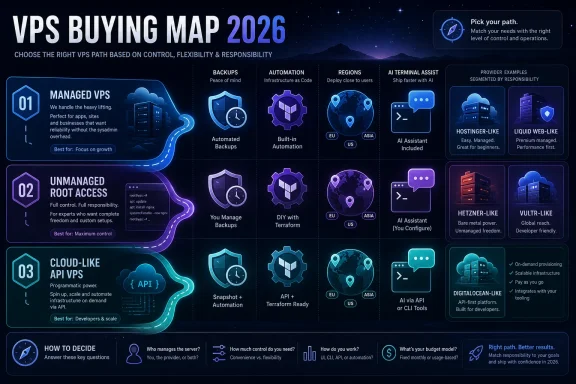 The Best VPS Is Now a Question of Who Does the Work
The old VPS pitch was simple: you wanted more control than shared hosting, but you did not want to rent an entire physical machine. A virtual private server gave you root access, reserved resources, and enough isolation to run a serious site or application without committing to dedicated hardware. That definition still works, but it no longer explains the buying decision.The 2026 VPS market has split into camps. One camp sells management: updates, monitoring, migrations, control panels, malware scanning, and someone to blame when a kernel update ruins your morning. Another sells infrastructure primitives: APIs, hourly billing, Terraform support, floating IPs, private networks, custom images, object storage, Kubernetes, and enough knobs to make a cloud engineer feel at home.
That difference matters more than benchmark charts. A cheap unmanaged VPS can be a bargain for a developer who already knows how to harden SSH, configure firewalls, tune a database, and restore from snapshots. The same server can be a liability for a small business owner who simply needs WooCommerce, invoices, email deliverability, backups, and sleep.
Hostinger’s comparison gets this broad segmentation right. Liquid Web and UltaHost are framed as managed options. Hetzner, Vultr, and DigitalOcean are treated as developer-first platforms. Kamatera, Scaleway, and OVHcloud sit closer to cloud infrastructure. Contabo and Time4VPS compete heavily on resources per dollar. That is the real map buyers need.
But the list also illustrates the industry’s biggest trap: providers increasingly use the same vocabulary while selling very different responsibilities. “VPS hosting” can mean a beginner-friendly dashboard with templates and AI command help, or it can mean an empty Linux box with root access and a billing meter. Those are not the same product, even if both show up in the same comparison table.
Hostinger’s Own Ranking Is the Least Surprising Part
Hostinger placing Hostinger first is not scandalous; it is expected. The article is hosted on Hostinger’s site and co-authored by Hostinger’s Head of VPS, which makes it closer to a vendor-authored buying guide than an independent lab review. That does not automatically make the information useless, but it changes how readers should consume it.The company’s pitch is clear. Hostinger wants to be the approachable VPS: KVM virtualization, NVMe storage, root access, backups, snapshots, a dedicated IP, global regions, a custom control panel, one-click app templates, and an AI assistant called Kodee to help users write commands or manage routine server tasks. In a market where unmanaged VPS hosting can feel hostile to newcomers, that is a coherent strategy.
The interesting part is that Hostinger is not trying to become Liquid Web. It is still described as self-managed, with support available for general questions rather than full administration. That positions it between two worlds: friendlier than a bare cloud instance, but not a replacement for a managed operations team.
That middle ground is valuable, but it is also where expectations get dangerous. AI-assisted terminals and one-click application catalogs can reduce friction, but they do not remove responsibility. If a user deploys Docker, n8n, a database, and a public-facing app, someone still has to patch the OS, rotate secrets, monitor logs, secure exposed ports, test backups, and understand what root access can break.
Hostinger’s comparison therefore doubles as a case study in where hosting companies see growth. The next wave of VPS customers is not only sysadmins and Linux hobbyists. It includes small agencies, indie SaaS builders, automation users, AI tinkerers, and WordPress refugees who have outgrown shared hosting but do not want to become infrastructure engineers.
The AI Terminal Is a Feature, Not an Admin
The most 2026 detail in Hostinger’s pitch is not NVMe storage or bandwidth. It is the AI assistant. Kodee and the AI Web terminal are presented as ways to help users write commands, configure settings, and perform routine server tasks without leaving the browser.That sounds minor until you remember how many VPS failures begin with a copy-pasted command from a forum thread. New users often know the outcome they want — install a firewall, deploy a Node app, configure Nginx, enable SSL — but not the implications of each command. An AI helper can lower the barrier by explaining syntax, generating commands, and turning an intimidating terminal into something closer to an interactive checklist.
The risk is that AI assistance may make root access feel safer than it is. A wrong command generated confidently is still a wrong command. A firewall rule that locks out SSH, a recursive permission change in the wrong directory, or an exposed admin panel does not become harmless because a chatbot helped create it.
For WindowsForum readers, the parallel is familiar. PowerShell made Windows administration more powerful and more scriptable, but it did not make every script safe. VPS AI assistants should be viewed the same way: useful accelerators for people who understand the blast radius, dangerous shortcuts for people who do not.
The better framing is that AI tools help with operator ergonomics. They reduce the blank-page problem and may help users learn by doing. They do not replace operational maturity, security review, or tested recovery procedures.
Managed VPS Still Exists Because Time Is More Expensive Than RAM
Liquid Web’s place near the top of the comparison is a reminder that the VPS market is not only a race to the lowest monthly price. Managed hosting remains expensive because people are expensive. For enterprises, agencies, and commerce-heavy sites, the price of support can be trivial next to the cost of downtime.A managed VPS provider is not selling only CPU cores and memory. It is selling response guarantees, migration assistance, control panel support, monitoring, patching help, and institutional knowledge. That is less exciting than a chart showing 8 vCPUs and 32 GB of RAM, but it is often the thing businesses actually need.
UltaHost appears in a similar lane, though with a more affordability-focused pitch. Its appeal is obvious for users moving from shared hosting to VPS: managed setup, multiple control panel options, Windows and Linux support, security features, backups, and snapshots. It tries to make VPS hosting feel less like a sysadmin apprenticeship.
The catch is that “managed” is not a universal standard. Some providers manage the OS but not application code. Some help with control panels but not custom stacks. Some will migrate websites but not debug a broken Docker Compose deployment. Buyers need to read the support boundary more carefully than the feature table.
This is especially true for Windows workloads. A provider that supports Windows Server images is not necessarily a provider that understands your IIS configuration, Active Directory integration, SQL Server licensing, or RDP hardening. For small businesses, the phrase “Windows VPS” can sound like a turnkey remote desktop in the cloud. In practice, it may be just a licensed server instance waiting for you to secure it.
Europe Is Selling More Than Latency
Scaleway, OVHcloud, TransIP, Hetzner, and Time4VPS all benefit from a trend that has grown larger than traditional hosting: European infrastructure as a selling point. Data sovereignty, jurisdiction, regulatory comfort, and regional trust are now part of the VPS decision.Scaleway’s positioning is the clearest. It is not merely offering virtual machines; it is offering European cloud infrastructure, EU data centers, developer tooling, and a sovereignty story. For teams dealing with privacy-sensitive workloads, procurement rules, or customers who care where data sits, that can matter as much as benchmark performance.
OVHcloud plays a broader game. It has the scale and global footprint to compete with mainstream cloud providers while keeping a strong European identity. Anti-DDoS protection by default, NVMe storage, IPv4 and IPv6 support, and a broad operating system range make it attractive to developers and businesses that want a large provider without defaulting to a US hyperscaler.
TransIP and Time4VPS are more regionally constrained, but that can be a feature for the right buyer. If your audience is European and your compliance model favors EU residency, a narrower footprint is not automatically a weakness. It only becomes a problem when your users, staff, or redundancy requirements become global.
Hetzner is the most interesting of the European players because it has become a developer favorite on price-to-performance. It is not beginner-friendly in the managed-hosting sense, and its cloud servers are not marketed as Windows-first machines. But for Linux workloads run by people who know what they are doing, Hetzner’s appeal is obvious: strong resources, predictable pricing, automation, and a reputation for value.
The Hyperscaler Shadow Hangs Over Every VPS Plan
DigitalOcean, Vultr, Kamatera, Scaleway, OVHcloud, and Hetzner all occupy the strange territory between VPS hosting and cloud computing. They sell virtual machines, but the surrounding ecosystem increasingly resembles public cloud: APIs, private networking, load balancers, object storage, snapshots, firewalls, Kubernetes, GPU instances, and usage-based billing.DigitalOcean’s Droplets remain one of the clearest examples of this middle market. They are simple enough for developers who do not want AWS complexity, but mature enough to support real application infrastructure. The move to per-second billing in 2026 strengthens that cloud-native appeal, especially for CI/CD jobs, test environments, batch workloads, and short-lived infrastructure.
Vultr is competing on breadth and speed. Its global region count, fast provisioning, multiple compute classes, and newer VX1 line point at buyers who want low-friction deployment without building around a giant hyperscaler. The performance-per-dollar language is aggressive, but the broader message is more important: VPS vendors know they are no longer compared only with one another. They are compared with AWS Lightsail, EC2, Azure VMs, Google Compute Engine, and every platform-as-a-service abstraction above them.
Kamatera goes even further toward configurability. Instead of forcing users into a few fixed plans, it lets them shape CPU, RAM, storage, operating system, and location with fine granularity. That is attractive for teams that understand their workload profile, but less friendly to buyers who want a simple “good, better, best” plan.
The cloud-like VPS model rewards technical confidence. It is excellent for reproducible infrastructure, blue-green deployments, staging environments, and distributed applications. It is less excellent for users who believe a low monthly starting price includes the human labor required to operate a production service.
Cheap Resources Are Not the Same as Cheap Operations
Contabo and Time4VPS represent another durable segment: lots of resources for not much money. This is the part of the VPS market that attracts game servers, hobby labs, test environments, storage-heavy projects, self-hosters, and budget-constrained developers who know exactly how to squeeze value out of a box.There is nothing wrong with that. In fact, this is one of the reasons VPS hosting remains compelling in a world full of serverless platforms and managed databases. Sometimes you just need a machine with RAM, storage, root access, and a predictable bill.
But resource-heavy budget plans often shift cost into other places. Backups may be paid add-ons. Premium locations may carry surcharges. Faster storage or networking may not be included. Support may be limited. The headline monthly price can be accurate and still fail to describe the real cost of running a safe production workload.
This is where buyers need to separate capacity from resilience. A server with abundant RAM but no included backups is not automatically a better deal than a smaller plan with snapshots and reliable restore tooling. A cheap instance in a single data center may be fine for a lab and unacceptable for a revenue-generating service.
The same principle applies to “unlimited” or “unmetered” language. Hosting buyers have learned this lesson repeatedly across shared hosting, bandwidth, email, and storage. Unlimited rarely means infinite. It usually means acceptable use until you become expensive.
Windows Users Need to Read the Fine Print Twice
For WindowsForum’s audience, the most important omission in many VPS comparisons is how uneven Windows support remains. Some providers support Windows Server directly. Some allow custom images. Some do not officially support Windows on cloud instances. Some support it only with additional licensing fees. Some make it technically possible but operationally awkward.That matters because Windows VPS use cases are different from generic Linux hosting. A Windows Server instance may be used for Remote Desktop access, .NET applications, IIS, SQL Server workloads, accounting software, automation tools, test labs, or legacy business applications. Those scenarios bring licensing, patching, firewalling, RDP exposure, and identity management concerns that do not show up in a Linux-first feature list.
Hostinger’s listed limitation — no Windows or custom image support — is therefore not a footnote. It is a hard disqualifier for users who need a Windows VPS or specialized OS image. The same applies to Hetzner’s lack of official Windows support for cloud servers, even if determined users find workarounds.
Providers such as Kamatera, UltaHost, OVHcloud, Hostwinds, Cloudzy, and Time4VPS may be more relevant to Windows users depending on image availability, licensing, data center choice, and support model. But even there, the buyer should ask what is actually included. Does the provider patch the OS? Is Windows licensing bundled or separate? Are backups application-consistent? Is RDP protected by default? Can you attach private networking or a firewall before exposing the server?
The answer often determines whether a Windows VPS is a practical business tool or a public-facing liability with a monthly invoice.
The Data Center Map Is a Performance Feature
Data center location used to be treated as a secondary detail. In 2026, it is a core product attribute. Latency affects not only website load times, but also SSH responsiveness, RDP usability, API performance, database round trips, replication lag, and the perceived quality of admin work.Vultr’s broad global footprint is an advantage for developers who want to place workloads near users across continents. Kamatera’s regional spread gives businesses more flexibility in matching infrastructure to customers. OVHcloud’s owned data center network gives it a different kind of control story. Scaleway, TransIP, and Time4VPS lean into Europe, each with different trade-offs.
Hostinger’s global-region story is also part of its value pitch. For a small business or developer, simply choosing North America, South America, Europe, or Asia without re-architecting an application can be enough. Not every project needs multi-region failover; many simply need not to host a Canadian audience from a distant region by accident.
Still, location flexibility can be oversold. A provider with many data centers is not automatically better if the plan you want is unavailable in the region you need, if backups remain region-bound, or if moving regions requires downtime and migration work. Buyers should verify not just where a provider operates, but where a specific plan, storage class, IP feature, or Windows image is available.
The practical rule is simple: choose the data center based on users, administration, compliance, and recovery — not just the country flag that looks best in a comparison table.
Backups Are the Feature Everyone Praises and Too Few People Test
Nearly every VPS provider now mentions backups, snapshots, or both. That is progress, but it can create a false sense of safety. Backup availability is not the same as restore confidence.Snapshots are useful for capturing a machine before risky changes. Scheduled backups are essential for recovering from deletion, compromise, bad updates, or application failure. But a backup plan only becomes real when someone has restored from it, measured the time required, and confirmed the application returns in a usable state.
This is where the managed-versus-unmanaged divide becomes concrete. On a self-managed VPS, the provider may give you the mechanism, but you own the recovery plan. You decide whether database dumps are consistent, whether object storage is included, whether secrets are backed up safely, and whether a snapshot of a running server is enough.
For databases and transactional applications, naive snapshots can be risky. A filesystem-level copy may not capture the application state cleanly unless the database is quiesced or designed for crash consistency. That is not a reason to avoid VPS hosting; it is a reason to treat backups as architecture, not decoration.
Security works the same way. DDoS protection, malware scanning, firewall controls, hardened PHP, and monitoring are useful. They are not substitutes for patch discipline, least-privilege access, key-based authentication, log review, vulnerability management, and a plan for when credentials leak.
The Marketing Word “Scalable” Hides Several Different Products
Every provider wants to be scalable. The word appears so often in hosting copy that it has almost stopped meaning anything. In practice, scalability can mean at least four different things.It can mean vertical scaling: moving from 2 GB to 8 GB of RAM, adding vCPUs, or increasing storage. That is the simplest and most common VPS upgrade path. It can also mean horizontal scaling: adding more servers behind a load balancer. That requires application design, shared storage or stateless services, database planning, and DNS or routing changes.
It can mean elastic cloud scaling, where instances are created and destroyed by automation. That is more common in cloud-like VPS platforms such as DigitalOcean, Vultr, Scaleway, and Kamatera than in traditional managed hosting. Or it can simply mean that a provider has bigger plans you can buy later.
Buyers should be suspicious of vague scalability claims. A WordPress site can often scale vertically for a long time. A SaaS application may need separate app, worker, database, cache, and queue layers. A game server may care more about single-thread performance and network quality than generic vCPU count. A storage-heavy backup node may care about disk pricing and egress rules.
This is why the best VPS provider cannot be selected by rank alone. The right answer depends on the workload’s failure modes.
The Hostinger List Is Useful If You Read It Against Itself
The most productive way to read Hostinger’s comparison is not as a coronation of Hostinger. It is to read the list against its own categories. Each provider’s weakness tells you what market segment it actually serves.Hostinger’s weakness is Windows and custom-image flexibility. Liquid Web’s weakness is price. Scaleway’s weakness is global reach compared with US-centric clouds. OVHcloud’s weakness is its unmanaged-by-design approach. UltaHost’s weakness is renewal pricing and plan caveats. TransIP’s weakness is geography and support hours. Hetzner’s weakness is beginner friendliness and Windows support. DigitalOcean’s weakness is that managed service is not the default. Contabo’s weakness is add-on cost. Time4VPS’s weakness is that some essentials are paid extras.
Those weaknesses are more useful than the strengths. Strengths tell you why a provider wants to be bought. Weaknesses tell you who should walk away.
This is also where independent testing would matter most. Claims about uptime guarantees, network speed, support response, and performance under sustained load should ideally be measured across identical workloads and regions. Vendor-authored comparisons can describe features, but they rarely punish the author’s own product with the severity an independent reviewer would.
Still, the article’s broad conclusions line up with the market’s current shape. There is no universal VPS champion. There are only better fits for different operators.
The 2026 VPS Shortlist Should Start With the Failure Scenario
A buyer choosing a VPS in 2026 should begin with a less glamorous question: what happens when this server fails at the worst possible time? That question cuts through most marketing.If the workload is a hobby project, the answer may be acceptable downtime and a manual restore. If it is an ecommerce site, the answer may require managed support, tested backups, monitoring, and a provider with real response guarantees. If it is a developer platform, the answer may require infrastructure-as-code, snapshots, private networking, and fast instance replacement. If it is a Windows business app, the answer may require licensing clarity, RDP hardening, and support that understands Windows Server.
Price still matters, but it should be evaluated after the operational model. A $5 server can be a brilliant deal if the user is competent and the workload is disposable. It can be an expensive mistake if it hosts customer data without backups, monitoring, or security hygiene.
The modern VPS buyer is not just renting compute. They are choosing a division of labor between themselves and the provider. That division is the product.
The Real 2026 Buying Test Is Whether the Server Still Makes Sense on a Bad Day
The Hostinger comparison gives shoppers a long list, but the practical shortlist is much smaller once you match providers to risk, workload, and skill level. The table stakes are no longer just CPU, RAM, and SSD storage. They are support boundaries, recovery tooling, automation, jurisdiction, Windows support, and the total cost after add-ons.- Hostinger is most compelling for users who want a friendlier self-managed VPS with AI-assisted tooling, but it is not a fit for Windows Server or custom-image workloads.
- Liquid Web and UltaHost make the most sense when support and managed operations matter more than squeezing every dollar out of raw resources.
- Hetzner, Vultr, and DigitalOcean are strongest for developers who prefer automation, documentation, and control over hand-holding.
- Scaleway, OVHcloud, TransIP, and Time4VPS deserve attention from European buyers who care about data residency, latency, or regional infrastructure.
- Contabo and Time4VPS can be attractive for resource-heavy budget projects, but buyers should price backups, storage, networking, and support before declaring victory.
- Windows VPS buyers should treat OS support, licensing, custom images, RDP exposure, and provider support scope as first-order requirements, not minor plan details.
References
- Primary source: Hostinger
Published: 2026-06-25T12:40:10.840307
Loading…
www.hostinger.com - Related coverage: techradar.com
Loading…
www.techradar.com - Related coverage: hosting-ranked.com
Loading…
hosting-ranked.com - Related coverage: mehosting.com
Loading…
mehosting.com - Related coverage: hosting-atlas.com
Loading…
hosting-atlas.com - Related coverage: vpsrated.com
Loading…
www.vpsrated.com
- Related coverage: linuxteck.com
Loading…
www.linuxteck.com