
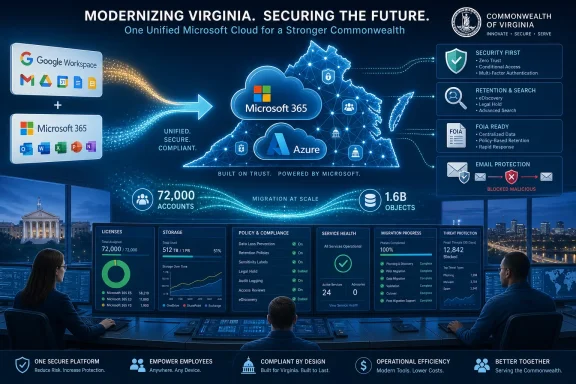
NTT DATA says it helped Virginia’s IT agency migrate Commonwealth agencies from a split Google Workspace and Microsoft 365 environment to Microsoft 365 on Azure, moving more than 72,000 accounts and 1.6 billion objects in under a year. The headline number is impressive, but the more interesting story is what Virginia chose to simplify: not just email, files, and chat, but the operating model beneath them. This was a consolidation project dressed as a productivity migration. For state government IT, that distinction matters.
For years, many public-sector technology environments have treated collaboration software as a local preference problem. One agency prefers Google Workspace, another is deep in Microsoft 365, a third has accumulated file shares, mailbox archives, bespoke workflows, and third-party compliance tools around whatever stack happened to win the last procurement cycle. That arrangement can feel flexible from the inside, but at Commonwealth scale it becomes a tax on every shared process.
Virginia’s move, as described by NTT DATA, was triggered by a mandate to reduce complexity and licensing costs after a new governor took office. That is the kind of instruction that sounds mundane until it hits the reality of state agencies with independent missions, separate histories, different risk profiles, and different tolerance for disruption. A modern state is not one enterprise with a single business unit; it is a federation of public services that only looks unified from the outside.
The decision to move all agencies to Microsoft 365 hosted on Azure therefore should not be read as a simple preference for Microsoft over Google. It is a bet that the cost of fragmented collaboration had become higher than the cost of standardizing on one cloud platform. In government IT, where records requests, cybersecurity mandates, and cross-agency coordination are not optional, that is a serious calculation.
The case study’s strongest claim is not that Microsoft 365 is inherently better than the tools it replaced. It is that Virginia wanted one control plane for collaboration, security policy, storage, reporting, and future endpoint management. That is the quiet logic behind many public-sector cloud projects now: the office suite is no longer just an office suite.
Moving people is politically hard. Moving their digital residue is technically hard. A user can be trained to open Teams instead of another chat tool, but a missing archive folder, broken permission inheritance, malformed calendar invite, or lost shared document can quickly turn a migration into a help desk bonfire.
NTT DATA says it approached the work agency by agency, rather than treating the Commonwealth as a single bulk cutover. That is the right instinct. In a state environment, the Department of Transportation, social services, public safety, health, finance, and environmental agencies may all use the same words — records, retention, access, field operations — while meaning different things operationally.
A one-at-a-time migration model slows the optics of progress but lowers the chance of systemic failure. It gives the migration team room to learn from each agency’s oddities, refine runbooks, and avoid turning a problem in one business process into a statewide incident. The absence of unplanned downtime, as claimed in the case study, is important precisely because collaboration tooling is now core infrastructure.
There is also a cultural dimension here. A forced migration can feel like central IT imposing uniformity on agencies that have spent years tailoring tools around their missions. By emphasizing agency-specific alignment, NTT DATA is effectively arguing that the Commonwealth standardized the platform without flattening every workflow into the same template. That is the line every government CIO wants to walk.
That bundling can be maddening for competitors and procurement skeptics. It can also be attractive to CIOs who are tired of stitching together point solutions only to discover that every integration creates another compliance boundary. Public-sector IT does not just need applications; it needs defensible governance.
Microsoft 365 Government offerings exist because U.S. federal, state, local, and tribal organizations have requirements that differ from commercial tenants. Those environments come with validation steps, service differences, compliance commitments, and feature caveats that administrators must understand before they promise parity with commercial Microsoft 365. But for many agencies, the basic appeal is straightforward: put collaboration and compliance into a platform designed for government use rather than a generic commercial cloud tenancy.
The Virginia case highlights the practical form of that appeal. Agencies now have unified access to SharePoint, Teams, OneDrive, Power Automate, and Power BI. That means a records process, a reporting workflow, a departmental dashboard, a file-sharing policy, and a cross-agency meeting can all live closer together than they did in a mixed Google-and-Microsoft estate.
This does not make Microsoft 365 magical. Anyone who has administered SharePoint permissions or cleaned up Teams sprawl knows that Microsoft’s platform can replace one kind of fragmentation with another. But it does give central IT a common language for policy and operations, and that may be the more important outcome.
A mixed productivity environment complicates public-records compliance in ways that are hard to see from outside. Search, retention, legal hold, mailbox export, file ownership, chat preservation, and third-party archive costs all become more difficult when content is scattered across different systems and policy regimes. A request that should be a repeatable process can become a bespoke investigation.
Microsoft 365’s compliance tooling is not a substitute for legal judgment or good records management policy. It does, however, give agencies a more centralized place to apply retention, search content, manage audit data, and coordinate responses. In that sense, Virginia’s move is less about making office work prettier and more about making public accountability operationally sustainable.
The “without incurring additional third-party costs” language in NTT DATA’s write-up is also telling. Many organizations discover that the sticker price of collaboration software is only part of the cost. Archiving, discovery, security gateways, workflow tools, reporting, and storage platforms all add secondary costs around the core suite.
If those needs can be met inside Microsoft 365, or at least reduced by moving more of the workload there, the financial case becomes easier to make. The risk, of course, is that agencies become dependent on Microsoft’s licensing tiers for capabilities that used to be purchased independently. Consolidation lowers complexity, but it also concentrates negotiating leverage on the vendor side.
The email-security numbers in the case study are stark. In a 30-day study of 22 million emails routed through the Commonwealth, 10 percent were blocked as malicious using Cloudflare Area 1 alongside Microsoft 365. Even allowing for the broad way some vendors classify malicious or unwanted mail, that is a reminder of how much hostile traffic public agencies absorb as a routine condition of doing business.
Pairing Cloudflare Area 1 with Microsoft 365 is also a useful reality check. The story is not that Microsoft 365 alone solved every security problem. Virginia’s email protection stack still uses an additional security layer, which suggests a more pragmatic model: consolidate the productivity platform, then reinforce it where the threat model demands.
Security centralization has clear benefits. It allows policies to be more consistent, alerts to be interpreted in a common context, and administrators to avoid managing separate rule sets for every agency platform. It also reduces the number of places where sensitive data may be stored without uniform controls.
But centralization also changes the blast radius. When a government puts most collaboration, identity-adjacent workflows, files, and communications into one ecosystem, outages, misconfigurations, licensing mistakes, or tenant-wide policy errors become more consequential. A better-secured monoculture is still a monoculture, and public-sector IT leaders have to treat it with the seriousness that implies.
In large organizations, unused and underused licenses accumulate because departments buy defensively, projects end quietly, workers change roles, contractors churn, and no one wants to remove access that might later be needed. The result is a software estate that reflects organizational inertia more than actual demand. A migration forces that inventory into the open.
The storage savings may be more consequential if the “hundreds of thousands of dollars monthly” estimate proves durable. Moving network storage into OneDrive changes the cost model from traditional shared infrastructure to cloud-based user and tenant storage entitlements. It can reduce spending on legacy storage systems, backup patterns, file-server operations, and distributed capacity planning.
But storage economics in Microsoft 365 are not a free lunch. Cloud storage has quotas, retention implications, sync behavior, eDiscovery consequences, and lifecycle-management needs. If agencies simply pour unmanaged data into OneDrive and SharePoint, today’s file-server sprawl can become tomorrow’s cloud-content swamp.
That is why the project’s policy and training work matters. NTT DATA says training and reference materials are housed in VITA’s ServiceNow platform, and that new policies and procedures were established to improve collaboration. Those details are less glamorous than billion-object migration counts, but they are what determine whether the savings persist after the consultants leave.
Telephony, however, is where collaboration-platform optimism meets operational reality. Agencies have call centers, emergency workflows, public-facing numbers, shared lines, analog devices, accessibility obligations, uptime expectations, and business-continuity requirements that do not always map neatly onto a Teams Phone deployment. The savings case must survive those edge cases.
For WindowsForum readers who administer Microsoft environments, the Teams calling plan is a reminder that Microsoft 365 migrations rarely stop at email and files. Once the tenant becomes the productivity hub, more workloads orbit it. Voice, meeting rooms, mobile-device management, workflow automation, analytics, and eventually AI assistants all become candidates for consolidation.
The case study also points to Microsoft Intune as part of future mobile device management efforts. That is another sign that the Commonwealth’s Microsoft 365 move is becoming an endpoint and identity strategy, not just a collaboration strategy. Intune brings policy enforcement closer to the devices that access state data, which is especially relevant for hybrid work, field employees, and mobile-first agency operations.
The long-term question is whether Virginia can avoid turning one successful consolidation into a series of rushed platform expansions. Teams calling and Intune can deliver real operational value, but only if each rollout is treated as its own transformation rather than an add-on checkbox.
Google Workspace remains strong in education, cloud-native collaboration, and organizations that prefer its simpler document model. Microsoft’s strength is that enterprise and government IT departments often already live in Windows, Active Directory or Entra ID, Office documents, Exchange histories, and Microsoft security tooling. The more a customer values integrated governance, the stronger Microsoft’s gravitational pull becomes.
That gravitational pull has risks. Once workflows are rebuilt around SharePoint libraries, Teams channels, Power Automate flows, Purview policies, OneDrive storage, Intune device compliance, and Power BI reporting, leaving Microsoft becomes harder. The migration that reduces complexity today can increase switching costs tomorrow.
For government buyers, the right response is not to avoid consolidation altogether. Fragmentation has its own costs, and Virginia’s case makes that clear. The response is to govern the consolidated platform with open eyes: understand data export paths, document policy decisions, maintain architectural discipline, and avoid confusing vendor convenience with public-sector resilience.
This is where CIOs earn their keep. The most successful Microsoft 365 deployments are not the ones that simply enable every feature because it is included. They are the ones that decide which capabilities belong in the platform, which require additional controls, and which should remain independent.
The Virginia migration numbers are still notable. Moving more than 72,000 accounts and 1.6 billion objects in under a year, while claiming 99.99 percent accuracy and no unplanned downtime, is a substantial operational achievement if the figures hold up across agency experience. The scale alone puts the project in the category of serious public-sector cloud modernization.
The missing details are the ones administrators would most like to see. How were shared drives mapped to OneDrive and SharePoint? What happened to Google-native documents? How were permissions rationalized? How many help desk tickets followed each agency migration? How much data was archived, deleted, or left behind? What licensing tier did the Commonwealth standardize on? How were retention requirements translated between systems?
Those questions do not undermine the project; they define its real complexity. A migration can be statistically accurate and still leave agencies with months of cleanup. Conversely, a messy migration can produce a much healthier environment if it forces long-deferred decisions about ownership, retention, and access.
The case study gives us the executive frame. The administrator’s frame is more granular: every object moved had context, and every context had a policy implication. That is why the reported success is impressive, but also why it should be understood as the beginning of a longer governance phase.
The Commonwealth’s next test will be whether the newly unified environment stays disciplined as more workloads move into Microsoft’s orbit. If VITA can turn the migration into durable governance — cleaner licensing, stronger security baselines, better records workflows, controlled storage growth, and careful expansion into voice and device management — the project will look less like a one-year migration win and more like a reset of state IT operations. If not, Virginia may discover that the only thing harder than escaping fragmentation is managing the platform that replaced it.
 Virginia Chose Standardization Over Tool Neutrality
For years, many public-sector technology environments have treated collaboration software as a local preference problem. One agency prefers Google Workspace, another is deep in Microsoft 365, a third has accumulated file shares, mailbox archives, bespoke workflows, and third-party compliance tools around whatever stack happened to win the last procurement cycle. That arrangement can feel flexible from the inside, but at Commonwealth scale it becomes a tax on every shared process.Virginia’s move, as described by NTT DATA, was triggered by a mandate to reduce complexity and licensing costs after a new governor took office. That is the kind of instruction that sounds mundane until it hits the reality of state agencies with independent missions, separate histories, different risk profiles, and different tolerance for disruption. A modern state is not one enterprise with a single business unit; it is a federation of public services that only looks unified from the outside.
The decision to move all agencies to Microsoft 365 hosted on Azure therefore should not be read as a simple preference for Microsoft over Google. It is a bet that the cost of fragmented collaboration had become higher than the cost of standardizing on one cloud platform. In government IT, where records requests, cybersecurity mandates, and cross-agency coordination are not optional, that is a serious calculation.
The case study’s strongest claim is not that Microsoft 365 is inherently better than the tools it replaced. It is that Virginia wanted one control plane for collaboration, security policy, storage, reporting, and future endpoint management. That is the quiet logic behind many public-sector cloud projects now: the office suite is no longer just an office suite.
The Migration Number Is Big, but the Object Count Is the Tell
The user-account number gets the attention: more than 72,000 accounts migrated in less than a year. For an IT audience, the bigger signal may be the 1.6 billion objects transferred with a claimed 99.99 percent accuracy rate. Mail, calendar items, files, permissions, metadata, folders, workflow artifacts, shared content, and long-forgotten data exhaust are where migrations become painful.Moving people is politically hard. Moving their digital residue is technically hard. A user can be trained to open Teams instead of another chat tool, but a missing archive folder, broken permission inheritance, malformed calendar invite, or lost shared document can quickly turn a migration into a help desk bonfire.
NTT DATA says it approached the work agency by agency, rather than treating the Commonwealth as a single bulk cutover. That is the right instinct. In a state environment, the Department of Transportation, social services, public safety, health, finance, and environmental agencies may all use the same words — records, retention, access, field operations — while meaning different things operationally.
A one-at-a-time migration model slows the optics of progress but lowers the chance of systemic failure. It gives the migration team room to learn from each agency’s oddities, refine runbooks, and avoid turning a problem in one business process into a statewide incident. The absence of unplanned downtime, as claimed in the case study, is important precisely because collaboration tooling is now core infrastructure.
There is also a cultural dimension here. A forced migration can feel like central IT imposing uniformity on agencies that have spent years tailoring tools around their missions. By emphasizing agency-specific alignment, NTT DATA is effectively arguing that the Commonwealth standardized the platform without flattening every workflow into the same template. That is the line every government CIO wants to walk.
Microsoft 365 Has Become the Public-Sector Default Because It Bundles the Argument
Microsoft’s advantage in deals like this is not merely Exchange Online, Teams, SharePoint, or OneDrive in isolation. It is the fact that those services arrive as part of a larger administrative and compliance story. The same platform conversation can include identity, data loss prevention, eDiscovery, retention, endpoint management, analytics, automation, telephony, and security reporting.That bundling can be maddening for competitors and procurement skeptics. It can also be attractive to CIOs who are tired of stitching together point solutions only to discover that every integration creates another compliance boundary. Public-sector IT does not just need applications; it needs defensible governance.
Microsoft 365 Government offerings exist because U.S. federal, state, local, and tribal organizations have requirements that differ from commercial tenants. Those environments come with validation steps, service differences, compliance commitments, and feature caveats that administrators must understand before they promise parity with commercial Microsoft 365. But for many agencies, the basic appeal is straightforward: put collaboration and compliance into a platform designed for government use rather than a generic commercial cloud tenancy.
The Virginia case highlights the practical form of that appeal. Agencies now have unified access to SharePoint, Teams, OneDrive, Power Automate, and Power BI. That means a records process, a reporting workflow, a departmental dashboard, a file-sharing policy, and a cross-agency meeting can all live closer together than they did in a mixed Google-and-Microsoft estate.
This does not make Microsoft 365 magical. Anyone who has administered SharePoint permissions or cleaned up Teams sprawl knows that Microsoft’s platform can replace one kind of fragmentation with another. But it does give central IT a common language for policy and operations, and that may be the more important outcome.
Compliance Was Always the Killer App
The case study specifically points to Virginia Freedom of Information Act requests as one of the beneficiaries of the migration. That detail deserves more attention than the usual “better collaboration” language. For government agencies, records discovery is not an afterthought; it is one of the reasons the platform exists.A mixed productivity environment complicates public-records compliance in ways that are hard to see from outside. Search, retention, legal hold, mailbox export, file ownership, chat preservation, and third-party archive costs all become more difficult when content is scattered across different systems and policy regimes. A request that should be a repeatable process can become a bespoke investigation.
Microsoft 365’s compliance tooling is not a substitute for legal judgment or good records management policy. It does, however, give agencies a more centralized place to apply retention, search content, manage audit data, and coordinate responses. In that sense, Virginia’s move is less about making office work prettier and more about making public accountability operationally sustainable.
The “without incurring additional third-party costs” language in NTT DATA’s write-up is also telling. Many organizations discover that the sticker price of collaboration software is only part of the cost. Archiving, discovery, security gateways, workflow tools, reporting, and storage platforms all add secondary costs around the core suite.
If those needs can be met inside Microsoft 365, or at least reduced by moving more of the workload there, the financial case becomes easier to make. The risk, of course, is that agencies become dependent on Microsoft’s licensing tiers for capabilities that used to be purchased independently. Consolidation lowers complexity, but it also concentrates negotiating leverage on the vendor side.
Security Consolidation Cuts Both Ways
NTT DATA says inconsistent data-security policies had exposed the Commonwealth to cyber threats before the consolidation. That is a plausible diagnosis in almost any large public-sector environment. Fragmented collaboration platforms tend to produce fragmented security baselines, which in turn produce gaps in phishing protection, data loss prevention, encryption, retention, and incident response.The email-security numbers in the case study are stark. In a 30-day study of 22 million emails routed through the Commonwealth, 10 percent were blocked as malicious using Cloudflare Area 1 alongside Microsoft 365. Even allowing for the broad way some vendors classify malicious or unwanted mail, that is a reminder of how much hostile traffic public agencies absorb as a routine condition of doing business.
Pairing Cloudflare Area 1 with Microsoft 365 is also a useful reality check. The story is not that Microsoft 365 alone solved every security problem. Virginia’s email protection stack still uses an additional security layer, which suggests a more pragmatic model: consolidate the productivity platform, then reinforce it where the threat model demands.
Security centralization has clear benefits. It allows policies to be more consistent, alerts to be interpreted in a common context, and administrators to avoid managing separate rule sets for every agency platform. It also reduces the number of places where sensitive data may be stored without uniform controls.
But centralization also changes the blast radius. When a government puts most collaboration, identity-adjacent workflows, files, and communications into one ecosystem, outages, misconfigurations, licensing mistakes, or tenant-wide policy errors become more consequential. A better-secured monoculture is still a monoculture, and public-sector IT leaders have to treat it with the seriousness that implies.
The Savings Story Is Really a Governance Story
NTT DATA says the project saved the Commonwealth nearly $1 million in recurring annual application licensing costs by identifying underutilized licenses for release. That number is meaningful, but it is not the kind of savings that happens once by accident. License rationalization is governance work, not just procurement work.In large organizations, unused and underused licenses accumulate because departments buy defensively, projects end quietly, workers change roles, contractors churn, and no one wants to remove access that might later be needed. The result is a software estate that reflects organizational inertia more than actual demand. A migration forces that inventory into the open.
The storage savings may be more consequential if the “hundreds of thousands of dollars monthly” estimate proves durable. Moving network storage into OneDrive changes the cost model from traditional shared infrastructure to cloud-based user and tenant storage entitlements. It can reduce spending on legacy storage systems, backup patterns, file-server operations, and distributed capacity planning.
But storage economics in Microsoft 365 are not a free lunch. Cloud storage has quotas, retention implications, sync behavior, eDiscovery consequences, and lifecycle-management needs. If agencies simply pour unmanaged data into OneDrive and SharePoint, today’s file-server sprawl can become tomorrow’s cloud-content swamp.
That is why the project’s policy and training work matters. NTT DATA says training and reference materials are housed in VITA’s ServiceNow platform, and that new policies and procedures were established to improve collaboration. Those details are less glamorous than billion-object migration counts, but they are what determine whether the savings persist after the consultants leave.
Teams Is the Next Consolidation Front
VITA’s plan to replace agency VoIP phones with Microsoft Teams calling is the most predictable next move and possibly the most disruptive. Once a government standardizes on Teams for meetings and chat, voice becomes the adjacent workload begging to be absorbed. The economic logic is obvious: reduce separate phone systems, contracts, devices, and administrative overhead.Telephony, however, is where collaboration-platform optimism meets operational reality. Agencies have call centers, emergency workflows, public-facing numbers, shared lines, analog devices, accessibility obligations, uptime expectations, and business-continuity requirements that do not always map neatly onto a Teams Phone deployment. The savings case must survive those edge cases.
For WindowsForum readers who administer Microsoft environments, the Teams calling plan is a reminder that Microsoft 365 migrations rarely stop at email and files. Once the tenant becomes the productivity hub, more workloads orbit it. Voice, meeting rooms, mobile-device management, workflow automation, analytics, and eventually AI assistants all become candidates for consolidation.
The case study also points to Microsoft Intune as part of future mobile device management efforts. That is another sign that the Commonwealth’s Microsoft 365 move is becoming an endpoint and identity strategy, not just a collaboration strategy. Intune brings policy enforcement closer to the devices that access state data, which is especially relevant for hybrid work, field employees, and mobile-first agency operations.
The long-term question is whether Virginia can avoid turning one successful consolidation into a series of rushed platform expansions. Teams calling and Intune can deliver real operational value, but only if each rollout is treated as its own transformation rather than an add-on checkbox.
Google Lost the Estate, but the Larger Contest Is About Administrative Gravity
It would be easy to frame this as Microsoft winning and Google losing in Virginia. That is true in the narrow sense that agencies formerly using a mix of Google Workspace and Microsoft 365 are now being unified on Microsoft’s platform. But the deeper competition is about administrative gravity: which vendor can make itself the place where identity, policy, compliance, collaboration, and automation converge.Google Workspace remains strong in education, cloud-native collaboration, and organizations that prefer its simpler document model. Microsoft’s strength is that enterprise and government IT departments often already live in Windows, Active Directory or Entra ID, Office documents, Exchange histories, and Microsoft security tooling. The more a customer values integrated governance, the stronger Microsoft’s gravitational pull becomes.
That gravitational pull has risks. Once workflows are rebuilt around SharePoint libraries, Teams channels, Power Automate flows, Purview policies, OneDrive storage, Intune device compliance, and Power BI reporting, leaving Microsoft becomes harder. The migration that reduces complexity today can increase switching costs tomorrow.
For government buyers, the right response is not to avoid consolidation altogether. Fragmentation has its own costs, and Virginia’s case makes that clear. The response is to govern the consolidated platform with open eyes: understand data export paths, document policy decisions, maintain architectural discipline, and avoid confusing vendor convenience with public-sector resilience.
This is where CIOs earn their keep. The most successful Microsoft 365 deployments are not the ones that simply enable every feature because it is included. They are the ones that decide which capabilities belong in the platform, which require additional controls, and which should remain independent.
The Numbers Are a Case Study, Not a Verdict
Vendor case studies are designed to make projects look clean. They compress the politics, delays, exceptions, help desk pain, user resistance, and budget fights into a handful of confident outcomes. That does not make them useless; it means readers should treat them as curated evidence.The Virginia migration numbers are still notable. Moving more than 72,000 accounts and 1.6 billion objects in under a year, while claiming 99.99 percent accuracy and no unplanned downtime, is a substantial operational achievement if the figures hold up across agency experience. The scale alone puts the project in the category of serious public-sector cloud modernization.
The missing details are the ones administrators would most like to see. How were shared drives mapped to OneDrive and SharePoint? What happened to Google-native documents? How were permissions rationalized? How many help desk tickets followed each agency migration? How much data was archived, deleted, or left behind? What licensing tier did the Commonwealth standardize on? How were retention requirements translated between systems?
Those questions do not undermine the project; they define its real complexity. A migration can be statistically accurate and still leave agencies with months of cleanup. Conversely, a messy migration can produce a much healthier environment if it forces long-deferred decisions about ownership, retention, and access.
The case study gives us the executive frame. The administrator’s frame is more granular: every object moved had context, and every context had a policy implication. That is why the reported success is impressive, but also why it should be understood as the beginning of a longer governance phase.
What Virginia’s Microsoft 365 Bet Tells Other Agencies Before They Jump
Virginia’s migration is best read as a signpost for other public-sector organizations trying to simplify collaboration without losing mission-specific flexibility. The project suggests that the strongest business case for Microsoft 365 is not the convenience of Teams or OneDrive alone, but the ability to make licensing, storage, compliance, and security decisions in a more unified way.- Agencies should treat a productivity-suite migration as an information-governance project from day one.
- License savings are most credible when the migration includes a serious inventory of actual use, not just a platform swap.
- Security improves fastest when consolidation is paired with consistent policy enforcement and layered threat protection.
- Moving file storage to OneDrive and SharePoint can reduce legacy infrastructure costs, but only if retention, ownership, and lifecycle rules are enforced.
- Teams calling and Intune should be planned as separate operational transformations, not automatic follow-ons to a successful email migration.
- Vendor consolidation can reduce day-to-day complexity while increasing long-term dependency, so exit paths and data portability still matter.
The Commonwealth’s next test will be whether the newly unified environment stays disciplined as more workloads move into Microsoft’s orbit. If VITA can turn the migration into durable governance — cleaner licensing, stronger security baselines, better records workflows, controlled storage growth, and careful expansion into voice and device management — the project will look less like a one-year migration win and more like a reset of state IT operations. If not, Virginia may discover that the only thing harder than escaping fragmentation is managing the platform that replaced it.
References
- Primary source: NTT Data
Published: Fri, 26 Jun 2026 09:41:00 GMT
Loading…
www.nttdata.com - Related coverage: us.nttdata.com
Loading…
us.nttdata.com - Related coverage: ca.nttdata.com
Loading…
ca.nttdata.com - Official source: microsoft.com
- Related coverage: businesswire.com
Loading…
www.businesswire.com - Related coverage: leo-cd01.nttdata.com
Loading…
leo-cd01.nttdata.com