
AI data security in the workplace means employees must use approved AI tools, limit sensitive inputs, verify outputs, protect access, and follow company policies whenever AI is used to summarize documents, draft content, analyze information, or automate routine business tasks. The point is not that AI is uniquely unmanageable. The point is that AI makes ordinary data-handling mistakes faster, easier, and harder to see. If companies treat it as a software rollout rather than a workplace behavior change, they will miss where the real risk lives: in the daily prompt.
For years, workplace data security was framed around familiar objects: the laptop, the password, the email attachment, the cloud folder, the USB stick. AI adds a new object to that list, but it does not look like one. It looks like a blank text box inviting employees to paste the very material security teams have spent years classifying, labeling, restricting, and auditing.
That is why AI data security has become an everyday operational issue rather than a niche concern for machine-learning teams. An employee who asks an AI tool to summarize a contract, rewrite a customer complaint, classify support tickets, or draft a sales response may be doing productive work. The same employee may also be moving confidential, regulated, or strategically sensitive data into a system the company has not approved.
This is the uncomfortable reality behind the current wave of enterprise AI adoption. The productivity case is obvious, especially for knowledge workers buried in documents, meetings, messages, and repetitive drafting. The security case is more subtle: AI can blur the line between internal work product and external processing in a way that employees may not recognize until after the data has already left the approved workflow.
The old advice — “don’t share confidential information” — is still true, but it is no longer enough. Employees need to know which AI tools are allowed, what kinds of information can be used, when anonymization is required, and who is accountable for the output. In practical terms, the prompt has become a security boundary, and most organizations are still teaching employees how to see it.
That behavior is not usually malicious. It is often the predictable result of a workplace that demands speed while treating governance as a separate lane. If an employee believes AI can save an hour on a task, and the company has not provided a clear approved route, the consumer AI tab in the browser becomes very tempting.
The risk is not simply that a third-party model might train on submitted data, though that remains a legitimate concern depending on the service and account type. The broader problem is loss of visibility. Once employees use unapproved tools, IT and security teams lose the ability to enforce retention rules, monitor access, apply data loss prevention controls, review incidents, or prove compliance.
That is why “use approved tools” is not a bureaucratic nicety. It is the foundation that makes every other safeguard possible. Approved AI environments can be configured around enterprise identity, access controls, logging, contractual data protections, compliance boundaries, and internal review processes. Unapproved tools usually cannot.
The most useful policies translate risk into workplace habits. They tell employees which tools are approved, which data categories require special handling, which use cases are prohibited, and when human review is mandatory. They also make clear that AI output is not automatically safe, accurate, unbiased, or ready to send.
This matters because many AI mistakes are mundane. Someone uploads a sensitive draft to summarize it. Someone pastes customer details into a prompt to “make the response more specific.” Someone accepts a generated answer without checking whether it invented a fact. Someone copies AI-written text into a regulated communication without legal, compliance, or subject-matter review.
The company’s job is to make the safe path the easy path. If employees are expected to use AI responsibly, they need approved tools, clear examples, recurring training, and a culture where asking “Can I use AI for this?” is treated as good judgment rather than friction.
That is what makes AI security culturally difficult. Employees understand that emailing a confidential file to the wrong person is risky. They may not instinctively understand that pasting selected paragraphs into an external AI service can create similar governance problems. The interface feels conversational, not transactional.
Organizations should therefore treat AI prompts and uploaded files as business records with security implications. That does not mean every prompt must be treated as toxic waste. It means employees need a simple classification mindset: public information is different from internal information, internal information is different from confidential information, and regulated or customer-specific data may require explicit approval before use.
The same logic applies to AI outputs. A generated summary can accidentally reveal confidential context. A rewritten email can change legal meaning. A generated report can blend accurate internal data with invented or unsupported claims. Data security is not only about what enters the AI system; it is also about what comes out and where that output goes next.
Employees should validate AI outputs before acting on them, especially when the work affects customers, finances, legal obligations, security decisions, hiring, healthcare, public communications, or regulated operations. Review should cover accuracy, completeness, tone, confidentiality, bias, and policy fit. The employee remains accountable for the final work product, even if AI drafted the first version.
This is not an argument against AI-assisted work. It is an argument against treating AI output as finished work. The safest pattern is to use AI as a drafting, summarization, brainstorming, and organization aid while keeping human judgment in charge of decisions and publication.
For managers, the practical question is whether review expectations are explicit. If a team uses AI to summarize meeting notes, who checks the summary before it is distributed? If AI drafts a customer response, who verifies the facts? If AI helps analyze internal data, who confirms that the data was approved for that use? These are not abstract governance questions. They are workflow questions.
A lost or compromised device can expose the same data employees are trying to protect inside AI workflows. Strong sign-in, device encryption, endpoint protection, phishing resistance, timely updates, and conditional access remain essential. AI does not replace endpoint security; it raises the value of the accounts and data those endpoints can reach.
This is especially important as AI tools become embedded in operating systems, browsers, productivity suites, and collaboration platforms. The more AI is woven into daily work, the more important it becomes that the device, identity, and data layers are configured together. A secure AI workflow running on an unmanaged or poorly protected device is still a weak workflow.
For Windows-heavy organizations, that means AI adoption should sit alongside existing security work: Microsoft Entra identity controls, Intune device management, Microsoft Defender protections, BitLocker, data loss prevention, sensitivity labels, and least-privilege access. The exact stack varies by organization, but the principle does not. AI security is strongest when it inherits mature enterprise controls rather than floating above them.
Companies should review AI guardrails continuously, with formal checkpoints and event-driven reassessments. New use cases should trigger review. So should model changes, prompt changes, expanded access, new data connectors, business process changes, legal developments, incidents, and employee reports of unexpected behavior.
This is particularly important for agentic AI systems that can take actions, call tools, retrieve documents, or operate across workflows. A chatbot that drafts text creates one type of risk. An AI agent connected to email, files, calendars, ticketing systems, CRM records, or code repositories creates another. The more the system can do, the more often its permissions and behavior need to be tested.
Governance also needs feedback from the people actually using the tools. Employees will find edge cases before policy teams do. They will discover which prompts are useful, which workflows are confusing, and which restrictions drive people toward shadow AI. A living AI security program listens to that feedback instead of pretending policy can anticipate every scenario.
Use the approved tool. Share the minimum necessary data. Remove sensitive details unless policy allows them. Check the output. Protect the account. Escalate uncertainty. These rules are simple, but their value comes from consistency.
The challenge is that consistency requires more than awareness training. Employees need workflows that reinforce good choices. If the approved AI tool is hard to access, they will route around it. If data categories are unclear, they will guess. If managers reward speed but ignore review, employees will skip review. If security teams only say “no,” shadow AI will grow.
A serious AI security program therefore has to be practical. It should include clear examples for common roles: what a salesperson can safely ask AI to draft, what HR should avoid entering, what developers can do with code, what finance teams must not upload, and what customer support can summarize. The closer guidance gets to actual work, the more likely employees are to follow it.
But vendor positioning should not be mistaken for finished governance. Buying an enterprise AI tool does not automatically classify data correctly, design review workflows, train employees, or decide which use cases are acceptable. Nor does it eliminate the risk of over-permissioned files, stale access rights, poor labeling, careless prompts, or unreviewed outputs.
This is where many organizations will stumble. They will assume that because a tool has enterprise protections, the deployment is safe. In reality, enterprise protections are the beginning of the control story, not the end of it. A secured AI system can still surface data an employee technically has access to but should not use in a particular context.
For IT pros, the lesson is familiar: permissions matter, defaults matter, and hygiene matters. AI makes existing data governance problems more visible and more consequential. If SharePoint permissions are a mess, if old Teams sites are overexposed, if sensitivity labels are inconsistently applied, AI will not politely ignore that disorder.
The best programs start with real workflows. Identify the tasks employees already want AI for: summarizing meetings, drafting emails, analyzing spreadsheets, preparing presentations, reviewing contracts, generating code, triaging tickets, or creating knowledge-base articles. Then decide which of those tasks are low risk, which require safeguards, and which are off limits.
Training should be short, repeated, and scenario-based. Employees should see examples of safe and unsafe prompts. They should understand why customer data, credentials, unreleased financials, confidential strategy, regulated records, and sensitive personal information require special treatment. They should also know that AI-generated content can be wrong even when it sounds authoritative.
The strongest signal of maturity is escalation without punishment. If an employee realizes they may have pasted sensitive information into the wrong tool, the organization should want to know quickly. A culture that punishes every mistake into silence will discover AI incidents late, if at all.
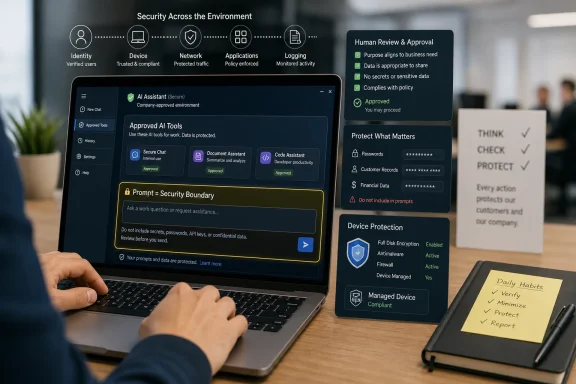 The Prompt Is Now a Workplace Security Boundary
For years, workplace data security was framed around familiar objects: the laptop, the password, the email attachment, the cloud folder, the USB stick. AI adds a new object to that list, but it does not look like one. It looks like a blank text box inviting employees to paste the very material security teams have spent years classifying, labeling, restricting, and auditing.That is why AI data security has become an everyday operational issue rather than a niche concern for machine-learning teams. An employee who asks an AI tool to summarize a contract, rewrite a customer complaint, classify support tickets, or draft a sales response may be doing productive work. The same employee may also be moving confidential, regulated, or strategically sensitive data into a system the company has not approved.
This is the uncomfortable reality behind the current wave of enterprise AI adoption. The productivity case is obvious, especially for knowledge workers buried in documents, meetings, messages, and repetitive drafting. The security case is more subtle: AI can blur the line between internal work product and external processing in a way that employees may not recognize until after the data has already left the approved workflow.
The old advice — “don’t share confidential information” — is still true, but it is no longer enough. Employees need to know which AI tools are allowed, what kinds of information can be used, when anonymization is required, and who is accountable for the output. In practical terms, the prompt has become a security boundary, and most organizations are still teaching employees how to see it.
Shadow AI Is the New Shadow IT, Only Faster
The phrase shadow IT used to conjure images of unsanctioned SaaS apps, personal Dropbox accounts, and rogue collaboration tools. Shadow AI is the same pattern with a more powerful engine. Employees reach for whatever tool is easiest, fastest, or most familiar, often because the official alternative is unclear, unavailable, or too restrictive.That behavior is not usually malicious. It is often the predictable result of a workplace that demands speed while treating governance as a separate lane. If an employee believes AI can save an hour on a task, and the company has not provided a clear approved route, the consumer AI tab in the browser becomes very tempting.
The risk is not simply that a third-party model might train on submitted data, though that remains a legitimate concern depending on the service and account type. The broader problem is loss of visibility. Once employees use unapproved tools, IT and security teams lose the ability to enforce retention rules, monitor access, apply data loss prevention controls, review incidents, or prove compliance.
That is why “use approved tools” is not a bureaucratic nicety. It is the foundation that makes every other safeguard possible. Approved AI environments can be configured around enterprise identity, access controls, logging, contractual data protections, compliance boundaries, and internal review processes. Unapproved tools usually cannot.
Employees Do Not Need to Become AI Engineers, but They Do Need Rules They Can Remember
A bad AI policy reads like it was written for auditors and forgotten by everyone else. A good AI policy is specific enough to guide real decisions under time pressure. Employees should not need to interpret a 40-page governance document before deciding whether to paste a spreadsheet into a chatbot.The most useful policies translate risk into workplace habits. They tell employees which tools are approved, which data categories require special handling, which use cases are prohibited, and when human review is mandatory. They also make clear that AI output is not automatically safe, accurate, unbiased, or ready to send.
This matters because many AI mistakes are mundane. Someone uploads a sensitive draft to summarize it. Someone pastes customer details into a prompt to “make the response more specific.” Someone accepts a generated answer without checking whether it invented a fact. Someone copies AI-written text into a regulated communication without legal, compliance, or subject-matter review.
The company’s job is to make the safe path the easy path. If employees are expected to use AI responsibly, they need approved tools, clear examples, recurring training, and a culture where asking “Can I use AI for this?” is treated as good judgment rather than friction.
The Biggest Data Leak May Be the One Nobody Notices
Traditional data leaks often have visible signals: a misaddressed email, a public link, a stolen laptop, a suspicious login, a breached server. AI-related exposure can be quieter. A prompt may contain pieces of a confidential plan, a customer record, a source-code snippet, or an unreleased financial assumption, and the employee may never think of it as a transfer of sensitive information.That is what makes AI security culturally difficult. Employees understand that emailing a confidential file to the wrong person is risky. They may not instinctively understand that pasting selected paragraphs into an external AI service can create similar governance problems. The interface feels conversational, not transactional.
Organizations should therefore treat AI prompts and uploaded files as business records with security implications. That does not mean every prompt must be treated as toxic waste. It means employees need a simple classification mindset: public information is different from internal information, internal information is different from confidential information, and regulated or customer-specific data may require explicit approval before use.
The same logic applies to AI outputs. A generated summary can accidentally reveal confidential context. A rewritten email can change legal meaning. A generated report can blend accurate internal data with invented or unsupported claims. Data security is not only about what enters the AI system; it is also about what comes out and where that output goes next.
Human Review Is Not a Speed Bump; It Is the Control Plane
The most dangerous myth about workplace AI is that the tool’s fluency is evidence of reliability. Generative AI systems are built to produce plausible responses, not to guarantee truth. In business settings, that distinction matters.Employees should validate AI outputs before acting on them, especially when the work affects customers, finances, legal obligations, security decisions, hiring, healthcare, public communications, or regulated operations. Review should cover accuracy, completeness, tone, confidentiality, bias, and policy fit. The employee remains accountable for the final work product, even if AI drafted the first version.
This is not an argument against AI-assisted work. It is an argument against treating AI output as finished work. The safest pattern is to use AI as a drafting, summarization, brainstorming, and organization aid while keeping human judgment in charge of decisions and publication.
For managers, the practical question is whether review expectations are explicit. If a team uses AI to summarize meeting notes, who checks the summary before it is distributed? If AI drafts a customer response, who verifies the facts? If AI helps analyze internal data, who confirms that the data was approved for that use? These are not abstract governance questions. They are workflow questions.
Secure Devices Still Matter in an AI Workplace
It is fashionable to talk about AI security as if everything important happens in the cloud. That misses the continued importance of the endpoint. Employees still work on laptops, desktops, tablets, and phones that cache files, store credentials, sync documents, and access AI-enabled business services.A lost or compromised device can expose the same data employees are trying to protect inside AI workflows. Strong sign-in, device encryption, endpoint protection, phishing resistance, timely updates, and conditional access remain essential. AI does not replace endpoint security; it raises the value of the accounts and data those endpoints can reach.
This is especially important as AI tools become embedded in operating systems, browsers, productivity suites, and collaboration platforms. The more AI is woven into daily work, the more important it becomes that the device, identity, and data layers are configured together. A secure AI workflow running on an unmanaged or poorly protected device is still a weak workflow.
For Windows-heavy organizations, that means AI adoption should sit alongside existing security work: Microsoft Entra identity controls, Intune device management, Microsoft Defender protections, BitLocker, data loss prevention, sensitivity labels, and least-privilege access. The exact stack varies by organization, but the principle does not. AI security is strongest when it inherits mature enterprise controls rather than floating above them.
Governance Cannot Be Annual When the Tools Change Weekly
One of the least convincing approaches to AI security is the annual policy review. AI tools, models, connectors, agents, plugins, and workplace use cases change too quickly for governance to be frozen in a yearly cycle. A policy that looked sensible in January may be incomplete by June if employees gained access to new data sources, new automation features, or new third-party integrations.Companies should review AI guardrails continuously, with formal checkpoints and event-driven reassessments. New use cases should trigger review. So should model changes, prompt changes, expanded access, new data connectors, business process changes, legal developments, incidents, and employee reports of unexpected behavior.
This is particularly important for agentic AI systems that can take actions, call tools, retrieve documents, or operate across workflows. A chatbot that drafts text creates one type of risk. An AI agent connected to email, files, calendars, ticketing systems, CRM records, or code repositories creates another. The more the system can do, the more often its permissions and behavior need to be tested.
Governance also needs feedback from the people actually using the tools. Employees will find edge cases before policy teams do. They will discover which prompts are useful, which workflows are confusing, and which restrictions drive people toward shadow AI. A living AI security program listens to that feedback instead of pretending policy can anticipate every scenario.
The Practical Standard Is Boring, Repeatable Discipline
The best AI data security habits are not glamorous. They are the same kinds of boring, repeatable practices that make ordinary security programs work. The difference is that employees now need to apply them inside a faster and more ambiguous interface.Use the approved tool. Share the minimum necessary data. Remove sensitive details unless policy allows them. Check the output. Protect the account. Escalate uncertainty. These rules are simple, but their value comes from consistency.
The challenge is that consistency requires more than awareness training. Employees need workflows that reinforce good choices. If the approved AI tool is hard to access, they will route around it. If data categories are unclear, they will guess. If managers reward speed but ignore review, employees will skip review. If security teams only say “no,” shadow AI will grow.
A serious AI security program therefore has to be practical. It should include clear examples for common roles: what a salesperson can safely ask AI to draft, what HR should avoid entering, what developers can do with code, what finance teams must not upload, and what customer support can summarize. The closer guidance gets to actual work, the more likely employees are to follow it.
Microsoft’s Framing Is Right, but the Burden Still Falls on the Enterprise
Microsoft’s workplace AI security advice lands in a predictable but important place: use business-ready tools, protect company data, train employees, and maintain oversight. That framing is sensible, especially for organizations already invested in Microsoft 365, Windows, Entra, Defender, Purview, and Intune. Enterprise AI is safer when it is tied to identity, policy, compliance, and device management rather than scattered across consumer services.But vendor positioning should not be mistaken for finished governance. Buying an enterprise AI tool does not automatically classify data correctly, design review workflows, train employees, or decide which use cases are acceptable. Nor does it eliminate the risk of over-permissioned files, stale access rights, poor labeling, careless prompts, or unreviewed outputs.
This is where many organizations will stumble. They will assume that because a tool has enterprise protections, the deployment is safe. In reality, enterprise protections are the beginning of the control story, not the end of it. A secured AI system can still surface data an employee technically has access to but should not use in a particular context.
For IT pros, the lesson is familiar: permissions matter, defaults matter, and hygiene matters. AI makes existing data governance problems more visible and more consequential. If SharePoint permissions are a mess, if old Teams sites are overexposed, if sensitivity labels are inconsistently applied, AI will not politely ignore that disorder.
The AI Security Program Employees Will Actually Follow
An effective employee-facing AI security program should feel less like a prohibition campaign and more like a set of reliable rails. Employees need to know where AI is allowed, where it is not, and how to get help when the answer is unclear. The goal is not to scare people away from AI. The goal is to make approved use safer than improvised use.The best programs start with real workflows. Identify the tasks employees already want AI for: summarizing meetings, drafting emails, analyzing spreadsheets, preparing presentations, reviewing contracts, generating code, triaging tickets, or creating knowledge-base articles. Then decide which of those tasks are low risk, which require safeguards, and which are off limits.
Training should be short, repeated, and scenario-based. Employees should see examples of safe and unsafe prompts. They should understand why customer data, credentials, unreleased financials, confidential strategy, regulated records, and sensitive personal information require special treatment. They should also know that AI-generated content can be wrong even when it sounds authoritative.
The strongest signal of maturity is escalation without punishment. If an employee realizes they may have pasted sensitive information into the wrong tool, the organization should want to know quickly. A culture that punishes every mistake into silence will discover AI incidents late, if at all.
The Workplace AI Rulebook Is Becoming a Daily Habit
The concrete lessons are not exotic, but they are urgent. AI has moved into ordinary office work faster than many governance programs can adapt, and that means the employee playbook has to become clearer, shorter, and more operational.- Employees should use only AI tools and workflows the organization has reviewed and approved.
- Employees should avoid entering confidential, regulated, customer-specific, financial, strategic, or credential-related information unless policy explicitly permits that use.
- Employees should treat prompts, uploaded files, and AI outputs as part of the company’s data-handling environment, not as casual side conversations.
- Employees should validate AI-generated material before sharing it, relying on human review for accuracy, tone, bias, confidentiality, and business impact.
- Organizations should revisit AI guardrails whenever tools, models, prompts, data sources, access rights, business requirements, or legal obligations change.
- Secure devices, strong identity controls, phishing resistance, and endpoint management remain essential because AI workflows still depend on trusted accounts and trusted hardware.
References
- Primary source: Microsoft
Published: 2026-06-26T11:10:19.286079
Loading…
www.microsoft.com - Official source: nist.gov
Loading…
www.nist.gov - Official source: learn.microsoft.com
Enterprise data protection in Microsoft 365 Copilot and Microsoft 365 Copilot Chat | Microsoft Learn
Learn what enterprise data protection means for Microsoft 365 Copilot and Microsoft 365 Copilot Chat.learn.microsoft.com - Official source: support.microsoft.com
Loading…
support.microsoft.com - Related coverage: techtarget.com
How does enterprise data protection in Copilot work? | TechTarget
Under enterprise data protection, Microsoft promises not to train Copilot on data that users submit in their queries. Learn more.www.techtarget.com
- Related coverage: productionai.institute
Microsoft 365 Copilot AI Data Use: Training & Privacy | Production AI Institute
Microsoft says files, communications, prompts, responses, and Microsoft Graph data used with Microsoft 365 Copilot are not used to train foundation models. www.productionai.institute
- Related coverage: tomsguide.com
Gaming Copilot AI under fire, but Microsoft says it’s not training AI models on your data | Tom's Guide
After a Gaming Copilot controversy, Microsoft asserts it's not training AI on your data.www.tomsguide.com - Related coverage: techradar.com
Loading…
www.techradar.com - Related coverage: itpro.com
Loading…
www.itpro.com - Related coverage: windowscentral.com
Shadow AI tools threaten UK privacy, Microsoft warns | Windows Central
A new Microsoft study says AI could save the UK economy 12.1 billion per year, but warns Shadow AI tools pose serious privacy and security risks.www.windowscentral.com