
Microsoft published a June 26, 2026 Windows for business article arguing that companies will get better employee adoption from AI when they frame it as augmentation rather than automation, grounding the case in workforce surveys about anxiety, misinformation, deskilling, upskilling, and human-agent collaboration. The post is vendor content, but the argument lands because it names a problem many IT departments already see: AI rollouts are no longer blocked mainly by model access or device readiness. They are blocked by trust. If Windows, Copilot, and the next wave of workplace agents are going to become ordinary tools rather than executive talking points, employees must believe the tools are being introduced to strengthen their work, not quietly measure it for removal.
Microsoft’s new pitch is simple enough to fit on a conference-room slide: stop selling AI as a machine that replaces labor, and start treating it as a layer that extends human capability. That may sound like messaging polish, but in workplace technology, language often becomes policy. “Automation” tells employees that a process is being redesigned to need fewer people; “augmentation” tells them the person is still part of the system.
The distinction matters because most organizations are not deploying AI into a blank cultural slate. Employees have spent years hearing executives, investors, consultants, and product vendors describe AI in the language of efficiency, productivity, and cost reduction. Even when leaders do not explicitly say jobs are at risk, workers can read the room.
Microsoft’s article leans into that tension. It cites survey evidence showing that employees worry about misinformation, overreliance, deskilling, and job displacement, then argues that adoption improves when companies invest in upskilling, transparency, and employee empowerment. This is not a purely humanitarian position. It is also a practical one: a tool that workers distrust will either be ignored, used performatively, or routed around in private.
For WindowsForum readers, the most interesting part is not that Microsoft wants businesses to buy Windows 11 Pro systems and Copilot+ PCs. That is expected. The interesting part is that Microsoft is now packaging the endpoint itself as part of a broader management problem: the PC is not merely where AI runs, but where employees decide whether AI is a co-worker, a supervisor, or a threat.
That admission is important. AI anxiety is not just fear of the unknown; it is fear of a very recognizable pattern. Workers have watched software turn tasks into dashboards, dashboards into performance metrics, and performance metrics into restructuring plans. When a new tool promises to summarize, draft, analyze, prioritize, classify, schedule, code, and decide, employees are not irrational for asking where that leaves them.
The history lesson in Microsoft’s article is familiar but useful. During the Industrial Revolution, machines did not simply “help” workers; they transformed labor markets, concentrated power, changed skills, and forced painful adaptation. Some workers moved into higher-value roles, but others were displaced, deskilled, or made dependent on systems they did not control.
That is why “augmentation” cannot be merely a softer word for the same managerial objective. If a company tells employees that AI will free them for higher-value work, it has to define what that work is, train people for it, and reward them for doing it. Otherwise augmentation becomes automation with better manners.
Microsoft’s article points to concerns about misinformation, disinformation, and deskilling. Those are not abstract ethical issues for office workers. They show up when an employee receives an AI-generated answer and cannot tell whether it is correct, when a manager prefers an automated summary over the person who attended the meeting, or when a junior worker stops learning the fundamentals because the model can produce acceptable first drafts.
This is where AI differs from many earlier office productivity tools. A spreadsheet can contain errors, but it does not usually pretend to reason. A search engine can return bad results, but it typically exposes sources and leaves synthesis to the user. A generative AI assistant produces fluent output that looks like work product, and fluency can disguise uncertainty.
That creates a new burden for employees. To use AI well, they need enough domain knowledge to challenge it, enough confidence to override it, and enough organizational backing to say no when the machine is wrong. If the workplace culture treats AI output as presumptively efficient and human objection as friction, augmentation collapses quickly into deference.
The strongest version of Microsoft’s argument is that workers should remain “in the loop by design.” The weaker version is that employees should simply accept AI because it will remove drudgery. The difference between those two positions is where real governance lives.
Executives experience AI as strategy. They see roadmaps, vendor briefings, analyst reports, productivity projections, and competitive pressure. Individual contributors experience AI as another tool added to a workflow that may already be overloaded, another system to learn, another source of monitoring anxiety, and another way their work may be judged.
This is why aggressive internal evangelism can backfire. The more breathless the pitch, the more suspicious employees may become. If every all-hands meeting presents AI as inevitable, transformative, and essential, workers may hear a very different message: adapt quickly or be classified as obsolete.
Microsoft’s article uses the term reactance, the tendency to resist when people feel their autonomy is being overridden. That is a useful concept for IT because failed adoption often looks like passive resistance rather than open rebellion. Employees keep using old workflows, paste AI output into documents without reviewing it, create shadow practices, or comply only when supervised.
The lesson is not that leaders should understate AI’s importance. It is that adoption depends on consent, clarity, and usefulness. Workers do not need another keynote. They need to know which tasks AI is meant to improve, which decisions remain human, what data the tool can access, what outputs are logged, and how their performance will or will not be measured.
Upskilling in this context is not just prompt-writing. It includes knowing when not to use AI, how to verify outputs, how to protect sensitive information, how to identify hallucinations, how to preserve records, and how to distinguish assistance from abdication. These are operational skills, not optional digital literacy.
For sysadmins and IT pros, this should change the rollout model. AI enablement cannot be left entirely to vendor tutorials or a few internal champions. It needs policy, role-based training, security review, and support channels that treat user uncertainty as part of the deployment rather than evidence that the user is behind.
That is especially true in regulated or security-sensitive environments. A worker who uses AI to summarize customer records, draft HR language, analyze financial information, or troubleshoot production systems may be creating compliance and confidentiality risks without intending to. Augmentation only works when the guardrails are visible and understandable.
Microsoft’s pitch for Windows 11 Pro and Copilot+ PCs fits here because endpoint control matters. Local AI capabilities, hardware-backed security, device management, and compatibility with existing Windows workflows are all part of whether AI can be deployed safely. But hardware alone cannot solve the harder question: whether employees know what the organization expects from them when the assistant is always one shortcut away.
There is real promise in that model. A skilled worker who can delegate research, summarization, scheduling, triage, reporting, and first-draft work to agents may become more effective. Small teams may gain capacity that previously required extra headcount. Junior employees may get faster feedback loops and better access to institutional knowledge.
But the phrase also hides a serious management question. If employees are expected to supervise AI agents, are they being given more authority, or just more responsibility? Are performance targets being adjusted because the tools are genuinely reliable, or because leadership assumes AI will magically absorb overload?
A human-agent workplace can easily become a speed trap. The employee is still accountable for the final decision, but the volume of AI-generated work increases faster than the time available to review it. In that environment, “human in the loop” becomes less a safeguard than a liability assignment.
For augmentation to be honest, companies need to redesign work, not just insert agents into old processes. Review time must be budgeted. Escalation paths must exist. Employees must be allowed to reject AI outputs without being treated as inefficient. The human role must be more than a signature on machine-produced work.
That gives Microsoft an advantage. Windows remains deeply embedded in enterprise workflows, and IT departments already manage identity, device compliance, patching, application control, and data protection across Microsoft environments. If AI is going to be governed at scale, the Windows estate is one of the obvious control planes.
It also creates reputational risk. Users do not experience AI as a procurement category; they experience it as changes to the tools in front of them. If Copilot features appear in familiar applications without enough explanation, or if AI defaults feel imposed, Microsoft can become the face of the anxiety its article describes.
That tension has followed Windows for decades. Microsoft wants to modernize the platform while enterprises want predictability. The company wants to make new capabilities discoverable while admins want control. AI raises the stakes because the feature is not just a new button; it can affect data handling, authorship, decision-making, and workplace power.
For IT pros, the answer is not to block everything or enable everything. It is to treat AI capabilities like any other consequential enterprise feature: inventory them, test them, document them, pilot them with real users, measure outcomes, and maintain rollback options where possible. Augmentation is not a slogan; it is a deployment discipline.
If AI reduces the time required to write reports, answer routine emails, summarize meetings, or draft support responses, what happens next? Do employees get time for training, customer interaction, creative work, maintenance, documentation, and thoughtful review? Or do managers simply raise throughput expectations until the freed capacity disappears?
Workers are sensitive to this because many have seen productivity tools become productivity demands. Email made communication faster, then made everyone reachable. Collaboration platforms made teamwork easier, then made interruption constant. Dashboards made work visible, then made measurement continuous.
Microsoft’s augmentation argument will be credible only where employees see some benefit from the efficiency they help create. That might mean better tools, more autonomy, reduced administrative burden, clearer career paths, or meaningful reskilling. If the benefit flows only upward, employees will treat AI adoption as self-incrimination.
This is where HR, legal, security, and IT need to be in the same room. AI deployment is not merely a software enablement project. It affects job design, performance evaluation, acceptable use, data governance, training budgets, and workforce planning. The more organizations pretend it is just another productivity app, the more likely they are to produce the resistance they claim to be solving.
That does not make Microsoft’s framing useless. It makes precision more important. A serious AI strategy should distinguish between tasks that can be automated, roles that can be augmented, decisions that must remain human, and areas where AI is not yet trustworthy enough for production use.
Employees are more likely to accept hard truths than vague reassurance. “This tool will draft first-pass summaries, but humans remain responsible for final customer communications” is credible. “AI is here to empower everyone” is not. “We will train support staff to supervise AI-assisted triage, and we will not use adoption metrics alone as performance measures” is credible. “This is about productivity” is not enough.
The same applies to measurement. If a company says AI improves work, it should measure more than output volume. It should measure error rates, review burden, employee confidence, customer satisfaction, security incidents, and whether employees have actually gained time for higher-value tasks. Otherwise productivity becomes whatever the dashboard can count.
For Windows administrators, this means asking awkward questions before the rollout reaches scale. What data can the assistant see? Where are prompts and outputs stored? Which features are enabled by default? How are plugins, connectors, and agents approved? Who owns remediation when AI output causes a mistake? These questions are not anti-AI. They are what responsible augmentation looks like.
A polished executive announcement cannot substitute for a good support article explaining when to use AI-generated meeting notes. A product demo cannot replace a manager telling employees that checking an AI answer is part of the job, not wasted time. A training video cannot fix a policy that leaves workers guessing whether customer data can be pasted into a prompt.
This is familiar terrain for IT, but AI intensifies it because the tool is probabilistic. Traditional software usually fails in repeatable ways. AI systems can fail plausibly, inconsistently, and confidently. That makes support harder and user education more important.
The best internal AI programs will likely look boring from the outside. They will have pilot groups, permission models, approved use cases, clear escalation routes, short training modules, and feedback loops. They will treat employee skepticism as input, not sabotage.
Microsoft’s article is at its strongest when it implies that adoption is cultural infrastructure. The company’s commercial interest is obvious, but so is the operational truth underneath it: AI that employees do not trust will not become durable workplace infrastructure, no matter how deeply it is wired into Windows.
Microsoft is right that the framing matters, but the next phase of workplace AI will not be won by the company with the friendliest noun. It will be won by organizations that can prove, in daily work rather than launch-day rhetoric, that AI makes employees more capable without making them more disposable. For Windows shops, that means the AI PC era is not just a hardware refresh or a Copilot licensing decision; it is a test of whether enterprise technology can finally improve workflows without quietly narrowing the human role inside them.
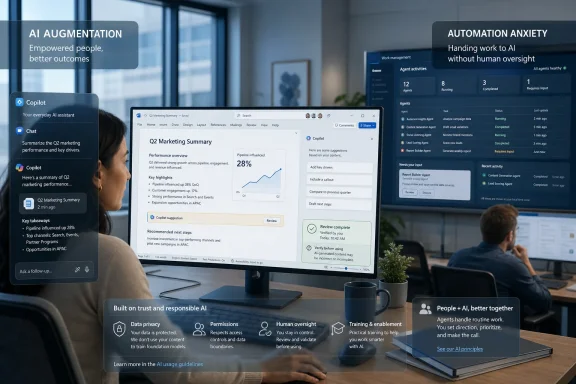 Microsoft Rebrands the AI Rollout Around the Worker, Not the Tool
Microsoft’s new pitch is simple enough to fit on a conference-room slide: stop selling AI as a machine that replaces labor, and start treating it as a layer that extends human capability. That may sound like messaging polish, but in workplace technology, language often becomes policy. “Automation” tells employees that a process is being redesigned to need fewer people; “augmentation” tells them the person is still part of the system.The distinction matters because most organizations are not deploying AI into a blank cultural slate. Employees have spent years hearing executives, investors, consultants, and product vendors describe AI in the language of efficiency, productivity, and cost reduction. Even when leaders do not explicitly say jobs are at risk, workers can read the room.
Microsoft’s article leans into that tension. It cites survey evidence showing that employees worry about misinformation, overreliance, deskilling, and job displacement, then argues that adoption improves when companies invest in upskilling, transparency, and employee empowerment. This is not a purely humanitarian position. It is also a practical one: a tool that workers distrust will either be ignored, used performatively, or routed around in private.
For WindowsForum readers, the most interesting part is not that Microsoft wants businesses to buy Windows 11 Pro systems and Copilot+ PCs. That is expected. The interesting part is that Microsoft is now packaging the endpoint itself as part of a broader management problem: the PC is not merely where AI runs, but where employees decide whether AI is a co-worker, a supervisor, or a threat.
Automation Anxiety Is Not a Bug in the Workforce
The technology industry often treats resistance as a failure of communication. If employees are worried, the theory goes, they simply have not seen the demo, taken the training, or heard the right leadership message. Microsoft’s article pushes against that assumption, at least partially, by acknowledging that anxiety around automation is real.That admission is important. AI anxiety is not just fear of the unknown; it is fear of a very recognizable pattern. Workers have watched software turn tasks into dashboards, dashboards into performance metrics, and performance metrics into restructuring plans. When a new tool promises to summarize, draft, analyze, prioritize, classify, schedule, code, and decide, employees are not irrational for asking where that leaves them.
The history lesson in Microsoft’s article is familiar but useful. During the Industrial Revolution, machines did not simply “help” workers; they transformed labor markets, concentrated power, changed skills, and forced painful adaptation. Some workers moved into higher-value roles, but others were displaced, deskilled, or made dependent on systems they did not control.
That is why “augmentation” cannot be merely a softer word for the same managerial objective. If a company tells employees that AI will free them for higher-value work, it has to define what that work is, train people for it, and reward them for doing it. Otherwise augmentation becomes automation with better manners.
The Real Fear Is Losing Judgment, Not Just Losing Tasks
The narrow version of the AI labor debate is about jobs. Will AI eliminate roles, reduce headcount, or make certain functions unnecessary? Those questions matter, but they miss a subtler workplace fear: employees worry that AI will erode their judgment before it eliminates their position.Microsoft’s article points to concerns about misinformation, disinformation, and deskilling. Those are not abstract ethical issues for office workers. They show up when an employee receives an AI-generated answer and cannot tell whether it is correct, when a manager prefers an automated summary over the person who attended the meeting, or when a junior worker stops learning the fundamentals because the model can produce acceptable first drafts.
This is where AI differs from many earlier office productivity tools. A spreadsheet can contain errors, but it does not usually pretend to reason. A search engine can return bad results, but it typically exposes sources and leaves synthesis to the user. A generative AI assistant produces fluent output that looks like work product, and fluency can disguise uncertainty.
That creates a new burden for employees. To use AI well, they need enough domain knowledge to challenge it, enough confidence to override it, and enough organizational backing to say no when the machine is wrong. If the workplace culture treats AI output as presumptively efficient and human objection as friction, augmentation collapses quickly into deference.
The strongest version of Microsoft’s argument is that workers should remain “in the loop by design.” The weaker version is that employees should simply accept AI because it will remove drudgery. The difference between those two positions is where real governance lives.
Leaders Are More Excited Than the People Asked to Use the Tools
One of the more revealing survey points in Microsoft’s article concerns the optimism gap between executives and individual contributors. Senior leaders often believe employees are enthusiastic about AI, while far fewer individual workers describe themselves that way. That gap should make every CIO and IT director uncomfortable.Executives experience AI as strategy. They see roadmaps, vendor briefings, analyst reports, productivity projections, and competitive pressure. Individual contributors experience AI as another tool added to a workflow that may already be overloaded, another system to learn, another source of monitoring anxiety, and another way their work may be judged.
This is why aggressive internal evangelism can backfire. The more breathless the pitch, the more suspicious employees may become. If every all-hands meeting presents AI as inevitable, transformative, and essential, workers may hear a very different message: adapt quickly or be classified as obsolete.
Microsoft’s article uses the term reactance, the tendency to resist when people feel their autonomy is being overridden. That is a useful concept for IT because failed adoption often looks like passive resistance rather than open rebellion. Employees keep using old workflows, paste AI output into documents without reviewing it, create shadow practices, or comply only when supervised.
The lesson is not that leaders should understate AI’s importance. It is that adoption depends on consent, clarity, and usefulness. Workers do not need another keynote. They need to know which tasks AI is meant to improve, which decisions remain human, what data the tool can access, what outputs are logged, and how their performance will or will not be measured.
Upskilling Is the Price of Credible Augmentation
The most practical claim in Microsoft’s article is that companies must invest in people, not just platforms. That line will sound obvious to anyone who has lived through a large software rollout, but AI makes it harder to fake. With many older tools, employees could learn by repetition. With AI systems, bad habits can scale quickly.Upskilling in this context is not just prompt-writing. It includes knowing when not to use AI, how to verify outputs, how to protect sensitive information, how to identify hallucinations, how to preserve records, and how to distinguish assistance from abdication. These are operational skills, not optional digital literacy.
For sysadmins and IT pros, this should change the rollout model. AI enablement cannot be left entirely to vendor tutorials or a few internal champions. It needs policy, role-based training, security review, and support channels that treat user uncertainty as part of the deployment rather than evidence that the user is behind.
That is especially true in regulated or security-sensitive environments. A worker who uses AI to summarize customer records, draft HR language, analyze financial information, or troubleshoot production systems may be creating compliance and confidentiality risks without intending to. Augmentation only works when the guardrails are visible and understandable.
Microsoft’s pitch for Windows 11 Pro and Copilot+ PCs fits here because endpoint control matters. Local AI capabilities, hardware-backed security, device management, and compatibility with existing Windows workflows are all part of whether AI can be deployed safely. But hardware alone cannot solve the harder question: whether employees know what the organization expects from them when the assistant is always one shortcut away.
The “Agent Boss” Is a Promotion Only If Power Actually Moves
Microsoft’s article nods to the rise of the “agent boss,” the worker who directs AI agents, sets priorities, and makes higher-level decisions while software handles routine tasks. It is a compelling image. Instead of being replaced by AI, the employee becomes a manager of digital labor.There is real promise in that model. A skilled worker who can delegate research, summarization, scheduling, triage, reporting, and first-draft work to agents may become more effective. Small teams may gain capacity that previously required extra headcount. Junior employees may get faster feedback loops and better access to institutional knowledge.
But the phrase also hides a serious management question. If employees are expected to supervise AI agents, are they being given more authority, or just more responsibility? Are performance targets being adjusted because the tools are genuinely reliable, or because leadership assumes AI will magically absorb overload?
A human-agent workplace can easily become a speed trap. The employee is still accountable for the final decision, but the volume of AI-generated work increases faster than the time available to review it. In that environment, “human in the loop” becomes less a safeguard than a liability assignment.
For augmentation to be honest, companies need to redesign work, not just insert agents into old processes. Review time must be budgeted. Escalation paths must exist. Employees must be allowed to reject AI outputs without being treated as inefficient. The human role must be more than a signature on machine-produced work.
Windows Becomes the Stage for a Workplace Trust Problem
Microsoft’s placement of this argument inside the Windows for business ecosystem is not accidental. The company wants AI to be ambient across the productivity stack: in the operating system, in Microsoft 365, in Teams, in Edge, in security tooling, and increasingly in devices marketed around neural processing units. The workplace AI debate will therefore be lived through Windows endpoints as much as through abstract enterprise strategy.That gives Microsoft an advantage. Windows remains deeply embedded in enterprise workflows, and IT departments already manage identity, device compliance, patching, application control, and data protection across Microsoft environments. If AI is going to be governed at scale, the Windows estate is one of the obvious control planes.
It also creates reputational risk. Users do not experience AI as a procurement category; they experience it as changes to the tools in front of them. If Copilot features appear in familiar applications without enough explanation, or if AI defaults feel imposed, Microsoft can become the face of the anxiety its article describes.
That tension has followed Windows for decades. Microsoft wants to modernize the platform while enterprises want predictability. The company wants to make new capabilities discoverable while admins want control. AI raises the stakes because the feature is not just a new button; it can affect data handling, authorship, decision-making, and workplace power.
For IT pros, the answer is not to block everything or enable everything. It is to treat AI capabilities like any other consequential enterprise feature: inventory them, test them, document them, pilot them with real users, measure outcomes, and maintain rollback options where possible. Augmentation is not a slogan; it is a deployment discipline.
Productivity Gains Will Be Judged by Where the Savings Go
The central moral hazard in workplace AI is not that it saves time. Saving time is good. The hazard is that organizations may capture all of the savings while asking employees to accept all of the uncertainty.If AI reduces the time required to write reports, answer routine emails, summarize meetings, or draft support responses, what happens next? Do employees get time for training, customer interaction, creative work, maintenance, documentation, and thoughtful review? Or do managers simply raise throughput expectations until the freed capacity disappears?
Workers are sensitive to this because many have seen productivity tools become productivity demands. Email made communication faster, then made everyone reachable. Collaboration platforms made teamwork easier, then made interruption constant. Dashboards made work visible, then made measurement continuous.
Microsoft’s augmentation argument will be credible only where employees see some benefit from the efficiency they help create. That might mean better tools, more autonomy, reduced administrative burden, clearer career paths, or meaningful reskilling. If the benefit flows only upward, employees will treat AI adoption as self-incrimination.
This is where HR, legal, security, and IT need to be in the same room. AI deployment is not merely a software enablement project. It affects job design, performance evaluation, acceptable use, data governance, training budgets, and workforce planning. The more organizations pretend it is just another productivity app, the more likely they are to produce the resistance they claim to be solving.
The Augmentation Story Still Needs Hard Edges
There is a danger in making augmentation sound too gentle. Some tasks will be automated. Some roles will change. Some teams may shrink. Some vendors and executives will continue to use AI primarily as a cost-reduction lever. No amount of careful language can erase that.That does not make Microsoft’s framing useless. It makes precision more important. A serious AI strategy should distinguish between tasks that can be automated, roles that can be augmented, decisions that must remain human, and areas where AI is not yet trustworthy enough for production use.
Employees are more likely to accept hard truths than vague reassurance. “This tool will draft first-pass summaries, but humans remain responsible for final customer communications” is credible. “AI is here to empower everyone” is not. “We will train support staff to supervise AI-assisted triage, and we will not use adoption metrics alone as performance measures” is credible. “This is about productivity” is not enough.
The same applies to measurement. If a company says AI improves work, it should measure more than output volume. It should measure error rates, review burden, employee confidence, customer satisfaction, security incidents, and whether employees have actually gained time for higher-value tasks. Otherwise productivity becomes whatever the dashboard can count.
For Windows administrators, this means asking awkward questions before the rollout reaches scale. What data can the assistant see? Where are prompts and outputs stored? Which features are enabled by default? How are plugins, connectors, and agents approved? Who owns remediation when AI output causes a mistake? These questions are not anti-AI. They are what responsible augmentation looks like.
The Windows AI Pitch Now Runs Through the Help Desk
The success or failure of AI augmentation may be decided less in boardrooms than in the first month after deployment. That is when employees discover whether the tool actually helps, whether support can answer practical questions, and whether managers punish or reward cautious use. The help desk, internal documentation, and team leads become the real AI adoption layer.A polished executive announcement cannot substitute for a good support article explaining when to use AI-generated meeting notes. A product demo cannot replace a manager telling employees that checking an AI answer is part of the job, not wasted time. A training video cannot fix a policy that leaves workers guessing whether customer data can be pasted into a prompt.
This is familiar terrain for IT, but AI intensifies it because the tool is probabilistic. Traditional software usually fails in repeatable ways. AI systems can fail plausibly, inconsistently, and confidently. That makes support harder and user education more important.
The best internal AI programs will likely look boring from the outside. They will have pilot groups, permission models, approved use cases, clear escalation routes, short training modules, and feedback loops. They will treat employee skepticism as input, not sabotage.
Microsoft’s article is at its strongest when it implies that adoption is cultural infrastructure. The company’s commercial interest is obvious, but so is the operational truth underneath it: AI that employees do not trust will not become durable workplace infrastructure, no matter how deeply it is wired into Windows.
The Practical Test for Microsoft’s Augmentation Thesis
Microsoft’s latest Windows for business message gives organizations a useful vocabulary, but vocabulary is only the opening move. The real test is whether companies can turn that language into enforceable practices that employees can see, challenge, and benefit from.- Organizations should explain which AI use cases are intended to assist employees and which tasks may be automated outright.
- Employees need role-specific training that covers verification, data handling, acceptable use, and the limits of AI-generated output.
- Managers should avoid treating AI adoption metrics as a proxy for performance without understanding the quality and risk of the work being produced.
- IT teams should pilot AI features with real workflows before enabling them broadly across Windows and Microsoft 365 environments.
- Companies should measure whether AI actually reduces drudgery or simply increases the pace and volume of work.
- Human review must be treated as skilled labor, not as a ceremonial checkbox after an automated system has already shaped the answer.
Microsoft is right that the framing matters, but the next phase of workplace AI will not be won by the company with the friendliest noun. It will be won by organizations that can prove, in daily work rather than launch-day rhetoric, that AI makes employees more capable without making them more disposable. For Windows shops, that means the AI PC era is not just a hardware refresh or a Copilot licensing decision; it is a test of whether enterprise technology can finally improve workflows without quietly narrowing the human role inside them.
References
- Primary source: Microsoft
Published: 2026-06-26T11:42:19.948739
Loading…
www.microsoft.com