
Microsoft announced Windows 11 on June 24, 2021, released it publicly on October 5, 2021, and five years later the operating system stands as a lesson in how hard it is to modernize the Windows desktop without breaking user trust. The lesson was not that users hate change. It was that Windows users hate being told that familiar, efficient habits are technical debt. Microsoft sold Windows 11 as a cleaner, safer, more modern PC platform, but the launch also reminded everyone that the desktop is not a stage for reinvention so much as a workshop where interruptions are remembered.
The awkwardness of Windows 11 begins with timing. Windows 10 was not beloved in the nostalgic way Windows XP or Windows 7 had been, but by 2021 it had become dependable enough to fade into the background. After the bruising Windows 8 era, that counted as an achievement.
Microsoft had spent years positioning Windows 10 as the stable center of personal computing: regularly updated, cloud-connected, and familiar enough for both home users and enterprise fleets. Then came a new version that looked calmer and more polished, but did not answer the one question that matters most in a mature platform transition: what pain does this solve today?
That question mattered even more because Windows 11 arrived during a strange period in PC history. The pandemic had made the PC newly important, not as a luxury device but as the endpoint for school, meetings, family logistics, and work. People were not asking for a philosophical refresh of their taskbar. They were asking their computers to keep the day moving.
Microsoft’s pitch was not empty. Windows 11 brought a more consistent design language, improved window management, a reworked Microsoft Store, gaming features, and a stronger security baseline. But the first experience for many users was not “this is safer.” It was “where did that button go?”
That is the central contradiction of Windows 11’s first five years. Microsoft wanted to move Windows forward, but it underestimated how much forward motion feels like friction when it starts by disturbing muscle memory.
Individually, these were product decisions. Collectively, they looked like Microsoft walking into a long-running workplace and rearranging every desk because the floor plan looked dated.
The taskbar mattered because it was not a decorative element. It was the navigation rail for millions of people who had built habits across decades of Windows releases. Power users did not move it to the side because they were resisting beauty; they moved it because ultrawide monitors, vertical workflows, and personal preference made that placement efficient.
Windows has always had a split identity. It is a consumer product that wants to be approachable and an enterprise platform that survives because it can be bent into shape. Windows 11 leaned hard into the first identity at launch and only later began clawing back pieces of the second.
Microsoft’s later restoration of some missing behaviors was not just feature maintenance. It was an implicit admission that the desktop’s boring affordances have value. The right-click menu, the taskbar, File Explorer, and Start are not old furniture. They are where users spend their day.
That is why the backlash had staying power. The issue was not that Windows 11 looked different. The issue was that it too often felt less capable than the system it replaced.
From Microsoft’s perspective, the argument was straightforward. The PC threat model had changed, firmware attacks were real, credential protection mattered, and modern Windows security features depended on a stronger hardware root of trust. A higher baseline would let Microsoft build a safer platform instead of dragging the entire ecosystem behind the oldest viable machines.
That argument was not irrational. In fact, for enterprise security teams, it was welcome in principle. The problem was that consumers and small businesses were looking at working PCs that ran Windows 10 comfortably and being told that the machines were now outside the official future of Windows.
The emotional effect was predictable. A laptop that boots quickly, handles Office, joins video calls, and receives updates does not feel obsolete to its owner. When a compatibility checker says otherwise, the owner does not experience that as security policy. They experience it as a vendor-imposed expiration date.
The situation was worsened by confusion in the earliest days of the announcement. TPM requirements, CPU lists, firmware settings, and compatibility tooling produced a fog of partial answers. Some users discovered that TPM existed but was disabled in firmware. Others found themselves blocked by processor lists even when performance seemed more than adequate.
Workarounds appeared quickly, as they always do in the Windows world. Their existence did not prove Microsoft’s security model was meaningless, but it did undermine the simplicity of the message. If enthusiasts could install Windows 11 on unsupported systems, then to many users the dividing line looked less like an engineering necessity and more like policy.
This was the upgrade’s most consequential wound. Microsoft did not merely ask users to accept a changed interface. It asked many of them to accept that a functioning PC had been demoted.
For years after release, Windows 10 remained the center of gravity. That was not only because people loved Windows 10. It was because migration inertia is powerful, Windows 11 eligibility was uneven, and many organizations had no appetite for a user-facing operating system transition when Windows 10 was still supported.
The turning point came in 2025, as Windows 10’s October 14, 2025 end-of-support date moved from an abstract lifecycle note to a budget and security problem. PC replacement cycles did what enthusiasm had not. Hardware aged out, new machines arrived with Windows 11, and organizations that had delayed migration began treating the move as unavoidable.
That distinction matters. Windows 11’s rise was real, but much of it was powered by the calendar rather than affection. It overtook Windows 10 only after years of hesitation and as the older operating system approached the end of mainstream support. That is not failure, but it is not the same kind of success as a release users rush toward.
For IT departments, the slow transition had practical consequences. The Windows 11 upgrade was not simply an image refresh. It required hardware inventory, TPM validation, firmware checks, application testing, user communication, and in many cases procurement planning. Organizations that might once have treated a Windows upgrade as mostly software had to treat this one as a hardware lifecycle event.
That changed the politics of the OS. A Windows upgrade that requires a new PC is no longer just an IT project; it is a capital planning issue. In schools, nonprofits, small firms, and households, that cost is felt directly.
The long tail of Windows 10 also created a familiar security tradeoff. After support ended, users could move to Windows 11 if eligible, buy new hardware, explore extended security options where available, or remain exposed. Microsoft could argue, correctly, that unsupported systems are risky. Users could answer, also correctly, that many of those systems were still useful.
That tension is the Windows 11 story in miniature. Microsoft pushed the platform toward a safer baseline. The installed base reminded Microsoft that the PC ecosystem does not turn on a keynote schedule.
That shift made Windows 11 feel less like a finished destination and more like a vessel for Microsoft’s next strategic urgency. The desktop was no longer just being modernized. It was being recruited into the AI platform war.
Some of that was inevitable. Microsoft had a lead in commercial AI distribution, deep OpenAI ties, and an unmatched ability to place assistant features in front of hundreds of millions of users. Windows was always going to become part of that push. The temptation was too great, and the surface area was too large.
But the Windows 11 experience had already primed users to be suspicious of forced changes. When Copilot buttons and AI-branded features began appearing across familiar apps, users often saw not empowerment but encroachment. Notepad, Paint, Photos, Edge, and the taskbar are not neutral real estate. They are trusted because they are simple.
Recent moves to reduce or soften Copilot branding in some Windows inbox apps suggest Microsoft has noticed the problem. Removing a Copilot label does not necessarily remove the AI feature, and it certainly does not mean Microsoft is retreating from AI. But it does show that the company understands branding can become a tax when users feel surrounded by it.
The lesson overlaps almost perfectly with the Windows 11 launch lesson. A feature can be technically impressive and strategically important while still being wrong for the moment, the place, or the workflow. The desktop punishes anything that feels like it was inserted for Microsoft’s benefit before the user’s.
AI may ultimately become a normal part of Windows. But if it does, it will succeed less as a mascot and more as plumbing: search that finds the right file, accessibility that works better, troubleshooting that explains itself, automation that saves time without demanding attention. The more Windows AI behaves like a pop-up strategy deck, the more it will inherit the resentment that greeted Windows 11’s early rough edges.
Windows is not an app that can reinvent itself every quarter. It is the surface beneath other work: accounting software, CAD tools, games, medical systems, classrooms, call centers, local government desktops, family photo libraries, and a thousand strange line-of-business applications nobody outside one department has ever heard of. Change lands differently on that kind of platform.
This is why the “users fear change” explanation is too convenient. Users accept enormous change when the benefit is obvious. They moved from spinning disks to SSDs, from local-only files to cloud sync, from passwords to biometrics, from VGA to high-DPI displays, from desktop towers to thin laptops. They are not allergic to progress.
What they resist is being asked to pay the cost of transition without receiving a clear dividend. A centered Start menu is not enough. A redesigned taskbar is not enough. A security architecture that requires replacement hardware may be enough for some environments, but it has to be explained with unusual clarity because the cost is visible and immediate.
Windows 11 improved over time because Microsoft softened some of its sharpest edges. The operating system today is more capable than the launch build, and many users who resisted it now run it daily without drama. That matters. Products are not frozen at release.
But reputations are sticky. Windows 11’s launch framed the conversation, and the next five years became a slow process of proving that the new Windows was not simply Windows 10 with fewer choices and stricter gates.
The problem was sequencing. Security teams might welcome the destination while endpoint teams still had to explain the disruption. A stricter hardware floor can be sensible at fleet scale, but it still collides with depreciation schedules, supply-chain timing, application certification, and the messy reality of devices used far beyond their planned refresh windows.
Large organizations can absorb that complexity with phased deployments. Smaller organizations often cannot. A five-person business with older but functional PCs does not think in terms of hardware root of trust. It thinks in terms of whether replacing every machine this year means delaying something else.
That is where Microsoft’s consumer and enterprise narratives diverged. In boardrooms and security briefings, Windows 11 could be presented as modernization. At the kitchen table or the small office, it could feel like an invoice.
There was also an administrative credibility issue. Windows admins have endured decades of shifting control panels, duplicated settings surfaces, changing management tools, and consumer features appearing in professional contexts. Windows 11 did not create that fatigue, but it landed on top of it.
The most security-minded administrators can accept stricter baselines. What they resent is ambiguity. If a device is unsupported, say exactly why. If a feature is deprecated, provide a path. If AI features are arriving, give policy controls before users discover them. If the desktop is changing, do not make administrators reverse-engineer the rationale after the fact.
In that sense, Windows 11’s enterprise lesson is less about TPM than trust. IT can manage almost anything that is predictable. It struggles with surprises disguised as product vision.
But Microsoft has choices in how it frames the next transition. It can make the case early, publish requirements clearly, provide compatibility tools that explain rather than merely reject, and distinguish between features that require new hardware and artificial product segmentation. It can also stop treating user workflow as negotiable decoration.
The next Windows will almost certainly be more AI-aware. It may lean harder on neural processing units, cloud-connected assistants, semantic search, local models, or automated system repair. Those features may be useful. Some may be excellent. But Microsoft should assume skepticism as the default, not because users are hostile to AI, but because they have learned to ask who benefits first.
A more careful Microsoft would make advanced features additive rather than invasive. It would let Notepad remain Notepad until the user asks for more. It would treat the taskbar as a sacred efficiency surface, not a billboard. It would give administrators strong controls on day one rather than after a backlash.
The company also has to be honest about sustainability. If hardware requirements strand otherwise capable PCs, Microsoft should explain the security tradeoff plainly and support realistic off-ramps. The environmental and economic costs of accelerated replacement are not side issues for users; they are part of the upgrade decision.
Windows 11’s five-year history is therefore not just a product review stretched over half a decade. It is a warning about platform stewardship. When you control the default computing environment for much of the world, every design decision has downstream consequences.
Microsoft’s important lesson from Windows 11 is that trust in the desktop is accumulated in small, almost invisible decisions: a menu that stays where users expect it, a PC that is not prematurely written off, a new feature that waits to be invited, and an upgrade path that feels like progress rather than pressure. If the next Windows begins from that humility, the five difficult years of Windows 11 may look less like a stumble and more like the moment Microsoft relearned what kind of product Windows really is.
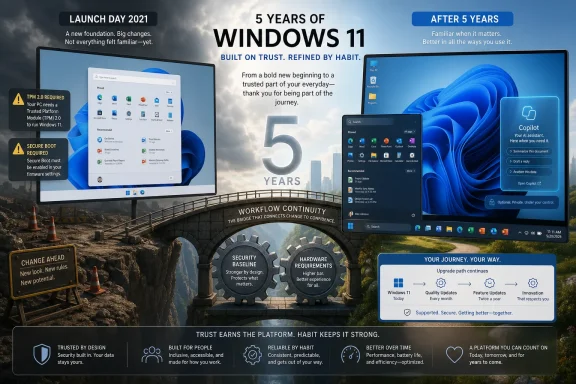 Windows 11 Was a Redesign That Arrived Without a Crisis
The awkwardness of Windows 11 begins with timing. Windows 10 was not beloved in the nostalgic way Windows XP or Windows 7 had been, but by 2021 it had become dependable enough to fade into the background. After the bruising Windows 8 era, that counted as an achievement.Microsoft had spent years positioning Windows 10 as the stable center of personal computing: regularly updated, cloud-connected, and familiar enough for both home users and enterprise fleets. Then came a new version that looked calmer and more polished, but did not answer the one question that matters most in a mature platform transition: what pain does this solve today?
That question mattered even more because Windows 11 arrived during a strange period in PC history. The pandemic had made the PC newly important, not as a luxury device but as the endpoint for school, meetings, family logistics, and work. People were not asking for a philosophical refresh of their taskbar. They were asking their computers to keep the day moving.
Microsoft’s pitch was not empty. Windows 11 brought a more consistent design language, improved window management, a reworked Microsoft Store, gaming features, and a stronger security baseline. But the first experience for many users was not “this is safer.” It was “where did that button go?”
That is the central contradiction of Windows 11’s first five years. Microsoft wanted to move Windows forward, but it underestimated how much forward motion feels like friction when it starts by disturbing muscle memory.
The Taskbar Became a Symbol Because It Touched Everyone
The Windows 11 taskbar controversy can sound petty if reduced to a checklist. Users complained that they could no longer move it to the top or sides of the screen. Context menus were simplified. Drag-and-drop behaviors changed. The Start menu was centered by default and replaced the live-tile era with a cleaner grid and recommendations.Individually, these were product decisions. Collectively, they looked like Microsoft walking into a long-running workplace and rearranging every desk because the floor plan looked dated.
The taskbar mattered because it was not a decorative element. It was the navigation rail for millions of people who had built habits across decades of Windows releases. Power users did not move it to the side because they were resisting beauty; they moved it because ultrawide monitors, vertical workflows, and personal preference made that placement efficient.
Windows has always had a split identity. It is a consumer product that wants to be approachable and an enterprise platform that survives because it can be bent into shape. Windows 11 leaned hard into the first identity at launch and only later began clawing back pieces of the second.
Microsoft’s later restoration of some missing behaviors was not just feature maintenance. It was an implicit admission that the desktop’s boring affordances have value. The right-click menu, the taskbar, File Explorer, and Start are not old furniture. They are where users spend their day.
That is why the backlash had staying power. The issue was not that Windows 11 looked different. The issue was that it too often felt less capable than the system it replaced.
Hardware Requirements Turned an Upgrade Into a Judgment
If the interface changes made Windows 11 annoying to some users, the hardware requirements made it personal. Microsoft drew a hard compatibility line around TPM 2.0, Secure Boot-capable systems, and supported processor generations, with Intel’s 8th-generation Core chips and broadly equivalent AMD platforms becoming the practical dividing line for many buyers.From Microsoft’s perspective, the argument was straightforward. The PC threat model had changed, firmware attacks were real, credential protection mattered, and modern Windows security features depended on a stronger hardware root of trust. A higher baseline would let Microsoft build a safer platform instead of dragging the entire ecosystem behind the oldest viable machines.
That argument was not irrational. In fact, for enterprise security teams, it was welcome in principle. The problem was that consumers and small businesses were looking at working PCs that ran Windows 10 comfortably and being told that the machines were now outside the official future of Windows.
The emotional effect was predictable. A laptop that boots quickly, handles Office, joins video calls, and receives updates does not feel obsolete to its owner. When a compatibility checker says otherwise, the owner does not experience that as security policy. They experience it as a vendor-imposed expiration date.
The situation was worsened by confusion in the earliest days of the announcement. TPM requirements, CPU lists, firmware settings, and compatibility tooling produced a fog of partial answers. Some users discovered that TPM existed but was disabled in firmware. Others found themselves blocked by processor lists even when performance seemed more than adequate.
Workarounds appeared quickly, as they always do in the Windows world. Their existence did not prove Microsoft’s security model was meaningless, but it did undermine the simplicity of the message. If enthusiasts could install Windows 11 on unsupported systems, then to many users the dividing line looked less like an engineering necessity and more like policy.
This was the upgrade’s most consequential wound. Microsoft did not merely ask users to accept a changed interface. It asked many of them to accept that a functioning PC had been demoted.
Slow Adoption Was the Market’s Reply
Windows 11 did eventually win the market-share race. But the word eventually is doing a lot of work.For years after release, Windows 10 remained the center of gravity. That was not only because people loved Windows 10. It was because migration inertia is powerful, Windows 11 eligibility was uneven, and many organizations had no appetite for a user-facing operating system transition when Windows 10 was still supported.
The turning point came in 2025, as Windows 10’s October 14, 2025 end-of-support date moved from an abstract lifecycle note to a budget and security problem. PC replacement cycles did what enthusiasm had not. Hardware aged out, new machines arrived with Windows 11, and organizations that had delayed migration began treating the move as unavoidable.
That distinction matters. Windows 11’s rise was real, but much of it was powered by the calendar rather than affection. It overtook Windows 10 only after years of hesitation and as the older operating system approached the end of mainstream support. That is not failure, but it is not the same kind of success as a release users rush toward.
For IT departments, the slow transition had practical consequences. The Windows 11 upgrade was not simply an image refresh. It required hardware inventory, TPM validation, firmware checks, application testing, user communication, and in many cases procurement planning. Organizations that might once have treated a Windows upgrade as mostly software had to treat this one as a hardware lifecycle event.
That changed the politics of the OS. A Windows upgrade that requires a new PC is no longer just an IT project; it is a capital planning issue. In schools, nonprofits, small firms, and households, that cost is felt directly.
The long tail of Windows 10 also created a familiar security tradeoff. After support ended, users could move to Windows 11 if eligible, buy new hardware, explore extended security options where available, or remain exposed. Microsoft could argue, correctly, that unsupported systems are risky. Users could answer, also correctly, that many of those systems were still useful.
That tension is the Windows 11 story in miniature. Microsoft pushed the platform toward a safer baseline. The installed base reminded Microsoft that the PC ecosystem does not turn on a keynote schedule.
The AI Pivot Made the Desktop Feel Like a Testing Ground Again
By the time Windows 11 reached maturity, Microsoft’s center of gravity had shifted again. The company that launched Windows 11 with rounded corners and a redesigned Start menu was now racing to make Copilot the connective tissue across Windows, Office, Edge, and developer tools.That shift made Windows 11 feel less like a finished destination and more like a vessel for Microsoft’s next strategic urgency. The desktop was no longer just being modernized. It was being recruited into the AI platform war.
Some of that was inevitable. Microsoft had a lead in commercial AI distribution, deep OpenAI ties, and an unmatched ability to place assistant features in front of hundreds of millions of users. Windows was always going to become part of that push. The temptation was too great, and the surface area was too large.
But the Windows 11 experience had already primed users to be suspicious of forced changes. When Copilot buttons and AI-branded features began appearing across familiar apps, users often saw not empowerment but encroachment. Notepad, Paint, Photos, Edge, and the taskbar are not neutral real estate. They are trusted because they are simple.
Recent moves to reduce or soften Copilot branding in some Windows inbox apps suggest Microsoft has noticed the problem. Removing a Copilot label does not necessarily remove the AI feature, and it certainly does not mean Microsoft is retreating from AI. But it does show that the company understands branding can become a tax when users feel surrounded by it.
The lesson overlaps almost perfectly with the Windows 11 launch lesson. A feature can be technically impressive and strategically important while still being wrong for the moment, the place, or the workflow. The desktop punishes anything that feels like it was inserted for Microsoft’s benefit before the user’s.
AI may ultimately become a normal part of Windows. But if it does, it will succeed less as a mascot and more as plumbing: search that finds the right file, accessibility that works better, troubleshooting that explains itself, automation that saves time without demanding attention. The more Windows AI behaves like a pop-up strategy deck, the more it will inherit the resentment that greeted Windows 11’s early rough edges.
Microsoft Remembered That Windows Is Infrastructure
The best version of Windows is rarely the one people praise every morning. It is the one they do not think about because it lets them get to the thing they actually wanted to do. That sounds modest, but it is a brutal design constraint.Windows is not an app that can reinvent itself every quarter. It is the surface beneath other work: accounting software, CAD tools, games, medical systems, classrooms, call centers, local government desktops, family photo libraries, and a thousand strange line-of-business applications nobody outside one department has ever heard of. Change lands differently on that kind of platform.
This is why the “users fear change” explanation is too convenient. Users accept enormous change when the benefit is obvious. They moved from spinning disks to SSDs, from local-only files to cloud sync, from passwords to biometrics, from VGA to high-DPI displays, from desktop towers to thin laptops. They are not allergic to progress.
What they resist is being asked to pay the cost of transition without receiving a clear dividend. A centered Start menu is not enough. A redesigned taskbar is not enough. A security architecture that requires replacement hardware may be enough for some environments, but it has to be explained with unusual clarity because the cost is visible and immediate.
Windows 11 improved over time because Microsoft softened some of its sharpest edges. The operating system today is more capable than the launch build, and many users who resisted it now run it daily without drama. That matters. Products are not frozen at release.
But reputations are sticky. Windows 11’s launch framed the conversation, and the next five years became a slow process of proving that the new Windows was not simply Windows 10 with fewer choices and stricter gates.
Enterprises Saw the Security Case and Still Counted the Cost
For enterprise IT, Windows 11 was never merely a taste issue. The security baseline mattered, and Microsoft’s push toward TPM 2.0, virtualization-based security, Secure Boot, and modern management aligned with where many organizations already wanted to go.The problem was sequencing. Security teams might welcome the destination while endpoint teams still had to explain the disruption. A stricter hardware floor can be sensible at fleet scale, but it still collides with depreciation schedules, supply-chain timing, application certification, and the messy reality of devices used far beyond their planned refresh windows.
Large organizations can absorb that complexity with phased deployments. Smaller organizations often cannot. A five-person business with older but functional PCs does not think in terms of hardware root of trust. It thinks in terms of whether replacing every machine this year means delaying something else.
That is where Microsoft’s consumer and enterprise narratives diverged. In boardrooms and security briefings, Windows 11 could be presented as modernization. At the kitchen table or the small office, it could feel like an invoice.
There was also an administrative credibility issue. Windows admins have endured decades of shifting control panels, duplicated settings surfaces, changing management tools, and consumer features appearing in professional contexts. Windows 11 did not create that fatigue, but it landed on top of it.
The most security-minded administrators can accept stricter baselines. What they resent is ambiguity. If a device is unsupported, say exactly why. If a feature is deprecated, provide a path. If AI features are arriving, give policy controls before users discover them. If the desktop is changing, do not make administrators reverse-engineer the rationale after the fact.
In that sense, Windows 11’s enterprise lesson is less about TPM than trust. IT can manage almost anything that is predictable. It struggles with surprises disguised as product vision.
The Next Windows Cannot Pretend the Last Five Years Did Not Happen
The obvious question is whether Windows 12, or whatever Microsoft eventually calls the next major client release, will repeat the pattern. Microsoft has not shown much appetite for abandoning Windows 11’s security baseline, and it probably should not. The industry has moved on from the assumptions that shaped Windows 7-era hardware.But Microsoft has choices in how it frames the next transition. It can make the case early, publish requirements clearly, provide compatibility tools that explain rather than merely reject, and distinguish between features that require new hardware and artificial product segmentation. It can also stop treating user workflow as negotiable decoration.
The next Windows will almost certainly be more AI-aware. It may lean harder on neural processing units, cloud-connected assistants, semantic search, local models, or automated system repair. Those features may be useful. Some may be excellent. But Microsoft should assume skepticism as the default, not because users are hostile to AI, but because they have learned to ask who benefits first.
A more careful Microsoft would make advanced features additive rather than invasive. It would let Notepad remain Notepad until the user asks for more. It would treat the taskbar as a sacred efficiency surface, not a billboard. It would give administrators strong controls on day one rather than after a backlash.
The company also has to be honest about sustainability. If hardware requirements strand otherwise capable PCs, Microsoft should explain the security tradeoff plainly and support realistic off-ramps. The environmental and economic costs of accelerated replacement are not side issues for users; they are part of the upgrade decision.
Windows 11’s five-year history is therefore not just a product review stretched over half a decade. It is a warning about platform stewardship. When you control the default computing environment for much of the world, every design decision has downstream consequences.
The Five-Year Report Card Is Written in User Habits
Windows 11 is better now than it was at launch, but the anniversary judgment is not simply about the current build. It is about the pattern Microsoft established and then had to correct. The concrete lessons are not mysterious.- Windows users will accept visual change more readily when Microsoft preserves the workflows that make the desktop efficient.
- Hardware security requirements are easier to defend when compatibility messages are clear, consistent, and tied to benefits users can understand.
- Windows 11’s adoption curve shows that lifecycle deadlines and PC replacement cycles can move markets even when enthusiasm is limited.
- Copilot’s uneven reception inside Windows apps suggests that AI features need to earn placement instead of arriving as branding.
- Enterprise administrators can manage strict requirements, but they need predictability, policy controls, and fewer surprises.
- The next Windows release will be judged less by its keynote promises than by whether it respects the daily habits Windows 11 disrupted.
Microsoft’s important lesson from Windows 11 is that trust in the desktop is accumulated in small, almost invisible decisions: a menu that stays where users expect it, a PC that is not prematurely written off, a new feature that waits to be invited, and an upgrade path that feels like progress rather than pressure. If the next Windows begins from that humility, the five difficult years of Windows 11 may look less like a stumble and more like the moment Microsoft relearned what kind of product Windows really is.
References
- Primary source: JournalArta
Published: 2026-06-25T14:10:19.727948
Loading…
journalarta.com - Related coverage: techradar.com
Windows 11 is now 5 years old — and for the first time this decade, I think Microsoft's finally onto a winner with the OS | TechRadar
It's half a decade since Windows 11 was announced — and I'm happy with the direction it's now heading inwww.techradar.com - Related coverage: techspot.com
Loading…
www.techspot.com - Related coverage: windowscentral.com
Loading…
www.windowscentral.com - Related coverage: pcworld.com
Windows 11 has finally taken over | PCWorld
Data from Statcounter shows that Windows 10 use is dying off in a big way, and leaving Windows 11 as the dominant version of Windows for the first time in history.www.pcworld.com - Official source: blogs.windows.com
Windows 11 available on October 5
Today, we are thrilled to announce Windows 11 will start to become available on October 5, 2021. On this day, the free upgrade to Windows 11 will begin rolling out to eligible Windows 10 PCs and PCs that come pre-loaded with Windows 11 will start toblogs.windows.com
- Related coverage: tomshardware.com
Loading…
www.tomshardware.com - Related coverage: computing.co.uk
Loading…
www.computing.co.uk - Related coverage: windowslatest.com
Loading…
www.windowslatest.com - Related coverage: gigazine.net
Loading…
gigazine.net - Related coverage: tomsguide.com
Microsoft starts removing Copilot from Windows 11 — I’m saying that sarcastically because it's clearly just lip service | Tom's Guide
Is Microsoft finally fixing Windows 11 bloat? The new "Commitment to Windows Quality" update starts rolls back Copilot branding in favor of "Writing Tools," but the RAM-hungry AI might just be hiding in plain sight.www.tomsguide.com - Related coverage: pcgamer.com
Microsoft is removing Copilot branding from Photos, Notepad, and more after promising to reduce 'unnecessary Copilot entry points' | PC Gamer
It's better than nothing, I suppose.www.pcgamer.com - Related coverage: askwoody.com
- Official source: download.microsoft.com